
A manager-focused guide to designing escalation tiers, setting clear triggers, preserving handoff context, and using escalation rates to improve support team performance.
Most escalation process guides are written for agents. They explain:
However, a significant amount of the effort for escalation belongs to managers: understanding what a high escalation rate actually means, what makes a handoff succeed or fail, and how to structure the whole system so it improves over time instead of just functioning.
A ticket escalation process is more than a routing workflow. It defines how customer issues move from one level of ownership to another when the current owner does not have the knowledge, authority, access, or time required to resolve them. For support managers, that means escalation should be treated as both an operational process and a diagnostic signal.
This guide looks at why escalation frameworks often fail, how to build tiers around capability instead of seniority, how to set clear escalation triggers, why context handoffs matter, and how escalation rate can reveal gaps in training, knowledge base coverage, and product readiness.
The standard escalation framework looks like this:
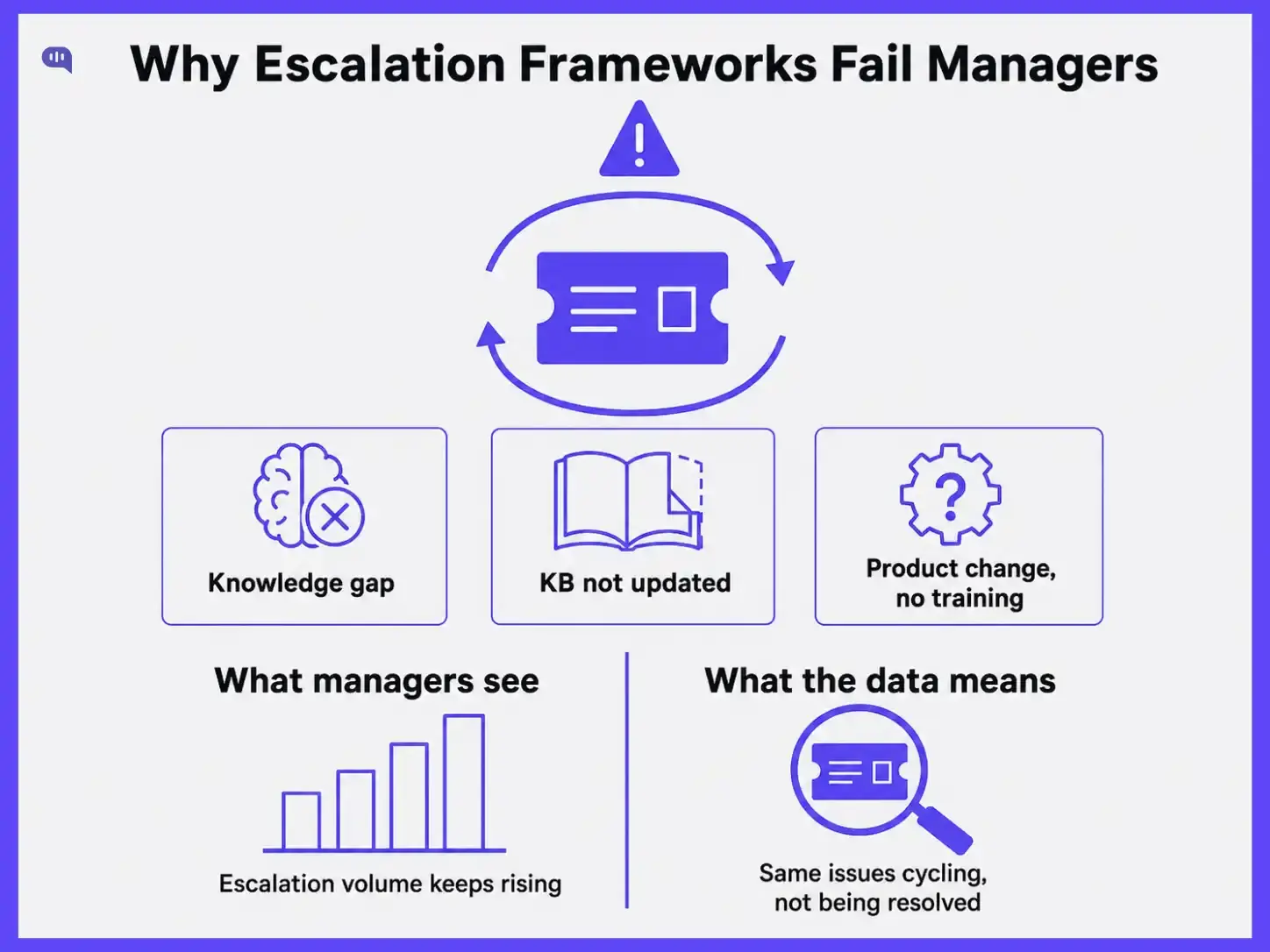
That structure doesn’t help you diagnose problems with your escalation framework. When escalation rates creep up, most managers respond by tightening routing rules. Some add a fourth tier. A few invest in automation. Almost none ask the question the data is actually raising: why are agents escalating these tickets in the first place?
The answer is almost always one of three things:
None of those are routing problems. All of them look like routing problems if your only lens is a ticket volume dashboard.
A framework support managers can actually use has to answer two questions, not one. The first is operational: how do tickets move through the system efficiently? The second is diagnostic: what is the movement pattern telling us about the health of the team?
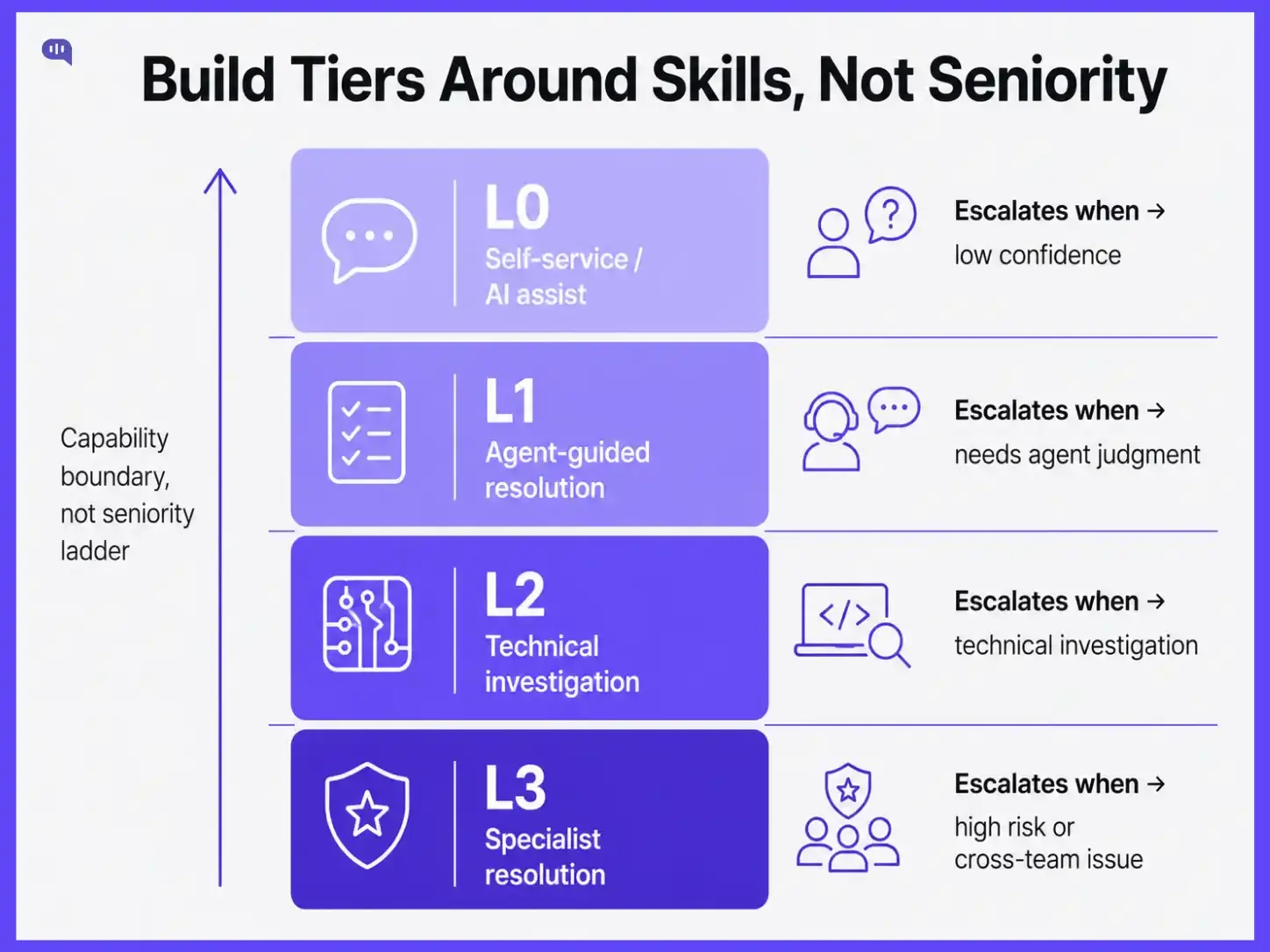
The most common mistake in escalation tier design is conflating seniority with ownership:
This creates a system where escalation is essentially a signal that says "this agent is junior," rather than "this ticket requires a different skill set."
Skill-based tier design flips that. Each tier is defined by what it can resolve, not by who sits in it. L1 owns common issues resolvable within a defined knowledge base scope. L2 owns technical complexity or cross-system issues requiring deeper product knowledge and tool access. L3 owns edge cases, policy exceptions, and issues requiring executive authority or engineering input. The boundary between tiers is a capability boundary, not a seniority ladder.
This matters for two reasons. First, it means a highly experienced agent handling L1 volume is not being underused. They are owning L1 efficiently. Second, it creates a clear training target: if agents are escalating within L1 volume, the knowledge gap is at L1, and that is where coaching effort should go.
The table below shows how this translates in practice for a mid-market SaaS support team.
One note on L0: if you are using an AI agent for first-contact resolution, it belongs in your tier structure. Kommunicate's AI agents escalate to human agents with full conversation context attached, so L1 agents do not start from zero. Where you place the confidence threshold for AI-to-human handoff is itself an escalation trigger decision, and it deserves the same deliberate design as your human tiers.
For a deeper view on how tier ownership maps to your team's reporting structure, the customer support team structure guide in the Learning Center covers role definitions, span of control, and escalation authority by team size.
Escalation triggers are the conditions that make moving a ticket upward the correct call. The risk in trigger design is setting them too loosely. When any agent can escalate any ticket they find difficult, escalation becomes a coping mechanism rather than a structured decision. L1 volume thins, L2 gets flooded with tickets it should not be handling, and resolution time stretches.
Good triggers are specific, measurable, and tied to one of four conditions: time, complexity, customer tier, or emotional escalation.
Two things worth noting:
This is where weekly escalation reviews (covered in the final section) pay off: patterns in complexity escalations reveal exactly which issue types need knowledge base updates or skill coaching.
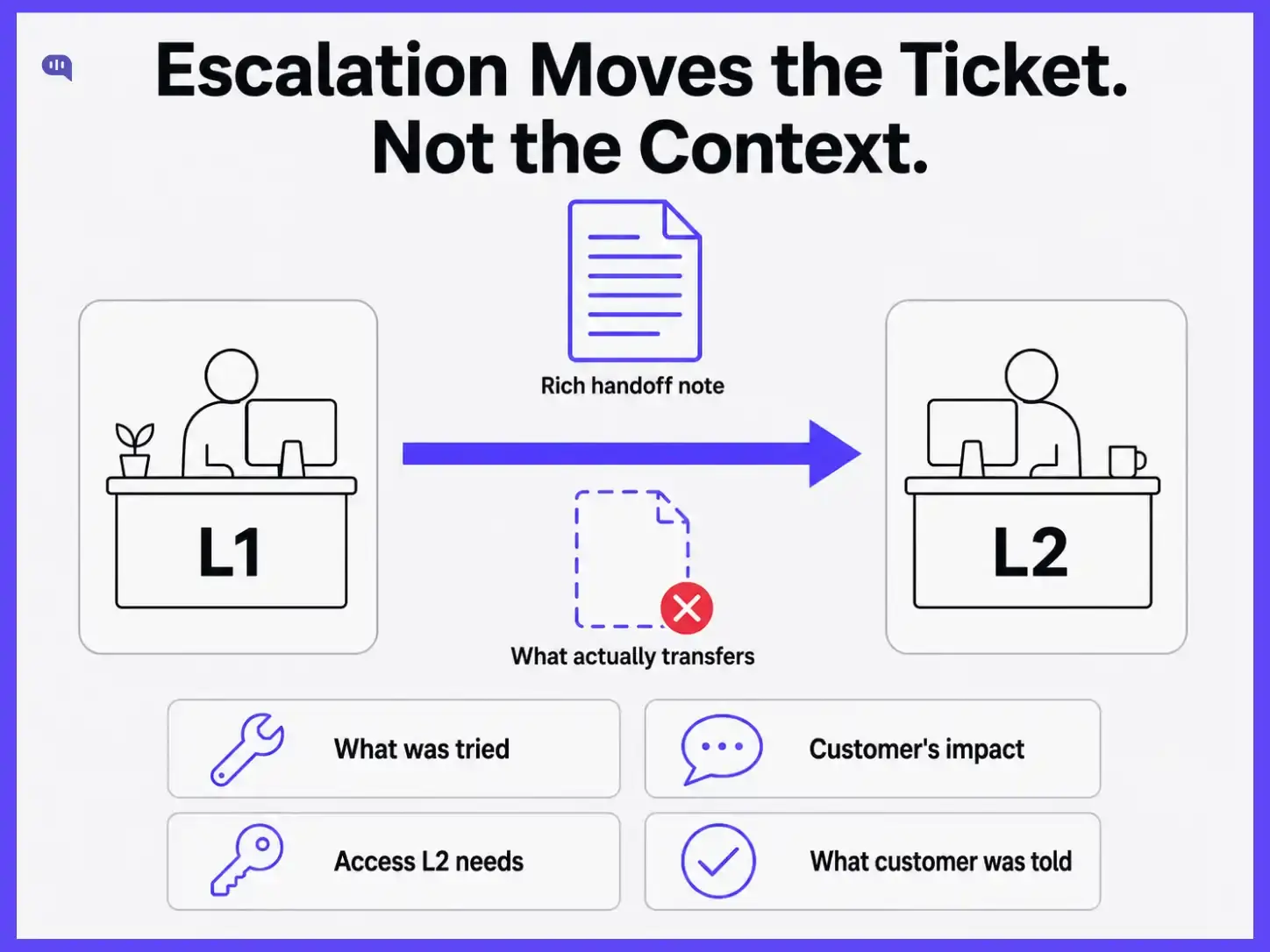
Here is how most escalation handoffs actually work: an agent marks a ticket as escalated, adds a one-line note ("customer can't access dashboard, might be a permissions issue"), and assigns it to the next tier. The L2 agent opens the ticket, sees a vague description and no troubleshooting history, and starts the diagnostic process from scratch. The customer gets asked for information they already provided. Time-to-resolution doubles.
A structured escalation note fixes this. It does not need to be long, but it needs to answer four questions consistently: what has already been tried (and ruled out), what the customer has shared about the impact, what information or access L2 will need to start immediately, and what the customer has been told so far. When those four things are present at the handoff, L2 can start working rather than re-investigating.
We have built an escalation rate health scorecard you can use below to assess where your handoff quality sits relative to your resolution metrics. Poor handoffs show up clearly as a gap between escalation volume and time-to-resolution at L2.
The other structural fix is closing the loop after resolution. When L2 or L3 resolves an escalated ticket, the resolution pathway should flow back to L1 in a format they can use. If it resolves cleanly via a step L1 did not know existed, that step belongs in the knowledge base. Escalation should transfer knowledge back to earlier support tiers, not just tickets upward.
Escalation rate, expressed as the percentage of total tickets escalated beyond first contact, is one of the most underused metrics in support management. Most dashboards display it. Almost nobody uses it as a diagnostic instrument.
The direction of the trend matters more than the absolute number. A rate that has moved from 10% to 14% over six weeks is a meaningful signal. It could mean a recent product update created new issue types that L1 is not equipped to handle. It could mean knowledge base coverage has fallen behind the ticket mix. It could mean a cohort of new agents has moved off their supervised queue without enough ramp time.
Each of these has a different response. That is why aggregating escalation rate into a single "escalations this month" number and comparing it to last month is not enough. You need to segment it: by issue type, agent cohort, customer tier, and week. The pattern in those segments tells you where to intervene.
For the SLA definitions that underpin escalation thresholds and their relationship to customer tier commitments, the customer service SLA templates article in the Learning Center has ready-to-use frameworks you can adapt directly.
The ticket escalation process is not a routing diagram. It is an operational feedback loop, and managers are responsible for closing it. Build tiers around capability, not hierarchy. Set triggers that require genuine judgment rather than giving agents a low-friction exit. Invest in handoff quality so resolution value is not lost at the transfer point. And read your escalation rate weekly as a signal about team health, knowledge coverage, and product friction.
When escalation is designed as a management tool rather than a process formality, it stops being a metric to minimize and starts being one of the clearest windows into what your support operation actually needs.