Updated on December 13, 2025
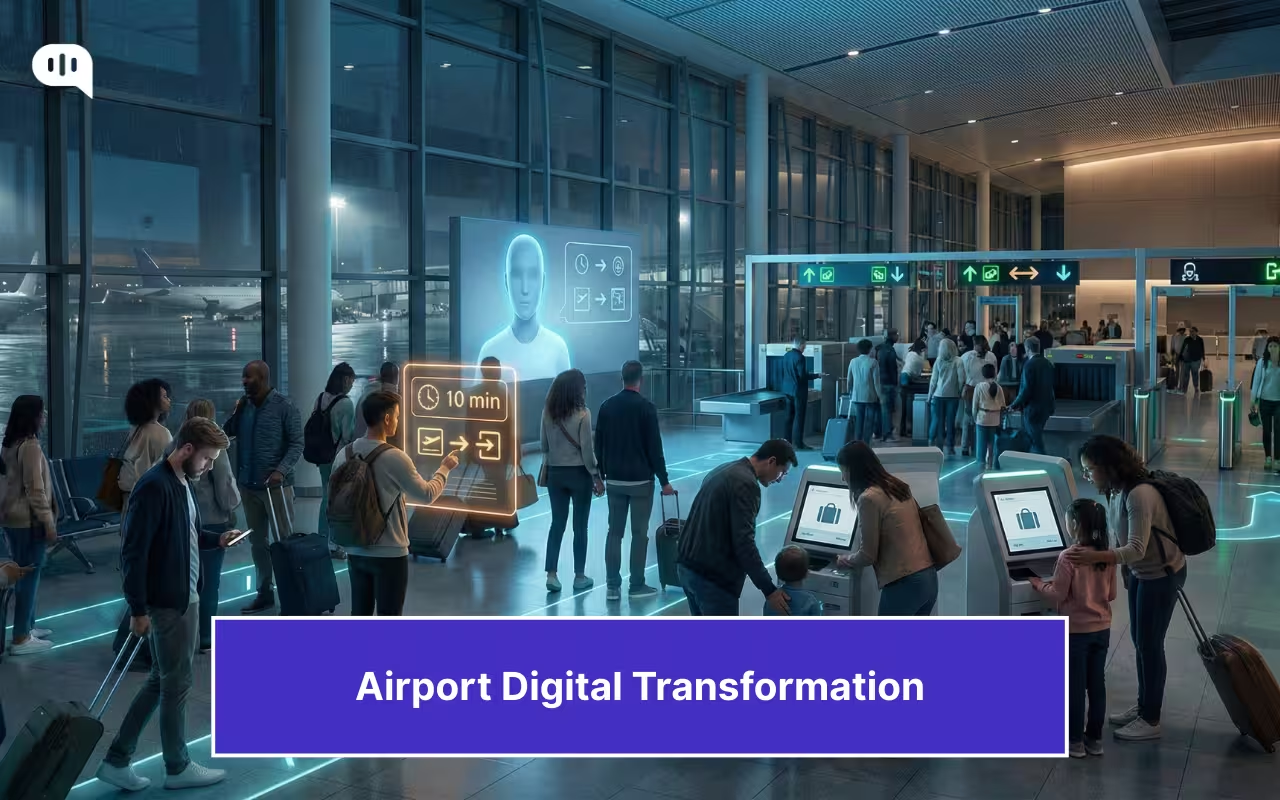
In December 2025, the Indian aviation industry collapsed. Due to new regulations and a non-compliant airline, thousands of flights were grounded during one of the busiest weekends of the year.
Now, we can clearly isolate the cause of this incident: it was regulatory and operational pressures. However, the increased stress from the incident revealed numerous operational problems with other parts of the infrastructure.
When passenger volumes spike and irregular operations hit, every weak link in the kerb-to-gate chain becomes visible. The incident stress-tested the airport experience and revealed why airport digital transformation is now inseparable from the customer service experience.
This article will break down how modern airports are enhancing the kerb-to-gate experience through the use of AI, automation, and digital identity. We’ll cover:
- How Can AI Become the New Face of the Airport Front Desk?
- How Can Airports Use Operational AI to Make Passengers Feel Comfortable?
- How Can Airports Enable Self-Service Everywhere?
- How Can Airports Deliver Smart Wayfinding and Real-Time Guidance?
- How Can Airports Reduce Passenger Stress With Better Baggage and Screening?
- How Can Biometrics and Digital Identity Enable a Frictionless Journey?
- How Should Airports Govern Trust, Privacy, and Consent When Deploying AI??
- What Does the Modern Airport Digital Stack Look Like?
- Which KPIs Best Prove the Business Case for Digital Transformation at Airports?
- How Can You Implement These Interventions in Your Business?
- What Are the Most Common Failure Modes?
- Conclusion
How Can AI Become the New Face of the Airport Front Desk?
When the system is under stress, the airport’s “front desk” needs to function at full capacity. Your team needs to answer questions, reroute passengers, reduce confusion, and restore control across thousands of micro-moments.
In those moments, the airport experience is shaped less by what is happening and more by whether passengers can quickly understand what to do next.
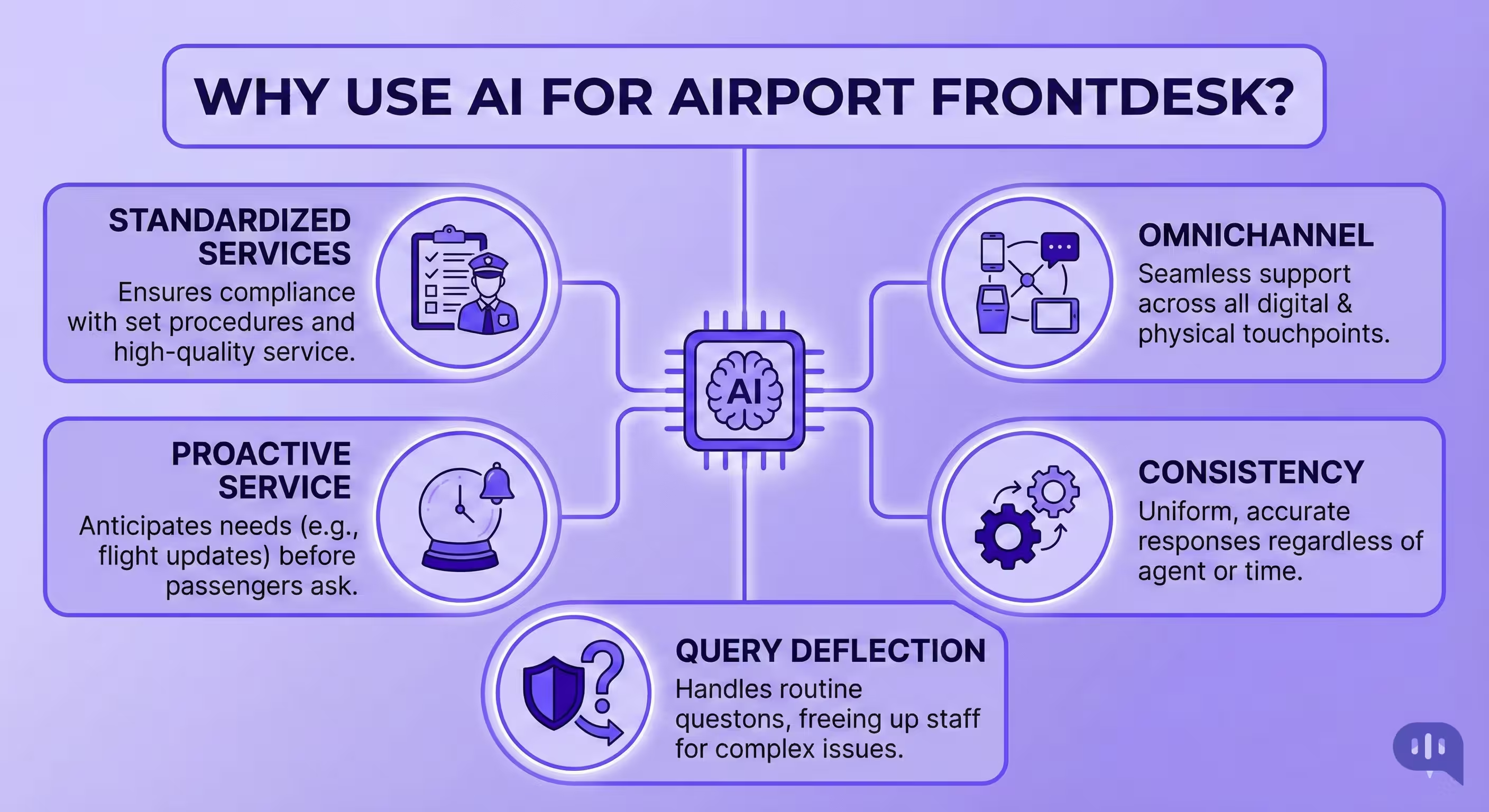
AI can become the new face of the airport front desk because it is not a single place. It is a presence that can accompany the passenger throughout the journey and maintain service consistency even when demand spikes.
- It is Present Everywhere – The “front desk” can be accessed across WhatsApp/SMS, the airport app, kiosks, QR codes on signage, Wi-Fi landing pages, and web chat, so passengers don’t need to hunt for a counter or queue just to ask a fundamental question.
- It Provides Consistent Answers – Airports often have multiple sources of information (airlines, gates, security, baggage, landside transport). AI can unify these into a single passenger-facing interface, ensuring guidance is consistent across all channels and not dependent on which desk you reach.
- It Deflects High-Frequency, Low-Complexity Queries – Most passenger questions during disruptions are repetitive: “Where do I go?”, “Which counter?”, “How long is security?” “What happens if I miss boarding?” AI absorbs that volume, allowing human agents to focus on exceptions, vulnerable passengers, and complex rerouting.
- It Enables Proactive Service – Instead of waiting for passengers to ask, AI can provide context-aware guidance, including gate changes, time-to-gate estimates, queue alerts, recommended routes within the terminal, and next-best actions based on the passenger’s stage in the journey.
- It Standardizes Service Quality – Human desks degrade under load. AI delivers the same operating playbook every time, escalates with structured context, and preserves an auditable record of what was communicated and when.
Airports can leverage these features to improve customer experience and service during peak hours. Let’s have a closer look at how this can work.
How Can Airports Use Operational AI to Make Passengers Feel Comfortable?
Operational AI enhances passenger comfort by mitigating uncertainty at the precise moments when delays, queues, and last-minute changes cause stress.
| Part of Customer Journey | AI Intervention | Result | KPIs Affected |
| Kerbside Arrival & Terminal Entry | Customer service AI agent on WhatsApp/SMS/app provides “where to enter + the nearest counter + time-to-gate” using live terminal signals. | Less confusion on arrival; smoother entry flow | Info requests deflected, entry congestion, time-to-first-guidance |
| Check-In Hall | AI demand forecasting recommends counter staffing; CS AI agent answers airline-specific check-in rules and directs to the right zone | Shorter lines; fewer misrouted passengers | Check-in wait time, throughput/hour, misdirection rate |
| Bag Drop | Computer vision/anomaly detection flags belt or kiosk issues | Faster recovery; fewer “stuck” passengers | Bag-drop wait, kiosk failure resolution time, desk visit reduction |
| Security Queue | Queue prediction + lane allocation | Reduced anxiety; fewer last-minute rushes | Security wait time, on-time-to-gate %, queue abandonment |
| Secondary Screening | Policy-compliant triage + staffing recommendations; | Calmer experience during checks; better flow | Secondary screening time, escalations, sentiment/CSAT |
| Immigration (International) | eGate performance monitoring + counter balancing | Fewer rejections; faster processing | Immigration wait, eGate utilization, document-error rate |
| Transfers & Connections | “Time-to-connection” prediction | Fewer missed connections; more control | Disconnect rate, assistance requests, run-rate incidents |
| Gate Area & Boarding | Boarding readiness prediction: CS AI agent sends proactive boarding alerts, gate changes, and boarding group guidance | Smoother boarding; less gate crowding | Boarding duration, gate crowding, and on-time departure |
| Irregular Operations (Delays/Cancellations) | AI prioritizes staffing and queue control | Faster service recovery; lower chaos | Rebooking time, complaint volume, CSAT/NPS, escalation rate |
| Terminal Services (Facilities, PRM, Lost & Found) | CS AI agent handles “where is X” and service requests; routing engine dispatches to the right team | Fewer desk visits; quicker assistance | First response time, request resolution time, desk deflection |
| Baggage Claim | Predict belt congestion and delay risks | Less uncertainty; fewer service desk queues | Bag delivery time, delayed bag rate, desk visits, AHT |
| Ground Transport & Exit | CS AI agent recommends pickup zones, live mode availability (taxi/ride-share/metro), and walking directions. | Faster exit; reduced kerbside friction | Exit time, kerbside congestion, passenger satisfaction |
These AI interventions can only work when airports also enable self-service processes throughout their operations. This needs a few things to start working in tandem.
How Can Airports Enable Self-Service Everywhere?
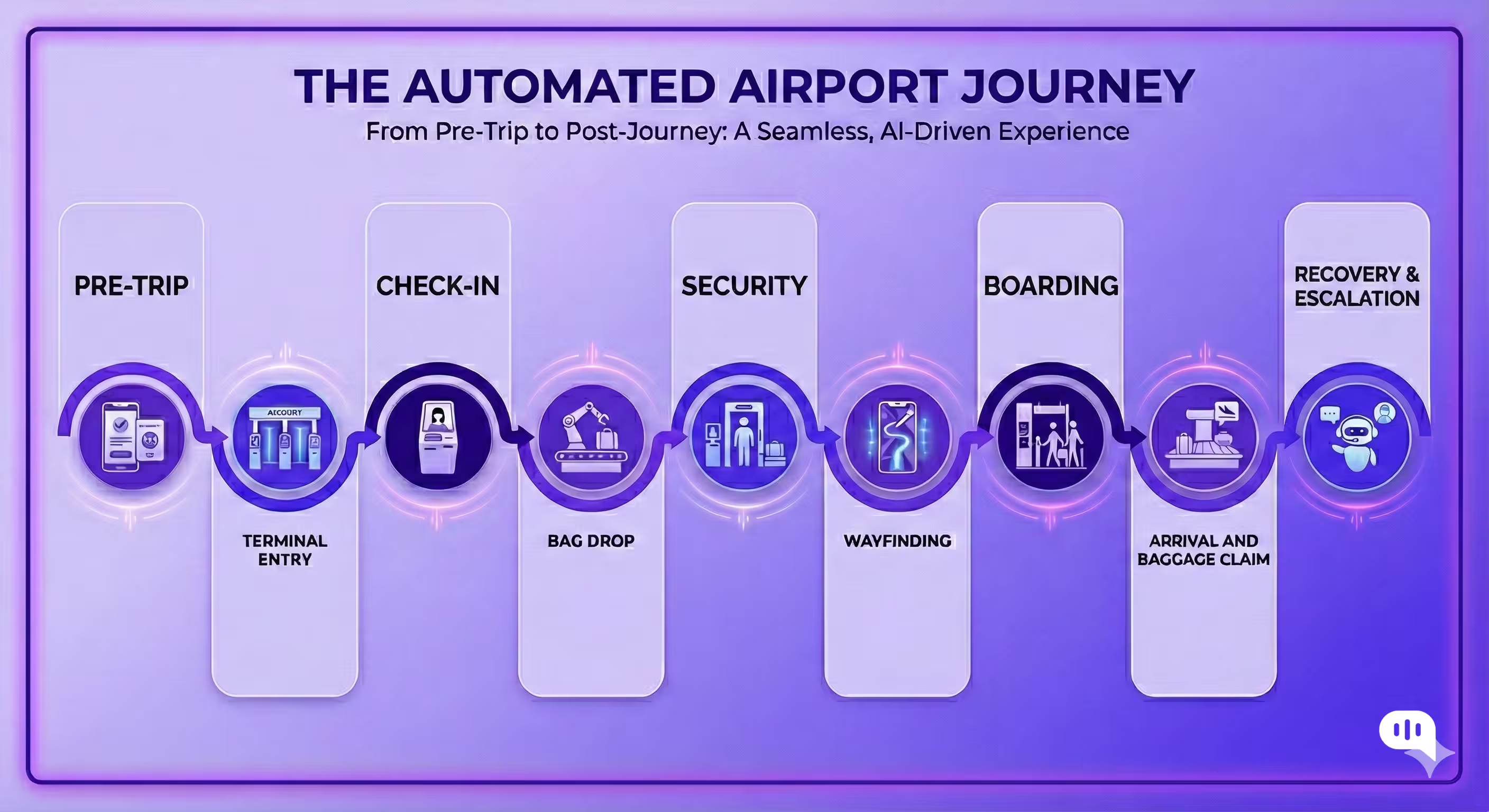
Enabling self-service for each part of the customer journey is simple. Here’s how high-volume airports operationalize self-service:
Before Arrival (Trip Prep)
- Publish a single “Ready-to-Fly” checklist that is personalized by flight/terminal (documents, baggage rules, entry gate, recommended arrival time)
- Let passengers complete pre-checks via app/WhatsApp/web (ID/doc reminders, baggage allowance, terminal map, accessibility needs)
Kerbside to Terminal Entry
- QR-first entry guidance: scan at kerbside signage to get “where to go next” in the passenger’s language.
- Digital assistance requests: PRM support, porter services, buggy requests, and help for families and the elderly, all without needing to find a counter.
Check-In (When It’s Still Needed)
- Mobile/app/web check-in as default, with clear fallbacks for exceptions (doc check, seat issues, payment).
- Self-service exception capture: collect the minimum necessary information (PNR, issue type, photo upload) and route it to the right agent/team.
Bag Drop
- Self-tag and assisted bag drop: passengers print tags (or use e-tags where available) and complete bag drop via kiosks optimized for throughput.
- “Fix it yourself” flows: guided steps for common failures (tag not printing, bag too heavy, payment required), with one-tap escalation.
Security Readiness
- Self-service security prep: localized, straightforward guidance on liquids/electronics, what triggers secondary checks, and family lanes
- Live wait times + recommended checkpoint: passengers choose the best lane based on real-time congestion
Wayfinding Inside the Terminal
- Interactive maps with “walk time to gate” and step-by-step indoor routing (including accessible routes)
- Contextual nudges: “you have time” vs “head to gate now” based on distance, queue forecasts, and boarding windows
Boarding and Gate Changes
- Self-service boarding readiness: boarding group info, gate updates, and “where do I queue” instructions pushed proactively.
- Automated re-accommodation guidance for disruptions: options, deadlines, and subsequent actions without needing to find a desk.
On-Arrival and Baggage Claim
- Self-service baggage tracking and belt updates, including delayed baggage workflows (status, expected timing, claim filing).
- Arrival navigation: directions to parking, ride-share zones, metro, hotel shuttles, and accessibility support.
Recovery and Escalation (The Self-Service Safety Net)
- Every self-service flow must end with: “Resolve now” (automated) or “Escalate with context” (handoff to staff).
- Escalation should pass structured data (PNR, location, issue, steps attempted) to reduce repeats and speed resolution.
These are complex interventions that take years to implement. However, this can be easily integrated into existing processes. The following few sections will take you through different parts of the process, and we’ll start by talking about wayfinding.
How Can Airports Deliver Smart Wayfinding and Real-Time Guidance?
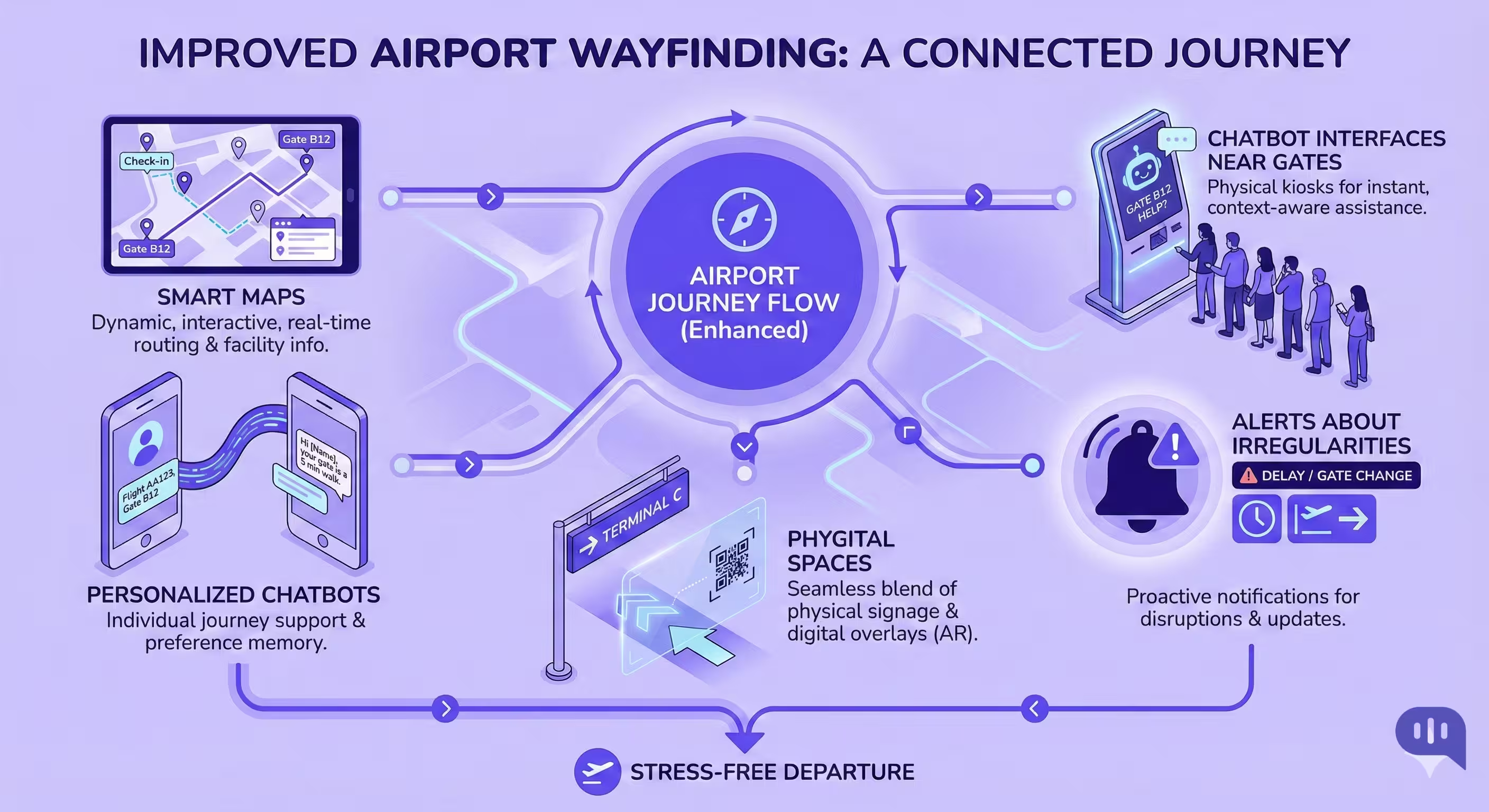
Wayfinding is one of the most challenging parts of an airport. Even though signs are everywhere, tired passengers often feel disoriented and get lost in larger airports. It’s easier to create guidance systems that refer back to something constant, such as gate numbers or store names, which customers can use to reorient themselves. Here’s an actionable plan on how to make it possible.
- Smart Maps – No screens needed, you need to display maps that show where a customer is at different parts of the airport. This is a simple tactic used across malls, and it helps customers find their way without friction.
- Chatbot Interfaces near Gates – A customer will likely have some common questions while waiting. They might want to go to the bathroom, eat, drink, or visit a store. Having a chatbot interface that answers this question is an easy way to provide support to customers. They can also be programmed to answer basic questions about whether the flight is delayed.
- Personalize Chatbots – Adding personalization at an airport is challenging. Most customers may open the website or app before travelling to the airport, but at the airport, they’re more likely to rely on kiosks and human assistance. A customer service chatbot that can answer basic questions in these locations will be helpful, and it can be personalized based on location.
- Make it Easy to Handle Irregularities – If luggage is missing or a plane is delayed, customers may struggle to find the correct location and utilize existing screens to guide them to airline-specific luggage retrieval and customer service booths.
- Use Phygital Spaces – Most customers are already familiar with the physical space at an airport. Adding a digital element to this physical space makes more sense than reinventing the process. If on-ground personnel already assist people near the gate, having a chatbot interface that allows people to access help quickly makes sense.
You can also take these basic design principles to design the baggage drop and screening processes.
How Can Airports Reduce Passenger Stress With Better Baggage and Screening?
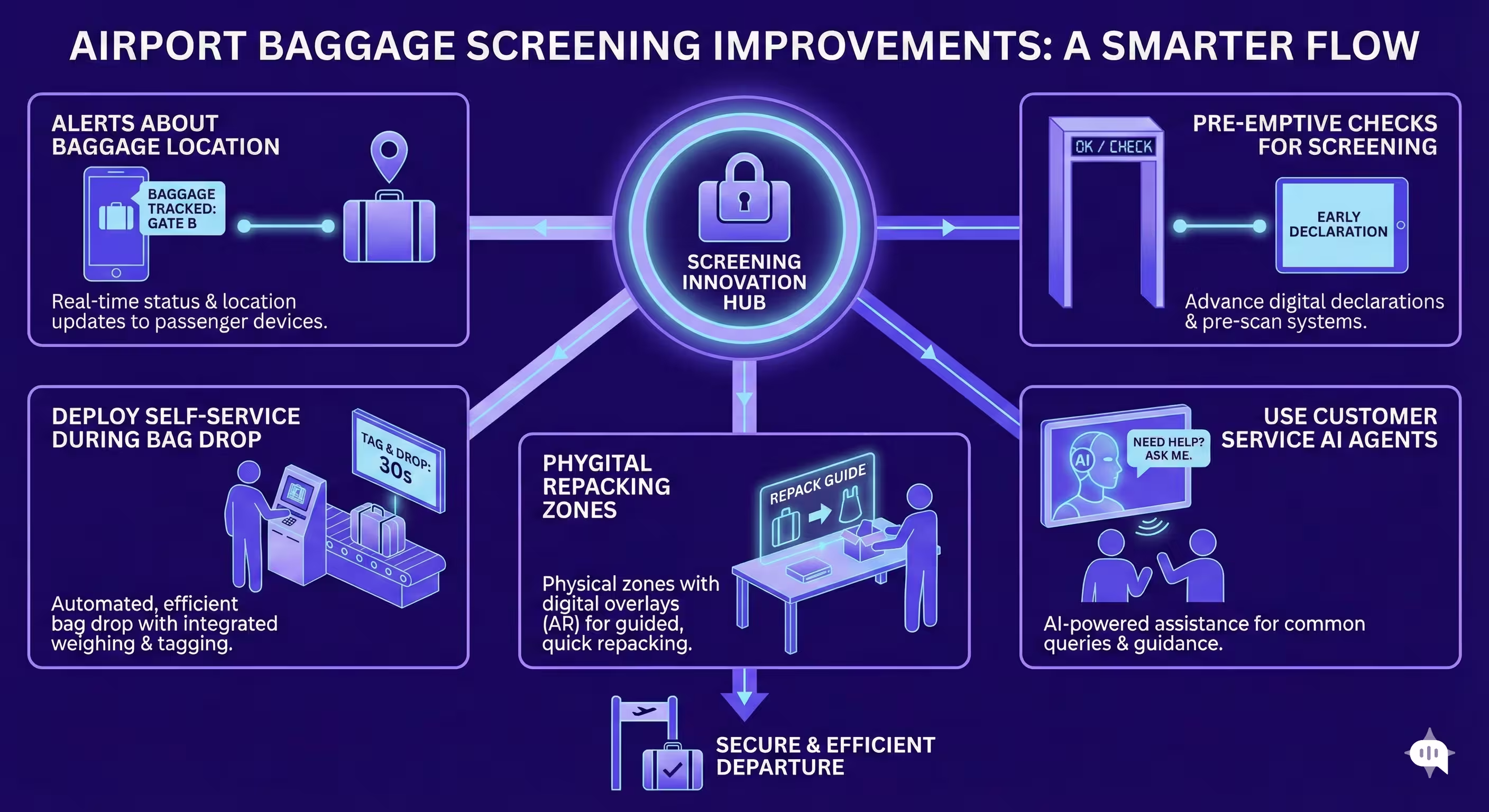
Baggage and screening are two of the highest-stress moments in an airport journey because they combine uncertainty (Will my bag make it? Will I get flagged?) with time pressure (Will I miss my flight?). Even when processes are well-designed, passengers often feel anxious when they are unsure of what is happening, what will happen next, or where to go if something goes wrong. The goal is not just faster throughput—it is predictable, explainable flow. Here is an actionable plan to reduce stress through better baggage and screening experiences.
- Prevent the Most Common Failure Points – A handful of predictable issues create the most stress: overweight bags, prohibited items, unclear rules for liquids and electronics, document checks, and secondary screening. Publish a simple “what triggers delays” guide in plain language across the app, QR posters, kiosks, and the AI agent so passengers can self-correct before they reach the belt or the scanner.
- Add “You Are Here” Status for Bags and Queues – Just like “You are here” maps to reorient passengers, baggage, and screening, they need visible progress signals. For baggage: show clear states (tagged → accepted → in system → loaded → arrived) with timestamps when possible. For screening, show live queue time bands and their meanings (“10–15 min, you will still make boarding”). The anxiety reduction comes from certainty, not from perfect speed.
- Deploy Assisted Self-Service at Bag Drop – Bag drop should function like a guided self-checkout, featuring self-tagging, clear step-by-step prompts, and easy recovery in case of failure. When kiosks fail (tag printer, belt pause, payment), the flow must offer an immediate “fix it” path and a one-tap escalation to staff—without forcing passengers to leave the line and search for help.
- Utilize Customer Service AI Agents at the Exact Stress Points – Place chatbot access where passengers tend to stall: near bag drop, before security entry, at repack stations, and immediately after secondary screening.
- Personalize Guidance by Location and Stage – Airport personalization is less about identity and more about context. If a passenger is standing at Bag Drop Zone D, the agent should provide Zone D-specific instructions, the nearest repack desk, and the correct exception counter. If a passenger is at Security Checkpoint 2, the agent should prioritize security prep, queue time, and the fastest path to the gate.
- Make Exceptions Easy – Irregularities create the most significant spikes in stress: delayed bags, damaged baggage, missed connections, and misrouted luggage. Passengers should not have to guess whether they need the airline desk, the airport desk, or a third-party handler. Provide one exception flow (QR + agent + kiosk) that captures minimum details (PNR/bag tag photo, issue type, location) and routes them to the correct desk with directions and an ETA for resolution steps.
- Use Phygital “Repack + Help” Zones – Most passengers already understand physical cues: a repack table, a scale, a staff member, a sign. Add a digital layer to those cues: QR codes that open a baggage rule checker, a checklist for prohibited items, and a “talk to an agent” escalation path. This reduces shame/friction and keeps lines moving because passengers can self-resolve without blocking the belt.
These optimizations around wayfinding, baggage claims, and screening should address FAQs. However, for truly frictionless kerb-to-gate journeys, we recommend incorporating digital identity tools into your tech stack.
How Can Biometrics and Digital Identity Enable a Frictionless Journey?
Biometrics and digital identity enable a frictionless airport journey by replacing repeated “show-document, prove-identity, re-enter-details” moments with a single, trusted identity handshake that can be reused across the passenger’s path.
Pre-Travel: Make Passengers “Ready to Fly” Before They Arrive
Digital identity programs enable document validation, eligibility checks, and identity binding to occur before travel, allowing the airport experience to focus on movement rather than verification. When passengers arrive, they are already “cleared to proceed” for the steps that do not require manual inspection.
One Identity, Many Touchpoints
A biometric identity token (typically face) can be used to confirm the same person across multiple checkpoints without repeatedly presenting passports, boarding passes, or IDs. The key value is not that biometrics are “cool,” but that they remove micro-delays caused by fumbling for documents, rescanning barcodes, and re-checking details.
Interoperability
Many airports conduct biometric trials, but they often fail to scale when each airline, terminal, and checkpoint operates under a different workflow. Digital identity frameworks (such as One ID-style approaches) emphasize interoperability, including common standards for identity proofing, credential formats, and trust between parties (e.g., airports, airlines, border agencies). That shared framework enables a passenger to have a consistent experience across all touchpoints and, ultimately, across airports.
Queue Reduction Through “Identity-First” Lanes
When identity verification becomes fast and reliable, airports can create higher-throughput lanes (e-gates, biometric entry points) that reduce queues for the majority of passengers while preserving manual processes for exceptions. This improves flow without forcing a one-size-fits-all system.
Better Service Recovery and Less Repetition
Digital identity reduces stress during disruptions because passengers do not need to re-explain who they are at every desk. If the identity is linked to the journey context (flight, baggage tag, or assistance needs), the passenger can be routed more efficiently, and handoffs between airline/airport teams can include verified context.
Design Principles for a Frictionless Digital Identity Rollout
- Start with a single high-friction moment (such as boarding or security entry) and expand only after reliability has been proven.
- Always offer an opt-in path and a non-biometric alternative that is equivalent.
- Make the “what happens to my data” explanation obvious and simple at the point of consent.
- Engineer for exceptions: mismatches, lighting, accessibility needs, and document edge cases must degrade gracefully to human help.
- Tie identity to guidance: once a passenger is verified, the airport can deliver more precise “next step” instructions and reduce pointless back-and-forth.
In practice, biometrics and digital identity are the foundation for an airport journey where verification fades into the background, and passengers experience the terminal as a continuous, uninterrupted flow from kerb to gate.
While these interventions have become a part of regular digital transformation in travel strategies, they also carry some risk. Let’s understand how these processes can be optimized for trust and privacy,
How Should Airports Govern Trust, Privacy, and Consent When Deploying AI??
Operational trust in airport AI is built when passengers can clearly see three things at the moment: what the system is doing, why it is doing it, and how they can take control if they are uncomfortable. To foster trust and governance while you champion digital transformation in travel, you need to do the following:
| Governance Area | What to Put in Place | How It Protects Passengers (Trust Outcome) | KPIs / Evidence |
| Consent and Choice | Explicit opt-in for biometrics; equivalent non-biometric path; easy opt-out and deletion requests | Passengers feel in control; reduced “forced adoption” backlash | Opt-in rate, opt-out rate, consent abandonment, and complaints volume |
| Purpose Limitation | Define allowed use cases (e.g., identity verification, wayfinding support) and explicitly disallow secondary uses (e.g., marketing without consent) | Prevents “scope creep”; strengthens credibility | Policy exceptions count, audit findings, and regulatory flags |
| Data Minimization | Collect only what is necessary (e.g., template, not raw images, where possible); shortest retention windows | Reduces privacy risk surface | Retention compliance %, data footprint per user, deletion SLA |
| Transparency at Point of Use | Simple notices at kiosks/gates/QR flows: what data is used, why, and for how long; “why did I get this answer?” for AI guidance | Builds passenger understanding; reduces fear and confusion | Comprehension rate (survey), complaint rate, trust score |
| Security Controls | Encryption in transit/at rest; strict key management; segmented environments; regular pen tests | Reduces breach risk and reputational damage | Security incidents, time-to-remediate, audit pass rate |
| Access Control and Least Privilege | Role-based access, strong authentication, logging, and limit who can view identity/bio data | Prevents misuse and insider risk | Unauthorized access attempts, access review compliance |
| Vendor and Third-Party Risk | Data processing agreements, sub-processor visibility, breach SLAs, right-to-audit, data residency alignment | Prevents weak links in the ecosystem | Vendor audit results, SLA compliance, and sub-processor changes logged |
| Model Governance (AI Agents) | Collect only what is necessary (e.g., template, not raw images, where possible); shortest retention windows. | Reduces hallucinations and inconsistent guidance | Accuracy rate, escalation rate, containment/deflection quality |
| Human-in-the-Loop and Escalation | Clear thresholds for handoff to staff; structured context passed during escalation | Passengers can reach humans when the stakes are high | Time-to-human, FCR, AHT, recontact rate |
| Bias, Fairness, and Accessibility | Test flows across languages, accents, disabilities; alternative channels for low-tech passengers | Prevents exclusion; improves perceived fairness | Accessibility pass rate, language success rate, and PRM satisfaction |
| Incident Management and Accountability | Defined owner for each system, incident playbooks, passenger communication templates, and post-incident reviews | Faster recovery; higher trust during disruptions | MTTR, incident frequency, and postmortem actions are closed |
| Compliance and Auditability | Impact assessments, where applicable, records of processing, audit trails for identity events and AI decisions. | Demonstrable compliance and defensibility | Audit trail completeness, compliance exceptions, and regulator requests handled |
| Data Quality and Source-of-Truth | Single source of truth for flight/gate/queue data; monitoring for stale/incorrect feeds | Prevents misinformation that erodes trust | Approved knowledge sources, versioning, testing, change control, rollback plan, prompt and policy guardrails |
| Measurement and Continuous Improvement | Regular passenger surveys, CSAT by touchpoint, red-team tests for AI and privacy | Governance stays real, not theoretical | CSAT/NPS, trust score, model regression incidents |
Now that we understand how to operationalize digital transformation through the airport to improve CX, let’s examine what your tech stack should look like to make it possible.
What Does the Modern Airport Digital Stack Look Like?
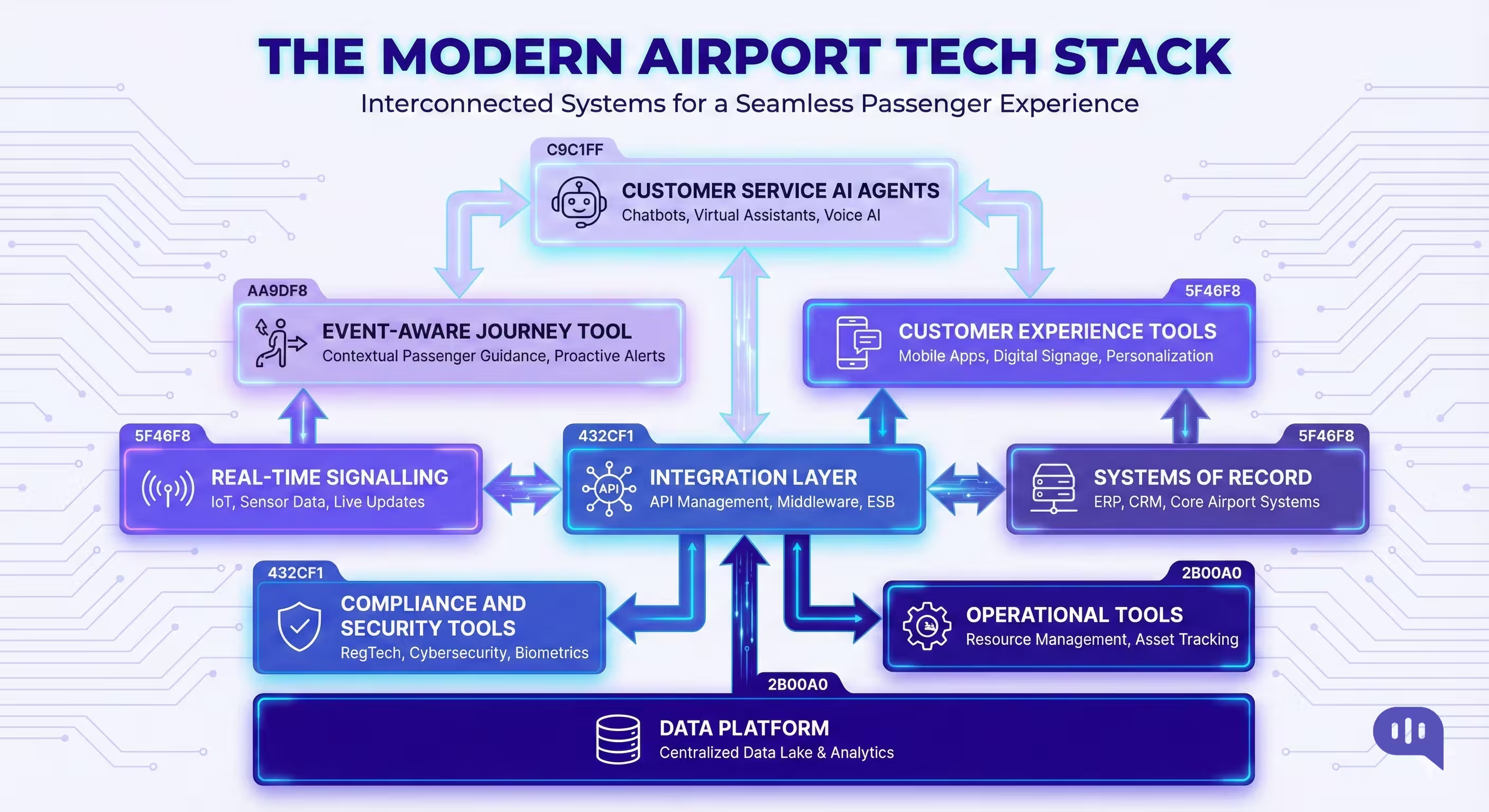
A modern airport digital stack is best understood as a set of interoperable layers that transform fragmented operational systems into a single, real-time “journey brain” for passengers and staff.
1) Systems of Record
These are the authoritative sources that already run the airport:
- AODB / FIDS (flight schedules, gates, stand allocation, status changes)
- Airline DCS integrations (check-in/boarding states where available)
- Baggage systems (BHS, BRS, bag tag events, belt allocation)
- Security and screening systems (checkpoint throughput signals, lane states)
- Border control/immigration interfaces for international flows (where applicable)
- Resource management (staff rosters, counter/gate assignments)
- Asset and facility systems (elevators/escalators, HVAC, outages, maintenance tickets)
2) Real-Time Signal Layer
This layer senses what is actually happening in the terminal right now:
- Crowd density and flow signals (Wi-Fi/BLE, cameras/computer vision counts)
- Queue time estimation signals (scan rates, lane open/close events)
- eGate health and throughput telemetry
- Boarding progress telemetry at gates
- Ground transport and kerbside congestion signals (where used)
3) Integration and API Layer
This is what prevents the airport from becoming a set of disconnected tools:
- API gateway + service catalogue for internal and partner access
- Identity and access management for systems, vendors, and staff tools
- Data normalization (common IDs for flight, gate, belt, checkpoint, zones)
- Rules and orchestration services (what to do when X happens)
4) Event-Driven “Journey Layer.”
This is the core differentiator in modern stacks:
- An event bus/streaming platform that publishes real-time events.
- A journey state engine that translates events into passenger-facing actions
5) Customer Experience Layer
Where passengers actually interact:
- Mobile app + mobile web (maps, status, alerts, services)
- WhatsApp/SMS/email (high-reach, low-friction communication)
- Kiosks and self-service surfaces (check-in, bag drop, info)
- QR-enabled signage for “instant guidance” without app installs
- Digital displays and PA integration for synchronized messaging
6) Customer Service AI Agent Layer
The “front desk everywhere” capability:
- Multilingual AI agents connected to approved knowledge and real-time events
- Location-aware and journey-aware responses (near-me guidance, next-step prompts)
- Structured escalation to humans with context (issue type, location, flight, steps tried)
- Playbooks for irregular ops (delays/cancellations, missed connections, baggage issues)
7) Operations and Decision Support
What airport teams use to run the day:
- AIOCC/operations dashboards (queues, throughput, staffing, predicted peaks)
- Resource optimization (counter/gate staffing recommendations)
- Incident management tooling (playbooks, comms templates, task dispatch)
- SLA monitoring for checkpoints, baggage delivery, and assistance requests
8) Data Platform and Analytics
How the airport measures, improves, and learns:
- Data lake/warehouse with governed datasets (historical + near real-time)
- KPI layer (CSAT/NPS, wait times, throughput, disconnects, desk deflection)
- Experimentation and rollout measurement (pilot vs control, terminal-by-terminal)
- Feedback loops (hotspots, repeat questions, failure clusters)
9) Trust, Security, and Governance
The foundation that keeps the stack deployable at scale:
- Consent management (especially for biometrics/digital identity)
- Data minimization, retention controls, and audit trails
- Privacy and security controls (encryption, RBAC, logging, vendor governance)
- Observability (latency, uptime, data freshness, model regression monitoring)
Now, after you’ve implemented a tech stack, the next step is to measure its effectiveness. We’ll discuss the KPIs that you can track to see your progress.
Which KPIs Best Prove the Business Case for Digital Transformation at Airports?
The strongest KPI set proves two things at once: passenger experience improves while the airport moves more people through the same infrastructure at a lower cost and with fewer disruptions.
Passenger Experience KPIs
- CSAT at touchpoints (security, baggage, gate, disruption handling)
- NPS by journey segment (departure vs arrival; domestic vs international)
- Complaint rate per 10,000 passengers (overall and by category)
- First-contact resolution rate for passenger support (FCR)
Journey Flow and Throughput KPIs
- Average and P95 queue time at security and immigration
- Time-to-gate (kerb-to-security, security-to-gate, total kerb-to-gate)
- Throughput per checkpoint per hour (and lane utilization)
- Missed-boarding and missed-connection rate attributable to queues/wayfinding
Service Desk and Customer Support Efficiency KPIs
- Digital containment/deflection rate (percentage resolved via self-service/AI agent)
- Time-to-first-response for passenger queries (especially during irregular ops)
- Average handling time for escalations (AHT) and re-contact rate
- Volume of “where do I go / what do I do next” queries (should drop as guidance improves)
Baggage and Arrival KPIs
- Bag delivery time (average and P95 for first and last bag)
- Mishandled baggage rate (delayed/damaged/lost per 1,000 bags)
- Baggage exception resolution time (filed → acknowledged → resolved)
- Baggage service desk visits per 1,000 arriving passengers
Irregular Operations KPIs (Where Transformation Pays Off Fastest)
- Passenger recovery time during disruptions (time to rebook, reroute, or resolve)
- Refund/voucher issuance time and completion rate
- Peak-day crowding index (density near gates, rebooking desks, baggage)
- Escalation rate to human agents during IROPS (should improve with better triage)
Commercial Uplift KPIs (Revenue Proof)
- Dwell time quality (time available before boarding after security)
- Conversion rate and spend per passenger in retail/F&B
- Lounge upsell conversion (where applicable)
- Advertising impressions/value tied to engaged passenger channels (app, Wi-Fi portal)
Cost and Productivity KPIs
- Cost-to-serve per passenger inquiry (blended digital + human)
- Staff productivity (cases resolved per agent hour; redeployment effectiveness)
- Overtime hours during peaks and IROPS
- Technology ROI: savings + revenue uplift vs total program cost
Risk, Trust, and Reliability KPIs
- Data freshness and correctness rate for passenger-facing info (wrong-info incidents)
- Privacy/consent metrics (opt-in rate, opt-out rate, deletion SLA)
- System uptime and latency for journey-critical services (maps, alerts, agent)
- Audit trail completeness for identity/biometric events (where used)
How Can You Implement These Interventions in Your Business?
Airports do not need a multi-year transformation program to improve the kerb-to-gate experience. The fastest path is to start with high-frequency passenger pain points, deploy visible “phygital” guidance, and connect it to real-time operational signals. In 90 days, you can pilot, validate impact, and expand coverage without disrupting core operations.
| Timeline | What You Build | Key Activities | Deliverables | Primary KPIs |
| Days 1–15 | Define the journey scope and baseline | Select 2–3 priority touchpoints (typically security queues, wayfinding, baggage exceptions); map passenger “top questions”; capture baseline metrics; identify data owners | Journey map, KPI baseline, top 25 passenger intents, pilot success criteria | Baseline CSAT/NPS, queue times (avg/P95), desk query volume |
| Days 16–30 | Launch “front desk everywhere” MVP | Deploy customer service AI agent on 1–2 channels (WhatsApp/web/airport Wi-Fi landing); publish an approved knowledge base; set escalation routes to staff | Live AI agent MVP, escalation playbook, multilingual FAQ/KB | Containment rate, time-to-first- response, escalation rate |
| Days 31–45 | Add phygital surfaces at hotspots | Place QR “instant help” and “you are here” guidance at security entry, post-security junctions, and gate clusters; enable “near me” intents (restrooms, food, shops) | QR signage pack, location-based flows, hotspot coverage map | Reduction in “where is…” queries, repeat question rate, and adoption scans |
| Days 46–60 | Connect to real-time operations signals | Integrate flight status (AODB/FIDS), gate changes, and basic queue estimates; push proactive alerts for key events (gate change, boarding start, queue spike) | Event-driven alerts, live flight/gate answers, wait-time guidance | Wrong-info incidents, alert engagement, on-time-to-gate% |
| Days 61–75 | Expand self-service and exception handling | Add baggage exception flow (bag delayed/damaged guidance + routing); add disruption flows (delay/cancellation guidance, rebooking directions); improve handoff context capture | Baggage and IROPS flows, structured escalation payloads | Desk visit reduction, complaint rate, and disruption recovery time |
| Days 76–90 | Scale coverage and operationalize governance | Expand to more zones/terminals; train staff on new operating model; implement monitoring (uptime, latency, data freshness); iterate intents using analytics. | Scaled rollout plan, runbooks, dashboards, governance checklist | CSAT uplift at pilot touchpoints, P95 wait reduction, cost-to-serve |
By day 90, you should have a measurable uplift in passenger confidence and a repeatable delivery pattern that scales across terminals. Next, we will address the standard failure modes that derail these programs, even after a promising pilot.
What Are the Most Common Failure Modes?
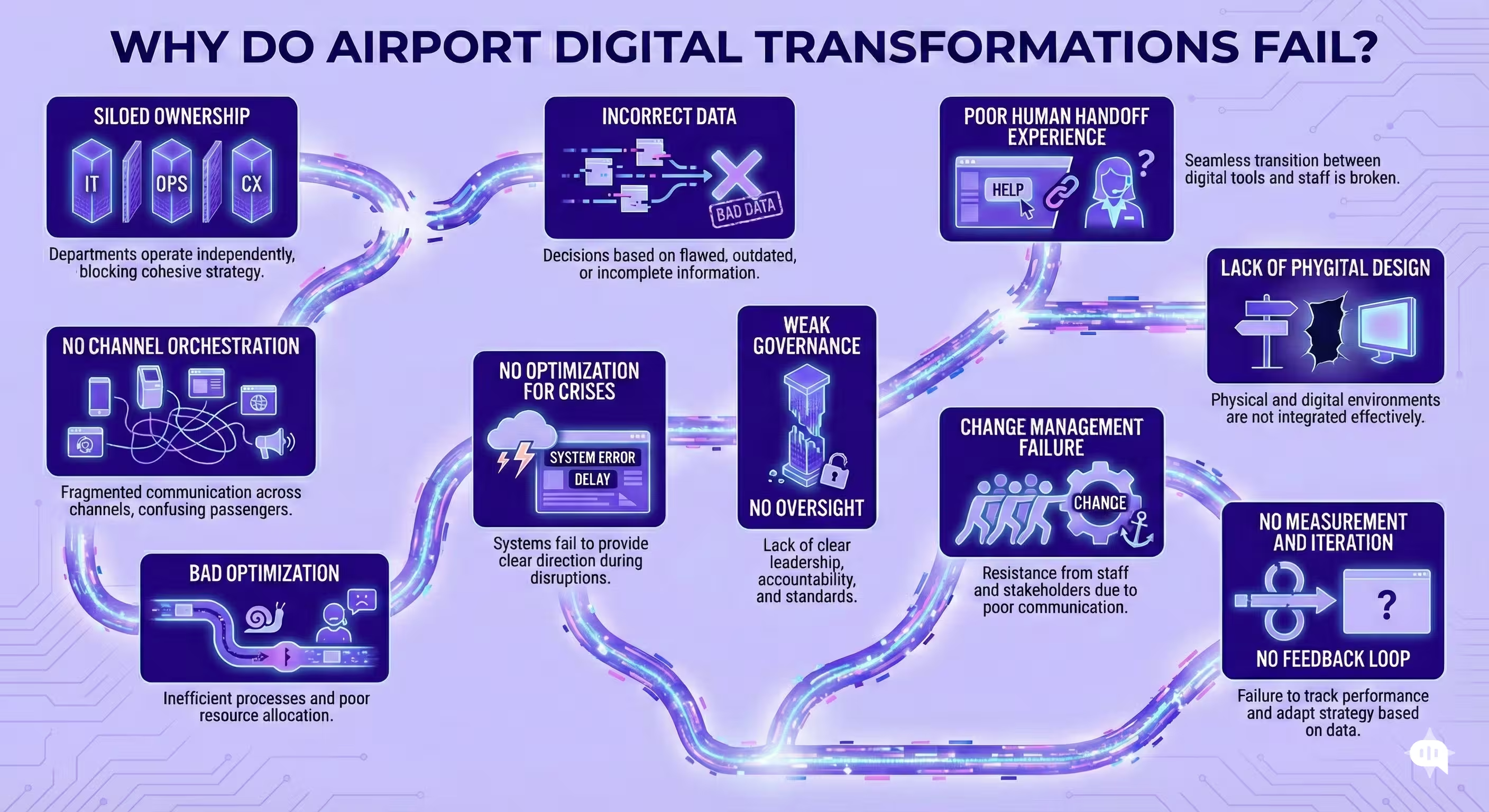
The most common failure modes are not “AI problems.” They are systems, operations, and trust problems that show up when you scale beyond a pilot.
- Siloed Ownership and Fragmented Source of Truth – Airports, airlines, ground handlers, security, and concessions each own part of the journey. If flight status, gate changes, queue times, and baggage events do not converge into a single, agreed-upon source of truth, passengers receive inconsistent answers across screens, desks, and bots.
- Stale or Incorrect Data Reaching Passengers – Nothing erodes trust faster than wrong guidance. If the AI agent or maps are fed by delayed FIDS updates, misconfigured gate mappings, or unreliable queue estimates, passengers will stop using the system after experiencing one instance of poor performance.
- Building Channels Without Orchestration – Teams deploy an app feature, a kiosk, a WhatsApp bot, and signage independently. Without shared intents, consistent language, and the same escalation paths, the “front desk everywhere” becomes “confusion everywhere.”
- Optimizing for Automation Instead of Resolution – High deflection appears effective until passengers are unable to complete tasks. If self-service flows do not handle exceptions (such as overweight bags, rebooking, missed connections, or PRM support), customers end up stuck, and the operational load is returned to humans in a worse form.
- Poor Handoff to Humans – Even Strong AI Needs Escalation. Failure happens when handoff is slow or context-free, forcing passengers to repeat details at the desk. The handoff must include structured context (location, flight, issue type, and steps attempted) and a clear route to the correct team.
- Lack of “Phygital” Design – Airports are physical environments. If you rely on app installs, buried menus, or “find us online” prompts, adoption will be low. Success requires QR surfaces, kiosk entry points, and guidance placed where confusion happens.
- Ignoring Irregular Operations in Design – Most pilots are tested on regular days. The real value is during disruptions, when volumes spike, and passenger anxiety rises. If you do not design and drill IROPS playbooks (for delays, cancellations, baggage exceptions, and gate changes), the system will fail when it matters most.
- Weak Governance and Consent Experiences – For biometrics and identity, passengers need visible choices. If opting out is difficult, messaging is unclear, or data handling appears opaque, adoption will stall, and reputational risk increases. Governance must be experienced, not just documented.
- Change Management Failure on the Ground – Frontline staff must trust the system. If agents believe the bot is providing incorrect answers, or if workflows add steps, they will route passengers back to manual processes. Training, incentives, and clear SOPs are essential.
- No Measurement Loop, No Iteration – Airports frequently launch pilots without a closed-loop measurement plan. Without hotspot analytics, repeat-question tracking, and content governance, performance degrades over time, and stakeholders conclude “it didn’t work.”
Most failures are preventable if you treat airport AI as a journey system, not a set of disconnected tools. The winners are the airports that invest early in data reliability, phygital adoption, and clear handoffs so the experience holds up on the worst days, not just the best ones.
Conclusion
Digital transformation in travel succeeds at airports when it is designed as a continuous journey from curb to gate, not a collection of isolated upgrades. The airports that win are the ones that remove uncertainty at scale by combining real-time operational signals with customer-facing AI agents, self-service flows, and clear wayfinding that works in the physical world. When those pieces operate as one system, passengers spend less time searching, waiting, and worrying. In comparison, teams spend less time answering repetitive questions and more time resolving valid exceptions, especially during irregular operations.
If you want to apply these interventions without a multi-year overhaul, start with the highest-frequency passenger moments, connect them to reliable data sources, and utilize AI agents to resolve queries at scale. If you would like to see what this looks like for your airport or aviation business, book a meeting with Kommunicate.