Updated on April 20, 2026
Estimated reading time: 13 minutes
TL;DR
Build a WhatsApp chatbot using Node.js in under 30 minutes. This guide covers setup, webhook integration, and sending automated responses step-by-step.
Over 150 billion messages are sent on WhatsApp every single day. If your business is not already responding to customers there, the chances are your competitors are.
Building a WhatsApp chatbot with Node.js is one of the fastest ways to fix that. You can automate support, capture leads and send instant replies around the clock, without needing to grow your team to do it.
The numbers back this up too. WhatsApp now has over 3 billion active users and the global chatbot market is on track to hit $60 billion by 2034. Businesses that get this right early will have a serious edge.
The good news is you do not need to be an expert to get started. Node.js was built for exactly this kind of work. Its event-driven architecture handles high volumes of concurrent messages without breaking a sweat, and with the right setup this guide covers, you can have a working bot in under 30 minutes.
In this step-by-step guide, we’ll show you how to:
- Leverage WhatsApp: Why it’s the #1 platform for customer engagement
- Harness Node.js: The unique advantages for chatbot development
- Build Your Bot: A practical, code-backed tutorial to launch your own WhatsApp chatbot
Whether you’re a developer, startup, or enterprise team, this tutorial will equip you with everything you need to build, deploy, and scale a WhatsApp chatbot using Node.js.
Why Use node.js to Build Your Whatsapp Chatbot
There are plenty of ways to build a WhatsApp chatbot. So why Node.js? A few reasons stand out, and they become more obvious once your bot is handling real traffic from real people.
1. Node.js Handles High Message Volumes Without Slowing Down
Node.js uses a non-blocking, event-driven architecture. In plain terms, that means it can process thousands of incoming WhatsApp messages at the same time without making anyone wait in a queue. For a customer support bot handling a spike in messages after a sale or a product launch, that kind of performance is not optional. It is the whole point.
2. You Get Access to Over 2.2 Million Ready-Made Packages
The npm ecosystem is one of the largest in all of software development. Whatever your chatbot needs to do, whether that is processing natural language, connecting to a database, integrating with an external API or tracking analytics, there is almost certainly a package that handles it already. You spend less time building the foundations and more time building the product.
3. Your Frontend and Backend Speak the Same Language
If your team already works in JavaScript on the frontend, Node.js removes the context switching that comes with moving to backend work. Same language, same patterns, same developers. For teams using React or Next.js, this consistency tends to mean faster development cycles and fewer handoff headaches between the two sides of the stack.
4. It Is Built for the Kind of Scale Whatsapp Demands
Node.js was designed for applications that need to stay fast and responsive under load. That is why companies like Netflix, Uber and PayPal rely on it in production. When your WhatsApp bot grows from a handful of test conversations to tens of thousands of real customer messages, Node.js scales alongside you rather than becoming the bottleneck.
5. The Community Is Huge and the Answers Are Already Out There
Node.js is consistently ranked as the most widely used web technology in Stack Overflow’s annual developer survey, with adoption peaking above 50% among professional developers. That kind of popularity has a practical benefit: when you hit a problem while building your bot, someone else has almost certainly solved it before you. The documentation is thorough, the community is active and the ecosystem keeps improving year on year.
Why It Matters for Businesses
Whether you are a solo developer trying something out for the first time or an engineering team deploying a production-grade chatbot, Node.js gives you the performance and flexibility to do it well without running into walls too early.
Prerequisites Before You Start
To follow along with this tutorial, make sure you have:
- A Kommunicate account with Kompose chatbot integrated.
- Node.js installed on your system.
Start Building Your AI Chatbot Without Sign upHow to Build a WhatsApp Chatbot with Node.js (Step-by-Step)
This tutorial walks you through every step from a blank folder to a working WhatsApp bot that can receive messages and send structured replies. It should take around 30 minutes if you have Node.js installed and a Kommunicate account ready.
If you have not set those up yet, grab Node.js from nodejs.org and create a free account at Kommunicate before continuing.
Step 1: Create your Project Folder
Start by creating a new folder for your project and adding the main file where your chatbot code will live. Open your terminal and run:
mkdir whatsapp_bot
cd whatsapp_bot
touch app.js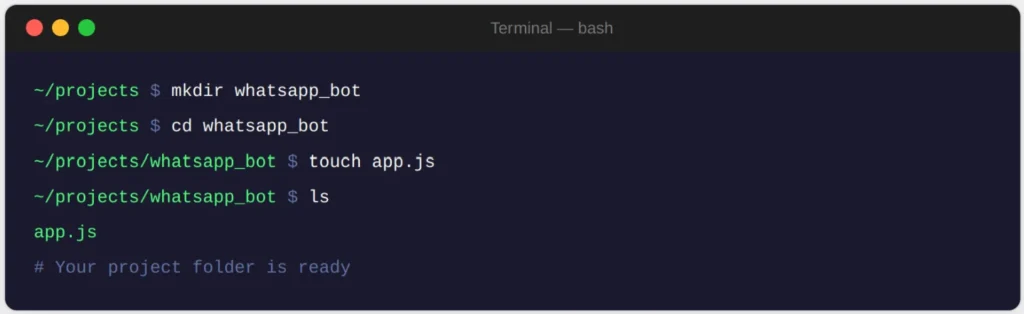
This gives you a clean working directory and an empty app.js file. Think of app.js as the brain of your chatbot. Everything your chatbot does, receiving messages, processing them and sending replies, will flow through this file.
Good to Know: You can name the folder anything you like. Just make sure the name matches the endpoint you set up in Step 3 and the ngrok URL you configure in Step 6.
Step 2: Install Express
Node.js comes with npm pre-installed, so you can add packages straight away. The only dependency you need to get started is Express, a lightweight framework that makes it easy to create the API endpoints your chatbot will use.
npm install express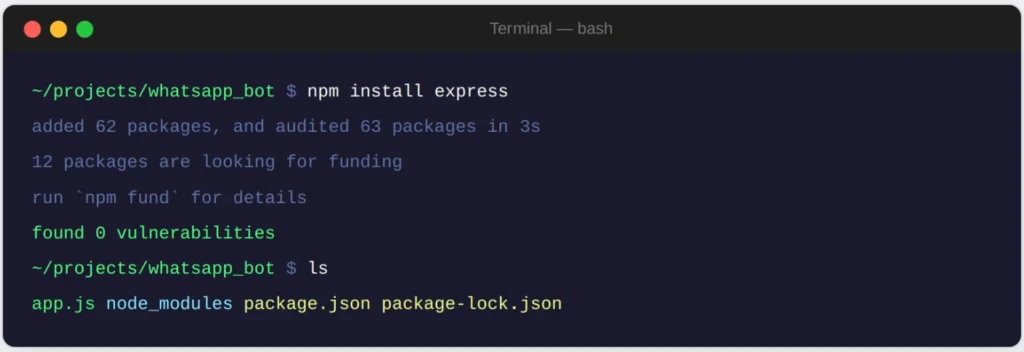
Once that finishes, you will notice a node_modules folder and a package.json file have appeared in your project directory. That is npm doing its job. You do not need to touch either of them manually.
Why Express? It strips away a lot of the boilerplate that comes with Node’s built-in HTTP module, so you can define routes and handle requests in just a few lines of code. For a chatbot webhook, that is exactly what you need.
Step 3: Create your first API endpoint
Now open app.js and add the following code. This creates a basic POST endpoint that your chatbot will eventually receive WhatsApp messages through:
const express = require('express');
const app = express();
const port = 8000;

app.use(express.json());

app.post('/whatsapp_bot', (req, res) => {
  res.send('Hello World');
});

app.listen(port, () => {
  console.log(`Server running on http://localhost:${port}`);
});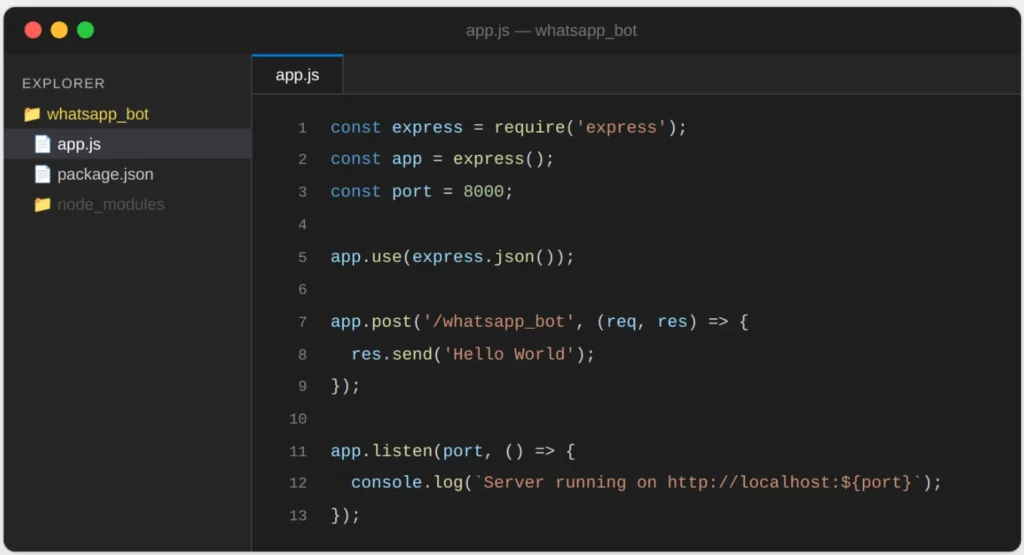
Save the file, then start your server by running:
node app.jsYou should see Server running on http://localhost:8000 in your terminal. To confirm everything is working, open Postman and send a POST request to http://localhost:8000/whatsapp_bot. If you get “Hello World” back, you are in good shape.
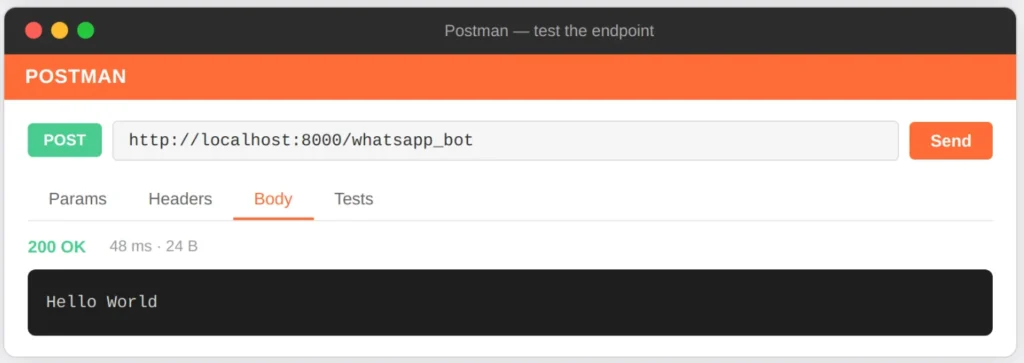
No Postman? You can also test this quickly with curl: curl -X POST http://localhost:8000/whatsapp_bot

Step 4: Make Your Local Server Publicly Accessible With Ngrok
WhatsApp needs to be able to reach your webhook from the internet, but right now your server is only accessible on your local machine. ngrok solves this by creating a secure public URL that tunnels traffic directly to your localhost.
Download ngrok from ngrok.com, then in a new terminal window run:
ngrok http 8000ngrok will give you a URL that looks something like this:
https://7c9b-103-180-2-159.ngrok.ioCopy the full URL and add your endpoint path to the end of it. That gives you something like:
https://7c9b-103-180-2-159.ngrok.io/whatsapp_botKeep this URL handy. You will need it when setting up the webhook in Kommunicate in Step 6.
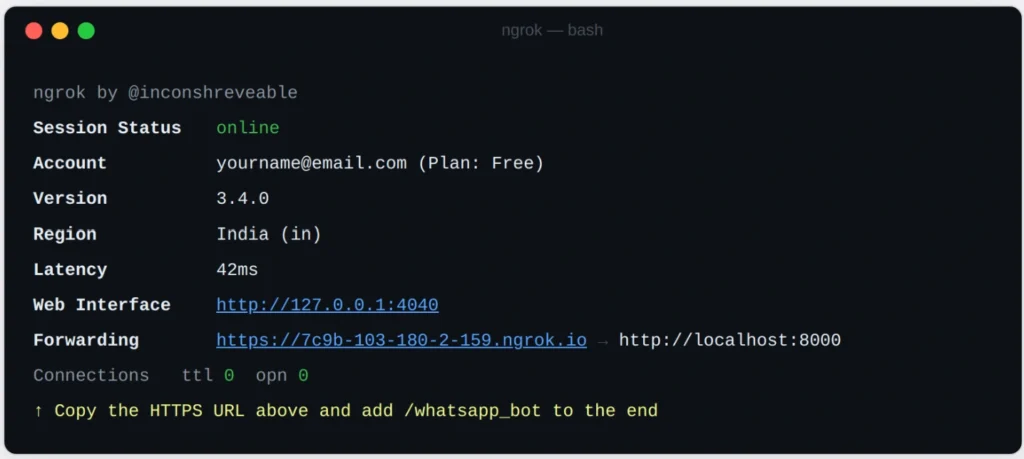
Worth knowing: The free version of ngrok generates a new URL every time you restart it. While you are developing this is fine, but when you move to production you will want to deploy your app to a proper host like Railway or Render so the URL stays consistent.
Step 5: Send a Structured Response That Whatsapp Can Understand
A plain text response is fine for testing, but WhatsApp chatbots need to return data in a specific format to render things like buttons and quick reply options properly. Kommunicate expects a structured JSON payload, so update your endpoint to return one:
app.post('/whatsapp_bot', (req, res) => {
  res.json([
    {
      "message": "Hi there! How can we help you today?"
    },
    {
      "message": "Please choose an option below:",
      "metadata": {
        "contentType": "300",
        "templateId": "6",
        "payload": [
          {
            "title": "Talk to support",
            "message": "Talk to support"
          },
          {
            "title": "Check order status",
            "message": "Check order status"
          },
          {
            "title": "Learn about our products",
            "message": "Learn about our products"
          }
        ]
      }
    }
  ]);
});
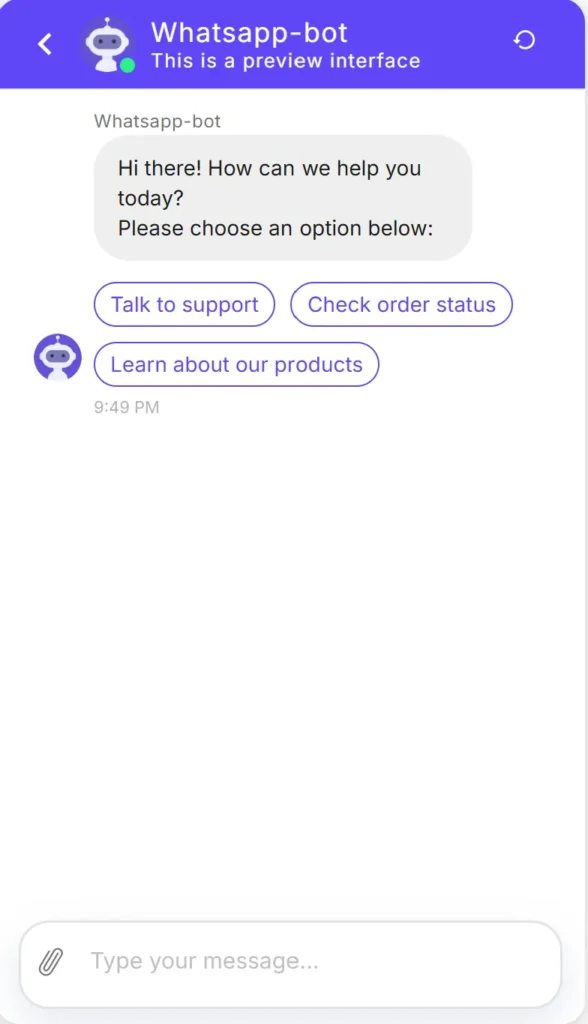
This response sends two messages in sequence. The first is a plain text greeting. The second includes a metadata block that tells Kommunicate to render a set of tappable buttons for the user to choose from.
You can customise the button titles and the messages they trigger to match whatever flow makes sense for your business. This is the foundation your entire conversation structure will build on.
Testing this: Send another POST request from Postman after saving and restarting your server. You should now see the full JSON array in the response body rather than a plain string.
Step 6: Connect your Webhook to Kommunicate
This is where the pieces come together. You are going to tell Kommunicate about the webhook you just built so it knows where to send incoming WhatsApp messages.
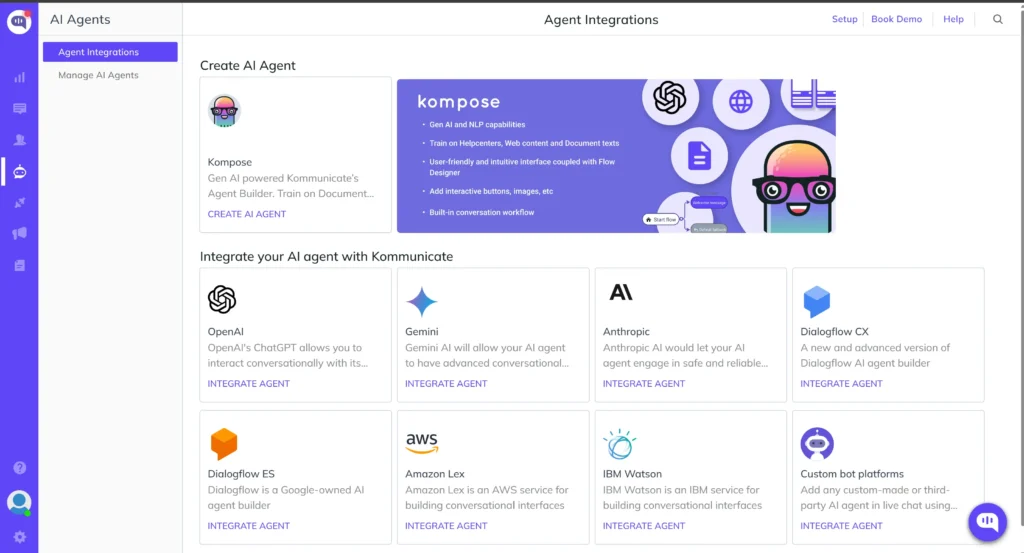
Create a New Bot
Log in to your Kommunicate dashboard and navigate to the Kompose Bot Builder. Click Create Bot and choose a template that matches your use case, or start from a blank bot if you prefer to build everything from scratch.
Add your Webhook
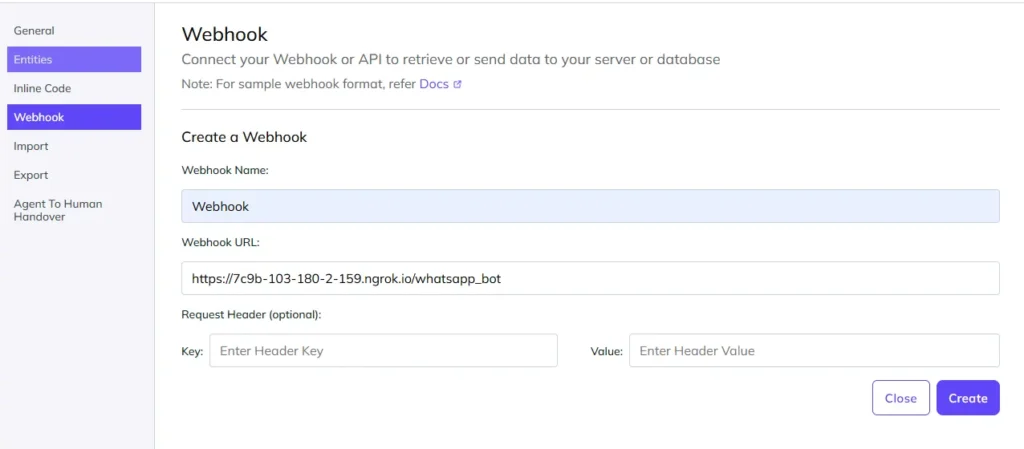
Inside the Bot Builder, open Settings and find the Webhook section. Click to add a new webhook and fill in two fields: a name for your webhook and the public URL you copied from ngrok in Step 4.
https://7c9b-103-180-2-159.ngrok.io/whatsapp_botSave the webhook once both fields are filled in.
Create an Intent and Attach the Webhook
Now create an intent inside your bot. An intent is essentially a trigger: it tells the bot what to do when a user sends a particular message or phrase. Give your intent a name, add a few training phrases so the bot knows when to activate it, then under the Bot Says section select the webhook you just created.
Once you are happy with the setup, click Train Bot to apply your changes.
Test it on WhatsApp
Open WhatsApp on your phone and send a message to the number connected to your Kommunicate account. If everything is wired up correctly, your bot will respond with the structured message you defined in Step 5 complete with the tappable button options.
Not integrated with WhatsApp yet? Kommunicate has a separate guide on connecting your account to the WhatsApp Business API. Get that set up first, then come back to this step.
Your Chatbot is Live. Here is What to do Next
At this point you have a working WhatsApp chatbot built on Node.js and Kommunicate. It can receive messages, process them through your webhook and return structured replies with interactive buttons.
From here there are a few natural next steps depending on what you want to build:
- Add conditional logic to your webhook so different messages trigger different responses
- Connect your bot to a CRM or database to personalise replies based on customer data
- Deploy your Node.js app to a production host like Railway or Render so you are not relying on ngrok
- Explore Kommunicate’s AI features to add natural language understanding on top of the rule-based flow you have built here
The foundation you have built in this tutorial is solid enough to take in any of those directions without needing to start over.
Conclusion
And that’s it! You’ve successfully learned how to build a WhatsApp chatbot using Node.js. From understanding why Node.js is ideal for scalable, real-time bots, to setting up your own chatbot step by step.
WhatsApp remains the world’s #1 messaging platform with 2B+ users, and combining it with Node.js’s event-driven performance gives you the power to:
- Automate support and reduce response times.
- Engage customers on the platform they already use daily.
- Scale seamlessly as your business and message volumes grow.
Whether you’re a small business experimenting with automation or a business building mission-critical chatbots, this setup unlocks a competitive advantage in customer experience.
Next Step: If you want to skip the heavy lifting and launch a production-ready WhatsApp chatbot in minutes, try Kommunicate’s WhatsApp chatbot solution.
There you have it! You’ve completed the journey of building your very own WhatsApp chatbot using Node.js. By now, you understand the potential of this technology to transform your interactions with customers and employees.
Frequently Asked Questions
1. Do I need to be a coding expert to build a WhatsApp chatbot with Node.js?
Not necessarily. While basic programming knowledge helps, Node.js offers many libraries and frameworks that simplify development. Plus, this guide includes ready-to-use code snippets to get you started quickly.
2. Can I follow this guide without the WhatsApp Business API?
This tutorial is optimized for the WhatsApp Business API (essential for production use). However, the Node.js concepts webhooks, async handling, API integration apply across platforms. For non-API setups, you may need third-party providers or SDKs.
3. Can I use Node.js to build chatbots for other messaging platforms?
Absolutely. The same approach works for Facebook Messenger, or Telegram, and more. Only the API integration layer changes.
4. Can I connect my WhatsApp chatbot to other business tools?
Yes. With Node.js’s ecosystem and APIs, you can integrate your bot with CRMs (Salesforce, HubSpot), helpdesks (Zendesk, Freshdesk), or even analytics tools to track performance.
At Kommunicate, we are envisioning a world-beating customer support solution to empower the new era of customer support. We would love to have you on board to have a first-hand experience of Kommunicate. You can signup here and start delighting your customers right away.

Adarsh Kumar is the CTO & Co-Founder at Kommunicate. As a seasoned technologist, he brings over 14 years of experience in software development, artificial intelligence, and machine learning to his role. His expertise in building scalable and robust tech solutions has been instrumental in the company’s growth and success.