Updated on September 27, 2026
TL;DR
An AI email ticketing system can classify, route, draft, and resolve a meaningful share of incoming support email. But the amount it can automate safely depends less on how well the AI understands language and more on what it is allowed to do. Routine requests such as order status checks and password resets can often be handled automatically. Refund exceptions, legal or compliance issues, distressed customers, and partially understood threads should remain human-controlled.
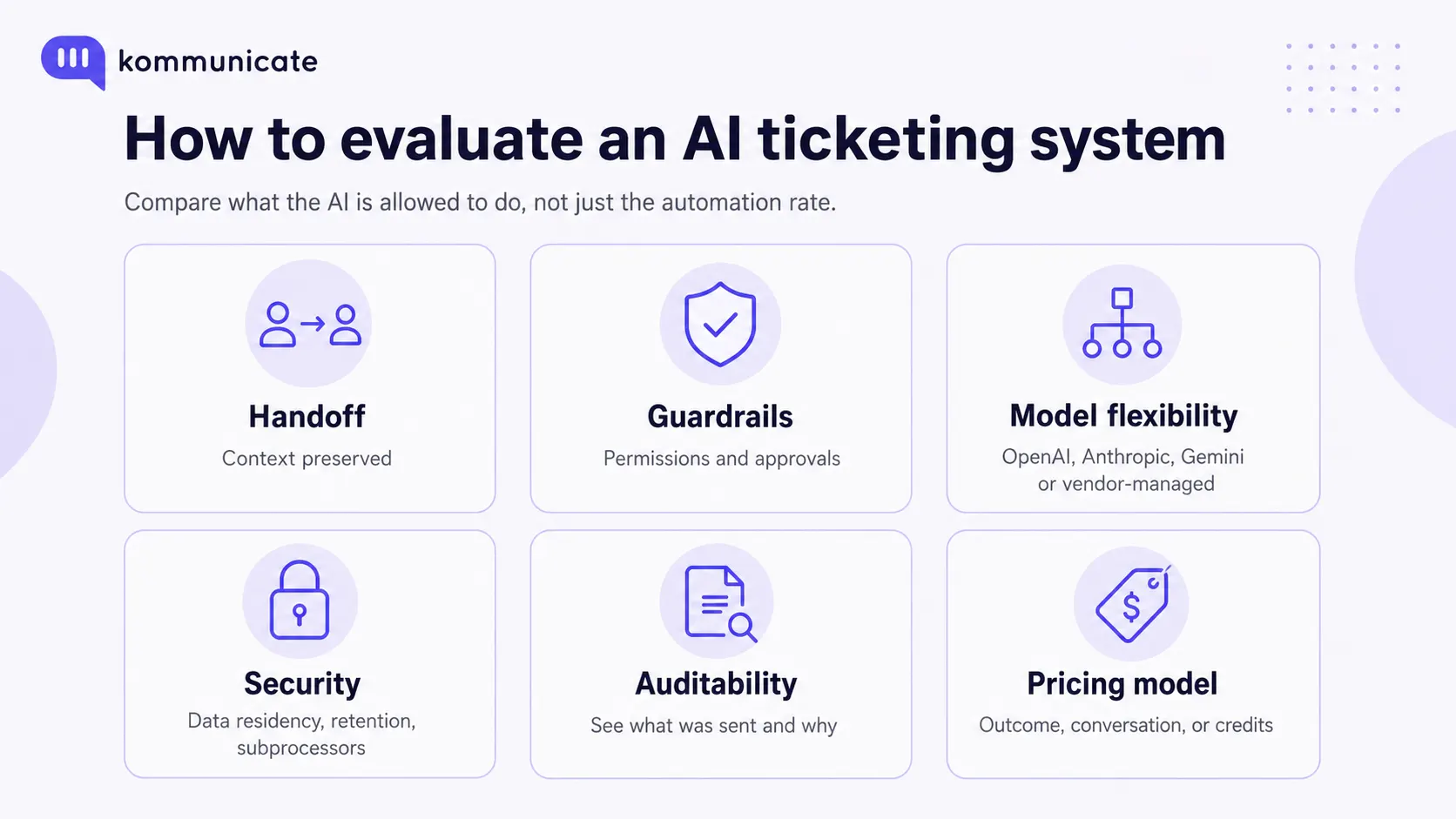
When evaluating an AI ticketing system, look beyond automation rate. Compare its handoff design, guardrails, auditability, model flexibility, security controls, and pricing model. The best system is not necessarily the one that automates the most email. It is the one that automates the most email your team can safely allow it to handle.
If you are reading this, you have probably already tested AI somewhere in your support operation. Chat is usually the first place teams experiment because a customer can correct a poor answer in the next turn. Email gives the system less room to recover.
A wrong chat reply may create a few minutes of frustration. A wrong email can become a written commitment your team has to honor, reverse, or explain later. Customers can forward it. Legal and finance teams can review it. The response can sit in an inbox for hours before anyone realizes it was wrong.
At the same time, pressure to automate has not eased. A 2026 Gartner survey of 321 customer service and support leaders found that 91% were under executive pressure to implement AI, with customer satisfaction, operational efficiency, and self-service success among the priorities.
So the useful question is no longer whether AI can read and answer email. It can. The harder question is how much authority you should give it before a human needs to take over. This guide focuses on that decision.
What is an AI email ticketing system?
An AI email ticketing system is an AI helpdesk capability that turns customer emails into structured and trackable support work. Unlike rules-based ticket automation, which relies on fixed triggers such as keywords or subject lines, an AI ticketing system reads intent and context, retrieves approved information, and then drafts, sends, routes, or escalates the response according to predefined rules and permissions.
In practical terms, the system can:
- Read an incoming email and identify what the customer is asking
- Connect the message to the correct thread or ticket
- Detect language, urgency, sentiment, and customer intent
- Retrieve information from approved support content and connected systems
- Draft or send a response when the request is safe to automate
- Route or escalate the ticket when human judgment is required
Your existing email ticketing system may already organize messages, track ownership, enforce SLAs, and store the support record. The AI layer adds comprehension and action selection. It attempts to understand what the customer actually needs and decides what should happen next.
If you want to see this applied to a live support inbox, Kommunicate’s AI email ticketing product connects support email to an AI assisted shared inbox while keeping human escalation available for unresolved or higher risk requests.
How it differs from the automation you already have
Traditional automation is deterministic. A subject line containing “invoice” can be routed to billing. A message from a VIP domain can be assigned to an account team. Those rules are valuable, but they become brittle when customers describe problems in their own words or combine several issues in one email.
An AI ticketing system works at the semantic level. An email titled “Quick question about my plan” may actually contain a cancellation request, a pricing objection, and a request for a refund. The system can classify those intents based on the message itself rather than the subject line alone.
The important difference is not that AI removes rules. Good implementations still use rules. AI improves the system’s ability to understand the request, while policies and permissions determine what the system is allowed to do with that understanding.
How AI email ticketing works on an email queue
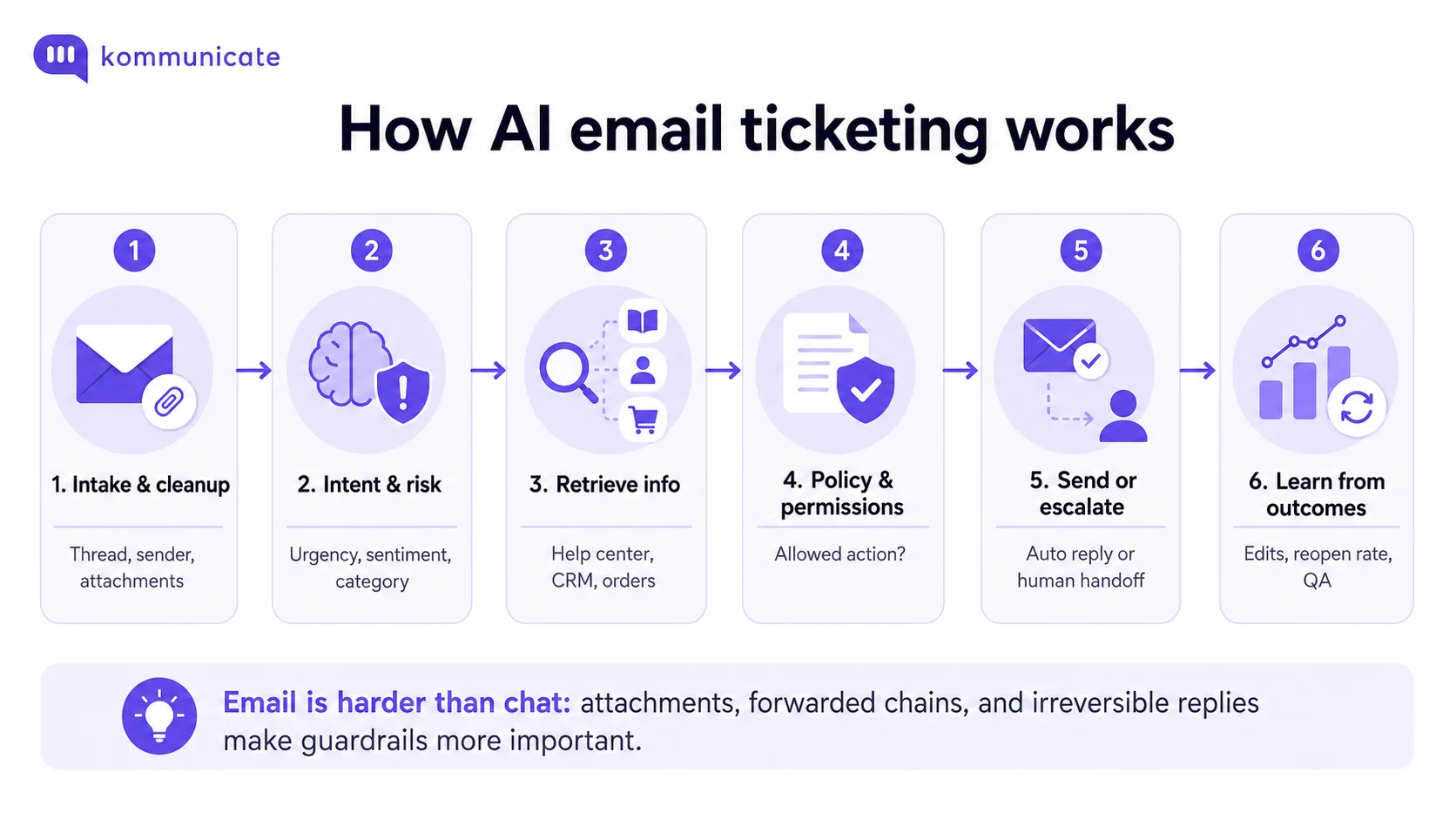
Ticket automation on email usually follows five stages. The exact implementation differs by vendor, but the decision path should be recognizable.
1. Intake, threading, and cleanup
The system converts the incoming email into a support ticket or attaches it to an existing conversation. It removes signatures and duplicated quoted text, preserves important thread history, and identifies the sender and relevant account context.
Attachments matter here. A screenshot can contain the error message the customer forgot to type. An invoice can explain a billing dispute. A reliable system should know whether it processed the attachment successfully before it makes a decision based on the email.
2. Intent, sentiment, and risk classification
Next, the AI identifies what the customer wants, the urgency of the request, the customer’s language, and other signals that affect routing or automation.
For example, a subject line that says “Quick question” may contain: “If this charge is not reversed today, we will dispute it with our bank.” The classification should reflect a high urgency billing dispute, not the casual subject line.
3. Retrieving information and applying policy
The system retrieves information from approved sources such as your help center, product documentation, CRM, order management system, account records, and previously resolved tickets. It then combines that information with the policy relevant to the request.
An order status email may require more than finding a help article. The AI may need to identify the customer, retrieve the latest order, check its current status, and use that structured data to generate the response.
4. Applying policy, permissions, and confidence checks
Before an AI-generated email is sent, the system should check more than model confidence. It should also determine whether that type of request is allowed to be handled autonomously, whether required customer data was retrieved successfully, and whether the proposed action falls within your business rules.
A high confidence password reset response may be safe to send automatically. A high confidence $5,000 refund should still require human approval if your policy says financial exceptions cannot be automated.
5. Delivery, routing, or human handoff
If the request passes the relevant policy and automation checks, the system can send the reply or complete the configured action. If it does not, the ticket should move to the appropriate human queue with enough context for the agent to continue without repeating the triage process.
Two additional processes run alongside these stages. The ticket should remain synchronized with the helpdesk, CRM, or MSP PSA software so the system of record stays current across customer records, service workflows, and billing data. Teams should also review agent edits, reopen rates, failed automations, and escalation reasons so they can improve knowledge and policies over time.
Why email is different from chat: email has weaker turn taking for clarification, important context may live inside attachments or forwarded chains, and a sent response is harder to recover from. That makes context completeness and permission design especially important.
Most AI email ticketing platforms can now handle common intake, classification, retrieval, and drafting tasks. The larger differences appear in how they apply guardrails, decide which emails can be sent autonomously, and preserve context when a human needs to take over.
That is why automation rate alone is a poor way to compare systems. Two platforms may understand the same email equally well but allow the AI to take very different actions.
What AI email ticketing replaces and what it does not
AI email ticketing is strongest when it removes repetitive tasks rather than pretending every support decision can be automated. The distinction matters because an automated ticketing system changes some support functions while making others more important.
| Type of work | Examples | What changes |
|---|---|---|
| AI can largely remove | Manual triage and tagging, repetitive first response drafting, order status replies, password reset instructions, basic policy questions, and Tier 1 queue monitoring outside business hours | An agent no longer needs to touch every routine email |
| AI changes but does not remove | Helpdesk workflows, quality assurance, knowledge base maintenance, and complex reply drafting | AI performs more of the first pass work, but humans still operate, review, and improve the system |
| A human still owns | Refund exceptions, contract changes, regulated disclosures, legal issues, distressed customers, unusual account problems, and decisions not covered by policy | AI can collect context and suggest a response, but a person makes the final decision |
How the agent’s role changes
Removing repetitive tickets does not remove the need for human agents. It changes the type of work that reaches them. Agents spend less time on repetitive first responses and more time reviewing exceptions, resolving unusual cases, and making decisions the AI is not authorized to make.
Three areas change most:
- Reply drafting: AI can prepare a grounded first draft. The agent reviews the parts that depend on account context, judgment, or policy exceptions.
- Quality assurance: QA expands from checking human responses to checking AI decisions, including whether the system used the right sources and whether it should have escalated sooner.
- Knowledge management: incomplete documentation becomes an automation bottleneck. When agents repeatedly correct the same response, the underlying documentation or policy usually needs attention.
If you want to model the financial impact, use an ROI calculator with your real email volume, agent cost, automation rate, and escalation rate rather than assuming that every automated ticket produces a permanent headcount reduction.
Which support tickets still need a human agent?
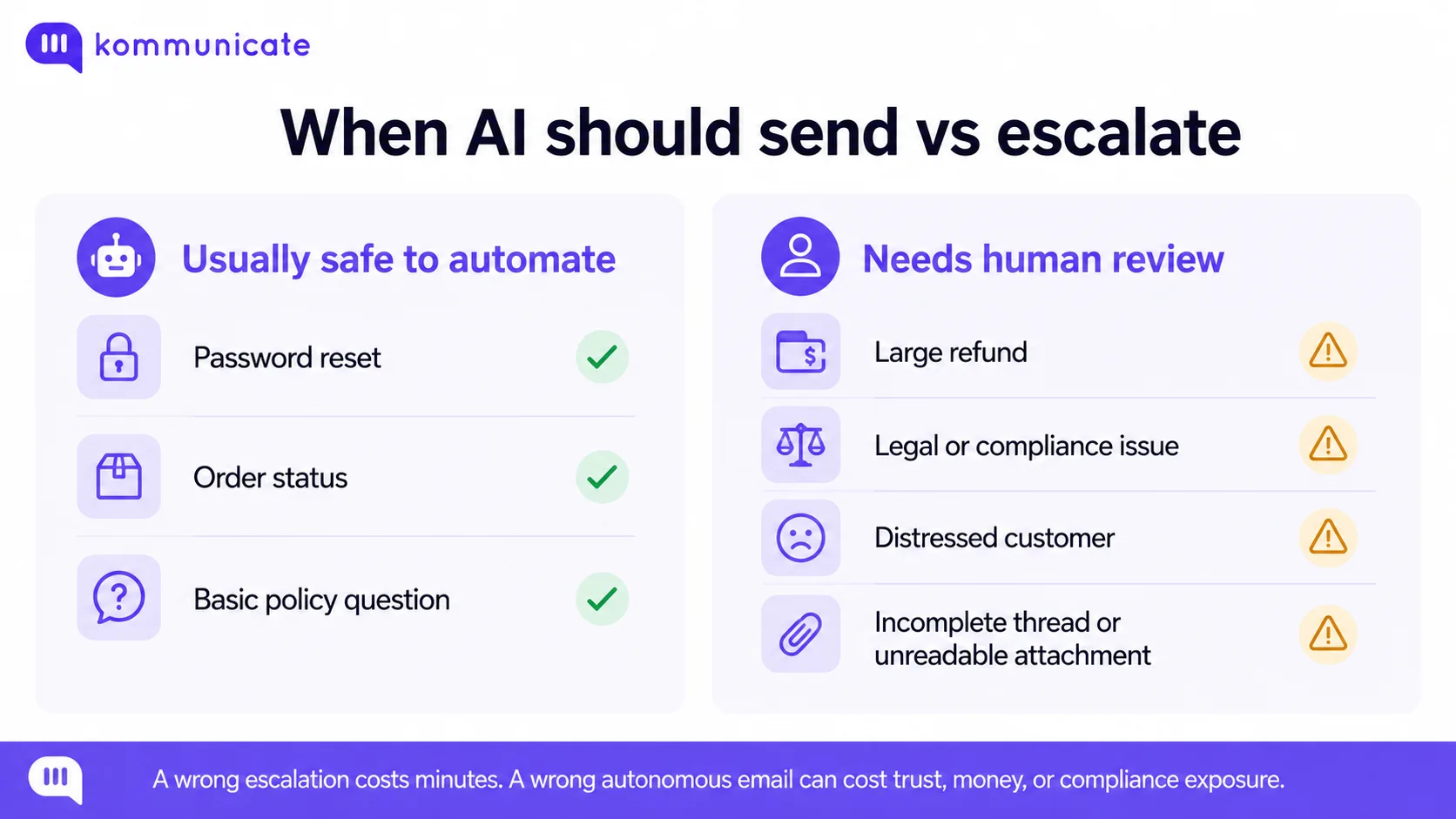
A support ticket should move to a human whenever the downside of a wrong autonomous response is materially larger than the cost of escalation. A needless escalation may cost a few minutes of agent time. A wrong autonomous email can create a refund, a compliance issue, a contractual commitment, or a churn risk.
That asymmetry makes the following categories poor candidates for unsupervised sending.
Requests that move money or end a relationship
Financial exceptions should normally require human confirmation regardless of how confident the model sounds. Automating a routine invoice copy may be fine. Approving a large refund, goodwill credit, pricing exception, or contract change is a different risk class.
AI can collect the account history, retrieve the relevant policy, and draft the response. A person should retain ownership of the decision when the outcome changes money, contractual terms, or the customer relationship.
Requests involving regulated disclosures, legal terms, or compliance
An email that refers to a legal obligation, regulatory requirement, formal complaint, privacy request, or compliance issue should generally require human review unless the response follows an explicitly approved workflow.
The problem is not simply whether the AI understands the question. These emails can create obligations for the company. AI can retrieve the relevant policy and prepare a draft, but legal, compliance, or an authorized support agent should retain control over the final response.
Customers showing distress or serious frustration
Sentiment should affect more than the tone of an AI generated reply. If a customer expresses serious distress, repeatedly threatens to leave, or indicates that the issue has caused significant personal or business harm, the ticket should move to a person.
AI can summarize the conversation and surface the relevant account information, but judgment and relationship management should remain human.
Customers who explicitly ask for a human
If a customer says, “I want to speak to someone,” the default should usually be to honor the request. Another automated answer often increases frustration because the system is ignoring a clear preference rather than failing to understand the issue.
Repeat emails about the same problem
A repeat email is a failure signal. It may mean the first answer was wrong, the response did not address the real issue, or the customer needs a different type of resolution. Sending the same automation again can turn a minor support problem into a trust problem.
Use repeat contact as a reason to raise the escalation priority, especially if the previous reply was AI generated.
New or unusual support issues
AI works best when it has reliable information to retrieve or structured actions it can execute. A newly reported bug, undocumented outage, or unfamiliar account state may have no useful answer in the knowledge base. That is a product investigation problem, not a drafting problem.
If several customers report the same unfamiliar issue, support should be able to surface the pattern to product or engineering rather than generating increasingly confident variations of an outdated answer.
Threads or attachments the AI has not fully understood
Do not allow autonomous sending when part of the evidence is missing. This includes unreadable attachments, unsupported file formats, forwarded chains that were only partially parsed, or long threads where the system cannot reliably reconstruct the sequence of events.
In these cases, escalation should happen because the context is incomplete, not because the model failed to generate text.
| Email category | Default automation posture | Reason |
|---|---|---|
| Password reset instructions | Usually autonomous | Low risk and normally covered by approved documentation |
| Standard order status | Usually autonomous | Can be grounded in a structured source of truth |
| Large refund or pricing exception | Human approval | Financial consequence |
| Legal, privacy, or compliance request | Human review | Potential legal or regulatory obligation |
| Distressed or highly escalated customer | Human review | Requires judgment and relationship management |
| Unreadable or partially parsed context | Human review | The system does not have complete evidence |
| Repeat unresolved contact | Escalate | Previous automation or resolution may have failed |
What a good AI email ticketing handoff should include
A useful handoff saves the agent work rather than simply moving the ticket to another queue. By the time a person takes over, the AI has already read the thread and gathered context. That work should travel with the escalation.
At minimum, the agent should receive:
- The full email thread so the conversation remains visible
- A short summary so the agent can understand the issue quickly
- The information or sources the AI used
- The reason the AI stopped or escalated
- The recommended next action or destination queue
The customer should not have to restate the same problem after the handoff. Context preservation is not a convenience feature. It is part of whether the automation actually reduced effort.
What security and procurement teams should ask before approval
Security and procurement reviews can delay an AI email deployment longer than the product demo. Email often contains addresses, order details, account records, attachments, and other information customers never expected to be processed by an AI system.
Get clear answers to these questions before the implementation reaches production.
1. Where does customer email data go, and how long is it stored?
Ask the vendor for:
- Its current subprocessor list
- Where email and customer data is processed and stored
- Available data residency options
- Data retention and deletion policies
- How attachments and PII inside attachments are processed and stored
- Whether customer emails are used to train models shared with other customers
- How customer data is isolated from other accounts
- What data can be exported when your contract ends
- How and when your customer data is deleted after you leave the platform
Get these answers in writing. “Secure AI” is not a useful procurement response.
2. Which security certifications and compliance reports are current?
Enterprise buyers need current evidence, not only a row of compliance logos. Review the coverage date and scope of SOC 2 Type 2 and ISO 27001 documentation, and ask how the vendor supports requirements relevant to your business, including HIPAA or GDPR where applicable.
Kommunicate publishes information about its SOC 2 Type 2, ISO 27001, HIPAA, and GDPR posture through its product and trust resources. The same standard should apply to every vendor you shortlist.
3. What happens if the underlying AI model changes?
An AI email ticketing system creates a dependency on the models used for classification, reasoning, retrieval, and response generation. A model retirement, pricing change, or performance shift can affect your support workflow even if the helpdesk itself has not changed.
Ask whether you can select or change models, whether model changes require rebuilding workflows, and how the vendor tests model upgrades before they reach production. Kommunicate supports models from OpenAI, Anthropic, and Google Gemini, which gives teams a choice of model provider within the platform.
4. Can we audit every AI-generated email response?
Email creates a durable customer record. Your support, compliance, or legal team should be able to reconstruct what happened if a customer later disputes what the company promised.
Ask whether the system can show:
- The original customer email
- The automated response that was sent
- When the response was generated and delivered
- The sources, customer data, or actions used to produce it
- The escalation or approval logic that applied to the ticket
5. How quickly can we stop automated email replies?
You should be able to pause AI replies without shutting down the entire support operation. Ask the vendor to demonstrate how you disable automation for a specific intent, route certain categories directly to humans, or pause all automated sending during an incident.
If every emergency change requires a ticket with the vendor, your operational control is weaker than it may appear in the demo.
One more question for finance: Will AI email automation actually lower costs?
Do not build the business case around permanent headcount savings alone. AI can reduce the time agents spend on repetitive tickets, but generative AI costs can also increase as usage and task complexity grow.
Gartner predicts that the cost per resolution for generative AI will exceed $3 by 2030. That forecast is a useful reminder that a credible business case should measure more than labor substitution.
Track the share of email volume AI handles safely, agent time saved, response time, reopen rate, escalation reasons, customer satisfaction, and the cost of the AI itself. Those metrics tell you whether automation is improving the operation, even as model economics change.
How to evaluate AI ticketing systems before you buy
Start with pricing, but do not stop there. The largest differences between AI ticketing systems often appear after the AI understands a request: what actions it is allowed to take, how escalation works, whether you can change models, and whether the resulting decision can be audited.
The table below is designed as a buyer’s comparison, not a feature count. Product packaging changes quickly, so verify any commercial detail before procurement.
| Vendor | Email support | Handoff and automation controls | Model flexibility | Pricing model | Buyer note |
|---|---|---|---|---|---|
| Kommunicate | AI Email Automation is available from the Starter plan. Email conversations can be managed in the shared support workflow. | Unresolved complex email tickets can transfer to human agents. AI Summary, sentiment, and key highlights are available to help agents understand the thread when a human takes over. | Choice of OpenAI, Anthropic, or Google Gemini models. | Conversation based plans. Monthly Starter is $40 with 250 conversations. Professional is $200 with 2,000 conversations. Additional conversations are currently $15 per 1,000 on Starter and $10 per 1,000 on Professional. | Useful when model choice and a common automation plus human support layer are priorities. |
| Zendesk AI Agents | AI agents support email as well as messaging and voice. Zendesk’s upgraded AI agent experience uses separate agents per channel. | Configurable escalation strategies and flows can move complex, urgent, or sensitive inquiries to human agents. | Vendor managed AI stack. Zendesk combines proprietary models with vetted third party LLMs rather than exposing a simple buyer facing model picker. | Automated resolution tiers. Zendesk bills based on successfully resolved AI interactions, with resolution allowances and tiering. | For email, Zendesk considers a conversation ended 72 hours after the last email before verifying the resolution. |
| Salesforce Agentforce | Agentforce Service agents can autonomously respond to customer emails through Service Email and Email to Case. | Omni Channel flows can control whether a case goes to Agentforce or a service rep, with outbound escalation available when the agent cannot answer. | Salesforce managed model options plus BYOLLM support for supported configurations through AI Models. | Flex Credits start at $500 per 100,000 credits. Conversation based Agentforce pricing is also available. | As currently documented, Agentforce Service Agent on Email processes text in the email subject and body, but not images or attachments. |
| HubSpot Customer Agent | Customer Agent can be deployed to email alongside supported messaging channels. | Centralized handoff guidelines can route conversations to humans immediately, later, or through workflows and team assignment rules. | Vendor managed. HubSpot uses models from multiple providers, but model selection is not positioned as a simple buyer controlled choice for Customer Agent. | 50 HubSpot Credits per resolved conversation. Additional credits are currently listed at $0.010 per credit, with included monthly credits depending on subscription. | The credit model means effective cost depends on both included credits and usage above the plan allowance. |
| Fin | Fin is optimized for email and uses the email conversation history as context. Fin Vision can also interpret images customers send via email. | Escalation Rules, Escalation Guidance, workflows, and human handoff settings control when Fin transfers to a person. Human approval can also be inserted into higher risk procedures. | Vendor managed AI stack. | $0.99 per outcome. The $49 monthly base for Fin with your helpdesk includes 50 resolutions. | Fin outcomes now include both resolutions and qualifying procedure handoffs, so compare the definition of a billable outcome carefully. |
Pricing and product notes checked September 3, 2026. Vendor packaging changes frequently. Verify the current vendor documentation and your contracted terms before making a purchase decision.
Vendor sources:Kommunicate, Zendesk, Salesforce, HubSpot, and Fin.
How the pricing model changes your AI ticketing costs
Pricing models create different incentives. Outcome or resolution pricing ties spend directly to successful AI activity, but costs increase as automation grows. Conversation based pricing makes usage easier to forecast, but the economics depend on how many conversations your team processes and how much work happens inside each one. Action or credit-based pricing adds another variable because a single customer request may consume multiple billable actions.
None of these models is inherently cheaper. Run your actual monthly email volume, automation rate, escalation rate, and expected actions per ticket through each vendor’s model before comparing headline prices. Review Kommunicate’s current pricing models and use the ROI calculator as one input to the comparison.
Check how each vendor defines a resolution or outcome
A “resolution” is not a standardized billing unit. Zendesk waits for the conversation to end, which for email is 72 hours after the last email, and then uses an LLM-based verification process to determine whether the AI resolved the request. Fin counts successful value delivery as an outcome, including a resolution or a qualifying procedure handoff.
The same set of customer interactions can therefore generate different billable counts on different platforms. Get the definition in writing before you build a forecast.
Look beyond the pricing page
Before you buy, ask the vendor to demonstrate the production behavior that matters to your support team:
- Can you set different automation and escalation rules for different intents?
- What happens when an attachment cannot be processed?
- Does a human receive the full thread and a useful summary after escalation?
- Can you change the underlying model without rebuilding the workflow?
- Can you pause automated sending immediately during an incident?
- Can security and compliance documentation be reviewed before contract signature?
Those answers often have a larger impact on implementation cost and operational risk than a small difference in the headline price.
The right way to scale AI email automation with Kommunicate
The safest way to scale email automation is to start with requests that have clear answers, reliable data sources, and low-cost failure modes. Then expand automation only when QA data shows that the system handles those requests consistently.
Kommunicate’s approach follows that model. Routine emails can be resolved automatically, while unresolved or higher risk requests can move to human agents rather than forcing automation where judgment is still required.
The handoff carries context
Kommunicate’s email ticketing workflow can transfer unresolved complex email queries to live support agents. AI Summary, sentiment analysis, and key conversation highlights are available in the support workflow to help the receiving agent understand what happened before responding.
Human agents keep AI assistance after escalation
Escalation does not mean the AI disappears. Agent Assist can retrieve information from support documents, suggest replies, and help agents improve grammar and tone while the person retains control over the final response.
Model choice is not tied to one provider
Kommunicate supports AI models from OpenAI, Anthropic, and Google Gemini. That gives teams model choice inside the support platform rather than requiring a separate ticketing implementation every time the preferred underlying model changes.
See AI email ticketing in action
Bring a real support thread and see how Kommunicate retrieves context, applies guardrails, and hands complex cases to your team.
Frequently asked questions
Should we automate email before or after chat?
After chat, in most cases. Chat gives teams a lower risk environment for finding knowledge gaps, tuning escalation logic, and validating what the AI should be allowed to handle. Those lessons can then be carried into email, where a wrong autonomous response is harder to recover from.
How do we stop AI from hallucinating a commitment we cannot honor?
Ground responses in approved sources, separate model confidence from business permission, and require human approval for high-risk categories such as money, contractual terms, regulated disclosures, or timelines that create obligations. Audit sent responses and reopened tickets during rollout.
What happens to human agents?
AI usually removes repetitive volume rather than the need for human agents. The remaining queue contains more exceptions, escalations, and judgment heavy cases. Agents therefore need stronger product knowledge, escalation skills, and the ability to review AI-generated decisions.
Do we need a separate tool, or can our current helpdesk do this?
Both approaches can work. An AI layer inside the existing helpdesk preserves familiar workflows. A dedicated AI support platform can provide different model, guardrail, handoff, or omnichannel options. Compare the behavior you need, not only whether the vendor has an “AI” feature.
How long does an AI ticketing system take to implement?
Implementation time depends on email volume, knowledge quality, helpdesk and CRM integrations, action permissions, and security review. A limited pilot can move faster than a full production rollout. Ask vendors for a timeline based on your actual support stack and approval process.
How should we measure whether AI email ticketing is working?
Track more than automation rate. Measure safe automation rate, reopen rate, escalation rate and reasons, first response time, resolution time, QA accuracy, CSAT, and cost per resolution. Rising automation is not useful if incorrect replies or reopened tickets rise with it.
Is AI email ticketing secure?
Security depends on how the vendor processes customer data. Review data residency, retention, subprocessors, access controls, audit logs, attachment processing, model training policies, certifications, and deletion procedures before allowing AI to process production email.
Choosing an AI ticketing system comes down to control
The most useful question to ask an AI ticketing vendor is not, “What percentage of our email can you automate?” It is, “What is your AI allowed to do without asking?”
A strong AI email ticketing system should automate low-risk, repeatable work, apply business rules before acting, and stop when a request becomes ambiguous, financially sensitive, regulated, or dependent on human judgment. When it stops, the customer should not have to start over.
For buyers, that means evaluating guardrails, auditability, data handling, model flexibility, handoff quality, and pricing together. The goal is not the highest possible automation rate. It is the highest automation rate your team can safely defend in production.
See how Kommunicate handles email automation
Test a real support thread to see how AI resolves routine requests and hands higher-risk conversations to a human.

Devashish Mamgain is the CEO & Co-Founder of Kommunicate, with 15+ years of experience in building exceptional AI and chat-based products. He believes the future is human and bot working together and complementing each other.