Updated on September 16, 2026
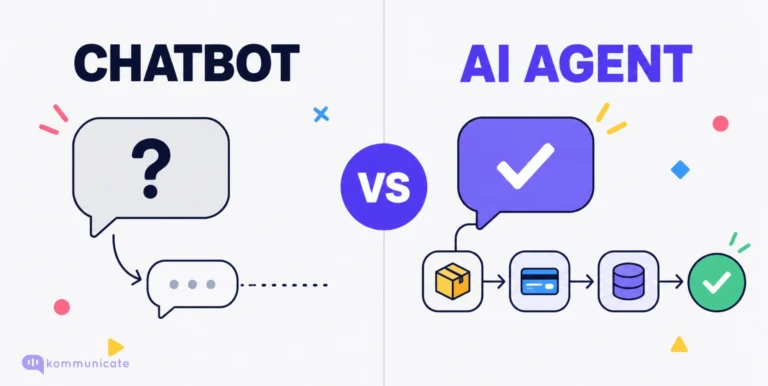
TL;DR: A custom AI agent is software that uses an AI model to do a real job inside your business. It reads your data, follows your rules, and takes action in your systems. A chatbot answers questions. A custom AI agent finishes the work.
Table of contents
- Why this matters now
- What a custom AI agent actually is
- Chatbot vs off-the-shelf tool vs custom AI agent
- How a custom AI agent works
- Types of custom AI agents
- Custom AI agents in sales
- Custom AI agents in customer support
- Custom AI agents for employee experience
- Custom AI agents in marketing
- Custom AI agents for ecommerce
- Build, buy, or partner
- How to build a custom AI agent, step by step
- Guardrails and governance
- Why agent projects fail
- What it costs and how to measure return
- Questions to ask a vendor
Why this matters now
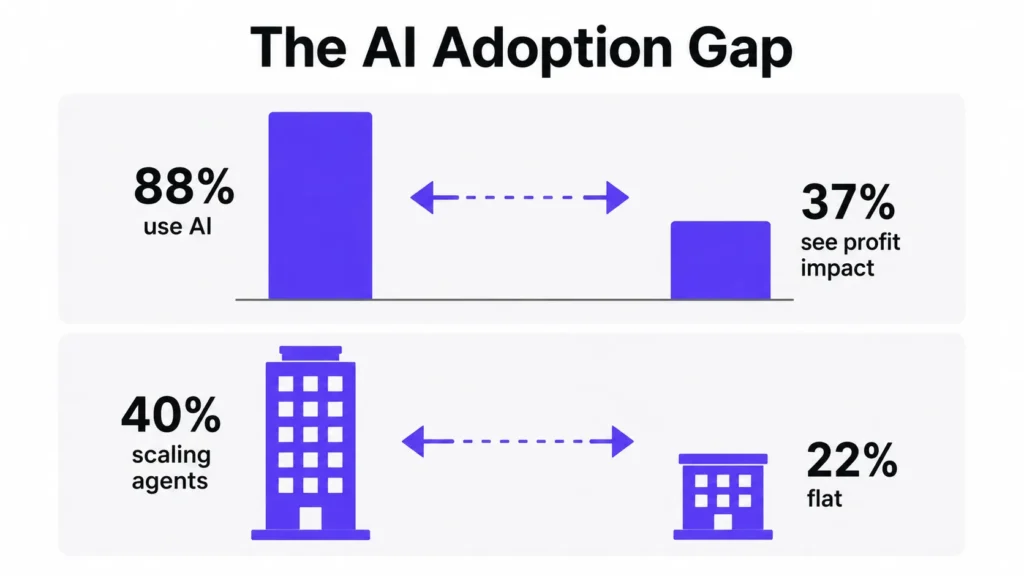
Most companies have already tried AI. McKinsey’s 2026 State of AI survey found that nearly nine in ten organisations use AI in at least one business function. The same survey found something less flattering: only 37% of respondents said AI has made a positive difference to their company’s profit. That number has barely moved in a year.
The gap is not caused by the technology. It is caused by what people build with it. A general chat tool that everyone uses to write emails helps individuals. Eight in ten people in that survey said AI improved their own productivity. But personal productivity does not show up on a profit line if the work around it stays the same shape.
A custom AI agent is different. It takes one job, owns it end to end, and gets measured on the outcome. That is the thing that shows up in the numbers.
The split is already visible in adoption. McKinsey found that 40% of large companies, those over $1 billion in revenue, are now scaling AI agents in one or more functions, up from 27% a year earlier. Smaller companies stayed flat at 22%. The distance between the two groups is widening.
This guide explains what custom AI agents are, how they work, what they cost, why they fail, and what they are actually doing today across sales, support, employee experience, marketing and ecommerce.
What a custom AI agent actually is
A custom AI agent is built around one job in your company. It has four things a general-purpose AI tool does not have:
- Your data. It can look up your products, your policies, your customer records, your inventory, your past tickets. A public model knows the internet. Your agent needs to know your business.
- Your rules. It knows what it is allowed to do on its own, what needs approval, what it must never touch, and when to hand the task to a person.
- Your systems. It can act inside your CRM, your order system, your helpdesk, your database, your billing platform. Without this, it can only describe the work instead of doing it.
- A defined job with a number attached. It is judged on one outcome, such as resolution rate or time to first response, not on being generally helpful.
Two things worth clearing up. “Custom” does not have to mean building from scratch. Plenty of companies build custom AI agents on top of existing platforms, using a vendor’s framework and adding their own data, tools and rules. What makes it custom is that it is shaped around your workflow.
“Agent” is not the same as “autonomous.” Most useful business agents run with a human in the loop for anything sensitive. Autonomy is a dial, not a switch, and turning it up is a decision you make later, once the logs give you a reason to.
Chatbot vs off-the-shelf tool vs custom AI agent
| Chatbot | Off-the-shelf AI tool | Custom AI agent | |
|---|---|---|---|
| Follows a fixed script | Yes | Partly | No, it reasons through the task |
| Reads your internal data | Rarely | Limited | Yes |
| Takes action in your systems | No | Some | Yes |
| Handles multi-step work | No | Sometimes | Yes |
| Remembers context | Within a session | Varies | Across sessions, if you want it to |
| Time to launch | Days | Days to weeks | Weeks to months |
| Fits your process | Poorly | Partly | Closely |
| Ongoing effort | Low | Low | Real and continuous |
The honest summary: chatbots are cheap and shallow. Off-the-shelf tools are fast and fine for common jobs that every company has. Custom AI agents cost more and take longer, and they are the right choice when the job depends on knowledge, rules and systems that only your company has.
If a job is identical at your company and at your competitor, buy it. If the way you do it is part of why customers pick you, build it.
How a custom AI agent works
Under the hood, almost every custom AI agent is made of the same six pieces. If a vendor cannot walk you through all six, that is a signal.
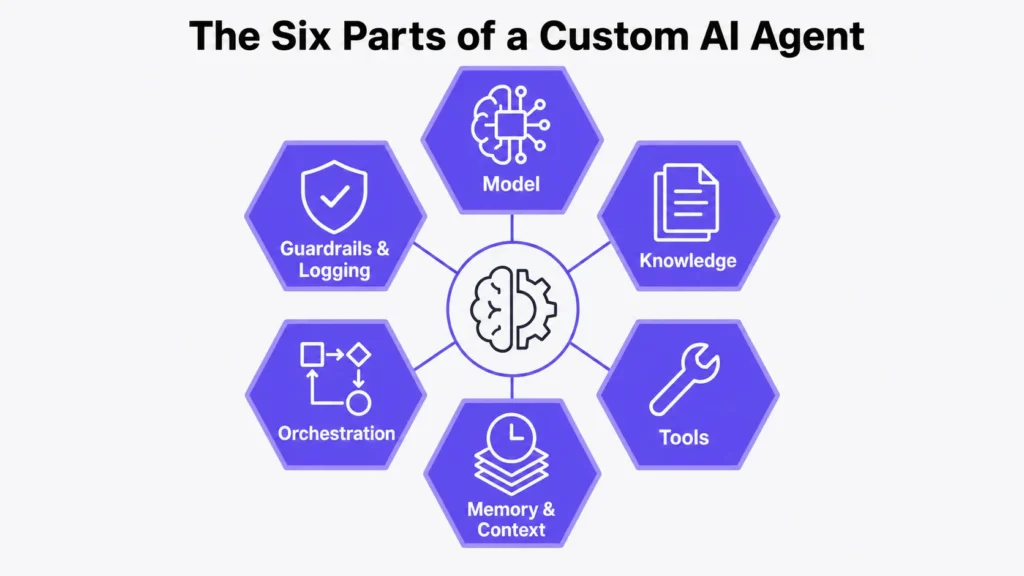
1. The model
The language model that does the reasoning. You choose one based on cost per task, speed, accuracy on your kind of work, and where the data is allowed to be processed. Most teams use a commercial model through an API. Some run open models on their own infrastructure when data cannot leave the building. Many production systems use more than one: a cheap fast model for simple steps, a stronger one for hard steps.
2. Knowledge
How the agent finds out about your business. In most builds this means retrieval: your documents, policies, product data and records are indexed so the agent can pull the right piece at the right moment. This is the part that decides whether answers are correct or invented.
It is also the part that quietly rots. Policies change. Products change. Prices change. If nobody owns keeping the knowledge current, quality drifts down over months and nobody notices until a customer complains.
3. Tools
The specific actions the agent can take. Look up an order. Check stock. Issue a refund under a limit. Update a CRM record. Send an email. Book a meeting. Query a database. Create a ticket.
Tools are what separate an agent from a search box. They are also where the risk lives, so each one gets its own permissions and its own log.
4. Memory and context
What the agent carries between steps in a task, and what it remembers between sessions. Short-term memory lets it complete a five-step job without losing the thread. Longer-term memory lets it recognise a returning customer or continue a conversation from last week. Memory also raises privacy questions, so what gets stored should be a deliberate decision, not a default.
5. Orchestration
The logic that decides what happens in what order, when to retry, when to stop, and when to escalate. Simple agents handle one task. More complex setups split work between several specialised agents that hand off to each other, which is powerful and considerably harder to debug.
6. Guardrails, logging and evaluation
Limits on what the agent can touch. Approval steps for risky actions. A complete record of what it did and why. And a test suite that runs against real past cases so you can tell when quality drops. Teams skip this piece to launch faster, then have no way to explain a bad outcome.
What one task actually looks like
A customer writes: “My order hasn’t arrived and I’m going away Friday.”
The agent identifies the intent: delivery problem, with a deadline.
It uses a tool to look up the customer and their most recent order.
It calls the carrier tracking API and sees the parcel has not moved in six days.
It retrieves your lost-parcel policy from the knowledge base.
It checks stock for a replacement and confirms next-day delivery is possible.
The replacement value is under the auto-approval limit, so it ships the replacement, opens a carrier claim, and writes back to the customer with a tracking number.
It logs every step, updates the ticket, and tags the case for the weekly review sample.
If the order value had been above the limit, step six would have become a draft for a human to approve in one click. That is the whole design pattern.
Types of custom AI agents
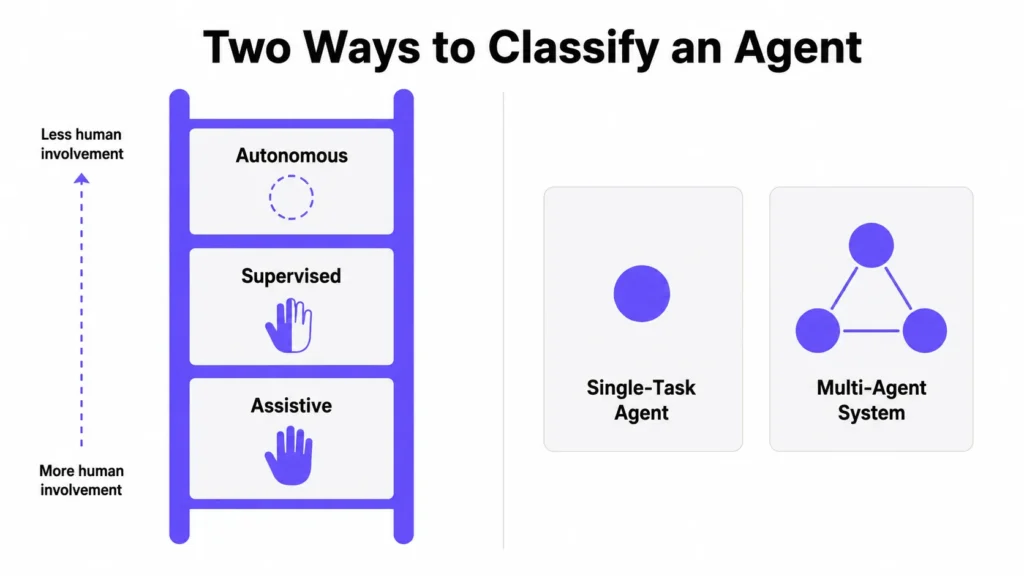
There are many ways to slice this. The two that matter for planning are autonomy and structure.
By autonomy
Assistive: The agent prepares work and a person sends it. Draft replies, draft summaries, draft outreach. Lowest risk, fastest to launch, real time savings, no scary failure modes. This is where most teams should start.
Supervised: The agent completes the task but certain actions need a click of approval. Refunds above a limit, price changes, anything customer-facing that is hard to undo. This is where most production agents live.
Autonomous: The agent completes the task and acts without approval, inside defined limits. Appropriate for high-volume, low-stakes, well-understood work where you have months of logs proving it behaves.
By structure
Single-task agents: One job, one set of tools. Order status. Invoice matching. Lead research. Easy to test, easy to measure, easy to fix. Most successful deployments are these.
Multi-agent systems: Several specialised agents that pass work between them. One researches an account, another drafts the outreach, another checks it against compliance rules. More capable, and significantly harder to evaluate, because when the output is wrong you have to work out which agent went wrong and why.
Start single: Move to multi-agent when a single agent has genuinely run out of room, not because multi-agent sounds more advanced.
Custom AI agents in sales
The problem sales agents are solving
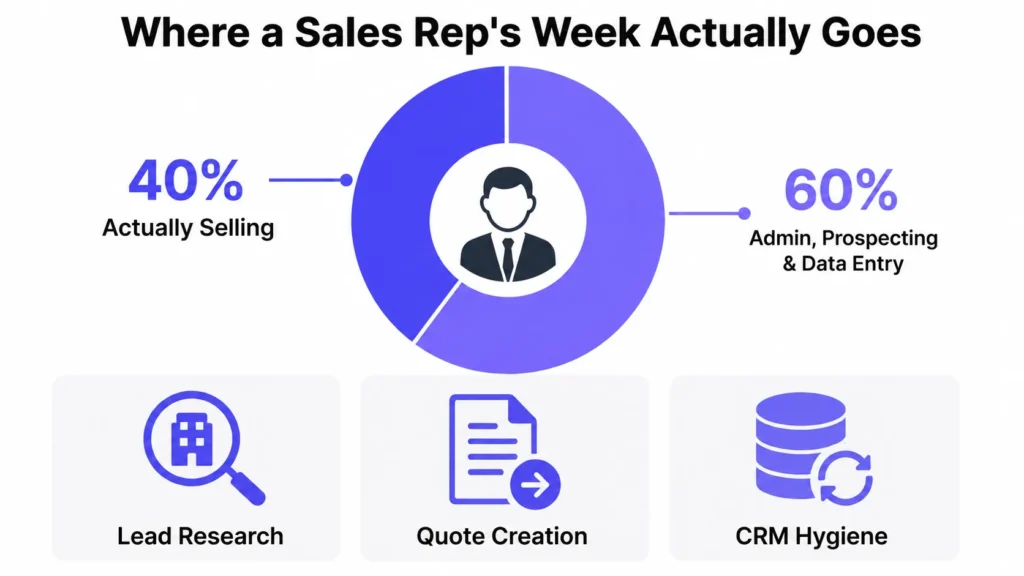
Salesforce’s seventh State of Sales report, based on 4,050 sales professionals in 22 countries, found reps spend around 40% of an average week actually selling. The other 60% goes to prospecting admin, quote creation, planning, manual data entry and training.
The pressure is coming from both directions. In the same research, 69% of sales professionals said measurable return on investment matters more to customers than it did last year, 67% said personalisation matters more, and 57% said customers take longer to decide. More work per deal, same number of hours.
Sales teams have responded quickly. 54% now use AI agents, and another 34% expect to within two years. Among leaders whose teams already have agents, 94% call them critical for meeting business demands.
What sales agents actually do
Lead research and enrichment: Before a rep touches an account, the agent gathers the company profile, recent news, existing relationship history, product usage, open support tickets and past deals, and writes a short brief. This is the single most obvious win, because it is pure preparation work with no judgement risk.
Inbound lead response and qualification: The agent responds when the lead is still warm, asks qualifying questions, checks the answers against your ideal-customer criteria, books a meeting on the right rep’s calendar, and writes a clean CRM record. Speed matters here because inbound intent decays fast.
Working the leads nobody works: Every company has a pile of leads that never got contacted. Salesforce described running agents against exactly this at its own company: in four months, agents contacted 130,000 previously untouched leads and created 3,200 opportunities.
Prospecting support: A third of sales teams with agents use them for prospecting, and 92% of sales professionals with agents say AI helps there. High performers are 1.7 times more likely than underperformers to use prospecting agents. This matters because 47% of reps say cold outreach is one of the worst parts of the job and 47% say their team lacks the bandwidth for it.
Quote and order work: In the Salesforce survey, the top agent use cases in sales were fulfilling orders, tracking product usage, creating quotes and managing commissions. These are unglamorous and highly repetitive, which is exactly why they pay back.
CRM hygiene: The agent listens to call recordings and reads email threads, then updates fields, logs next steps, and flags deals that have gone quiet. Reps hate CRM admin and skip it, which is why forecasts are wrong.
Coaching and role play: 34% of sales teams with agents use them for coaching. 52% of reps say traditional enablement material does not give them the skills they need, 46% say they rarely get feedback on their sales conversations, and 40% say their manager’s lack of time is the obstacle. A coaching agent that role plays a discovery call and gives specific feedback scales something managers cannot.
What to measure
- Time from lead creation to first meaningful contact
- Percentage of inbound leads contacted at all
- Meetings booked per rep per week
- CRM field completeness on active opportunities
- Hours per rep per week spent on research and admin
- Opportunity creation from previously untouched lead pools
Pitfalls specific to sales
Data quality is the big one. 46% of sales professionals with agents say data quality issues hurt their sales results, and the top data problems reported by teams with agents are manual errors and duplicate records. An agent that researches an account using a duplicate record produces a confident, wrong brief.
Tool sprawl is the second. Sales teams use an average of eight standalone tools, and 42% of reps say they are overwhelmed by the number. Adding an agent as tool number nine, with its own login and its own view of the world, makes the problem worse rather than better.
The third is tone. Fully automated outreach at volume is the fastest way to burn a domain and a brand. Assistive drafting with human sending is usually the right setting for anything a prospect will read.
Custom AI agents in customer support
Where support agents stand today
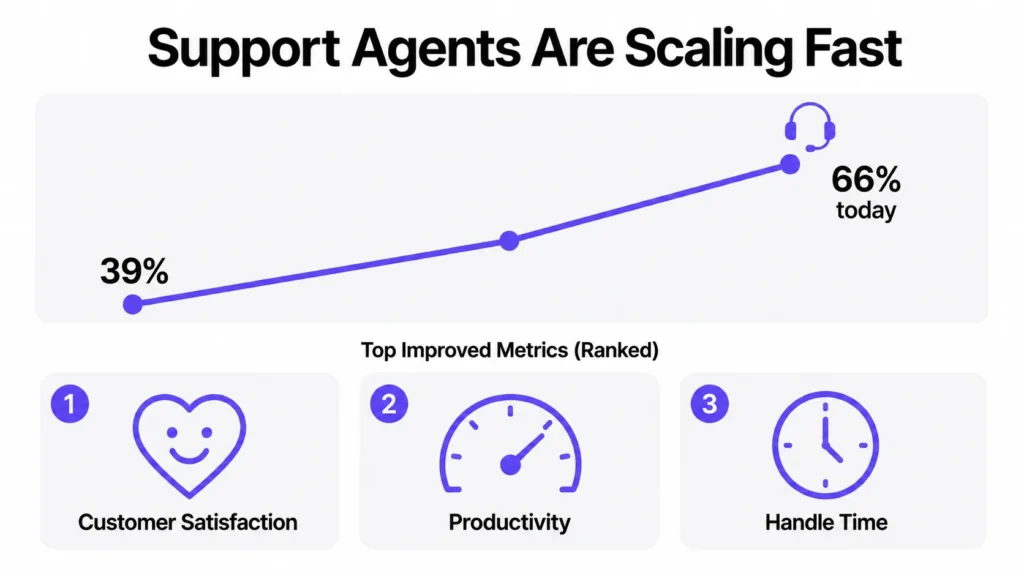
Customer support is the most mature use case, and the adoption curve is steep. Salesforce’s State of Service: AI Agents Edition, based on 3,075 service professionals surveyed in March and April 2026, found that 66% of customer service organisations now use agentic AI, up from 39% a year earlier. That is a 1.7 times increase in twelve months.
The speed of payback is unusual. 70% of organisations with AI service agents said they saw measurable value within 60 days of deployment.
The most interesting finding is which metric moved most. When asked which KPI improved the most after deploying agents, respondents put customer satisfaction first, ahead of rep productivity, average handle time, customer retention and first-response time. That runs against the usual assumption that these agents are purely a cost play.
Confidence is high among people who have actually run one: 89% of service professionals with AI agents say their organisation would benefit from expanding their use.
What support agents actually do
Full case resolution: Not deflection, resolution. The agent reads the question, looks up the account, checks the order or subscription, applies the policy, takes the action, and confirms. Salesforce reports that on its own help site, its agent handled 4.3 million enquiries and resolved about 70% of them without a human.
Triage and routing: Before a human sees the ticket, the agent classifies it, sets priority, attaches the relevant history, and routes it to the right queue with a summary. 77% of service teams with agents run them in both customer-facing and internal operations, and this behind-the-scenes work is a large part of the internal half.
Draft replies for complex cases: For anything the agent should not resolve alone, it prepares a reply with the relevant policy and account details already pulled in. The human edits and sends. This shortens handle time without putting judgement calls on autopilot.
Proactive outreach: Delivery delayed, payment about to fail, subscription about to renew at a higher price. Contacting the customer before they contact you removes the ticket entirely.
Post-call work: Summaries, disposition codes, follow-up tasks, knowledge-base gap flags. This is dead time for reps and easy work for an agent.
Voice. Increasingly agents handle phone as well as chat and email, with the same escalation rules.
What to measure
- Autonomous resolution rate, meaning cases fully closed with no human touch
- Escalation rate, and whether escalated customers end up happy
- Customer satisfaction on agent-handled cases compared with human-handled ones
- Average handle time on cases the agent assists rather than resolves
- Repeat contact rate, which catches agents that close cases without solving them
- Cost per resolution
That fifth one deserves emphasis. An agent that closes tickets quickly and generates a second ticket from the same customer two days later is destroying value while reporting a great number.
Pitfalls specific to support
Data readiness is underrated by leadership. In the Salesforce research, 72% of service operations professionals said data readiness is a major blocker to AI, compared with 59% of service leaders. The people closest to the data are more worried than the people approving the budget. When those two numbers disagree, believe the operations team.
Companies overestimate customer trust. 65% of service professionals said their customers fully trust AI. Separate consumer research cited in the same report, from the Metrigy Consumer CX Index, found only 44% of consumers trust AI to handle their customer service needs. That gap should shape how you design the handoff to a human: make it obvious, easy, and never hidden behind three refusals.
Workforce planning is not optional. 97% of service leaders with AI say it is changing how they plan their workforce. Some of that means new roles, such as people who maintain the knowledge base the agent depends on. Deciding this after launch causes more disruption than deciding it before.
Custom AI agents for employee experience
This is the most underrated category. It is lower risk than customer-facing work, the audience is forgiving, and the volume of repetitive questions inside a company is enormous.
The problem
Employees lose hours hunting for information they are entitled to. What is the parental leave policy in this country. How do I expense this. Which floor is IT on. How does the mid-year review work. Do I qualify for this allowance. The answer usually exists, buried in an intranet page that was last updated three years ago, behind a login nobody remembers.
The alternative is filing a ticket and waiting days for a person to look up something that was written down.
A concrete example
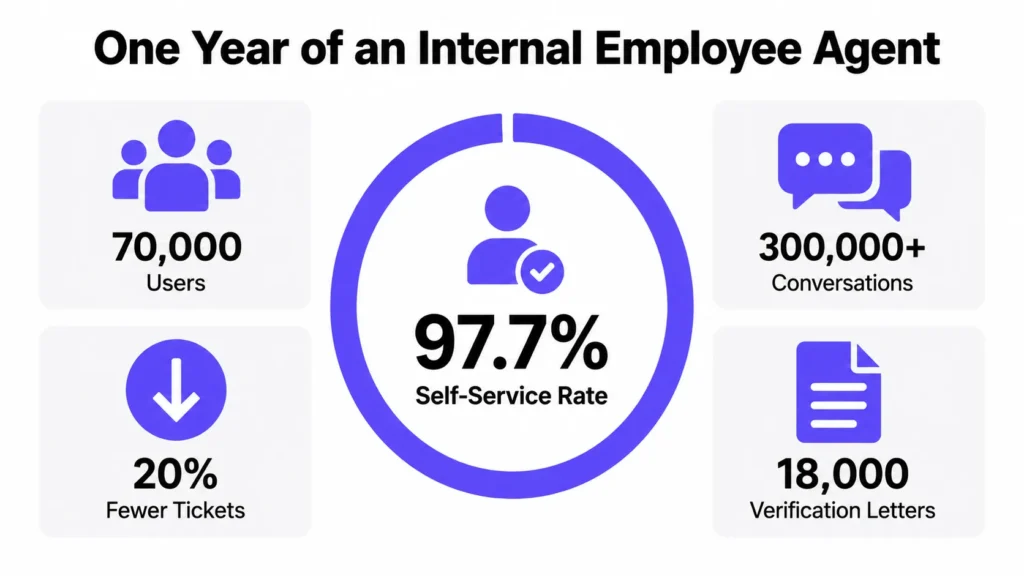
Salesforce published a detailed account of running an internal Employee Agent for a year. The numbers give a realistic picture of what this category delivers:
- 70,000 users, making it the most-used agent in the company
- A 97.7% self-service rate, meaning nearly all sessions end with the employee resolving their own issue without filing a ticket
- More than 300,000 conversations in the first year
- Organic adoption above 80%, without a mandate
- A 20% year-over-year reduction in case volume across 103,000 basic tier-one cases
- During open enrolment, a 58% drop in support cases and an 82% more positive employee experience compared with the previous year
- Around 18,000 employment-verification cases handled per year, so employees no longer wait days for a letter needed for a loan or a tenancy
What employee agents actually do
Answer policy questions with permissions applied: The agent only shows an employee what that individual is allowed to see. A manager sees things an individual contributor does not. This is a hard requirement, not a nice-to-have.
Take action, not just answer: Book a meeting room. Schedule a meeting. Generate an employment verification letter. Start a leave request. Update a benefit election.
Surface internal opportunities: In the Salesforce example, the agent surfaces relevant open roles and personalised reskilling suggestions, which turns an HR help tool into a retention tool.
IT support: Password resets, access requests, device issues, software provisioning. The most repetitive queue in most companies.
Onboarding: New joiners have the highest question volume and the least idea where to look. An agent that answers their first two weeks of questions saves an enormous amount of manager time.
Proactive reminders: Enrolment deadlines, review cycles, compliance training, expiring documents.
Where to put it
Put it where people already work. Salesforce integrated its agent directly into Slack rather than building a new destination, and named that as a key reason for adoption. An internal agent that lives on a portal nobody visits will be used by nobody.
The lesson worth stealing
The most useful part of that write-up is the failure they describe honestly. Their library of more than 1,000 internal knowledge articles was full of overlapping policies and outdated text. Humans filtered the noise automatically. The agent took everything literally and produced confusing and sometimes incorrect answers.
Fixing it meant archiving hundreds of pages and rewriting policy language into clear, direct statements. They also changed who they wrote for: instead of short articles built for quick human reading, they now write longer, more complete articles so the agent has full context.
That is the real work in this category. The agent is the easy part.
What to measure
- Self-service rate, meaning sessions that end without a ticket
- Ticket volume for tier-one categories, before and after
- Time to answer, compared with the old ticket queue
- Adoption without mandate
- Employee satisfaction during high-volume periods such as enrolment or review season
What to keep human
Sensitive and high-stakes conversations. Bereavement, grievances, performance management, hiring decisions. An agent that tries to handle those does real damage. Draw that line explicitly and write it into the agent’s rules.
Custom AI agents in marketing
Where marketing stands
Marketing has the highest general AI adoption of any function and one of the lowest agent adoption rates, which makes it the biggest gap on this list.
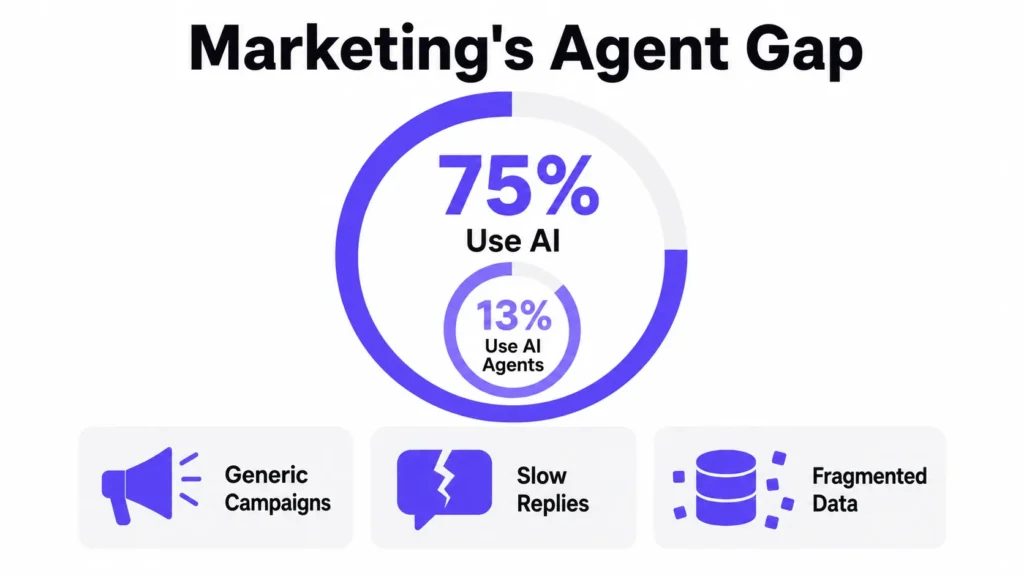
Salesforce’s tenth State of Marketing report, based on 4,450 marketers across 26 countries, found that 75% of marketing organisations use some form of AI, but only 13% use agentic AI. High-performing marketing teams are nearly twice as likely as underperformers to use AI agents.
The problem agents are being pointed at is a familiar one. 84% of marketers admit to running generic campaigns. 69% struggle to respond to customers promptly. 83% recognise that customers now expect two-way, personalised conversation rather than broadcast messaging, but only about one in four are satisfied with how they use data to power those moments.
The reported results are encouraging without being extraordinary. Marketers using AI report a 20% increase in marketing return on investment, a 20% increase in customer satisfaction, a 19% increase in conversion rates and a 19% decrease in marketing costs. 82% of marketers who use or plan to use agents expect major or moderate improvement to marketing ROI, and they expect to reclaim around eight hours a week.
What marketing agents actually do
Respond to inbound messages in real time: This is the biggest gap and the clearest job. Customers reply to emails and texts, and most of those replies go nowhere. An agent that reads the reply, understands intent, answers or routes it, and updates the record closes a hole that most marketing teams have simply accepted.
Build and maintain segments: Instead of a quarterly segmentation project, an agent watches behaviour continuously and moves people between segments as their behaviour changes.
Campaign production at variant scale: Draft subject lines, body copy, ad variants and landing page copy for each segment, following brand rules, then queue them for human review. The bottleneck in personalisation is production volume, and this is a production volume problem.
Journey and lifecycle work: Trigger the next message based on what the customer actually did, not on a fixed day-three, day-seven schedule.
Performance analysis and reporting: Pull campaign results, identify what changed, explain why, and propose the next test. This replaces the weekly report that nobody reads with an answer to the question somebody actually asked.
Content operations: Repurpose one asset across channels, keep product claims consistent, check copy against legal and brand guidelines before it ships.
Competitor and market monitoring: Track competitor messaging, pricing and positioning changes on a schedule and report what moved.
What to measure
- Response rate and response time on inbound customer messages
- Conversion rate by segment, before and after
- Number of personalised variants shipped per campaign
- Hours per campaign from brief to launch
- Cost per acquisition
- Percentage of campaigns that are genuinely targeted rather than broadcast
Pitfalls specific to marketing
Fragmented data is the ceiling. Every version of this research points back to the same blocker: personalisation fails because customer data sits in separate systems that do not agree with each other. An agent does not fix that. It exposes it faster.
Brand voice needs to be written down. An agent producing 40 variants will produce 40 variants of whatever it inferred your voice to be. If your brand guidelines exist mainly in one person’s head, extract them first.
Volume is not the goal. The ability to send more messages more often is the least valuable thing an agent gives a marketing team, and the easiest one to misuse.
Custom AI agents for ecommerce
Ecommerce deserves its own section because the buying journey itself is changing, not just the back office.
AI has become a real sales channel
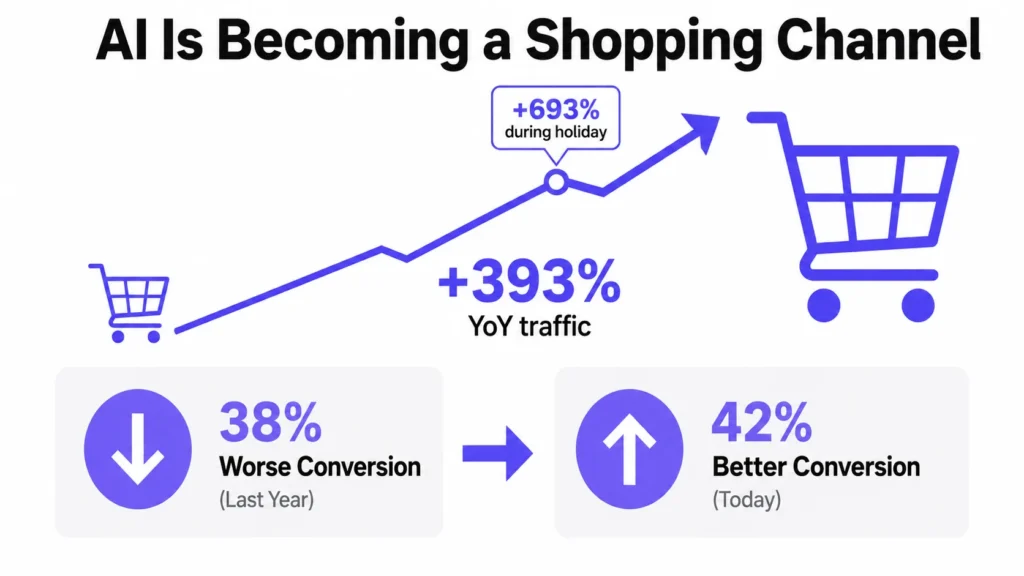
Adobe Analytics, which tracks over a trillion visits to US retail sites, found that traffic arriving at retail sites from AI sources grew 393% year over year in the first quarter of 2026. Over the 2025 holiday season the year-over-year jump was 693%.
What those visitors do once they arrive is the more important part. In March 2026, traffic from AI sources converted 42% better than traffic from channels like paid search and email. A year earlier, the same AI traffic converted 38% worse. That is a complete reversal in twelve months.
Adobe also found AI-referred visitors spent 48% longer on site, browsed 13% more pages, and produced 37% more revenue per visit. In its consumer survey, 39% of people said they had used AI for online shopping and 85% of that group said it improved their experience.
Amazon’s disclosures point the same way. In its Q4 2025 earnings, Amazon said more than 300 million customers used its Rufus shopping assistant during the year and that it drove close to $12 billion in incremental annualised sales. Amazon has said shoppers who use Rufus are around 60% more likely to complete a purchase.
Distribution has shifted too. In March 2026, Shopify switched on Agentic Storefronts by default for eligible stores, making millions of merchants’ products discoverable inside ChatGPT, Microsoft Copilot, Google AI Mode and Gemini without merchants installing anything.
The takeaway for ecommerce operators is simple. AI assistants now sit between you and a growing share of your customers. That creates two distinct jobs.
Job one: get found and chosen by shopping AI
When an assistant answers “best waterproof jacket under $200,” it picks from a very short list. Adobe’s research also found that a substantial share of retailer content is not readable by AI models at all, which means some retailers are invisible in that answer regardless of how good their product is.
Product data agents. Work through your catalogue and find listings with missing attributes, vague descriptions, no sizing detail, no materials, no compatibility information. Then rewrite them in a structured, complete form. Across 40,000 SKUs, this is not something a content team does by hand.
AI visibility agents. Run a fixed set of buying questions across the major assistants on a schedule. Record which products get recommended, which competitors appear, and where you do not show up at all. This is the closest thing to rank tracking for the new channel.
Review and question-gap agents. Mine support tickets, reviews and on-site search for the questions customers keep asking that your product pages never answer, then feed those gaps to the content team. Those unanswered questions are exactly what an assistant needs and cannot find.
Job two: run the store better
This is where returns are easier to prove, because you already have baselines.
Support and returns agents. Order status, delivery problems, sizing questions, refund eligibility, returns processing, exchange offers. Because these connect to your order system, they resolve the case rather than describing the policy. Support is usually the fastest ecommerce agent to pay back.
On-site shopping assistants. A guided assistant that knows your catalogue, stock levels, sizing and returns policy, and helps a shopper narrow options. This keeps the conversation on your property, where you keep the customer relationship and the data. It also captures the intent signal that AI assistants otherwise capture instead of you.
Inventory and demand agents. Watch stock levels, spot items about to sell out during a promotion, flag slow movers before they become markdowns, and prepare reorder recommendations for approval.
Pricing and promotion agents. Track competitor prices against your margin thresholds and stock cover, then propose changes. Keep approval with a human until you have months of evidence.
Merchandising agents. Reorder category pages, rebuild collections, fix on-site search results based on what is converting this week rather than what converted last quarter.
Fraud and chargeback agents. Review flagged orders against your history and route doubtful ones to a person with the evidence already assembled.
Marketing operations agents. Build segments, draft campaign variants, write product feed copy, prepare performance reports.
Post-purchase agents. Proactive delivery updates, replenishment reminders based on actual usage cycles, and review requests timed to when the customer has actually used the product.
What ecommerce teams should build first
- Start with support or product data.
- Support has clear existing metrics and high volume of repetitive work, so you can prove value in weeks. Product data is a one-time cleanup that improves your position with every AI assistant simultaneously, and it also improves your own site search and feed quality as a side effect.
- Both are low risk. Neither one is spending money or changing prices on its own.
- Leave autonomous pricing and autonomous purchasing until you have run something simpler for several months and you trust what the logs tell you.
What to measure in ecommerce
- Share of traffic and revenue arriving from AI sources, tracked separately from other channels
- Conversion rate and revenue per visit for AI-referred traffic
- Percentage of catalogue with complete structured attributes
- Presence in assistant answers for your top 50 buying questions
- Autonomous resolution rate and repeat contact rate in support
- Return rate, which good sizing and product information should reduce
Build, buy, or partner
This is the real decision, and the answer is usually a mix.
Buy when the job is common, an existing tool already does it well, and your requirements are not unusual. Standard support deflection, meeting notes, basic email drafting. You reach value in weeks and you do not carry the maintenance.
Build when the job depends on your own data, your own rules, or systems no vendor has integrated with. Also build when the workflow is a competitive advantage. Handing your best process to a generic tool wastes what makes it good.
Partner when you have the use case but not the team. This is the most common situation. The skills gap is rarely in writing prompts. It is in evaluation, integration, data cleanup and governance.
One shift is worth noting. McKinsey found that 32% of companies decided against buying at least one software product or feature because they could build it in-house using AI coding tools. Building is genuinely cheaper than it was two years ago. That does not make it free, and it does not remove the ongoing maintenance bill, which is the part that surprises people.
A practical middle path: buy for the common 70%, build for the 30% that is specific to you, and make sure the two can share data.
How to build a custom AI agent, step by step
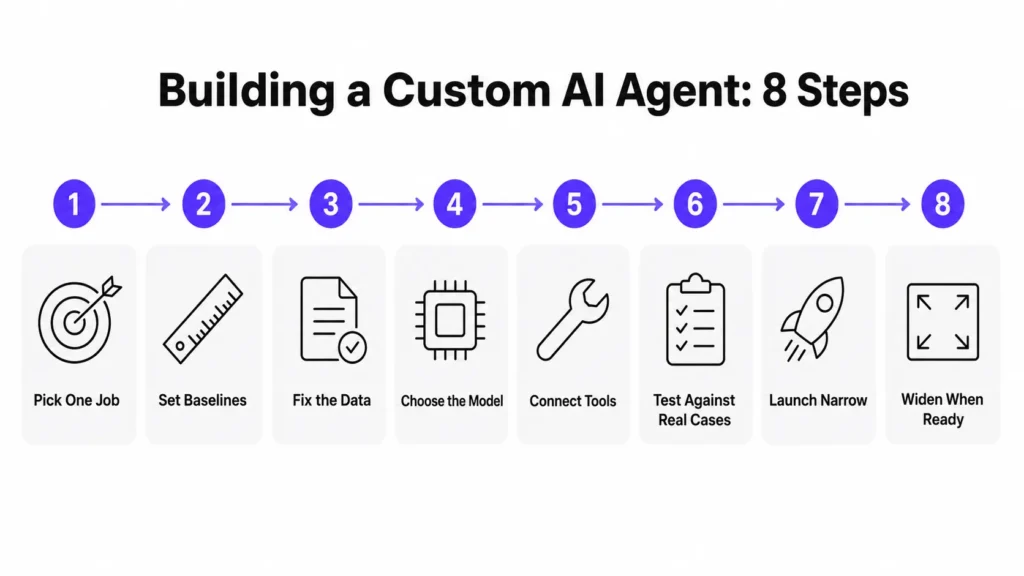
1. Pick one job, not a category
Not “AI for customer service.” Instead: “answer where-is-my-order questions end to end, including checking the carrier and issuing a reship when the parcel is lost.”
A narrow job can be scoped, tested and measured. A category cannot. Almost every failed agent project started as a category.
2. Write down the numbers you will judge it on
Current handle time. Current resolution rate. Current cost per ticket. Current hours spent per week. Current response time.
If you cannot state the baseline today, you will never prove the return, and the project gets cut at the next budget review no matter how well it works.
3. Fix the data and the knowledge first
This is where most projects quietly die. If your policies contradict each other, your product data is patchy, or your knowledge base has three years of drift, the agent will repeat all of it with total confidence.
Expect this to take longer than the build. Rewrite for completeness rather than brevity, because the agent needs full context where a human would have filled in the gaps.
4. Choose the model and the architecture
Decide whether the agent looks things up live, works from an indexed knowledge base, or both. Decide where data is allowed to be processed. Decide what happens when the model is slow or unavailable.
Decide how many reasoning steps a typical task should take, because that drives cost.
5. Connect tools with tight limits
Give the agent the specific actions it needs and nothing more. Read-only first. Add write access one action at a time, each with a log and each with an approval rule if it costs money or is visible to a customer.
6. Test against real cases before launch
Collect several hundred real past tickets, orders, leads or documents. Run the agent against them. Score the outputs against what actually happened. Fix. Repeat.
Vague testing produces vague agents. This test set also becomes your regression suite, so you can tell whether next month’s change made things better or worse.
7. Launch narrow and watch closely
One channel, one product line, one region or one customer segment. Keep a human reviewing a sample of output daily for the first few weeks. Set a clear rollback plan and make sure somebody has the authority to use it.
8. Widen only when the numbers hold
Expand scope when your resolution rate, error rate and satisfaction numbers stay steady at the new volume. Then repeat the whole process for the second job rather than bolting the second job onto the first agent.
Guardrails and governance
The parts that are boring to build and expensive to skip.
Permissions. The agent should see only what the requesting person is allowed to see. This is non-negotiable for internal agents that touch HR, finance or personal data.
Action limits. Hard caps on refund value, discount depth, number of records changed per hour, and anything irreversible.
Approval steps. A one-click approval queue for anything above the limits. Design it so approving is faster than doing the task manually, or people will bypass it.
Escalation to humans. Explicit, easy, and never hidden. If a customer asks for a person, they get a person.
Audit logging. Every action, every input, every retrieved document, every decision point. When something goes wrong at 2am, this is the only thing that lets you explain it.
Evaluation on a schedule. A test set that runs weekly, plus human review of a random sample. Quality drifts as your business changes. Assume it will.
A named owner. One person accountable for the agent’s behaviour and its numbers. Agents without an owner rot.
Data retention decisions. What is stored, for how long, and who can see it. Decide before launch, not after a customer asks.
Why custom AI agent projects fail
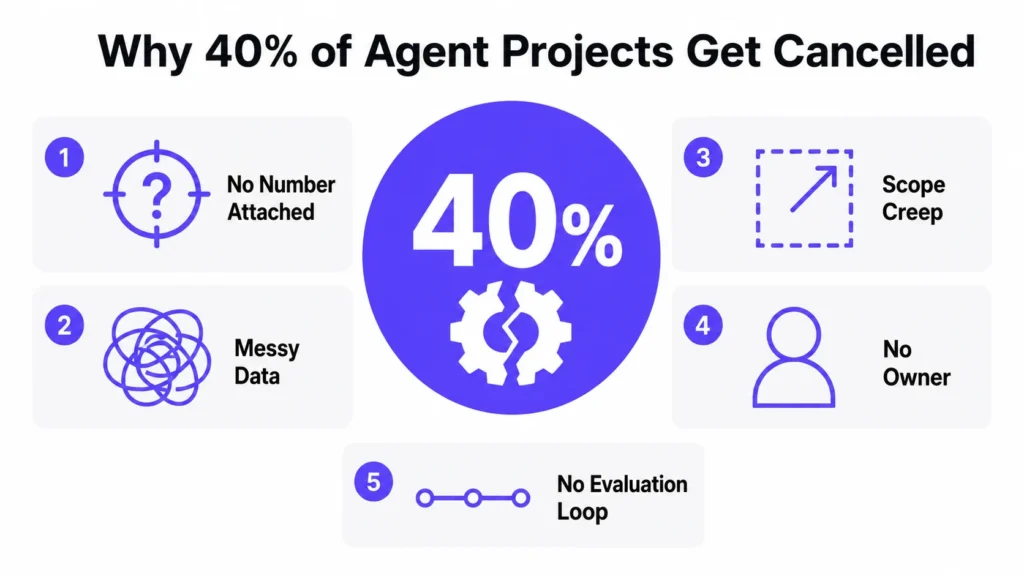
Gartner predicted in June 2025 that more than 40% of agentic AI projects will be cancelled before the end of 2027. The reasons it gave are worth repeating, because none of them is about the AI being incapable: escalating costs, unclear business value, and inadequate risk controls.
Gartner also warned about “agent washing,” where existing chatbots and automation tools get relabelled as agents without any real change in capability. Its analysts estimated that only around 130 of the thousands of vendors claiming agentic capability were genuinely doing it.
The practical failure patterns:
No number attached to the job. Nobody can say what success looks like, so nobody can defend the budget.
Messy data underneath. The agent inherits every contradiction in your documentation and every duplicate in your CRM.
Scope creep. The pilot works, then four more use cases get added before the first one is stable, and the whole thing becomes untestable.
No owner. When the agent makes a bad call, it is unclear whose problem it is.
No evaluation loop. Quality drifts as products, policies and prices change, and nobody notices for a month.
Running cost surprises. McKinsey found about one in five organisations is already limiting AI use because of operating costs, including token costs. Agents that reason through many steps can be expensive per task. Model that cost at expected volume before you scale, not after.
Deflection dressed as resolution. Especially in support. An agent that closes tickets without solving problems produces a beautiful dashboard and angry customers.
What it costs and how to measure return
Pricing varies too much for a single honest number. A narrow single-task agent built on an existing platform is a small project. A multi-agent system touching regulated workflows, with audit trails and compliance review, is a large one. Anyone quoting a firm price before seeing your systems and your data is guessing.
The cost drivers that actually matter:
- Number and difficulty of system integrations
- The state of your data and knowledge base before you start
- Model choice and how many reasoning steps each task takes
- Compliance, security and audit requirements
- Human review capacity during the supervised phase
- Ongoing evaluation, monitoring and knowledge maintenance
That last line is the one people forget. A custom AI agent is not a one-time build. It is a production system with an ongoing running cost and an ongoing maintenance need.
On the return side, measure against your own baseline, per workflow, not against vendor averages:
- Percentage of cases completed with no human involvement
- Cost per task before and after
- Time from request to completion
- Error rate and rework rate
- Repeat contact or repeat work rate
- Revenue effects where relevant, such as conversion rate, average order value or opportunities created
- Staff hours redirected to higher value work
One useful market signal: Salesforce now sells one of its service agents on a pay-per-resolution basis, charging only when the agent resolves an issue autonomously from start to finish. Vendors are beginning to price on outcomes. You can hold your own internal projects to the same standard.
Questions to ask a vendor
- Which specific workflow will this agent own, and which number will it move?
- What happens to our data? Where is it processed and where is it stored?
- How does the agent know when it does not know? Show me the escalation path.
- What can it do without approval, and what requires a human?
- How do you test it, what is in the test set, and can I see the results?
- What does the running cost look like at ten times today’s volume?
- Who owns the agent after launch, and what does maintenance cost per year?
- Show me the logs of a task it got wrong and how you fixed it.
- What does the rollback look like if we need to turn it off tomorrow?
- How does it handle permissions, so it never shows someone data they should not see?
A good partner will answer all ten directly. A weak one will change the subject to model names and benchmark scores.
Frequently asked questions
Software that uses an AI model to do a specific job in your business. It reads your data, follows your rules, uses your systems, and completes tasks rather than just answering questions.
A general assistant knows the world but not your business, and it cannot act inside your systems. A custom AI agent is connected to your data and tools and is built for one job with defined limits.
Almost never. Most custom AI agents use an existing model and get their specialisation from your data, your tools and your rules. Training or fine-tuning a model is a much larger undertaking and rarely the bottleneck.
A narrow assistive agent can be running in weeks. A supervised agent that acts in production systems takes longer, and most of that time goes to data cleanup, integration and testing rather than to the AI itself.
The highest-volume, most repetitive workflow where you already track a number. In most companies that is customer support or internal employee questions.
It should not. Single-purpose agents are easier to test, measure, fix and trust. Build the second one after the first is stable.
Giving the agent authority before you have defined governance, ownership and rollback. That is the pattern behind most cancelled projects, not model capability.
The bottom line
Custom AI agents are not a general upgrade to your company. They are a way to hand one well-defined, expensive, repetitive job to software that can actually finish it.
The pattern across every function in this guide is the same. Sales agents work when they own preparation and follow-up, not the relationship. Support agents work when they resolve rather than deflect. Employee agents work when the knowledge base behind them has been genuinely cleaned up. Marketing agents work when the customer data underneath them is unified.
In every case the AI is the easy part. The data, the rules and the ownership are the work.
The companies getting real returns are not the ones running the most pilots. They picked one painful workflow, cleaned up the data behind it, set a number, built carefully, watched closely, and only then built the second one.
If you are in ecommerce, the clock runs a little faster. AI assistants are already sending traffic that converts better than your other channels, and your product data decides whether they mention you at all. That is worth acting on this quarter.

Manab is the Head of Go-To-Market (GTM) at Kommunicate, with over 12 years of professional experience. He collaborates closely with the engineering, sales, and marketing teams to deliver and position Kommunicate’s AI solutions effectively in the market.
Prior to joining Kommunicate, he worked at Cvent, an enterprise event management software company, and Entropik, an emotion AI company that helps brands understand and interpret consumer emotions.