Updated on June 25, 2026
Estimated reading time: 18 minutes
OpenAI webhooks let your backend receive a signed HTTP POST when an asynchronous OpenAI task finishes, so your system acts only when there is something to act on.
- Summarizing a ticket thread before an agent picks it up
- Classifying a batch of incoming requests overnight
- Drafting a post-call report
- Running a QA check on a resolved conversation
- Preparing a draft reply for human review
- Live chat where the customer is waiting for an immediate answer
- Real-time voice responses where latency is critical
For these, use streaming or real-time events instead.
response.completed for background Responses API calls and batch.completed for Batch API jobs. Also handle response.failed and response.incomplete to prevent failed jobs from disappearing silently.
What are OpenAI webhooks?
A webhook is a pattern where OpenAI sends an HTTP POST to a URL on your server when a specific event happens.
Instead of your application repeatedly asking, “Is this job done yet?”, OpenAI sends your application a notification when the job reaches a relevant state.
For example, when a background response finishes, OpenAI can send a response.completed event to your webhook endpoint. Your backend can then retrieve the final response and update the relevant ticket, conversation, summary, or internal record.
In practical terms, webhooks are useful when you want OpenAI to process something asynchronously and notify your system when it is ready. There are three common patterns for handling AI task results.
Webhooks vs Polling vs Streaming
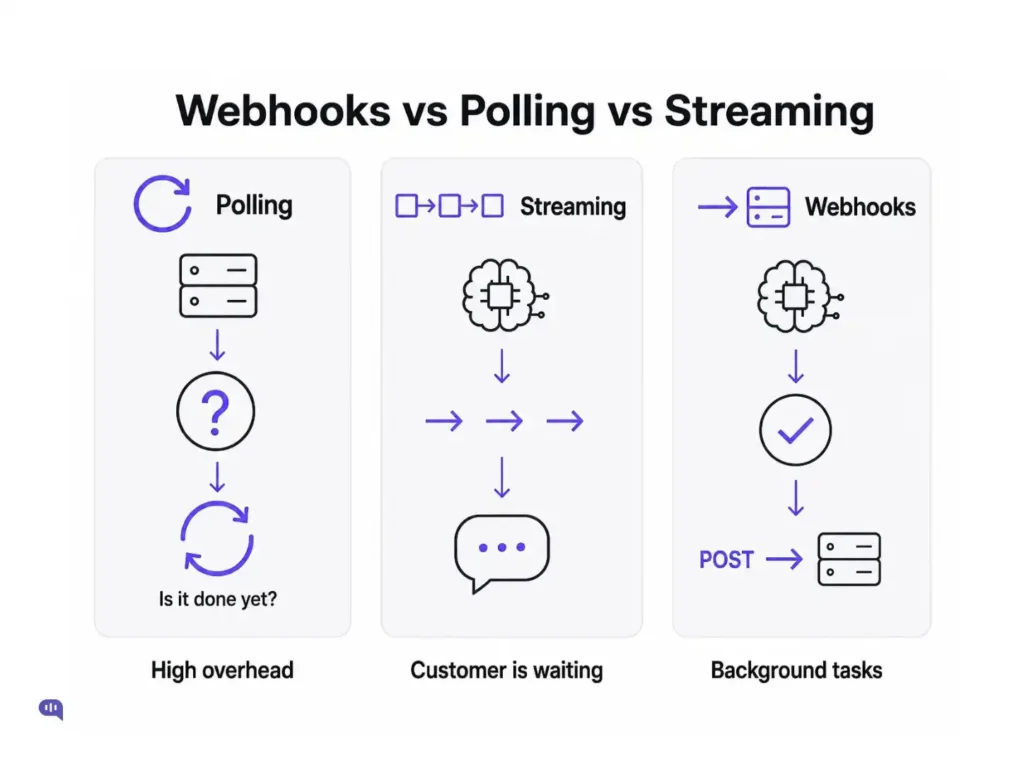
There are three common ways to handle AI task results.
1. Polling
Your server repeatedly asks OpenAI whether a job is finished. This works, but it adds unnecessary requests and operational complexity. It also creates a delay between the job finishing and your system noticing that it finished.
2. Streaming
OpenAI sends output tokens or events as they are generated. This is useful when a customer or agent is actively waiting for a response, such as in a live chat interface.
3. Webhooks
OpenAI sends your backend a notification when an asynchronous event happens. This is useful when the task can run in the background, and your application only needs to act once the task has finished.
For most support automation workflows, the rule is simple:
- Use streaming when someone is waiting.
- Use webhooks when the work can happen in the background.
This article covers the working of OpenAI webhooks and talks about:
- When should you use OpenAI webhooks?
- How do OpenAI webhooks work?
- Example: Set up an OpenAI webhook
- Handling real-world webhook events
- Support workflow examples
- Common mistakes and how to avoid them
- Production checklist
- Final thoughts
- Frequently Asked Questions
When should you use OpenAI webhooks?
Use OpenAI webhooks when the result does not need to be shown to the customer immediately.
In customer support, good webhook use cases include:
| Use Case | Webhook Fit |
|---|---|
| Background response completion | Strong |
| Batch ticket classification | Strong |
| Email summary generation | Strong |
| Fine-tuning job completion | Strong |
| Batch API job completion | Strong |
| QA check after a conversation is resolved | Strong |
| Drafting a reply for agent review | Strong |
| Live chat answer | No – customer is waiting; use streaming |
| Voice realtime response | No – latency-sensitive; use real-time events |
If someone is sitting in a chat widget waiting for an answer, webhooks are not the right pattern. Use streaming or a real-time connection instead.
If you are processing 1,000 support tickets overnight, generating summaries before an agent shift, or preparing post-call reports after calls end, webhooks are a strong fit.
How do OpenAI webhooks work?
Here is the basic flow:
- Your application starts an asynchronous OpenAI task.
- OpenAI accepts the task and immediately returns an ID.
- OpenAI processes the task in the background.
- When the task reaches a subscribed event state, OpenAI sends a signed HTTP POST to your webhook endpoint.
- Your endpoint verifies the signature.
- Your endpoint stores and deduplicates the event.
- Your endpoint queues the work and quickly returns a 2xx response.
- A background worker retrieves the full result and updates your support system.
If your endpoint does not return a 2xx response within a few seconds, OpenAI retries delivery for up to 72 hours with exponential backoff, which is why idempotency is not optional.
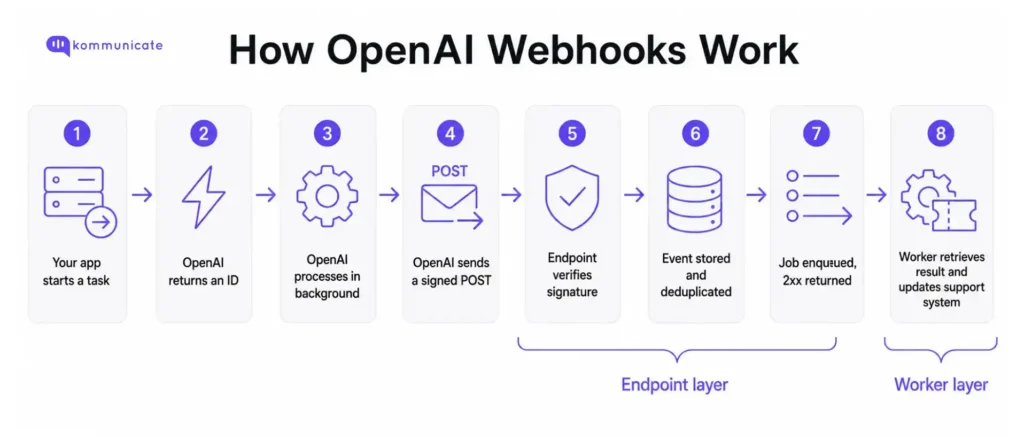
The most important rule is this: Your webhook endpoint should be fast.
The endpoint should not run the full business workflow. Its job is to receive the event, verify it, store it, enqueue it, and return a successful response. The heavier work should happen in a background worker.
Think of the endpoint as the front desk and the worker as the back office. The front desk should acknowledge the delivery quickly. The back office should do the actual work.
Now, let’s set up OpenAI webhooks for a sample workflow.
Example: Set up an OpenAI webhook
Step 1: Configure your webhook endpoint in OpenAI
Before you can receive webhook events, create a webhook endpoint in the OpenAI dashboard.
You will need to:
- Add your public webhook URL.
- Select the project the webhook belongs to.
- Subscribe to the event types your application needs.
- Store the webhook signing secret securely.
The signing secret is shown only once when you create the endpoint. Store it immediately in your environment variables as OPENAI_WEBHOOK_SECRET — it cannot be retrieved later. If you lose it, you will need to delete the webhook and create a new one.
For example, your endpoint might be:
https://your-domain.com/webhooks/openai
For a support automation system, common events include:
| Event | What It Means |
|---|---|
| response.completed | A background response finished successfully |
| response.failed | A background response failed |
| response.incomplete | A background response ended incompletely |
| response.cancelled | A background response was cancelled |
| batch.completed | A Batch API job has been completed |
| batch.cancelled | A Batch API job was canceled |
| batch.expired | A Batch API job expired |
Start with the smallest event set you need. For example, if you are only processing background ticket summaries, start with response.completed, response.failed, and response.incomplete.
Step 2: Start a background response
For a background Responses API task, set background: true.
Example:
| const response = await openai.responses.create({ model: “gpt-4o”, background: true, store: true, input: [ { role: “user”, content: “Summarize this support transcript: …” } ] }); console.log(“Background response started:”, response.id); |
Note: background: true is supported on select models only. Check the OpenAI documentation for the current list of models that support background responses before deploying.
This request returns a response ID quickly. OpenAI then processes the response asynchronously.
When the response completes, OpenAI sends a response.completed event to your configured webhook endpoint.
The webhook event tells you that the response is ready. Your worker should then retrieve the full response using the response ID.
Step 3: Build an Express webhook endpoint
We have created a minimal Express endpoint to receive OpenAI webhook events. The important part is that the request body must remain raw. Do not parse it with express.json() before verification.
If your app applies express.json() globally as middleware, it will run before your route handler and break signature verification. Apply express.text({ type: 'application/json' }) only on the webhook route, as shown above, and keep express.json() off the webhook path.
| import express from “express”; import OpenAI from “openai”; const app = express(); const openai = new OpenAI({ webhookSecret: process.env.OPENAI_WEBHOOK_SECRET }); app.post( “/webhooks/openai”, express.text({ type: “application/json” }), async (req, res) => { let event; try { event = await openai.webhooks.unwrap(req.body, req.headers); } catch (error) { console.error(“Invalid OpenAI webhook signature”, error); return res.status(400).send(“Invalid signature”); } try { await enqueueWebhookEvent({ deliveryId: req.headers[“webhook-id”], eventId: event.id, type: event.type, data: event.data }); } catch (err) { console.error(“Failed to enqueue webhook event”, err); return res.status(500).send(“Internal error”); } return res.status(200).send(“ok”); |
The unwrap() method verifies the webhook signature and parses the event.
- If verification fails, return a 400 response.
- If verification succeeds, store the event, add it to a queue, and return 200 quickly.
For a full end-to-end example of building the customer service agent that generates these webhook events, including order status lookups and human handoff flows, see our tutorial on building a customer service AI agent with OpenAI and Node.js.
Step 4: Verify the OpenAI webhook signature
Every OpenAI webhook request is signed. Signature verification confirms two things:
- The request came from OpenAI.
- The payload was not modified in transit.
The safest approach is to use the official SDK verification method instead of writing your own signature logic.
In Node.js, the SDK can handle this:
| const event = await openai.webhooks.unwrap(req.body, req.headers); |
Make sure you pass the raw request body. If your framework first parses and re-serializes the JSON, the signature check can fail because the exact bytes have changed.
If you are not using the SDK, use a Standard Webhooks-compatible verification library rather than hand-rolling your own security logic.
If you implement manual verification instead of using the SDK, also validate the webhook-timestamp header. Reject any request where the timestamp is more than 5 minutes old. This prevents replay attacks where an intercepted valid request is resent later. The SDK handles this automatically.
Step 5: Deduplicate webhook deliveries
Webhook delivery is at least once. That means the same event can be delivered more than once. Your webhook handler must be idempotent. If OpenAI retries a delivery, your system should not create duplicate replies, tickets, summaries, or notifications.
Use the webhook-id header as the delivery idempotency key.
The webhook-id changes on each delivery attempt for the same event, while event.id remains constant across all retries of that same event. Always deduplicate on webhook-id, not on event.id.
Example:
| async function enqueueWebhookEvent(event) { const existingDelivery = await db.webhookEvents.findUnique({ where: { deliveryId: event.deliveryId } }); if (existingDelivery) { return; } await db.webhookEvents.create({ data: { deliveryId: event.deliveryId, eventId: event.eventId, eventType: event.type, payload: event.data, status: “queued”, receivedAt: new Date() } }); await queue.add(“openai-webhook”, { deliveryId: event.deliveryId }); } |
Store more than the event ID. A richer event record makes debugging much easier.
Example webhook record:
| { “deliveryId”: “wh_123”, “eventId”: “evt_456”, “eventType”: “response.completed”, “resourceId”: “resp_789”, “status”: “queued”, “receivedAt”: “2026-06-11T10:15:00Z”, “attemptCount”: 1, “relatedConversationId”: “conversation_456”, “lastError”: null } |
When a ticket summary does not appear, this record helps you answer:
- Did the webhook arrive?
- Did it pass signature verification?
- Was it queued?
- Did the worker start?
- Did the worker fail?
- Was the final support record updated?
Step 6: Treat webhook processing as a state machine
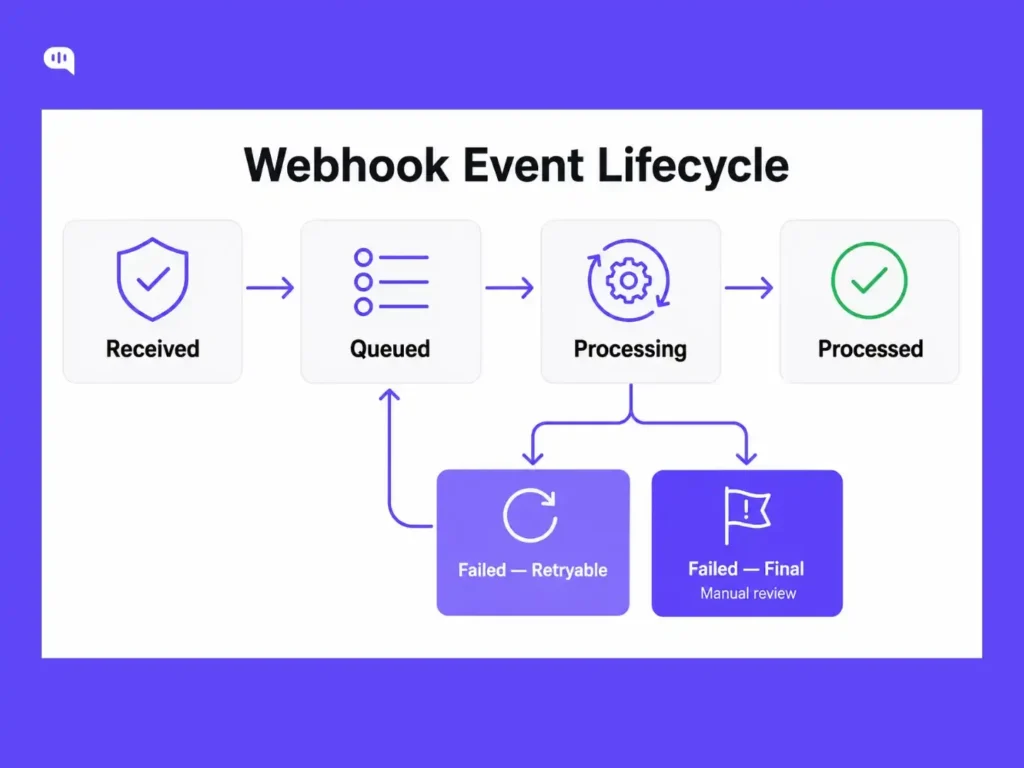
A webhook record should move through clear states.
| Status | Meaning |
|---|---|
| received | Signature verified and event stored |
| queued | Worker job created |
| processing | Worker is applying the event |
| processed | Ticket, summary, or conversation update succeeded |
| failed_retryable | Temporary failure; retry is allowed |
| failed_final | Manual review needed |
This is worth the extra setup. In support systems, duplicate or invisible processing can create real problems.
For example:
- A customer receives the same reply twice.
- An agent gets duplicate notifications.
- A ticket is routed to the wrong queue twice.
- A failed summary silently disappears.
- A batch classification finishes but never updates the queue.
Webhook state tracking prevents these failures from becoming invisible.
Step 7: Process the webhook in a background worker
Once your endpoint has verified and stored the event, a background worker should do the actual work.
For the response.completed event, the webhook provides the response ID. Your worker should retrieve the full response and apply it to the relevant support workflow.
Example:
| async function processOpenAiWebhookJob({ deliveryId }) { const event = await db.webhookEvents.findUnique({ where: { deliveryId } }); if (!event) { throw new Error( Webhook event not found: ${deliveryId});} await db.webhookEvents.update({ where: { deliveryId }, data: { status: “processing” } }); if (event.eventType === “response.completed”) { const responseId = event.payload.id; const response = await openai.responses.retrieve(responseId); await updateSupportTicket({ responseId, output: response.output_text }); } await db.webhookEvents.update({ where: { deliveryId }, data: { status: “processed” } }); } |
This keeps your webhook endpoint fast and your business logic isolated.
If the response was generated by a multi-step agent with tools or handoffs, see how to structure that agent in our OpenAI Agents SDK guide.
Handling real-world webhook events
1. Handling Batch API webhook events
The Batch API is useful when you need to process many requests together.
For example:
- Classifying 500 incoming tickets by intent and priority
- Running QA checks on yesterday’s resolved conversations
- Generating summaries for a backlog of email threads
- Extracting structured fields from thousands of support transcripts
When a batch job completes, OpenAI can send a batch.completed event to your webhook endpoint.
The pattern is similar:
- Create the batch job.
- Receive the batch.completed webhook event.
- Retrieve the batch by ID.
- Fetch the output file.
- Apply the results to your support records.
For example:
| const batch = await openai.batches.create({ input_file_id: fileId, endpoint: “/v1/chat/completions”, // verify supported endpoints in OpenAI Batch API docs completion_window: “24h” }); console.log(“Batch started:”, batch.id); When the batch completes, your webhook worker can process it: if (event.eventType === “batch.completed”) { const batchId = event.payload.id; const batch = await openai.batches.retrieve(batchId); if (!batch.output_file_id) { throw new Error( Batch completed without output file: ${batchId});} const outputFile = await openai.files.content(batch.output_file_id); await applyBatchResultsToTicketQueue(outputFile); } |
Note: The Batch API supports specific endpoint values. Check the OpenAI Batch API documentation for the current list of supported endpoints before using /v1/responses in production.
You should also handle batch failure states.
| Event | Recommended Action |
|---|---|
| batch.completed | Retrieve the output file and apply the results |
| batch.cancelled | Mark batch as cancelled |
| batch.expired | Mark pending records as unprocessed and decide whether to retry |
| batch.failed | Log failure and alert the owning team |
Batch workflows can affect a large number of records, so avoid applying results blindly. Validate the output before updating production support queues.
2. How to handle failed and incomplete responses?
Do not only handle successful events.
In production, you should also handle failed and incomplete states.
Example:
| if (event.eventType === “response.failed”) { await markWebhookFailed({ deliveryId, reason: “OpenAI response failed”, retryable: false }); } if (event.eventType === “response.incomplete”) { await sendToManualReview({ deliveryId, reason: “OpenAI response incomplete.” }); } |
For customer support workflows, incomplete output should usually go to review rather than being published automatically. Using structured outputs in your Responses API calls gives your worker a consistent shape to validate against, making it easier to detect incomplete or malformed results before they reach the queue.
This is especially important for:
- Refunds
- Billing disputes
- Account access
- Healthcare workflows
- Legal or compliance-sensitive conversations
- Any workflow where a wrong answer creates operational risk
A completed AI response should not automatically become a customer-facing message unless the workflow explicitly allows it.
For sensitive workflows, default to draft mode and let an agent review the output before sending.
3. Manage retry behavior and fast responses
Webhook retries are normal.
If your endpoint fails or does not respond quickly enough, OpenAI may retry the delivery. This is why your webhook handler should be fast and idempotent.
Good webhook endpoint behavior:
- Verify the signature.
- Store the event.
- Deduplicate the delivery.
- Add a job to a queue.
- Return 2xx quickly.
Bad webhook endpoint behavior:
- Calling multiple downstream APIs before returning
- Running long database migrations
- Generating AI output inside the handler
- Updating many tickets synchronously
- Waiting for a CRM or helpdesk API before responding
- Returning non-2xx for duplicate events
If the same valid delivery arrives again, return success after confirming it has already been stored. Do not treat duplicates as errors.
4. Queue-based processing
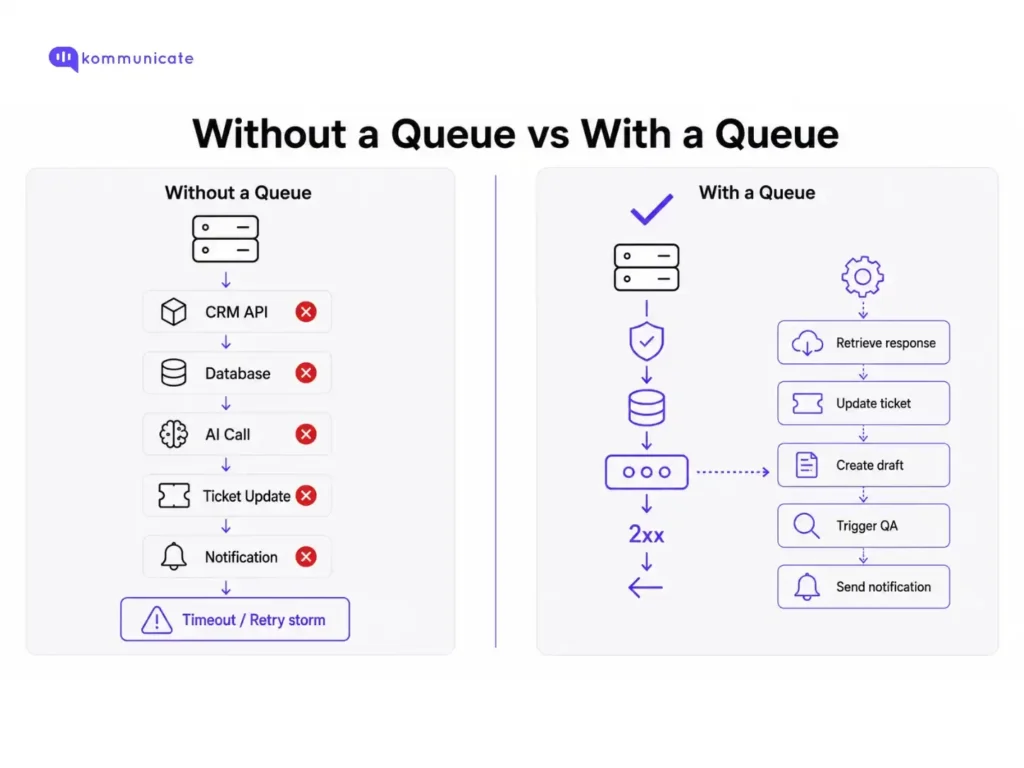
A queue adds resilience to your webhook pipeline.
Without a queue, your endpoint has to do too much work immediately. If a downstream API is slow or unavailable, the endpoint fails, and OpenAI retries the webhook. That can create duplicate work and noisy failures.
With a queue, the endpoint stays simple:
- Receive event.
- Verify signature.
- Store event.
- Queue job.
- Return 200.
The worker handles:
- Retrieving the final OpenAI response
- Updating a support ticket
- Creating a draft reply
- Routing a conversation
- Attaching a transcript
- Triggering QA
- Sending an internal notification
- Retrying temporary failures
When something fails, log enough context to act on it.
Example:
| async function markWebhookFailed(deliveryId, error) { await db.webhookEvents.update({ where: { deliveryId }, data: { status: error.retryable ? “failed_retryable” : “failed_final”, lastError: error.message, attemptCount: { increment: 1 } } }); } |
The distinction between failed_retryable and failed_final matters for two reasons.
- A temporary CRM timeout is retryable.
- A malformed payload that will never parse correctly is not.
This distinction helps you escape errors without triggering infinite loops.
Support workflow examples
OpenAI webhooks become more useful when they are connected to a real support workflow. Some examples of this are:
| Webhook Event | Backend Action | Support Workflow Action |
|---|---|---|
| AI summary completed | Store summary by conversation ID | Show the summary to the agent before the handoff |
| Classification completed | Save intent, priority, and confidence | Route ticket or queue for review |
| Draft reply ready | Save as draft | Ask the agent to review before sending |
| Tool lookup failed | Log failure and reason | Trigger fallback or human handoff |
| Post-call transcript ready | Attach the transcript and outcome | Trigger QA or follow-up |
| Batch job completed | Retrieve output file | Apply classifications to the ticket queue |
| Response failed | Mark the job as failed | Notify the agent or send to the review queue |
| Response incomplete | Store incomplete state | Prevent auto-publish and request review |
For example, if OpenAI finishes summarizing a long conversation, your worker can update the support conversation with an internal note.
This is where support workflow design matters. The webhook only tells your system that something happened. Your application decides what should happen next.
Common mistakes and how to avoid them
| Mistake | Why It Matters | Fix |
|---|---|---|
| No signature verification | Anyone can send fake events to your endpoint | Verify every webhook |
| No timestamp validation | Replayed requests from hours ago can trigger duplicate actions | Reject requests where webhook-timestamp is more than 5 minutes old; the SDK handles this automatically |
| Using parsed JSON for signature verification | The original signed bytes may change | Use the raw request body |
| Doing heavy work at the endpoint | Slow endpoints cause retries and duplicate processing | Enqueue and return 2xx quickly |
| No idempotency check | Duplicate deliveries can create duplicate actions | Deduplicate using webhook-id |
| Treating retries as errors | Retries are normal in webhook systems | Design for at least one delivery |
| No event logging | Failures become impossible to debug | Store event type, ID, status, and timestamps |
| Auto-publishing AI output | Risky for sensitive support workflows | Default to draft or review |
| Ignoring failed events | Failed jobs disappear silently | Handle response.failed, batch.failed, batch.cancelled, and batch.expired explicitly |
| Ignoring incomplete events | Partial output may be used incorrectly | Send incomplete results to review |
| No retry/final failure distinction | Everything either loops or needs manual review | Separate retryable and final failures |
Security and compliance considerations
Webhook security is not optional.
At minimum:
- Verify every webhook signature.
- Use HTTPS.
- Store the webhook secret securely.
- Do not expose the endpoint through unnecessary middleware.
- Avoid logging sensitive customer content.
- Deduplicate events before running business logic.
- Keep webhook processing idempotent.
- Restrict what AI output can do automatically.
Also, check your data retention requirements.
Background mode stores response data for a limited period so it can be retrieved by your worker after the webhook fires. Check the OpenAI documentation for the current retention window, and verify that this aligns with your organization’s data retention policy before using background mode in regulated workflows. If your organization requires Zero Data Retention, verify that background mode and webhook-based workflows align with your policy before using them in production.
This is especially important for regulated support workflows in industries such as healthcare, fintech, insurance, and legal services.
Production checklist
Before launching an OpenAI webhook workflow, confirm the following:
- Webhook endpoint is configured in the OpenAI dashboard.
- Endpoint subscribes only to required events.
- Webhook secret is stored securely.
- Endpoint uses raw body parsing.
- Signature verification is enabled.
- Delivery deduplication uses webhook-id.
- Events are stored with status and timestamps.
- Endpoint returns 2xx quickly.
- Heavy work runs in a background worker.
- Worker retrieves full response or batch output by ID.
- Failed and incomplete events are handled.
- Retryable and final failures are separated.
- Sensitive outputs are saved as drafts or routed for review.
- Logs avoid storing unnecessary sensitive content.
- ZDR and retention requirements have been checked.
Final thoughts
OpenAI webhooks are not complicated once you understand the pattern:
- Receive fast.
- Verify always.
- Deduplicate by delivery ID.
- Queue the heavy work.
- Make every action idempotent.
The extra setup pays off quickly.
A webhook pipeline with clear state tracking is much easier to debug than one that silently succeeds or fails. In customer support, that visibility matters. If a ticket summary does not appear, a draft reply fails, or a batch classification does not update the queue, your team should be able to see exactly where the workflow broke down.
For support teams, OpenAI webhooks work best when they are connected to real operational workflows: routing, escalation, QA, summaries, draft replies, and agent review.
FAQs
They notify your server when subscribed OpenAI API events happen, such as background response completion or batch job completion. The most common support use cases are ticket summarization triggered by response.completed, batch classification via batch.completed, post-call processing, and QA automation.
OpenAI sends the signature in a header called webhook-signature. The value is a base64-encoded HMAC-SHA256 signature prefixed with v1. To verify it, you reconstruct the signed payload from the webhook-id, webhook-timestamp, and raw request body, hash it with your webhook secret, and compare the result. In practice, use the SDK’s unwrap() method rather than implementing this manually. The SDK handles signature reconstruction, comparison, and timestamp validation automatically.
Yes, always. Without verification, anyone who discovers your webhook URL can send fake events to your endpoint. Use timing-safe comparison and validate the timestamp to prevent replay attacks.
Webhook events may be delivered more than once due to network retries. Without idempotency, a single event can trigger duplicate ticket updates, duplicate replies, or duplicate agent notifications.
Pass background: true and a webhook URL when creating a response. The API returns a response ID immediately, and your endpoint receives it as a completed event when processing finishes.
No. The endpoint should only verify the signature, deduplicate the event, and enqueue a job. All business logic should run in a background worker. Slow endpoints get retried, which causes the duplicate-processing problems idempotency is designed to prevent.
Not for the immediate answer path. For live chat, streaming is the right approach. Webhooks are the right pattern for asynchronous support work, like ticket summaries, classification, and post-call processing.

Adarsh Kumar is the CTO & Co-Founder at Kommunicate. As a seasoned technologist, he brings over 14 years of experience in software development, artificial intelligence, and machine learning to his role. His expertise in building scalable and robust tech solutions has been instrumental in the company’s growth and success.