Updated on July 6, 2026
This June, we focused on giving AI agents broader capabilities, improving how teams handle conversations across channels, and sharpening the overall experience across mail, chat, and the Agent Builder. Here’s everything we shipped.
Features
We’ve enabled “Answer from the web” for all AI agents
The Answer from Web feature is now available across all AI agents. When a customer asks something your knowledge base does not directly cover, your AI agent can now pull a relevant, up-to-date response from the web rather than falling back to a generic reply or routing to a human agent.
We’ve added a WYSIWYG editor for mail in conversations
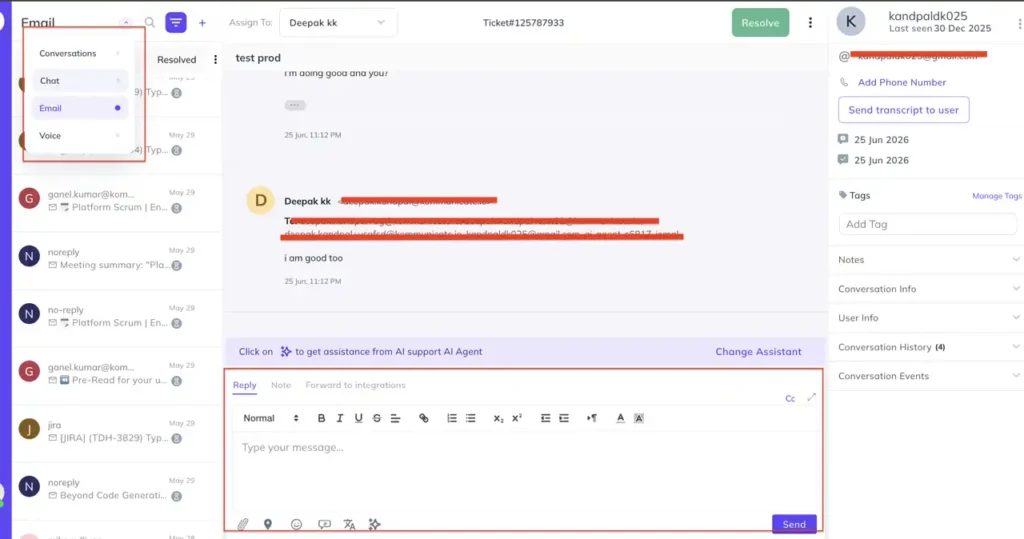
We’ve added a rich text editor for mail conversations. Your support team can now format email replies directly within the conversation view, with standard text formatting options available inline, making email responses faster to compose and easier to read for customers.
Attachment processing toggle in Agent Builder
You can now control whether your AI agent processes attachments sent by users. The toggle is available directly in the Agent Builder settings, giving teams the flexibility to enable or disable file handling depending on the agent’s use case and workflow.
Custom positioning for the web SDK icon
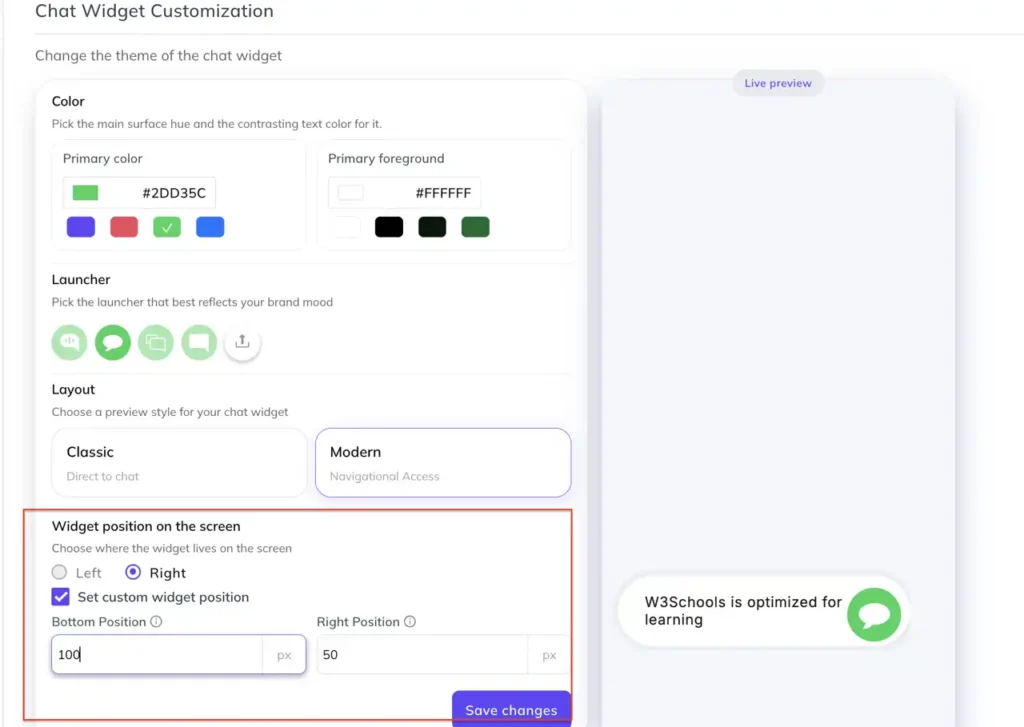
The chat widget icon can now be placed in a custom position on your website. Instead of being locked to the default bottom-right corner, you can now configure its exact placement to fit your site’s layout and design without any workarounds.
Improvements
- The conversation section has been redesigned with a dedicated filter for Chat, Email, and Voice, making it faster to navigate across channel types without having to scroll through a mixed inbox.
- AI conversation quality has been improved. AI agents now handle follow-up queries more naturally, maintaining context across turns so conversations feel less transactional and more like a continuous exchange.
- When a churned customer opens the chat widget, they now see a clear, appropriate message rather than a standard support experience, allowing teams to handle these situations with the right context.
- When a new user is CC’d on an email conversation, they now receive the full prior chat history, so they have the complete context from the start without needing a manual summary.
- The Integrations section has been revamped to surface all Kommunicate products in one place, making it easier for teams to discover and connect the tools they are already using.
- Real-time token streaming is now live for OpenAI models. Responses appear progressively as they are generated, reducing perceived wait time and making AI interactions feel more responsive.
Bug fixes
- Fixed incorrect conversation assignment logic that was routing conversations to offline agents.
- Fixed duplicate email addresses appearing in the TO field for sent emails.
- Fixed an issue where markdown-formatted responses were briefly rendering as plain text before switching to the correct format in generative responses.
- Fixed an issue where AI responses were not being returned for queries with minor spelling variations.
- Fixed an issue where WhatsApp user IDs and phone numbers were being saved without the country code prefix (+), which was causing campaign template failures.
- Fixed an issue where promotional emails were being assigned directly to SuperAdmin instead of following the correct routing logic.
- Fixed email translation not functioning correctly in certain conversation flows.
- Fixed a hyperlink injection vulnerability on the signup flow for email inputs.