Updated on June 23, 2026
Estimated reading time: 15 minutes
TL;DR
– Billing disputes are the #1 complaint category in telecom and a leading churn accelerator.
– The window to intervene is narrow: most customers have already decided to leave by the time they reach a live agent.
– Conversational AI, deployed at the right point in the customer journey and connected to live billing data, can contain disputes before they escalate, reduce agent load, and protect retention.
– This article covers why it matters, how to design automation, and how to implement it with Kommunicate.
A billing dispute is not just a support ticket. It is a customer actively questioning whether they trust you.
By the time a subscriber types “why is my bill so high” into a chat window, they have already done the math, felt the frustration, and made a mental note. If the next sixty seconds do not give them a clear, satisfying answer, that mental note becomes a decision. And in telecom, decisions about switching carriers take minutes to execute.
Billing is the single largest complaint category in telecom, accounting for 52% of all issues filed, with disputed charges being the top sub-category at 36.2%.These are not edge cases. They are a structural, recurring pressure on support teams and a persistent drag on customer loyalty.
CX directors know the downstream consequences. What is harder to solve is the upstream problem: billing disputes are being absorbed by support infrastructure designed for resolution, not prevention.
In this article, we’ll cover the methods our clients use to mitigate billing disputes at scale. We’ll cover:
1. Why are Billing Disputes a Silent Churn Accelerator?
2. The Real Cost of Letting the Support Team Handle It
3. What Does Automated Dispute Resolution Actually Mean?
4. How to Deploy a Billing Dispute Chatbot With Kommunicate?
5. The Metrics That Tell You Whether It’s Working
6. Conclusion
Why are Billing Disputes a Silent Churn Accelerator?
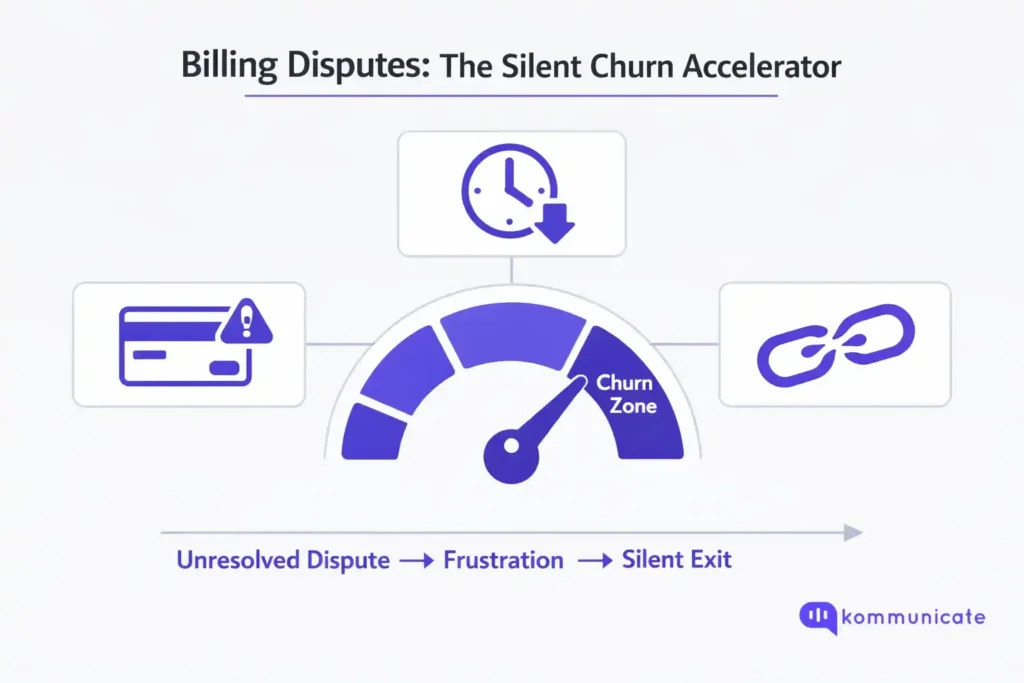
Most telecom CX teams measure billing complaint volume. Few measure the churn velocity that follows an unresolved billing dispute within 24 to 72 hours. That measurement gap is part of why the problem persists.
46% of telecom customers have changed providers in the last year following a poor customer service experience. Understanding why telecom customers churn is the first step toward building a support model that actually retains them.
Billing disputes sit at the sharpest edge of that dynamic. They combine two of the worst emotional triggers: the sense of being financially wronged and the cost of having to prove it.
Annual churn in telecom ranges from 20% to 50%, and for a carrier with one million subscribers at a $50 monthly ARPU, a 20% churn rate translates to $120 million in lost annual revenue. Acquiring a replacement customer costs six to seven times as much as retaining an existing one.
A billing dispute that escalates to a live agent is not just a support cost. It is a retention failure in progress — and a customer acquisition cost waiting to be counted.
The TDR’s chairperson described the current complaint environment plainly: “These levels seem to be the new normal.” That framing should concern every CX leader.
This structural problem needs to be solved structurally. This means that CX directors need to look beyond solving for the support team.
The Real Cost of Letting the Support Team Handle It
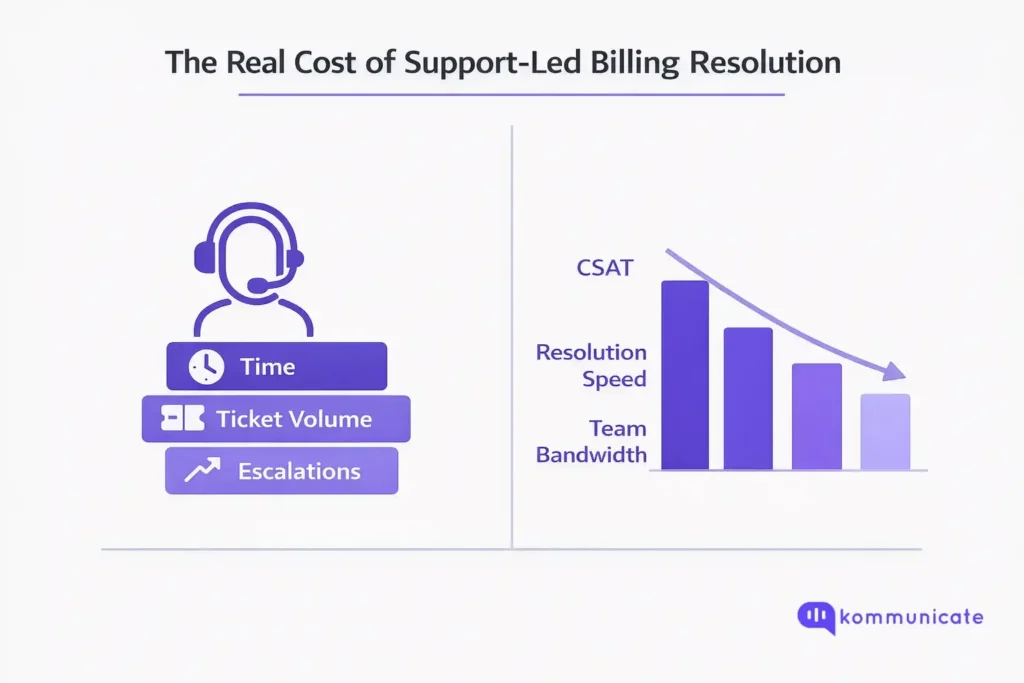
There is a widely-held assumption in telecom operations that billing disputes are best resolved by experienced human agents. The reasoning is understandable. Billing inquiries can be complex. Customers are often agitated. Empathy matters.
The problem is not that agents handle these calls poorly. The problem is that the escalation ladder itself is expensive, slow, and starts too late.
A billing dispute that enters through a contact center typically moves through several stages before resolution:
- An IVR menu
- A queue wait
- An initial agent interaction
- Potential hold time while the agent pulls the account
- A transfer to a supervisor or specialist, in a meaningful percentage of cases
Each stage adds minutes, costs money, and degrades the customer’s experience regardless of the outcome.
By the time a subscriber is on hold for the second time, the dispute is no longer just about the charge. It is about the experience of fighting to be heard. That distinction is what converts a billing complaint into a churn event.
The Regulatory Tail Nobody Budgets For
Unresolved billing disputes do not simply disappear when a customer churns. In 2023–2024, more than 17,000 telecom complaints were filed with regulatory bodies about billing alone.Each one represents a case that moved past the carrier’s own resolution process entirely.
Regulatory complaints carry compliance costs, public reporting obligations, and reputational exposure that extend well beyond the original disputed amount.
Delaying automation is not a conservative choice. It is an expensive one.
What Does Automated Dispute Resolution Actually Mean?
The word “automation” in customer support has earned legitimate skepticism. Most customers have experienced the alternative: an IVR system that routes them in circles, a chatbot that returns a FAQ link in response to a specific billing question, a bot that cannot access their account, and suggests they call instead.
That is not automation. That is deflection. And deflection makes disputes worse.
Effective billing dispute automation is built on an entirely different architecture. It requires three things working together: real-time data access, intent classification, and clear escalation logic.
- Real-time Data Access means the bot can pull a subscriber’s actual billing record in the moment, not a static summary. A customer asking why their bill increased by $18 this month cannot be served by a bot that cannot see the bill.
- Intent Classification means distinguishing between the surface question (“Why is my bill higher?”) and the underlying need. Is the customer seeking an explanation? Requesting a credit? Signaling cancellation intent? Each of these warrants a different response path. An AI-powered system trained on billing-specific intents can make that distinction in real time and route the conversation accordingly.
- Clear Escalation Logic means defining when the bot should stop trying to resolve and start handing off. Disputes involving repeated charges, account-level policy exceptions, or specific language patterns (threats to cancel, mentions of regulatory bodies, expressions of significant distress) should trigger seamless escalation to a live agent, with full conversation context intact. No re-explaining. No queue from scratch.
97% of telecom executives who deployed AI customer service in telecom reported improvement in CSAT scores.The differentiator in those implementations is almost always the same: the bot was connected to live data and designed to escalate gracefully, not to contain volume at all costs.
When implemented correctly, automation does not replace the human element in billing disputes. It reserves human agents for the cases that genuinely need them. On WhatsApp billing dispute flows, these same escalation rules apply and the handoff to a human agent is significantly smoother when context is preserved in the thread.
We’ve worked with multiple telecom companies over the years, and we use an automation framework that escalates the right issues at the right time, with full context.
How to Deploy a Billing Dispute Chatbot with Kommunicate?
Kommunicate is a customer support automation platform that lets telecom operators deploy AI-powered chatbots across web, app, and messaging channels without overhauling your existing CRM or support infrastructure. The approach mirrors what works in high-volume, dispute-prone industries like telecom.
Here is how a billing dispute chatbot deployment works in practice.
Step 1: Create Your Bot and Select an AI Model
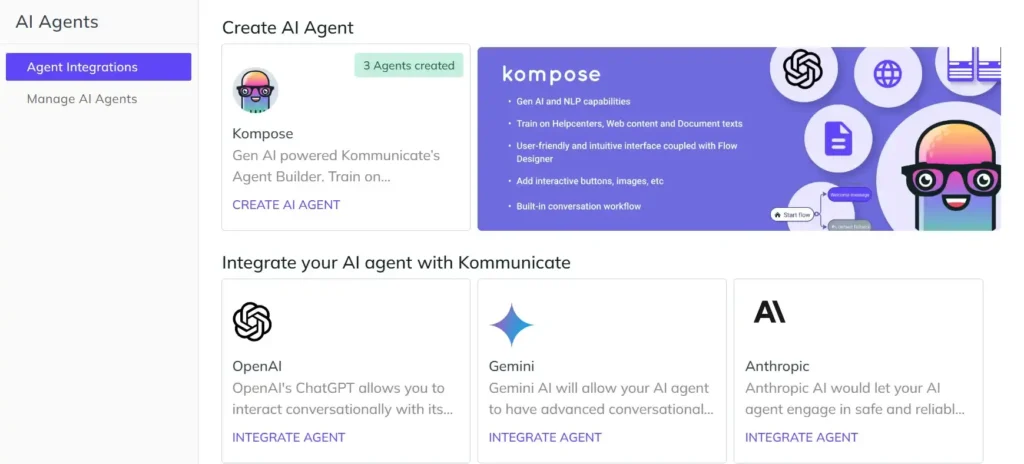
Log in to the Kommunicate dashboard and navigate to Bot Integrations. You will choose the underlying AI model — OpenAI, Google Gemini, or Anthropic Claude — all of which are available. For billing dispute use cases, the Claude Sonnet model is a strong default: it handles nuanced, multi-turn conversations well and produces factual, low-hallucination responses when constrained by a structured system prompt.
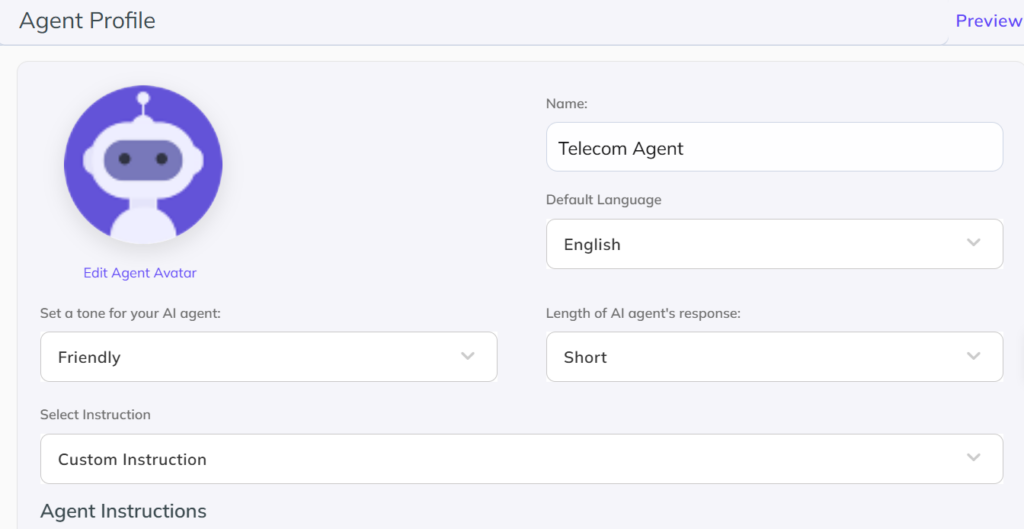
Create an Agent Profile afterwards. Here you can choose how long the AI agent’s responses should be (short, medium, or long), and the tone of the conversations (Friendly, Casual, or Professional).
You can also assign a default language and create a custom prompt for your AI agent. This prompt will be heavily based on the company you’re creating the AI agent for.
For example, if your audience comes from across different regions in the EU, making a prompt saying, “Use the language the customer is using, and keep replies short and courteous,” would help you connect with your customers better.
Step 2: Set Up a Welcome Message
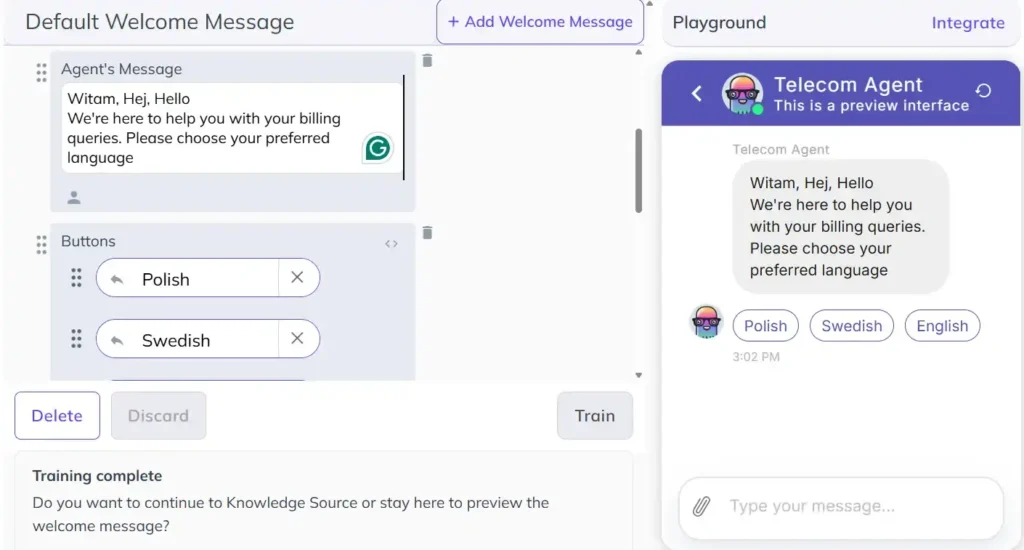
On the second step, choose which message the conversation actually starts with. Going with the EU theme, we’ve set a small welcome message that also understands which language the user prefers.
Step 3: Train the AI Agent on your Support Docs
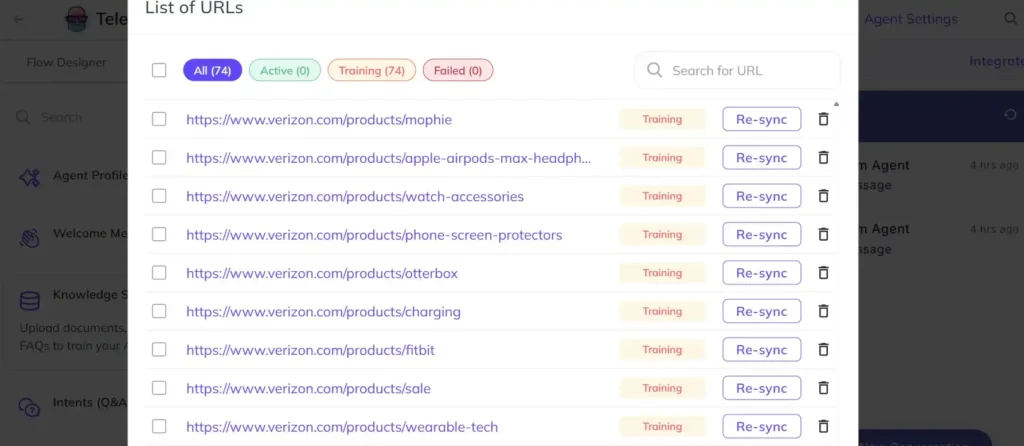
We’re using the verizon.com/support/ and verizon.com/products/ pages here because they’re easily available. In this step navigate to the Knowledge Source section in your agent training dashboard, and add any of the following:
- URLs to your Knowledge Base or Help Desk
- Documents (PDFs, Excel Sheets, or Word Docs)
- Your actual Knowledge Base (from Zendesk or Salesforce)
The AI agent will train on the documents you provide, and then it will be able to answer your questions.
Step 4: Manage the Default Fallback
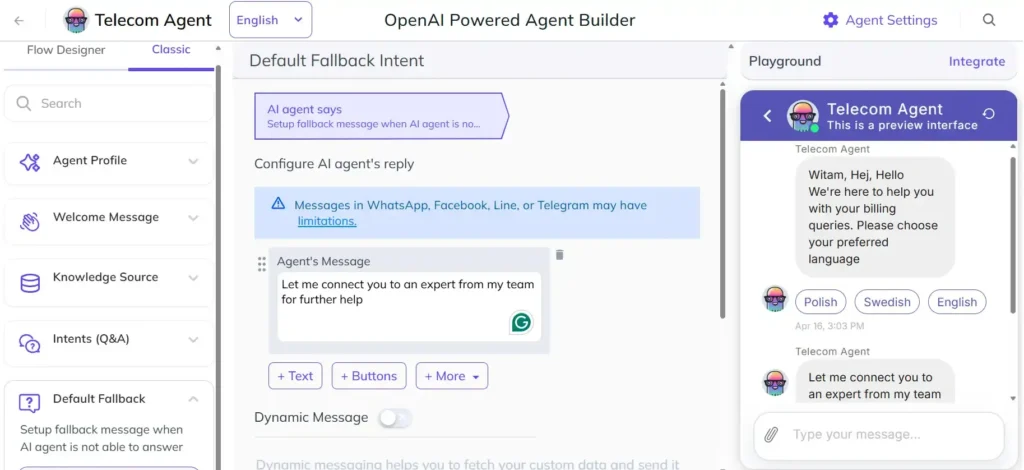
Every AI agent you train on Kommunicate gets trained on the best escalation practices. So, if your customers:
- Are frustrated
- Are asking questions that the agent doesn’t know
- Are not able to get a convincing answer
The query will be sent to your customer service representative. This keeps the overall resolution clean and makes the process better.
Step 5: Integrate on Your Website
You can navigate to the Install section under your Profile to find the Universal Plugin for Websites. This will let you install the Kommunicate chat widget in any website.
This is the code you should add to your billing support section to get the Kommunicate chat there.
The automaticChatOpenOnNavigation flag is particularly relevant for billing pages. A subscriber who opens their invoice and immediately sees a “Questions about your bill?” prompt is being met at the precise moment of potential dispute — before frustration has time to build. For more on how Kommunicate approaches telecom-specific support workflows, see their telecom product overview.
| <script type=”text/javascript”> (function(d, m) { var kommunicateSettings = { appId: “YOUR_APP_ID”, popupWidget: true, automaticChatOpenOnNavigation: true }; var s = document.createElement(“script”); s.type = “text/javascript”; s.async = true; s.src = “https://widget.kommunicate.io/kommunicate-widget-3.0.min.js”; var h = document.getElementsByTagName(“head”)[0]; h.appendChild(s); window.kommunicate = m; m._globals = kommunicateSettings; })(document, window.kommunicate || {}); </script> |
Step 6: Connect to Live Billing Data
The embed without data integration is a plain FAQ chatbot.
Kommunicate supports REST API and webhook connections, which allow the bot to pull live account data in response to a subscriber’s query.
This is the step that separates effective dispute automation from polished deflection. A bot that can say, “I can see your bill increased by $18 this month because your promotional discount ended on March 15th. Would you like me to explain your current plan options?” is solving a problem. A bot that says “Please check our FAQ for billing information” is creating one.
Your Telecom Billing Agent is Live
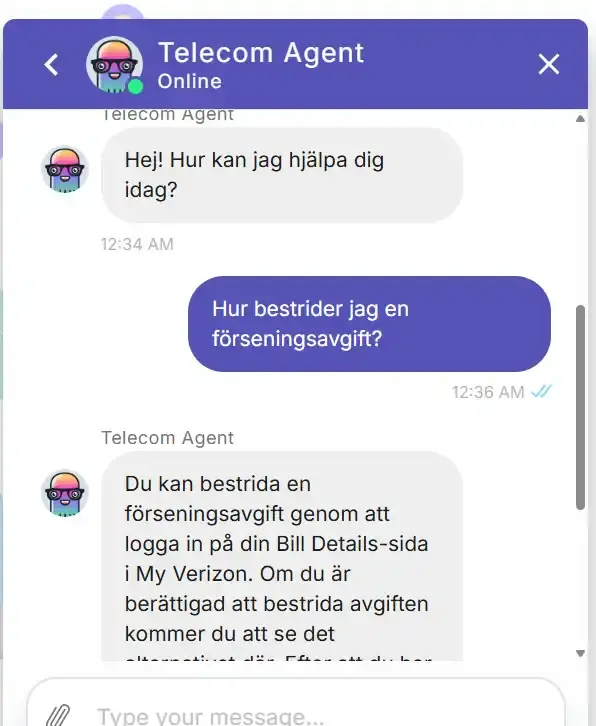
Now, our AI agent isn’t connected to live data, so it can’t give personalized responses yet. However, it can answer using the Verizon documents, and it follows our chosen language (Swedish).
With a data source, you will make the interaction more personalized and provide an exact solution to your customer queries.
Now, building this AI agent shouldn’t take too long. However, over time, you need to track some metrics to prove that it works.
The Metrics That Tell You Whether It’s Working
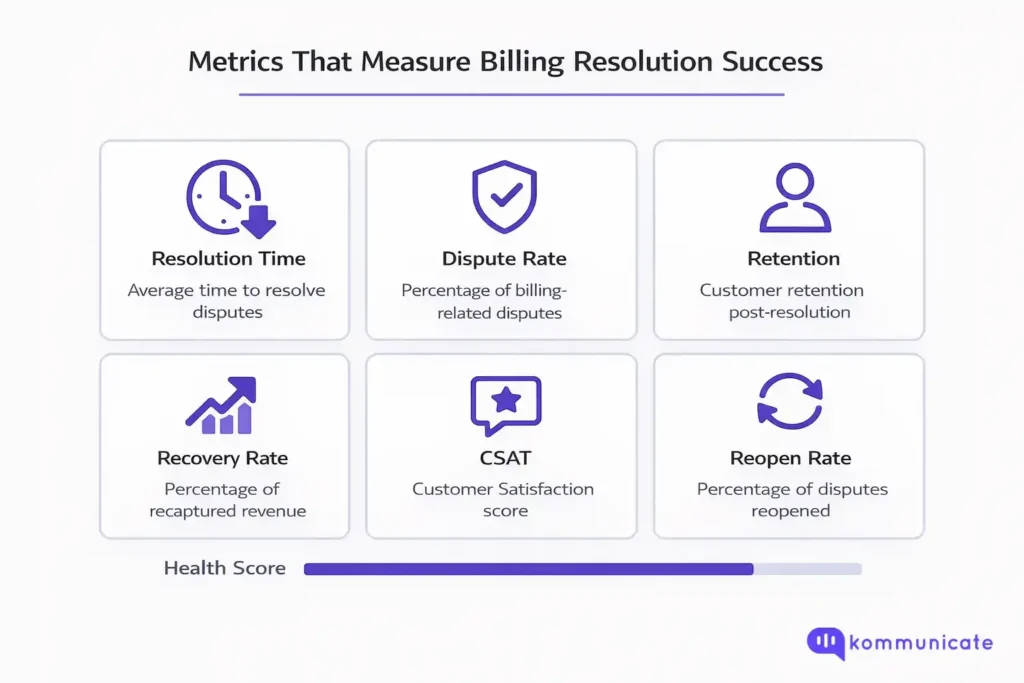
Automation without measurement is a cost center, not a capability. CX directors should track the following from the moment a billing dispute bot goes live.
- Bot Containment Rate is the primary signal: what percentage of billing disputes are fully resolved without human escalation? A well-deployed bot should move this meaningfully within the first 60 to 90 days.
- First-Contact Resolution (FCR) measures whether the dispute was resolved in a single interaction. FCR is one of the strongest leading indicators of CSAT in dispute-heavy support environments.
- Average Handle Time on Escalated Calls should decrease as the bot does triage. Agents receiving escalations with full context should resolve faster than agents starting from scratch.
- Escalation Rate Trend tracks whether the bot is getting more effective over time. A flat escalation rate after 90 days suggests the training corpus or system prompt needs refinement.
- Post-Dispute Churn Rate, Segmented by Resolution Channel, is the metric that closes the loop. If customers whose billing disputes were resolved by the bot churn at a lower rate than those who went through live agents, the case for expanded automation is made in the language of revenue, not support efficiency.
Optimize for Customer Effort Score above all other satisfaction metrics. In billing dispute resolution, how hard the customer had to work to get an answer is a stronger predictor of churn than whether they were satisfied with the outcome.
Conclusion
Billing disputes are not a support volume problem. They are a trust problem with a very short resolution window.
A subscriber who feels financially wronged and gets a clear, immediate, accurate explanation will almost always stay. A subscriber who feels financially wronged and has to fight for an explanation will almost always leave.
The intervention point is the billing page, not the escalation queue. The right tool is a bot connected to live data with well-defined escalation logic, not a FAQ link. And the measurement that matters is what happens to those customers 90 days later, not whether the ticket was closed.
CX directors have the organizational leverage to drive this change. The technology to execute it is available, deployable within days, and measurable from day one.
The question is how many billing disputes you are willing to lose before you automate them. If you’re ready now, feel free to book a demo with Kommunicate.
Frequently Asked Questions about Telecom Billing Disputes
A well-trained bot can handle the majority of first-contact billing queries like charge explanations, promotional credit expiry, overage breakdowns, late fee dispute eligibility, and payment arrangement options. Disputes that involve policy exceptions, repeated unresolved charges, or cancellation intent should escalate to a human agent with full conversation context intact.
No, a knowledge-base-trained bot without live data can still resolve a significant share of disputes by explaining billing policy accurately and directing customers to the right self-service step. However, connecting to live billing data via webhook meaningfully improves resolution rates. A bot that can tell a customer exactly why their bill changed this month is more effective than one that explains why bills generally change.
The embed itself takes minutes, it is a single JavaScript snippet added to your billing portal. The time investment is in the training corpus and system prompt. A well-structured knowledge base upload and a carefully written system prompt can be production-ready within a few days.
Escalation rules defined in the Kommunicate dashboard trigger a handoff to a live agent. The agent receives the full conversation transcript: the customer does not need to re-explain the dispute from scratch. That handoff quality is one of the most important variables in post-escalation CSAT.
Track post-dispute churn rate segmented by resolution channel. If customers whose disputes were handled by the bot churn at a lower rate at 90 days, the retention case is made in revenue terms. Bot containment rate and first-contact resolution are the leading indicators to watch in the first 60 to 90 days.
Yes. Kommunicate supports multilingual deployments. The bot’s response quality in a given language depends on the language of the training data and the underlying AI model’s multilingual capability. Claude Sonnet and GPT-4 class models handle major European and Asian languages reliably.

Adarsh Kumar is the CTO & Co-Founder at Kommunicate. As a seasoned technologist, he brings over 14 years of experience in software development, artificial intelligence, and machine learning to his role. His expertise in building scalable and robust tech solutions has been instrumental in the company’s growth and success.