Updated on August 18, 2026
The landscape of US customer support is undergoing a fundamental shift. For years, CS Ops managers have relied on ticket deflection as the primary measure of success. However, in an era where 70% of consumers expect AI to interact with them for immediate resolutions, simply “deflecting” a user away from an agent is no longer enough. The modern goal is Automated Resolution Rate (ARR).
The real problem facing support organizations today is repetitive work.
Support teams are frequently drowning in “How-to” tickets that account for up to 40% of their total volume, leading to agent burnout and stagnant CSAT scores. Traditional keyword-based bots often exacerbate this problem by providing rigid, irrelevant answers that force a manual escalation anyway.
According to Gartner, by 2029, 80% of customer service organizations will be applying generative AI to improve agent productivity and customer experience. This guide is designed for the CS Ops leader who needs to move beyond “bot answers” toward a controlled, auditable AI decision engine. We will explore how to transform your Zendesk Knowledge Base from a static library into a high-velocity resolution engine that handles the heavy lifting, allowing your human agents to focus on high-emotion, high-complexity problem solving.
We’ll cover:
1. Why is the Industry Shifting From Ticket Deflection To Automated Resolution?
2. What are the Core Prerequisites for Building A Successful Automation Stack?
3. How Should You Structure Your Zendesk Knowledge Base for AI Accuracy?
4. How Do You Implement a Step-By-Step Integration Between Zendesk and Your AI Platform?
5. How Can You Implement CSAT Guardrails To Maintain Support Quality?
6. What Metrics Should CS Ops Track To Measure Automation Success?
7. What Does A Proven 30-Day Rollout Plan for FAQ Automation Look Like?
8. Which Common Automation Pitfalls Negatively Impacts Your Customer Experience?
9. Conclusion
Why is the Industry Shifting From Ticket Deflection to Automated Resolution?

The traditional goal of customer service operations was deflection.
However, in 2026, the industry has realized that a “deflected” customer isn’t necessarily a “satisfied” one. If a user closes a chat window because they are frustrated with a bot, that counts as deflection, but it also creates silent churn.
The shift toward automated resolution reflects a more sophisticated approach where the “win” isn’t avoiding the customer but solving their problem end-to-end without human intervention.
The Problem With Traditional Deflection
Traditional deflection strategies often rely on static FAQs or keyword-matching bots. These systems are “outcome-agnostic,” meaning they measure success by the reduction in ticket volume rather than the quality of the answer.
- The “Dead End” Experience: Customers are often looped back to the same unhelpful articles, leading to “re-contact” spikes 24–48 hours later.
- Lack of Accountability: Deflection metrics don’t account for the “effort” a customer had to exert to find an answer.
Why is Automated Resolution the New Gold Standard?
Automated Resolution Rate (ARR) measures conversations that reach a definitive “Solved” status. This shift is driven by three operational realities:
1. Resolution over Redirects: Modern AI doesn’t just point to an article; it synthesizes the answer from your Zendesk Knowledge Base and provides it directly in the chat or email. This removes the “reading tax” from the customer.
2. The “Tier 0” Filter: By treating automation as a “Tier 0” support level, you create a high-density filter. When repetitive L1 questions (e.g., “Where is my order?” or “How do I reset my password?”) are resolved autonomously, the “noise” in your Zendesk queue drops significantly.
3. Strategic Re-allocation to L2 and L3: This is the most critical benefit for CS Ops Managers. When L1 is 60% automated, your human agents are no longer “answering machines.” They are transformed into subject matter experts (SMEs).
- Focus on L2 (Technical Troubleshooting): Agents have the time to investigate deep-rooted bugs or complex account issues without a ticking clock on 50 other pending L1 chats.
- Focus on L3 (High-Value/High-Emotion): Critical issues like churn threats, VIP account management, or complex refunds get the white-glove treatment they deserve.
Freed from the “hamster wheel” of repetitive queries, service workers report higher Agent Satisfaction (ASAT). When their workday consists of solving meaningful, complex problems rather than copy-pasting the same three macros, retention rates improve.
So, now that you understand the benefits of strategically prioritizing automation in your support tickets, let’s talk about how you can start building for automation.
What are the Core Prerequisites For Building A Successful Automation Stack?
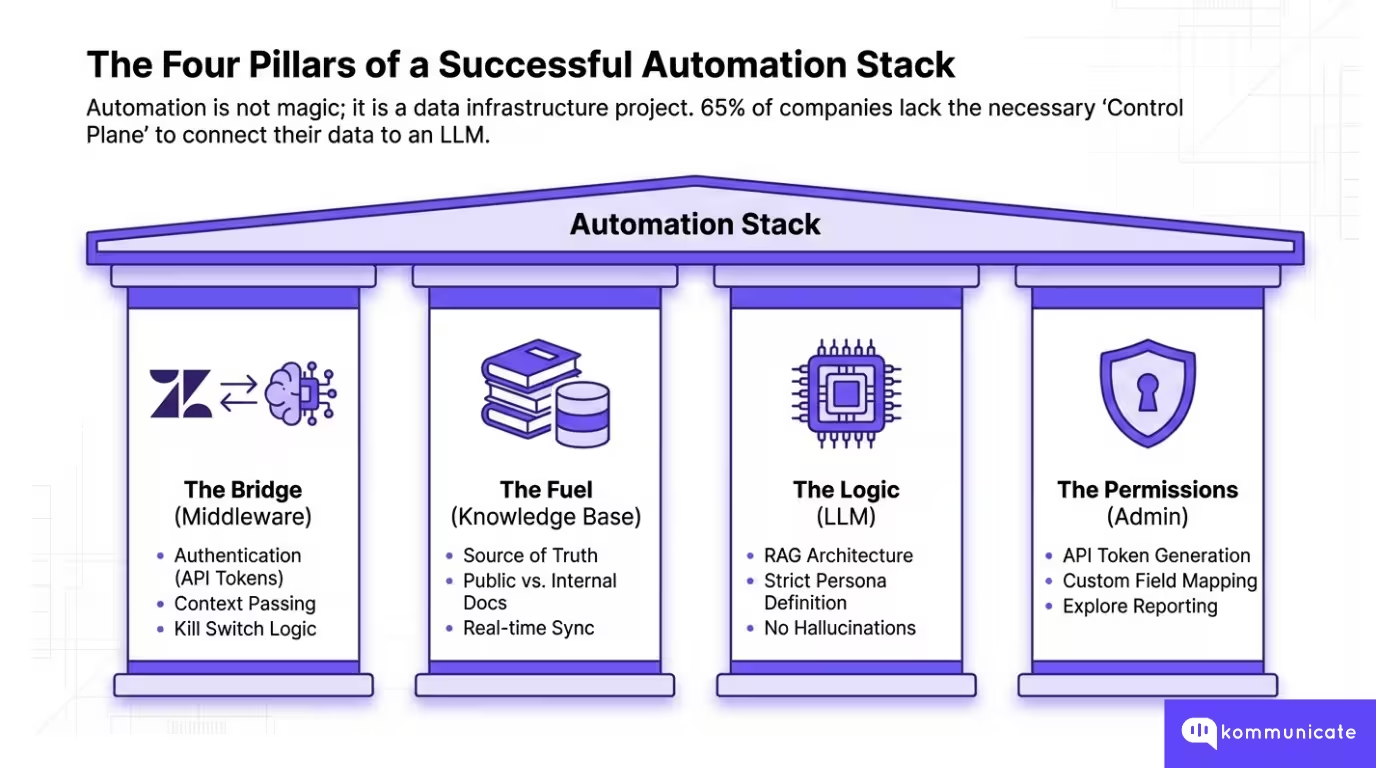
Building an automation stack isn’t about replacing your help desk; it’s about creating a sophisticated “control plane” that sits on top of it. To successfully move repetitive L1 queries away from your human staff, your infrastructure must be able to “read” your existing content and “write” back to your ticket fields seamlessly.
According to Lucidworks, 65% of companies don’t have the data infrastructure to automate their systems. To avoid this, CS Ops managers must secure four foundational pillars before going live.
1. The Bridge: An AI-Zendesk Integration Layer
You cannot simply “point” an LLM at a support inbox. You need a middleware platform (like Kommunicate) to act as the bridge between Zendesk and the large language model (GPT-4, Claude, or Gemini). This layer is responsible for
- Authentication: Securely connecting via Zendesk API tokens.
- Context Passing: Ensuring the AI knows who the customer is and their ticket history before it tries to answer.
- The Kill Switch: Managing the logic of when the bot should stop talking and hand the conversation to a human.
2. The Fuel: Zendesk Knowledge Base
Your automation is only as smart as the documentation you provide. For an LLM to resolve a ticket, it needs access to your Zendesk Guide.
- Public vs. Internal: You must decide which articles the AI is allowed to “consume.” While public FAQs are standard, some teams also allow AI to index internal “agent-only” documentation to provide more technical L1 troubleshooting steps.
- Knowledge Sync: The integration must support real-time syncing so that when you update a policy in Zendesk, the bot’s “brain” is updated instantly.
3. The Logic: LLM Selection and Prompt Engineering
As outlined in the Kommunicate Zendesk-LLM integration guide, you don’t need to be a machine learning engineer to set this up, but you do need to define the “Persona” and “Source of Truth.”
- Strict RAG (Retrieval-Augmented Generation): The stack must be configured to only answer from your Zendesk Knowledge Base. This prevents “hallucinations” where the AI might accidentally promise a refund or a feature that doesn’t exist.
4. The Permissions (API and Admin Access)
From a technical standpoint, the person setting up the stack needs:
- Zendesk Admin Status: To enable the “Talk Partner Edition” or “Zendesk Integration” settings.
- API Token Generation: To allow the AI platform to read ticket data and, more importantly, update ticket status to “Solved” once a resolution is reached.
- Custom Field Mapping: The ability to create tags in Zendesk (e.g., ai_resolved, bot_escalated) so your reporting in Zendesk Explore remains accurate.
Why Does This Matter?
When these prerequisites are met, the handoff becomes data-rich. Instead of an L2 agent receiving a blank ticket, they receive a transcript of the bot’s attempt, the specific Zendesk Guide article the bot tried to use, and a sentiment score.
This ensures that when an L1 question is escalated because of its complexity, the agent can jump straight into the “value add” work without asking the customer to repeat themselves.
Now, one of the key parts of this happens before you start automating. The structure of your Zendesk Knowledge Base will determine how much of your L1 you can automate. We will go through some actionable steps in the next section.
How Should You Structure Your Zendesk Knowledge Base for AI Accuracy?
For years, the Zendesk Guide was built for humans who could skim, infer context, and ignore sidebars. However, an LLM (large language model) does not “read” an article; it “consumes” it in chunks. If your knowledge base is a cluttered library, your AI will be a confused librarian.
To achieve high Automated Resolution Rates (ARR), you must move from a “Help Center” mindset to a “Machine-Ready Data Store” mindset. Here is how to structure your Zendesk environment for maximum AI precision.
The “One Intent, One Article” Rule
The biggest enemy of AI accuracy is the mega article (a 2,000-word document covering everything from billing to technical setup). When an AI “chunks” this article, it often loses the connection between the question and the specific answer.
- The Strategy: Break broad articles into granular, single-topic pages. Instead of one “Billing FAQ,” create separate articles for “How to Update Credit Card,” “Where to Find Invoice,” and “Refund Policy.”
- The Benefit: High “Semantic Density.” When the user asks about a refund, the AI retrieves a 300-word article exclusively about refunds, reducing the risk of the bot hallucinating information from the “Pricing” section.
Machine-Ready Article Templates
Use consistent, structured templates to help the LLM identify the “Resolution Path” quickly.
1. The Troubleshooting Template (For L1/L2 Technical Queries)
- Title: Phrased as a direct user question (e.g., “Why is my screen flickering?”)
- Symptoms: A bulleted list of signs the user might see.
- Prerequisites: What the user needs before they start (e.g., “Ensure you are on version 2.4”).
- Step-by-Step Resolution: Numbered steps (1, 2, 3) with one action per step.
- Escalation Path: Clear instructions for when the steps fail.
2. The Policy/Fact Template (For L1 Policy Queries)
- Title: Active phrase (e.g., “Standard Shipping Policy”)
- Scope: Who this applies to (e.g., “US Customers only”).
- The Core Fact: A single-sentence answer (e.g., “Shipping takes 3-5 business days.”)
- Exceptions: A “When this doesn’t apply” section to prevent false positives.
Final Preparation Checklist
We’ve created a quick checklist that you can use internally to improve how you structure your Zendesk knowledge base.
AI Knowledge Audit Checklist
Now that we have the prerequisites sorted, let’s talk about how you can create an AI agent integration for Zendesk.
How Do You Implement a Step-By-Step Integration Between Zendesk and Your AI Platform?
Let’s understand how Kommunicate can connect your Zendesk Guide (knowledge base) to an AI customer service system. We’ll go step-by-step, and we’ll add the operational guardrails you care about: secure credentialing, knowledge-source discipline, escalation triggers, and measurement-ready tagging.
You can follow this video to understand how this works:
1) Secure Zendesk API credentials
- In the Zendesk Admin Center, API tokens are managed under Apps and Integrations → APIs → API Tokens.
- Treat the token like a password: Zendesk’s developer documentation warns that API tokens can impersonate account users and should be kept secure.
- Ops best practice: create a dedicated service account user for the token (so employee changes don’t break automation).
2) Create your AI Agent
In Kommunicate, you should start in the dashboard:
- Go to Kommunicate Dashboard → Agents → Create an Agent.
- Choose a provider: OpenAI/Gemini/Claude.
- Select the specific model (you can choose between GPT-4o variants, Gemini 2 Flash, and Claude 3.5 Haiku).
- Set model parameters. We recommend setting the temperature to 0 for customer service processes to reduce “creative” variance.
3) Point the AI Agent to your Zendesk Knowledge Base
This is where you enforce the “answers must come from the Zendesk Knowledge Base” discipline:
- In Kommunicate: Manage Bots → Go to Bot Builder → Knowledge Source → Knowledge Base → Select Zendesk.
- Then “Integrate Zendesk with your Chatbot” by entering: 1. Email (Zendesk login), 2. Subdomain (format: your_domain.zendesk.com) and 3. Access token (Zendesk API token)
4) Enforce grounding and escalation
Add these controls even if your tooling labels them differently:
- Enable Human Handoff – Kommunicate already pre-loads usual triggers that assess when the AI agent has failed to answer a question. When that happens, your human handoff sends the conversation to a human customer service agent.
- Set Conversation Rules – You can set conversation rules to ensure that the right human agent gets notified whenever a problem is escalated. In Kommunicate, you can set it to be “round robin” (an available person is assigned a ticket) or “inform all” (every available customer service agent is notified).
5) Test safely before going live
- Run a controlled pilot with your top FAQ set (e.g., 50 common L1 questions).
- Validate retrieval correctness, escalation behavior, and whether the bot is pulling from the right Zendesk Knowledge Base sections.
Once you’ve got the integration up and running, you can start focusing more on the guardrails. Let’s talk about how you can use CSAT as a metric to guard support quality.
How Can You Implement CSAT Guardrails to Maintain Support Quality?
Implementing CSAT guardrails in Zendesk is less about “collecting a score” and more about building a closed-loop control system that can
(1) Capture feedback at the right moment
(2) Auto-route failures for fast remediation
(3) Use reporting to tighten your automation scope.
1) Set up CSAT collection so feedback is timely and attributable
Zendesk’s native CSAT is tied to solved tickets: customers are prompted to rate the support they received after the ticket is solved (email and messaging experiences are supported).
Guardrail: For FAQ automation, you want CSAT as close to the automated interaction as possible.
- For customer service agents, Zendesk sends CSAT surveys via a system automation 24 hours after a ticket is solved.
- Kommunicate will send out a CSAT survey right after an AI agent answers a question, so you can get the feedback quickly.
2) Build the CSAT review loop (what happens after a bad rating)
A “bad CSAT” guardrail only works if you can fix it:
Minimal effective operating procedure
Daily: CS Ops reviews csat_bad and csat_bad_ai
For AI-related bad CSAT: classify into one of 4 buckets
- KB gap (article missing)
- KB defect (wrong/outdated)
- Retrieval defect (article exists, not found)
- Escalation defect (should have handed off earlier)
Action Mapping
- KB gap/defect → update Zendesk Knowledge Base.
- Retrieval defect → fix KB structure/labels; adjust knowledge-source settings
- Escalation defect → tighten confidence threshold and/or add escalation triggers
3) Monitor CSAT with Segmentation (AI vs Human)
Zendesk provides CSAT visibility in the Support dashboard’s Satisfaction tab (via Explore).
On Kommunicate, you will also get the statistics of your team members and the AI agent. You should measure the following:
Dashboards CS Ops should maintain
- CSAT overall (baseline)
- CSAT for AI-resolved vs. agent-resolved (use Kommunicate’s dashboard)
- Bad CSAT volume and trend
- Top intents driving bad CSAT (by tag) (use Kommunicate’s Insights feature)
- Reopen rate for AI-resolved tickets (secondary quality signal)
Setting a CSAT Guardrail Standard
To make AI agent intervention successful, you need to follow the following best practices:
- CSAT is sent reliably and quickly after resolution
- Bad CSAT triggers an immediate operational response
- Bad CSAT is segmented by automation involvement (tags)
- Every bad CSAT produces a concrete fix: KB update, retrieval tune, or escalation rule change
Having a response ready for whenever your CSAT is affected will help you operationalize automation much faster. Additionally, we will cover some other metrics that you should track to measure automation success.
Having a response ready for whenever your CSAT is affected will help you operationalize automation much faster. Additionally, we will cover some other metrics that you should track to measure automation success.
What Metrics Should CS Ops Track To Measure Automation Success?

To measure automation success in Zendesk, CS Ops should run a scorecard that separates three things:
1. How much work automation takes off the queue
2. Whether automation preserves (or improves) support quality
3. Whether escalation stays predictable and measurable in Explore
Below is a practical KPI set that maps to those goals.
| Metric | What it measures | How to calculate |
| Automated Resolution Rate (ARR) | The share of the eligible demand fully resolved by automation | AI-resolved ÷ automation-eligible volume |
| Containment rate | % of engaged bot conversations that do not transfer to an agent | Engaged conversations not transferred ÷ engaged conversations |
| Deflection rate | How often does self-service prevent ticket creation/agent work | Deflected contacts ÷ self-service contacts (or deflected sessions ÷ self-serve sessions) |
| Automation coverage | How much of the total demand is even eligible for automation | Automation-eligible tickets ÷ total tickets |
| Cost per ticket avoided/ resolved | ROI in financial terms | (Baseline cost per ticket × human tickets reduced) − AI costs |
| CSAT (AI-resolved vs. human-resolved) | Whether automation preserves or improves perceived quality | CSAT score segmented by ai_resolved vs non-AI tags |
| Bad CSAT rate for automation | Early warning that automation is harming CX | Bad CSAT on ai_resolved ÷ total CSAT responses on ai_resolved |
| CSAT response rate | Whether you have enough signal to trust CSAT trends | CSAT responses ÷ CSAT requests sent |
| Reopen rate after AI resolution | Proxy for “false resolution” (ticket closed but not solved) | Reopened ai_resolved tickets ÷ total ai_resolved tickets |
| Escalation rate | Whether the bot is overreaching or underhelping | Escalated AI conversations ÷ AI-handled conversations |
| Escalation latency | Whether customers get stuck before a human | Time from first customer message ÷ handoff timestamp |
| Handoff completeness rate | Whether agents receive the context needed to avoid re-asking | % escalations with required fields present |
| First reply time | Speed to first public agent response after ticket creation | First public agent reply timestamp − ticket created timestamp |
| First resolution time | Time from ticket creation to first solve | First “solved” timestamp − created timestamp |
| Full resolution time | Time from ticket creation to most recent solve | Most recent “solved” timestamp − created timestamp |
Once you have these metrics set up, it’s easy to start setting up your AI agents at some scale. In the next section, we will give you a quick overview of how implementation takes place for our clients.
What Does a Proven 30-Day Rollout Plan for FAQ Automation Look Like?
The core principle for implementation is simple: start with a small set of high-volume, low-risk FAQs, enforce strict escalation and CSAT guardrails from day one, and expand scope only after the data proves automation is stable.
For CS Ops, the objective is not “more bot replies.” It is predictable outcomes: higher automated resolution, controlled handoffs, and CSAT that stays at or above baseline.
| Timeframe | Primary objective | What you implement | Key deliverables | Go no go success criteria | Primary owners |
| Days 1 to 3 | Define a scope that is safe and has a high ROI | Pull top ticket drivers, select 5 pilot FAQs, and define exclusions such as billing disputes, refunds, account access, and outages | Pilot scope list, exclusion list, baseline metrics snapshot | Pilot FAQs are deterministic, volume is meaningful, and exclusions are agreed | CS Ops, Support Lead |
| Days 4 to 7 | Make the Zendesk Knowledge Base automation ready | Clean and consolidate articles, remove duplicates, standardize labels, ensure one best answer per FAQ, and archive outdated content | 5 automation-grade Zendesk Guide articles, KB hygiene checklist | Each pilot FAQ has a single authoritative article, and labels are consistent | Knowledge Owner, Zendesk Admin |
| Days 8 to 10 | Connect Zendesk to the AI layer and enforce grounding | Connect API, sync Zendesk Guide as source of truth, configure knowledge retrieval mode, set safe response behavior | Working integration in the sandbox, knowledge sync validated | Bot answers only from KB; KB misses routes to escalation | Zendesk Admin, Automation Owner |
| Days 11 to 14 | Turn on the pilot with strict escalation controls | Set confidence threshold, define escalation triggers, add loop kill switch, enable tags and fields for measurement | Escalation rules, tag taxonomy, and limited pilot live | No critical failures, escalations route correctly, tags populate reliably | CS Ops, Automation Owner |
| Days 15 to 17 | Add CSAT guardrails and triage workflow | Segment CSAT by AI tags, define a “bad CSAT” escalation path, create a CSAT triage queue, and enforce structured review notes | CSAT triage workflow, manager review template | Negative feedback is captured and routed within the agreed SLA | CS Ops, QA Lead |
| Days 18 to 21 | Expand the scope safely from 5 FAQs to 10 to 15 | Add new intents with the same KB discipline, tune thresholds per intent, and tighten escalation triggers based on pilot data | Expanded FAQ coverage, updated escalation and threshold matrix | AI CSAT within an acceptable delta of baseline, reopen rate stable | CS Ops, Knowledge Owner |
| Days 22 to 24 | Optimize performance and reduce false resolution | Review top escalations and KB misses, fix content gaps, improve retrieval by structure and labels, adjust thresholds | Top 10 failure reasons log, KB fixes shipped | Escalation reasons decline, KB miss rate drops | Knowledge Owner, Automation Owner |
| Days 25 to 27 | Establish governance so quality does not drift | Define weekly review cadence, monthly KB sprint, ownership model, and change control for policies and macros | Operating cadence, ownership RACI, backlog for KB, and automation improvements | Review cadence is scheduled, owners assigned, backlog prioritized | CS Ops Lead |
| Days 28 to 30 | Produce a leadership scorecard and scale decision | Report ARR, containment, escalation rate, escalation latency, CSAT by AI tags, reopen rate, cost impact estimate | Pilot to scale memo, dashboard, next scope recommendation | Data supports scale, or a clear corrective plan exists before expanding | CS Ops, Support Leadership |
A 30-day rollout succeeds when it treats FAQ automation as an operating system, not a feature. However, every automation system has a few points of failure, let’s talk about them in the next section.
Which Common Automation Pitfalls Negatively Impacts Your Customer Experience?

Even the most advanced AI integration can degrade the customer experience if implemented without the structural guardrails required for high-stakes support environments.
- The Infinite Bot Loop: Forcing users through repetitive automated cycles without a clear “exit to human” path, leading to customer abandonment and silent churn.
- Context Blindness during Handoff: Failing to pass the AI’s transcript and detected intent to the agent, which forces the customer to repeat their entire problem once escalated to Tier 2.
- Relying on “Stale” Knowledge: Allowing the AI to index outdated Zendesk articles or deprecated macros, which leads to “hallucinations” where the bot provides incorrect or legacy policy information.
- Ignoring Negative Sentiment: Neglecting to set triggers that immediately bypass the bot when a user expresses high frustration, urgent billing issues, or threats to cancel their subscription.
- Over-Automation of Complex Queries: Attempting to solve high-emotion or multi-step L3 problems with a bot, rather than identifying these early and routing them directly to a specialist.
- Lack of “I Don’t Know” Logic: Not configuring a strict confidence threshold, which results in the AI “guessing” an answer instead of gracefully admitting its limitations and escalating.
- Treating Deflection as Success: Measuring only the reduction in ticket volume while ignoring “re-contact rates” (users who open a new ticket 24 hours later because the automated answer failed).
By treating automation as a continuous governance process rather than a one-time setup, CS Ops managers can protect the integrity of their support brand. Maintaining a “resolution first” mindset ensures that AI acts as a high-speed filter for your agents, not a wall between you and your customers.
Conclusion
Transitioning from a strategy of simple ticket deflection to a culture of automated resolution is the most significant operational upgrade a modern CS Ops team can undertake in 2026. By implementing the “Tier 0” framework discussed in this guide, you aren’t just lowering your ticket volume; you are fundamentally changing the value of your human support staff.
However, the success of this transition relies entirely on treating your automation as a living system rather than a “set it and forget it” tool. As we’ve explored, the technology is only as effective as the Zendesk Knowledge Base that fuels it and the escalation guardrails that protect it. By maintaining a strict focus on knowledge hygiene, monitoring CSAT in real-time, and ensuring a seamless, context-rich handoff to human agents, you can scale your support operations without compromising on quality.
Ready to transform your Zendesk environment into a high-performance resolution engine? Book a 15-minute demo with Kommunicate to see these escalation and CSAT guardrails in action.

Adarsh Kumar is the CTO & Co-Founder at Kommunicate. As a seasoned technologist, he brings over 14 years of experience in software development, artificial intelligence, and machine learning to his role. His expertise in building scalable and robust tech solutions has been instrumental in the company’s growth and success.