Updated on May 26, 2026
TL;DR
Enterprise AI agents need more than a good model. They need a control plane:
1. Permissions
2. Knowledge governance
3. Tool scoping
4. Audit logs
5. Evaluation
6. Human handoff
Without it, your demo decays in production. You need to start with a narrow workflow, prove quality through real evaluations, and expand only once the governance layers are in place.
Over the past year, I have seen hundreds of enterprise AI agent demos that followed the same script:
1. The intent classifier scored well.
2. The retrieval looked clean.
3. The answers felt human.
4. Then, a customer gets a refund policy, and the AI support agent fails
None of this is a model problem. It is a governance problem, and it is the problem most teams skip when they move from prototype to production.
In the prototype stage, your software is just supposed to answer questions. But, in the enterprise context, it needs to function within a business.
Your AI agent will touch customer expectations, support policies, private data, brand trust, and, in regulated industries, legal exposure. That is a fundamentally different bar, and treating it like a bigger prototype is how enterprise AI earns a bad reputation.
So, I thought I’d put together an article on how to build an enterprise AI agent that integrates with OpenAI. I’ll be covering:
- The key failure point for enterprise AI agents
- Technical architecture of an OpenAI enterprise AI agent
- The governance layers you should build
- Why does enterprise AI fail so often?
- Implementation plan for enterprise AI agents
- When should you use Kommunicate?
- Conclusion
The key failure point for enterprise AI agents
Teams building enterprise AI agents spend most of their time on the center of the stack: retrieval quality, prompt design, model selection, and tool integration. These matter. But they are not the hard part.
The hard part is the set of questions that surround the model:
- Is this customer allowed to receive this answer?
- Is this agent authorized to access this source?
- Is this answer supported by approved, current knowledge?
- Is the action low-risk enough to automate without human review?
- Can we explain what happened if something goes wrong?
- Who owns this workflow when it drifts?
These are not engineering questions. They are operational ones. In enterprise support, getting them wrong causes a trust incident.
Enterprise AI agents need a control plane around the model. OpenAI provides language generation, structured output, tool calling, and retrieval, while the enterprise system around it provides governance.
The technical architecture for this structure is important.
Technical architecture of an OpenAI enterprise AI agent
A production-grade enterprise AI agent is not a prompt with tools bolted on. It is a layered system where each layer has a distinct owner, a distinct job, and a distinct failure mode.
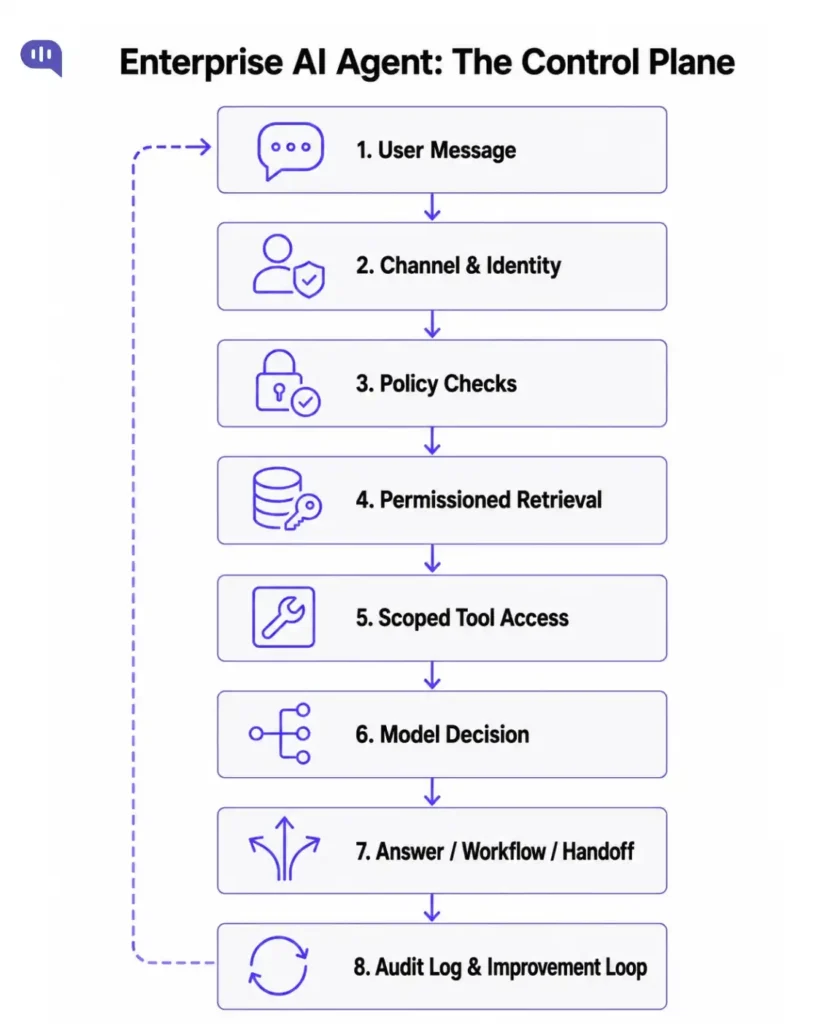
Here is what each layer actually controls:
| Layer | What Does It Control? | What Happens If It Isn’t Built? |
|---|---|---|
| Channel | Web chat, WhatsApp, mobile, email, voice | No channel-specific response rules or routing |
| Identity | Customer, account, plan, region, auth state | Agent answers account-specific questions without verification |
| Policy | Restricted topics, blocked actions, risk thresholds | The agent answers questions it was never authorized to answer |
| Knowledge | Approved sources, freshness rules, deletion, and access | Agent serves stale, wrong-brand, or out-of-scope content |
| Tool | CRM, orders, payments – scoped access with audit logs | Agent takes write actions without approval gates |
| Model | Reasoning, classification, structured output | The agent hallucinates or generates off-policy responses |
| Decision | Answer, clarify, fallback, escalate | The agent automates high-risk cases that should require review |
| Human handoff | Escalation reason, summary, SLA, specialist routing | Human gets a context-free conversation and starts over |
| Observability | Decisions, sources, tool calls, model version, outcome | Team debugs blindly after every failure |
The most important insight here: if everything lives in one prompt, no enterprise team can safely govern it:
1. The policy owner cannot update restrictions without touching retrieval logic.
2. The knowledge owner cannot refresh sources without re-testing the prompt.
3. The compliance team cannot audit decisions without an observability layer.
Everything becomes dependent on engineering, and engineering becomes the bottleneck for trust. Remember that the non-technical departments will primarily use your AI agent, and every engineering bottleneck can delay go-live date.
This means that you need to build your agentic harness and governance layers as the first step.
The governance layers you should build
The following six governance layers help you build a functional OpenAI enterprise agent:
1. Knowledge ownership
Who owns source accuracy? In most enterprise deployments, no one does. Help center articles get updated by support ops on a different cadence than the AI system. Deprecated policies stay in the retrieval index. The agent answers confidently using content that was correct eight months ago.
Knowledge governance means every source has an owner, a freshness rule, and a deletion path. It means the retrieval layer respects region, product line, customer segment, and channel. It means a US enterprise customer does not receive an EU consumer refund policy. It means deleted content cannot be retrieved.
This is not a retrieval problem. It is a content operations problem. The AI team cannot solve it alone.
2. Permissions and data boundaries
Do not pass every piece of customer data to the model. The agent should have explicit scoping built in.
The permission layer separates:
- Public knowledge vs. internal SOPs
- Customer-specific account data vs. general policy
- Restricted regulatory content vs. approved answers
- Live operational data vs. logged historical data
- Human-only notes vs. retrievable context
In multi-tenant or multi-brand deployments, this becomes a product feature. The wrong brand’s policy reaching the wrong customer is not a minor error. It is a trust failure that breaks the entire case for AI in that organization.
3. Tool access with approval gates
Tools are where enterprise AI earns real leverage. Every tool action should have an explicit risk level and a corresponding control:
| Tool Action | Risk | Control |
|---|---|---|
| Search help articles | Low | Allow with source logging |
| Read order or account status | Low–medium | Allow after identity check |
| Create or update a ticket | Low–medium | Allow with audit log |
| Schedule callback | Medium | Confirm with the customer |
| Issue refund | High | Require human approval |
| Change subscription or account | High | Authentication + policy gate |
| Medical, legal, or financial topics | High | Handoff only — tightly scoped sources |
The most valuable enterprise AI deployments are not the most autonomous. They are the ones that have tight risk tiers and fallbacks.
4. Human handoff as a feature
Most AI systems treat handoff as a failure state. Enterprise deployments that work treat it as a designed workflow.
Handoff should be triggered for account access issues, billing disputes, policy exceptions, legal and regulated topics, emotionally escalating complaints, and any case where the agent’s confidence falls below the threshold. The trigger conditions are business logic, not model behavior.
Good handoff sends the human agent:
- Escalation reason (not just “user requested agent”)
- Full conversation summary
- Customer identity and account context
- Sources retrieved and tool calls attempted
- Sentiment signal and urgency
- Recommended queue and SLA priority
Bad handoff sends the human agent nothing and makes the customer repeat everything. The difference between these two determines whether enterprise AI saves human time or just displaces effort.
5. Concrete business-focused evaluations
Enterprise AI needs test sets that reflect production reality, not friendly demos. The cases that matter most:
- Approved answer from approved source (grounding test)
- Missing source or knowledge gap (fallback test)
- Stale or deprecated content in index (freshness test)
- Policy conflict between two sources (conflict test)
- Regulated question in restricted category (compliance test)
- PII-heavy message (data handling test)
- Prompt injection attempt (security test)
- Human handoff request (escalation test)
- Tool timeout or failure (resilience test)
The best evaluation sets come from real production conversations. Pull the cases, anonymize them, label expected behavior, and add new cases every time the agent fails. Treat evaluation as an ongoing operation.
6. Audit logs for debugging
Audit logs are not only for compliance teams. They are the debugging tool that tells you what actually happened.
When a wrong answer reaches a customer, you should be able to inspect: what was retrieved, which prompt version was active, which model was used, which tool calls ran, why the final response was sent, and whether escalation was considered and rejected. Without this trace, every fix is a guess, and every incident erodes confidence without a clear path forward.
Teams that don’t intentionally build these governance layers often hit a wall when building enterprise AI agents. This is because they lack the information that they’d need to iterate. I’ve seen several of these failure points over time.
Why do enterprise AI agents fail so often?
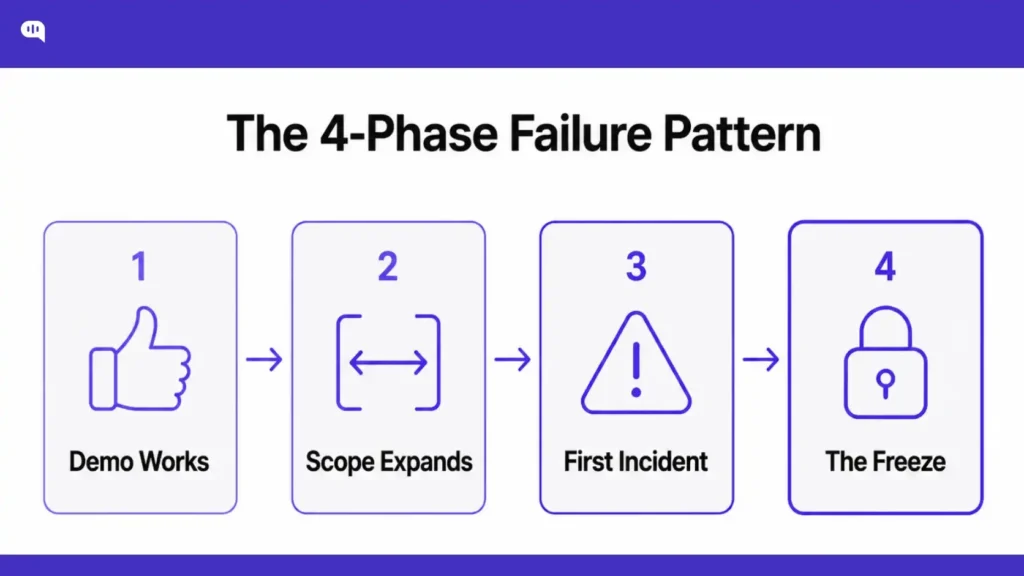
The MIT study from Aug 2025 might have shocked many first-time founders. However, as someone who has been doing this for more than a decade, I can assure you that these results are fairly accurate.
The failure modes of enterprise AI are regular and predictable. They appear in the same sequence across industries.
1. Phase 1: The demo works. The scope is narrow, the knowledge is curated, and the test cases are friendly. The agent looks good.
2. Phase 2: Production scope expands. More channels, more use cases, more customer types. The prompt grows. Behavior becomes harder to predict.
3. Phase 3: The first incident. A wrong answer reaches a customer. The team reviews the logs and discovers they cannot trace which source was retrieved, which prompt version was active, or why the model chose that response over a handoff.
4. Phase 4: The freeze. The agent stops expanding. Engineers are afraid to touch the prompt. The business loses confidence. The project becomes “AI-assisted” indefinitely.
This is not a failure of AI. It is a failure of architecture. Teams that build the control plane before scaling do not hit phase 3 the same way, because they can trace, debug, and correct without guessing.
If you get this correct, you can actually start shipping these enterprise AI agents to production. We use a very simple implementation plan for this at Kommunicate.
Implementation plan for enterprise AI agents
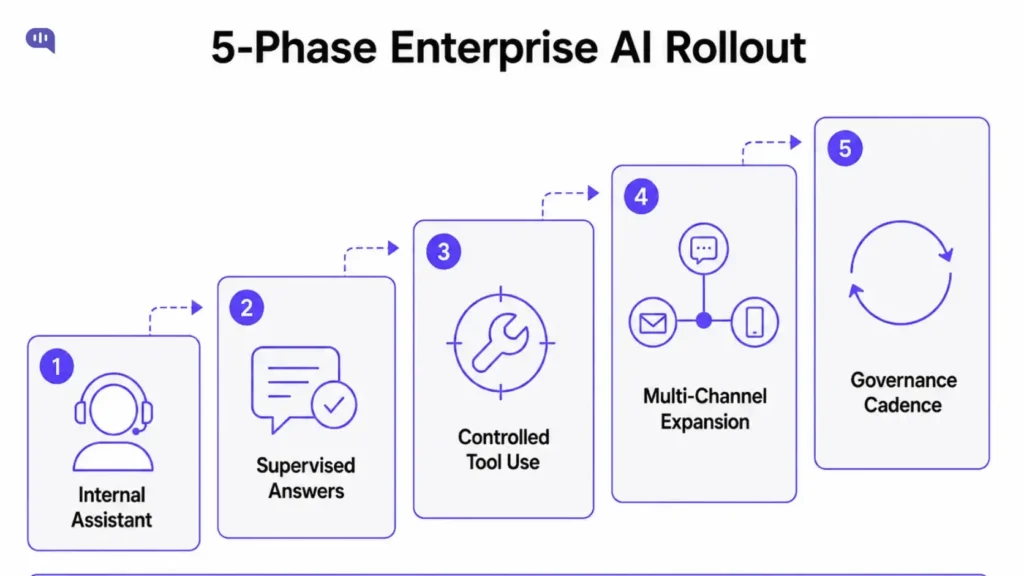
For any project involving AI, it makes sense to start with a narrow scope and then expand into deeper use cases. This looks like:
Phase 1 – Internal assistant.
The AI only helps support agents, never customers directly. Tasks: summarize conversations, draft replies, find relevant articles, classify intent. Risk is low because humans review all output before it reaches customers.
This phase builds the evaluation dataset and reveals knowledge gaps without customer exposure.
Phase 2 – Supervised customer-facing answers.
A narrow set of low-risk, high-volume questions gets automated: store hours, shipping timelines, document checklists, policy explanations. Human review stays active for sensitive cases.
This phase gives you your escalation triggers.
Phase 3 – Controlled tool use.
Add read-only tool calls after Phase 2 quality is stable. Order lookup, ticket creation, and callback scheduling. Every tool has scope, logging, and explicit failure handling.
Don’t add any write actions until the read-only layer is proven.
Phase 4 – Multi-channel expansion.
Expand from web chat to other channels only after quality metrics are stable on the first channel. The same prompt does not behave identically across web chat, email, WhatsApp, and voice.
Phase 5 – Governance cadence.
Weekly failure review, monthly knowledge audit, prompt change review, source freshness checks, and evaluation regression runs. Enterprise AI decays when no one owns it.
It’s also important to avoid scope creep. I recommend the following approach.
Use this checklist before you expand the scope.
Before moving to the next phase, verify all of these. If any gate is unverified, expanding the scope introduces risk that cannot be traced back to its origin when something goes wrong.
| Gate | What It Verifies |
|---|---|
| Accuracy | Critical support evaluations pass for the current scope. |
| Knowledge | Sources have owners, freshness rules, and deletion handling. |
| Permissions | Restricted sources and tools are blocked by policy. |
| Handoff | Human queue receives summary, reason, and context. |
| Audit | Decisions, sources, tool calls, and model versions are logged. |
| Operations | Weekly review owner and rollback path are named. |
Ownership after launch
Launching an enterprise AI agent without an operating model is like launching software without a runbook. The system works until it does not, and no one knows what to do.
| Owner | Responsibility |
|---|---|
| Support operations | Queue design, handoff rules, escalation, and customer experience. |
| Knowledge owner | Source quality, freshness, approval, deletion, and content gaps. |
| Engineering | Tool integration, logging, deployment, and security controls. |
| Legal/compliance | Restricted topics, approved language, and audit requirements. |
| QA/evaluation owner | Test sets, regression checks, and quality scorecards. |
| Leadership | Risk appetite, automation goals, and success metrics. |
This is the organizational structure that allows the AI agent to improve over time rather than decay. Without it, the agent is a liability masquerading as a product.
Metrics that actually matter
Deflection rate is a weak standalone metric for enterprise AI. It doesn’t measure the actual impact of the AI agent. The metrics that reflect real enterprise value are:
- Answer accuracy and grounded-answer rate
- Fallback rate and knowledge gap frequency
- Handoff rate and escalation quality score
- First response time reduction
- Human resolution time (Does better AI context improve the quality of work from human agents?)
- Human override rate (proxy for agent quality)
- CSAT after AI interactions vs. human-only interactions
- Repeated contact rate (did the answer actually resolve the issue?)
- Tool failure rate and resilience under load
These translate into defensible enterprise outcomes: fewer tickets, faster resolution, better human-agent leverage, and fewer misroutes.
These are numbers that make more concrete sense to business stakeholders than any AI transformation whitepaper.
When should you use Kommunicate?
Businesses do not just need an agent that can reason. They need an AI agent that can work inside live support operations.
Here’s a useful way to think about it: there are two layers every enterprise AI deployment needs: a reasoning layer and a support operations layer.
- OpenAI provides the reasoning layer: classification, language generation, structured output, tool calling, and retrieval.
- Kommunicate provides the support operations layer: channel management, human handoff, knowledge workflows, support inbox, routing and escalation, conversation history, analytics, and admin controls.
| Build Your Own | Use Kommunicate | |
|---|---|---|
| Best for | Engineering teams building support AI as a product or internal platform. | Support, CX, and operations teams that need to ship fast and iterate on customer experience. |
| Strong choice when | Your core product is a chatbot, an agentic workflow, or an AI developer tool. | Customer support is a business function that needs reliability, speed, and continuous improvement. |
| What you get | Full control over model orchestration, tool execution, and agent logic. | Production-ready support workflows, channels, dashboards, and integrations out of the box. |
| What you own | Deployment, analytics, handoff logic, channels, and ongoing maintenance. | Configuration, conversation flows, and customer experience — not the underlying infrastructure. |
| Flexibility | Unlimited — you build exactly what you need. | High — extend the platform with your own APIs, webhooks, plugins, and backend workflows. |
| Trade-off | Full control, but full maintenance responsibility. | Less low-level control, but faster time to value and no infrastructure overhead. |
| Best suited for | Teams with dedicated engineering bandwidth to build and run support infrastructure alongside their core product. | Teams that want production-ready AI agents for customer support without rebuilding the platform layer from scratch. |
| The real question | How much of the support infrastructure do you want to build, own, and maintain? | How fast do you need to deploy, and how much do you want support teams to own independently? |
If you are building a deeply custom developer tool, internal research agent, or code execution workflow, the Agents SDK may be the right foundation. But if customer support automation is not the core product you are building, recreating the entire platform layer becomes a distraction. You need channels, integrations, routing, escalation, analytics, security controls, and a dashboard your support team can actually use.
For most enterprises, the right answer is Kommunicate; you should use a support platform for everything that support teams need to operate confidently.
Conclusion
Enterprise AI theater looks impressive. It demos well. It gets executive approval. Then it quietly fails to scale because no one built the control plane.
Enterprise AI that works looks conservative at first. One queue. One knowledge source. Clear escalation rules. Boring pilot metrics. Then it expands, because the foundation held.
The model is one layer. The governance around it is what makes the difference between a system your organization can trust and one it manages.
Build the control plane before you expand the agent.
Kommunicate helps enterprise teams deploy OpenAI-powered AI agents inside a support platform with channels, human handoff, knowledge workflows, and analytics already in place. Book a demo to plan a governed AI agent pilot for your support team.

Adarsh Kumar is the CTO & Co-Founder at Kommunicate. As a seasoned technologist, he brings over 14 years of experience in software development, artificial intelligence, and machine learning to his role. His expertise in building scalable and robust tech solutions has been instrumental in the company’s growth and success.