Updated on August 17, 2026

Key Takeaways
Choosing the right customer support software requires:
(1) Defining your specific support problems and goals
(2) Identifying your key channels (phone, email, chat, social)
(3) Consulting agents, managers, and customers
(4) Researching and comparing shortlisted tools on G2/Capterra
(5) Trialling 3–4 options before committing.
The customer support software market is a fast-growing segment valued at over $14 billion in 2024 (Verified Market Research, 2024). Businesses that once relied on phone calls and email inboxes now face customers who expect instant, 24/7 support across multiple channels. Choosing the wrong tool wastes money, frustrates your agents, and damages your brand.
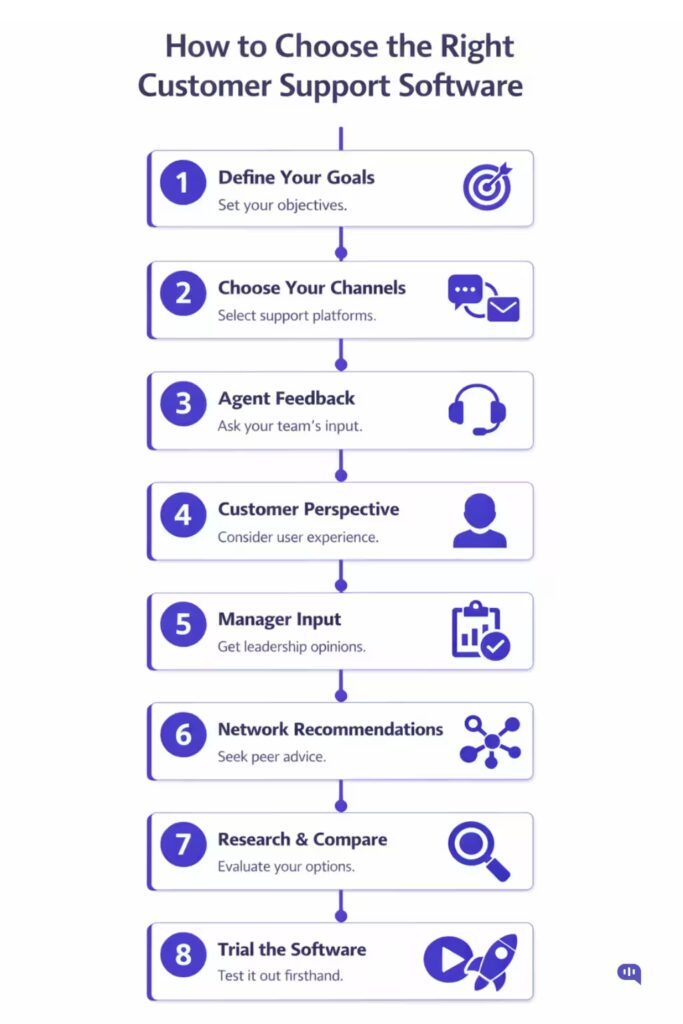
This guide walks you through a proven 8-step framework to identify, evaluate, and select the customer support software that best fits your business. We’ll take you through all the steps, and cover:
- 8-Step Framework for Evaluating Customer Support Software
- Frequently Asked Questions about Customer Support Software
- Conclusion
8-Step Framework for Evaluating Customer Support Software
1. Define Your Problems and Goals
Before comparing software, clarify why you need it. The best customer support software is the one that solves your specific problem.
Ask yourself: what does ‘excellent customer support’ look like for your business specifically? Common problems that signal it’s time to invest in a dedicated tool include:
- A surging volume of customer queries is overwhelming your current inbox or phone system
- Agents who can’t keep up with multi-channel queries across email, phone, chat, and social
- Too much time spent answering the same repetitive questions
- No visibility into support metrics like response time, ticket volume, or resolution rate
Defining your pain points up front narrows your shortlist dramatically and prevents you from being upsold on features you’ll never use.
2. Identify Your Preferred Support Channels
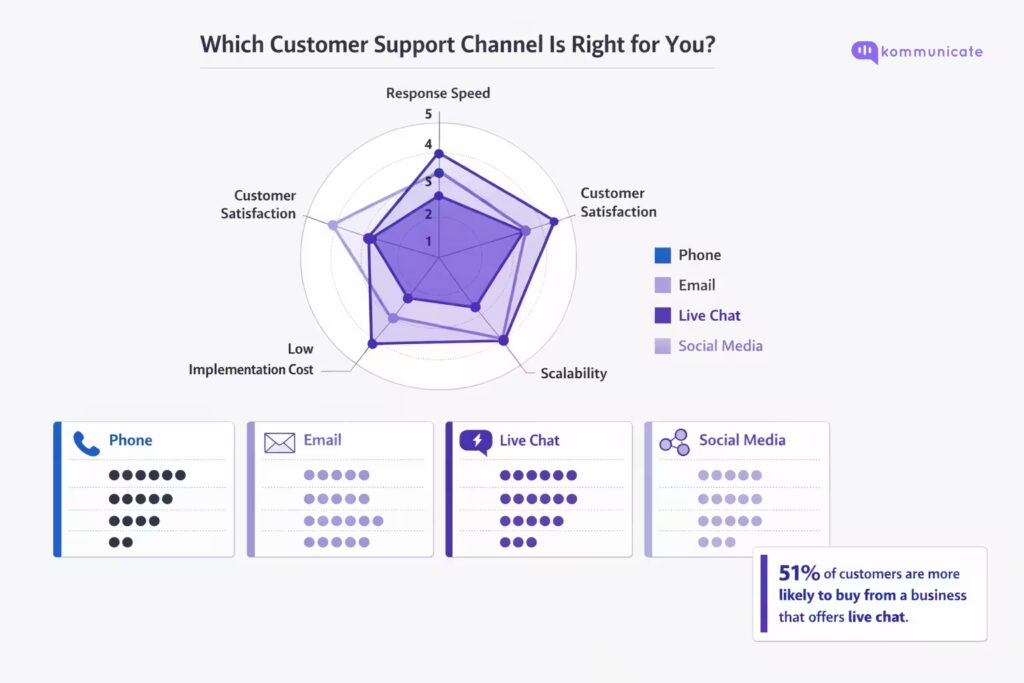
Different customer support software is optimised for different channels. Understanding which channels your customers use most is critical before you evaluate any tool.
| Channel | Best For | Response Speed | Scalability | Cost |
|---|---|---|---|---|
| Phone | Complex, urgent queries | Instant | Low (1:1) | High |
| Detailed, non-urgent issues | Hours–days | High | Low | |
| Live Chat | Real-time sales & support | Seconds | Medium–High | Medium |
| Social Media | Public brand queries | Variable | Medium | Medium |
Phone Support
Phone support is common in industries where customers need immediate answers — travel, hospitality, education, e-commerce, and financial services. B2C businesses typically see higher phone volumes. If call management is your primary challenge, consider VoIP-based tools, which are more affordable than traditional landlines and enable shared-agent access.
You can also look at our new Voice AI for a customer support platform to automate phone support.
Email Support
Email remains the dominant channel globally. If your volume is manageable but your workflow is manual and error-prone, a dedicated helpdesk with ticketing, tagging, and auto-routing will solve most of your problems without requiring a full platform overhaul.
Live Chat
Live chat is the fastest-growing support channel. Research consistently shows its impact on business outcomes:
- 51% of customers are more likely to purchase from a business that offers live chat (Invesco, 2025)
- 48% of customers say they are more likely to return to a website that has live chat (Forrester, 2022)
- 41% of online shoppers say they trust a brand more when live chat is available (Narvar, 2019)
Live chat is particularly powerful because it enables automation: chatbots can handle repetitive queries while agents focus on complex issues.
Social Media Support
Brands like Uber, Amazon, and Casper have made social media a core support channel. The challenge is that it’s public and hard to track across platforms. If you use social for support, invest in a tool with social listening and centralized inbox features to prevent queries from falling through the cracks.
3. Gather Customer Support Agent Feedback
The agents who use your support software every day will spot problems your managers can’t. Before evaluating new tools, run a structured feedback session with your frontline team. Key questions to ask:
- Where in the current process do you lose the most time?
- What feature would make your job significantly easier?
- What’s the most frustrating thing about our existing setup?
- If you could change one thing about how we handle tickets, what would it be?
Agent feedback surfaces workflow friction that doesn’t appear in management dashboards — and directly affects your shortlist criteria.
4. Consider the Customer Perspective
All of this investment is ultimately in service of your customers. Before finalizing your requirements, gather direct customer input. Ask:
- Have you ever had trouble reaching our support team? What happened?
- Which channel do you prefer to use when you have a problem?
- Would 24/7 availability change how you feel about our support?
A short customer survey or post-ticket feedback form can surface surprising preferences. Many businesses assume phone support is essential, only to discover their customers strongly prefer live chat or self-service.
5. Get the Support Manager’s Input
Your support manager sits at the intersection of strategy and execution. They know the process inside out, and they’ll be accountable for the new tool’s adoption and performance. Their perspective covers areas agents and customers typically won’t raise:
- Reporting and analytics capabilities (SLA tracking, CSAT, first contact resolution)
- Workflow automation needs (assignment rules, escalation paths, SLA timers)
- Team capacity planning and forecasting
- Integration requirements with your CRM, billing, or product systems
Manager feedback often reveals requirements that can immediately disqualify certain tools — or elevate ones you hadn’t considered.
6. Ask Your Network for Recommendations
Internal feedback gives you your requirements. Your professional network gives you real-world experience with specific tools. Post your shortlist in relevant LinkedIn groups, Slack communities, or Q&A forums like Quora with specific questions such as:
- “Which customer support software would you recommend for a B2B SaaS company with a 10-person support team?”
- “What’s your honest experience with [Tool A] vs [Tool B]? What surprised you after implementation?”
- “What did you wish you had known before switching platforms?”
Peer recommendations cut through vendor marketing. Prioritise feedback from businesses with industries, sizes, and channel mixes similar to your own.
7. Research and Compare Tools Online
Customer Support Software Evaluation Scorecard
Customer Support Software Evaluation Scorecard
Rate each tool 1–5 per criterion · Weighted score calculates automatically
| Software | Price× 0.20 | Ease of Use× 0.20 | Channels× 0.15 | Automation× 0.15 | Reporting× 0.15 | Integrations× 0.10 | Support× 0.05 | Score |
|---|
We recommend the following platforms for your research:
Review Platforms
Use G2 and Capterra to research verified user reviews of your shortlisted tools. Filter by company size, industry, and use case to find reviews most relevant to your situation. Pay attention to recurring complaints, not just star ratings — a pattern of 'terrible onboarding' or 'unreliable uptime' is more useful than an average score.
Case Studies
Most software vendors publish case studies on their websites. Look for case studies that mirror your situation: similar industry, team size, and the specific problem you're trying to solve. A case study from a 5-person team at a SaaS startup is more relevant than one from a 500-seat enterprise contact centre.
Pricing Comparison
Always visit vendor websites directly to verify pricing. When comparing, look beyond the headline per-agent cost and account for:
- Minimum seat requirements
- Costs for additional channels (chat, phone, social) as add-ons
- Automation and AI features are gated behind higher tiers
- Onboarding, setup, or professional services fees
Product Tours and Demo Videos
Watch vendor demo videos on YouTube before requesting a live demo. This gives you an unfiltered view of the UI and core workflows before you engage a sales team.
8. Trial Shortlisted Software
After completing the steps above, you should have 3–4 tools that closely match your requirements. Most customer support platforms offer a free trial of 14–30 days. Use this time to:
- Set up your real support workflows
- Have agents use it for actual tickets (or simulated ones) and collect feedback after 5–7 days
- Test the vendor's own customer support: response time and quality, to predict your long-term experience
- Verify integration with your existing tech stack (CRM, billing, product analytics)
Evaluate trials against a consistent scorecard so you're comparing like for like. After trialling all options, the right choice should be clear.
Frequently Asked Questions about Customer Support Software
Customer support software is a platform that helps businesses manage, track, and resolve customer inquiries across multiple channels, including email, live chat, phone, and social media. It typically includes a ticketing system, reporting dashboard, and automation tools to improve agent efficiency and customer satisfaction.
The best option depends on your channels and budget. Small businesses typically benefit from platforms like Kommunicate (live chat + chatbot), Freshdesk (email + ticketing), or Intercom (conversational support). Look for tools with a generous free tier or startup pricing, strong self-serve documentation, and easy setup — you won't have an IT team to manage complex configurations.
Pricing ranges from free (basic plans on tools like Freshdesk) to $150+ per agent/month for enterprise platforms. Most mid-market tools fall in the $25–75 per agent/month range (Kommunicate starts at $40 dollar per month). Always account for add-ons — channels like phone and advanced analytics are often gated behind higher tiers.
Simple email/chat setups can be live within a day. Complex implementations involving custom integrations, CRM sync, chatbot training, and multi-channel routing typically take 2–8 weeks. Factor in implementation time when evaluating: some vendors offer dedicated onboarding; others leave you with documentation.
Kommunicate's AI chatbot can go live in 10 minutes!
Start specialized if you have one dominant channel and a small team: it's faster to implement and easier to master. Move to an all-in-one platform (Zendesk, Kommunicate, Intercom) once you're managing 3+ channels and need centralized reporting across them. Avoid buying an enterprise platform before your volume justifies it.
Conclusion
The right customer support software isn't the one with the most features: it's the one that solves your specific problems, fits your team's workflows, and scales with your business. Follow the 8-step framework in this guide to move from overwhelmed to confident: define your problems, consult every stakeholder, research rigorously, and always trial before you commit.
If live chat is on your shortlist, Kommunicate offers a free trial that lets you deploy a chatbot-powered live chat widget in minutes.