Updated on June 16, 2026
TL;DR: Intercom is powerful, but its resolution-based AI pricing introduces unpredictable costs that scale faster than team size. For enterprises with complex in-app workflows, the tradeoff may be worth it. For mid-market teams focused on L1 automation and cost predictability, the operational overhead and billing volatility can outweigh the benefits.
Intercom is a SaaS giant that commands 30.8% of the customer engagement market. There are two reasons for this:
1. It’s a heavy app that can manage in-app messaging at scale
2. It’s an early adopter of AI (with Fin.AI) and has gained traction in the conversational AI market.
Now, while Intercom is really useful for customer engagement, it has also become the poster child for “pricing anxiety” in the SaaS world. If you browse popular communities on Reddit and review websites, the sentiment is clear: people love the product, but they loathe the bill.
What used to be a straightforward seat-based model has evolved into a complex system of overages and modular add-ons that can make your monthly invoice look like a high-stakes maths problem.
To truly understand what you’re paying for, you have to look past the marketing site and into the hidden costs of maintenance, data hygiene, and the unpredictable nature of automated support.
- Intercom Pricing Breakdown
- What You Pay For When You Buy Intercom vs. What You Still Manage?
- How can Resolution-Based Pricing Result in Overages? (With Customer Reviews)
- When Does Intercom’s Pricing Actually Make Sense?
- Conclusion
Intercom Pricing Breakdown
Intercom’s pricing model is split into three main tiers based on team size and automation needs, with additional usage-based costs for AI and outbound messaging. This looks like:
| Plan | Annual Price (per seat/month) | Monthly Price (per seat/month) | Key Features Included | Seat Types |
| Essential | $29 | $39 | Shared Inbox, Ticketing, Public Help Center, Fin AI Agent access, Slack integration, and basic reporting. | Full seats only |
| Advanced | $85 | $99 | Everything in Essential, plus: Workflows (automation builder), Round Robin assignment, Multiple team inboxes, Private & Multilingual Help Centres, Salesforce & Marketo integrations. | Includes 20 free Lite seats |
| Expert | $132 | $139 | Everything in Advanced, plus: SLAs, HIPAA support, SSO & Identity Management, Workload management, Real-time dashboards, and Multi-brand support (Messenger/Help Centre). | Includes 50 free Lite seats |
Add-ons & Usage-Based Costs
Beyond your base subscription, Intercom applies charges based on automation performance and message volume. These costs are billed at the end of your billing cycle and often follow a tiered structure.
| Item | Pricing | Description |
| Fin AI Agent | $0.99 per resolution | Only charged when the AI successfully resolves a customer issue without agent intervention. |
| Fin AI Copilot | $35 per seat/month* | An internal AI assistant for agents. (*$29/mo if billed annually). |
| Proactive Support Plus | $99 /month | A required add-on for advanced engagement tools. Includes the first 500 “Messages Sent” per month for free. |
| Messages Sent (Overages) | Starts at $0.07 /message | Applies to Product Tours, Surveys, Checklists, Mobile Push, and Carousels once the 500-message limit in Proactive Support Plus is exceeded. |
| Bulk Email Sent | Starts at $0.045 /email | Billed for outbound emails sent via Series, API, or Contact lists. (Standard 1:1 emails from the Inbox remain free). |
| SMS Segments | Starts at $0.06 /segment | Cost varies by region (e.g., $0.06 for US/Canada, $0.09 for UK/Australia). The default limit is 10,000 segments per month. |
| Bulk WhatsApp Sent | Starts at $0.10 /unit | Applied to teammate-initiated outbound WhatsApp messages (1:1 or 1:many). |
| Phone & Voice | Usage-based | Billed for phone number rental, inbound/outbound minutes, and recording minutes. Includes Messenger call minutes. |
While this pricing is on par with other SaaS providers, there are several things that buyers might be interested in before going through with the purchase. In the next section, we’re going to cover what you’re paying for with these subscription tiers, and what are the things you will need to manage are.
What You Pay For When You Buy Intercom vs. What You Still Manage?
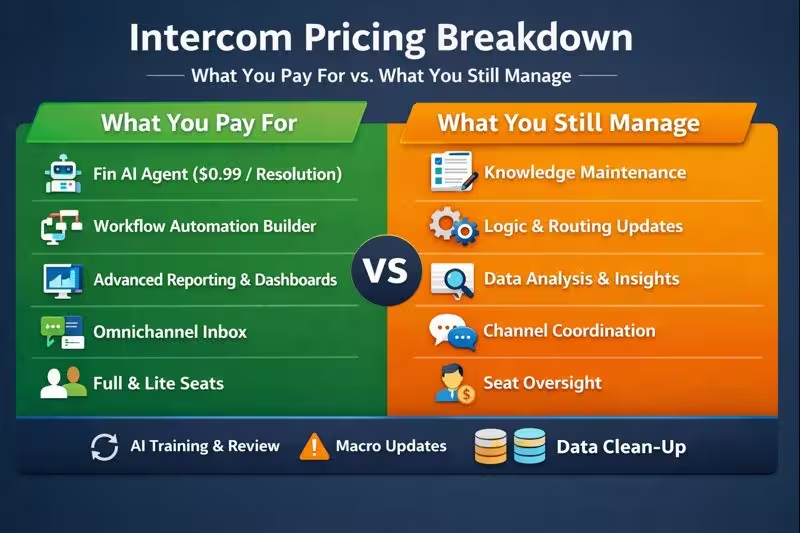
Intercom is one of the best-reviewed customer products on G2 and Capterra, and Fin is explicitly advertised as “#1 for Complex Queries.” However, this doesn’t mean that you can subscribe and forget. There are several tasks that you need to perform to facilitate these automations.
| What You Pay For | What You Still Manage |
| Fin AI Agent ($0.99/resolution) | Knowledge Hygiene: Fin is only as good as your documentation. You must manually audit, simplify, and update your Help Center articles weekly to prevent AI “hallucinations.” |
| Workflow Automation Builder | Logic Maintenance: You are responsible for building the “if-this-then-that” logic. Every time you launch a new product feature, a human must update the routing rules and automated triage paths. |
| Advanced Reporting & Dashboards | Data Synthesis: Intercom gives you the numbers, but a manager still has to spend hours analyzing why resolution rates dropped or which macros are causing customer friction. |
| Omnichannel Inbox | Channel Orchestration: While Intercom connects SMS, WhatsApp, and email, your team must still manage the distinct “voice” and response expectations for each unique channel. |
| Full & Lite Seats | Seat Governance: To keep costs down, you must actively police your user list (downgrading inactive teammates to “Lite” seats) to avoid paying the $29–$139 “Seat Tax” for non-support staff. |
Tasks You Need to Perform for Maintenance
Intercom power users often cite these three areas as the biggest “unbilled” time sinks:
1. The AI Training Loop: Even with a “set and forget” bot, high-performing teams spend 3–5 hours a week reviewing “failed resolutions” to see where Fin went wrong and correcting the source documentation.
2. Macro Decay: Canned responses (macros) quickly become outdated. Without a human regularly “weeding” the macro library, your agents will accidentally send stale information, leading to higher escalation rates.
3. Customer Data Clean-up: Intercom charges based on “People Reached” in some legacy models and “Full Seats” in others. A human must regularly archive stale leads and old conversations to ensure the workspace remains organized and cost-efficient.
As we’ve covered in our recent article about the customer support org chart, customer support automation products don’t automate your team. You still need to invest time in managing the responses and solving customer problems at scale.
However, in Intercom’s specific case, this workload is complicated by the pay-per-resolution pricing.
How can Resolution-Based Pricing Result in Overages? (With Customer Reviews)
While the $0.99 per resolution model sounds fair on paper, it is the primary driver of “billing shock” for Intercom customers. Unlike seat-based pricing, which is a fixed cost, resolution-based pricing is a variable cost that can scale infinitely and unexpectedly.
For example, your $3,000 Intercom bill can become $8,500
- 1,200 Fin resolutions/month × $0.99 = $1,188
- 4 Advanced seats × $99 = $396
- 10 Lite seats (governance missed → upgraded) × $39 = $390
- Proactive Support Plus = $99
- 3,000 outbound messages × $0.07 = $210
- Copilot for 5 agents × $35 = $175
- Total AI-driven overages: $2,057/month
- Total monthly bill: ~$4,700 → ~$6,000+ with growth
As you can see, resolution-based pricing can inflate your subscription by quite a bit. Additionally, Fin also has some controversial rules around resolutions, which can make the overages worse.
Fin considers two instances as resolutions:
1. Hard Resolution – The customer clicks the “That Helped 👍,” button or replies with an affirmative.
2. Soft Resolution – When the customer exits a conversation without requesting further assistance within 24 hours.
This seems like a fair evaluation of resolutions, but there are two major problems –
1. All Resolutions Aren’t Equal
When a customer asks you, “Where can I buy the WhatsApp add-on?”. Your customer service representative can reply with a link and close the conversation. Fin will charge you $1 for this message.
Even on the higher side (let’s say your customer service agents were paid at $60/hour), this 5-second conversation takes around 10 cents.
While resolution-based pricing seems fair, at scale, your repetitive, FAQ-based questions are going to eat into a chunk of your overall costs.
2. Soft Resolutions Might be a Sign of Customer Dissatisfaction
If Fin gives out a wrong answer, then the customer or prospect might just leave your website or unsubscribe from a product. If this happens, you are effectively paying for a resolution that hurts customer engagement and your business.
We’ve seen these stories when we were compiling our research, and we’ll take you through some examples.
Customer Reviews & Reddit Sentiment
Most SaaS leaders and support leads agree that resolution-based pricing makes budget allocation difficult:
1. Intercom Pricing Increased by 120%
According to a viral Reddit post by u/AnkitatTripock on r/SaaS, “I used Intercom’s AI chatbot Fin for my company, the cost shot up, and I’m not able to see significant productivity improvement. I was already spending over $4k/month, with 40 agents. Now it’s shot up to $9k.”
2. Priced for Failures
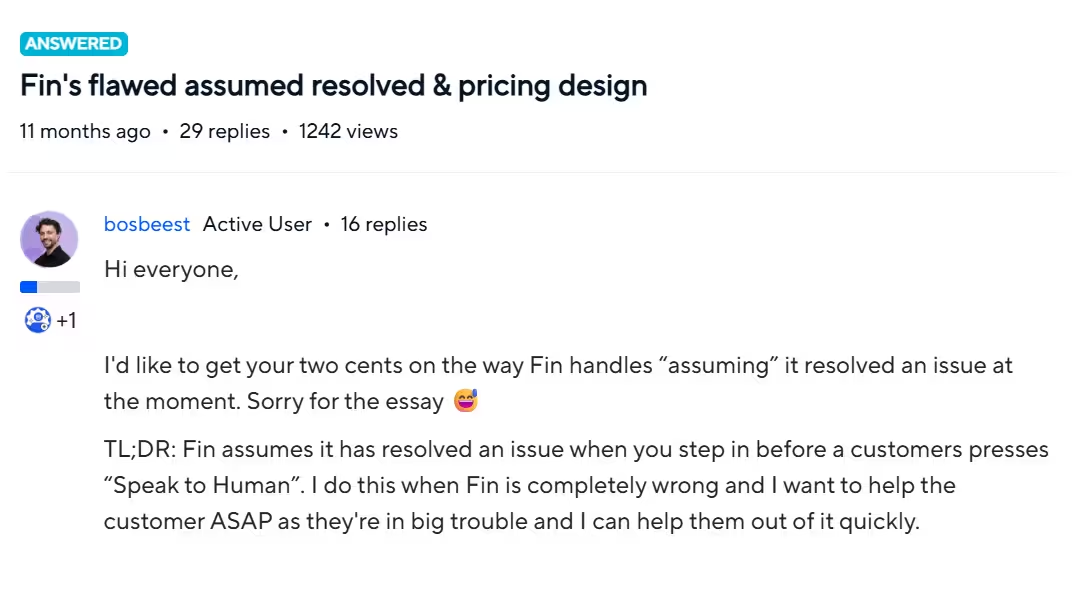
In a popular Intercom community post, an Intercom customer points out that Fin assumes that the customer complaint was resolved even when a human takes over from the AI chatbot.
While Intercom had promised to work on this suggestion during their “Built For You” event last year, they walked back the promise later.
3. A Meta-Analysis of 200+ Reviews from Capterra Talks about the AI Tax
An analysis of 200+ reviews from Capterra shows that founders and operators can’t predict their customer support bills anymore. This makes budget allocation and other financial processes needlessly difficult for users.
Additionally, users also complain about how the Intercom ecosystem locks them into specific products and makes data migration hard.
While Intercom is definitely useful for a lot of customer service teams, it might not be the perfect fit for yours. Let’s understand which teams can get the most benefit from Intercom.
When Does Intercom’s Pricing Actually Make Sense?
Choosing a customer support platform in 2026 depends on whether you prioritize a broad, integrated marketing and support ecosystem or a laser-focused, cost-predictable automation engine. While Intercom offers an unmatched feature set for global brands, its complexity and variable costs can be a hurdle for mid-market teams.
| Business Segment | Why They Should Use Intercom | Key Benefit |
| Enterprise SaaS | High-volume teams requiring multi-brand support and deep in-app messaging capabilities. | Centralized Control: Manage multiple product lines and regions within a single, unified interface and SDK. |
| Product-Led Growth (PLG) | Companies that rely on in-app onboarding and proactive feature announcements to drive adoption. | Seamless CX: Use Product Tours and Checklists to guide users through the UI without them leaving the app. |
| Complex Ecosystems | Teams already deep in the Salesforce, Marketo, or Zendesk ecosystems that need native, high-fidelity syncing. | Data Continuity: Maintain a 360-degree view of the customer by syncing every chat event to your CRM in real-time. |
| Automation-First Teams | Businesses with high-quality documentation that want to offload up to 50–80% of L1 support to an AI (Fin). | Instant Scale: Handle viral traffic spikes or outages without hiring additional human headcount. |
If you’re wondering whether Intercom is the right fit for your business, we’ve prepared a quick checklist that will help you decide if you should continue using Intercom.
The Intercom Checklist
Use this checklist to determine if you should stay or start looking for an alternative:
- Audit Your Bill: Does more than 20% of your monthly invoice come from “Assumed Resolutions” (customers who left without clicking anything)?
- Check Your Response Time: Are you paying for “Expert” or “Advanced” tiers but still waiting more than 24 hours for Intercom’s own support team to help you?
- Evaluate Your “Labor Gap”: Is your team spending more than 5 hours a week just cleaning up documentation to keep the AI from failing?
- Analyze Migration Costs: Do you have more than 50 active “Workflows” or “Series” that would need to be manually rebuilt in a new platform?
- Assess Automation Needs: Do you primarily need a high-accuracy chatbot for FAQs (L1 support), or do you truly need the full suite of product tours, checklists, and outbound SMS?
For mid-market firms and businesses that are highly sensitive to automation accuracy and cost, Kommunicate often serves as a more practical alternative.
While Intercom excels in breadth, Kommunicate is designed for rapid deployment and offers a more predictable, conversation-based pricing model that avoids the “uncertainty” of Intercom’s $0.99 resolution fee. If your primary goal is high-accuracy AI resolution with a smooth human handoff without the enterprise overhead, Kommunicate is the more agile choice for 2026.
Conclusion
Intercom remains a powerhouse for a reason: its ability to unify in-app messaging, AI-driven support, and complex marketing workflows is virtually unmatched for enterprise-level SaaS. However, the transition to a resolution-based pricing model has fundamentally changed the relationship between the platform and its users. It is no longer a tool you can simply “set and forget”; it requires a dedicated strategy for knowledge hygiene and a vigilant eye on “soft resolutions” to ensure you aren’t paying a premium for customer frustration.
For mid-market companies and startups, the decision to stick with Intercom often comes down to a trade-off between “all-in-one” convenience and financial predictability. If your support volume is predictable and your product requires deep, multi-layered in-app guidance, the “Intercom Tax” may be a price worth paying.
But if you find yourself spending more time auditing bot hallucinations and disputing “assumed resolutions” than actually helping customers, it may be time to look toward leaner, automation-first alternatives like Kommunicate that offer the same AI power without the variable-cost anxiety.

A Content Marketing Manager at Kommunicate, Uttiya brings in 11+ years of experience across journalism, D2C and B2B tech. He’s excited by the evolution of AI technologies and is interested in how it influences the future of existing industries.