Updated on May 19, 2026
TL;DR
- OpenAI’s latest Agents SDK update helps developers build production-ready AI agents, not just basic chatbots.
- The update adds a stronger agent harness, native sandbox execution, manifest-based workspaces, MCP support, memory, file handling, and shell execution.
- Agents can now inspect files, call tools, run commands, maintain context, and complete multi-step workflows inside controlled environments.
- The tutorial shows how to build a chatbot with the Agents SDK and add tools for policy and order lookups.
- The same foundation can scale into a customer support agent that retrieves data, takes action, and escalates when needed.
OpenAI’s latest Agents SDK update (April 2026) moves agent development closer to production infrastructure. OpenAI describes the update as a model-native harness plus native sandbox execution for building longer-running agents safely.
This matters because most real-world AI agents are not prompt-and-response systems. The updated SDK provides developers with a standardised way to build those workflows without having to recreate the agent loop, tool routing, state handling, and sandbox infrastructure from scratch.
In this article, we will first break down the major features in the new Agents SDK update and show you how to build a chatbot with it. We’ll cover:
1. What is the OpenAI Agents SDK?
2. Key features in the new OpenAI Agents SDK update
3. Tutorial: Build a chatbot with the OpenAI Agents SDK
4. How does the new Agents update change this chatbot?
5. Build vs buy: Does the new Agents SDK make the chatbot platform irrelevant?
6. Conclusion
What is the OpenAI agents SDK?
The OpenAI Agents SDK is a framework for building agentic applications in code. In simple terms, it helps developers:
1. Define agents
2. Give them instructions
3. Attach tools
4. Run them
5. Inspect outputs
6. Expand into more advanced workflows
OpenAI describes agents as applications that can plan, call tools, collaborate across specialists, and maintain enough state to complete multi-step work.
AI agents work in a loop and are expected to handle multiple tools during each run. The workflow looks like this:
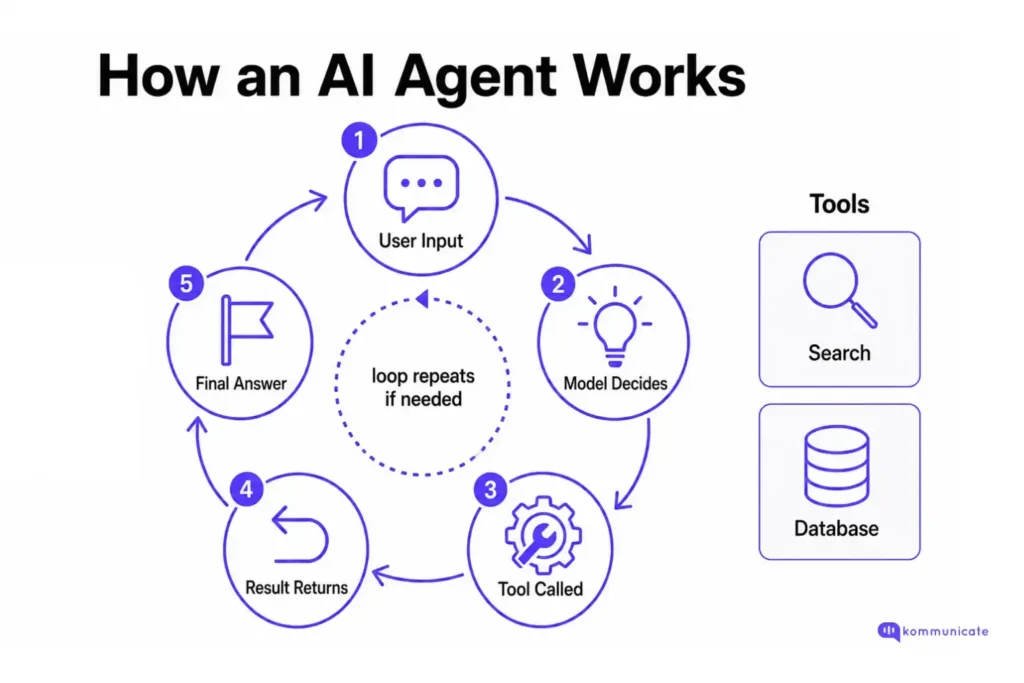
The SDK abstracts many of the steps in the loop, so developers can focus on the workflow rather than manually managing every model call, structured output, tool call, and response state. The new features introduced with this update are worth reviewing.
Key features in the new OpenAI Agents SDK update
The major features in this OpenAI Agents SDK update are:
1. A more capable agent harness
The biggest update is the improved agent harness. OpenAI says the SDK now supports:
- Configurable memory
- Sandbox-aware orchestration
- Codex-like filesystem tools
- MCP-based tool use
- Skills
- Custom instructions through AGENTS.md
- Shell execution
- File edits with apply patch
The harness is the layer that coordinates the agent loop. It decides how the agent receives instructions, how tools are made available, how the state is carried forward, and how the model interacts with files or systems.
For developers, this means fewer custom abstractions. Instead of building your own orchestration layer for every agent project, you can use the SDK’s native primitives and extend them where needed.
2. Native sandbox execution
The updated Agents SDK supports native sandbox execution. This provides agents with a controlled workspace where they can read and write files, install dependencies, run code, and safely use task-specific tools.
This is important for production agents because many useful workflows require more than text generation. For example, an internal support chatbot may need to inspect a policy document, generate a report, update a file, or run a script. Without sandboxing, developers often have to manually wire together file access, execution environments, permissions, and cleanup logic.
OpenAI has added support for sandbox providers such as Blaxel, Cloudflare, Daytona, E2B, Modal, Runloop, and Vercel.
3. Manifest-based workspaces
The SDK introduces a Manifest abstraction for defining an agent’s workspace.
A Manifest can describe:
- Mounted files
- Output directories
- Data from storage providers (AWS S3, Google Cloud Storage, Azure Blob Storage, and Cloudflare R2)
This gives the agent a predictable environment. Instead of vaguely telling the model that “files are available,” developers can specify where inputs are located, where outputs should be written, and which resources are available during the run.
For chatbot development, this becomes useful when the bot needs to answer from product docs, support policies, onboarding files, or knowledge base exports.
4. Separation between harness and compute
OpenAI has also separated the agent harness and the compute environment. This is a security and scalability improvement. The harness manages orchestration and state, while the sandbox handles execution.
That separation helps keep credentials away from environments where model-generated code may run. It also enables snapshotting and rehydration, so a run can continue in a fresh container if the original sandbox fails or expires.
For production teams, this is one of the most important updates. It makes agent workflows more durable and reduces the risk of exposing sensitive credentials within the same environment where the model executes commands.
5. Better support for long-running and multi-step tasks
The updated SDK is built for agents who need to keep working across multiple steps. OpenAI specifically calls out agents that inspect files, run commands, edit code, and work on long-horizon tasks.
This makes the SDK more useful for real business workflows, such as:
| Use Case | What the Agent Needs to Do |
|---|---|
| Customer support chatbot | Answer questions, check policies, call APIs, and escalate complex issues. |
| Internal IT assistant | Read docs, run diagnostics, and create tickets. |
| Research assistant | Inspect files, summarize data, and cite sources. |
| Coding assistant | Read files, edit code, and run tests. |
| Operations assistant | Pull data, compare records, and generate reports. |
This all sounds good, right? But it’s better in production. Let’s see how it works by building something with this new Agents SDK.
Tutorial: Build a chatbot with the OpenAI Agents SDK
Step 1: Install the Agents SDK
- Install the Python SDK with:
| pip install openai-agents |
- And set your API key:
| export OPENAI_API_KEY=your_api_key_here |
Step 2: Create a basic chatbot agent
We’re going to create a very basic chatbot using the ChatGPT responses API. It can answer questions, but it won’t have context about your business.
| import asyncio from agents import Agent, Runner chatbot = Agent( name=”Support Chatbot”, instructions=( “You are a helpful customer support chatbot. “ “Answer clearly, ask clarifying questions when needed, “ “and do not make up policy details.” ), model=”gpt-5.5″, ) async def main(): result = await Runner.run( chatbot, “Hi, I need help understanding your refund policy.” ) print(result.final_output) if __name__ == “__main__”: asyncio.run(main()) |
Step 3: Add a simple tool
- A chatbot becomes more useful when it can call tools. For example, let us add a tool that returns a sample refund policy.
| import asyncio from agents import Agent, Runner, function_tool @function_tool def get_refund_policy() -> str: “””Return the company’s refund policy.””” return ( “Customers can request a refund within 30 days of purchase. “ “Refunds are processed to the original payment method within 5-7 business days.” ) chatbot = Agent( name=”Support Chatbot”, instructions=( “You are a helpful customer support chatbot. “ “Use the refund policy tool when the user asks about refunds. “ “If the question is outside the policy, ask for more details or escalate.” ), model=”gpt-5.5″, tools=[get_refund_policy], ) async def main(): result = await Runner.run( chatbot, “Can I get a refund if I bought the product two weeks ago?” ) print(result.final_output) if __name__ == “__main__”: asyncio.run(main()) |
Now the chatbot is not only generating an answer. It can decide when to use a tool, retrieve the relevant policy, and respond with grounded information.
Step 4: Add an order lookup tool
- Next, we’ll add a tool that simulates checking order status. In a real application, this would connect to your CRM, help desk, e-commerce platform, or internal API.
| import asyncio from agents import Agent, Runner, function_tool @function_tool def get_refund_policy() -> str: “””Return the company’s refund policy.””” return ( “Customers can request a refund within 30 days of purchase. “ “Refunds are processed to the original payment method within 5-7 business days.” ) @function_tool def lookup_order(order_id: str) -> str: “””Look up the status of a customer order.””” sample_orders = { “ORD-1001”: “Delivered on May 10, 2026.”, “ORD-1002”: “In transit. Expected delivery: May 15, 2026.”, “ORD-1003”: “Refund initiated. Expected completion: 5-7 business days.”, } return sample_orders.get( order_id, “Order not found. Please check the order ID and try again.” ) chatbot = Agent( name=”Support Chatbot”, instructions=( “You are a helpful customer support chatbot. “ “Use tools when the user asks about refunds or order status. “ “If an order is not found, politely ask the user to verify the order ID. “ “Do not invent order details.” ), model=”gpt-5.5″, tools=[get_refund_policy, lookup_order], ) async def main(): result = await Runner.run( chatbot, “Can you check the status of order ORD-1002?” ) print(result.final_output) if __name__ == “__main__”: asyncio.run(main()) |
This is the key transition in the tutorial. The chatbot is no longer just a conversational interface. It is now an agent that can decide whether it needs a tool, call that tool, observe the result, and produce a user-facing answer.
Step 5: Make it interactive
Let’s execute a small terminal chatbot loop:
| import asyncio from agents import Agent, Runner, function_tool @function_tool def get_refund_policy() -> str: “””Return the company’s refund policy.””” return ( “Customers can request a refund within 30 days of purchase. “ “Refunds are processed to the original payment method within 5-7 business days.” ) @function_tool def lookup_order(order_id: str) -> str: “””Look up the status of a customer order.””” sample_orders = { “ORD-1001”: “Delivered on May 10, 2026.”, “ORD-1002”: “In transit. Expected delivery: May 15, 2026.”, “ORD-1003”: “Refund initiated. Expected completion: 5-7 business days.”, } return sample_orders.get( order_id, “Order not found. Please check the order ID and try again.” ) chatbot = Agent( name=”Support Chatbot”, instructions=( “You are a helpful customer support chatbot. “ “Use tools when needed. “ “Keep answers concise and accurate. “ “Do not make up company policies, order statuses, or refund timelines.” ), model=”gpt-5.5″, tools=[get_refund_policy, lookup_order], ) async def main(): print(“Support Chatbot is ready. Type ‘exit’ to quit.”) while True: user_message = input(“\nYou: “) if user_message.lower() in [“exit”, “quit”]: print(“Chatbot: Goodbye!”) break result = await Runner.run(chatbot, user_message) print(f”Chatbot: {result.final_output}”) if __name__ == “__main__”: asyncio.run(main()) |
How does this application work?
This application is fairly simple:
- The user sends a message
- The SDK passes the message and agent instructions to the model
- If the model can answer directly, it returns a response
- If it needs external information, it calls one of the tools
- The tool’s result is then returned to the model, which uses it to generate the final answer.
This is the quintessential AI agent loop of:
- Reason
- Act
- Observe
- Answer
The major difference is that the OpenAI Agents SDK provides developers with a structured framework for deploying that loop without building everything from scratch.
To help you understand how the new update connects to the tutorials we’ve written, let’s look at where the new features are most helpful.
How does the new Agents SDK update change this chatbot?
The tutorial above uses a simple tool-based chatbot. The new SDK update becomes more valuable as the chatbot grows.
| Chatbot Requirement | Relevant SDK Capability |
|---|---|
| Answer from uploaded files | Sandbox workspace and file access |
| Work with structured folders | Manifest abstraction |
| Run code or commands | Native sandbox execution |
| Use external tools | MCP and tool integrations |
| Maintain multi-step progress | State and durable execution patterns |
| Avoid exposing credentials | Separation between the harness and compute |
| Debug agent behaviour | Tracing and observability |
OpenAI also recommends inspecting traces early so developers can see model calls, tool calls, handoffs, and guardrails before tuning prompts.
Now, you might be tempted to replace your production support chatbot with this, but it’s not that simple.
Build vs buy: Does the new Agents SDK make chatbot platform irrelevant?
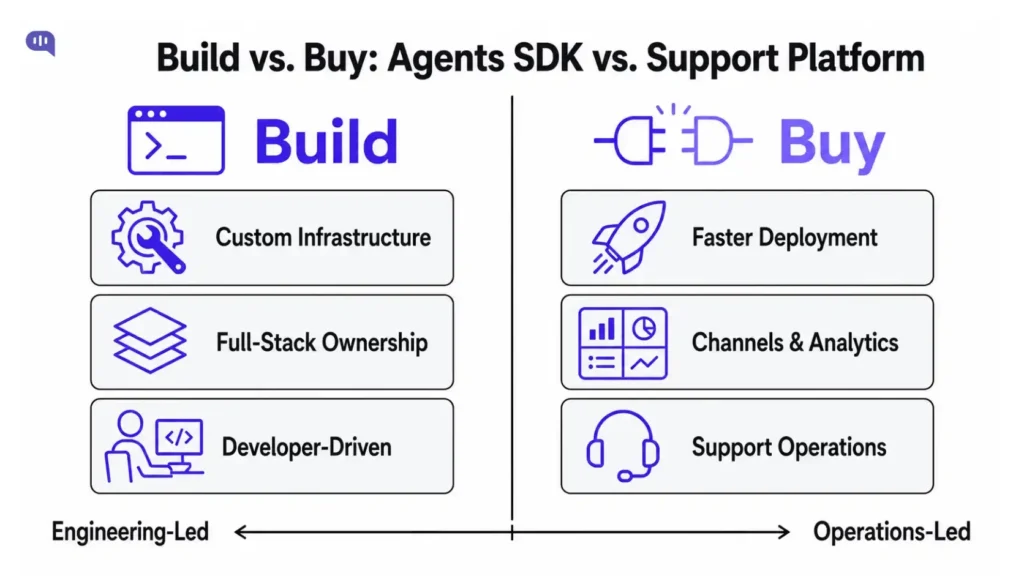
OpenAI’s updated Agents SDK makes it easier for developers to build agentic workflows, but it does not replace the operational layer needed to run customer support chatbots at scale.
A chatbot platform solves a different problem. It is not only about making the model call the right tool. It is about deploying that agent across customer-facing channels, connecting it to support workflows, giving non-technical teams control, monitoring conversations, managing handoffs, and improving resolution rates over time.
For example, if you build directly with the Agents SDK, your engineering team still has to handle:
| Requirement | What Your Team Still Needs to Build |
|---|---|
| Channel deployment | Website chat, WhatsApp, mobile apps, Instagram, email, and other customer touchpoints. |
| Human handoff | Routing conversations to the right team or agent with full context. |
| Agent dashboard | A workspace where support teams can view, reply, assign, and close conversations. |
| Knowledge management | Syncing help centre articles, FAQs, PDFs, and internal documents. |
| Conversation analytics | Measuring resolution rate, deflection quality, CSAT, fallback rate, and escalation patterns. |
| Access control | Managing roles, permissions, teams, and business rules. |
| Integrations | Connecting Zendesk, Freshdesk, Salesforce, Shopify, CRMs, ticketing tools, and backend systems. |
| Guardrails | Escalation triggers, fallback handling, confidence thresholds, and answer governance. |
| Ongoing optimization | Reviewing unresolved conversations and improving the bot without constant engineering work. |
This is where Kommunicate fits in.
Businesses do not just need an agent that can reason. They need an AI agent that can work inside live support operations:
- Answer customers on the right channel
- Pull from approved knowledge sources
- Create or update tickets
- Hand off to humans
- Summarize the conversation
- Give support teams visibility into what is happening.
A useful way to think about it is this:
| Build with Agents SDK | Buy or use a platform like Kommunicate |
|---|---|
| Best for engineering-led teams who are building a support AI agent as a product offering | Best for support, CX, and operations teams that need faster deployment |
| Strong choice when your core product offering is a chatbot or agentic AI platform | Strong choice when customer support is a business function that needs speed, reliability, and continuous optimization |
| Gives control over model orchestration and tool execution | Gives ready-to-use support workflows, channels, dashboards, and integrations |
| Requires engineering ownership for deployment, analytics, handoff, and maintenance | Provides a plug-and-play operational layer for support, so teams can focus on improving customer experience instead of rebuilding support infrastructure |
| Best suited for teams that can allocate additional bandwidth to customer support operations while managing their core responsibilities | Best suited for forward-thinking teams that want to move fast with production-ready AI agents for customer support without the overhead of building and managing them in-house |
| Gives full control, but also full maintenance responsibility | Gives less infrastructure control, but you can extend the platform with your own APIs, workflows, plugins, and backend systems |
So the real question is “How much of the chatbot infrastructure do you want to build and maintain yourself?”
If you are building a deeply custom developer tool, internal research agent, or code execution workflow, the Agents SDK may be the right foundation.
But if customer support automation is not the core product you are building, recreating the entire chatbot platform layer can become a distraction. You need channels, integrations, routing, escalation, analytics, security controls, and a dashboard for support teams.
That is where Kommunicate makes more sense. It gives you a flexible support automation platform that works out of the box, while still allowing your team to extend capabilities through custom APIs, backend workflows, webhooks, plugins, and tools you build on your side.
In other words, the Agents SDK is useful when you want to build the agent infrastructure yourself. Kommunicate is useful when you want to deploy, manage, customize, and scale AI customer support agents without reinventing the wheel.
Conclusion
OpenAI’s latest Agents SDK update shows how quickly AI agent development is moving from simple prompt-response workflows to more capable, tool-using systems. With stronger orchestration, sandbox execution, manifest-based workspaces, MCP support, memory, file handling, and shell execution, developers now have a more structured way to build agents that can reason, act, observe results, and continue working across multi-step tasks.
But the SDK does not make chatbot platforms irrelevant. It solves the developer infrastructure problem, not the full customer support operations problem.
That is where platforms like Kommunicate remain important. The Agents SDK can provide the intelligence layer, while Kommunicate provides the support execution layer around it. For teams that want to build custom internal agents, the SDK is a strong foundation. For teams that want to deploy AI agents across website chat, WhatsApp, mobile apps, and helpdesk systems, Kommunicate helps turn that agentic capability into a production-ready customer support experience faster.
If you want to deploy an AI agent to customer support within hours, sign up for Kommunicate.

Adarsh Kumar is the CTO & Co-Founder at Kommunicate. As a seasoned technologist, he brings over 14 years of experience in software development, artificial intelligence, and machine learning to his role. His expertise in building scalable and robust tech solutions has been instrumental in the company’s growth and success.