Updated on July 1, 2026
OpenAI RAG helps developers build grounded AI answers from approved knowledge sources.
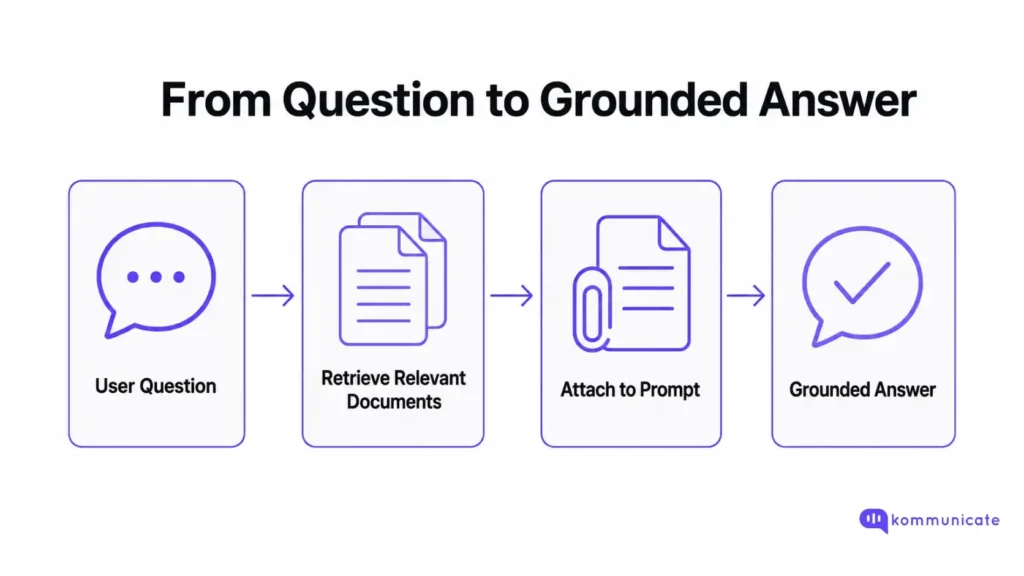
OpenAI RAG, or retrieval-augmented generation, is a pattern where your application retrieves relevant knowledge, attaches that context to a prompt, and asks an OpenAI model to generate a grounded answer.
The basic flow is simple:
- Retrieve relevant documents or chunks.
- Add them to the model context.
- Generate an answer using only that context.
- Fall back or hand off when the context does not answer the question.
For a prototype, embeddings and cosine similarity are enough. For a production RAG system, you also need chunking, metadata filters, hybrid retrieval, reranking, source validation, access control, fallback behavior, and evaluation.
This guide walks through how OpenAI RAG works, where RAG pipelines fail, how to build a minimal Python example, and when a managed customer support platform like Kommunicate is a better choice than maintaining the whole RAG stack yourself.
What is RAG?
RAG stands for retrieval-augmented generation. In an OpenAI RAG application, the model does not rely only on what it learned during training. Your application first retrieves relevant content from approved sources, such as help docs, policy pages, PDFs, internal SOPs, or product documentation. Then it passes that content to the model as context.
This matters because large language models can generate plausible-sounding answers even when they do not know your latest refund policy, shipping timeline, pricing rule, or product documentation. Fine-tuning can help with style and repeated patterns, but it is not the best way to keep fast-changing business knowledge current.
RAG solves that problem by keeping knowledge outside the model. When the knowledge changes, you update the source or index instead of retraining the model.
This tutorial takes you through the whole process of creating a RAG pipeline for customer service in production. We’re going to talk about:
- Two Ways To Build RAG With OpenAI
- How does RAG work? Three stages
- Where does RAG fail? Five common failure modes
- How to evaluate your RAG pipeline?
- RAG vs. Tool lookup vs. FAQ automation
- A minimal RAG pipeline in Python
- Security risks in production RAG
- What does production RAG need? Checklist
- Should you build your own RAG pipeline or use Kommunicate?
- Conclusion
- FAQs
Two Ways To Build RAG With OpenAI
There are two practical ways to build RAG with OpenAI.
Option 1: Use OpenAI File Search
OpenAI File Search is the managed path. You upload files to an OpenAI vector store, attach the vector store to the file_search tool, and call it from the Responses API. OpenAI handles parsing, chunking, embedding, indexing, and retrieval.
This is useful when you want to move quickly and do not need complete control over every part of the retrieval pipeline.
A simplified flow looks like this:
- Create a vector store
- Upload files to the vector store
- Ask a question using the Responses API
- Allow the file_search tool to retrieve relevant content
- Generate the final answer from the retrieved context
Use this path when your main goal is to build a working document Q&A or support assistant quickly.
Option 2: Build A Custom RAG Pipeline
A custom RAG pipeline gives you more control. You own the chunking strategy, metadata schema, embedding model, vector database, keyword search, reranking, source validation, logging, and fallback behavior.
Use this path when you need:
- Custom chunking
- Strict tenant-level permissions
- Region, plan, product, or language filters
- A custom reranker
- External vector databases
- Cross-provider portability
- Detailed retrieval observability
- Support for non-standard data structures
For customer support, the right choice depends on how much control your team needs and how much infrastructure your team is prepared to maintain.
How does RAG work? Three stages
Stage 1: Ingestion
Before anything can be retrieved, documents need to be ingested, split, enriched, and indexed.
- Ingestion means pulling your knowledge sources into a processable form. This includes help center articles, product docs, internal SOPs, policy PDFs, and onboarding guides.
- Splitting means dividing those documents into chunks that can be stored as vector embeddings. A common mistake is splitting by character count alone. A 500-character chunk that says “eligible within 30 days if unused” is useless without knowing which product, which country, and which policy version it came from.
This is the core problem contextual retrieval tries to solve: chunks often lose the document-level context that made them meaningful. The fix is to enrich chunks before indexing them:
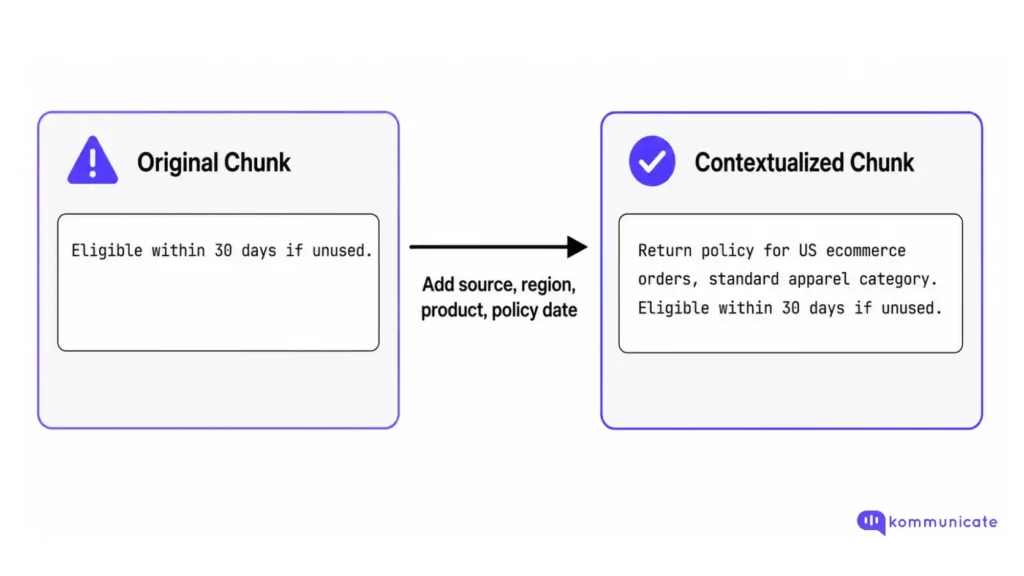
Prepend source title, product area, region, policy date, document purpose, and any important policy conditions before embedding. This adds work during ingestion, but it makes retrieval more reliable because each chunk carries enough context to stand on its own.
Metadata is what lets you filter retrievals later. At minimum, store:
- Source URL
- Product or category
- Region or language
- Owner or team
- Last updated date
Deleted content must be removed from the index. An AI agent answering from a superseded returns policy is worse than no agent at all.
Stage 2: Retrieval
When a user submits a query, the retrieval layer converts it into a vector embedding and finds the most similar chunks in the index. This is semantic search: it finds related content even when the exact keywords do not match.
Semantic search alone has a gap. If a user types an order ID, a product SKU, or an exact policy name, semantic similarity can smooth away the match you needed. Most production RAG systems combine two signals:
- Semantic search
- Keyword search
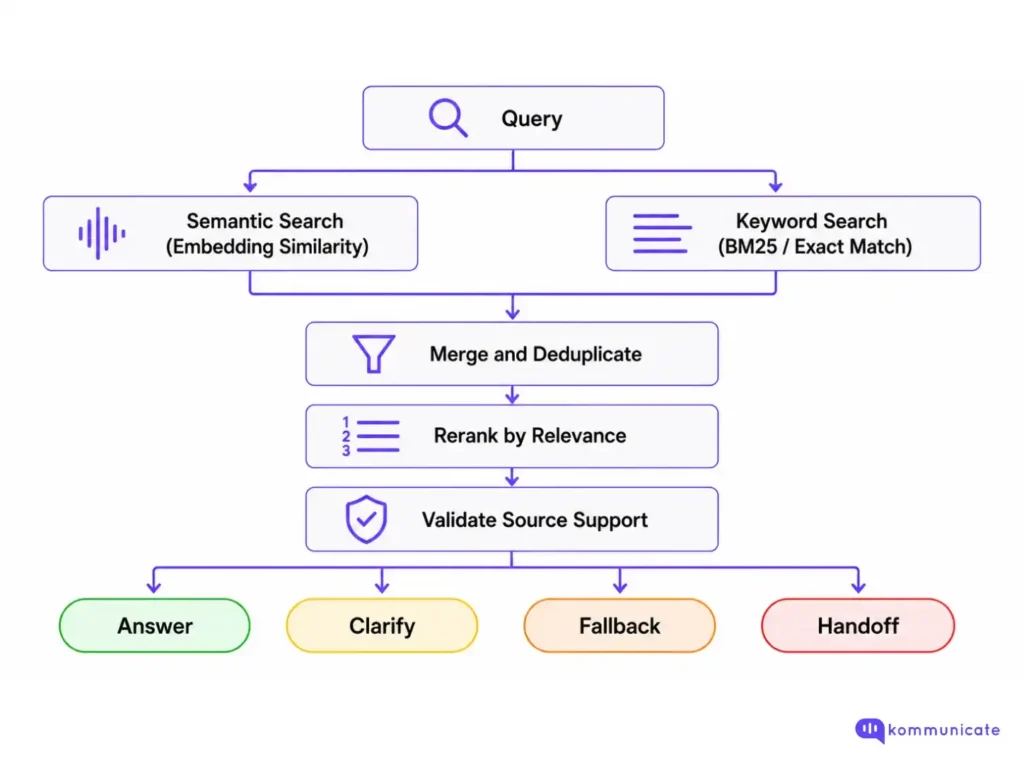
Reranking is the step developers most commonly skip. A reranker, often a cross-encoder or managed ranking model, evaluates retrieved chunks against the query and reorders them based on relevance, not just embedding distance.
For support use cases, reranking is usually worth the added latency because the cost of a wrong answer is higher than the cost of a slightly slower answer.
Metadata filters are also essential for support contexts where answers depend on plan tier, region, product line, or policy version. A customer on a free plan asking about enterprise SLAs should get filtered retrieval, not a semantically close but wrong answer.
Query embedding caching can reduce latency for repeated questions. You can cache the normalized query embedding for common phrases like “where is my order,” “refund policy,” and “cancel subscription.”
Do not cache and reuse the final answer for support queries. The answer still needs live retrieval because policies, pricing, inventory, order status, and account data can change. For account-specific questions, retrieval is not enough. The AI should call a tool or API and answer from the live result.
Stage 3: Generation with source validation
Once retrieval returns a set of chunks, the model needs to be constrained to answer only from that context. A useful prompt contract looks like this:
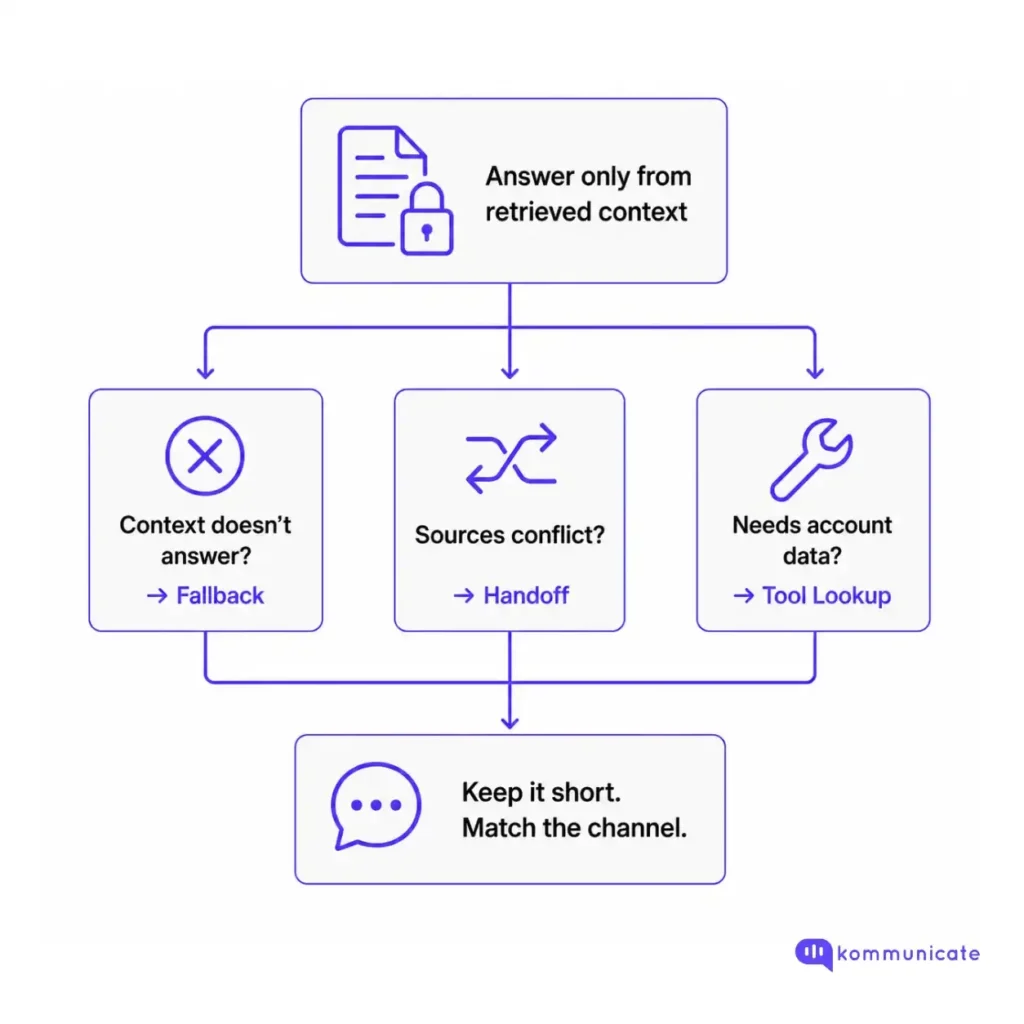
Source validation happens before the answer is sent. Ask:
- Does the retrieved source actually answer the question?
- Is it current?
- Does it conflict with another retrieved source?
- Is this a high-risk topic that requires human review?
If any answer is no, you should trigger a fallback without guessing the answer.
Where does RAG fail? Five common failure modes
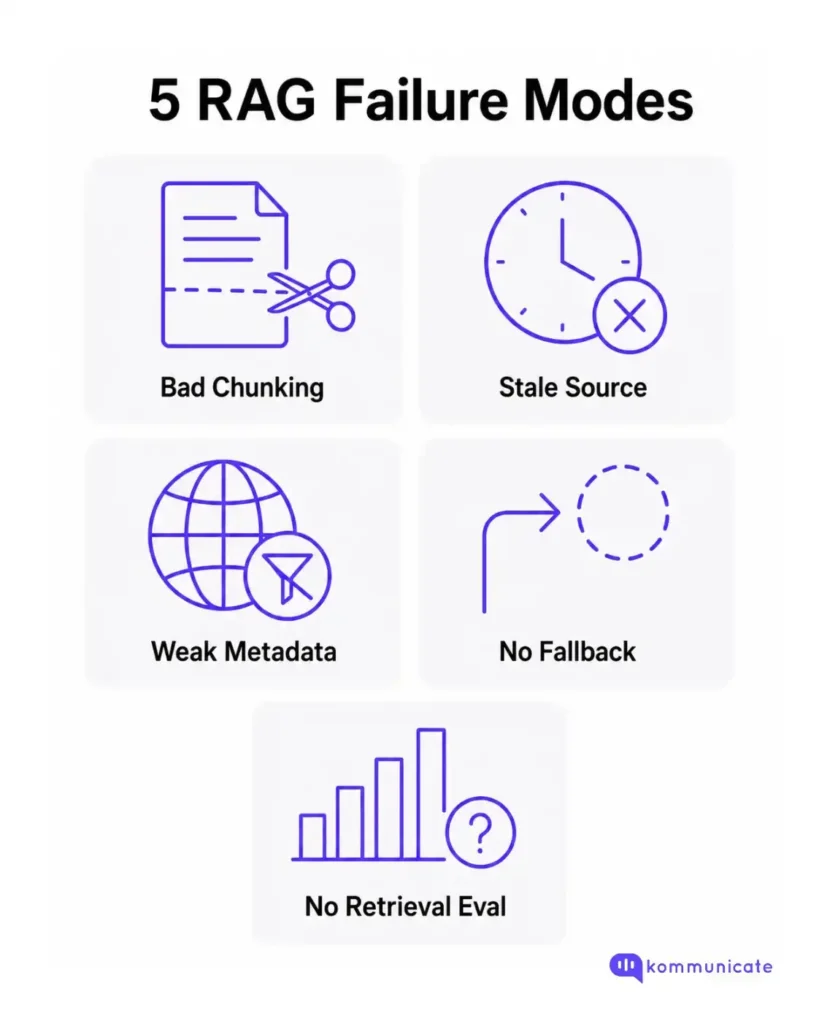
| Failure Mode | What It Looks Like | Fix |
|---|---|---|
| Bad chunking | Answer omits a critical policy exception | Enrich chunks with context before indexing |
| Stale source | The agent gives a discontinued promotion or old pricing | Attach freshness metadata; remove deleted content |
| Weak metadata | A customer in Germany gets answers from the US return policy | Add region and language filters to retrieval |
| No fallback | Agent guesses when no source matches | Define explicit fallback behavior in the prompt contract |
| No retrieval evaluation | Same wrong answer returns after a doc update | Evaluate retrieval separately from final answer quality |
Most RAG failures are diagnosed at the wrong layer. For example, if the model gives a wrong answer, the instinct is to change the prompt. But maybe the answer was wrong because the wrong chunk was retrieved, or because no chunk matched, and the model filled the gap.
So, whenever you encounter a RAG failure, evaluate retrieval first.
How to evaluate your RAG pipeline?
Split the evaluation into two stages:
1. Retrieval evaluation
Retrieval evaluation checks whether the right source was found:
| Metric | What Does It Tell You |
|---|---|
| Recall@k | Did the correct chunk appear in the top-k results? |
| Precision@k | Were most retrieved chunks actually useful? |
| Top source rank | Was the best source near position 1? |
| Source freshness | Was the retrieved doc still current? |
| Filter accuracy | Did metadata route to the right product, region, or plan? |
2. Answer evaluation
Answer evaluation checks what the model did with the retrieved context:
| Metric | What Does It Tell You |
|---|---|
| Groundedness | Did the answer stay within the retrieved source? |
| Completeness | Did it include important conditions and exceptions? |
| Action correctness | Did it answer, fallback, or hand off when appropriate? |
| Citation accuracy | Do the shown sources actually support the response? |
Test against at least five case types:
- Direct FAQ
- Paraphrase of the same FAQ
- Missing source
- Conflicting sources
- Vague question
If the agent guesses rather than falls back when the source is missing, the prompt contract is not being respected.
RAG vs. Tool lookup vs. FAQ automation
Not every support question needs retrieval. Choose the right pattern for the question type:
| Question Type | Better Approach | Example |
|---|---|---|
| Static FAQ | Simple keyword match or short retrieval | “What are your support hours?” |
| Policy with conditions | RAG with source validation | “Can I return a used item?” |
| Customer-specific state | Tool lookup | “Where is my order?” |
| Regulated or risky | RAG plus human review queue | “Can I change this prescription?” |
| Vague or ambiguous | Clarification | “Help with my account.” |
RAG is strongest when the answer exists in approved content, but the user may phrase it in many different ways. For account-specific questions, the AI should call a tool and explain the result without hallucinating a plausible answer.
A minimal OpenAI RAG pipeline in Python
Here is a minimal RAG example using OpenAI embeddings, in-memory retrieval, and the Responses API.
This example is for learning purposes. It does not replace a production vector database, metadata-aware retrieval layer, reranker, access-control system, or evaluation pipeline.
Set your API key:
export OPENAI_API_KEY="your_api_key_here"Now create a minimal RAG pipeline:
from __future__ import annotations

import os
from typing import Any

import numpy as np
from openai import OpenAI

client = OpenAI()

EMBEDDING_MODEL = "text-embedding-3-small"
GENERATION_MODEL = os.getenv("OPENAI_MODEL", "gpt-5.5")

FALLBACK_MESSAGE = (
    "I don't have that information in the available sources. "
    "Let me connect you to a human agent."
)

DOCS: list[dict[str, Any]] = [
    {
        "id": "return_policy_us_apparel",
        "text": (
            "US apparel return policy: customers can return unused apparel "
            "within 30 days if the item is in its original packaging."
        ),
        "metadata": {
            "region": "us",
            "product": "apparel",
            "source": "return_policy.md",
            "last_updated": "2026-06-15",
        },
    },
    {
        "id": "shipping_standard_global",
        "text": (
            "Standard shipping takes 3-5 business days. "
            "Express shipping takes 1-2 business days."
        ),
        "metadata": {
            "region": "global",
            "product": "all",
            "source": "shipping_policy.md",
            "last_updated": "2026-06-10",
        },
    },
]


def embed(text: str) -> np.ndarray:
    """Create a normalized embedding vector for the supplied text."""
    response = client.embeddings.create(
        model=EMBEDDING_MODEL,
        input=text,
    )

    vector = np.array(response.data[0].embedding, dtype=np.float32)
    norm = np.linalg.norm(vector)

    if norm == 0:
        return vector

    return vector / norm


def metadata_matches(
    doc_metadata: dict[str, Any],
    filters: dict[str, Any] | None,
) -> bool:
    """Return True when a document matches all requested metadata filters."""
    if not filters:
        return True

    for key, expected_value in filters.items():
        actual_value = doc_metadata.get(key)

        if actual_value != expected_value:
            return False

    return True


# Pre-compute document embeddings.
for doc in DOCS:
    doc["embedding"] = embed(doc["text"])


def retrieve(
    query: str,
    *,
    k: int = 2,
    filters: dict[str, Any] | None = None,
    min_score: float = 0.35,
) -> list[dict[str, Any]]:
    """Retrieve the top matching documents for a query."""
    query_embedding = embed(query)

    scored_docs: list[dict[str, Any]] = []

    for doc in DOCS:
        if not metadata_matches(doc["metadata"], filters):
            continue

        score = float(np.dot(query_embedding, doc["embedding"]))

        if score >= min_score:
            scored_docs.append(
                {
                    "id": doc["id"],
                    "text": doc["text"],
                    "metadata": doc["metadata"],
                    "score": score,
                }
            )

    scored_docs.sort(key=lambda item: item["score"], reverse=True)
    return scored_docs[:k]


def answer(
    query: str,
    *,
    filters: dict[str, Any] | None = None,
) -> dict[str, Any]:
    """Generate an answer using only retrieved context."""
    retrieved_docs = retrieve(query, filters=filters)

    if not retrieved_docs:
        return {
            "answer": FALLBACK_MESSAGE,
            "source_ids": [],
            "decision": "fallback",
        }

    context = "\n\n".join(
        (
            f"Document ID: {doc['id']}\n"
            f"Source: {doc['metadata']['source']}\n"
            f"Last updated: {doc['metadata']['last_updated']}\n"
            f"Content: {doc['text']}"
        )
        for doc in retrieved_docs
    )

    response = client.responses.create(
        model=GENERATION_MODEL,
        input=[
            {
                "role": "system",
                "content": (
                    "You are a customer support assistant. "
                    "Answer only from the provided context. "
                    "If the context does not answer the question, return exactly: "
                    f"{FALLBACK_MESSAGE} "
                    "Do not guess. Keep the answer concise."
                ),
            },
            {
                "role": "user",
                "content": f"Question: {query}\n\nContext:\n{context}",
            },
        ],
    )

    return {
        "answer": response.output_text,
        "source_ids": [doc["id"] for doc in retrieved_docs],
        "decision": "answered",
    }


if __name__ == "__main__":
    print(
        answer(
            "Can I return a jacket I bought last week?",
            filters={"region": "us", "product": "apparel"},
        )
    )

    print(answer("How long does shipping take?"))

    print(answer("Can I return a used jacket after 90 days?"))
This example includes four constraints that matter in production:
- It normalizes embeddings before scoring.
- It applies metadata filters before generation.
- It uses a minimum score threshold before answering.
- It returns source IDs with the answer.
OpenAI embeddings are already normalized, so dot product and cosine similarity produce the same ranking for OpenAI embeddings. The example still normalizes vectors explicitly to make the retrieval logic easier to understand and safer to adapt across providers.
The system prompt is the final guardrail, not the only guardrail. The application should filter, retrieve, score, and validate sources before asking the model to generate the final answer.
There is still a lot missing from this tutorial that will not be optional in production:
- Chunking logic
- Metadata filtering at scale
- Hybrid search
- Reranking
- Source validation with freshness checks
- Tenant-level access control
- Trace logging
- Fallback-to-handoff routing
- Retrieval evaluation
Security risks in production RAG
A production RAG system is not just a search pipeline. It is also a permissions system. If retrieval is not permission-aware, the model may receive context that the user should never see.
Before retrieval, enforce access control based on the user, workspace, tenant, region, role, plan, and channel. Do not retrieve first and hope the prompt prevents leakage later.
The main security risks are:
- Cross-tenant data leakage
- Internal-only documents appearing in customer answers
- Prompt injection hidden inside uploaded documents
- Outdated policy pages being treated as current
- User-specific account data being answered from generic documents
- Sensitive source text being exposed in citations
- Logs storing private customer information without controls
A safer production flow looks like this:
- Authenticate the user
- Determine what the user is allowed to access
- Apply metadata and permission filters before retrieval
- Retrieve only allowed sources
- Validate source freshness
- Generate an answer only from approved context
- Fall back or hand off when the answer is missing, risky, or ambiguous
For customer support, this is especially important because RAG systems often touch policies, billing, account data, support history, and regulated customer information.
What does production RAG need? Checklist
Here is a pre-launch checklist for teams moving from a working OpenAI RAG prototype to a production customer support system:
- Source pages are current and approved for AI answers
- Source citations hide internal-only text when needed
- Chunks preserve meaning. For example, policy exceptions are not split from the policies they modify
- Metadata supports filtering by region, product, plan, and language
- Deleted and outdated content is removed from the index
- Fallback behavior is defined and tested
- Human handoff receives the failed question and the retrieval trace
- Human review is triggered for risky, regulated, or policy-sensitive questions
- Evaluation covers real support questions from the last 30 days
- Account-specific questions use tool lookup instead of generic retrieval
- Retrieval is evaluated separately from answer quality
- Retrieval is permission-aware before the model receives context
- Logs include: question, retrieved source IDs, retrieval scores, answer decision, and fallback reason
- Prompt injection checks are applied to uploaded or crawled documents
RAG quality is operational. It depends on how the knowledge base is maintained, not just which model generates the final answer.
Now, there are advantages and disadvantages to building a RAG pipeline for customer support in your organization. We’ll discuss this in some detail in the next section.
Should you build your own RAG pipeline or use Kommunicate?
A working RAG prototype can take a weekend. A production RAG pipeline for customer support usually takes weeks or months because retrieval quality, permissions, freshness, fallback, handoff, analytics, and knowledge-base operations all need to work reliably.
Here is what “production-ready” actually means for a support context:
- Chunking pipeline that preserves policy exceptions and tables
- Metadata tagging by region, product, plan tier, and language
- Hybrid retrieval with reranking
- Source validation with freshness checks
- Fallback behavior that routes to a human agent with the trace attached
- Channel layer: web chat, WhatsApp, mobile SDK, API
- Handoff queue with conversation history passed through
- Analytics to track resolution rate, fallback rate, and retrieval quality
- Knowledge base refresh process with ownership assigned
You’re not building just a RAG pipeline but the entire support infrastructure behind it.
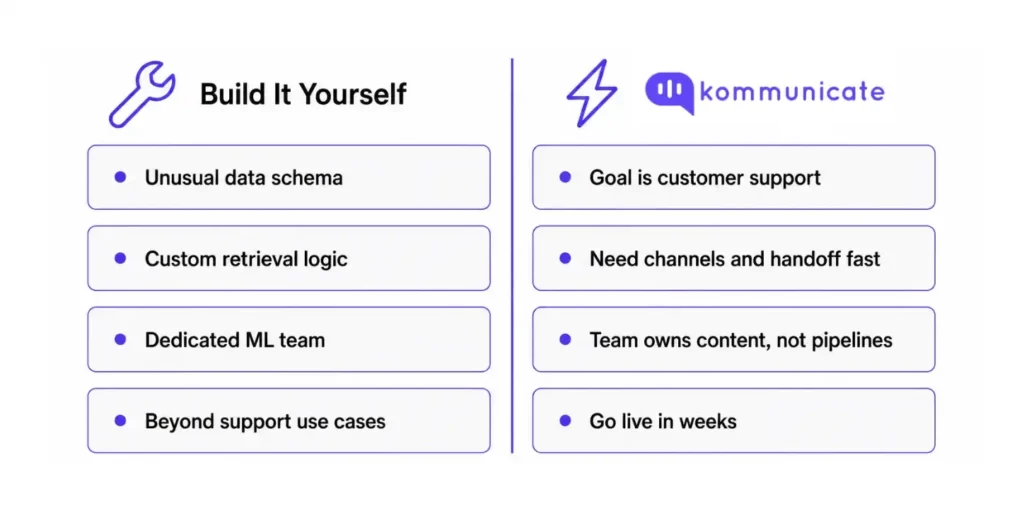
Build it yourself when:
- Your knowledge base has an unusual structure (regulated documents, multi-modal content, proprietary data schemas)
- You need retrieval logic that no off-the-shelf tool exposes
- You have a dedicated ML or platform team who will own the pipeline long-term
- Your use case goes beyond support (internal search, product recommendations, code assistance)
Use Kommunicate when:
- The goal is customer support automation, not RAG infrastructure research
- You want to connect approved knowledge sources to live channels quickly
- You need web chat, WhatsApp, mobile SDKs, APIs, and human handoff in one workflow
- Your team should spend more time improving support content than maintaining embedding pipelines
- You need conversation history, fallback routing, and support analytics built into the deployment
- You want to go live in weeks, not quarters
Kommunicate connects your knowledge source directly to the channels customers use, with human handoff, conversation history, and resolution analytics built in. What you own is the content.
If you are still in the RAG research phase, keep going with this tutorial. If you have already validated that RAG works for your support content and need to operationalize it, check out Kommunicate’s generative AI chatbot.
Conclusion
Working through a RAG implementation teaches you something no conceptual explainer does: retrieval failure and generation failure look identical to the end user but require completely different fixes. That diagnostic instinct is what separates developers who can actually debug AI systems from those who keep adjusting prompts and wondering why nothing improves. The tutorial you just read is the foundation. Production is where the real learning happens.
When you are ready to stop debugging infrastructure and start improving support quality, that is the right time to reach for a tool like Kommunicate. The pipeline work you did here still matters: you now understand what is happening under the hood, which makes you a better operator of any system built on top of it.
Ready to productionize your support workflow? Book a demo with us to get started!
FAQs
Retrieval-augmented generation. The model retrieves relevant documents before generating a response, so the answer stays grounded in your actual content.
The basic pattern is straightforward. But production RAG (with chunking, metadata, hybrid search, source validation, fallback, and evaluation) requires real engineering. Most failures happen in retrieval, not generation.
For prototypes, in-memory cosine similarity works. For production, you need a scalable retrieval layer. That can be OpenAI vector stores, a dedicated vector database like Pinecone or Weaviate, or pgvector inside Postgres. The right choice depends on your scale, filtering needs, latency targets, data ownership requirements, and engineering resources.
Fine-tuning bakes knowledge into model weights and requires retraining when knowledge changes. RAG retrieves knowledge at query time and updates it by updating the index. For support use cases with frequently changing policies, RAG is almost always the right choice.
Yes. OpenAI File Search with vector stores is a managed retrieval option available through the Responses API. It can handle file ingestion, chunking, embedding, indexing, retrieval, metadata filtering, result limits, and ranking options. A custom retrieval layer still gives more control when you need custom chunking, external vector databases, custom rerankers, strict tenant isolation, cross-provider portability, or deeper observability.
OpenAI File Search is one way to implement RAG. It gives you a managed retrieval layer over files stored in OpenAI vector stores. RAG is the broader architecture pattern: retrieve relevant knowledge, pass it to the model as context, and generate an answer grounded in that context.

Adarsh Kumar is the CTO & Co-Founder at Kommunicate. As a seasoned technologist, he brings over 14 years of experience in software development, artificial intelligence, and machine learning to his role. His expertise in building scalable and robust tech solutions has been instrumental in the company’s growth and success.