Updated on July 8, 2026
TL;DR
- OpenAI launched Workspace Agents in ChatGPT in April 2026 as a successor to custom GPTs.
- They let enterprise teams build shared, cloud-hosted agents that run repeatable workflows across tools like Slack, Google Drive, Salesforce, and SharePoint.
- This tool is currently in research preview for Business, Enterprise, Edu, and Teachers plans.
- Workspace Agents are genuinely useful for structured internal workflows. For customer-facing support automation, they are a general-purpose starting point rather than a purpose-built solution.
OpenAI has spent the last two years steadily repositioning ChatGPT from a conversational assistant into something closer to an enterprise automation platform. The clearest sign of that shift arrived in April 2026: ChatGPT Workspace Agents, a new capability that lets teams build shared agents, publish them across a workspace, and run them on schedules, all without touching code.
Custom GPTs, which served as ChatGPT’s previous answer to repeatable workflows, are being phased out. Workspace Agents are their replacement, and they operate on a meaningfully different model. Workspace agents are:
- Persistent
- Team-wide
- Cloud-hosted
- Built for multi-step work
This article explains what Workspace Agents are, how they are built, where they perform well, and what product and operations teams need to consider before deploying them in production workflows. We will cover:
- What are ChatGPT Workspace Agents?
- How to build Workspace Agents?
- Which apps can you connect to?
- Where do Workspace Agents work well?
- Where shouldn’t you use these agents?
- Security and Governance Before You Deploy
- Conclusion
What are ChatGPT Workspace Agents?
Workspace Agents are shared, cloud-hosted agents that teams configure once and run across workflows inside ChatGPT and Slack. Unlike a standard ChatGPT session, which ends when you close the browser tab, Workspace Agents persist. They carry defined tools, skills, memory, and schedules, and they can keep working even when no one has ChatGPT open.
OpenAI describes them as an evolution of custom GPTs, which were lighter, individually built helpers. Workspace Agents are team-wide by design. A manager can build an agent once, publish it to the workspace, and every team member uses the same version with the same approved tools and instructions. Improvements made to the agent are available to everyone immediately.
The underlying model is Codex, OpenAI’s cloud-based coding agent, which gives Workspace Agents the ability to write and run code.
They are currently in research preview for ChatGPT Business, Enterprise, Edu, and Teachers plans. On Enterprise and Edu plans, admins can enable the feature through role-based access controls. Pricing is credit-based, with heavier and longer runs consuming more credits than lighter ones.
Plan Availability and Pricing
Workspace Agents are not available on Free, Go, or Plus plans. The table below covers the plans where they are accessible, based on OpenAI’s current pricing page
| Plan | Seat Price | Workspace Agents Access | Agent Pricing Model | Admin Controls |
|---|---|---|---|---|
| Business | $20/user/month (annual) or $25/user/month (monthly); 2-seat minimum | Yes, included | Credit-based; usage draws from shared Codex agentic pool. Overage credits purchasable. | Basic workspace controls; no RBAC for agent access |
| Enterprise | Custom; ~$60–$100+/user/month; 150-seat minimum, annual contract required | Yes, off by default, enabled by admins via RBAC | Credit-based; same token-rate structure as Business. Allocation and expiry are defined in the Order Form | Full RBAC, Compliance API access, admin console with per-agent analytics, ability to suspend agents |
| Edu | Custom (contact sales) | Yes, admin-controlled via RBAC | Credit-based | Same controls as Enterprise |
| Teachers | Free for verified US K–12 educators (through June 2027) | Yes | Included in the plan | Limited |
A few details worth flagging before you plan around these numbers:
- Agent pricing takes effect July 6, 2026. According to OpenAI’s rate card, Workspace Agent pricing in ChatGPT was in preview (free) until that date. Agents run within Slack will remain in free preview until a separate date is confirmed.
- Credit cost varies by task. There is no fixed credit cost per agent run. Usage depends on the volume of input tokens, cached tokens, and output tokens the run consumes. A short triage task costs considerably less than an agent pulling from a large SharePoint library and generating a structured report.
- API access is a separate billing stream. A ChatGPT Business or Enterprise subscription does not include API credits. Teams building on top of the API alongside a ChatGPT plan pay both.
Now that you know how to access workspace agents, let’s start talking about how to work with them.
How to build Workspace Agents?
Workspace Agents are built for teams that want to automate repeatable work without turning every workflow into an engineering project.
Take a simple example: a support team wants an agent who prepares a daily escalation summary every morning.
- Instead of asking an engineer to build a custom workflow, a team lead can open Agents from the ChatGPT sidebar and describe the task in plain language:
“Every weekday morning, review yesterday’s unresolved support conversations, identify the top escalation reasons, group them by product area, and draft a summary for the support manager.”
- From there, ChatGPT helps turn that request into an agent. It walks the user through the workflow step by step: what the agent should check, which data sources it should use, what format the output should follow, and when the agent should stop instead of guessing.
- For this escalation-summary agent, the setup might look like this:
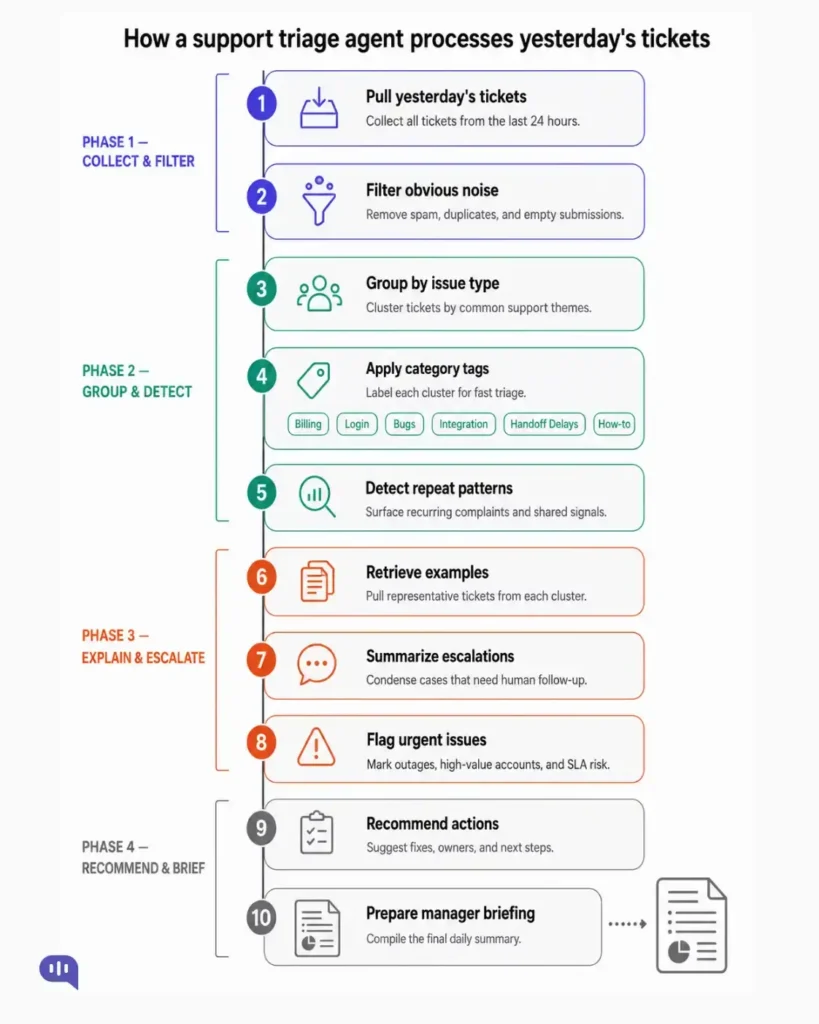
This is where OpenAI’s guidance becomes useful. Building an agent is similar to delegating work to a person. Before handing this task to a new support operations teammate, you would clarify the scope:
- Which tickets count
- What tools can they access
- What format should the report use
- When they should ask for help.
The same logic applies to the agent. You define:
- What it is responsible for
- When should it begin
- Which tools can it use
- What process should it follow
- Where it should stop or escalate.
For example, the agent may be allowed to summarize support tickets, but not close them. It may be allowed to draft recommendations, but not to message customers directly. It may flag a spike in billing complaints, but escalate to a human manager before suggesting a policy change.
The builder is also iterative. The first version of the escalation-summary agent may be too broad, miss important product labels, or include too much detail. The team can test it, review the output, and refine the instructions directly. They can also coach the agent in plain language, such as:
- “Keep the summary under 300 words.”
- “Always separate bugs from how-to questions.”
- “Flag anything affecting enterprise customers.”
- “Include three example tickets only when the issue appears more than five times.”
Over time, the agent becomes more useful because the workflow improves with real feedback. Once the support team finds a version that works, the same agent can be reused across the workspace, so everyone benefits from the improvements.
In practice, this turns Workspace Agents into reusable operational workflows. A team does not just ask ChatGPT a one-off question. It creates a repeatable agent that knows the job, follows the process, uses approved tools, and improves as the team refines it.
A workspace agent might end up with a prompt as follows.
Mini Tutorial: What the Escalation Summary Agent Actually Does
Agent: Daily Support Escalation Summary
Trigger:
- Runs every weekday at 9 AM
- Can also be started manually by a support manager
- Can be triggered through an internal API when ticket volume crosses a threshold
Inputs:
- Yesterday’s unresolved support conversations
- Escalated tickets
- Customer priority tags
- Product area labels
- Internal incident notes, if available
Actions:
- Collects all unresolved and escalated tickets from the previous day.
- Filters out closed, duplicate, or low-priority conversations.
- Groups the remaining tickets by issue type:
- Billing
- Login problems
- Product bugs
- Integration errors
- Handoff delays
- General how-to questions
- Identifies repeated complaints or patterns.
- Checks whether any issue affects enterprise or high-priority customers.
- Pulls 2–3 example conversations for the most common issues.
- Summarizes the top escalation reasons in plain language.
- Highlights urgent issues that need manager review.
- Drafts recommended next actions for the support team.
- Creates a short manager-ready summary.
Rules:
- The agent can summarize tickets, but it cannot close them.
- The agent can suggest next steps, but it cannot change support policies.
- The agent can flag urgent issues, but it must escalate major incidents to a human.
- The final summary should stay under 300 words.
Output:
- A short daily escalation report
- Top issue categories
- Example tickets
- Urgent risks
- Recommended next actions
This makes the agent easier to understand because it shows the exact work it performs, not just the abstract setup process.
Which apps can you connect to?
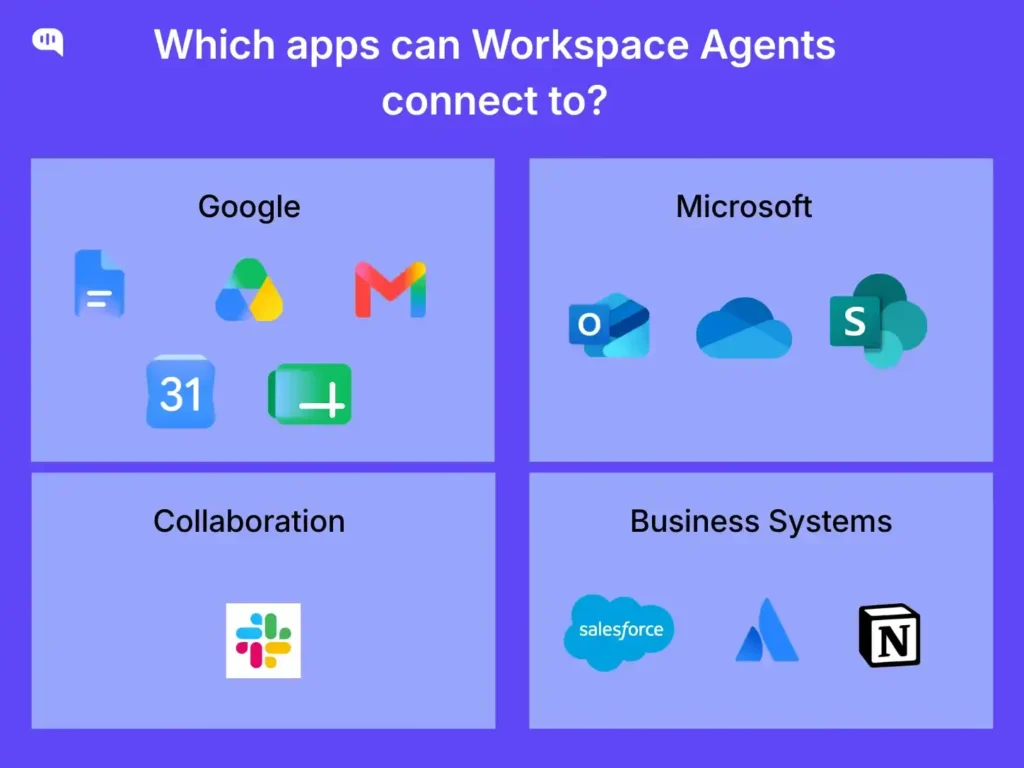
Workspace Agents connect to business tools through a combination of native integrations and the Model Context Protocol (MCP). Supported connectors include:
- Google Workspace: Gmail, Google Drive, Google Calendar, Google Docs, Sheets, Slides
- Microsoft: SharePoint, OneDrive, Outlook
- Collaboration: Slack
- Business systems: Salesforce, Notion, Atlassian Rovo
Admins control which apps are enabled within the workspace and how the agent authenticates with each one. Available connectors depend on what your workspace administrator has approved.
The connection model is important to understand. When you give an agent access to Google Drive, for example, it can search for files, read document contents, and in some cases write back to them. That breadth of access is what makes agents powerful and what makes governance non-negotiable.
Where do Workspace Agents work well?
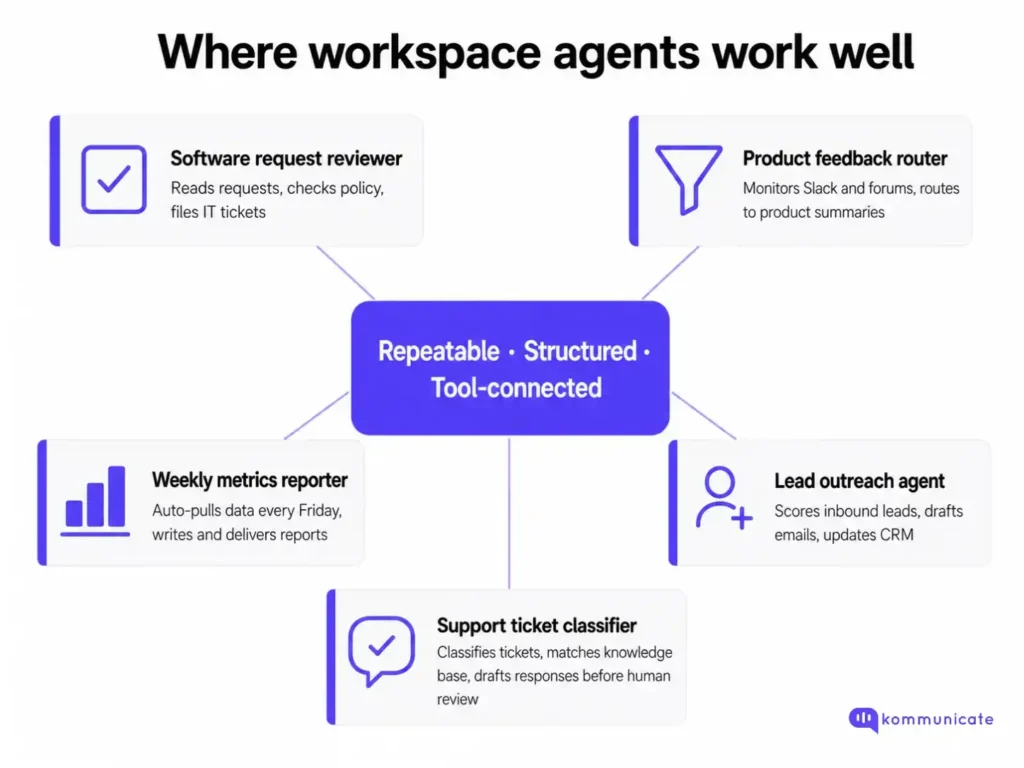
Workspace Agents are a strong fit for workflows that are repeatable, structured, and connected to systems the organization already uses. OpenAI’s own team has built several reference examples that illustrate the pattern well:
- Software request reviewer: Reads employee software requests, checks them against approved tools and policies, recommends next steps, and files IT tickets when needed.
- Product feedback router: Monitors Slack, support channels, and public forums, then turns aggregated feedback into prioritized tickets and weekly product summaries.
- Weekly metrics reporter: Pulls data every Friday, creates charts, writes the narrative, and delivers a report to the team, without anyone initiating the run manually.
- Lead outreach agent: Researches inbound leads, scores them against a qualification rubric, drafts personalized follow-up emails, and updates the CRM.
These workflows share a common profile: the input is predictable, the tools are defined, and there is a clear output the team can evaluate. Incoming support tickets are another well-documented case where an agent classifies tickets, matches them against a knowledge base in Drive or SharePoint, and drafts a response for human review before a person ever opens the ticket.
That is a meaningful time-saving for support operations teams, and it does not require the agent to handle the conversation directly.
Where shouldn’t you use these agents?
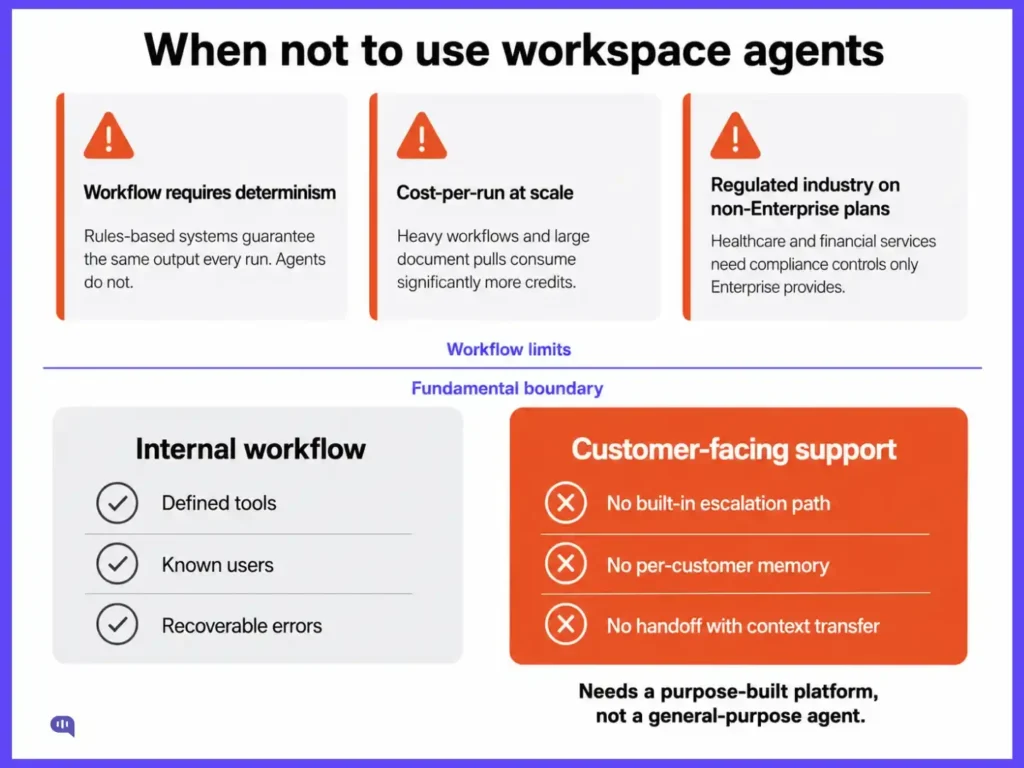
Workspace Agents are a general-purpose tool. That is their strength for internal workflows and their hard limit for specialized deployments. There are three categories where that boundary matters most.
- When your workflow requires determinism. Unlike rules-based automation tools, agents introduce variability on every run. If your use case requires deterministic, auditable steps with guaranteed outputs, a rules-based system is still the more reliable choice. Agents reason about what to do; they do not guarantee they will do the same thing each time.
- When cost-per-run matters at scale. Agents use model inference on every run, and the credit-based pricing model means heavier workflows, such as those pulling from large document libraries or making multiple tool calls, will consume significantly more credits than lighter ones. Before standardizing an agent org-wide, it is worth baselining the actual cost of a few real workflows at production frequency.
- When you are in a regulated industry. Enterprise closes the governance gap; Business and lower plans leave it wide open. If your organization operates in healthcare, financial services, or any other regulated vertical, the compliance, audit, and data isolation controls on non-Enterprise plans are meaningfully weaker than what those industries require.
Beyond these workflow-level limits, there is a more fundamental boundary: Workspace Agents are for internal workflow automation and not for customer-facing processes.
Should you use Workspace Agents for customer support?
Internal workflow automation operates in a controlled environment with defined tools, known users, and organizational permissions already in place. When something goes wrong, the consequences are usually recoverable internally.
Customer-facing support is different. The users are external. The context they bring to each conversation is unpredictable. A wrong answer, a misrouted request, or a confident but inaccurate response is felt by customers and shows up in retention and NPS data. Without tools, per-customer memory, and CRM integration, ChatGPT is not suited to production customer support.
Workspace Agents add tools and memory, but they are not built around the handoff quality, compliance requirements, and escalation design that customer support deployments specifically require.
There is also no built-in escalation path for transferring a conversation to a human agent with full context preserved. That is a core requirement for any external support workflow, and it has to be built on top of Workspace Agents rather than coming standard.
A production customer support agent needs:
- A maintained and permission-controlled knowledge base
- CRM integration with per-customer context
- A defined escalation path with context transfer
- Compliance coverage appropriate to the industry
- Analytics that measure resolution quality rather than run volume
Workspace Agents can contribute to parts of that workflow, particularly internal triage and draft generation. But assembling those capabilities on top of a general-purpose platform means building the infrastructure that purpose-built support platforms provide by default.
Security and Governance Before You Deploy
Workspace Agents are not just smarter automation. They are AI systems with access to your business tools, and that changes the risk model.
The critical distinction, as noted by enterprise security researchers, is this: the risk shifts from “what did the employee paste into a chat window” to “what did the agent decide to send, on its own.” An agent with write access to Gmail, Salesforce, and SharePoint can take real actions across real systems without a human reviewing each step.
Five controls belong in place before any Workspace Agent goes into production.
| Control | What It Means | What to Watch |
|---|---|---|
| Least-privilege access | Each agent should only reach the systems and data fields its specific task requires | An agent summarizing customer feedback does not need write access to CRM records or visibility into HR data |
| Separation of retrieval and action | Reading from a document is lower risk than updating a record, sending a message, or filing a ticket | High-consequence actions should require an explicit human approval step, not AI judgment alone. OpenAI supports configurable approval steps, but they must be designed deliberately |
| Prompt injection defense | Malicious instructions can be hidden inside content the agent processes, such as webpages, documents, or emails | As agents read more external content, the attack surface grows. Retrieved content must be treated as data, not as authority |
| Full step logging | Admins can access conversation logs through the Compliance API on Enterprise and Edu plans | That log captures the conversation; it does not place a real-time control in the path of each tool call. For regulated workflows, the distinction matters |
| Defined escalation and stop conditions | Every agent needs explicit rules for when to stop, ask for clarification, or hand off to a human | An agent that tries to answer everything is a liability. An agent that knows its limits is a reliable part of a workflow |
Conclusion
If your team is evaluating AI for customer-facing support, the question worth asking is not whether you can build something with Workspace Agents. You likely can. The better question is whether you want to own the governance, escalation design, compliance configuration, and knowledge management infrastructure that production support requires.
Kommunicate is built specifically for that context. It handles:
- AI-to-human handoff with context preservation
- Integrates natively with CRMs and helpdesks
- Ships with HIPAA, SOC2, and ISO compliance built in.
Enterprises including HDFC Life, Rakuten, and KPMG use it to automate support at scale without assembling those layers from scratch.
If you are comparing what it takes to build versus buy your AI support layer,we can take you through your options in a demo.

Devashish Mamgain is the CEO & Co-Founder of Kommunicate, with 15+ years of experience in building exceptional AI and chat-based products. He believes the future is human and bot working together and complementing each other.