Updated on May 6, 2026
TL;DR
OpenAI Structured Outputs let you ask the model to return data that follows a JSON schema for production apps. In customer support, these structured outputs are useful for routing, ticket classification, entity extraction, fallback decisions, human handoff, sentiment labels, and answer validation.
The key idea is simple: use natural language for the customer-facing answer, but use structured output for the backend decision.
Support automation breaks when the backend has to parse paragraphs.
If the model says, “I think this should probably go to billing.”
Your backend isn’t receiving the correct signal.
But, if the model returns:
{ "action": "handoff", "routingTeam": "billing", "confidence": 0.91 }Your product can act.
This is the core idea behind OpenAI function calling and the structured output parameters. We’re going to take a look at how you can use these features and how they can help you build performant AI agents.
We’re going to cover:
- What are OpenAI Structured Outputs?
- JSON mode vs. Structured Outputs vs. Function calling
- How does Kommunicate route conversations?
- How to use Structured Outputs in production?
- How to avoid production schema failures?
- Workflow example: How to handle structured output and customer answers?
- Final thoughts
- FAQs
What are OpenAI Structured Outputs?
Structured Outputs make model responses adhere to a JSON schema you define. OpenAI’s docs describe this as ensuring schema adherence.
| Mode | Valid JSON | Matches Schema |
|---|---|---|
| Plain prompt | Maybe | No guarantee |
| JSON mode | Yes | No guarantee |
| Structured Outputs | Yes | Yes, within supported schema limits |
Structured Outputs are supported on gpt-5.4-mini (and all gpt-5 family models), as well as gpt-4o-2024-08-06 and gpt-4o-mini-2024-07-18 and later. They work across the Chat Completions API, the Responses API, the Assistants API, the Fine-tuning API, and the Batch API.
Note on model compatibility: If you’re on an older model, such as gpt-4-0613 or gpt-3.5-turbo, Structured Outputs via response_format is not available. Use those models only with function calling + strict: true.
Now, we’re going to be using a lot of terms throughout this article. To demystify them, it makes sense to differentiate between structured outputs, JSON mode and function calling.
JSON mode vs. Structured Outputs vs. Function calling
| Pattern | Use It For |
|---|---|
| Plain JSON prompt | Quick experiments, internal analysis, one-off scripts |
| JSON mode | Ensuring valid JSON when the schema is simple and low risk |
| Structured Outputs (response_format) | Structuring model responses: routing, classification, extraction |
| Function calling (strict: true) | Connecting the model to tools, APIs, databases, or external systems |
How to use: If the model is responding to a user, use response_format. If the model is calling a tool or fetching data, use function calling. These can be used together in agent architectures, but they serve different purposes.
It might be useful to contextualize in terms of real production workflows. In the next section, we’ll describe how Kommunicate uses the OpenAI API for automating customer support.
How does Kommunicate route conversations?
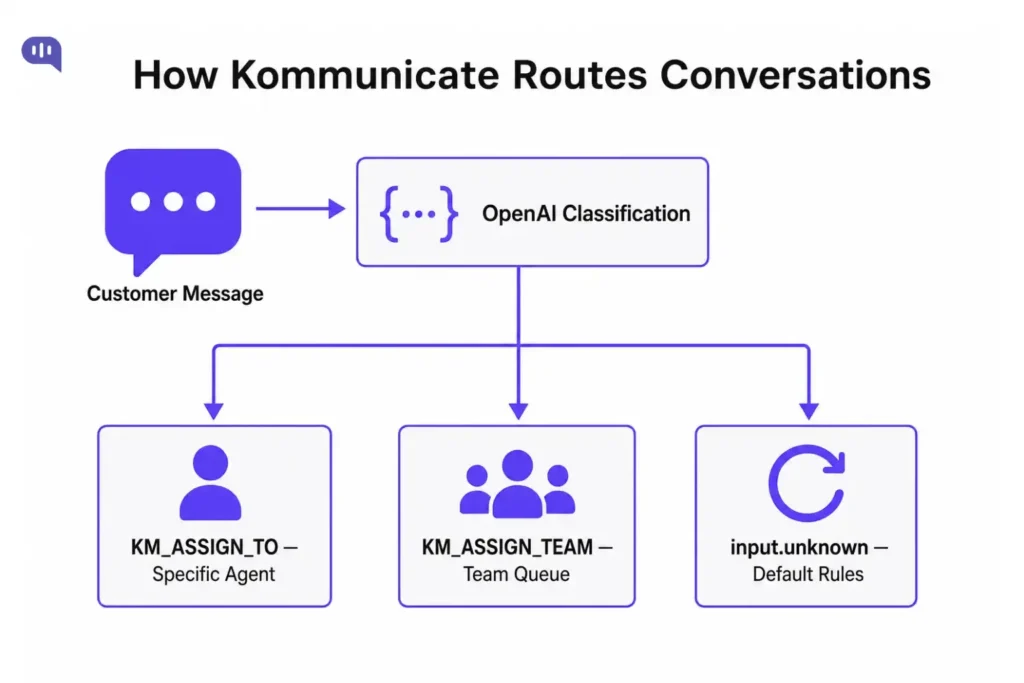
Before building the schema, you need to understand how Kommunicate’s handoff actually works. There are three mechanisms:
1. Default Fallback action – When none of a bot’s intents are matched, your AI model should return the Default Fallback as an action. Kommunicate will detect the action in the response and automatically route the conversation to a human agent based on your configured routing rules (automatic assignment or notify everybody).
2. KM_ASSIGN_TO — assign to a specific human or AI agent– Add this as a custom payload to any intent response. Set the value to an agent’s user ID (their Kommunicate login email) to route to that person. Leave it empty to apply your default routing rules. To hand off to another bot, set the value to the Bot ID.
{
  "platform": "kommunicate",
  "message": "Let me connect you with the right person.",
  "metadata": {
    "KM_ASSIGN_TO": "agent@yourcompany.com"
  }
}
3. KM_ASSIGN_TEAM — assign to a team. Use a Team ID to route to a specific team queue. Get the Team ID from: Dashboard → Settings → Company → Teammates → Team.
{
  "platform": "kommunicate",
  "message": "One of our team members will be with you shortly.",
  "metadata": {
    "KM_ASSIGN_TEAM": "54515931"
  }
}
These are the only routing signals Kommunicate acts on. OpenAI’s job is to produce the right values for these fields, which is exactly what Structured Outputs does.
How to use Structured Outputs in production?
1. Build a classification schema
The schema’s job is to output exactly what Kommunicate needs: a routing decision, a customer-facing message, and an internal reason.
// schema.js
export const supportClassificationSchema = {
type: "object",
additionalProperties: false,
properties: {
action: {
type: "string",
enum: ["answer", "handoff_agent", "handoff_team", "default_fallback"]
},
customerMessage: {
type: "string",
description: "The message shown to the customer"
},
assignTo: {
anyOf: [{ type: "string" }, { type: "null" }],
description: "Agent email or bot ID for KM_ASSIGN_TO. Null if routing to a team or applying default rules."
},
assignTeam: {
anyOf: [{ type: "string" }, { type: "null" }],
description: "Team ID for KM_ASSIGN_TEAM. Null if routing to an agent."
},
reason: {
type: "string",
description: "Internal note explaining the routing decision"
},
confidence: {
type: "number"
}
},
required: ["action", "customerMessage", "assignTo", "assignTeam", "reason", "confidence"]
};
Schema rules you should follow:
- additionalProperties: false is required — without it, strict mode won’t work
- Every property must appear in the required
- Root objects cannot be anyOf type — OpenAI supports a subset of JSON Schema, not the full spec
- Keep the schema small: only fields your backend actually uses
2. Call the API in Node.js (Responses API)
In the Responses API, defining structured outputs has moved from response_format to text.format. The shape looks like this:
// classify.js
import OpenAI from "openai";
import { supportClassificationSchema } from "./schema.js";

const openai = new OpenAI();

export async function classifyMessage(customerMessage) {
  const response = await openai.responses.create({
    model: process.env.OPENAI_MODEL || "gpt-5.4-mini",
    input: [
      {
        role: "system",
        content: `You are a customer support classifier for an e-commerce company.
Classify the customer message and decide the best routing action.

Available teams:
- billing team ID: "54515931"
- technical support team ID: "98234710"
- returns team ID: "77120034"

Available agent emails:
- billing specialist: "billing@company.com"
- senior support: "senior@company.com"

Actions:
- answer: bot can handle this, no handoff needed
- handoff_agent: route to a specific agent (set assignTo)
- handoff_team: route to a team queue (set assignTeam)
- fallback: cannot determine intent, apply default routing rules`
      },
      {
        role: "user",
        content: customerMessage
      }
    ],
    text: {
      format: {
        type: "json_schema",
        name: "support_classification",
        schema: supportClassificationSchema,
        strict: true
      }
    }
  });

  // Always check for refusal before parsing
  if (response.output[0]?.type === "refusal") {
    return null; // handle separately
  }

  return JSON.parse(response.output_text);
}
Example output for “I was charged twice and want to speak to someone”:
{
  "action": "handoff_team",
  "customerMessage": "I can see this is a billing issue. Let me connect you with our billing team right away.",
  "assignTo": null,
  "assignTeam": "54515931",
  "reason": "Customer reports a duplicate charge and is requesting human assistance.",
  "confidence": 0.97
}
3. Alternative: Call the API in Python (Pydantic + Chat completion)
The OpenAI SDKs for Python and JavaScript make it easy to define object schemas using Pydantic and Zod, respectively. The SDK takes care of supplying the JSON schema, automatically deserializing the JSON response into the typed data structure, and parsing refusals.
# classify.py
from enum import Enum
from typing import Optional, Union
from pydantic import BaseModel
from openai import OpenAI

client = OpenAI()

class ActionType(str, Enum):
    answer = "answer"
    handoff_agent = "handoff_agent"
    handoff_team = "handoff_team"
    fallback = "default_fallback"

class SupportClassification(BaseModel):
    action: ActionType
    customer_message: str
    assign_to: Union[str, None] = None       # maps to KM_ASSIGN_TO
    assign_team: Union[str, None] = None     # maps to KM_ASSIGN_TEAM
    reason: str
    confidence: float

SYSTEM_PROMPT = """You are a customer support classifier for an e-commerce company.
Classify the customer message and decide the best routing action.

Available teams:
- billing team ID: "54515931"
- technical support team ID: "98234710"
- returns team ID: "77120034"

Available agent emails:
- billing specialist: "billing@company.com"
- senior support: "senior@company.com"

Actions:
- answer: bot can handle this, no handoff needed
- handoff_agent: route to a specific agent (set assign_to)
- handoff_team: route to a team queue (set assign_team)
- default_fallback: cannot determine intent, apply default routing rules"""

def classify_message(customer_message: str) -> Optional[SupportClassification]:
    completion = client.beta.chat.completions.parse(
        model="gpt-5.4-mini",
        messages=[
            {"role": "system", "content": SYSTEM_PROMPT},
            {"role": "user", "content": customer_message}
        ],
        response_format=SupportClassification,
    )

    message = completion.choices[0].message

    # Check for refusal before accessing .parsed
    if message.refusal:
        return None

    return message.parsed
4. Handle Refusals
Structured Outputs will still allow the model to refuse an unsafe request. There is a new refusal string value on API responses that allows developers to programmatically detect if the model has generated a refusal instead of output matching the schema.
If you skip refusal handling, your parser will throw when it tries to deserialize a refusal response as JSON.
Responses API (Node.js):
if (response.output[0]?.type === "refusal") {
  // Do not call JSON.parse on output_text
  const refusalText = response.output[0].refusal;
  return buildFallbackPayload(refusalText);
}
const classification = JSON.parse(response.output_text);
Chat completions (Python)
message = completion.choices[0].message

if message.refusal:
    return build_fallback_payload(message.refusal)

classification = message.parsed
Refusals occur when:
- The content hits safety filters
- The request is completely out of scope
- The input appears to be a prompt-injection attempt.
You should treat these refusals as a first-class routing path: they should reach a human agent, not crash the bot.
5. Validate output in your app
Structured Outputs guarantee that the model’s response is not only valid JSON but also strictly follows the structure you defined. However, schema validity is not the same as business logic correctness.
A confidence: 0.51 score on a billing handoff may warrant a different treatment than a confidence: 0.97. Validate before acting.
For example:
Node.js with Zod:
import { z } from "zod";

const Classification = z.object({
  action: z.enum(["answer", "handoff_agent", "handoff_team", "fallback"]),
  customerMessage: z.string(),
  assignTo: z.string().nullable(),
  assignTeam: z.string().nullable(),
  reason: z.string(),
  confidence: z.number()
});

const classification = Classification.parse(JSON.parse(response.output_text));
Python
When using client.beta.chat.completions.parse(), the .parsed attribute is already a validated, typed Pydantic object.
You should add a business rule layer on top:
// Apply human review override for low-confidence decisions
if (classification.confidence < 0.7) {
  classification.action = "handoff_team";
  classification.assignTeam = GENERAL_SUPPORT_TEAM_ID;
}
6. Map the result to a Kommunicate custom payload
Once you have a validated classification, build the Kommunicate payload and send it as a custom payload response from your bot.
// kommunicate-payload.js
export function buildKommunicatePayload(classification) {
  const metadata = {};

  if (classification.action === "handoff_agent" && classification.assignTo) {
    metadata.KM_ASSIGN_TO = classification.assignTo;
  }

  if (classification.action === "handoff_team" && classification.assignTeam) {
    metadata.KM_ASSIGN_TEAM = classification.assignTeam;
  }

  // For "fallback", send empty KM_ASSIGN_TO to trigger default routing rules
  if (classification.action === "fallback") {
    metadata.KM_ASSIGN_TO = "";
  }

  // For "answer", no metadata needed -- the bot replies directly
  return {
    platform: "kommunicate",
    message: classification.customerMessage,
    ...(Object.keys(metadata).length > 0 && { metadata })
  };
}
The full flow now looks like this:
// handler.js
import { classifyMessage } from "./classify.js";
import { buildKommunicatePayload } from "./kommunicate-payload.js";

export async function handleIncomingMessage(customerMessage) {
  const classification = await classifyMessage(customerMessage);

  if (!classification) {
    // Refusal -- route to default, human agent
    return {
      platform: "kommunicate",
      message: "Let me connect you with a support agent.",
      metadata: { KM_ASSIGN_TO: "" }
    };
  }

  return buildKommunicatePayload(classification);
}
If you were using our Agent Builder process within Kompose, the process looks as follows:
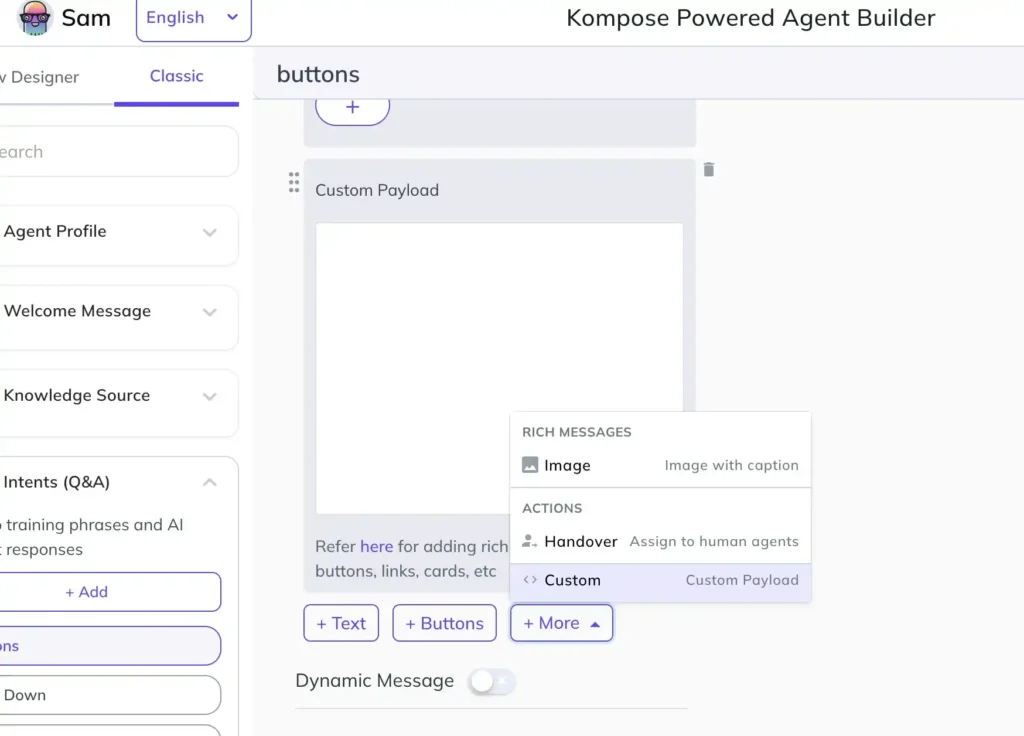
Now, this production pipeline is working, but for your customized workflows, you need to check for the usual production errors.
How to avoid production schema failures?
Structured Outputs reduce parsing errors, but they don’t remove the need for careful schema design. The failures shift from “invalid JSON” to “valid JSON with wrong values.”
| Failure | What Happens | Fix |
|---|---|---|
| Team ID drift | Schema has a stale team ID that no longer exists | Keep team IDs in a config file, not hardcoded in prompts |
| Agent email wrong | KM_ASSIGN_TO routes to a deleted agent | Validate agent emails against Kommunicate API before shipping |
| action misused | Model picks handoff_agent but leaves assignTo null | Add a business rule: if handoff_agent and assignTo are null, fall back to team routing |
| Refusal crashes parser | JSON.parse(output_text) throws on a refusal response | Always check the output type before parsing |
| Low-confidence routing | The model is unsure but still picks a specific agent | Apply a confidence threshold — below 0.7, route to a team instead |
| Schema too large | Model fills fields your backend ignores | Remove any field that does not drive a real routing or UX decision |
| Missing additionalProperties | Strict mode silently fails | Add "additionalProperties": false to every object in your schema |
We’ve also put together a quick schema checklist that you can use while designing workflows in production:
| Check | Why It Matters |
|---|---|
additionalProperties: false on every object |
Required for strict schema enforcement |
| All properties listed are required | Prevents missing fields in the output |
| Team IDs and agent emails from config | Prevents stale values from living in prompts |
| Refusal handled before parsing | Prevents parser crashes on safety refusals |
| Confidence threshold applied | Overrides risky low-confidence routing decisions |
assignTo and assignTeam are nullable |
Ensures only one is set at a time; avoids conflicting routing |
| Schema tested with edge-case inputs | Ensures robustness against angry users, gibberish, and prompt injection attempts |
Now, structured outputs are helpful for production work. However, you don’t usually want to send the JSON output directly to your customers. So, in production, your workflow will be a bit different.
Workflow example: How to handle structured output and customer answers?
Many teams mix the customer-facing text and the routing decision into a single field. Keep them separate.
The model produces both in one response:
{
  "action": "handoff_team",
  "customerMessage": "I can see this is a billing issue. Let me connect you with our billing team right away.",
  "assignTo": null,
  "assignTeam": "54515931",
  "reason": "Customer reports a duplicate charge and is requesting human assistance.",
  "confidence": 0.97
}
customerMessage goes to the customer. assignTeam goes to Kommunicate. reason goes to your logs or the agent’s conversation view. Nothing needs to be parsed out of a paragraph — each consumer gets exactly the field it needs.
You can build a Kommunicate payload with this:
{
  "platform": "kommunicate",
  "message": "I can see this is a billing issue. Let me connect you with our billing team right away.",
  "metadata": {
    "KM_ASSIGN_TEAM": "54515931"
  }
}
Final thoughts
Structured Outputs are one of the most practical OpenAI features for production support automation. Use them wherever the backend needs to act. You just need to follow a few rules:
- Keep schemas small
- Build in support when the model refuses to answer
- Validate output
This is how our app builds an enterprise AI agent to answer customer queries and route conversations.
If you want to use Kommunicate to build your own enterprise AI agent for customer support, feel free to sign up.
FAQs
Yes for production. JSON mode guarantees only syntactical validity — the model might leave out required fields, invent new ones, or return a string where you expected a number. Structured Outputs go further by enforcing strict adherence to a provided JSON Schema.
The gpt-5 family (gpt-5.4-mini, gpt-5.4, and later), gpt-4o-2024-08-06, and gpt-4o-mini-2024-07-18 all support Structured Outputs via response_format. Function calling with strict: true is available on all models from gpt-4-0613 and gpt-3.5-turbo-0613 onward.
Use Pydantic (Python) or Zod (Node.js). The SDKs handle converting the data type to a supported JSON schema, automatically deserializing the JSON response into the typed data structure, and parsing refusals if they arise.
No. Use one or the other. If both are set, KM_ASSIGN_TO takes precedence. Design your schema so only one is non-null at a time.
Send KM_ASSIGN_TO with an empty string. Kommunicate will apply your default routing rules (either round-robin to available agents or notify everybody_, depending on your dashboard configuration.
Yes. Structured Outputs guarantee schema shape, not business logic correctness. Low-confidence scores, null routing fields, and edge-case inputs all require a rule layer on top of the model output.
No. Set parallel_tool_calls: false when using Structured Outputs alongside tools.

Devashish Mamgain is the CEO & Co-Founder of Kommunicate, with 15+ years of experience in building exceptional AI and chat-based products. He believes the future is human and bot working together and complementing each other.