Updated on September 11, 2025

When you’re running a lean startup like Kommunicate, you build many tools yourself. For example, I have a small AI agent that analyses all the meeting notes of the day in my email and updates the statuses of the tasks we’re tracking on Jira.
And since it’s difficult to build all these tools on our own, we use a lot of AI help. Over the past one and a half years, we’ve been through most of the AI coding agents available today. We’ve used them on our backend, DevOps, website development, and actual AI agent creation.
So, in this article, I will take you through the five coding tools we have liked the most (and the one I and the team are now using every day). We’ll cover:
2. How are we ranking AI Coding Agents?
3. What are the Best AI Software Development Agents?
4. Which AI Coding Agent Should You Use?
5. Conclusion
Why use AI Coding Agents?
No one writes every single line of code themselves!
This has been true for ages, with tools like IntelliJ and autocomplete, most developers like to focus on the core logic of their development, instead of optimizing syntax. Plus, you must build quickly and scale when you’re under pressure to deliver new features and meet client requirements.
This has been my primary motivation for adopting AI agents. I’ve talked to a lot of tech leads in the startup space, and their reasons were:
1. Optimizing Time to Build – A lot of code is scaffolding, and building each piece of scaffolding by hand can become expensive. Using AI to write boilerplate code and then adding your insights helps you cut costs.
2. Reducing Costs – If you’ve ever tried to hire a top-level software engineer, you know the cost can be very high. It’s more cost-effective to meet the team’s requirements through AI.
3. Faster Training – Whenever an intern shows up, we need to work to introduce them to our systems, and that takes time. Coding agents speed up this process and help them develop an intuitive sense about the product and the code base.
4. Improve Code Quality – In enterprises, there will always be several people watching over you before you push something. In startups, not so much. Having some form of code review through AI agents helps maintain the code quality.
5. Fast Prototypes – In every business, coding is an expensive activity. If you want to develop a new feature and get feedback, that cycle can easily last a whole month. For me and a lot of my colleagues, AI agents are a fast way to ship a prototype for demonstrations so that we can get the right investment into a project.
Of course, these reasons are from the perspective of a startup operator. And they will vary a bit when you approach these tools as a solo developer or an enterprise engineering manager. But, now that you know the why, let’s start talking about the best AI coding agents.
How are we Ranking AI Coding Agents?
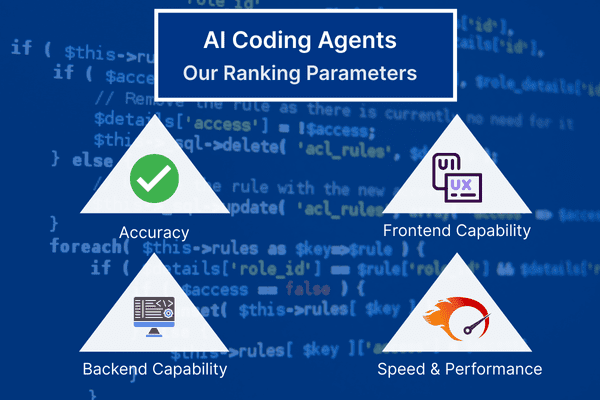
Before I started writing this article, I asked fellow tech leads and my team for the core parameters that they look at while choosing these agents. We zeroed in on four core parameters:
1. Accuracy
This is the most critical factor, hands down. An AI agent is useless if it consistently produces code that is buggy, inefficient, or simply incorrect. Accuracy for us means:
- Logical Correctness: Does the generated code actually perform the requested task without logical flaws?
- Contextual Understanding: How well does the agent understand the surrounding code, project structure, and overall intent? A good agent doesn’t just write a function in isolation; it writes a function that fits seamlessly into the existing codebase.
- Reduced Hallucinations: Does the agent invent libraries, methods, or syntax that don’t exist? Inaccurate code that looks plausible is dangerous and can waste hours on debugging.
We’re looking for an agent that we can trust to get it right the majority of the time, minimizing the need for extensive corrections and debugging.
2. Frontend Capability
A significant portion of our work involves building and refining user interfaces. Therefore, an agent’s proficiency in frontend development is a huge deal. We evaluate this based on its ability to:
- Handle Modern Frameworks: How well does it work with frameworks like React, Vue, and their ecosystems? Can it generate clean, reusable components with proper state management?
- Generate UI Structures: Can we ask it to build complex UI elements like a responsive navigation bar, a data table with sorting and filtering, or a form with validation, and get a functional result?
- CSS and Styling: Is it capable of writing clean CSS, understanding pre-processors like Sass, or working with utility-first frameworks like Tailwind CSS to create visually appealing and responsive designs?
A strong frontend agent can turn a design mock-up or a simple prompt into a working prototype in minutes.
3. Backend Capability
The core logic of our applications, from handling data to managing user authentication, resides in the backend. My little Jira-updating tool is a perfect example of a backend task. For this, we need an agent that excels at:
- Server-Side Logic: Can it write efficient code in languages like Node.js, Python, or Go?
- API Development: How quickly and accurately can it generate RESTful or GraphQL API endpoints, including the necessary request handling, validation, and response structuring?
- Database Interaction: Does it understand how to write clean database queries (both SQL and NoSQL), create schemas, and manage data models effectively?
- DevOps and Scaffolding: Can it assist with creating Dockerfiles, CI/CD pipeline configurations, or other infrastructure-as-code scripts?
A powerful backend assistant helps us build and scale the robust engine that powers our services.
4. Speed and Performance
Productivity is a game of momentum. A tool that interrupts a developer’s “flow state” can do more harm than good. We look at speed from two angles:
- Generation Speed: How quickly does the AI agent return a suggestion or a block of code? A noticeable lag can be disruptive and break a developer’s concentration. The interaction should feel seamless and instantaneous.
- Code Performance: Is the code generated by the AI efficient and optimized? An agent that produces slow, resource-intensive code is just creating technical debt that we’ll have to pay off later.
The ideal agent is a quick partner that produces performant code, enhancing our workflow without compromising the quality of the final product.
Now that we have a framework for ranking our software development AI agents, let’s list them out.
What are the Best AI Software Development Agents?
We’ve tried and tested most AI software development agents in the market, and here is the ranking, we’ve landed on:
| Feature / Criterion | GitHub Copilot | Amazon Q | Claude CLI | OpenAI Codex | Gemini CLI |
| Core Technology | Multi-model (GPT-4o, GPT-5, Claude 3.5) | AWS-trained models, Amazon Q | Anthropic Claude 3.5 Sonnet / Opus 4.1 | OpenAI GPT-5 | Google Gemini 2.5 Pro |
| Accuracy (SWE-bench) | ~74.9% (with GPT-5) | N/A (Claims 57% faster dev) | ~49% (with custom harness) | ~74.9% | ~46.8%–63.8% |
| Context Window | Model dependent (e.g., 128K) | N/A | 200K tokens | 400K tokens | 1M tokens |
| Primary Interface | IDE (VS Code, JetBrains), CLI | IDE, Lambda Console, CLI | Terminal (CLI) | Web UI, API | Terminal (CLI) |
| Agentic Capabilities | Agent Mode (Autonomous PRs), multi-file edits | Basic (code generation) | High (multi-step tasks, tool use, planning) | Low (conversational, requires prompting) | High (tool use, multi-modal) |
| Key Strengths | Best all-around IDE integration and feature set | AWS services, IaC, security scanning | Code quality, complex refactoring, multi-step tasks | Rapid prototyping & debugging via conversation | Massive context processing; multimodal input (code from images) |
| Pricing Model | Tiered ($10–$19/mo), free tier available | Free individual tier, Professional tier | Requires Pro/Max subscription ($17–$100/mo) | Tiered ($20/mo+) | Generous free tier (1000 req/day) |
Let’s dive deeper, and compare each tool on this list:
1. Claude Code
Anthropic’s command-line interface (CLI) tool Claude Code is probably my favorite AI agent. The Opus line of models are very capable and can put together entire apps. The recent release of Sonnet and Opus 4.0 have increased their capabilities, and the inference is very fast.
Most developers I’ve spoken with use Claude Code for some portion of their development workflow. Even though the models are expensive (You can end up racking up $10,000 in no time), Claude Code is the best option for more difficult coding problems.
Pros
- High accuracy, Claude Opus currently leads the SWE-Bench leaderboard with ~67% accuracy.
- Great at Python, if you’re building AI projects, the platform can deliver exceptional results
- While not as good as GPT-5, Claude Opus 4 and Claude Opus 4.1 are great at web development
Cons
- Claude Opus 4 is very expensive and is best suited to more complex problems.
Pricing
The pricing for Claude Code is
- Claude Pro – $20/month
- Claude Max – $200/month
You can choose to use the API when your limits expire.
Verdict
If Claude didn’t have strict usage limits and associated costs, I’d default to Claude Code every time. These model outperforms every other tool in the category, and can assist with very complex coding tasks.
2. Gemini CLI

Google’s Gemini CLI is an open-source AI agent that brings the power of the Gemini models. Alongside Claude, this is the tool most developers and tech leads use. Most of this is owing to the massive context window of these models (1 million tokens),
It’s also a reliable workhorse model, capable of generating boilerplate for most use-cases. The only massive disadvantage is that, it’s not as effective as Claude Code is for coding. However, it more than makes up for it with its speed and pricing.
Pros
- The 1 million token context window is a significant advantage for refactoring enormous, legacy codebases and for understanding complex, multi-service backend architectures.
- It has a generous free tier offering 1,000 requests per day makes it highly accessible for individual developers and for experimenting with agentic workflows.
- The underlying Gemini 2.5 Pro model is highly capable, achieving a near-perfect 99% on the HumanEval benchmark.
Cons
- While the agent is fast, the code quality can be hit-or-miss. Inconsistent quality is the biggest disadvantage for this model.
Pricing
Gemini CLI is freely accessible, offering a generous free tier of 1,000 requests per day.
You can also connect your Gemini API to the tool, where the costs for Gemini 2.5 is:
- $1.25 for smaller inputs (<=200k tokens) and $2.5 for larger inputs (>200k tokens) per 1 million tokens
- $10 for 1 million tokens in answer to smaller inputs, and $15 for 1 million tokens in answer to longer inputs
Verdict
Gemini CLI’s core strength is its unparalleled ability to process and reason over vast quantities of information in multiple formats, rather than generating the most elegant code. It’s a workhorse tool that most developers combine with Claude Code for effective automated coding.
The generous free tier also means that this is the perfect AI coding tool for someone who’s just starting out.
3. Amazon Q
We got a Amazon Q subscription with AWS, and tried it out for DevOps work. The tool is very performant for someone new to DevOps and the performance is admirable. Amazon CodeWhisperer, now integrated with the Amazon Q AI assistant, is a strategic offering designed to solidify AWS’s position as the premier platform for cloud development. Since, it is trained on billions of lines of code, it has a deep, specialized knowledge of the AWS ecosystem.
This is the software development AI that I’d recommend to DevOps teams building on Amazon Web Services.
Pros
- Amazon Q understand AWS APIs very well, which makes it perfect for backend development.
- The model is built for enhanced security. It also points out the places where reference code is being used.
Cons
- This is not a general-purpose coder. You will need another tool for regular coding use-cases.
- Claude and Gemini CLI offer much better web development capabilities.
- The model is good, and can be inaccurate some times.
Pricing
Amazon Q is available with a free individual tier as well as a paid professional tier.
Verdict
Amazon Q should be viewed as a specialized, strategic tool for AWS-centric development rather than a direct competitor to general-purpose agents. If you are using AWS for your backend, it makes sense to invest in this.
4. GitHub CoPilot

Two years ago, GitHub CoPilot would have ruled this list. However, over time we’ve started to prefer other tools. It’s AI assist nature is also less comfortable than the command-line format that we’re used to at Kommunicate.
The platform has matured a lot in the recent years and the fact that it’s easily available with VS Code is a huge plus. Plus, with the new GPT models, the accuracy has improved a lot.
Pros
- If you use VS Code or JetBrains as your IDE, GitHub CoPilot will be your go-to.
- The CoPilot is built to work with GitHub, which helps you maintain version control, and create more advanced projects.
- The agent mode is quite nice and comparable to Cursor and Lovable in terms of capabilities.
Cons
- The accuracy can be off some times. We’ve seen that the CoPilot hallucinates often.
- Since the underlying models aren’t built for large context understanding, using this tool on a mature project can be painful
Pricing
GitHub Copilot is available through a tiered pricing model:
- A generous free tier with 50 requests per month.
- $10/month for unlimited requests with GPT5
- $40/month for unlimited requests and switching to other AI models.
Verdict
GitHub Copilot was the first competitor on the scene and it shows a lot of promise. If you are someone who wants to play around with different AI models from different labs, this is the perfect AI coding agent for you.
5. OpenAI Codex
Okay, I am ranking this lower because I haven’t had the chance to run this tool to its full potential. We’re huge GPT users at Kommunicate, but, our developers were already using Claude and Gemini full-time when Codex came into the frame.
From my limited experience, I have found that GPT-5 is a very well-made model. With Codex it can deliver exceptional performance and it’s great for building and prototyping features. I haven’t used it on a larger codebase yet, but, my friends do recommend it for that use-case too.
Pros
- You can delegate entire tasks to Codex (e.g., “Fix this bug and open a PR”), and it will work asynchronously in the cloud while you focus on other things.
- You can start a task on your local machine with the CLI or IDE extension and then “handoff” the task to the cloud to complete, all without losing context.
- It uses OpenAI’s most powerful models (like GPT-5) by default, giving it strong reasoning and problem-solving capabilities.
Cons
- Access is limited to users on ChatGPT Plus, Pro, Team, or Enterprise plans. There is no free tier for the agentic features.
- According to some developers, while the underlying models are powerful, the CLI tool itself is less refined and customizable than competitors like Claude Code.
Pricing
Codex is included as part of the paid ChatGPT subscription plans (Plus, Pro, Team, and Enterprise). There are no separate usage fees beyond the cost of the subscription, though enterprise plans may have additional credit-based usage.
Verdict
The new Codex represents the shift from AI assistants to true AI agents. It feels less like a tool that helps you type and more like hiring a junior developer who can work independently on tasks you assign.
I’m definitely going to use this AI agent more for async tasks and for creating smaller projects. Also since, most people already have access to ChatGPT, this is an easy step-up from there.
Additional Information on this Ranking
While I have personally tested all the tools listed here, there are some other tools that I have been recommended. They are:
1. Rippling AI Agent – Well-suited to a variety of tasks and very easy-to-use.
2. Jules by Google – Powered by Gemini 2.5, and Google’s version of Codex.
3. Cursor – This is great for personal projects, however, recent vulnerabilities mean that you can’t use this for enterprise tools.
New tools are releasing every day, and there are always going to be exciting tools to try. So, don’t take our rankings as gospel. Try out new tools, and see what works best.
Now, since you have a good overview of the top 5 AI coding agents, let’s talk about which one fits your use case.
Which AI Coding Agent Should You Use?
Short answer: You should pick your coding agent based on where you spend most of your time (IDE vs CLI), your stack (AWS vs polyglot), and the shape of work (quick assists vs deep refactors vs autonomous tasks). Here’s what we recommend:
- AWS-first DevOps/IaC teams: Amazon Q (CodeWhisperer) → Best at AWS APIs, templates, policies. Pair with Claude Code for tricky logic.
- Tough refactors & complex reasoning: Claude Code (CLI) → Strongest multi-step planning and quality. Pair with Gemini CLI for giant contexts.
- Massive context / multimodal (logs, screenshots, long code): Gemini CLI → huge window + stable parsing. Pair with Claude Code to polish output.
- Day-to-day coding inside the IDE (VS Code/JetBrains): GitHub Copilot → frictionless suggestions, PR assistance. Pair with Claude Code for hard tasks.
- Autonomous tasks & async PRs (delegate and let it run): OpenAI Codex (ChatGPT agent) → offload units of work, cloud execution. Pair with Copilot locally.
- Budget-sensitive solo devs / students: Gemini CLI → generous free tier to explore, then add Copilot or Claude Code as you scale.
- Frontend-heavy (React/UI, multi-file edits): Claude Code → high-quality components & refactors. Copilot is a great companion inside the IDE.
- Backend/API microservices (polyglot): Claude Code primary; Codex if you want background execution and PRs; Amazon Q if you’re deep on AWS.
Parting Thoughts
There’s no single “best” coding agent there’s a best fit for your workflow. Most teams win with a two-agent setup: an IDE companion for flow (e.g., Copilot) plus a reasoning-first CLI agent for hard refactors (e.g., Claude Code), adding Gemini for huge context, Amazon Q for AWS-heavy work, and Codex when you want true delegation.
If you’d like to see how we combine AI agents to ship faster and how the same stack powers customer support automation get a demo of Kommunicate or sign up and start building today.

Adarsh Kumar is the CTO & Co-Founder at Kommunicate. As a seasoned technologist, he brings over 14 years of experience in software development, artificial intelligence, and machine learning to his role. His expertise in building scalable and robust tech solutions has been instrumental in the company’s growth and success.