Updated on August 27, 2026
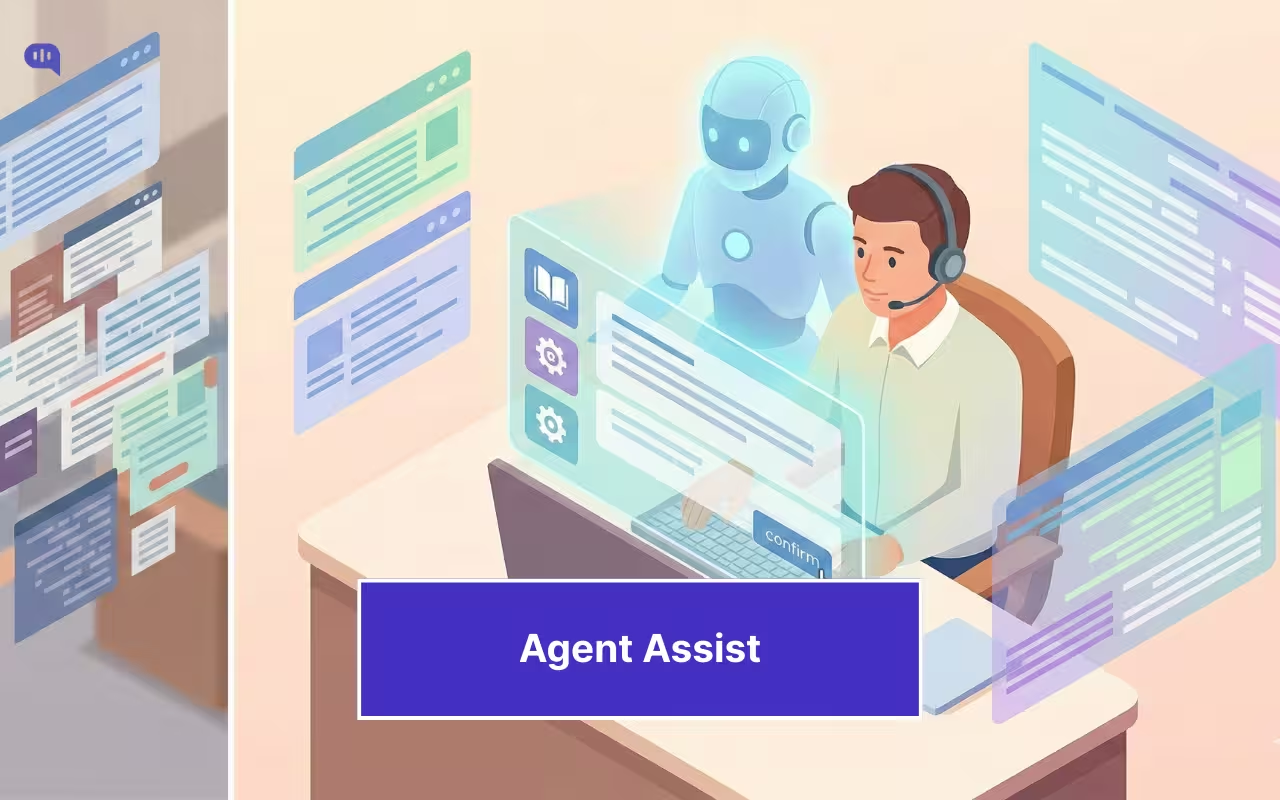
Picture the start of a normal shift. Tickets are piling up. One customer needs a refund exception. Another is stuck in an integration step that is documented, but buried in an internal page.
You want to help, but half your attention goes to navigating tools: CRM, billing, knowledge base, policy docs, SOP updates, and past tickets. Then you still have to translate what you found into a response that matches brand tone and avoids compliance risk.
This is the hidden tax of support. The job is not only resolving issues, but it is also constantly retrieving context, validating it, and packaging it into a customer-safe answer. That is why an agent assist or support copilot module is needed: it reduces search and drafting effort while keeping the agent in control of what gets sent.
This article will introduce you to Agent Assist and take you through:
- What Is a Support Copilot in Customer Service?
- Why do Customer Service Reps Need a Copilot?
- How Does a Support Copilot Work?
- What Should a Support Copilot Be Able to Do?
- Metrics That Prove Your Support Copilot Is Working
- Common Mistakes When Shipping Agent Assist
- How to Roll Out a Support Copilot in 30 Days
- Support Copilot in Kommunicate
- Conclusion
What Is a Support Copilot in Customer Service?
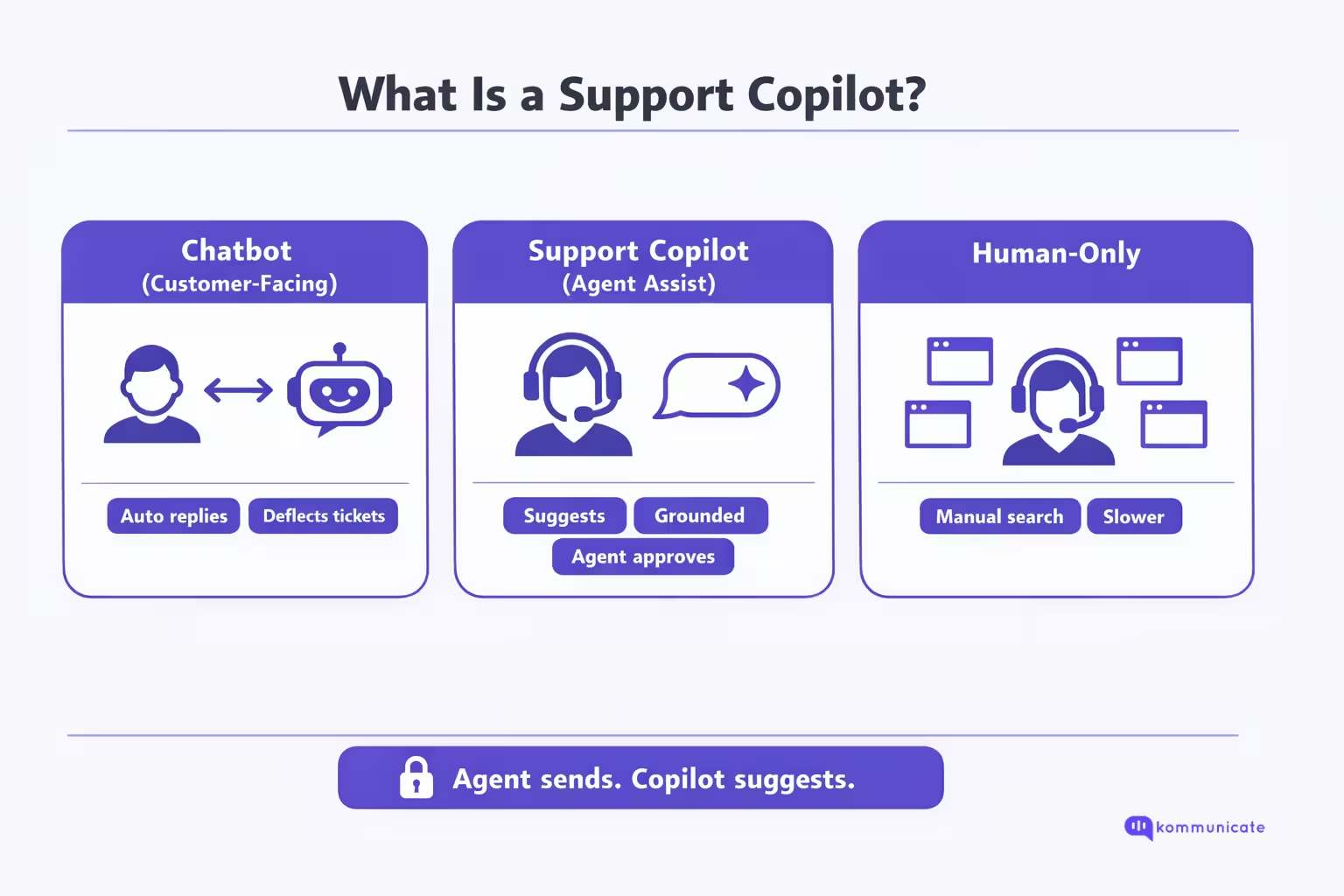
A support copilot is an agent-assist system that helps customer support reps resolve tickets faster by retrieving the right internal knowledge and drafting a suggested response, while keeping the agent fully in control of what gets sent. The customer still talks to a human. The copilot works in the background to reduce the time spent searching across tools, validating policies, and rewriting answers into an on-brand, customer-safe message.
Unlike a customer-facing chatbot, a support copilot is designed for human approval, not autonomous resolution. It surfaces relevant articles, SOPs, and past cases, provides a grounded draft (ideally with citations or source links), and helps agents summarize context or next steps. This makes it a productivity layer inside the agent workspace, not a replacement for the agent.
This support copilot can help your customer service reps provide more time to each problem, solving them completely. It also helps them solve a lot of problems through the workday, a concept we’ll explore in the next section.
Why do Customer Service Reps Need a Copilot?
Support work is cognitively expensive because the hardest part is rarely “typing a reply.” It is finding the right answer fast, verifying it against policy, and rewriting it into something accurate, safe, and on brand, while the customer is waiting.
| Where the Time or Friction Goes | What Research Says | What It Means in the Agent Seat |
| Searching for internal info | Interaction workers spend nearly 20% of the workweek looking for internal information or tracking down colleagues. | Even “simple” tickets inherit a search tax before the first correct answer appears. |
| Swivel-chairing across tools | 58% of agents at underperforming orgs toggle across multiple screens to find what they need, vs 36% at high performers. | Context switching is a performance differentiator, not a personal productivity flaw. |
| Hours lost to search in the workday | Employees spend 3.6 hours daily searching for information (survey of 4,000). | “Answer time” is dominated by retrieval and validation, not composition. |
| Speed vs quality pressure | 69% of agents report difficulty balancing speed and quality. | Agents are forced into tradeoffs that create reopens, escalations, and QA defects. |
| Workload strain and burnout | 77% of agents report increased and more complex workloads; over half report burnout. | The same staffing level is handling higher complexity, making “search overhead” feel exhausting. |
What a Support Copilot Changes (And What It Should Not Replace)
A support copilot (agent assist) exists because the system-level problem is retrieval, verification, and packaging, repeated across every interaction. Instead of forcing reps to hunt across CRM, billing, KB, SOPs, and past tickets, a copilot reduces time-to-first-correct-answer by surfacing the most relevant sources and drafting a grounded response that the agent can approve and edit.
This is how you reduce handle time without sacrificing accuracy: you remove the “find and stitch” workload that burns agents out and creates inconsistency.
There is also an important nuance: research on generative AI in customer support shows productivity gains on average, but benefits are not uniform. In a large field study, AI assistance raised issues resolved per hour on average, with the biggest gains for lower-skilled or less experienced agents, and minimal or mixed effects for top performers.
This is exactly why a copilot must be designed as assistive, with grounding and control, not as an autopilot. In the next section, we’ll talk about the design choices that makes a support copilot work.
How Does a Support Copilot Work?
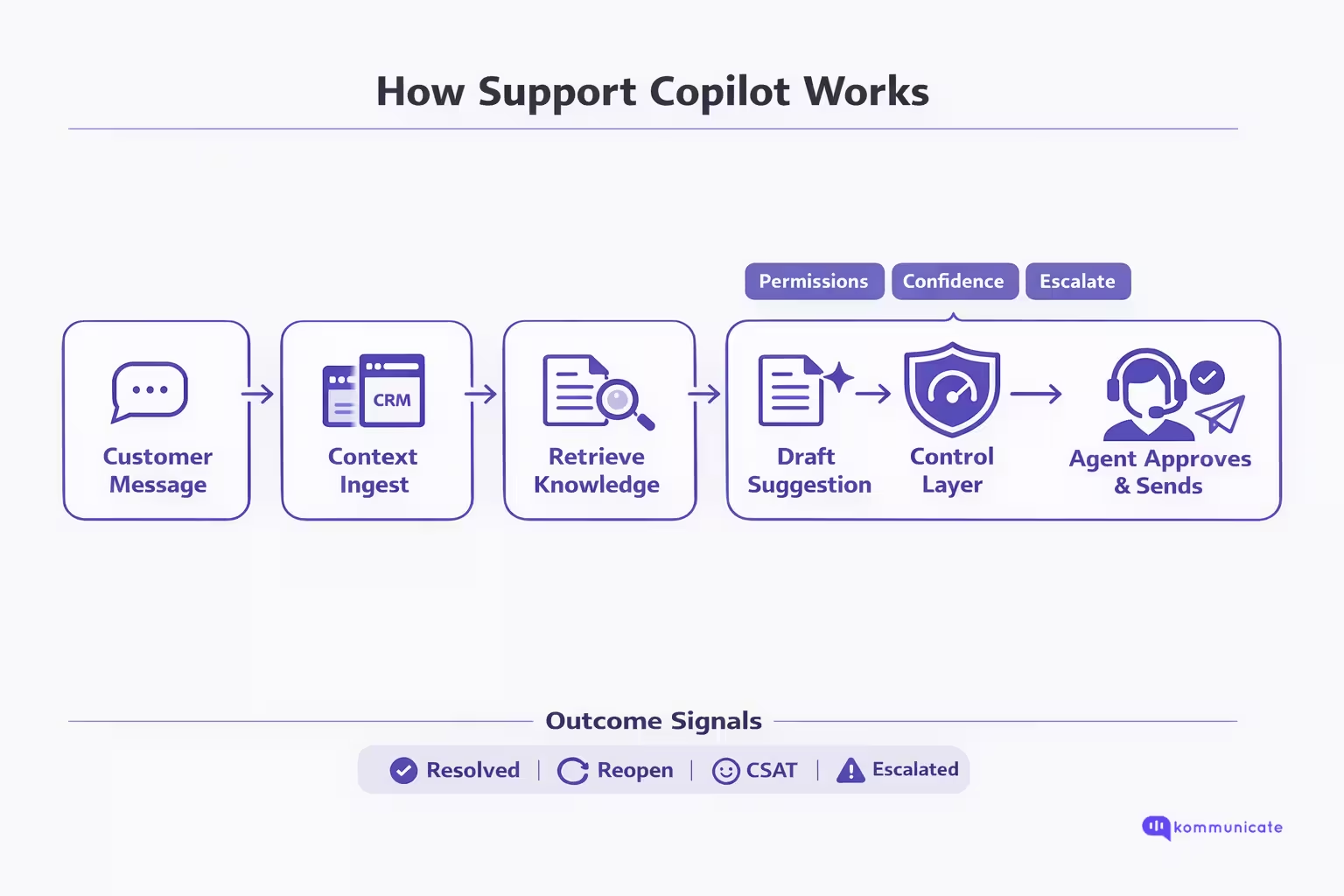
A support copilot (agent assist) runs inside the agent desktop and turns every live interaction into a retrieve → draft → verify → send loop. The key design rule is that the copilot suggests, but the agent decides.
The workflow looks like this:
| Stage | What Happens | Why It Matters |
| 1) Ingest context | The copilot reads the live conversation (or transcript) plus ticket metadata like account plan, order details, prior history, and tags. | Good suggestions require the same context agents manually collect across tabs. |
| 2) Understand the request | It identifies intent + entities (product, feature, error code, region, plan, SLA, etc.). | Prevents generic replies and narrows retrieval to the right slice of knowledge. |
| 3) Retrieve knowledge (permissioned) | It runs semantic search over internal sources (KB, SOPs, policy docs, prior cases), limited by what the agent is authorized to access. | This is where most time is saved: fewer searches and less “swivel-chairing.” |
| 4) Draft a grounded suggestion | It generates a recommended answer using the retrieved material, ideally showing citations/source links so the agent can verify quickly. | |
| 5) Apply the control layer (safety + quality) | The copilot attaches confidence signals, flags policy risks, avoids restricted content, and encourages review. | |
| 6) Present in the agent panel (not autopilot) | Suggestions appear in an assist panel as “recommended replies” and “recommended knowledge,” not as an auto-sent message. | |
| 7) Agent edits and sends | The agent accepts, edits, or rejects; the customer still receives a human response. | This is the “without taking control” principle. |
| 8) Capture outcomes (learning loop) | The system records what was suggested vs what was sent, plus outcomes (resolved, reopened, escalated, CSAT/QA). | Enables continuous improvement of retrieval, content quality, and governance. |
As you can see the support copilot workflow is deliberatgely designed to support a customer service representative who needs to make quick choices. This brings us to an important question, what are the things that this support copilot can reliably do.
What Should a Support Copilot Be Able to Do?
A support copilot is only useful if it removes the retrieval + verification + drafting burden without adding new risk. In practice, the “must-haves” are the capabilities that:
(1) surface the right knowledge in-flow
(2) show the agent why it thinks that’s the right answer
(3) keep access and compliance boundaries intact.
| Capability | What “Good” Looks Like in the Agent Seat |
| Single in-workflow assist surface | Agents get one place to see guidance and recommendations while working the ticket, reducing tool switching. |
| Instant access to knowledge + policy guidance | Copilot can surface KB articles and policy guidance immediately, so agents don’t hunt across systems. |
| Real-time suggested replies that update with the conversation | Suggestions adapt as new customer messages arrive (not static macros). |
| Confidence signals on suggestions | Every suggestion includes a reliability cue so agents can quickly decide: use, edit, or ignore. |
| Grounded answers with traceability (citations/source callouts) | Agents can see what the draft is based on, which makes verification fast and reduces incorrect answers. |
| Permission-aware knowledge access | Copilot only uses sources the agent is authorized to access (no accidental leakage of restricted docs). |
| Summarization for wrap-up + escalation | Copilot summarizes case/chat history and drafts resolution notes so agents spend less time on clerical work. |
| Task simplification inside the assist surface | Triggering workflows or updating records from the same panel can reduce clicks, but should be governed tightly. |
These capabilities give your support representatives the chance to break through the mundane parts of their workflows, so that they can create deeper relationships with customers. But, how do we know that a support copilot implementation is working as intended? Let’s talk about the metrics you can watch for performance assessment in the next section.
Metrics That Prove Your Support Copilot Is Working
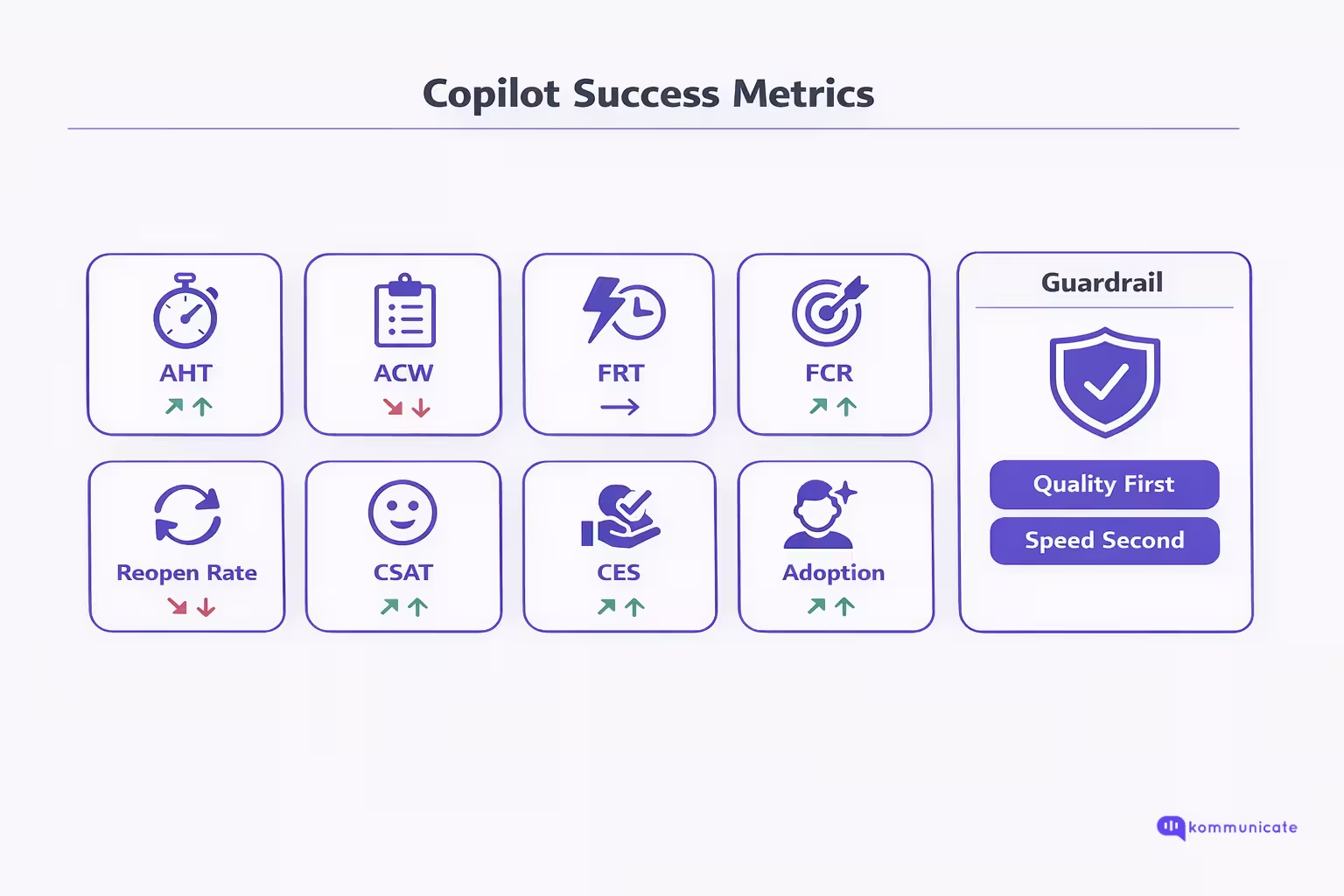
A support copilot is working when it reduces time-to-first-correct-answer while keeping resolution quality and customer experience stable or improving. The safest way to prove that is to track four metric groups together: efficiency, resolution quality, CX, and adoption + reliability signals.
1) Efficiency Metrics
- First Response Time (FRT): How long it takes to respond after an inquiry is received. Use it to prove agents can acknowledge and engage faster once a copilot surfaces context and drafts.
- Average Handle Time (AHT): Average time a contact is connected with an agent from start to finish; in Amazon Connect it includes talk, hold, and after-contact work. AHT is your headline “time saved” metric, but only meaningful when paired with quality outcomes.
- After-Contact Work (ACW/AACW): Time spent on post-interaction tasks like logging and updating CRM. Copilot summarization and auto-notes should show up here first.
What “good” looks like: FRT down, ACW down, AHT down without reopen rate rising.
2) Resolution Quality Metrics
- First Contact Resolution (FCR): Whether the issue is resolved during the first interaction without follow-ups. This is your best proxy for “first correct answer,” because it captures completeness, not just speed.
- Ticket Reopen Rate: Percentage of solved tickets that customers reopen. Treat reopens as a quality alarm: if copilot speeds up the wrong answer, reopens climb.
What “good” looks like: FCR up, reopen rate flat or down. If AHT improves but reopens increase, your copilot is accelerating incorrect or incomplete responses.
3) Customer Experience Metrics
- CSAT: Measures how satisfied customers are with a specific interaction, typically captured via a post-interaction rating question and expressed as a percentage.
- Customer Effort Score (CES): Measures how much effort a customer had to expend to complete a task or interaction. CES is especially sensitive to repetition, transfers, and “please repeat that” loops.
What “good” looks like: CSAT stable or up; CES improves even if speed is only modestly better (because the experience becomes less repetitive and more coherent).
4) Adoption + Reliability Metrics
These are operational metrics you instrument inside the agent desktop:
- Copilot view rate: % of tickets where agents opened/copilot surfaced suggestions.
- Insert/copy rate: % of tickets where a suggestion was used.
- Edit distance / edit rate: How much agents modify drafts before sending. (A healthy trajectory is: edits start high, then decrease as retrieval and content improve.)
- Fallback rate: % of tickets where copilot returns “low confidence/needs clarification/escalate” (track by intent; spikes can indicate knowledge gaps).
- Source/citation interaction rate: When you provide citations/links, track whether agents click or expand them as a proxy for “verifiability” and trust (especially on high-risk intents).
What “good” looks like: High view rate, steady use rate, and outcomes (FCR/reopens/CSAT/CES) moving in the right direction. Adoption without outcome improvement usually means suggestions are “nice,” but not actually correct or relevant.
How to avoid false wins
- Never celebrate AHT alone. Pair AHT with reopen rate and FCR so you don’t optimize for speed while quality degrades. (Amazon Connect, “Metric definitions”; MetricHQ, “Ticket Reopen Rate (RR)”; NiCE, “What is First Call Resolution (FCR)?”).
- Segment by ticket type and agent tenure. Copilots often deliver the biggest gains on high-search intents and newer agents; you want to see improvements by segment, not just averages.
These metrics will give you a proper first-hand view of how your implementation of support copilot is working. And if your metrics are underperforming, we’ve prepared a small list of things that might have gone wrong.
Common Mistakes When Shipping Agent Assist
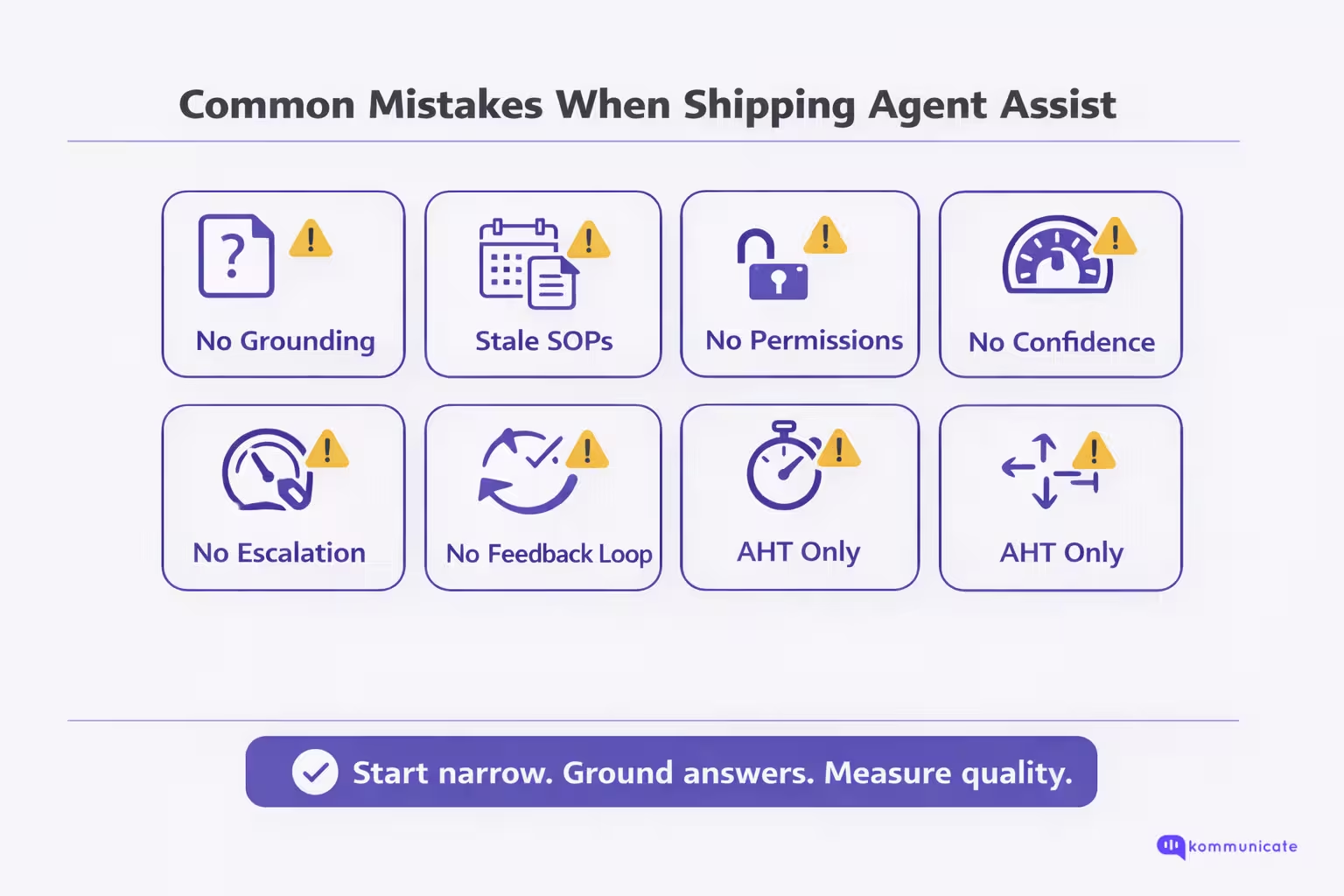
Agent assist fails less because “AI isn’t ready” and more because teams ship it like a UI feature instead of an operating model. A support copilot changes how agents find knowledge, make decisions, and communicate with customers. If you do not design for grounding, permissions, and measurement, you will either get quiet quality regressions or low adoption, both of which look like “the copilot didn’t work.”
1) Treating Copilot Like Autocomplete
If the copilot “sounds right” but isn’t grounded in approved sources, you get confident-looking errors. The fix is to make retrieval first-class: surface the source, show why it matched, and optimize for time-to-first-correct-answer, not “fastest draft.”
2) Shipping Without a Freshness Strategy
Even a perfect copilot will produce wrong answers if it’s reading outdated SOPs, deprecated product docs, or stale policy pages. You need versioning, “latest-only” rules for high-risk policies, and a process to retire or supersede old articles.
3) No Permission Boundaries
Agent assist often has access to internal documents. If you don’t enforce role-based access, copilots can leak restricted information into drafts or citations. Make “copilot only knows what the agent is allowed to know” a non-negotiable requirement.
4) Missing the Control Layer
Teams ship suggestions without confidence signals or escalation logic. Result: agents over-trust, under-check, and errors slip into production. Add low-confidence behaviors (ask clarifying questions, recommend escalation), policy blocks for restricted topics, and visible reliability cues.
5) Measuring the Wrong Success Metric
AHT alone can improve while quality quietly degrades. If you don’t pair speed with FCR and reopen rate, you will optimize for faster wrong answers. Treat reopens, QA defects, and repeat contacts as hard constraints.
6) Not Instrumenting Adoption and Edit Behavior
If you can’t see view rate, insert rate, and edit distance, you can’t diagnose whether the copilot is unused, untrusted, or irrelevant. Over time, a healthy pattern is: strong usage plus edits decreasing as retrieval and knowledge improve.
7) No Feedback Loop
Copilots fail most often because retrieval can’t find the right doc, or the right doc doesn’t exist. Without agent feedback (“wrong source,” “outdated,” “missing policy”), you cannot improve. Build a tight loop from feedback → content fixes → retrieval tuning.
8) Launching Broad Instead of Narrow
Copilot quality varies sharply by intent. Launching across everything creates noisy failures and destroys trust. Start with a small set of high-volume, high-search intents, prove outcomes, then expand in controlled waves.
9) Poor Change Management
If agents are not trained on when to use copilot, when to verify, and when to escalate, results will be inconsistent. Ship a short playbook and QA guidelines alongside the copilot, not after.
The pattern is consistent: agent assist breaks when it is shipped without governance, instrumentation, and a scoped rollout plan that earns trust. In the next section, we will walk through a practical 30-day rollout that starts narrow, sets up the right knowledge and controls, and proves impact with the right metrics before you scale.
How to Roll Out a Support Copilot in 30 Days?
A 30-day rollout works when you treat a support copilot as an operating model, not a feature toggle. The fastest path is: start narrow (few intents), ground in approved knowledge, add a control layer, pilot with real agents, then scale in waves.
| Timeline | Primary Goal | What You Do | Key Deliverables | Exit Criteria (Go / No-Go) |
| Week 1 (Days 1–7) | Define scope, success metrics, and safety rules | Pick 3–5 high-volume, high-search intents. Capture baseline AHT, ACW, FCR, reopen rate, CSAT/CES. Define the control policy (what copilot can draft, restricted topics, escalation triggers). Build an evaluation set (real tickets) per intent. | Intent shortlist + routing rules; baseline metric snapshot; safety rules + escalation logic; evaluation set + scoring rubric; knowledge map (top docs per intent). | Clear intent scope, measurable baseline, and safety policy approved by support + compliance/ops stakeholders. |
| Week 2 (Days 8–14) | Connect knowledge and make retrieval reliable (permissioned + fresh) | Connect KB/SOPs/policies/past tickets. Enforce role-based access. Implement freshness rules (latest-only for volatile policies, deprecations). Tune retrieval using the evaluation set. Standardize answer structure (answer-first, steps, confirmations). | Connected sources + permissions; retrieval configuration per intent; freshness/deprecation rules; response structure template; evaluation results + gap list. | Retrieval hits the right docs consistently for evaluation tickets; no restricted-doc leakage; obvious outdated sources flagged/removed. |
| Week 3 (Days 15–21) | Pilot with a small agent cohort and calibrate | Pilot with 5–15 agents handling selected intents. Instrument: view rate, use rate, edit rate, fallback rate. Run daily feedback loops: wrong source, outdated SOP, missing article, unsafe draft. Adjust confidence thresholds, blocks, and escalation triggers. Train agents on “when to trust vs verify.” | Pilot report (baseline vs pilot); top failure modes + fixes; agent playbook; updated retrieval tuning + knowledge improvements; QA checklist for copilot outputs. | Adoption is meaningful (agents actually use it) and quality constraints hold (no spike in reopens/QA defects). |
| Week 4 (Days 22–30) | Roll out to the full team for the same intents + formalize governance | Expand to all agents for the initial intents (do not expand intent set yet). Stand up governance cadence: weekly review of reopens, escalations, QA defects; content owners per domain; deprecation process. Create a dashboard pairing speed + quality outcomes. Plan next wave (2–3 new intents). | Team-wide rollout (initial intents); governance owners + weekly rhythm; copilot dashboard; next intent wave plan + readiness checklist. | Stable improvement on target metrics and a repeatable governance process to scale safely. |
Optional: The “Rollout Gate” Metrics You Should Check Weekly
- Speed: AHT, ACW, First Response Time
- Quality: FCR, reopen rate, QA defect rate
- CX: CSAT and/or CES
- Adoption: View rate, Use rate, Edit rate, Fallback rate
If you execute this plan correctly, you earn trust first: the copilot reliably surfaces the right knowledge, drafts grounded suggestions, and stays within your safety and permission boundaries. Once the initial intent set is stable, expansion becomes a repeatable wave-based rollout instead of a risky big-bang launch. Next, we will make this concrete by showing how the support copilot modal works in Kommunicate.
Support Copilot in Kommunicate
A support copilot only matters if it shows up where the work actually happens: inside the agent queue, in the middle of live customer conversations. In Kommunicate, that copilot experience is delivered through Agent Assist, which is designed to elevate agent performance by improving efficiency and customer satisfaction using generative AI. The same copilot approach extends to operations and workflow agents across HR, IT, and sales, not just support. Instead of making reps jump between dashboards to hunt for answers, Agent Assist brings smart bot assistance directly into the conversation dashboard, so agents can stay focused on resolving the customer’s issue.
How Does Support Copilot Work in Kommunicate?
Kommunicate’s support copilot workflow is simple: enable Agent Assist, connect a bot that knows your internal knowledge, and let it suggest responses inside the agent’s conversation view.
Agent Assist is an AI-powered assistant that integrates into the support agent’s conversations dashboard. Once enabled, it provides suggested responses based on the customer’s query. This means that when an agent receives a question they do not immediately know, they do not need to pause and search for solutions across internal documentation. Instead, Agent Assist offers instant suggestions, helping agents respond faster while supporting accuracy in replies.
This is exactly what a support copilot should do: reduce resolution time by removing the “search and stitch” step, while still letting the agent decide what to send.
What Agents Gain From Agent Assist?
- Time-Saving: Agent Assist offers instant suggestions so agents no longer need to search for solutions and can resolve queries faster.
- Increased Customer Satisfaction: Faster resolutions lead to happier customers, and Agent Assist supports prompt, accurate responses that improve the experience.
- Seamless Integration: Because the feature is built into the agent dashboard, agents can switch between manual responses and bot-assisted replies without disrupting workflow.
How to Enable Agent Assist in Kommunicate?
- Create a Bot: Set up a bot using Kompose, OpenAI, Gemini, or Anthropic, and incorporate your internal URLs and documents for a more personalized response system.
- Enable Agent Assist: Log into the Kommunicate dashboard, go to the Conversations section, and activate Agent Assist.
- Select Your Bot: Choose the bot that will assist during customer interactions.
- Use Suggested Responses: As customer queries are received, Agent Assist suggests responses so agents can deliver quicker, more accurate resolutions.
- Respond Instantly: Agents can now answer customer inquiries with immediate assistance inside the conversation dashboard.
For businesses where answers are sensitive, having human oversight that’s built into the product is essential. A support copilot (like the one in Kommunicate) makes it easier for enterprises to maintain human connections while scaling their operations.
Conclusion
A support copilot works when it reduces the hidden tax of support: searching, validating, and rewriting answers while customers wait. Done right, it speeds up resolution without taking control away from agents, because the agent still reviews, edits, and sends every response.
In Kommunicate, Agent Assist delivers that copilot experience directly inside the conversation dashboard by providing suggested replies based on the customer’s query, powered by a bot trained on your internal URLs and documents. If you want to see what faster, more consistent support looks like with agents still in charge, book a demo with us today.

Adarsh Kumar is the CTO & Co-Founder at Kommunicate. As a seasoned technologist, he brings over 14 years of experience in software development, artificial intelligence, and machine learning to his role. His expertise in building scalable and robust tech solutions has been instrumental in the company’s growth and success.