Updated on March 5, 2026
Higher education institutions are facing an operational imbalance. Student expectations for instant support have increased, but administrative and IT teams remain constrained by staffing, semester surges, and fragmented communication channels.
In many universities, support requests begin in the learning management system (usually Moodle), but Moodle itself was never designed to serve as a case management or helpdesk platform. Its core purpose is instructional delivery, not structured triage or escalation.
Attempting to convert an LMS into a ticketing system often results in plugin sprawl, performance overhead, and governance complexity rather than measurable improvements in student experience.
At the same time, research on digital student services consistently shows that repetitive academic and administrative queries consume a disproportionate share of support capacity. These interactions are typically L1 in nature, rule-based, and automation-ready. This is where an AI chatbot for education becomes strategically relevant.
By resolving high-frequency queries automatically and routing complex or high-risk cases with complete context, institutions can reduce operational strain without degrading academic oversight.
This guide answers the question: How do you design a student support triage system around Moodle that balances automation with human judgment?
It covers:
- Why Moodle Is Not a Helpdesk (And Why That’s a Good Thing)?
- What an AI Chatbot for Education Actually Does?
- Where do Student Support Requests Originate in Moodle-Based Institutions?
- The Three-Layer Student Support Triage Model
- A Cleaner Architecture: AI Chat Layer + Escalation System
- Metrics That Prove Your Education Chatbot Is Working
- How to Launch an AI Chatbot for Moodle in 30 Days?
Why Moodle Is Not a Helpdesk (And Why That’s a Good Thing)?
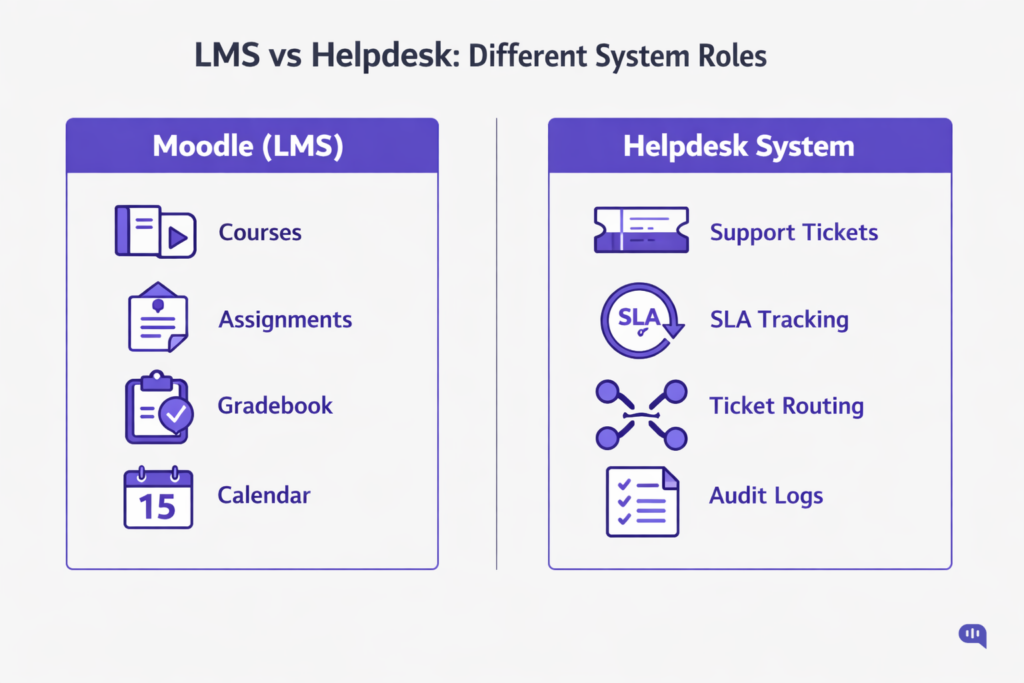
Moodle is structured as learning software, not a support module. It has the following responsibilities:
- Course hosting
- Assignment submission
- Grading workflows
- Content distribution
- Academic progress tracking
Helpdesks must be built around:
- Ticket lifecycle management
- SLA tracking
- Queue prioritization
- Cross-department routing
- Escalation logs
These are fundamentally different system objectives. Forcing an LMS to serve as a ticketing engine introduces structural inefficiencies because the underlying data models and workflow assumptions are misaligned.
So, to architect Moodle helpdesks, administrators use plugins. However, these plugins carry some operational risk.
1. “Helpdesk Plugins” Introduce Operational Risk
When institutions attempt to retrofit Moodle with helpdesk plugins, they typically encounter:
- Database load increases during peak academic periods
- UI fragmentation, where support lives outside normal course flows
- Version upgrade conflicts with Moodle core updates
- Maintenance overhead requiring specialised admin effort
The result is often technical debt rather than operational clarity. Over time, plugin-heavy LMS environments become slower, harder to govern, and more fragile during semester surges.
Plus, there’s a fundamental problem in retrofitting academic software into a helpdesk, because it affects performance.
2. Academic Platforms Should Remain Performance-Optimised
An LMS must prioritise:
- Page load speed
- Assessment reliability
- Data integrity
- Role-based academic permissions
Embedding ticketing complexity into the LMS layer risks degrading the student learning experience. During exam periods or assignment deadlines, system responsiveness is non-negotiable.
Keeping Moodle focused on instructional delivery preserves system stability.
Finally, there’s a problem with how we use helpdesks because of how student support works in general.
3. Student Support Is a Triage Problem, Not a Ticketing Problem
Most student queries inside Moodle-based institutions fall into three categories:
- Repetitive academic clarifications
- Access or technical issues
- Administrative policy questions
A significant portion of these interactions is L1, rule-based, and automation-ready. They do not require a ticket at all.
The real challenge is structured triage:
- Resolve repetitive queries automatically
- Route academic questions correctly
- Escalate high-risk or sensitive issues with context
This is where an AI chatbot for education becomes relevant: not by replacing Moodle or turning it into a helpdesk, but by adding an intelligent support layer around it.
4. Separation of Concerns Creates Better Governance
By keeping:
- Moodle = Academic delivery
- AI chatbot = Triage + Resolution layer
- Human teams = Judgment + Exception handling
Institutions maintain:
- Cleaner governance boundaries
- Better performance control
- Lower upgrade risk
- Clear accountability across departments
Moodle not being a helpdesk is not a limitation. It is an architectural boundary. When respected, that boundary enables a more scalable, automation-driven student support model that balances efficiency with academic oversight.
And an AI chatbot is often enough to architect a support system that functions at scale across the institution.
What an AI Chatbot for Education Actually Does?
An AI chatbot for education is not just a floating chat bubble answering FAQs. In a university or Moodle-based environment, it operates as a structured triage and resolution layer that sits around the LMS. While Moodle manages coursework and assessments, an AI chatbot manages intent detection, policy retrieval, routing logic, and escalation control.
Its purpose is operational: reduce repetitive load, accelerate resolution, and ensure that complex academic or administrative issues reach the right human team with full context. When implemented correctly, it improves both efficiency metrics and student experience outcomes.
| Feature | Operational Benefit | Value for the Student |
| Instant FAQ & Policy Retrieval | Automates repetitive L1 academic and administrative queries | Immediate answers without waiting for email replies |
| Deadline & Status Lookup | Pulls structured information (assignment deadlines, enrollment status, fee confirmations) | Reduces anxiety around submissions and compliance |
| Intent Recognition | Identifies whether the issue is academic, technical, or administrative | Prevents misrouting and repetitive explanations |
| Context-Aware Escalation | Transfers conversation with summary (intent, attempted solutions, user details) | No need to repeat the issue to multiple departments |
| Department-Based Routing | Routes queries to IT, Registrar, Finance, or Faculty based on classification | Faster access to the correct authority |
| Semester Surge Handling | Absorbs volume spikes during enrollment, exams, or results | Maintains responsiveness during peak stress periods |
| Guardrail Enforcement | Blocks unsupported or high-risk actions and escalates appropriately | Protects academic integrity and sensitive data |
| Conversation Analytics | Tracks containment rate, escalation rate, and repeat contact trends | Continuous improvement in service quality |
In most institutions, a significant share of student queries is predictable and repeatable. Automating these does not remove human judgment; it protects it. Faculty and administrative teams can focus on high-value academic decisions while the chatbot resolves standardised inquiries at scale.
An AI chatbot for education is therefore not a replacement for institutional support teams. It is a triage system that balances automation with human oversight, improving response speed, reducing operational strain, and delivering a more predictable student support experience.
But to operationalise student support across the institution, you need to understand where student queries are actually coming from.
Where do Student Support Requests Originate in Moodle-Based Institutions?
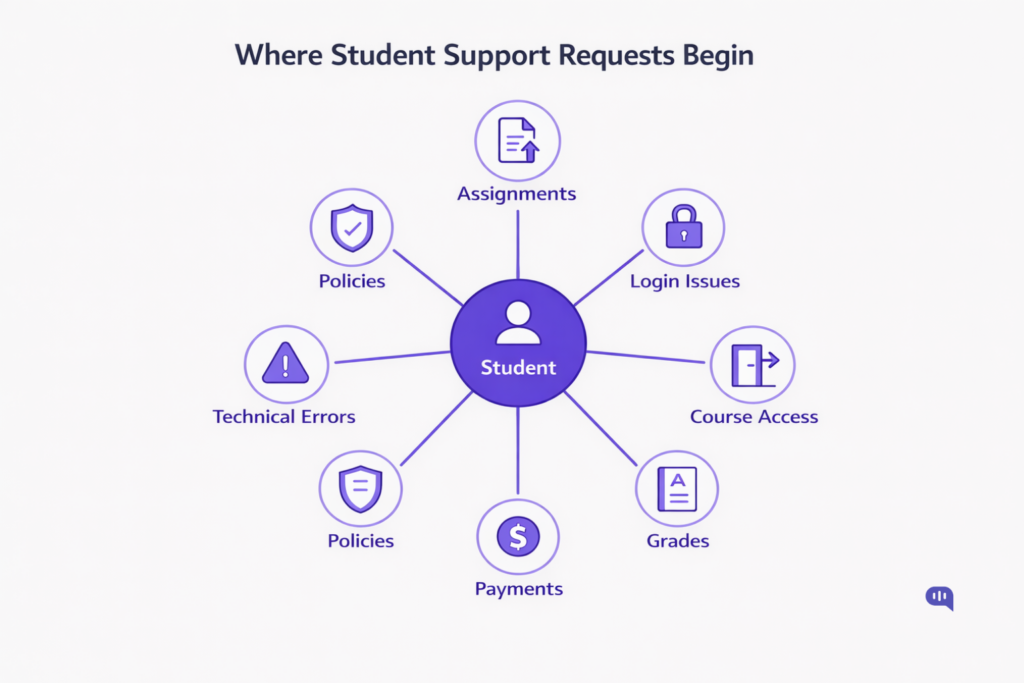
In institutions using Moodle, support demand does not originate from a single channel. While Moodle serves as the academic interface, the triggers for student support requests emerge from academic workflows, technical friction, administrative processes, and policy uncertainty.
Understanding the source of these requests is essential before designing automation or triage logic. Without mapping demand sources, institutions risk automating the wrong issues or over-escalating low-risk queries.
1. Assignment Submission Friction
Students frequently raise tickets due to:
- File format errors
- Missed deadlines
- Upload failures
- Confusion about grading rubrics
These are high-volume, deadline-sensitive, and often repetitive.
2. Login and Authentication Issues
Common triggers include:
- Forgotten passwords
- Multi-device login conflicts
- Account lockouts
- SSO misconfigurations
These requests typically escalate to IT but are largely rule-based and automation-ready.
3. Course Access and Enrollment Errors
Students often contact support when:
- A registered course is not visible
- Access permissions are incorrect
- Sections are locked unexpectedly
- Prerequisite validations fail
These are routing-sensitive but structured issues.
4. Grading and Assessment Queries
Support originates from:
- Delayed grade publication
- Clarification on scoring
- Appeal procedures
- Feedback visibility issues
These require careful triage, as some are informational while others demand faculty judgment.
5. Payment and Administrative Status Questions
Administrative offices receive high volumes of:
- Fee payment confirmations
- Scholarship status updates
- Enrollment verification
- Certificate issuance requests
These are repetitive and policy-driven.
6. Technical Compatibility Problems
Students report:
- Browser incompatibility
- Mobile access issues
- Video playback errors
- Plugin or integration conflicts
These issues spike during exams and content-heavy modules.
7. Policy and Compliance Clarifications
Students frequently seek clarity on:
- Attendance requirements
- Late submission rules
- Academic integrity policies
- Exam rescheduling guidelines
These are documentation-driven and ideal for knowledge-based automation.
Student support demand in Moodle-based institutions is not random; it clusters around predictable friction points in academic and administrative processes. A significant percentage of these requests are repetitive, structured, and suitable for automated resolution.
By clearly mapping these seven origin points, institutions can design an AI-driven triage model that resolves routine issues.
The Three-Layer Student Support Triage Model
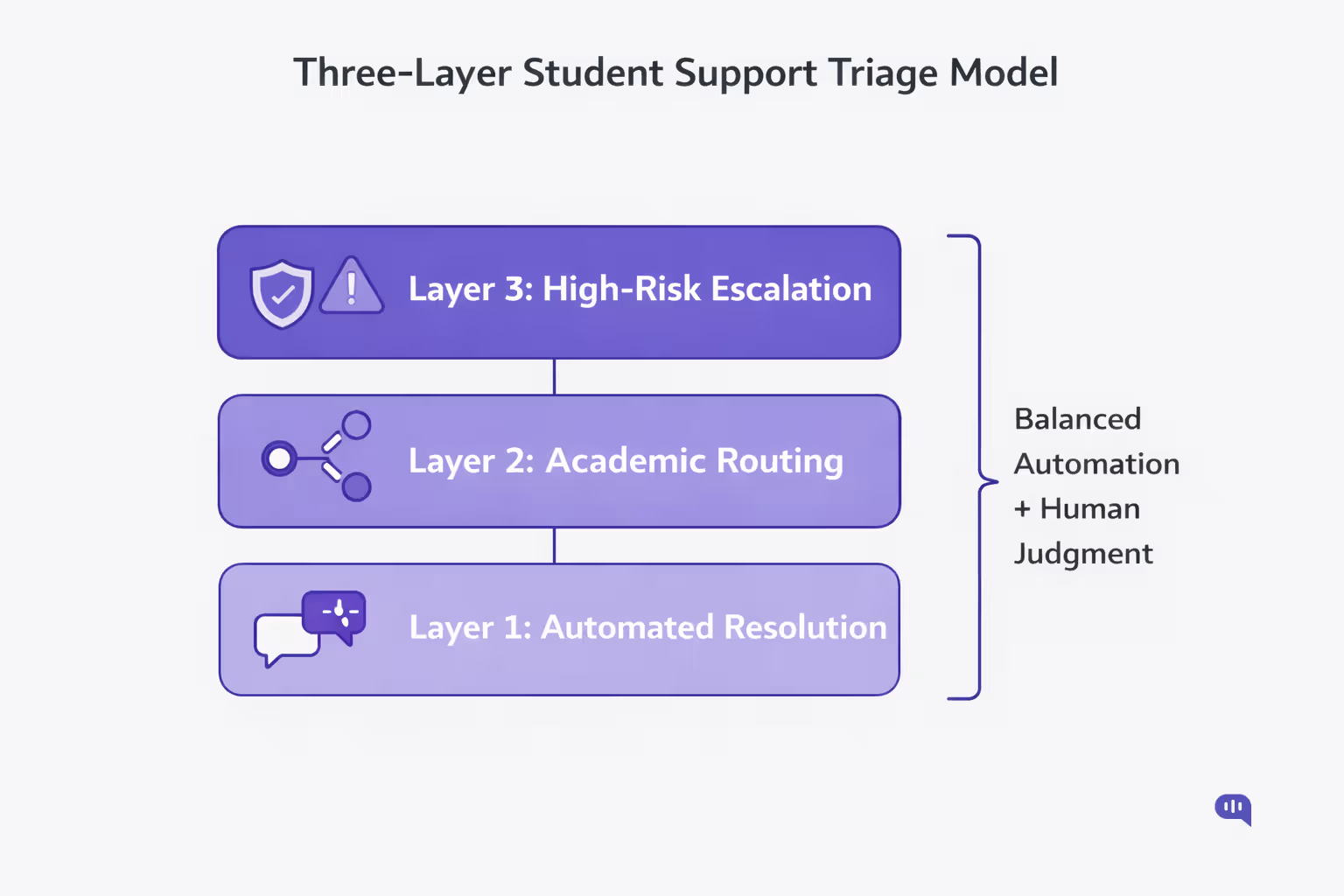
Student support in Moodle-based institutions should not begin with ticket creation. It should start with triage. Most inbound queries are predictable, repeatable, and low-risk. A smaller percentage requires academic judgment. An even smaller subset involves policy sensitivity, compliance, or institutional risk.
A structured triage model clearly separates these layers: protecting faculty time, reducing IT overload, and improving the student experience without turning the LMS into a helpdesk.
Below is a practical three-layer architecture that institutions can deploy around Moodle.
Layer 1: Automated Resolution (L1 Containment)
Objective: Instantly resolve repetitive, rule-based queries without human intervention.
Examples:
- Assignment deadlines
- Submission format requirements
- Attendance thresholds
- Fee payment confirmation steps
- Password reset guidance
How It Works:
- Intent detection
- Retrieval from approved knowledge sources
- Structured, policy-grounded responses
- Confirmation step before closure
Key Metrics:
- Containment rate
- First-contact resolution
- Deflection savings
This layer absorbs the highest volume of queries. It protects human capacity and reduces wait times during semester surges.
Layer 2: Intelligent Academic Routing
Objective: Route nuanced queries to the correct authority without friction.
Not all questions can or should be automated. Academic ambiguity requires structured escalation.
Examples:
- Grade disputes
- Extension requests
- Feedback clarification
- Course-specific exceptions
How It Works:
- Detect low confidence or ambiguity
- Classify by course, instructor, or department
- Generate a handoff summary including: Student identity, intent, attempted automated responses, & relevant course metadata.
Key Metrics:
- Routing accuracy
- Time to human
- No-context handoff rate
This layer ensures that human judgment is preserved where necessary, but without repetitive explanation from the student.
Layer 3: Administrative and High-Risk Escalation
Objective: Escalate sensitive or high-impact issues with structured control.
These include:
- Financial disputes
- Academic integrity concerns
- Data privacy issues
- Enrollment status conflicts
- System outages
How It Works:
- Trigger-based escalation thresholds
- Guardrail enforcement
- Direct routing to IT, registrar, or finance teams
- Audit logging for governance
Key Metrics:
- Escalation rate
- Compliance adherence
- Resolution time for high-risk cases
This layer ensures governance and institutional protection while maintaining transparency and traceability.
The three-layer system creates clear operational separation:
- Layer 1 protects scale
- Layer 2 protects academic precision
- Layer 3 protects institutional integrity
Instead of embedding ticketing complexity inside Moodle, institutions implement an intelligent triage layer around it. The LMS remains optimised for learning delivery, while automation and escalation logic operate as a controlled support system.
Technically, this can be engineered with an AI chatbot and a working escalation system.
A Cleaner Architecture: AI Chat Layer + Escalation System
Instead of forcing ticketing logic into Moodle, institutions can deploy a structured AI triage layer that sits around the LMS and integrates with existing escalation systems.
Kommunicate is designed precisely for this architecture. It does not attempt to replace academic systems or act as a heavy ITSM tool. Instead, it provides a conversational interface, a knowledge-grounded AI agent, and a context-preserving escalation framework that connects students to the right human team when necessary.
1. AI Chat Layer: Knowledge-Grounded Automation With Guardrails
The AI chat layer (from Kommunicate) acts as the first line of triage.
Core Architectural Components:
- No-code AI Agent Builder – Deploy and configure AI agents without modifying Moodle’s core system.
- Knowledge Source Ingestion – Sync institutional documentation (policies, academic rules, FAQs, fee guidelines) into a controlled knowledge base.
- Intent Detection + Retrieval – Classifies queries and retrieves grounded answers rather than generating speculative responses.
- Role-Based Guardrails – Controls what the AI can and cannot answer. High-risk intents automatically trigger escalation.
- Multi-Channel Deployment – Works across web, mobile, and messaging channels without adding LMS plugin load.
Architectural Advantage:
The AI chat layer resolves high-volume L1 queries without creating tickets. It absorbs predictable demand while maintaining institutional compliance and answer accuracy.
2. Escalation System: Context-Preserving Human Judgment
Automation alone is insufficient in academic environments. Escalation must be structured and context-aware.
Escalation Capabilities:
- Shared Inbox for Human Teams – Routes conversations to IT, registrar, finance, or faculty teams based on classification.
- Conversation Summary Handoff – Passes intent, student details, and attempted resolutions to prevent repetition.
- Department-Based Routing Rules – Supports course-level or function-level routing logic.
- Audit Trails + Monitoring – Tracks escalation rate, time-to-human, and resolution metrics.
- Human-in-the-Loop Controls – Enables agents to intervene, override, or refine AI responses.
Architectural Advantage:
Instead of embedding case workflows into Moodle, the escalation system operates externally while maintaining tight contextual continuity. Students experience seamless handoff; administrators maintain governance control.
This architecture works because:
- Moodle remains lightweight and performance-optimised.
- AI automation handles repetitive academic and administrative queries.
- Human teams focus on high-value decisions.
- Governance boundaries remain clear.
This AI chat layer + escalation system approach avoids plugin sprawl, reduces operational friction, and creates a scalable student support model that balances automation with academic oversight.
Once you’ve got this figured out, let’s start focusing on the performance of your new triage system.
Metrics That Prove Your Education Chatbot Is Working
Deploying an AI chatbot for education is not the goal; measurable operational improvement is. To justify automation in a Moodle-based environment, institutions must track performance across containment, escalation, and student experience.
The metrics we recommend are:
- Containment Rate – Percentage of conversations resolved without human intervention.
- Escalation Rate – Share of conversations routed to human teams; should decline for repetitive intents.
- Time to Human – Average time taken to connect a student to the correct department after escalation.
- First Contact Resolution (FCR) – Percentage of issues fully resolved in the initial interaction (bot or human).
- No-Context Handoff Rate – Percentage of escalations where students must repeat information; should trend toward zero.
- Repeat Contact Rate – Frequency of students reopening the same issue within a defined time window.
- Routing Accuracy – Percentage of escalations correctly assigned to the intended department or instructor.
- Semester Surge Stability – System performance and response consistency during peak academic periods.
- CSAT After Handoff – Student satisfaction scores following bot-to-human transfer.
- Cost per Resolved Query – Total support cost divided by resolved interactions, used to quantify ROI.
A chatbot is working when containment improves, escalations become smarter, and students reach the right human faster with less friction.
Since we have a primer on how the triage and helpdesk workflow in Moodle works, let’s discuss an implementation plan.
How to Launch an AI Chatbot for Moodle in 30 Days?
Launching an AI chatbot around Moodle does not require a year-long digital transformation project. With the right triage model and governance controls, institutions can deploy a structured AI layer in 30 days.
The key is sequencing: start narrow, control risk, measure outcomes, then expand before peak academic load.
| Stage | Timeline | Focus Area | Key Actions | Deliverable |
| Stage 1: Knowledge Audit & Scope Definition | Days 1–7 | Identify automation-ready intents | Map top 50 student queries, classify L1 vs escalation, and clean policy documentation | L1 Automation Map + Approved Knowledge Base |
| Stage 2: AI Configuration & Guardrail Design | Days 8–15 | Build controlled automation layer | Configure AI agent in Kommunicate, define escalation triggers, set role-based permissions | AI Agent Configured + Escalation Threshold Matrix |
| Stage 3: Pilot Deployment (Single Department or Course Cluster) | Days 16–23 | Validate containment and routing | Launch for one faculty or administrative unit, monitor escalation rate, and adjust intents | Pilot Performance Report (Containment, Routing Accuracy, FCR) |
| Stage 4: Optimization & Semester-Ready Rollout | Days 24–30 | Scale with governance controls | Refine knowledge gaps, train human teams on shared inbox workflows, and activate the monitoring dashboard | Full Rollout + Monitoring Dashboard |
A 30-day launch is achievable when institutions focus on triage design, guardrails, and measurable outcomes. The result is a scalable AI support layer that protects Moodle’s performance while balancing automation with human academic judgment.
Conclusion
In designing and deploying an AI chatbot around Moodle, the goal is to create a structured triage ecosystem that aligns with how students actually interact with academic systems. By focusing on controlled automation, context-aware escalation, and measurable outcomes, institutions can reduce repetitive workload, improve resolution times, and preserve faculty and administrative capacity for high-value decision-making. A well-implemented AI chatbot does not replace human judgment; it augments it, ensuring that common queries are handled quickly while complex issues are routed with full context to the right teams.
As you operationalise your education support strategy, guardrails become critical to maintain accuracy, institutional compliance, and student trust. Thoughtful controls around intent classification, escalation thresholds, and knowledge governance prevent chatbot responses from straying into unsafe or speculative territory. With transparent governance and continuous monitoring, your chatbot becomes a reliable support partner that enhances the student experience without compromising academic integrity.

Adarsh Kumar is the CTO & Co-Founder at Kommunicate. As a seasoned technologist, he brings over 14 years of experience in software development, artificial intelligence, and machine learning to his role. His expertise in building scalable and robust tech solutions has been instrumental in the company’s growth and success.