Updated on April 30, 2026
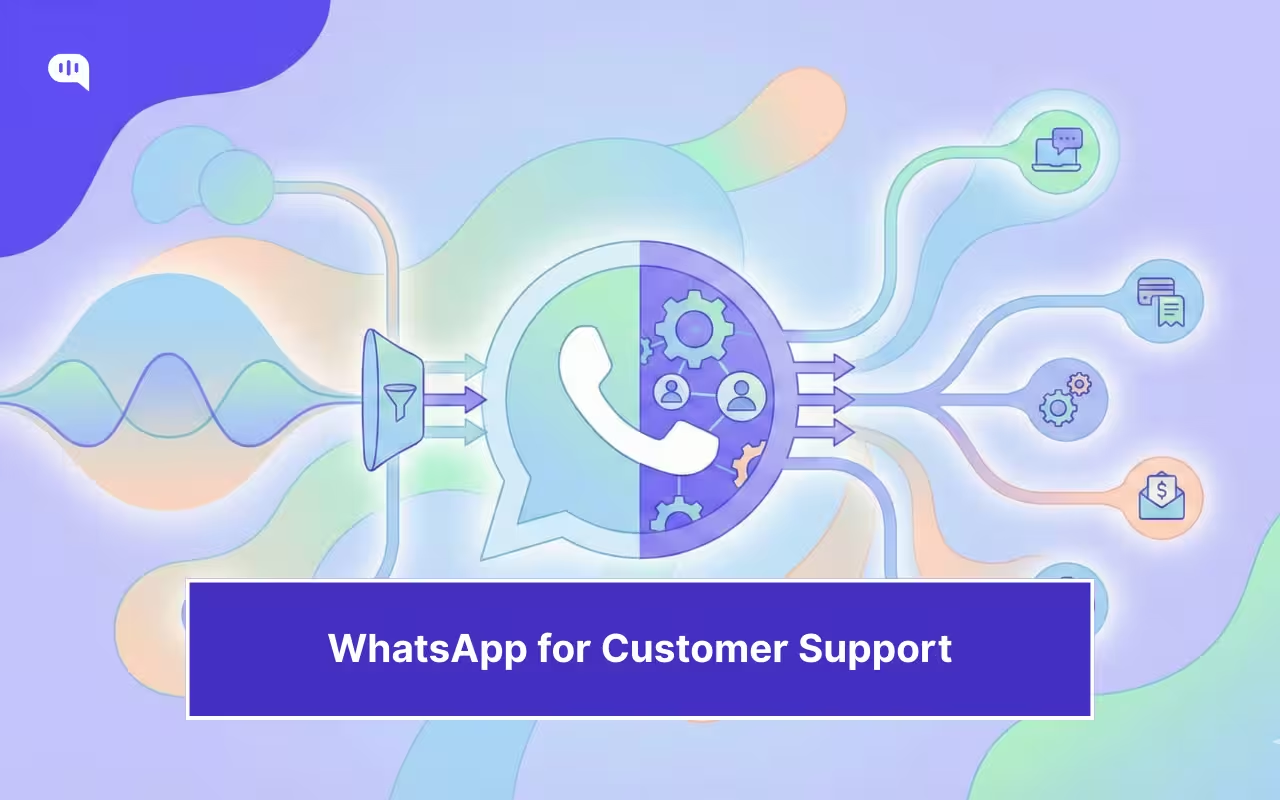
WhatsApp customer service has become the default “front door” for support in many businesses. Customers use it because it is fast, familiar, and always-on. Leaders adopt it because it scales better than voice and email when demand spikes. The problem is that WhatsApp’s speed amplifies the cost of breakdowns: misrouted conversations, slow escalations, and specialists starting cold.
For CX directors, the real question is where automation should stop, and how WhatsApp routing should move the right issues to L2 support and specialist routing without losing context. WhatsApp’s operating constraints make this non-negotiable: the 24-hour customer service window, template rules outside the window, and the requirement to provide clear escalation paths all shape what “good” looks like.
This article lays out an executive-ready operating model for support segmentation and omnichannel support. We’ll cover:
- Why L2 Breaks Faster on WhatsApp Than on Email or Web Chat?
- What “Omnichannel L2” Means in Practice?
- Where WhatsApp Works Best in the L2 Journey?
- When Should WhatsApp Hand Off to Specialists?
- Zero-Loss Context Transfer: The Minimum Handoff Payload for L2
- Specialist Routing Design: Skills + Work Types + Priority Lanes
- Who Owns Customer Service While L2 Works Behind the Scenes?
- Governance: Prevent Duplicate Work, Conflicting Answers, and Silent Stalls
- Metrics CX Leaders Should Run for WhatsApp L2
- Conclusion
Why L2 Breaks Faster on WhatsApp Than on Email or Web Chat?
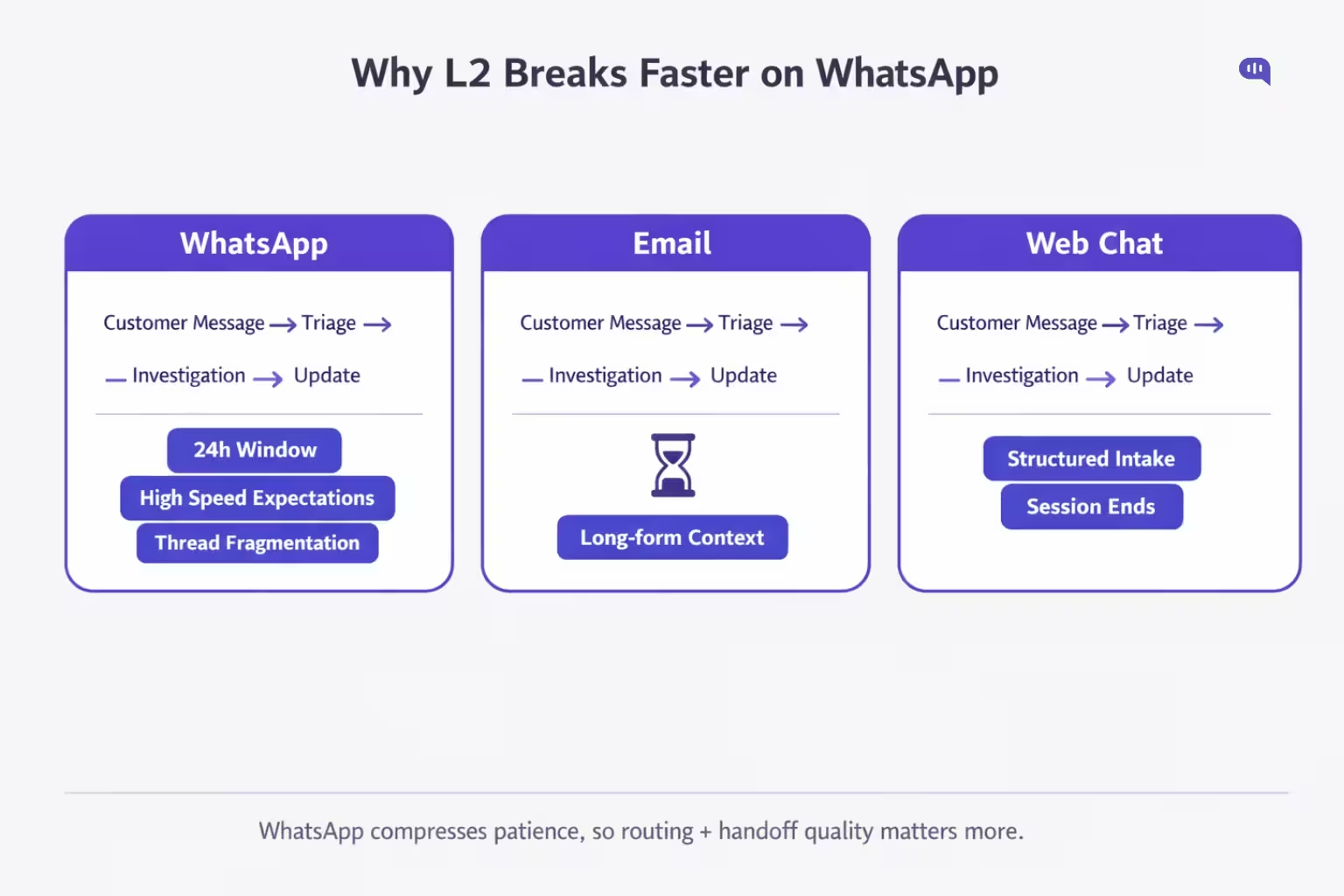
L2 support involves investigation, exceptions, approvals, and cross-team dependency. But, WhatsApp customer service compresses patience, increases transfer visibility, and adds channel constraints that email and web chat typically do not.
1) The 24-hour Service Window Turns “Investigation Time” into a Risk
On the WhatsApp Business Platform, you can reply freely within the 24-hour customer service window. Outside that window, businesses can only message using approved templates.
That matters because L2 work often exceeds 24 hours. If the customer goes quiet while your team investigates, you risk a silent stall in which your specialist cannot send a standard update without a template.
2) WhatsApp is “High Velocity”
Many teams start with ad-hoc setups (individual devices, groups, manual forwarding). The predictable result is zero queue visibility, SLA misses, and unseen messages.
Email and web chat usually come bundled with ticket states, assignment, and reporting. WhatsApp does not. Unless you operationalise it with a shared inbox and workflow layer, L2 breaks under volume because you cannot manage what you cannot see.
3) L2 Needs a Case Object
L2 support is not just conversation. It is a case: ownership, status, audit trail, internal collaboration, and links to systems of record. A shared inbox model converts WhatsApp conversations into ticket-like entities with an owner, status, and history, and can extend to an omnichannel view.
Without that structure, L2 becomes “DM-based incident management,” which collapses fast.
4) Transfers on WhatsApp are Visible and Immediate
In email, a handoff is mostly invisible. On WhatsApp, every transfer appears to have latency. If your WhatsApp routing is weak, customers experience it as “being bounced,” not “being escalated.”
Omnichannel routing systems exist precisely to route work based on availability, capacity, priority, and skills, so the right agent receives the conversation sooner.
5) Context Loss is Costlier
WhatsApp messages are short, fragmented, and asynchronous. That is great for L1, but L2 requires structured context: intent, identifiers, what’s been tried, evidence, and the subsequent decision needed.
If you do not standardise capture upstream, specialist routing becomes “specialists starting cold,” which increases resolution time and the risk of reopens.
6) Policy and Trust Constraints
WhatsApp’s Business Messaging Policy explicitly requires businesses to provide clear escalation paths when using automation (human transfer, phone, email, web support, forms, and more).
Many L2 scenarios (identity verification, regulated data, complex disputes) are better handled via controlled flows or alternate channels. The operational mistake is pretending everything can stay inside WhatsApp just because the customer started there.
7) Templates add Governance Overhead
Templates are necessary outside the service window and must be approved. In practice, templates can be rejected, paused, or disabled due to policy or negative feedback, which can interrupt outbound update workflows.
Email does not have this constraint. That is why the L2 update discipline on WhatsApp must be designed, not assumed.
L2 breaks faster on WhatsApp because its fast UX sits atop slow, exception-heavy work. The fix is not “more automation.” The fix is an operating model that supports segmentation, specialist routing, and zero-loss omnichannel handoffs, anchored in a shared inbox workflow.
What “Omnichannel L2” Means in Practice?
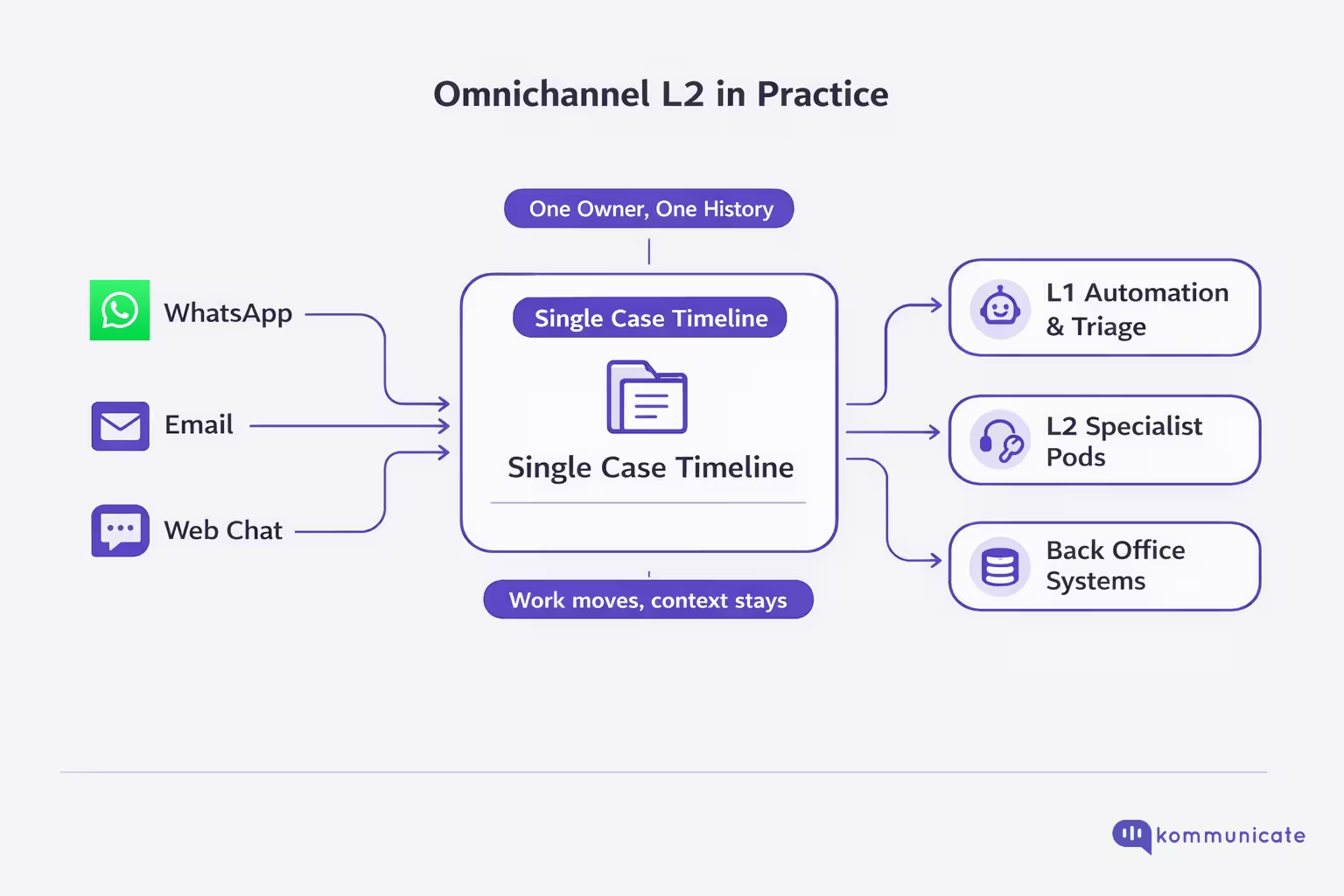
In practice, omnichannel L2 means a customer can start on WhatsApp customer service, but the work can move across systems and teams (billing, risk, engineering, logistics) while the experience stays continuous. The customer should never feel a channel switch as a restart, and specialists should never receive a “cold handoff.”
It is easiest to think of this as one case, multiple touchpoints:
- WhatsApp is the front door (intake, triage, lightweight clarification, updates).
- L2 happens in the back office (investigation, exceptions, approvals, cross-functional collaboration).
- Omnichannel is the glue (routing, ownership, context, and audit trail across every move). A shared inbox pattern explicitly “ticketizes” WhatsApp conversations by adding an owner, status, and timeline, and can also unify other channels into a single view.
What is it not?
- Not “we offer WhatsApp plus email plus chat.”
- Not “we have a chatbot and agents can jump in.”
- Not “we forward a WhatsApp thread to a specialist.”
Those models fail because WhatsApp has hard operating constraints: free-form replies are allowed only within 24 hours of the last user message, outside that window, you can only message via approved templates, and if you use automation, you must provide prompt, clear escalation paths (human transfer, phone, email, web support, forms, etc.).
The 5 practical requirements CX leaders should enforce
- A case object exists for every WhatsApp conversation (owner, status, timestamps, SLA).
- Support segmentation drives specialist routing (skill + work type + priority lane), not “first available agent.”
- Zero-loss handoff payload is mandatory (intent, customer segment, identifiers, what’s been tried, evidence, next decision needed).
- Channel escalation policy is explicit (when to stay on WhatsApp vs move to voice/email, especially for identity checks and regulated data), aligned with WhatsApp’s escalation requirements and messaging window rules.
- Template governance exists for L2 follow-ups (because investigations often exceed 24 hours, and template availability/status can block proactive updates if not managed).
Omnichannel L2 cases that use WhatsApp require robust handoff and routing architectures to work well. This is why it’s essential to understand where WhatsApp sits on this journey.
Where WhatsApp Works Best in the L2 Journey?
WhatsApp works best in L2 when you treat it as the customer-facing thread while the specialist work happens backstage. The goal is continuity: fast, low-effort updates for the customer, and a structured context for the specialist team.
The 6 “Best-Fit” L2 Moments for WhatsApp
- Intake + triage (before L2 touches it) – Use WhatsApp to capture intent, IDs, and urgency, then route into the right specialist lane through a shared inbox (owner, status, SLA).
- Evidence collection (screenshots, order IDs, logs, brief clarifications) – L2 investigations move faster when WhatsApp is the lightweight channel for asynchronously gathering artefacts, without scheduling a call.
- Progress checkpoints during investigation – Customers tolerate L2 work if they get predictable updates in the same thread. The operational constraint: free-form replies are only allowed within 24 hours of the user’s last message; outside that window, updates must use approved templates.
- Decision and approval loops – WhatsApp is ideal for “yes/no” confirmations that unblock specialists: identity confirmation steps, consent to proceed, replacement preference, and refund option selection. (Fast closure, minimal effort.)
- Channel switches that keep context (message → call when needed) – Some L2 scenarios need voice, but you still want the WhatsApp thread as the record. WhatsApp’s Calling API is designed to switch between messaging and calling within the same journey.
- Resolution + closure (with audit-friendly traceability) – Close the loop in WhatsApp with a summary, what changed, and next steps. A shared inbox model makes this measurable and coachable (status, ownership, timeline).
What to operationalise as a CX leader
- Shared inbox = case discipline (assignment, SLA, queue visibility).
- Automation with compliant escalation (WhatsApp explicitly requires clear paths to a human/other support options when using automation).
- Template governance for L2 updates beyond 24 hours (to avoid investigations creating “silent stalls”).
Once you understand WhatsApp’s place in the L2 support journey, you can start thinking about when and how handoff should be built into the platform.
When Should WhatsApp Hand Off to Specialists?
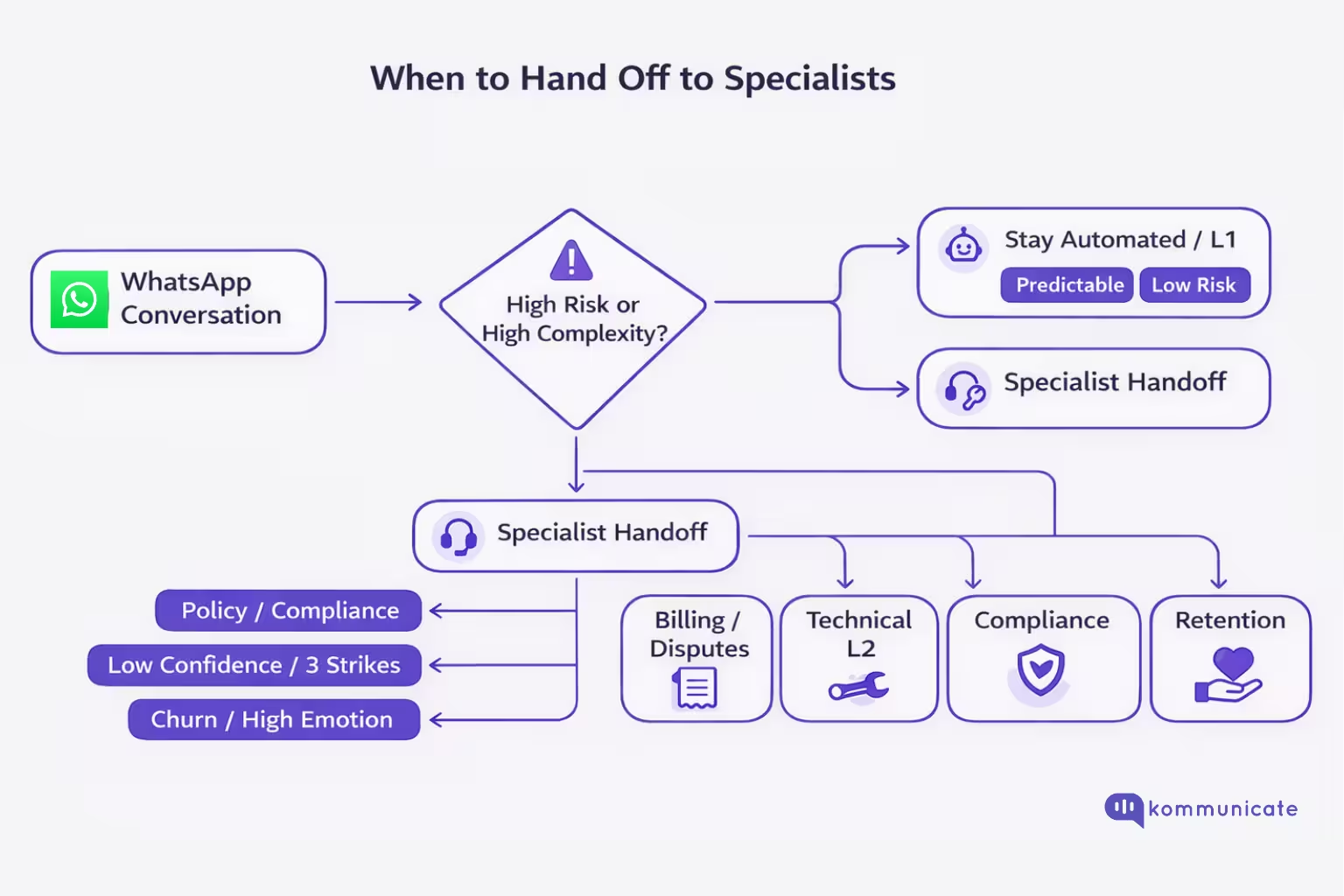
In WhatsApp customer service, escalation is not a failure state. It is an explicit requirement for automated flows and the fastest path to resolution when the work becomes high-risk or non-standard.
| Trigger | What it looks like on WhatsApp | Route to |
| Policy, compliance, or regulated decision | “Is this allowed?” “Can you waive…?”, eligibility edge cases | Specialist/supervisor (with decision authority) |
| Sensitive data exposure risk | Customer tries to share IDs, card details, and account numbers | Specialist + secure workflow / alternate channel (don’t collect sensitive identifiers in-chat) |
| Low confidence or ambiguity after 2–3 turns | Repeated clarifications, contradictory info, “that didn’t work” loops | L2 specialist (avoid chat ping-pong) |
| Multi-system investigation required | Needs logs, backend checks, vendor coordination, and engineering input | L2 resolver group (investigation work type) |
| Exception handling (refund disputes, chargebacks, special approvals) | “This is wrong,” “I want to dispute,” “You promised…” | Billing/risk specialist lane |
| High emotion/churn risk / reputational risk | Threats to cancel, public escalation, abusive language, and extreme frustration | Retention/escalation desk (human-led de-escalation) |
| Time risk vs the 24-hour window | The investigation will exceed the service window, and the customer goes silent | Specialist lane + structured follow-up plan (templates/governance) |
WhatsApp allows automation in the 24-hour window, but requires prompt, clear, direct escalation paths (including in-chat human transfer plus backup options like phone/email/web support/forms). Treat this as your baseline control, not a “nice to have.”
One of the key features of these escalation paths is the information you need to pass during a zero-context-loss handoff.
Zero-Loss Context Transfer: The Minimum Handoff Payload for L2
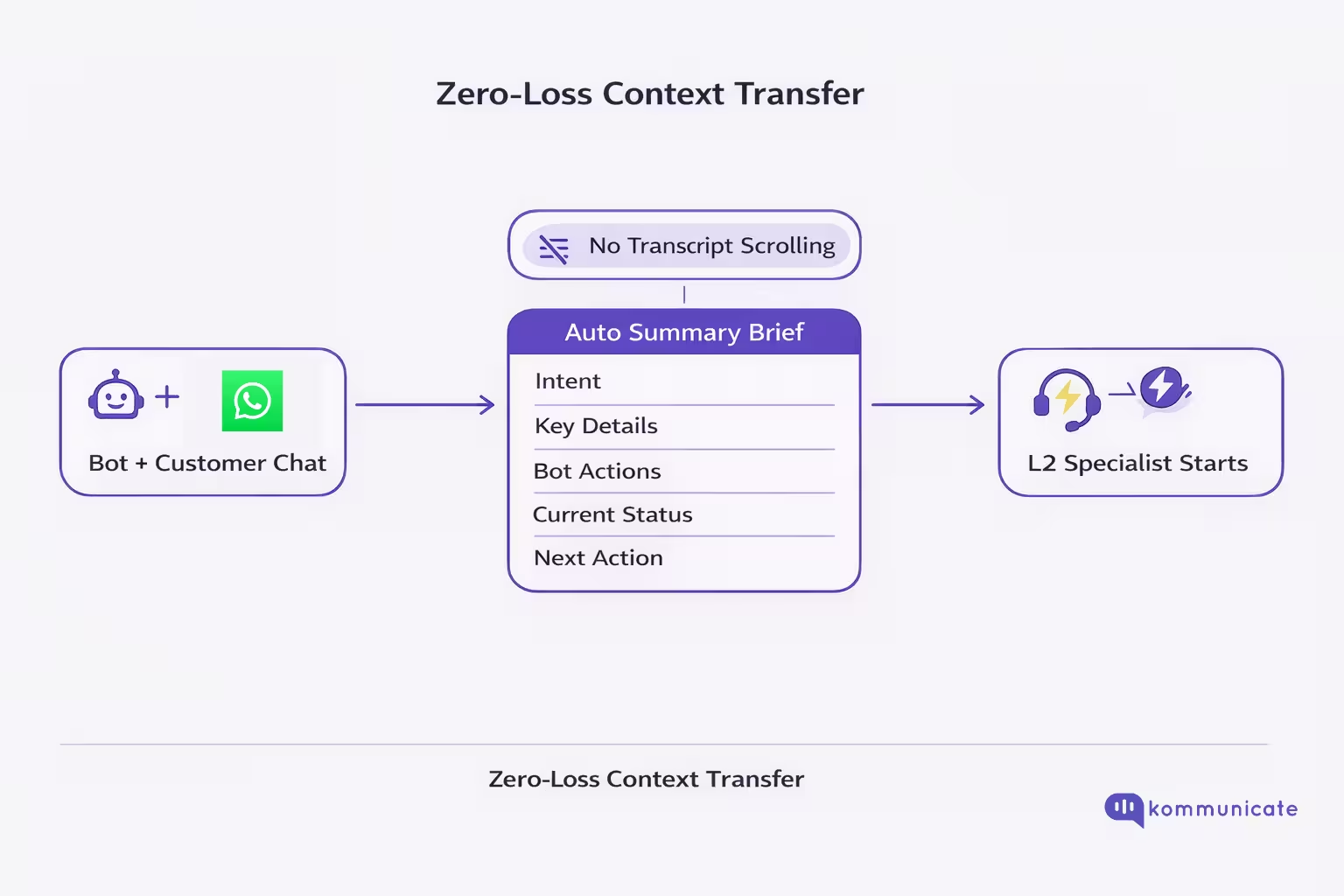
In WhatsApp customer service, L2 breaks down when the specialist inherits a chat thread rather than a clear case brief. “Zero-loss context transfer” means the opposite: the moment a conversation escalates, the specialist sees a concise, actionable summary of what the customer and bot already covered, so they can move straight to diagnosis or resolution without asking the customer to repeat themselves.
This is precisely what Kommunicate’s Summarisation enables: it automatically presents agents with a quick snapshot of the bot-customer conversation at the point of handoff, removing the need to scroll long chat logs and ensuring agents are fully informed before responding.
Think of the summary as a briefing pack, not a transcript. At minimum, it should surface:
- Customer’s core issue (Intent) – What the customer is trying to solve, in one line. This prevents misrouting and reduces “discovery” time in L2.
- Key details the customer already provided: The identifiers and context L2 needs to act on immediately, such as order number, delivery date, account details (where appropriate), product, plan, or device context. (Your summarisation should elevate these so they don’t get buried in the thread.)
- What the bot already did (Attempted steps) – The troubleshooting steps, instructions, or recommendations the bot already provided. This is what stops L2 from repeating the same playbook and frustrating the customer.
- Current status at handoff – Where the conversation left off and why it escalated (for example: unresolved after bot guidance, customer still blocked, needs manual intervention). This turns the handoff into an actionable work item.
- Open question or following action required – What the agent should do next: verify something, perform an internal check, initiate a refund workflow, escalate to a resolver group, etc. This is how you reduce time-to-first-meaningful-response.
Why Does This Matter?
Summarisation is not just “nice UX.” It directly drives the outcomes CX leaders care about:
- Faster ramp-up for specialists because context is immediately available
- Shorter wait times because agents can respond faster
- Fewer redundant questions because the agent can see what was already discussed
- Smoother customer experience because escalation feels like progress, not repetition
Use-case Example
- Issue: Delivery delayed
- Details captured: Order #12345, promised delivery date Feb 20
- Bot actions: Asked for order ID, suggested tracking check, provided delivery policy snippet
- Status: Customer has not received the order, requests resolution
- Following action: Check carrier scan + initiate exception workflow/escalation
The “minimum handoff payload” for L2 is the set of details that allows a specialist to start working immediately. Kommunicate’s Summarisation makes that payload available automatically at the bot-to-agent handoff, which is the practical mechanism for zero-loss context transfer in WhatsApp-based escalations.
This handoff works best when combined with a routing architecture that can assign tickets to the right specialist who can solve the problem. This brings us to how these routing processes are designed.
Specialist Routing Design: Skills + Work Types + Priority Lanes
If you want WhatsApp routing to scale into L2 support, you need to treat routing as an escalation architecture, not “agent availability.” The system’s job is to recognise when AI should step aside and hand the conversation off to the right specialist with the right priority.
1) Skills Lanes: Route to the Team That Can Actually Decide
Start by mapping “specialist routing” to real ownership and authority, not generic queues. Kommunicate’s escalation framework groups high-impact handoffs into clear specialist targets (for example: Account Executive for pricing, Compliance/Security for legal risk, Success Manager for churn intent, Support Lead for frustration).
Recommended skills lanes
- Revenue Protection Lane: enterprise pricing, quotes, upgrade, billing errors → Account Executive/Billing Specialist
- Legal & Compliance Lane (Zero-Tolerance): GDPR/CCPA, hacked/breach, litigation → Compliance/Security
- Retention Lane: cancel, too expensive, switching → Success/Retention Specialist
- Customer Recovery Lane: “human/agent,” intense frustration, profanity, urgency → Support Lead / Escalations Desk
2) Work-Type Lanes: Route by Depth of Work, Not Just Topic
Most orgs fail L2 because they route only by topic. Instead, add work types that reflect effort and dependency:
- Level 1 (Routine): FAQs, password reset → AI-first, no specialist
- Level 2 (Technical): integrations, API connections, configuration → Specialised technical agents
- Level 3 (Mission Critical): outages, security breaches → Immediate senior intervention
This is the cleanest way to keep L2 specialists from drowning in L1 noise while ensuring high-severity issues bypass general queues.
3) Priority Lanes: Make “Fast Lane” a Policy, Not a Favour
Priority is where support segmentation becomes executive-relevant. Kommunicate’s model explicitly calls out:
- Value-Based Segmentation (“Fast Lane”): Enterprise VIPs get immediate human handoff (sub-30-second waits), while free/trial users stay AI-first until hurdles are met.
- Behavioural/Urgency Triage: signals such as repeated visits to cancel flows or multiple failed payments can flag “at-risk” users, bypassing general support and sending them straight to retention.
Routing Blueprint
| Lane | Entry Signal | Target | Priority |
| VIP Fast Lane | Enterprise tier / strategic account | Senior support / dedicated pod | High (sub-30s goal) |
| Compliance Zero-Tolerance | GDPR/CCPA, hacked, lawsuit | Compliance/Security | Immediate |
| Revenue Protection | pricing/quote/upgrade, billing errors | AE / Billing specialist | High |
| Retention Desk | cancel, switching, too expensive | Success Manager | High |
| Technical L2 | API/integration/config complexity | Technical specialists | High/Med (by severity) |
| Customer Recovery | “human/agent,” strong frustration, urgency | Support lead | Medium/High |
Trigger Logic That Keeps Routing Honest
To avoid “bot traps,” use behavioural triggers that force escalation:
- 3-strike loop breaker (fallback repetition → mandatory handoff on strike 3)
- Confidence threshold (low confidence → concierge escalation instead of guessing)
- Healthy escalation rate: expect ~5–10% escalations; 0% is usually a red flag for trapped users.
This structure is what makes WhatsApp customer service viable for L2: skills determine who, work types determine how, and priority lanes determine how fast.
But, as you know, the crux of customer service lies in ownership, and we need to determine who owns the L2 outcomes in this scenario.
Who Owns Customer Service While L2 Works Behind the Scenes?
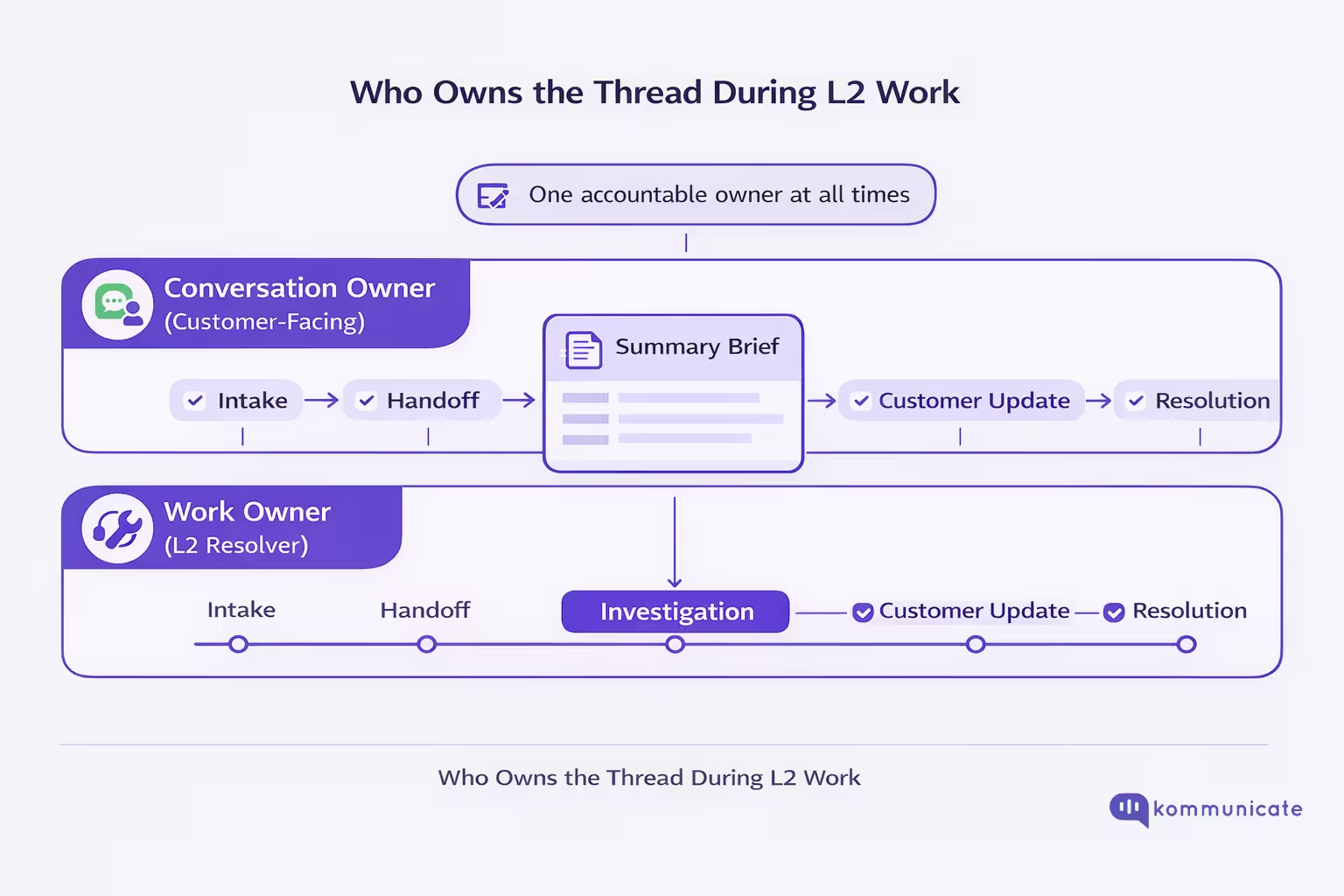
In WhatsApp customer service, you need one accountable owner for the customer-facing thread, even when the actual resolution work is happening in L2 queues. Otherwise, investigations turn into “silent stalls,” and you run into WhatsApp’s operational constraints, like the 24-hour customer service window and the requirement to offer clear escalation paths when automation is used.
The Core Principle: Split Ownership Into Two Roles
- Conversation Owner (Customer-Facing Owner): accountable for the next update to the customer, the tone, and keeping the thread moving.
- Work Owner (Resolver): accountable for the actual fix (investigation, exception, approvals, engineering, risk).
A shared inbox structure is what makes this enforceable because each WhatsApp conversation is treated like a ticket with an assigned owner, status, and time-stamped history, not an endless chat thread.
Three Operating Models (Pick One Per Segment/Work Type)
Model A: L1 Owns the Thread, L2 Consults “Backstage” (Recommended default)
Use when L2 needs to investigate, but the customer should have a single stable owner.
- L1 remains Conversation Owner.
- L2 contributes via internal notes / @mentions that are invisible to the customer, and L1 relays the final response.
Best for: investigations, multi-team checks, “needs approval” work types.
Model B: Direct Reassignment to the Specialist (Specialist becomes Conversation Owner)
Use when the specialist must engage directly (high stakes, high nuance, high emotion).
- Conversation is reassigned to the L2 specialist queue with full context.
- The specialist replies as the owner (no proxy).
Best for: compliance/security, disputes, VIP escalations, and strong frustration signals.
Model C: Escalation Desk “Control Tower” Owns the Thread
Use when volume is high, or specialist teams are fragmented.
- A small escalation desk owns the customer thread end-to-end.
- They route work to specialist pods, collect answers, and manage updates.
Best for: enterprise support orgs, multiple specialist teams, strict SLA environments.
How Routing Should Decide Ownership Automatically
Your specialist routing should switch models based on triggers:
- High priority/frustration: route to high-priority human lane (often Model B).
- Repeated bot failure: auto-handoff and assign to a human queue (then Model A or B depending on risk).
- Time risk: if the work exceeds the 24-hour window, the Conversation Owner must manage scheduled updates and template governance.
What Should CX Leaders Standardise?
- A documented rule: “Every WhatsApp conversation has exactly one Conversation Owner at all times.”
- A required handoff brief (intent, attempted solutions, status) so specialists never start cold.
- An explicit escalation policy that satisfies WhatsApp’s requirement for prompt, clear, direct paths to human support.
The above sections should give you a comprehensive view of the WhatsApp customer service workflows we at Kommunicate advocate. Next, we’re going to talk about governance and the performance metrics we use to control these workflows at scale.
Governance: Prevent Duplicate Work, Conflicting Answers, and Silent Stalls
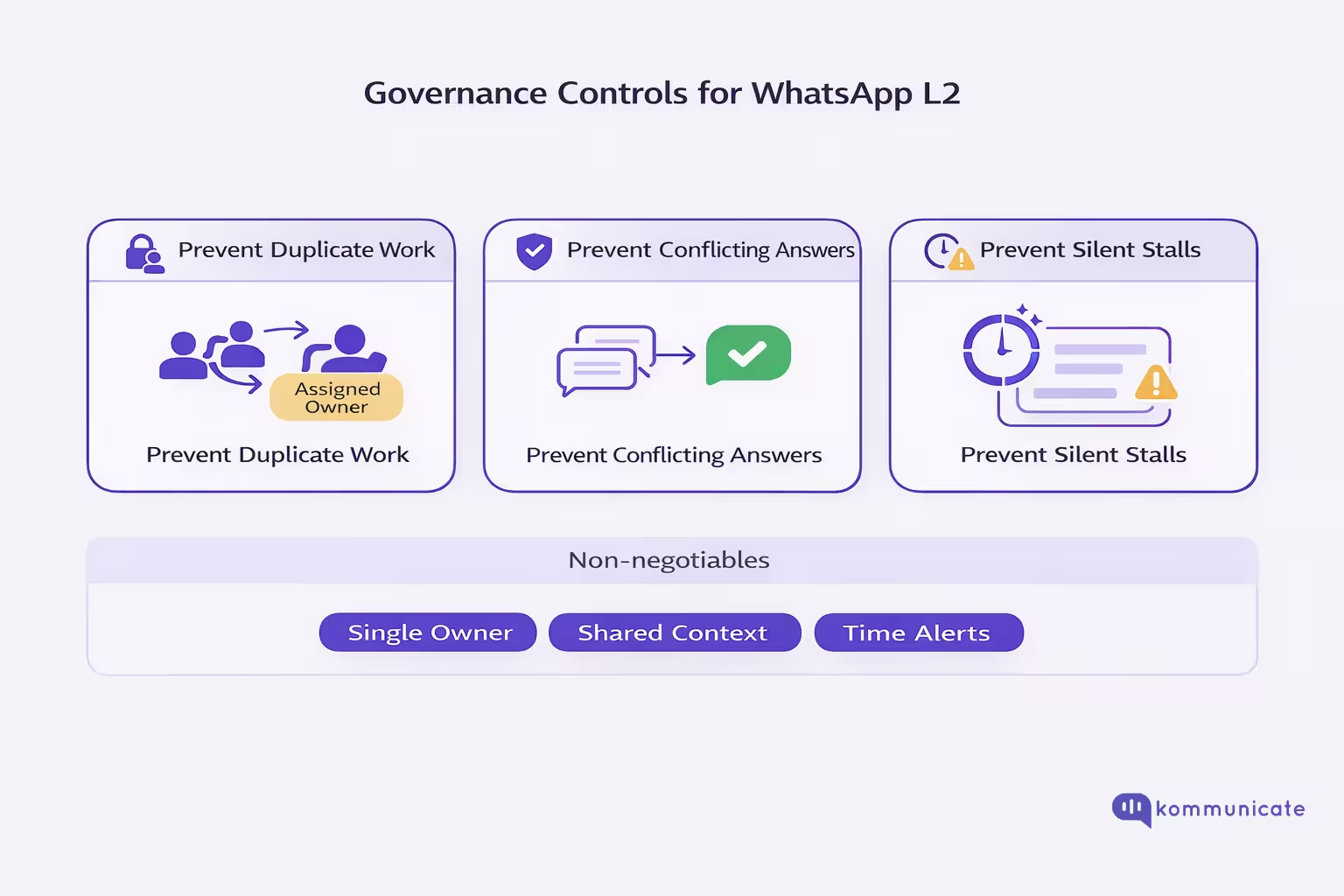
At the L2 scale, WhatsApp fails for predictable reasons: two people work the same case, two teams give different answers, or nobody replies in time to keep the thread alive. Governance is the operating layer that prevents all three by enforcing ownership, visibility, and time-based controls inside a shared inbox.
1) Prevent Duplicate Work
Control 1: One case, one active owner (always). Every WhatsApp conversation must have a single assigned owner and a visible status. Shared inbox + queues make this enforceable at the system level (not “whoever saw it first”).
Control 2: “Claim” rules for L2 queues. For specialist queues, use a claim model: once claimed, the conversation is locked to that specialist until resolution or explicit reassignment. This prevents parallel investigation and contradictory follow-ups.
Control 3: Duplicate detection at intake. At triage, the system should match the thread to an existing open case (same customer and intent) and route it to the current owner, rather than spawning a new workflow. A shared inbox and a unified conversation history are prerequisites.
2) Prevent Conflicting Answers
Control 4: “Decision authority” routing, not topic routing. Kommunicate’s escalation model emphasises routing to the right human based on the nature of the request (e.g., billing/pricing → commercial owner, compliance/security → specialist authority, churn intent → success/retention). This is how you avoid teams answering outside their mandate.
Control 5: Standardise the handoff brief as the shared “source of context.” Require a consistent briefing at escalation (intent, attempted solutions, current status). When every specialist starts from the same structured context, you reduce “interpretation drift” across teams.
Control 6: Guardrail escalation triggers to stop the bot from guessing. Use confidence thresholds and “strike 3” auto-handoff rules so the system escalates instead of generating low-confidence answers that later conflict with specialist guidance.
3) Prevent Silent Stalls (The Customer Waits, the Window Closes, You Lose the Thread)
Control 7: Time-based escalation and “ageing” alerts. If an issue is unresolved past a defined threshold, trigger proactive check-ins or escalate priority. Kommunicate explicitly calls out time gaps/unresolved time as a detection signal for intervention.
Control 8: 24-hour window governance (hard operational constraint). WhatsApp allows free-form replies only within 24 hours of the user’s last message; outside that window, businesses must use approved templates. If you do not track this, investigations turn into silent stalls.
Control 9: Template reliability monitoring (avoid “we can’t message them” incidents). Templates can be paused/disabled due to negative feedback or policy issues, which can block re-engagement workflows when the window closes. Treat template status as an operational dependency.
Control 10: Mandatory “clear escalation paths” in automated flows. WhatsApp policy requires prompt, clear, direct escalation paths (human transfer + fallback options like phone/email/web support/forms). This prevents customers from getting stuck when automation can’t proceed.
The executive rule of thumb
If you cannot answer “Who owns this thread right now? What is the next action, and when is the next customer update due?” from a single screen, governance is not yet in place. Shared inbox, escalation rules and time controls are the minimum viable operating system for L2 on WhatsApp.
Finally, let’s discuss the performance metrics we can use to assess whether our governance controls and support workflows are functioning effectively.
Metrics CX Leaders Should Run for WhatsApp L2
A WhatsApp L2 dashboard should measure speed, routing health, handoff quality, and proper resolution (not just “the bot ended the chat”). Here’s a practical set of 10 metrics in a single table.
| Metrics | What It Measures | How to Calculate (Simple) | Why It Matters for L2 | Target / Alert Guidance |
| First Response Time (FRT) | How fast the customer gets a first reply on WhatsApp | first_agent_or_bot_reply_ts − customer_first_msg_ts | WhatsApp feels real-time; slow starts create early churn and escalations | Many teams aim for sub-5-minute FRT on WhatsApp. |
| Time to Specialist (TTS) | Speed of getting the case into the right L2 lane | specialist_assignment_ts − customer_first_msg_ts | Misroutes and “general queue waits” are what customers interpret as “being bounced” | Track by lane (Billing, Tech, Risk). Optimise the slowest lane first. |
| 24-Hour Window Risk Rate | How many open L2 threads are near/over the WhatsApp service window | % of open threads where (now − last_user_msg_ts) > X hours | Outside the 24-hour customer service window, you can only send approved templates, so investigations stall if governance is weak | Set alert at 18–20h; treat >24h without a plan as a process defect. |
| Escalation Rate (AI → Human) | How often does automation hand off to humans | escalated_conversations ÷ total_conversations | A “healthy” escalation rate prevents bot traps while protecting agent capacity | Kommunicate suggests 5–10% is typical; 0% is a red flag for “bot hell.” |
| Bot Trap Index | How often users get stuck in loops before resolution/handoff | % with fallback/repeat intent > N | L2 load spikes when customers churn through failed automation and re-enter angrier | Monitor “intent fallback >2” or “repeat question” patterns as trap signals. |
| Misroute Rate | % conversations reassigned because initial routing was wrong | reassigned_due_to_wrong_queue ÷ total_conversations | Misroutes inflate handle time, increase transfers, and drive conflicting answers | Break down by entry intent and lane to find routing rule gaps. |
| Transfer Count per Resolution | How many handoffs happen before closure | avg(number_of_owner_changes_per_case) | High transfers = low ownership clarity and rising contradiction risk | Aim to reduce trendline; investigate top transfer reasons weekly. |
| Average Resolution Time (ART) | End-to-end time to close the case | closed_ts − opened_ts | L2 is fundamentally about throughput and closure quality | Track by work type; WhatsApp shared inbox reporting tracks ART commonly. |
| Deflection vs Resolution (48-Hour Rule) | Whether “closed” actually stayed solved | % cases with repeat contact for the same issue within 48h | Prevents fake wins where bots “close” but customers come back | Kommunicate recommends using a 48-hour window to validate real resolution. |
| Context Completeness Rate (Handoff Payload Present) | Whether L2 received the minimum briefing | % escalations with summary including intent + attempted steps + current status | This is the single biggest lever on L2 efficiency and customer repetition | Treat as a compliance metric (binary first, quality scoring later). |
Strong WhatsApp L2 performance comes from routing accuracy, escalation quality, and zero-loss context, not from chasing containment. If these metrics are trending in the right direction, specialists spend less time reconstructing history and more time delivering real resolution.
Conclusion
WhatsApp customer service can scale into L2 only when you treat WhatsApp as the customer-facing thread and design everything behind it: support segmentation, specialist routing, and zero-loss context transfer. Automation should handle predictable work, but when risk, complexity, or ambiguity arises, your system must escalate cleanly, preserve the full handoff payload, and keep a single accountable owner driving the next customer update.
For CX leaders, the win condition is measurable: faster time to specialist, fewer misroutes and transfers, lower reopen rates, and fewer silent stalls around the 24-hour window. If you want to operationalise this end-to-end on WhatsApp, Kommunicate gives you the building blocks so escalations feel like progress, not repetition.

Devashish Mamgain is the CEO & Co-Founder of Kommunicate, with 15+ years of experience in building exceptional AI and chat-based products. He believes the future is human and bot working together and complementing each other.