Updated on January 19, 2026
In the UK, September and October are not only welcome weeks. They are a predictable semester surge that compresses thousands of student questions into a short window. Manchester Metropolitan University’s IT Service Desk explicitly lists September–October as a seasonal “busy period” and notes that it may take longer to get through, even while they still aim to meet SLAs.
Student-facing service centers describe the same operational reality in more concrete terms. The University of Hertfordshire’s Ask Herts Service Level Agreement states that email responses target five working days in non-peak periods but increase to 10–15 working days during peak periods. It also notes that phone and in-person response targets may take longer during peak times.
For students, this can be a rude awakening. Just when the semester begins, support response times stretch. At the same time, students are trying to stabilize the basics before learning even starts: accommodation logistics, module choices and credit rules, timetable navigation, fee and finance questions, account access, and the practical “where do I click” workflows inside Moodle. The result is avoidable friction at exactly the moment when confidence and momentum matter most.
This is why student support automation should be designed as surge capacity, not as a replacement for human support. The goal is to absorb repetitive, low-risk questions at scale and escalate the cases that require judgment, empathy, or personalized guidance to the right staff, with full context.
In this article, we will discuss how student support automation can help businesses navigate the semester surge. We’ll cover:
1. Why Do Traditional Support Systems Fail?
2. Can Student Support Automation Solve the Triage Crisis?
3. How Do You Integrate Kommunicate With Moodle?
4. How Does Student Support Automation Boost Retention and Staff Wellness?
5. Conclusion
Why Do Traditional Student Support Systems Fail?
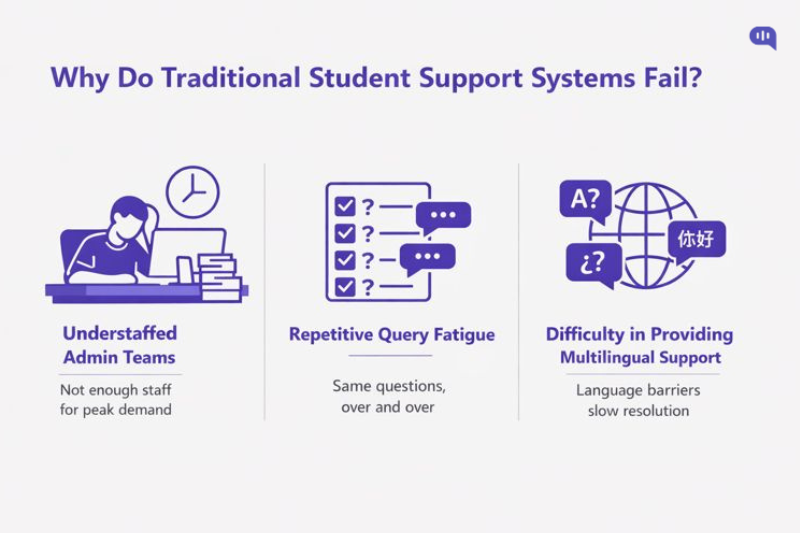
Week 1 does not create a single problem. It makes a compound bottleneck: demand spikes faster than staffing can flex, agents burn time on the same high-frequency issues, and language barriers introduce extra clarification loops that stretch resolution timelines.
In this section, we will break down the mechanics of that bottleneck by focusing on three major points:
The Understaffing Crisis: Admin Teams Built for Steady-State, Not Surges
Most university admin and IT support desks are staffed and scheduled for normal operating weeks. Week 1 breaks that model. Volume spikes, cases are more time-sensitive, and every “quick question” still requires identity checks, system lookups, and a coherent response.
Many institutions acknowledge this publicly because the demand-capacity gap is predictable. The University of Hertfordshire’s Ask Herts team explicitly flags January, February, August, September, and October as its busiest months and warns that wait times increase during peak periods. When a student center’s own SLA plans for degraded response times during a surge, it is a strong indicator that the baseline staffing model is not designed for semester-start load.
This is not a UK-specific problem. Lehigh University’s Enrollment Management Services notes that in peak periods, ticket prioritization can be adjusted “due to the volume of tickets received,” with processing delays communicated accordingly.
Repetitive Query Fatigue
During the semester surge, a small set of repeatable intents drives most inbound demand. The exact mix varies by institution, but the pattern is consistent: access, navigation, and “Where do I find X?” questions arrive in waves. Password resets alone are a meaningful share of volume in support environments; HDI reported that about 3 out of every 10 tickets are password-reset related.
In universities with Moodle-led support, the week-1 “Top 5” typically looks like this:
1. Login and Access Issues – Password resets, account lockouts, SSO failures, MFA confusion.
2. Course Enrollment and Missing Course Access – “Why is my course not showing up?” “I was added, but cannot enter.”
3. Syllabus and Core Content Location – “Where is the syllabus?” “Where do I find the lecture link, readings, and weekly schedule?”
4. Assignment Submissions and File Upload Friction – Submission errors, accepted file types, confirmation of successful submission.
5. Grades, Feedback, and Deadlines Basics – “Where do I see my grades?” “When is the deadline?” “How do extensions work?”
A practical pattern to solve this might be to use a Kommunicate bot inside Moodle for first-line containment and structured data capture, then escalate with full context when a case crosses a risk threshold.
The Language Wall: International Students Experience More Back-and-Forths
The semester surge is not only about volume. It is also about communication efficiency. International cohorts often face language and communication difficulties as they adapt to a new academic and administrative environment, which increases the likelihood of clarification loops, misinterpretation of policy, and incomplete ticket information.
In practice, translation friction shows up as:
- Longer time to capture the minimum required details (student ID, course code, intake, program, screenshot evidence).
- More iterative clarification messages slow resolution even when the underlying issue is simple.
- Higher risk of misunderstandings on policy-heavy topics (enrollment rules, credits, deadlines, accommodation processes).
This is also why “support in a student’s native language” changes expectations and behavior. Intercom’s survey data found that customers are more tolerant and more patient when they can interact with support in their native language, including a willingness to wait longer for replies. In a university context, that patience is not a solution; it is a signal that language accessibility is a structural constraint during a surge.
When you put these three forces together, you get a predictable outcome: queues grow, responses slow, and the student experience degrades exactly when students are most likely to need reassurance and direction.
The way forward might be through triage-first student support automation. In the next section, we’re going to explore that concept in a little bit more detail.
Can Student Support Automation Solve the Triage Crisis?
The semester surge creates a triage crisis because demand does not arrive evenly. Hundreds of students ask the same foundational questions at the same time, while a smaller set of cases requires individualized guidance, judgment, or sensitive handling.
Student support automation can materially reduce the triage burden, but only if it is scoped as a surge buffer, not positioned as a full replacement for human support. The goal is to resolve repetitive questions instantly, collect the right context up front, and route the remaining cases to people with fewer back-and-forth cycles.
What Can Student Support Automation Solve?
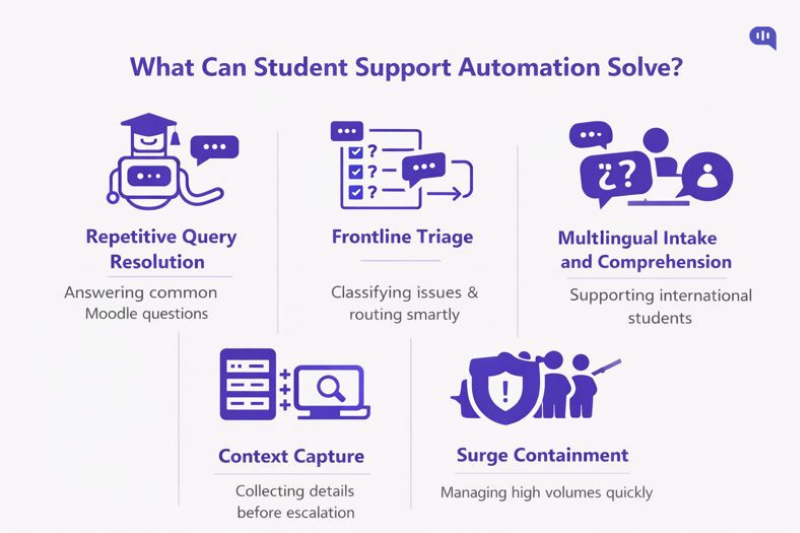
1) Instant Resolution of Repetitive Questions
Automation is highly effective for predictable, “known answer” intents such as login help, course visibility, where-to-find content, deadlines, submission steps, and basic policy links. These are the tickets that flood queues, and they are also the easiest to handle with structured self-service.
2) Frontline Triage and Smart Routing
A Moodle chatbot can ask a few targeted questions to classify the issue and route it correctly (for example: course code, program, intake, device type, screenshot upload). This reduces misrouting and prevents tickets from bouncing between teams.
3) Context Capture
Automation can enforce “minimum viable context” before escalation: student ID, course ID, exact error text, browser/device, timestamps, and what they have already tried. When a human finally sees the case, they can act instead of interrogating.
4) Multilingual Intake and Comprehension Support
Even when your team is monolingual, automation can support multilingual conversations for common intents and translate the intake into a standardized case summary. This reduces clarification loops and improves time-to-triage for international students, especially during week 1.
5) Surge Containment
When designed with clear boundaries, automation prevents queues from being overwhelmed. Students get immediate answers for routine questions, and staff capacity is preserved for the cases that need human intervention.
Implementation note: If your automation is driven by an LLM, constrain it to verified sources and Moodle-safe workflows, and treat escalation as a core feature.
What Can’t Student Support Automation Solve?
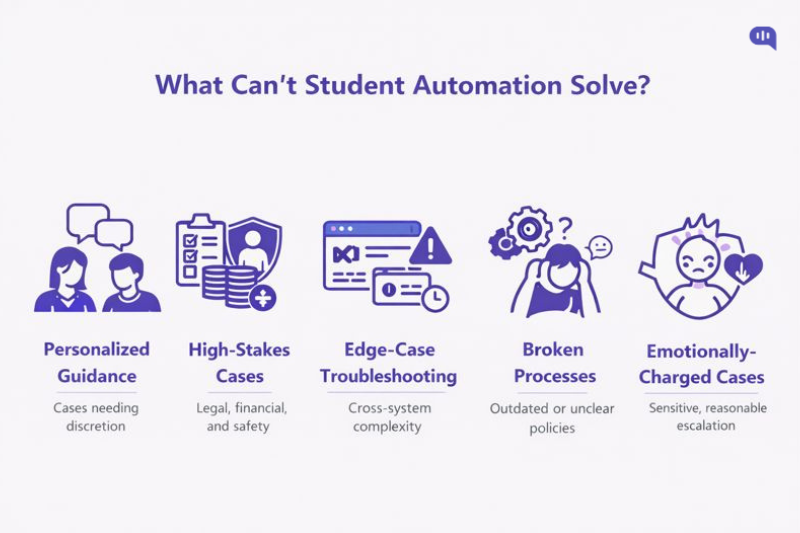
1) Personalized Academic or Administrative Guidance
Automation should not attempt to advise on complex credit decisions, exceptions, personal circumstances, or nuanced policy interpretation. These cases require a human who can ask clarifying questions, understand trade-offs, and apply discretion.
2) High-Stakes Cases
When a student’s situation has potential harm, legal sensitivity, or reputational risk, automation must switch from “resolution mode” to “escalation mode.” The best design is an early detection rule set and a fast handoff.
3) Edge-case Troubleshooting
Many week-1 issues appear simple but are actually caused by mismatches across identity systems, enrollment status, SIS sync timing, permissions, or third-party tools. Automation can gather evidence, but root-cause resolution often requires an operator with system access.
4) Broken Processes and Poor Documentation
Automation cannot compensate for unclear or outdated policies, missing Moodle course templates, inconsistent naming conventions, or undocumented “tribal knowledge.” If the underlying knowledge base is wrong, automation will scale the wrong answer faster.
5) The Emotional Dimension of Student Stress
Week 1 includes anxiety, urgency, and fear of falling behind. Even when the question is operational, the student may need reassurance, prioritization, and a human tone that is difficult to standardize at scale.
If multilingual support is part of your student experience mandate, the constraint is not only translation quality but also escalation design.
Student support automation can solve a large part of the triage crisis by removing repetitive loads, enforcing structured intake, and providing multilingual self-service for standard questions. What it cannot do, and should not attempt, is replace human judgment for personalized guidance, high-stakes issues, or complex troubleshooting. The winning model during the semester surge is a two-lane system: automate the predictable questions inside Moodle and escalate the important cases to staff with complete context so humans spend time on decisions, not data collection.
To help you achieve this, we’ll briefly cover the process of creating an AI agent for customer support inside Moodle.
How Do You Integrate Kommunicate With Moodle?
After you have clarified which issues should be automated and which must be escalated, the next question becomes operational: how do you deploy automation inside Moodle without losing control of handoffs, approvals, and accountability?
This is where Kommunicate is useful for student administrators. It is designed to keep escalation and human handoff under administrative control.
Kommunicate helps you build a “surge buffer” model that protects staff capacity while ensuring that important cases still reach a person with the right context.
Why Use Kommunicate for the Moodle Integration?
You can connect many tools to Moodle, but during the semester surge, the operational requirements are stricter than “make a bot respond.” You need governance, safety boundaries, and reliable escalation:
- Controlled Automation Scope: Kommunicate lets you automate repetitive Moodle intents while keeping high-stakes or context-heavy questions out of automation lanes.
- Administrative Routing and Ownership: Escalations can be routed to the appropriate team or queue, which prevents misrouting and reduces time-to-resolution when staff are already stretched.
- Multilingual-First Support Patterns: If you serve international cohorts, Kommunicate helps you support multilingual entry points and reduce translation friction, while still escalating complex cases to humans.
Brief Overview of the Integration (and Where to See It)
At a high level, the Moodle integration follows a straightforward deployment pattern:
1. Embed Kommunicate in Moodle so students can access support inside the learning environment without switching channels.
2. Connect your knowledge sources and workflows so the bot can answer predictable questions and run structured intake for common tickets.
3. Configure escalation and handoff rules to route sensitive, complex, or unresolved conversations to support personnel with complete context.
For a walkthrough and implementation, you can check out our guide or the video below.
Once Kommunicate is embedded in Moodle and you’ve defined the key intents, student support automation becomes more than deflection.
It becomes a controlled triage layer that reduces repetitive workload, preserves human attention for high-impact cases, and creates faster, clearer student experiences during surges. In the next section, we will quantify why this matters beyond operational efficiency.
How Does Student Support Automation Boost Retention and Staff Wellness?
Student support automation is not only a cost or efficiency lever. When implemented inside Moodle with clear escalation boundaries, it reduces early-term friction that can derail student confidence while simultaneously protecting staff from repetitive workload and peak-period burnout.
In practice, it improves retention and wellness through the same mechanism: faster resolution of routine barriers and better prioritization of the cases that actually require human judgment.
| What Improves? | Why? |
| Time-to-First-Response | A Moodle chatbot provides instant answers for common questions and immediate acknowledgment for complex ones, preventing students from feeling stuck during peak weeks. |
| Time-to-Resolution for Repetitive Issues | Standard L1 intents (login help, course visibility, syllabus location, submission steps) can be resolved in one interaction, reducing queue pressure and eliminating multi-touch follow-ups. |
| Student Confidence in Week 1 | Students get unblocked quickly on foundational tasks, which reduces early frustration and the perception that “I’m already behind,” a common precursor to disengagement. |
| Reduction in “Support Back and Forth” | Automation can capture structured context up front (course ID, error text, screenshots, device/browser), so escalated cases start with actionable information rather than a long clarification cycle. |
| Better Prioritization | Escalation rules ensure sensitive, policy-heavy, or personal situations reach the right humans faster, instead of being buried under routine tickets. |
| Multilingual Accessibility | Automated multilingual intake reduces translation friction and misinterpretation, which improves both student clarity and the quality of routed cases. |
| Lower Staff Cognitive Load | Repetitive tickets are a primary driver of fatigue; deflecting them lets staff spend time on fewer, higher-impact cases with clearer context. |
| Lower Burnout during Peak Periods | Automation absorbs the surge layer, reducing backlog anxiety, overtime pressure, and the emotional strain of constantly apologizing for delays. |
| More Consistent Service Quality | Standardized responses and guided workflows reduce variability in answers and ensure students receive the same approved guidance across channels and agents. |
| Stronger Feedback Loops | Ticket clustering and bot analytics make it easier to identify documentation gaps and broken processes, so the system improves each term rather than repeating the same surge failure patterns. |
Student support automation boosts retention by reducing the early-term barriers that create friction, uncertainty, and disengagement. It boosts staff wellness by removing repetitive load, improving triage quality, and ensuring humans spend their time when judgment and empathy actually matter.
Conclusion
A semester surge is a predictable operational stress test for universities, especially in the UK, where September–October demand spikes often coincide with slower response targets. The institutions that handle it well do not try to “automate everything.” Instead, they design student support automation as surge capacity: a first-line layer that resolves repetitive Moodle questions instantly, captures structured context for anything that needs a human, and routes escalations with clear ownership so important cases do not get buried under volume.
When you treat automation as triage rather than replacement, you improve outcomes on both sides of the system. Students get unblocked quickly on access, navigation, and deadline basics, which preserves confidence in Week 1 and reduces early disengagement. Staff get relief from repetitive ticket loads, better-quality escalations, and fewer back-and-forth loops, which reduces burnout and makes it easier to sustain service quality during peak weeks. The result is a support model that scales without over-automation and protects the human moments that actually drive trust.
Book a demo with Kommunicate to see how a Moodle chatbot with controlled escalation can help you handle Week-1 ticket spikes.

Adarsh Kumar is the CTO & Co-Founder at Kommunicate. As a seasoned technologist, he brings over 14 years of experience in software development, artificial intelligence, and machine learning to his role. His expertise in building scalable and robust tech solutions has been instrumental in the company’s growth and success.