Updated on April 30, 2026
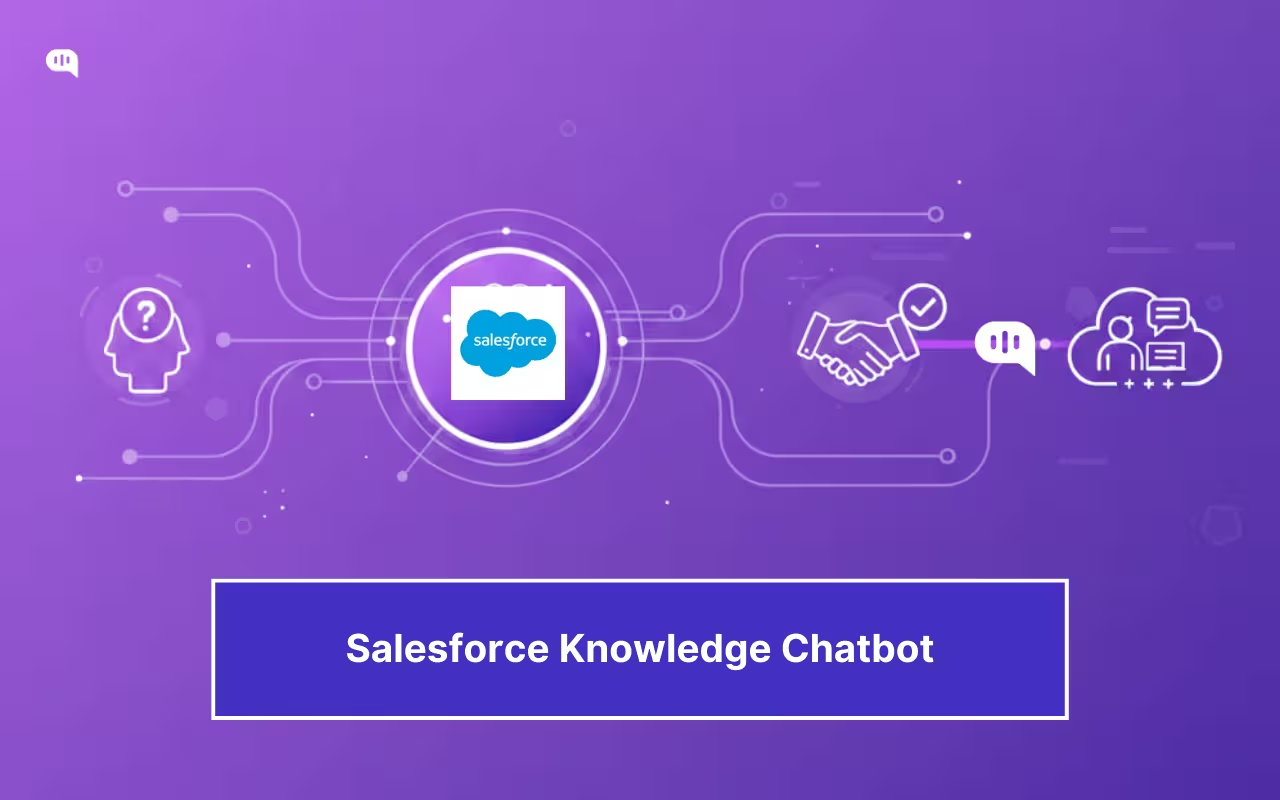
Salesforce Agentforce Service has been built around the promise of case deflection. However, deflection often creates quieter failures: customers bounce between search, bots, and forms, then return angrier. Deflecting the wrong ticket delays work, drives repeat contacts, and inflates reopens.
A salesforce knowledge chatbot can fix this, if it’s built as a routing system: intent → retrieve → answer → confirm → escalate.
AI answers from Salesforce Knowledge must stay grounded in current articles, show clear handoff options, and pass full context to agents instead of forcing customers to repeat themselves.
This article breaks down the operating model by covering:
- What Makes Salesforce Knowledge AI-Ready?
- Who Owns Knowledge Governance Decisions?
- How Should you Structure a Knowledge Chatbot Flow?
- Which Deflection Mechanics Beat “Search Harder”?
- How to Escalate Without Friction?
- Which Metrics Prove Real Resolution?
- What Should You Ship in 30 Days?
- Parting Thoughts: You Should Optimize Routing Over Volume
What Makes Salesforce Knowledge AI-Ready?

Salesforce Knowledge becomes AI-ready when it can power self-serve and agent assist without leaking restricted content or trapping customers in “search harder” loops. AI-Generated Search Answers can use large language models (LLMs) to generate responses from Knowledge articles, so weak articles and weak controls fail.
Start with a Knowledge Article Quality Framework
Build your Knowledge Base with confidence states, validation, and review discipline.
Salesforce positions Knowledge-Centered Support (KCS) as a best-practice baseline, and Lightning Knowledge includes mechanisms to signal article confidence and governance.
Make Articles Retrieval-Shaped
Use record types and page layouts to separate FAQs, procedures, and policies; don’t let one giant template try to serve every intent. Salesforce notes record types control article content and layout, and recommends testing changes in a sandbox before enabling in production.
Control Knowledge Governance and Access
Use visibility fields, data categories, and field-level security to decide what audiences can see and what fields they can’t. Data categories also support category visibility settings via roles, permission sets, or profiles.
Do Salesforce Knowledge Search Optimization
Enable snippets/highlighting and auto-complete to reduce misclicks and duplicate work. Use Knowledge Search Activity reporting to create synonym groups, promote search terms, and improve weak articles.
Connect the Layer that Actually Answers
Use Kommunicate’s Salesforce FAQ automation. Emphasize on governance, controlled auto-reply, and escalation guardrails so humans stay in control when confidence drops.
One of the most important parts of creating a function knowledge base for AI retrieval is governance. In the next section, we’re going to talk about how you can structure your governance decisions.
Who Owns Knowledge Governance Decisions?
Knowledge governance fails when “everyone owns it.” You need to assign clear decision owners for quality, access, escalation triggers, and search relevance.
| Governance decision | Single owner | Consulted | Approves | Cadence / SLA |
| Article creation standards (templates, tone, structure) | Knowledge Program Owner (Support Ops) | Support Enablement, QA | Head of Support | Quarterly review |
| Article lifecycle (publish, refresh, retire, merge duplicates) | Knowledge Program Owner | Domain SMEs | Head of Support | Refresh SLA by risk tier |
| Policy truth (refunds, compliance, security, billing rules) | Policy Owner (Finance/Legal/Security) | Support Ops | Policy Owner | Immediate on policy change |
| Technical accuracy (product steps, workflows, edge cases) | Product SME / PM | Support Tier-2/3 | Product SME | Monthly high-volume intents |
| Access control (audiences, data categories, field visibility) | Salesforce Admin / Platform Owner | Security, Support Ops | Security | Change-controlled |
| Search relevance (synonyms, promoted terms, taxonomy) | Search/IA Owner | Support Ops, SMEs | Knowledge Program Owner | Bi-weekly tuning |
| Escalation triggers (what must hand off) | Escalation Owner (Support Leadership) | Policy Owners, Tier-2/3 | Head of Support | Monthly review |
| Bot answer guardrails (confidence thresholds, “don’t answer” zones) | AI Ops / Bot Owner | Escalation Owner, Policy Owners | Escalation Owner | Weekly during launch |
| Feedback loop (escalations → KB gaps backlog) | Knowledge Program Owner | Bot Owner, Tier-2/3 | Head of Support | Weekly triage |
How to Implement Knowledge Governance in Your Team?
Start with a RACI matrix that makes one person accountable per decision.
- Name a Knowledge Program Owner and publish decision scope (quality, lifecycle, search, measurement).
- Create risk tiers (FAQ/how-to/policy/security) with distinct review SLAs.
- Standardize a knowledge article quality framework (checklist + score) and enforce it in review.
- Define escalation ownership: triggers, handoff UX, required context payload, SLA.
- Assign a Search/IA Owner to run a weekly “top queries + no-results + low CTR” tuning loop.
- Implement change control for policy articles and visibility rules (who can approve, how fast).
- Run a weekly escalation-to-gap meeting: top escalations → missing/weak articles → backlog.
- Track outcomes: repeat contact by intent, reopen rate, time-to-human, plus article health metrics.
Knowledge governance only works when you make it operational. And once you have created that structure, you can start structuring your knowledge chatbot flow.
How Can You Structure a Knowledge Chatbot Flow?
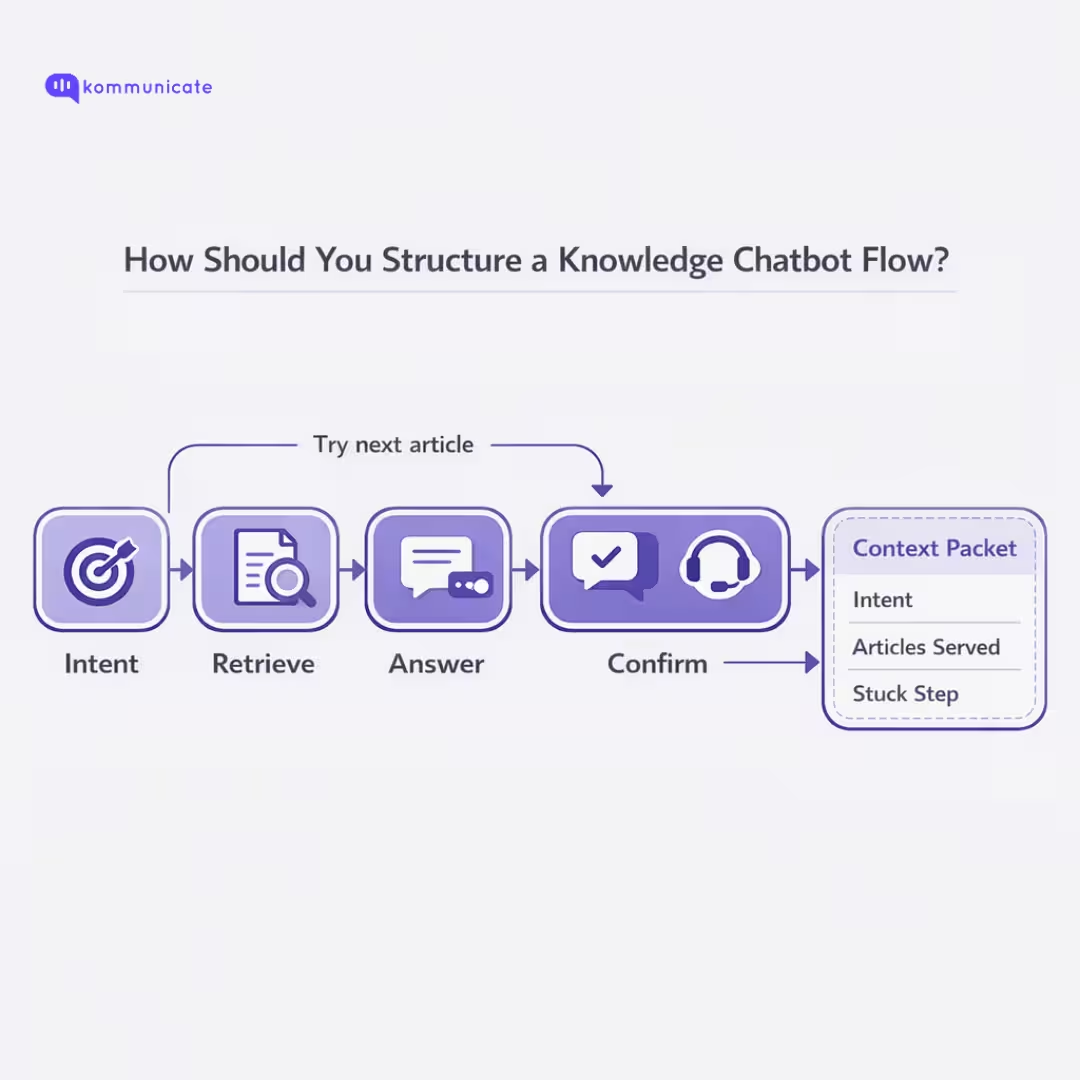
A Salesforce knowledge chatbot should behave like a routing system: capture intent, retrieve the best Knowledge article, answer only when confidence is high, confirm resolution, then escalate with full context when it isn’t.
1) Define Your Intent
Classify what the user wants (refund policy vs reset password) so you can route to the right article type, confidence threshold, and escalation rules.
2) Retrieve from Salesforce Knowledge
Use Salesforce’s search controls (highlights/snippets, synonyms, promoted terms, topics, and case keywords) so retrieval surfaces the right article without forcing users to “try different words.”
3) Answer Only When Confident
Generate AI answers from Salesforce Knowledge by summarizing the retrieved article (steps + constraints), not by improvising. If confidence is below threshold, skip generation and escalate.
4) Confirm Resolution
Ask a binary confirmation (“Did this solve it?”), then offer the next best article or escalation—this prevents silent abandonment and repeat contacts.
5) Escalate with Context
When you hand off, pass intent, what articles were served, and where the user got stuck—so the agent doesn’t restart the conversation.
6) Instrument the feedback loop
Review escalations as a knowledge gap stream: update weak articles, retire duplicates, tune synonyms/promoted terms, then re-ship.
7) Use it in your Stack
If you’re implementing with Kommunicate, connect Salesforce Knowledge as the source of truth, train the bot, define entry points, then validate the integration.
You can use the following video to perform the integration and take your Salesforce knowledge bot live in minutes.
To help you with measuring the performance of your Salesforce automation, it’s important to understand how deflection works in practice. Let’s discuss that in detail in the next section.
Which Deflection Mechanics Beat “Search Harder”?

Deflection works when Salesforce routes users to the right fix at the moment of intent, then escalates cleanly when knowledge coverage breaks. We’re going to discuss a few ways you can make your Salesforce Knowledge base work harder:
- Deflect Inside the Case Form – Use the Case Deflection component in Experience Cloud: it searches text as the user types in the Contact Support form and returns relevant articles and discussions.
- Turn on Suggested Articles Where Work Happens – Enable Suggested Articles so agents (and portals) get article recommendations on cases instead of manual searching.
- Upgrade to Einstein Article Recommendations – Suggested Articles is keyword-based; Einstein Article Recommendations learns from closed cases and attached articles, then improves via relevance/confidence scoring and agent feedback. Salesforce recommends disabling Suggested Articles if you adopt Einstein to avoid two competing sets of recommendations.
- Use Knowledge Tuning – Enable highlights/snippets, synonyms, promoted terms, topics, and case keywords so users land on the right article without rephrasing.
- Promote Known Answers – Use promoted search terms to surface the “fix-it” article you already know resolves a common issue.
- Limit Choices – Present a small set of recommended solutions (not a search results wall). Salesforce’s suggested solutions/recommendations patterns emphasize returning a bounded list of relevant items, not asking users to browse endlessly.
- Gate AI Answers with Confidence Thresholds – If you generate answers with Kommunicate’s Salesforce automation, only do it when retrieval confidence clears a threshold; otherwise escalate (we automatically do this for your in Kommunicate). This avoids “confident wrong” deflection that drives repeats and reopens.
While deflection can help you automate nearly 80% of your repetitive queries, some queries will need to be escalated. Proper escalation can, in fact, be healthy for customer service, and in the next section, we’ll outline how you can do it without friction.
How to Escalate Without Friction?
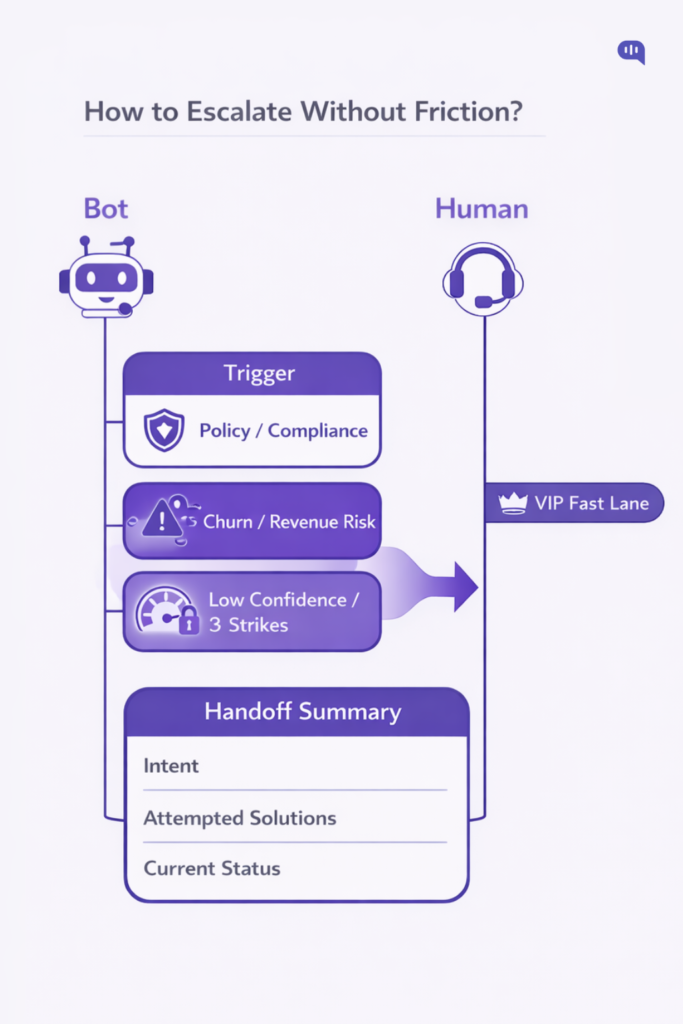
Frictionless escalation is designed, not improvised. Your bot needs explicit “stop points,” fast routing, and zero context loss at handoff.
1) Define Escalation Triggers as Guardrails
AI “doesn’t know what it doesn’t know,” so you must hard-code boundaries where it pauses and routes to a human instead of guessing.
2) Use Our 4-pillar Keyword Protocols
Group handoff keywords into four emergency buckets, each with a clear owner/queue: Revenue Protection (pricing/quotes/billing errors), Legal & Compliance (GDPR, breach, legal action), Churn Prevention (cancel/terminate/too expensive), Emotional Distress (profanity, “human,” “useless,” urgency). (Mamgain)
3) Segment Users so the Right Humans see it
Route by value (VIP fast lane), complexity (L1 vs L2 vs mission-critical), and behavioral risk (failed payments, cancel-page signals) using CRM attributes, so escalation lands with the team that can resolve, not just “any agent.”
4) Break loops with the 3-Strike rule
Escalate on repeated fallback patterns:
- Standard fallback + chips
- Acknowledge difficulty + offer human option
- Automatic handoff with transcript
5) Escalate on low confidence, not low patience
Set a confidence threshold (example: <70%) that triggers a human handoff button, reframing the moment as “concierge routing,” not bot failure.
6) Make Handoff feel Seamless with a Summary
Our model follows a “no repeat-yourself” policy. We provide the agent an instant summary with Intent, Attempted Solutions, and Current Status, so the first human message starts from context, not from zero.
Done right, escalation becomes a trust feature, not a cost cente, then you can measure it against your SLAs and post-handoff CSAT. We’re going to discuss the exact metrics we use in the next section.
Which Metrics Prove Real Resolution?
While deflection is a leading indicator., resolution only shows up in repeat contacts, reopens, and how fast escalation lands with the right human. You can measure it using the following:
| Metric | What it proves | How to measure | Watch-outs |
| Confirmed deflection rate | Users solved without creating cases | (Confirmed deflections ÷ (Confirmed deflections + Created cases)) × 100 | Track confirmed, not abandonment |
| 48-hour resolution rate | Deflection wasn’t “ghosting” | % of users who don’t return for same issue within 48 hours | Requires intent matching / dedupe logic |
| Repeat contact rate by intent | Wrong deflection + weak coverage | # users who re-contact within X days ÷ total users, segmented by intent | Segment by channel and user tier |
| Reopen rate | Fix didn’t hold | Reopened cases ÷ closed cases | High reopen often equals stale articles |
| Time-to-human (escalations) | Handoff isn’t friction | Median minutes from escalation trigger → agent engaged | Break down by queue + hours |
| Post-handoff CSAT | Escalation experience quality | CSAT on escalated conversations only | Drops signal context loss or slow routing |
| Containment by intent | Where self-serve is actually strong | Resolved without human ÷ total, per intent | “Overall containment” hides failures |
| Escalation rate + reason codes | Guardrails health | % escalated, tagged by reason (low confidence, policy, no-match, user request) | Too low can mean abandonment; too high means weak retrieval/KB |
| Article helpfulness / engagement | Knowledge is usable | Helpful votes, CTR from recommendations, time-on-article | Optimize top intents first |
| Agent assist adoption | Knowledge drives faster handling | % cases with attached/used articles; time saved | Adoption drops when search relevance is poor |
If these metrics move together, you’re improving outcomes, not just suppressing case creation.
In the next section, we’ll outline how you can ship a salesforce knowledge bot in 30 days: top intents, coverage map, triggers, and a weekly escalation-to-knowledge gap loop.
What Should You Ship in 30 Days?
To ship a controlled salesforce knowledge chatbot pilot, you need to cover top intents, enforce quality and governance, tune search, then launch with escalation guardrails and outcome metrics. We recommend the following process:
| Week | Ship this | Exact deliverables | Definition of done |
| Week 1 (Days 1–7) | Scope + baseline | Top 10 intents list, current-volume baseline, article coverage map (intent → articles → gaps), escalation trigger taxonomy (policy/billing/security/churn/user request) | Coverage map exists for all 10 intents; every trigger has an owner + queue |
| Week 2 (Days 8–14) | Knowledge quality system | Knowledge article quality framework (scorecard), templates for FAQ/how-to/policy, refresh SLAs by risk tier, retire/merge duplicate articles | Top-gap articles rewritten; every article has owner, last-verified date, and risk tier |
| Week 3 (Days 15–21) | Search + recommendation tuning | Salesforce Knowledge search optimization: synonyms, promoted terms, topics, snippets/highlights; enable Suggested Articles / recommendations in the right surfaces | Top intents return correct article in top 3 results; promoted terms cover frequent queries |
| Week 4 (Days 22–30) | Bot flow + escalation + measurement | Bot flow: intent → retrieve → answer → confirm → escalate; 3-strike rule; confidence threshold; context-carry handoff; dashboard for deflection + resolution signals | Pilot live on 1–2 entry points; escalation passes intent + attempts + status; metrics tracked weekly |
If you can ship this, you’ll have a measurable pilot that improves resolution while protecting escalation integrity.
Parting Thoughts: You Should Optimize Routing Over Volume
Case deflection is a routing problem, not a scoreboard. If your self-serve pushes customers to “search harder,” you don’t reduce work: you delay it, raise repeat contacts, and turn escalation into a frustration event.
A salesforce knowledge chatbot wins when it routes cleanly: answer only when Knowledge coverage is strong, confirm resolution, then escalate fast with full context when it isn’t. That’s how you protect trust while still cutting avoidable cases.
If you want to implement this without breaking escalation, Kommunicate connects with Salesforce to deliver controlled AI answers, guardrails, and seamless human handoff. Book a demo.

Adarsh Kumar is the CTO & Co-Founder at Kommunicate. As a seasoned technologist, he brings over 14 years of experience in software development, artificial intelligence, and machine learning to his role. His expertise in building scalable and robust tech solutions has been instrumental in the company’s growth and success.