Updated on July 26, 2026
TL;DR
A production-grade voice AI agent is a connected system of:
- Telephony
- Speech processing
- Identity verification
- Intent classification
- Backend tool calls
- Routing logic
- QA analytics
This article walks through the full architecture layer by layer, covering how to design escalation, manage CRM context, handle warm transfers, and measure support quality after launch.
Vogo had a call center problem. Thousands of weekly calls were coming in from users on the go (recharge queries, booking issues, account questions), and the support team was being pulled away from operations just to keep up with the volume.
The chatbot they deployed was built with proper routing: automation handled the frequent, repetitive queries, and customers who needed a human were passed to the right agent with context.
The result was 700 hours saved per month by making sure every call reached the right outcome faster.
That distinction is central to the design of a voice AI agent for a call center.
Most voice AI systems are evaluated on containment: the percentage of calls the AI handles without transferring to a human. But containment does not tell you whether the customer’s issue was actually resolved, how long it took, or whether they called back two days later with the same problem.
A well-designed voice AI support agent should do three things:
- Resolve simple calls autonomously
- Escalate risky or complex calls early
- Pass enough context during every transfer so that the human agent can continue the conversation without asking the customer to start over.
Getting that right requires more than a good voice model. It requires an architecture where telephony, speech processing, customer identity, intent classification, backend integrations, routing logic, and QA analytics all work together. We’ll talk about:
- Overview of the architecture
- How to handle call outcomes?
- How to design escalation?
- How to handle the CRM and call context?
- How to manage warm context transfer?
- Before you launch
- Rollout, QA, and failure planning
- Conclusion
Overview of the architecture
A voice AI agent for call center automation is a connected support system where telephony, speech processing, customer identity, backend data, routing logic, and QA analytics all work together.
The voice model handles the live conversation, but the architecture decides whether the call is safe to automate, what data the agent can access, when the call should be transferred, and what context should be passed to the human agent.
A reliable architecture should answer five questions during every call:
- Who is calling?
- Why are they calling?
- Can the AI resolve this safely?
- What systems or knowledge sources does it need?
- What should happen if the AI cannot resolve the issue?
You need the following layers for the voice AI agent to work:
| Layer | Responsibility | What Breaks If Skipped |
|---|---|---|
| Telephony | Connect inbound and outbound calls, route calls, and support transfers | Calls drop, transfers fail, or phone metadata is lost |
| Voice session | Listen, understand speech, respond naturally, handle silence, and interruptions | The conversation feels slow, awkward, or broken |
| Identity | Match the caller to the right customer record and verify access | The agent may expose private information or act on the wrong account |
| Intent classification | Understand why the caller is calling and whether the issue is low-risk or high-risk | Calls go to the wrong workflow or to the wrong team |
| Knowledge retrieval | Answer approved policy, FAQ, and process questions | The agent may give vague, outdated, or unsupported answers |
| Tool calls | Fetch account facts such as orders, tickets, appointments, or case status | The agent cannot resolve account-specific questions |
| Routing | Transfer the caller to the right queue, agent, callback, or ticket workflow | Customers repeat themselves or land with the wrong team |
| QA analytics | Review outcomes, latency, fallbacks, summaries, and transfer quality | Teams cannot tell whether voice AI is actually improving support |
Do not collapse these layers into one prompt. A prompt can shape the agent’s tone and behavior, but it cannot replace telephony logic, identity verification, CRM integration, routing rules, escalation design, or QA reporting.
A typical call should move through the architecture like this:
- The customer calls through the telephony layer.
- The voice session starts by listening and speaking in real time.
- The system identifies the caller or asks for verification.
- The agent classifies the customer’s intent.
- The agent checks whether the issue is safe to automate.
- If the query is general, the agent retrieves an approved knowledge answer.
- If the query is account-specific, the agent calls the right backend tool.
- If the query is risky, unclear, emotional, or blocked by a failed tool, the agent escalates.
- The call ends with a structured outcome, summary, transcript, and QA flags.
This is the main difference between a standalone voice bot and a call center voice AI agent. A call center voice AI agent has to resolve, route, transfer, summarize, and improve support operations after every call.
The voice session layer
The voice session layer is what makes the agent feel like a phone call rather than a chatbot with audio. In practice, the layer is composed of at least three components working in sequence:
- Speech-to-text (STT): Transcribes the caller’s audio input in real time. Quality here affects everything downstream. STT models need to handle accents, background noise, low-bandwidth audio, and partial sentences where the caller trails off or self-corrects.
- Language model processing: Takes the transcribed input, the conversation history, and any retrieved context (knowledge, CRM data, tool results) and generates the next response. This is where intent classification, tool call decisions, and escalation logic are applied.
- Text-to-speech (TTS): Converts the model’s response into audio and streams it to the caller. Voice quality, naturalness, and pacing matter here.
Beyond the core pipeline, the voice session layer also needs to handle two conditions that do not exist in chat: interruptions and silence.
- Interruptions happen when a caller speaks while the agent is still responding. A well-designed voice session detects this, stops the current response, and processes the new input. Failing to handle interruptions gracefully is one of the most common reasons voice AI feels unnatural.
- Silence is when the caller stops speaking. When the caller stops speaking, the agent needs to decide whether the turn is complete or whether the caller is still thinking. Too short a silence threshold, and the agent cuts in before the caller has finished. Too long, and the call feels dead. A typical threshold sits between 500ms and 1 second.
The voice session layer does not make decisions about what to say, but it determines whether the conversation feels fast, natural, and trustworthy. A slow or brittle voice session will damage the caller’s experience regardless of how well the rest of the architecture is designed.
A reliable speech-to-text API plays a big role here because the transcript becomes the input for everything that follows. If the system misses accents, noisy audio, mixed-language speech, or partial sentences, the language model may misunderstand the caller’s intent and route the call poorly. Clean transcription gives the rest of the voice AI architecture a much stronger foundation.
Let’s explore this structure further by talking about how the voice AI agent should handle different call outcomes.
How to handle call outcomes?
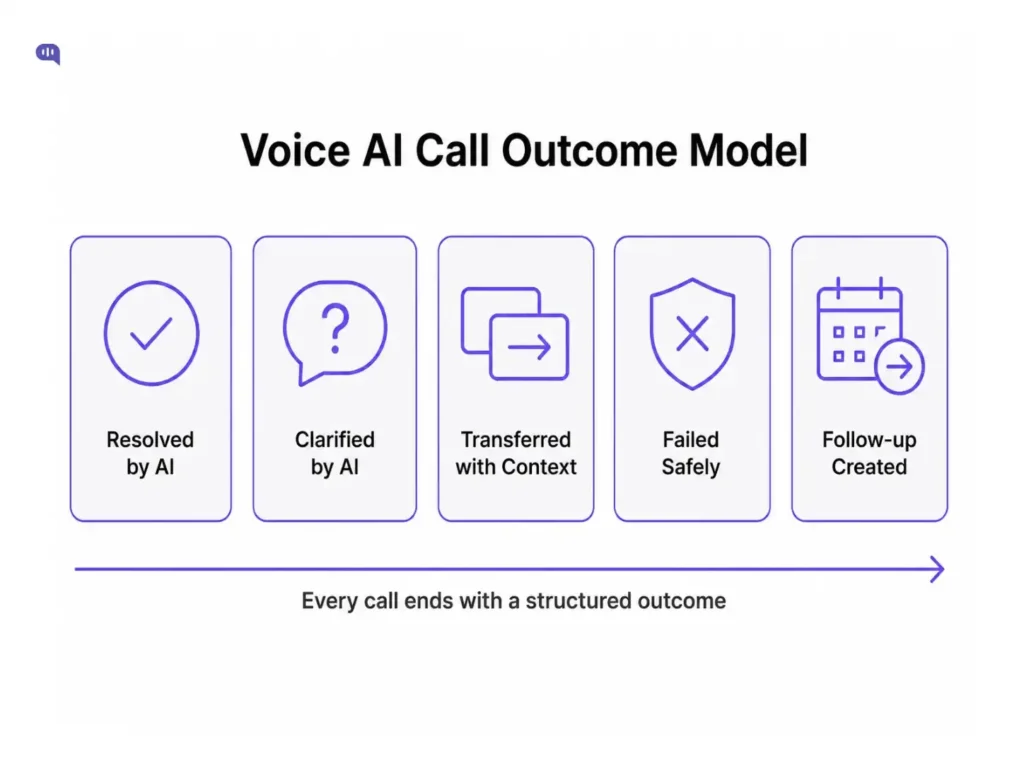
A voice AI agent should end with a structured support outcome.
This matters because call centers cannot evaluate voice AI only by checking whether the call was contained. A contained call may still be a poor support interaction if the customer received an incomplete answer, had to call again, or was blocked from reaching a human.
A good outcome model helps support teams separate automation volume from support quality.
| Outcome | What It Means | Example | What Should Happen Next |
|---|---|---|---|
| Resolved by AI | The agent answered the question or completed the task without human help | Store hours, appointment confirmation, and order status after verification | Log the resolution, call summary, intent, and any tools used |
| Clarified by AI | The agent collected missing information before deciding the next step | Missing order ID, unclear appointment date, and incomplete account details | Continue automation if safe, or transfer with the collected details |
| Transferred with context | The agent identified that a human should take over and passed the conversation history | Refund dispute, billing exception, and account access issue | Send the human agent the summary, caller details, tools used, and escalation reason |
| Failed safely | The agent could not answer confidently or was blocked by policy, risk, or missing data | Unknown policy, low-confidence answer, tool failure, and identity mismatch | Avoid guessing, explain the limitation, and transfer or create a follow-up |
| Follow-up created | The call could not be completed live, so the system created a next step | Ticket, callback, supervisor review, and document request | Log the follow-up owner, SLA, customer details, and required next action |
This structure prevents the team from treating all non-transferred calls as successful. A voice AI call is successful only when the customer reaches the right outcome safely, quickly, and with enough context for the next step.
For example, a refund dispute should not be counted as a failed automation simply because it was transferred. If the AI verified the customer, checked the order, captured the reason for the dispute, and routed the call to the returns team with a summary, the automation still created value. It reduced discovery time and improved the quality of the human handoff.
A call outcome should be logged as a structured object:
{
  "outcome": "transferred_with_context",
  "intent": "refund_dispute",
  "riskLevel": "high",
  "identityVerified": span class="hljs-literal">true/span>,
  "toolsUsed": ["order_lookup"],
  "toolResults": {
    "orderStatus": "delivered",
    "issueReported": "damaged_delivery"
  },
  "summary": "Caller requested a refund exception after reporting a damaged delivery.",
  "transferTeam": "returns",
  "escalationReason": "refund_exception_requested",
  "recommendedNextAction": "Review refund eligibility and confirm replacement or refund option.",
  "qaFlags": ["high_risk", "refund_request"]
}
The same structure can be used for resolved calls, failed calls, and follow-up cases. What changes is the outcome value and the next action.
For example:
{
  "outcome": "resolved_by_ai",
  "intent": "order_status",
  "riskLevel": "low",
  "identityVerified": span class="hljs-literal">true/span>,
  "toolsUsed": ["order_lookup"],
  "summary": "Caller asked for the status of order A18291. AI verified the caller and confirmed that the order is out for delivery today.",
  "transferTeam": span class="hljs-literal">null/span>,
  "escalationReason": span class="hljs-literal">null/span>,
  "recommendedNextAction": span class="hljs-literal">null/span>,
  "qaFlags": []
}
This is how call-center teams separate containment from quality. The question is, “Did the customer reach the right support outcome with the right level of automation, safety, and context?”
How to design escalation?
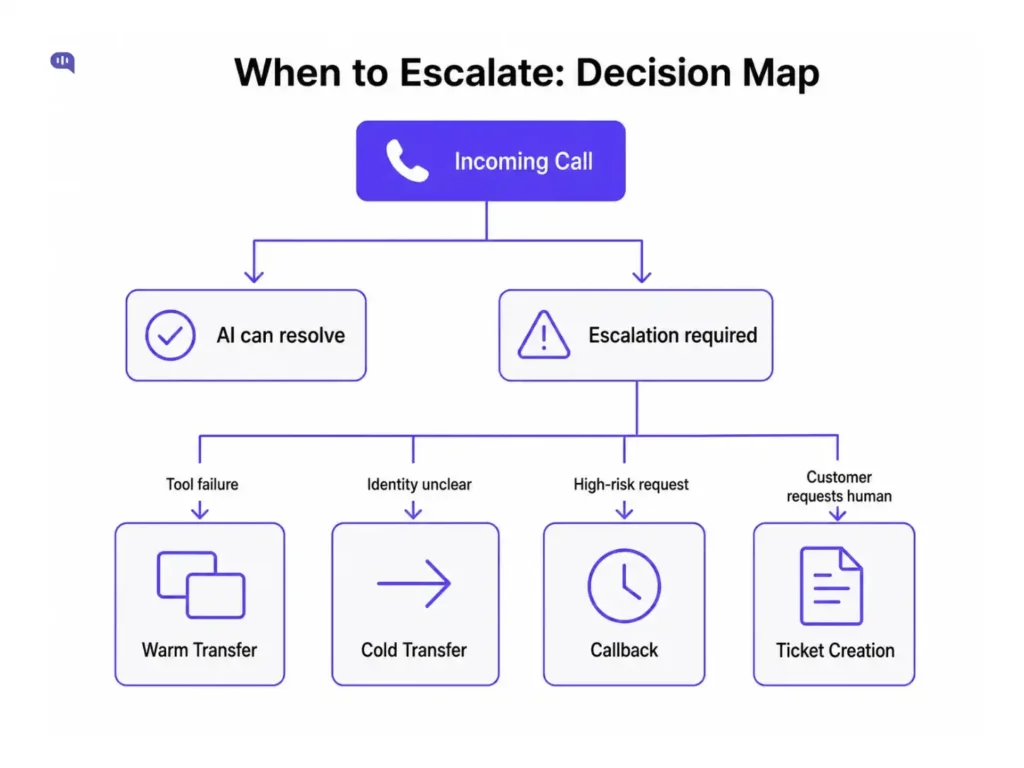
Some calls are better handled by humans because they involve risk, emotion, unclear identity, or policy judgment.
Escalation rules should be designed before launch, not added after the agent starts making mistakes. The goal is to transfer at the right moment, to the right team, with enough context for the human agent to continue the conversation smoothly.
Escalate when:
- The customer asks for a person
- The requested action is risky
- Caller identity is unclear
- The customer sounds frustrated, angry, distressed, or confused
- The backend tool fails
- The agent repeats itself
- Policy confidence is low
- The customer is asking for an exception
- The issue involves payment, fraud, account access, medical, legal, or compliance risk.
The transfer should include:
| Transfer Context | Why It Matters |
|---|---|
| Caller identity and verification status | Helps the agent know whether the customer has already been verified |
| Detected intent | Routes the call to the right queue or specialist |
| Short call summary | Prevents the customer from repeating the full issue |
| Attempted actions | Shows what the AI has already checked or tried |
| Tools used | Helps the agent understand which systems were queried |
| Escalation reason | Explains why the call moved from AI to a human |
| Recommended next action | Helps the human agent continue from the right point |
For call centers, escalation should also define the transfer type.
| Escalation Type | When to Use It | Example |
|---|---|---|
| Cold transfer | The call needs to move to another queue, but little context is required | General routing to sales or support |
| Warm transfer | The human agent needs the full conversation context before taking over | Refund dispute, billing exception, account issue |
| Callback | The issue is not urgent, but it needs human follow-up | Appointment rescheduling, document review, and service request |
| Ticket creation | The issue requires asynchronous investigation | Failed delivery claim, technical bug, missing payment update |
| Supervisor review | The issue involves policy exceptions, complaints, or high-value customers | Escalation complaint, refund exception, compliance-sensitive case |
A caller asking for store hours does not need the same escalation path as a caller disputing a payment. The first can be resolved by AI or routed through a basic queue. The second should be transferred with identity status, account details, attempted tool lookups, and a clear escalation reason.
A good escalation system protects both the customer and the business. It prevents the AI from guessing when confidence is low, and it prevents human agents from entering the call without context.
How to handle the CRM and call context?
Call center voice AI should receive only the context needed to handle the current call. More context does not always make the agent better. In fact, too much customer data can increase security risk, slow down the workflow, and make the agent more likely to expose information that should stay private.
The right approach is to give the voice agent a limited, task-specific view of the customer. For example, if the caller is asking about an order, the agent may need:
- The caller ID match
- Verification status
- Open order
- Recent delivery update
- Previous transfer reason
It does not need the customer’s full account history. This helps the agent understand who is calling, what they may need, and whether the call should be handled by AI or routed to a human.
The agent should not read sensitive account details aloud until identity is verified.
- Before verification, it can ask clarifying questions or explain what information is needed.
- After verification, it can retrieve account-specific details, perform approved tool calls, and summarize the issue for a human agent if escalation is needed.
This keeps the call useful without making it unsafe. The voice AI agent gets enough context to resolve or route the call, while the business keeps control over what customer data is exposed during the conversation.
How to manage warm context transfer?
A warm context transfer means the human agent receives the call with enough information to continue the conversation without asking the customer to start over.
This is one of the most important parts of call center voice AI architecture. If the AI transfers the call but the customer has to repeat their name, issue, order number, and previous answers, the experience still feels broken. The automation may have reduced queue pressure, but it did not improve resolution quality.
A good warm transfer should answer these questions for the human agent before they pick up:
- Who is the caller?
- Has the caller been verified?
- Why did the caller contact support?
- What did the AI already ask?
- What tools or systems did the AI check?
- What answer was already given?
- Why is the call being escalated?
- What should the agent do next?
For example, instead of transferring a call with only the label “refund request,” the voice AI should pass a summary like this:
The customer called about a damaged delivery and requested a refund exception. AI verified the caller using order ID A18291, checked the order status, and confirmed the item was delivered yesterday. The call was transferred because the customer is asking for a refund exception outside the standard policy.
This gives the human agent a clear starting point. The agent knows the customer’s issue, what has already been checked, and why the AI could not complete the request.
Without warm context transfer, voice AI only moves the customer from one waiting point to another. With warm context transfer, it reduces handle time, improves agent preparedness, and makes escalation feel intentional instead of frustrating.
Before you launch
Before launching a voice AI agent in a call center, test the architecture against real support conditions, not just ideal demo conversations. A voice AI agent that performs well in a scripted walkthrough can still fail in production.
Start with a narrow set of low-risk, high-volume call types. Good first use cases include:
- Store hours
- Order status
- Appointment confirmation
- Document checklists
- Delivery updates
- Basic routing.
These calls are repetitive enough to automate and structured enough to test safely. Proving that the agent can resolve simple calls cleanly and escalate risky ones early should be the only goal of a first launch.
What to validate before go-live?
Before any call volume goes live, confirm that the voice AI agent can do the following consistently:
- Identify the caller or request verification when needed
- Classify the customer’s intent correctly across your target call types
- Distinguish low-risk calls from high-risk calls without prompting
- Retrieve answers only from approved knowledge sources
- Execute backend tool calls reliably, including graceful failure when a tool is unavailable
- Handle silence, interruptions, and repeated questions without breaking the conversation
- Transfer to the right queue or human agent when escalation criteria are met
- Pass a clear, structured summary during every handoff
- Create a ticket or callback when live resolution is not possible
- Log the final call outcome with intent, tools used, escalation reason, and QA flags
Test each of these against recorded transcripts from your existing call center, not synthetic inputs. Real transcripts expose the edge cases that matter: callers who give the wrong account number, calls where the issue shifts mid-conversation, and cases where the customer is already frustrated before the AI picks up.
Latency testing
Latency should be tested as a first-class requirement, not an afterthought. In chat, a two-second delay is noticeable but recoverable. On a phone call, the same delay reads as a dropped connection or a frozen IVR. Sub-700ms response time is the industry benchmark for voice AI that feels natural. Once latency consistently exceeds 1.5 seconds, callers begin to perceive the system as broken.
Test latency across your actual telephony stack and your target tool call patterns. A response that’s fast in isolation may slow significantly when the agent is waiting on a CRM lookup or a knowledge retrieval step.
Define failure behavior before launch
Failure cases should be specified explicitly before the agent goes live. At a minimum, define what the agent should do when:
- Identity verification fails: the agent should not reveal any account information. It should explain what it needs and offer an alternative path.
- A backend tool call fails: the agent should not guess or stall. It should acknowledge the limitation, offer to escalate, and pass the context it has collected so far.
- The agent’s confidence in a policy answer is low: it should clarify or escalate, not approximate.
- The customer asks for a human: the agent should transfer without resistance, immediately, and with full context.
- The agent has repeated the same clarifying question twice without resolution: treat this as a loop condition and escalate rather than asking a third time.
These rules should be implemented in routing logic, not left to the prompt. A prompt can shape tone and behavior, but it cannot reliably enforce safety constraints under all real-world conditions.
Pilot framework
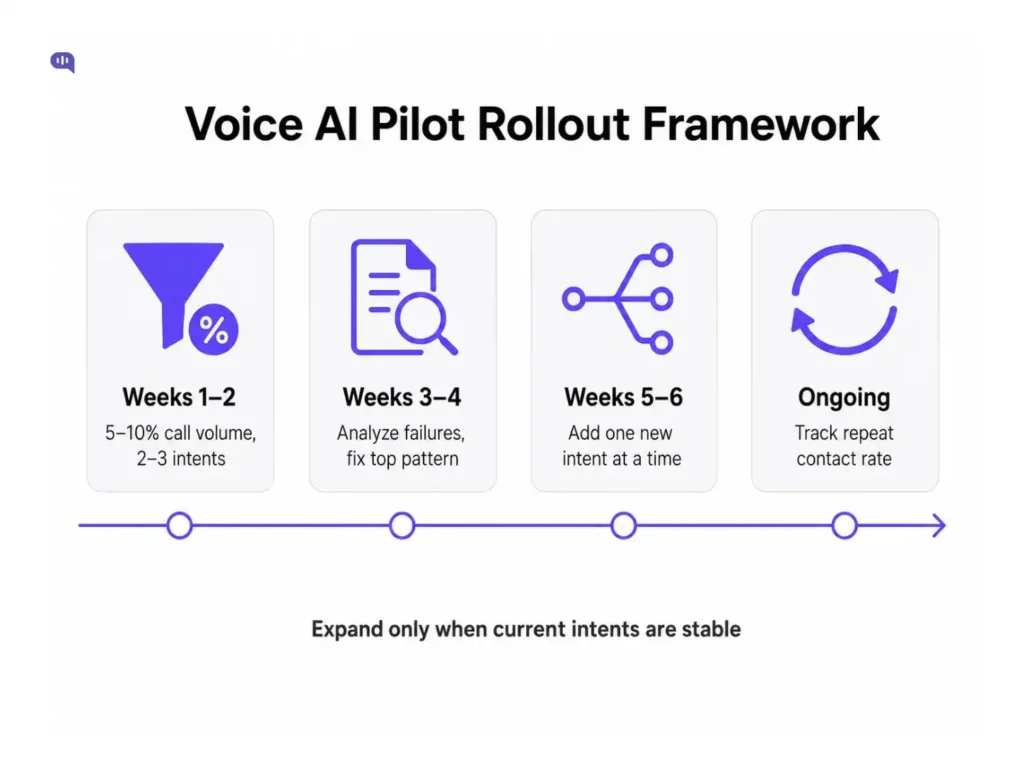
Run a structured pilot before full rollout. A reasonable starting framework:
Weeks 1–2
Route 5–10% of calls on two or three low-risk intents through the voice AI agent. Review every transcript daily. Focus on intent classification accuracy, tool call reliability, and escalation behavior.
Weeks 3–4
Analyze escalation reasons. Group failures by type. Fix the highest-frequency failure pattern before expanding. Check transfer quality by reviewing whether human agents received enough context to continue the call without asking the customer to repeat themselves.
Weeks 5–6
If the target intents are stable, expand to the next tier of call types. Introduce one new intent at a time. Avoid expanding the scope while known failure patterns are still unresolved.
Ongoing
Track repeat contact rate. If customers are calling back about the same issue within 48–72 hours, the first interaction did not fully resolve the problem, regardless of whether the call was contained.
The goal of the pilot is not to prove that voice AI can handle volume. It is to prove that the agent can resolve simple calls correctly, escalate risky ones early, and transfer context cleanly every time. Once those three things are stable, the foundation exists to expand.
Rollout, QA, and failure planning
A voice AI rollout should begin with narrow use cases, but “narrow” will look different depending on the industry. The safest first use case is not always the simplest-looking one. It is the call type where the answer is factual, the data source is reliable, and escalation is easy if the agent gets stuck.
For example, order status may be a good first use case for e-commerce, but account access may be too risky for banking and financial services. Appointment reminders may be safe for healthcare, but symptoms or prescription questions should move to a human immediately.
Use industry risk to decide what the voice AI should handle first.
| Industry | Good First Use Cases | Transfer Early For |
|---|---|---|
| Healthcare | Appointment reminders, scheduling, billing, routing, and insurance status | Symptoms, prescriptions, clinical questions, and emergency language |
| Banking & Financial | Branch hours, document checklist, card delivery status, basic service routing | Fraud, disputes, account access, payment failures, and limit changes |
| Travel | Booking status, baggage policy, cancellation policy, itinerary details | Missed flights, refund disputes, urgent rebooking, accessibility needs |
| Telecom | Plan details, recharge status, outage updates, and SIM delivery status | Billing disputes, number portability issues, and account ownership changes |
| Education | Admission FAQs, document checklist, fee deadline reminders, class schedule updates | Payment disputes, student record access, disciplinary issues, special accommodation requests |
The goal of rollout is not to automate the most complex call first. The goal is to prove that the voice AI agent can resolve simple calls cleanly, escalate risky calls early, and transfer context without forcing customers to repeat themselves.
Metrics to track after launch
Measure voice AI by support quality, not just containment. A contained call is not successful if the customer leaves confused, calls again later, or reaches a human without context.
Track these metrics after launch:
- Containment by intent: The percentage of calls fully handled by AI for each intent. This shows which use cases are actually automation-ready.
- Resolution rate: The percentage of calls where the customer’s issue was solved, whether by AI or with human help.
- Repeat contact rate: The percentage of customers who call again about the same issue. A high repeat rate means the first interaction did not fully resolve the problem.
- Transfer reason: The reason a call moved from AI to a human, such as low confidence, customer request, tool failure, or policy risk.
- Transfer quality: Whether the human agent received enough context to continue the call without asking the customer to repeat everything.
- Average latency: The delay between the customer’s input and the AI’s response. Voice latency matters because silence on a call feels broken.
These metrics help the team separate automation volume from support quality.
What does QA look like for a voice AI agent?
1. Problem: Voice AI failures are harder to notice than chat failures.
In chat, a weak answer can often be reviewed later from the transcript. In voice, the customer reacts in real time. Long pauses, repeated questions, awkward interruptions, wrong routing, and failed transfers immediately damage trust.
QA should therefore focus on the moments where voice AI can create hidden support problems:
- The agent misunderstood the intent,
- The customer repeated the same information multiple times,
- AI gave an incomplete or unsupported answer,
- Backend tool failed, and the AI kept waiting.
- The call was transferred without a useful summary.
- The customer reached the wrong queue.
- The call was contained, but the customer called again later.
Solution: review calls by outcome, not only by transcript quality.
Every reviewed call should be checked against the expected support outcome.
- If the call was resolved by AI, QA should confirm that the answer was correct, grounded, and complete.
- If the call was transferred, QA should check whether the transfer happened at the right time and whether the human agent received useful context.
- If a follow-up was created, QA should verify that the ticket, callback, owner, and next step were logged correctly.
This creates a practical QA loop:
- Review a sample of AI-handled calls every day during the pilot.
- Group failures by intent, tool, escalation reason, and transfer queue.
- Fix the highest-frequency failure first.
- Update prompts, knowledge sources, routing rules, or tool behavior based on the failure pattern.
- Expand to new intents only after the current ones are stable.
The goal of QA is to make the support outcomes from voice AI more reliable.
Final thoughts
Voice AI for call center automation should not be designed only to reduce call volume. It should help customers reach the right outcome faster, give human agents better context, and make support operations easier to measure and improve.
The strongest voice AI architecture combines automation with safe escalation. Simple calls can be resolved by AI, risky calls can move to humans early, and every transfer can carry the context needed to avoid customer repetition.
If you are planning to bring voice AI into your support workflow, explore Kommunicate’s Voice AI solution. It helps businesses automate customer calls, route conversations intelligently, and support human agents with better context.
Book a demo to see how Kommunicate can help you build a voice AI experience for support.

Adarsh Kumar is the CTO & Co-Founder at Kommunicate. As a seasoned technologist, he brings over 14 years of experience in software development, artificial intelligence, and machine learning to his role. His expertise in building scalable and robust tech solutions has been instrumental in the company’s growth and success.