Updated on June 4, 2026
Key Takeaways
- Email routing is a five-layer pipeline: ingestion, parsing, classification, queue assignment, and fallback.
- OpenAI handles layer three: classifying intent, scoring urgency, and outputting structured routing metadata. It recommends queues; Kommunicate enforces them.
- Rules-based routing breaks at scale in three predictable ways: mixed tenant traffic, silent misroutes, and brittle regex.
- Kommunicate sits at layers four and five: handling queue assignment, agent handoff, routing, and the fallback lane that keeps misroutes visible.
- Attachments carry a routing signal. Ignoring them at parse time is a triage mistake that compounds at every layer downstream.
Most engineers encounter “email routing software” as a product category and assume it means a SaaS tool with forwarding rules and a dashboard. That framing is fine for low volume. It breaks the moment your support queue grows past a few hundred emails a day.
The real problem is that routing is not a feature. It’s a pipeline. It has discrete layers with different failure modes, different ownership boundaries, and different tradeoffs between automation and human control. Collapsing those layers into a single set of forwarding rules is why high-volume email queues become chaotic: everything looks like it’s “routing” until the moment it doesn’t, and by then you have misrouted tickets, angry customers, and no visibility into where things went wrong.
This article walks through that pipeline using OpenAI for classification and Kommunicate for queue assignment and handoff. We cover:
- The five layers of an email routing pipeline
- Where does rules-based routing break down?
- Using OpenAI for email classification
- Using Kommunicate for queue assignment
- How to handle fallbacks and failure modes?
- Measuring the accuracy of email routing
- Conclusion
The five layers of an email routing pipeline
Before writing a line of integration code, you need a mental model of what routing actually does. Here are the five layers, and where OpenAI and Kommunicate plug in:
| Layer | What It Does | Implementation | What Breaks If You Skip It |
|---|---|---|---|
| Ingestion | Receives inbound email via SMTP/MX | Postfix, Mailgun, SendGrid Inbound Parse | Emails are lost or silently dropped |
| Parsing | Extracts headers, body, attachments, metadata | Custom parser, mail libraries | Routing runs on an incomplete signal |
| Classification | Assigns intent, urgency, and queue candidate | OpenAI (function calling or structured output) | Everything lands in the same queue |
| Queue assignment | Maps classification output to actual team queues | Kommunicate routing rules + CRM lookup | Labels exist, but no one acts on them |
| Fallback handling | Catches low-confidence, ambiguous, or exception cases | Kommunicate fallback queue + human review lane | Misrouted emails disappear silently |
Each layer has a distinct job.
- Layers 1 and 2 are infrastructure: they get email into a parseable state.
- Layer 3 is where OpenAI reads the content and produces structured routing metadata.
- Layers 4 and 5 are where Kommunicate takes that metadata and turns it into an actual agent workflow.
The most common mistake we see is building layers 1 through 4 and treating layer 5 as optional. It is not. Without a fallback lane, low-confidence OpenAI classifications silently route to the wrong Kommunicate queue, and no one knows until a customer escalates.
Most routing systems do not fail because teams forgot to add rules. They fail because rules are asked to do classification, prioritization, and escalation at the same time. That is where the pipeline model becomes useful.
We’ve built an interactive pipeline diagram below: Click any layer to see its components, failure modes, and where OpenAI and Kommunicate fit in.
The email triage pipeline – Technical architecture
Interactive Reference
Email Routing Pipeline — Five Layers
Click any layer to see its components, how OpenAI and Kommunicate fit in, and what breaks if you skip it.
What it does
Accepts inbound email via SMTP. Handles MX record resolution, TLS negotiation, and initial spam and IP filtering before any content is read.
Common components
Postfix, Mailgun Inbound, SendGrid Inbound Parse, Amazon SES receiving rules.
If skipped or misconfigured: Emails are silently dropped or rejected before reaching your pipeline. No error surfaces downstream — the message simply never arrives.
What it does
Decodes raw MIME. Extracts sender, subject, body text, reply-to chain, attachment types, and metadata. Attachment signals — invoice, ID document, screenshot — are captured here for use at classification.
Common components
Python mailparser, Node mailparser, Mailgun parse webhooks, custom MIME decoders.
If skipped or underbuilt: OpenAI classifies on incomplete signal. Attachments are ignored, reply chains stripped, and the model sees only a fragment of the actual email context.
What it does
OpenAI reads parsed email content and returns structured routing metadata: intent, urgency, suggestedQueue, confidence, requiresHumanReview, and attachmentSignal. It recommends — it does not decide.
Integration pattern
OpenAI function calling or structured output mode. Pass parsed body, subject, and attachment metadata. Receive a JSON payload that Kommunicate consumes directly at layer four.
If OpenAI owns the routing decision (not just the label): Customer tier, SLA policy, and risk controls are bypassed. A VIP billing complaint routes identically to a routine FAQ. That is a workflow failure, not a model failure.
What it does
Kommunicate handles conversations by AI default. Escalation is triggered — not assumed — when OpenAI returns a low confidence score, a sensitive intent, or a human review flag. Escalation routes to a skill-matched team based on intent, not a generic human queue.
Needs-lookup pattern
When intent requires live data — order status, account balance, subscription state — inline code snippets trigger backend workflows at conversation time, pulling the record into context before the AI responds or an agent reads it.
If teams are not mapped by skill and intent: OpenAI labels are correct but routing is still wrong. A billing_dispute label that routes every case to a single general billing team provides no operational improvement. Queue design must match how agents actually work.
What it does
Fallback is not failure — it is a controlled escalation lane. Kommunicate escalates cases that meet defined triggers: low confidence, competing intents, sensitive language, missing fields, VIP tier, or sensitive attachment. Each trigger routes to a specific specialist team, not a catch-all inbox.
Correction loop
When agents move or escalate conversations in Kommunicate, the action is logged. Mismatches between OpenAI’s suggested queue and the agent’s final action are reviewed to update either the prompt, the confidence threshold, or the Kommunicate routing rules.
If fallback is missing: Low-confidence OpenAI classifications route silently into normal queues. The ticket appears routed — but may carry the wrong SLA, the wrong team, and no flag that a human should have reviewed it. The failure is invisible until the customer escalates.
Where does rules-based routing break down?
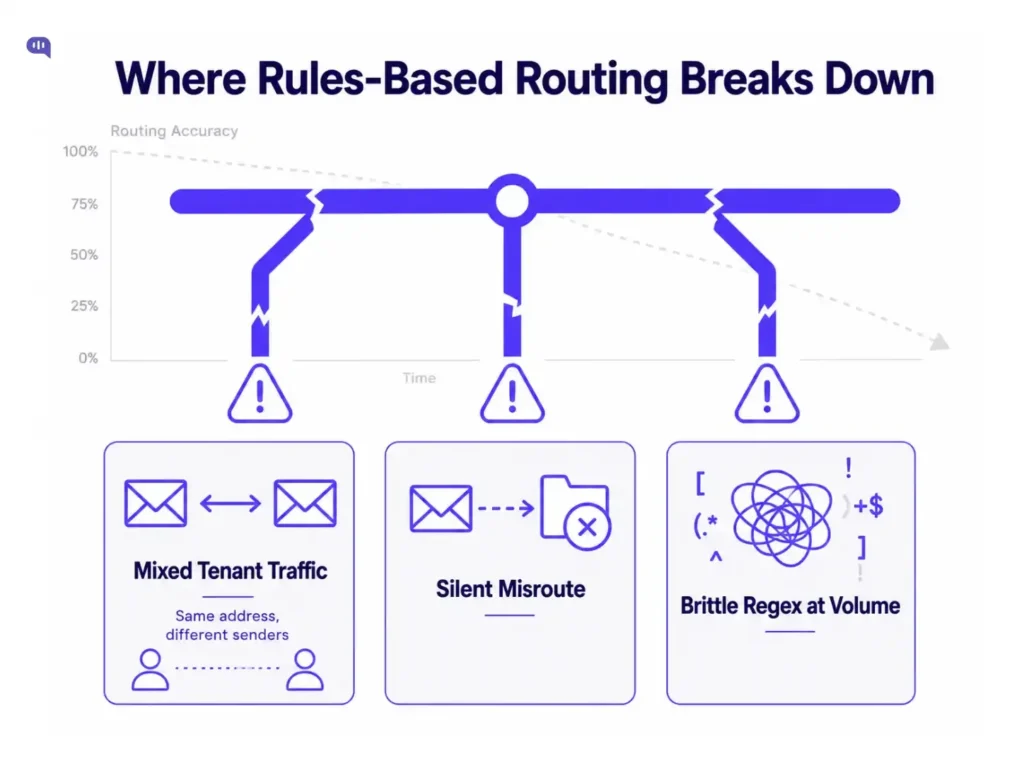
Rules-based routing that uses regex on subject lines, keyword matching, and sender domain lookups breaks down after a point. That point is lower than most teams expect.
The three failure modes are predictable:
- Mixed tenant traffic. When multiple customers, regions, or product lines share an inbound address, forwarding rules have no reliable way to separate them. A rule that routes “billing” to the finance queue will catch a billing complaint from a VIP enterprise customer and a routine invoice request from a trial user in the same bucket. The downstream queue sees both, and the humans working it have to re-sort manually.
- Silent misroutes. A regex that matches “cancel” will catch “I want to cancel my subscription” and “I need to cancel my appointment for a call.” Both are connected to churn. Only one belongs there. The misroute is silent, and the customer waits in the wrong queue.
- Brittle regex at volume. Language is messy. Customers don’t write support emails the way engineers write routing rules. At a few hundred emails a day, a human can patch rules fast enough to keep up. At a few thousand, the rules multiply, conflict, and become unmaintainable.
This is the architectural moment where OpenAI classification replaces the regex layer, to make layer three robust enough that Kommunicate’s queue rules at layer four can actually be trusted.
Using OpenAI for email classification
OpenAI classification belongs at layer three, where you figure out the intent behind the email.
The important design principle is that this output should be treated as a routing recommendation, not a final operational decision. Final assignment should still depend on queue rules, customer tier, SLA status, compliance flags, and human-review policies.
The integration is straightforward: after parsing, we will pass the email body, subject, and attachment metadata to OpenAI using function calling or structured output mode. The model returns a JSON object that Kommunicate can consume directly:
For example, the payload can look like:
| { “intent”: “billing_dispute”, “urgency”: “high”, “suggestedQueue”: “billing_review”, “requiresHumanReview”: true, “confidence”: 0.91, “reason”: “Customer reports duplicate charge with negative sentiment.”, “missingFields”: [], “attachmentSignal”: “invoice_detected” } |
Kommunicate receives this payload, checks it against its routing rules:
- Is this customer on a premium tier?
- Is the SLA window closing?
- Is there a fraud flag on the account?
It uses this to make the final queue assignment. The OpenAI label is an input to Kommunicate’s routing logic.
| Routing Signal | Source | OpenAI Action | Kommunicate Override |
|---|---|---|---|
| Intent | Email body | Classify and label | None: OpenAI owns this |
| Urgency | Sentiment + keywords | Score high/medium/low | SLA policy can escalate |
| Suggested queue | Intent + urgency | Recommend | Customer tier, risk policy override |
| Human review flag | Confidence + intent type | Flag sensitive intents | Always true for billing, legal, and KYC |
| Attachment signal | Metadata inspection | Tag type: invoice, ID, screenshot | Secure routing for sensitive docs |
For a deeper look at how routing models work, read our AI email routing and prioritization guide, which breaks down each approach and when to use them.
Using Kommunicate for queue assignment
Classification is only useful if the queues it feeds actually reflect how your team works. Most teams design queues around tool defaults rather than operational reality, then wonder why routing accuracy metrics look good, but agent efficiency doesn’t improve.
In Kommunicate, AI handles conversations by default. Human agents only enter the picture when escalation is explicitly triggered, either by the OpenAI classification (a high-urgency or low-confidence flag) or by a defined business rule.
When escalation fires, Kommunicate routes to a specific team rather than a generic human queue. Teams are composed by skill or expertise (billing specialists, technical support, KYC agents), and the intent label from OpenAI determines which team receives the handoff.
This means the routing model has three tiers in practice:
| Tier | What Handles It | Trigger |
|---|---|---|
| AI-default | Kommunicate AI | No escalation flag; high confidence, known intent |
| Needs lookup | Kommunicate AI + inline workflow | Intent requires live data: order status, account info, subscription state |
| Escalation | Human team, routed by intent | Low confidence, permission required, sensitive case, or missing data |
Human review and fallback are not separate buckets. They follow the same escalation path. If an email needs a permission decision, touches a sensitive intent (billing dispute, legal mention, KYC failure), or has a confidence score below the threshold, Kommunicate escalates it. The difference in outcome is which expert team it lands with, not whether a human is involved.
Triggering live data to answer questions
For emails that require a data lookup before resolution, Kommunicate’s AI agents can run small inline code snippets that call specific backend workflows at the point the conversation is handled.
The OpenAI classification identifies the intent (order_status, subscription_query), and the snippet fires the appropriate API call, pulling the relevant record into the conversation context before the AI responds or the agent reads it.
This keeps the AI response grounded in live data rather than trained assumptions: important for anything time-sensitive like shipping ETAs, payment states, or active subscription details.
Attachment handling also follows a similar pattern. An email flagged invoice_detected by OpenAI escalates differently than a billing complaint with no attachment.
The Kommunicate AI email ticketing system handles this full chain in a single dashboard:
- AI-default handling
- Inline workflow triggers
- Intent-based team routing
- Escalation
This architecture works only if the fallback is configured correctly throughout. Let’s dissect that in detail.
How to handle fallbacks and failure modes?
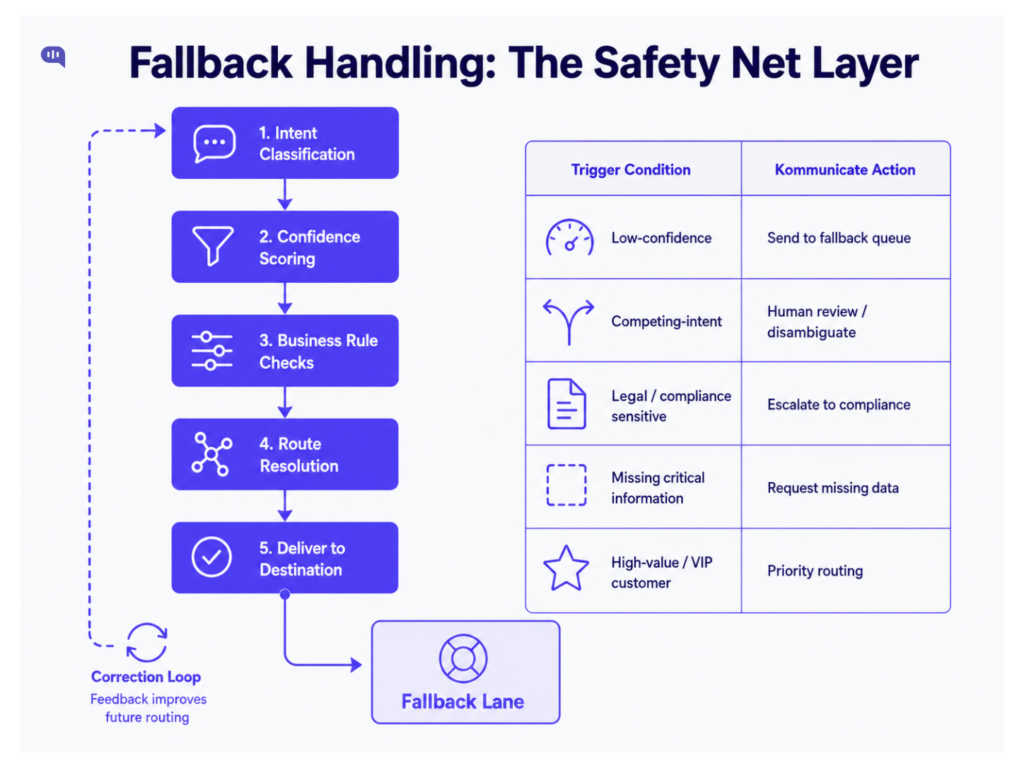
Fallback handling is the difference between an AI routing system that is safe to operate and one that only looks accurate in a demo.
Every email classifier will eventually encounter emails it cannot classify or route with enough confidence. If the system still forces those cases into a normal queue, the failure is silent. The ticket appears routed, but it may be routed to the wrong team, with the wrong SLA, and without anyone knowing a human should have reviewed it first.
That is why fallback handling needs to be treated as a dedicated fifth layer, not an exception buried inside the classification prompt. A simple fallback policy can look like this:
| Fallback Trigger | Why It Matters | Recommended Action in Kommunicate |
|---|---|---|
| Low confidence score | OpenAI is not certain enough to route safely | Send to fallback queue |
| Competing intents | The email contains multiple possible requests | Send to fallback |
| Legal, fraud, breach, or security terms | High-risk language should not be handled as routine support | Escalate to senior or specialist queue |
| Billing dispute or refund complaint | Wrong routing can delay revenue-sensitive issues | Route to billing review with human ownership |
| Missing required fields | The message doesn’t contain the required data | Hold in fallback and send a clarification request email |
| Sensitive attachment detected | Documents may require restricted handling | Route to specific team |
| VIP or enterprise customer | SLA and account ownership may override normal routing | Escalate based on customer tier |
The important point is that fallback is not the same as failure. A fallback queue is a controlled review lane. It keeps uncertain cases visible, prevents confident misroutes, and gives support teams a clean way to correct the system before the customer experience breaks.
The safest design is to make fallback rules explicit in the integration layer. For example:
| { “intent”: “billing_dispute”, “urgency”: “high”, “suggestedQueue”: “billing_review”, “confidence”: 0.72, “requiresHumanReview”: true, “fallbackReason”: “Confidence below threshold and billing dispute detected” } |
Kommunicate can use this payload to route the conversation directly to a fallback or review queue instead of letting the AI make a final assignment. This is especially important for regulated or revenue-sensitive workflows where the cost of a wrong route is higher than the cost of a short human review.
A good rule of thumb: if the classifier is unsure, the customer should not pay the price for that uncertainty. Route the case to a visible fallback lane, preserve the full conversation context, and let a human make the final decision.
Measuring the accuracy of email routing
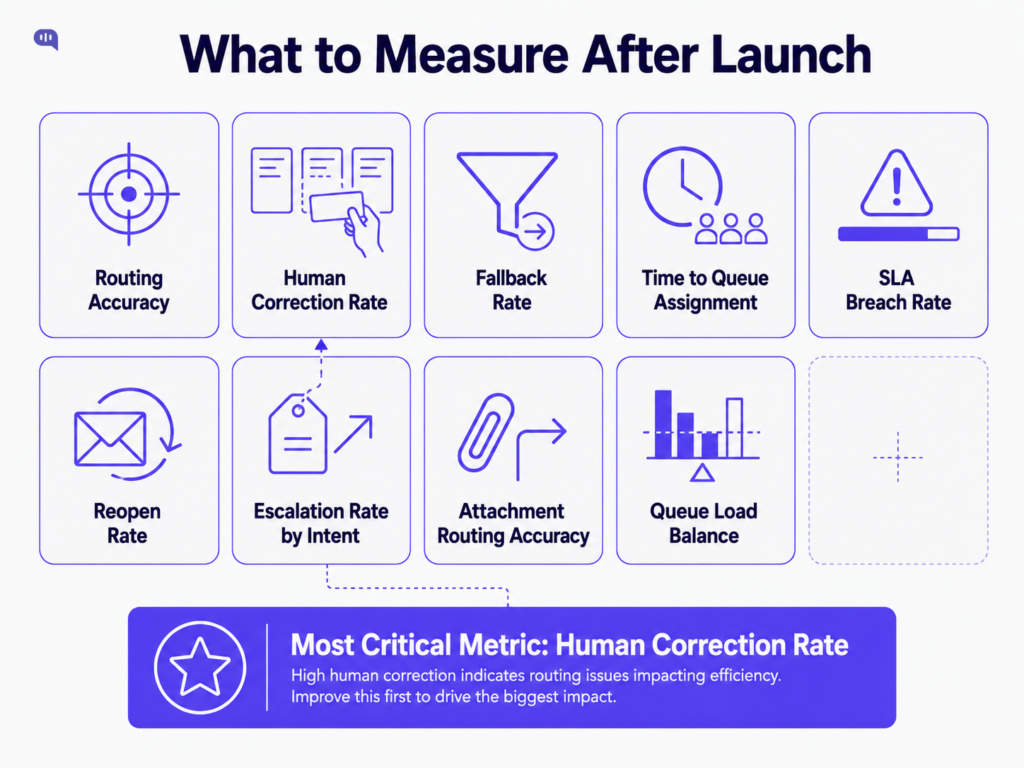
Once the email routing pipeline is live, accuracy alone is not enough to measure success.
A classifier can produce accurate labels and still fail operationally if tickets land in queues that do not match agent skills, SLA policies, or customer priority. The goal is to get each email to the right owner fast enough for the customer to receive the right response.
Track metrics across both layers: OpenAI classification performance and Kommunicate workflow performance.
| Metric | What It Tells You | Why It Matters |
|---|---|---|
| Routing accuracy | Whether OpenAI’s intent label matches the expected queue | Shows whether the classifier understands inbound emails correctly |
| Human correction rate | How often agents have to move conversations to another queue | Reveals silent misroutes that classification accuracy may hide |
| Fallback rate | How many emails are sent to the fallback queue | Shows whether the model is uncertain too often or routing rules are too strict |
| False fallback rate | Which fallback emails could have been routed automatically | Helps reduce unnecessary human review |
| Time to queue assignment | Time between email receipt and Kommunicate queue placement | Measures whether automation is speeding up triage |
| SLA breach rate | How often routed emails miss response-time targets | Shows whether routing is improving support operations |
| Reopen or recontact rate | Whether customers come back because the first route or response failed | Captures downstream routing quality |
| Escalation rate by intent | Which intent categories most often require human intervention | Helps refine queue design and automation boundaries |
| Attachment-based routing accuracy | Whether emails with invoices, screenshots, or IDs reach the right queue | Prevents attachment-heavy cases from being under-triaged |
| Queue load balance | Whether one team receives too many routed conversations | Shows whether the routing logic matches actual team capacity |
The most useful metric is usually human correction rate. If agents frequently move tickets out of the queue where the system placed them, the issue may be the mapping between OpenAI intent labels and Kommunicate queues.
For example, if OpenAI correctly labels an email as billing_dispute but Kommunicate routes every billing dispute to the same general billing queue, enterprise complaints, duplicate charges, and refund requests will still pile up in the wrong place. The classifier did its job. The queue design was too broad.
That is why post-launch monitoring should create a correction loop:
- OpenAI classifies the email.
- Kommunicate routes it to a queue.
- An agent accepts, resolves, escalates, or moves the conversation.
- The final human action is logged.
- The team reviews mismatches and updates either the OpenAI prompt, the confidence threshold, or the Kommunicate routing rules.
This loop turns agent corrections into system feedback. Over time, you should see high-confidence routing increase, fallback volume stabilize, queue moves decrease, and SLA performance improve.
The best routing systems:
- Make uncertainty visible
- Learn from human corrections
- Keep improving without letting misrouted emails disappear
Conclusion
Email routing software is a solved category at the surface and an underbuilt system in practice. OpenAI handles the part that rules can’t: understanding language well enough to classify intent and score urgency at scale.
Kommunicate handles the part that AI shouldn’t own:
- Enforcing queue rules
- Applying business logic
- Managing agent assignment
- Keeping humans in the loop
The engineers who get this right give each layer a clear owner: OpenAI at classification, Kommunicate at queue assignment, and fallback. Start with the architecture. The tool choices follow from that.
Want to automate email triage without building the full OpenAI classification, queue assignment, fallback, and handoff layer from scratch? Book a demo with Kommunicate to see how AI email ticketing works inside a live support workflow.

Devashish Mamgain is the CEO & Co-Founder of Kommunicate, with 15+ years of experience in building exceptional AI and chat-based products. He believes the future is human and bot working together and complementing each other.