Updated on June 23, 2026
Estimated reading time: 15 minutes
TL;DR
This workbook walks you through a five-category healthcare customer support audit:
- Channel gaps
- Response time failures
- Ticket overload
- Compliance risks
- After-hours blind spots
Based on the audit, we give a scored readiness assessment that tells you where AI automation will actually move the needle.
Your healthcare customer support team is struggling because the communication architecture of legacy support tech was never designed for the increased volume of patients. And it’s difficult to fix this until you can identify the faults: every new hire, every new tool, every new workaround just papers over the same structural problem.
This workbook will walk you through a systematic audit of five failure categories: channel gaps, response time failures, ticket overload, compliance risks, and after-hours blind spots. Work through each section honestly. At the end, you’ll have a scored readiness profile that tells you where an AI customer service platform can help.
Slow response times are one of the clearest signals your support infrastructure has gaps and they carry a measurable cost to patient engagement. For context on the data behind this, see our guide on patient response time benchmarks.
Set aside 45–60 minutes. You’ll need access to your ticketing system, call logs, and a rough sense of your staffing model. We’re going to talk about:
- Healthcare audit tool
- Before you start: Establish your baseline
- Section 1: Channel gap audit
- Section 2: Response time failure analysis
- Section 3: Ticket overload diagnosis
- Section 4: Compliance risk assessment
- Section 5: After-hours blind spot audit
- Scoring your AI automation-readiness
- What to do with these findings?
- Conclusion
Healthcare customer support audit tool
Before you start: Establish your baseline
You can't diagnose what you can't measure. The first thing this audit assesses is the data preparedness of your organization.
Pull these numbers from the last 30 days before going any further. If you can answer all of them, you have adequate visibility. If you're estimating half of them, you have a measurement gap that will show up repeatedly across every section.
1. What volume data should you have on hand?
You're looking for total inbound contacts across all channels and average tickets opened and closed per day. These numbers tell you whether you're running a surplus or a deficit in your queue.
A practice that opens 200 tickets per day and closes 150 has a growing backlog. Most operations leaders know their headcount. Far fewer know their daily throughput.
2. What resolution data should you have?
You should be able to pull data about:
- First-contact resolution rate: Estimates how many patients need to repeat themselves when they raise a ticket
- Average handle time: To understand the efficiency of resolution
- Average ticket age at close: To estimate the average wait time for a resolution
3. What staffing data should you have?
We’re going to ask the following questions:
- How many agents handle patient-facing support, and exactly when is the queue staffed?
- Are there gaps between when the last agent logs off and the first one logs back on?
- When does the queue go unmanned?
If you can't pull some of these numbers, it means you don't have adequate visibility into your own support infrastructure, and that visibility gap is what this audit is designed to surface.
Section 1: Channel gap audit
The first source of ticket overload is mismatched channels. When patients can't reach you through the channel they prefer, they either give up (a compliance risk) or escalate to a channel that's more expensive for you to staff (a cost problem).
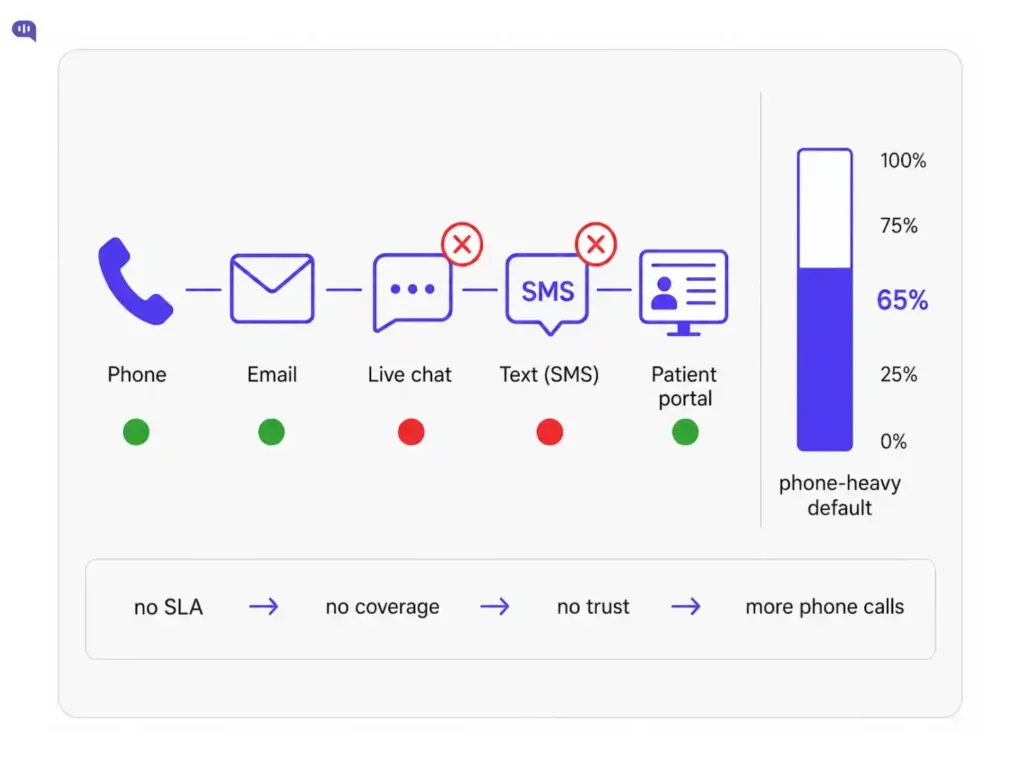
Healthcare is notoriously phone-heavy. That's partly habit, partly the nature of urgent care communication. But it's also partly a self-fulfilling prophecy: you built for phone, so patients use phone, so you staff for phone, so digital channels go understaffed, so patients don't trust them, so they use the phone.
1. What channels are patients actually using to reach you, and which ones are you effectively staffing?
The question identifies the support channels that:
- Have a defined SLA
- A person responsible for monitoring them during business hours
- A clear answer to what happens after hours.
In our experience, while the phone has all three of those things, everything else is informal.
2. What does your channel distribution actually look like?
Run a query of your last 30 days of tickets and tag each one by the channel where it originated. If phone accounts for more than 60% of your inbound volume, you almost certainly have a channel gap: patients are defaulting to phone because your asynchronous channels either don't exist, aren't promoted, or aren't trusted.
A 7% call abandonment rate on 2,000 daily calls means roughly 140 unanswered calls per day. At an average ticket revenue impact of $200–$1,200 per missed healthcare interaction, that's a real number with real consequences.
But the deeper problem is patient trust. 73% of patients aged 17–54 say they would switch providers over poor communication experiences. They won't file a complaint. They'll just leave.
The three indicators from this section:
- Do you have a defined SLA for every active channel?
- Are your asynchronous channels (chat, SMS, patient portal) consistently staffed, or are they open in name only?
- Do you track abandonment or bounce rates across channels, or only on inbound calls?
These three questions diagnose whether your channel architecture is managed well.
Section 2: Response time failure analysis
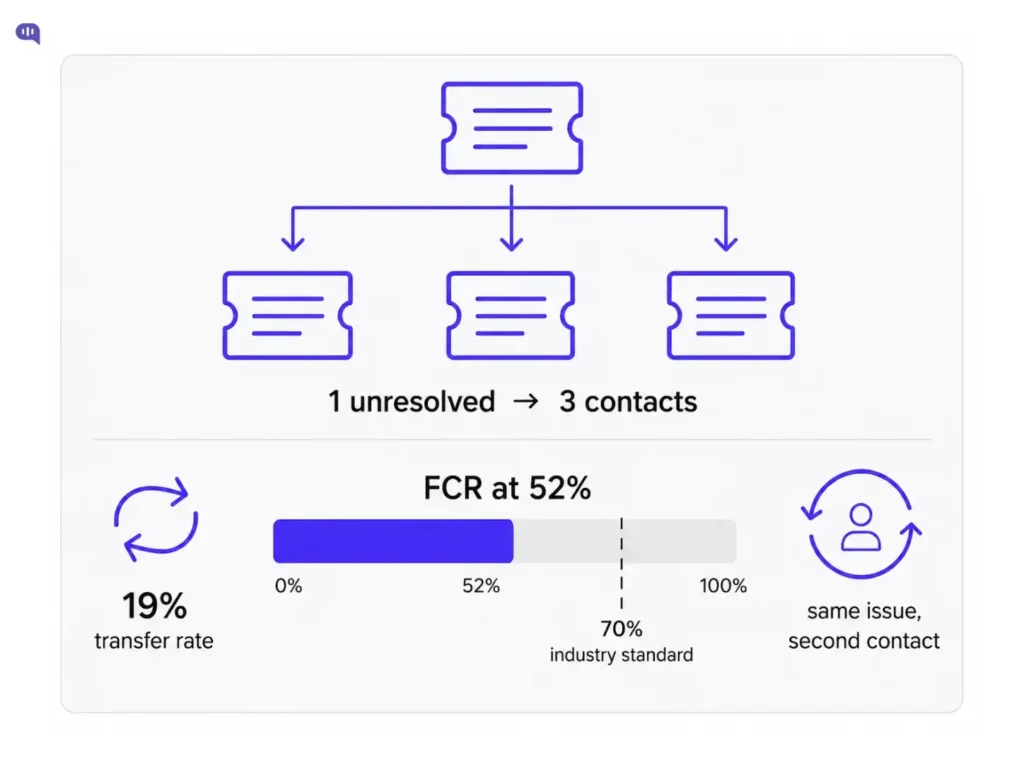
Slow responses compound ticket volume. When a patient doesn't hear back within their expected window, they keep following up. One unresolved ticket becomes three, all for the same issue.
A healthcare contact center’s average handle time is 6.6 minutes per call, and the average first-contact resolution rate sits at just 52%. That means roughly half of all patients are contacting you more than once for the same issue.
1. What is your actual first-contact resolution rate?
The industry standard in healthcare is 70–79% FCR.
If you're below 50%, your response time problem has a resolution quality problem. Agents are closing tickets before the issue is actually resolved, or routing patients to the wrong resource on the first contact.
Healthcare call centers face transfer rates of up to 19%. Every transfer is a resolution failure where a patient continually has to repeat themselves and still doesn’t receive an answer.
2. For each active channel, are your actual response times in line with your stated SLAs?
This question reveals two things simultaneously:
- Whether your SLAs are properly organized
- Whether they're being met
Many healthcare organizations have phone SLAs and nothing else. Portal messages and email often operate on informal expectations that nobody has written down, which means nobody can measure whether they're being violated.
3. What percentage of your tickets are multi-contact for the same issue within 72 hours?
This is the most direct measure of resolution failure in your queue. Pull a report on reopened tickets or look for the same patient ID appearing more than once within a three-day window. If that number is above 20% of total volume, a significant portion of your queue is patients who weren't helped the first time.
4. What are the top five reasons patients contact you more than once for the same issue?
If appointment scheduling, referral status, prescription refills, or billing questions appear on that list, you have high-automation candidates hiding in your repeat volume.
These are structured, rule-bound queries that just require fast access to the right system.
Section 3: Ticket overload diagnosis
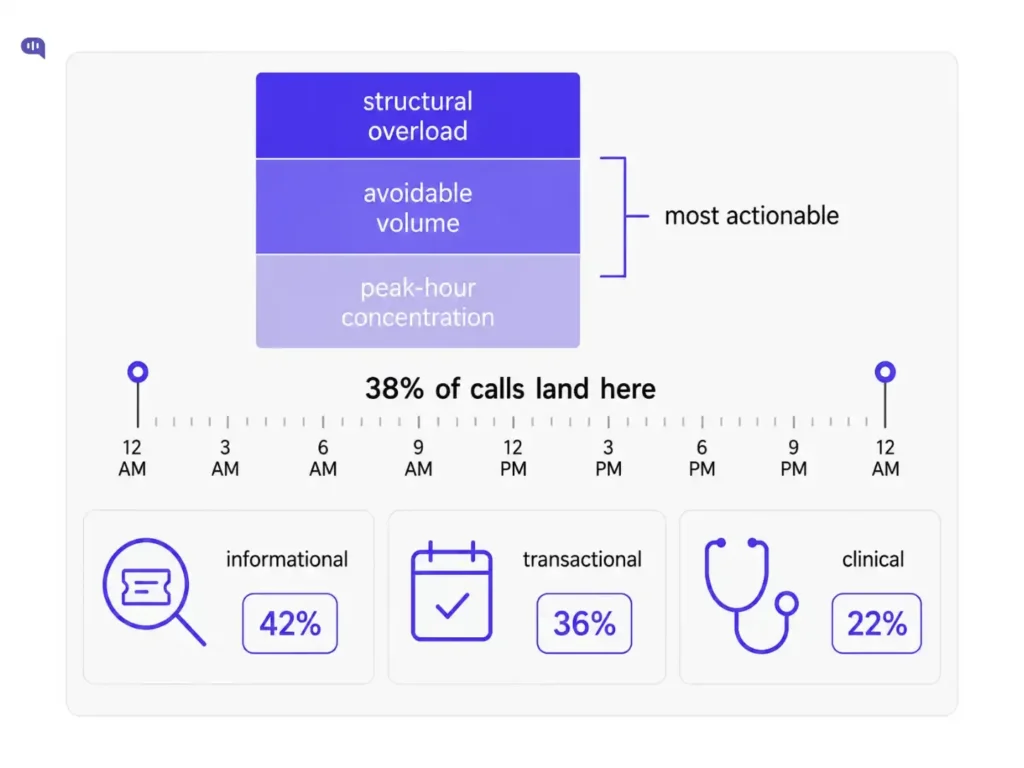
This section tries to identify which of the three overload patterns are showing up in your ticket volume. The patterns are:
- Structural overload means you have more inbound volume than your staffing model was designed to handle. This shows up as consistently long queues, high abandonment, and agents who are perpetually behind. The issue here is capacity.
- Avoidable volume means a significant portion of your tickets shouldn't exist. Patients are contacting you because they can't find information themselves, either because your processes generate confusion or because a previous interaction wasn't resolved completely. This is the most actionable category.
- Peak-hour concentration means your overall volume may be manageable, but it's unevenly distributed. 38% of daily calls in medical practices occur in the first and last hours of the operating day. If your staffing model doesn't account for this, those hours become a chokepoint that creates a bad patient experience regardless of your total capacity.
1. When do tickets arrive relative to when agents are available?
Pull your ticket data by hour of day and day of week for the last 30 days. Map arrival against coverage. The peak arrival window and your lowest coverage window are often not the same, but if they overlap, that's where your abandonment rate is being generated.
2. What share of your tickets are informational or transactional in nature?
Categorize a sample of 50–100 recent tickets as:
- Informational (hours, location, insurance questions)
- Transactional (scheduling, cancellations, refills, referrals)
- Clinical (symptom or care questions)
- Billing or administrative
- Complaint/escalation
If informational and transactional tickets together account for more than 40% of your sample, you have substantial automatable volume sitting in your human queue.
3. What are the five questions your agents answer the same way, every single time, without needing to think about it?
Ask your agents directly. The answers they give you are your automation candidates. They require no judgment, no clinical expertise, and no human relationship. They require fast, accurate information retrieval: something a well-configured AI handles at a fraction of the cost.
Section 4: Compliance risk assessment
This is the section most healthcare support leaders underestimate because compliance often goes unnoticed.
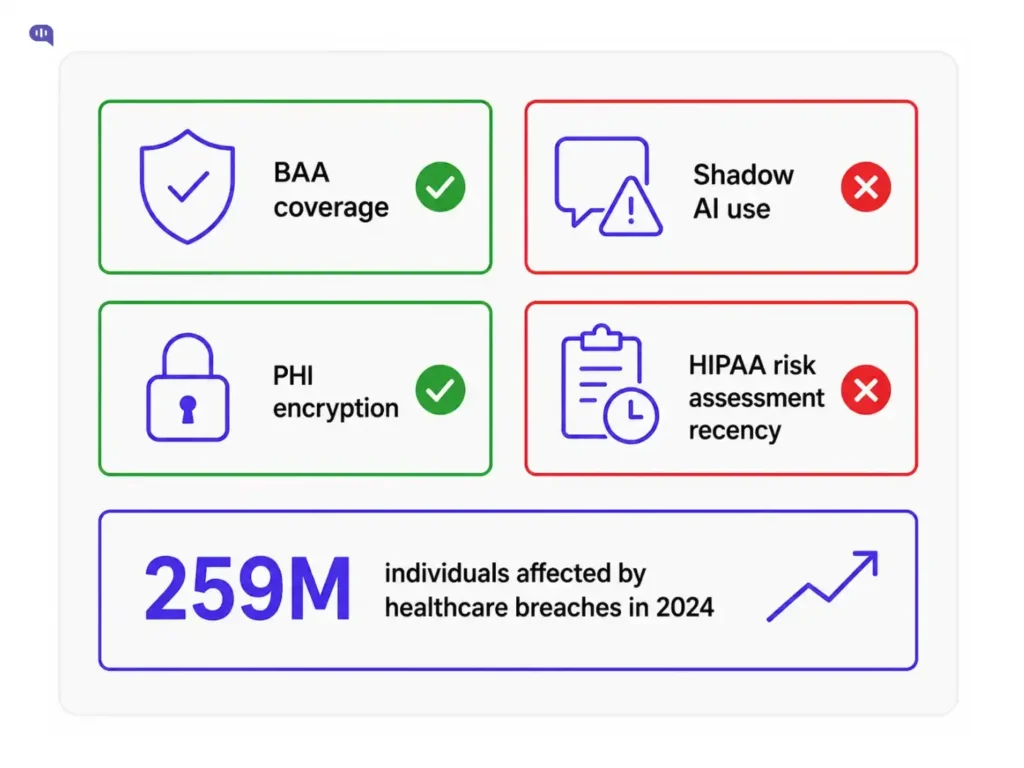
But the risk landscape is shifting. Healthcare data breaches affected 259 million individuals in 2024, up from 27 million in 2020.
Most of those breaches originated with third-party vendors handling patient data. If your support infrastructure runs through any third-party tool, that vendor is now in your compliance perimeter.
ECRI ranked AI chatbot misuse as the #1 health technology hazard entering 2026, because of "functional failures" (AI giving patients incorrect medical guidance with high confidence). This section tries to estimate your compliance-readiness using documents you already have on hand.
1. Does every third-party tool in your support stack that handles PHI have a Business Associate Agreement in place?
This is the foundational question. For each tool your team uses, ask whether it touches patient data and whether a BAA exists. If this question is unanswered for some tools, those tools can be risky.
2. Do you have a formal, enforced policy governing how agents use AI tools to communicate with patients?
This is where most organizations have a hidden gap. Staff using public versions of ChatGPT or Gemini to draft patient emails, summarize records, or explain lab results are creating potential HIPAA violations with every interaction.
Only 24% of medical organizations had provided any AI training to staff as of 2024. What your agents are doing informally, in the absence of policy, is your actual compliance posture.
3. When was the last time your organization conducted a formal HIPAA risk assessment of the tools in your support workflow?
This is a specific assessment of the patient communication and ticketing tools your support team uses. If the answer is more than two years ago, or never, the tools you're using today were probably not part of any assessment that has since been completed.
Section 5: After-hours blind spot audit
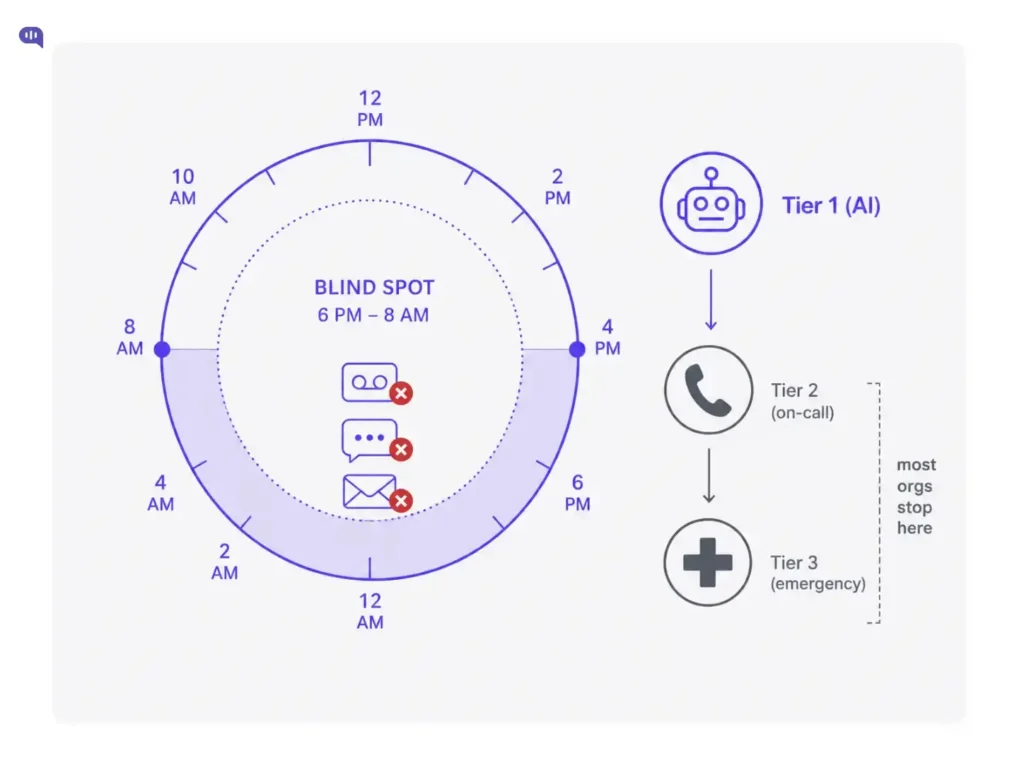
This is the most predictable failure point in healthcare support, and the most consistently ignored.
The math is clear:
- Only 19% of healthcare call centers operate 24/7
- 11% of all patient calls occur outside regular business hours
- 67% of after-hours calls in healthcare go unanswered.
What happens to those patients?
- Some try again in the morning and add to your peak-hour queue.
- Some will go to urgent care or an emergency room for something that didn't need that level of intervention.
- Some will switch providers.
- Some will have worse health outcomes because they couldn't reach anyone when they needed guidance.
After-hours coverage isn't a nice-to-have for patient retention. It's a care continuity issue.
1. What actually happens when a patient contacts your organization outside of staffed hours?
Does the phone go to voicemail? Does the chat widget disappear? Does the portal message sit unread until morning? Is there any triage mechanism that distinguishes between an urgent request and a routine one, or does everything wait equally?
2. How long, on average, before an after-hours contact gets a response?
This is the number that usually surprises leadership. Voicemails from late afternoon can sit until mid-morning the next day once the queue opens and agents work through the backlog. That's potentially 16 hours.
For a patient trying to reschedule an appointment or confirm medication instructions, that's a bad experience. For a patient with a time-sensitive concern, it's a care failure.
3. Do you track after-hours contact volume as a distinct metric?
Most organizations don't. Which means they have no baseline against which to measure improvement, and no way to quantify the size of the gap.
If you can't answer what percentage of your weekly contact volume occurs outside business hours, you're flying blind on a problem that reliably affects at least 10% of your patient interactions.
4. What good after-hours coverage actually looks like:
You don't need to staff agents overnight. You need a tiered system.
- Tier 1 is AI handling informational and transactional queries.
- Tier 2 is urgent but non-emergency contacts routed to an on-call triage line.
- Tier 3 is true emergencies redirected to appropriate emergency services with clear messaging.
Most healthcare organizations have Tier 3 in place. Almost none have Tier 1.
Scoring your AI automation-readiness
Each section scores up to 6 points across three indicators, for a total of 30. Use the interactive tool above to tally your scores, then use this guide to interpret the result.
0–10: Critical infrastructure gap
Your support operations have foundational gaps that need to be addressed before AI automation will deliver value.
Start with visibility: build the reporting infrastructure that tells you what's actually happening in your queue. Then address the highest-risk compliance findings. AI deployed on a broken foundation makes broken processes faster.
11–18: Partial readiness
You have some of the infrastructure in place, but there are clear gaps that will limit AI performance.
The audit has identified specific categories where the underlying data, processes, or policies aren't ready. Address those gaps in parallel with any AI evaluation. Prioritize the sections where you scored lowest.
19–24: Strong readiness
Your support infrastructure is sufficiently mature to capture meaningful value from AI automation. You have the visibility, the process documentation, and the compliance posture to deploy AI responsibly.
The question now is sequencing, which automation use cases to prioritize first. Focus on the highest-volume, most repetitive query categories identified in Section 3.
25–30: Optimization stage
Your infrastructure is mature. You're likely already using some form of automation, or you're leaving significant efficiency on the table by not doing so.
The priority now is intelligent routing: making sure the right queries go to AI, the right queries go to human agents, and your compliance posture keeps pace with increasing AI scope.
What to do with these findings?
This audit is a map, not a plan. It tells you where the problems are. Use the table below to find the strategy to fix the gaps:
| Finding | What It Signals | First Action |
|---|---|---|
| You couldn't answer questions in multiple sections | Measurement gap: You don't have visibility into your own queue | Build dashboards for ticket volume, resolution rates, after-hours contacts, and channel distribution before evaluating any AI tool |
| Section 3 shows 50%+ informational or transactional tickets | High avoidable volume: But processes may be undocumented | Document and standardize underlying workflows before automating them; AI on inconsistent processes makes inconsistency faster |
| Section 4 revealed missing BAAs or no AI tool policy | Open compliance exposure in your current stack | Use Section 4 findings as your vendor filter: BAA availability and PHI handling protocols are the first qualification, not a later detail |
| Section 5 shows unmanned after-hours contacts | The most predictable and contained gap to close | After-hours automation has the clearest ROI, lowest stakeholder dependency, and no impact on your daytime workflow |
| Any automation touching triage or symptom guidance | Clinical governance risk | Involve clinical leadership before go-live; ECRI's #1 health tech hazard for 2026 is AI giving confident but clinically wrong responses |
The goal is not full automation. It's the right query going to the right resource every time: some to AI, some to trained agents, some to clinicians. The organizations that get this right did the diagnostic work first.
Conclusion
If you want to diagnose exactly where your response time gaps are coming from, a structured healthcare customer support audit will map your ticket volume by channel, identify your highest-avoidable categories, and score your readiness for AI automation. If your audit turned up gaps in:
- Measurement
- Channel coverage
- Compliance posture
- After-hours response
You know where to direct your energy. That clarity is the point. Most healthcare support teams aren't under-resourced; they're operating without a clear picture of what's actually driving their volume. This audit gives you that picture.
When you're ready to act on what you found, Kommunicate is built for exactly this context. It deploys HIPAA-compliant AI automation across chat, messaging, and patient portals, without replacing the human judgment that complex cases require. Book a demo to see how it works.

Devashish Mamgain is the CEO & Co-Founder of Kommunicate, with 15+ years of experience in building exceptional AI and chat-based products. He believes the future is human and bot working together and complementing each other.