Updated on July 3, 2026
- Kommunicate integrates as a middleware layer. It can read from customer-approved EHR endpoints, sync with your helpdesk, and route conversations through your existing channels without replacing your systems of record.
- Your Zendesk and Freshdesk workflows do not need to be rebuilt. Kommunicate can hand off escalated conversations, along with relevant context, into your existing ticketing workflows.
- For healthcare deployments involving PHI, Kommunicate can be deployed under a signed BAA, scoped access controls, and customer-approved data flows. Many workflows can use read-only EHR lookup access, while actions such as appointment booking or rescheduling should use tightly scoped, customer-approved APIs.
- Implementation does not require a platform migration, EHR schema change, or helpdesk rebuild. It is typically a scoped integration project involving credential setup, workflow configuration, testing, and compliance review.
- Integration anxiety is one of the most common reasons AI deployment stalls in healthcare.
Every healthcare CX director we speak to has the same first question: “Will this break what we already have?”
That’s a reasonable concern. Healthcare IT stacks are expensive, fragile, and deeply regulated:
- Your EHR took months to implement.
- Your Zendesk instance has years of ticket history, routing rules, and agent training baked into it.
- Your Salesforce Health Cloud integration costs more than anyone wants to admit.
The last thing you need is a chatbot vendor asking you to migrate data, rebuild workflows, or hand your patient records to an opaque AI model with a vague compliance posture.
The good news: Kommunicate doesn’t work on the principle of “rip-and-replace.” This article explains exactly how the integration is architected so you can make a clear-eyed evaluation. We’re going to cover:
- How does Kommunicate connect with your support stack? Technical architecture
- Why do most AI deployments in healthcare stall?
- How does the EHR connection work?
- What happens if an integration fails?
- Zendesk and Freshdesk: Ticketing integrations
- Salesforce and WhatsApp integration: Knowledge base and channel
- Security controls to confirm before go-live
- What does a real deployment timeline look like?
- Conclusion
How does Kommunicate connect with your support stack? Technical architecture
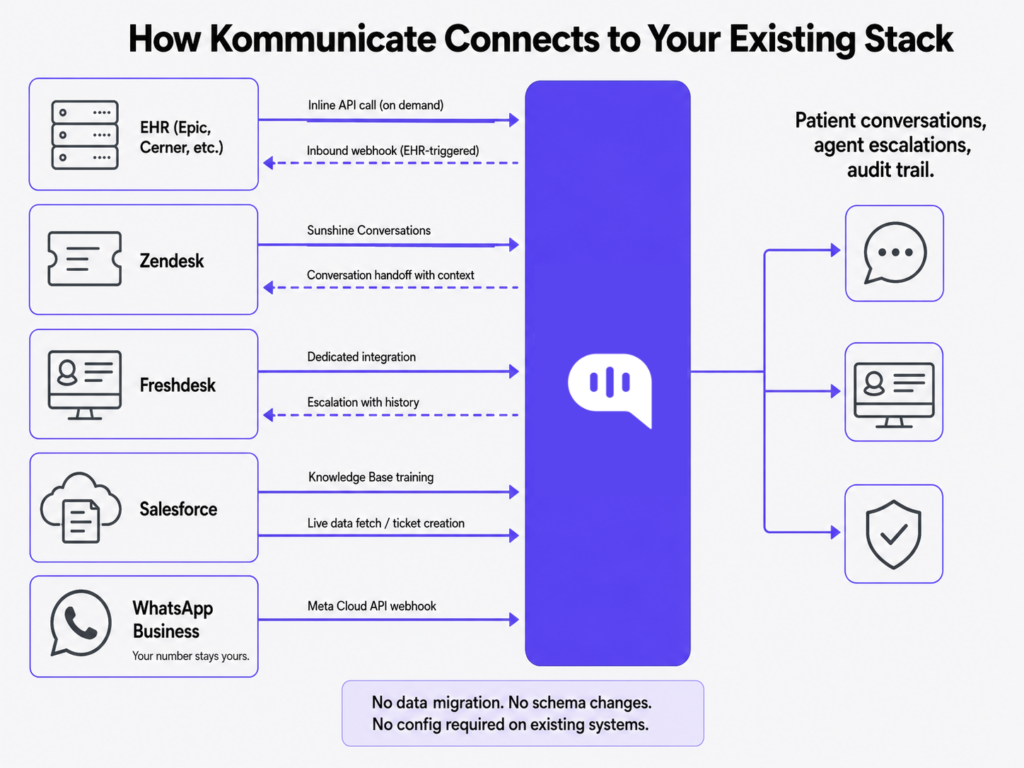
The exact connection pattern depends on the systems already available in your environment. Some teams expose REST APIs, some use FHIR-compatible endpoints, some rely on outbound webhooks, and some route healthcare events through an existing middleware or interface engine.
Why do most AI deployments in healthcare stall?
The problem is that most vendors ask for more than they need to give you what you want.
Ripping and replacing your helpdesk is not a prerequisite for AI-assisted patient support. Migrating EHR data is not required for a chatbot to pull appointment information. What is required is a secure API connection and a well-defined event schema: both of which your existing systems already support.
When AI deployment stalls in healthcare, it’s usually because the vendor’s architecture requires one of three things:
- Data migration to a proprietary database
- Changes to existing EHR or helpdesk configurations
- A compliance posture that can’t be clearly explained.
Kommunicate’s architecture avoids all three. It operates as a middleware layer, sitting between your channels and your systems of record, reading data via APIs, routing events via webhooks, and writing back only what’s necessary and only where it’s authorized.
The diagram above shows the integration topology. Your EHR, your helpdesk, your CRM, your WhatsApp Business account: all of them continue operating exactly as they did before Kommunicate was in the picture.
How does the EHR connection work?
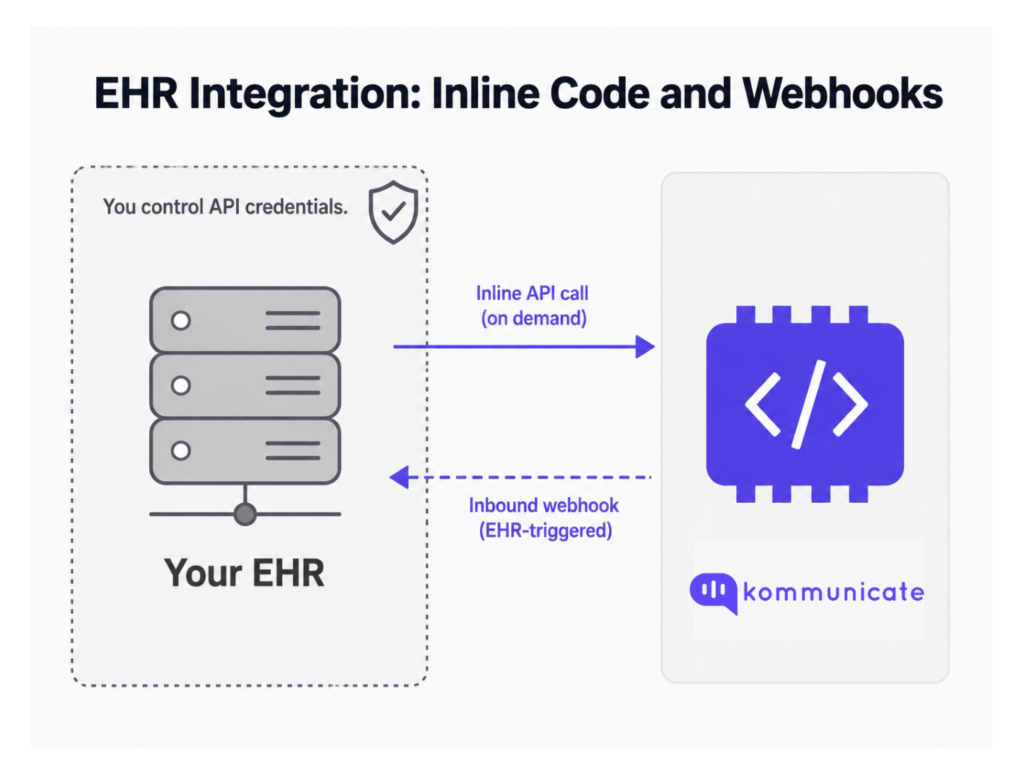
The EHR integration is the one that causes the most anxiety, so let’s be specific about the actual mechanism.
Kommunicate can connect to EHR workflows through customer-approved APIs, inbound or outbound webhooks, FHIR-compatible endpoints where available, or middleware exposed by the healthcare organization. In Kompose flows, API calls can be written into specific conversation steps using inline code, so the system only fetches the data required for that workflow.
The inline code approach is worth understanding because it gives your team precise control over what data is fetched, when it’s fetched, and how it’s used in the patient conversation. Kommunicate does not require persistent EHR data replication. API calls can be scoped to specific conversation steps, and access should be limited through customer-issued credentials, token rotation, allowlisting, and least-privilege permissions.
In practice, an inline code block in a Kompose flow is a small script that fires at a specific step in the conversation.
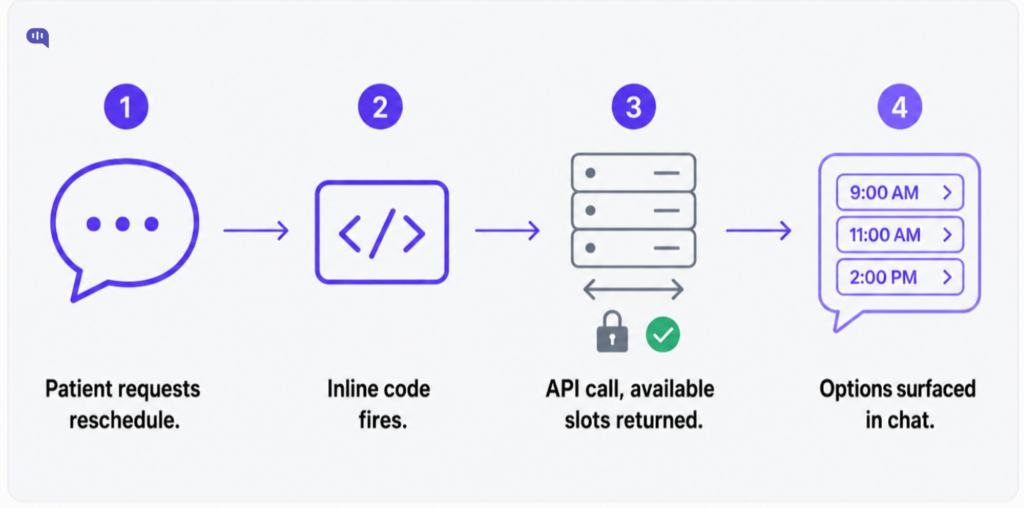
To demonstrate this more clearly, we have also created an appointment-booking flow that integrates with Google Calendar.
Webhook-based connections work in the opposite direction:
- Your EHR fires an event (a lab result is ready, a prescription is approved, a referral is confirmed)
- Kommunicate receives that event and routes it to the right patient conversation or agent queue.
Where supported, you are using the outbound webhook capability your EHR or middleware layer already provides.
What this means for your IT team: there is no EHR schema change or patient-data migration. For each workflow, your team only maps the specific fields needed for the conversation, such as patient identifier, appointment ID, available slots, location, provider, or escalation reason. You define the API calls you need, write them into your conversation flows, and the EHR behaves exactly as it would with any other authorized API consumer. The scope of access is entirely determined by the API credentials you issue.
One compliance point worth validating early: if PHI is processed, confirm that the applicable BAA, subprocessor terms, and LLM-provider arrangements cover the exact products, channels, and data flows used in the deployment. This is why the BAA and subprocessor review should cover the full data flow, not only the application layer.
What happens if an integration fails?
If an API call fails, Kommunicate should fail closed rather than guess. For example, if the EHR scheduling API times out, an authentication token expires, or the patient identity cannot be verified, the flow should show a safe fallback message and route the conversation to the right human queue. The escalation should include the attempted action, failure reason, channel source, and conversation context so the agent does not have to restart the interaction.
Zendesk and Freshdesk: Ticketing integrations
Kommunicate sits upstream of your helpdesk, handling the first layer of patient contact, resolving what it can autonomously, and escalating when human judgment is needed. The mechanics of that escalation are what make this genuinely non-disruptive.
For Zendesk, Kommunicate integrates via Sunshine Conversations.
Setup happens in the Zendesk Admin Center:
- You connect Kommunicate as a Sunshine Conversations integration, configure the channel, and Kommunicate’s AI handles inbound patient conversations.
- When a conversation needs a human agent, it surfaces directly inside Zendesk’s agent interface.
- Your agents can continue working from the same queue, with relevant conversation context attached to the handoff.
Your existing Zendesk queues, routing rules, SLA policies, agent groups, and tagging structures can remain in place. Kommunicate creates the conversation handoff; Zendesk continues to apply the workflow logic configured in your Zendesk instance.
For Freshdesk, Kommunicate has a dedicated integration.
- Patient conversations are handled by Kommunicate’s AI first. When a chat is transferred to a human agent, Kommunicate can create a Freshdesk ticket and pass the relevant conversation context into the ticket, such as transcript, user metadata, channel source, and escalation reason, depending on your Freshdesk configuration.
- Your Freshdesk agents can receive escalations as part of their normal workflow without needing to manage the conversation from a separate Kommunicate interface.
In both cases, your agents do not need to adopt a new working interface, and your helpdesk configuration does not need to be rebuilt. The only difference is that a significant share of contacts, including repetitive queries about appointments, billing, prescription refill routing, and status updates, are resolved before they ever reach the queue.
If you’re currently managing patient queries across multiple disconnected channels, the helpdesk integration is usually where you’ll see the most immediate efficiency gains. For the full architecture of the Zendesk automation layer, the step-by-step guide to automating Zendesk FAQs covers knowledge base preparation and guardrail configuration in detail.
Salesforce and WhatsApp integration: Knowledge base and channel
Salesforce knowledge base integration
Kommunicate can use Salesforce Knowledge Base content as a governed knowledge source for AI responses. Your FAQ articles, policy documents, support guides, and internal playbooks stored in Salesforce Knowledge can be indexed or retrieved for answer generation while Salesforce remains the governed source of truth.
Your Salesforce Knowledge Base continues to do what it was always supposed to do: serve as the governed, version-controlled source of truth for your support operation.
Kommunicate’s AI uses it to resolve patient queries accurately, without your agents having to copy and paste from articles manually. For the full architecture of how this works in practice, the Salesforce FAQ automation guide walks through knowledge preparation, confidence thresholds, and escalation guardrails.
Kommunicate AI can also fetch live data from Salesforce. We allow you to connect with Salesforce to:
- Fetch the latest data points
- Create Salesforce cases, leads, or other approved records depending on your Salesforce object model and permissions.
- Route patients, members, or customers to the right support, care coordination, or service team
This can be handled through approved APIs, inline code, and webhooks, depending on your Salesforce configuration, permission model, and workflow requirements.
WhatsApp integrations
WhatsApp is the channel healthcare CX directors most consistently underestimate. In many markets outside North America, WhatsApp is often a preferred support channel for patient communication.
Kommunicate connects to WhatsApp through the Meta Cloud API. During setup, Kommunicate is configured as the webhook handler for inbound WhatsApp message events. Your WhatsApp Business Platform number and verified business profile remain under your Meta Business setup, while Kommunicate routes incoming conversations through your AI and escalation flows.
For healthcare use cases, define what information can be shared over WhatsApp before go-live. Consent, message templates, the 24-hour customer service window, identity verification, and PHI handling rules should be reviewed as part of the channel setup.
| System | How Kommunicate Connects | What Doesn’t Change |
|---|---|---|
| EHR (Epic, Cerner, etc.) | Customer-approved APIs, webhooks, FHIR-compatible endpoints, or middleware-triggered calls from Kompose flows | EHR system of record, database schema, and core configuration |
| Zendesk | Sunshine Conversations integration via Zendesk Admin Center | Existing tickets, routing rules, SLA policies, and agent groups can remain in place |
| Freshdesk | Dedicated Freshdesk integration | Existing tickets, agent workflows, and automation rules can remain in place |
| Salesforce | Salesforce Knowledge used as a governed knowledge source; approved APIs for live data fetch or record creation | All CRM data, case history, and article governance |
| WhatsApp Business | Meta Cloud API webhook registration | Your WA number and verified business profile |
Security controls to confirm before go-live
| Area | What To Confirm |
|---|---|
| API access | Scoped credentials, token rotation, least-privilege permissions |
| Webhooks | Authentication headers, signed requests, HTTPS endpoints, retry handling |
| PHI handling | Data minimization, redaction, approved channel rules |
| Auditability | API calls, handoffs, escalation reason, and agent actions are logged |
| Human fallback | Sensitive, uncertain, or failed workflows escalate safely |
| Environment setup | Sandbox/UAT testing before production go-live |
What does a real deployment timeline look like?
The technical configuration is often faster than the broader approval process. Timeline usually depends on API access, security review, BAA execution, data-flow approval, UAT, and coordination between CX, IT, compliance, and clinical operations teams.
Week 1: Stack mapping and credential setup
Your team confirms API access for your EHR, configures the Sunshine Conversations or Freshdesk integration, and connects your WhatsApp Business number. No EHR schema changes or patient-data migration. The work is mostly credential setup, channel configuration, workflow mapping, and testing.
Weeks 1 to 2: Conversation flow build
Kompose flows are configured for your priority use cases: appointment scheduling, prescription refill or status-routing queries, and billing FAQs. Salesforce Knowledge Base content is connected, indexed, or retrieved as an approved knowledge source. Escalation rules and CSAT guardrails are set.
Weeks 2 to 3: UAT and go-live (mid-market)
User acceptance testing with your CX team. Agent handoff tested end-to-end—production deployment on your live channels.
Weeks 4 to 8: Go-live (enterprise)
Enterprise deployments with multiple EHR instances or complex Salesforce configurations run longer. The additional time is usually due to coordination across IT, compliance, clinical operations, and security teams, especially when multiple EHR instances, Salesforce configurations, or channel policies are involved.
The compliance track (runs in parallel)
BAA execution, InfoSec review of Kommunicate’s SOC 2 Type II documentation, and data flow diagram approval typically run alongside the technical track. Starting this early is the single best way to compress your overall timeline. The Integration Readiness Checker above is designed to help you get that process moving before your first vendor conversation.
Conclusion
Kommunicate doesn’t ask your healthcare organization to change what’s already working. The EHR stays in place as the system of record, connected through customer-approved APIs, webhooks, FHIR-compatible endpoints, or middleware depending on your environment. Zendesk and Freshdesk keep doing what they do: Kommunicate hands off to them cleanly via Sunshine Conversations and the Freshdesk integration. Salesforce Knowledge Base remains your governed source of truth; Kommunicate can use that content for AI-assisted responses with escalation guardrails when confidence is low or the request requires human review. WhatsApp Business can run through your existing verified Meta Business setup, with Kommunicate handling inbound webhook events and routing them through the configured AI and escalation workflows. What Kommunicate adds is an AI orchestration layer that connects patient conversations to your approved systems, resolves supported workflows, escalates with relevant context when needed, and preserves a traceable record of the interaction based on your configured logging and retention policies. For teams using this as a foundation to grow, our guide on scaling customer support covers what to prepare for as volume increases. For teams using this as a foundation to grow, our guide on scaling customer support covers what to prepare for as volume increases.
The architecture is non-disruptive by design, not by accident. If you want to see exactly how it maps to your specific stack, exploring what an AI-first patient engagement model looks like in practice is a good place to start before your first demo conversation.

Adarsh Kumar is the CTO & Co-Founder at Kommunicate. As a seasoned technologist, he brings over 14 years of experience in software development, artificial intelligence, and machine learning to his role. His expertise in building scalable and robust tech solutions has been instrumental in the company’s growth and success.