Updated on January 13, 2026
Universities usually face a problem called “Summer Melt,” which happens when students accept offers of admission but don’t show up for enrollment.
Georgia State University identified this problem and saw some trends. Most students who didn’t show up faced problems with:
- Financial aid
- Immunization exams
- Placement exams
- Class registration
To solve this, GSU developed its own AI chatbot, “Pounce,” and a student portal that answered student questions. This reduced the problem of “summer melt” by 21%. The AI chatbot answered 100,000 questions, and they only needed human intervention in 1% of the cases.
However, this case study dates back to 2016, and a lot has changed since then.
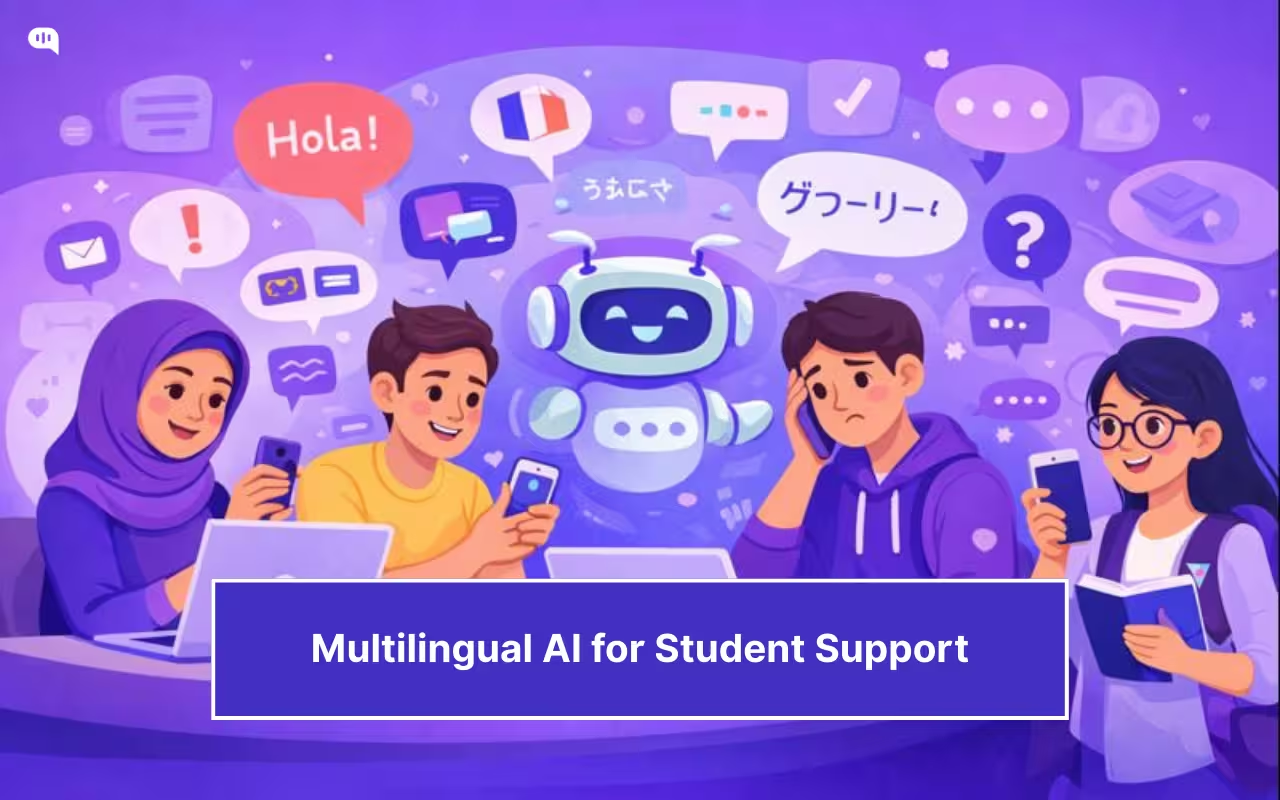
Colleges and universities across the world now deal with a wide array of students. For an international student navigating complex visa regulations or a first-generation enrollee struggling with financial aid jargon, a chatbot that only speaks “Academic English” is a barrier.
When a student is anxious about their application at 3 AM in a different time zone, they need support that feels accessible, understandable, and culturally aware.
In this article, we will explore why multilingual support is critical for modern campuses and how to design these systems without losing the “human touch.” We’ll cover:
- What is the Reality of Modern College Campuses?
- Why Do Universities Need Multilingual Support Systems?
- How Do We Design Accessible and Inclusive Student Support Bots?
- What Makes a Chatbot “Human-Sensitive” in Education?
- How Can You Build a Multilingual Chatbot With Kommunicate?
- How Do You Measure the Success of Your Student Support Bot?
- How Do You Manage Rollout and Continuous Improvement?
- Conclusion
What is the Reality of Modern College Campuses?
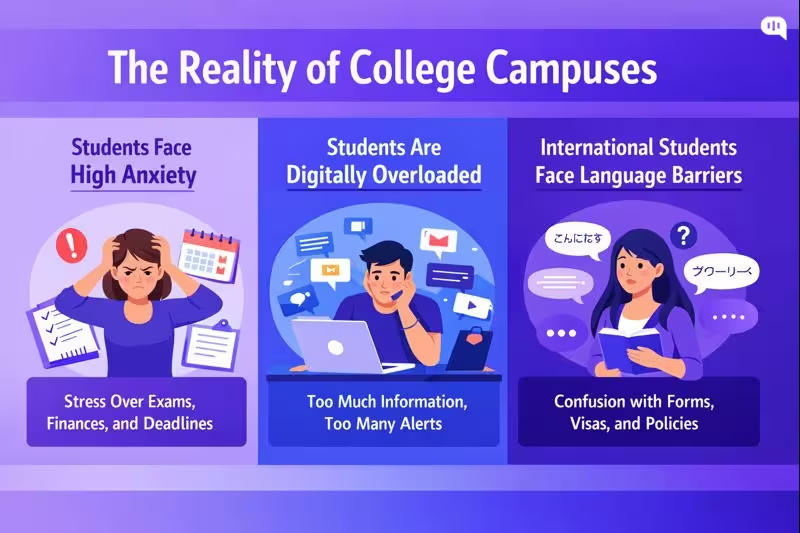
To understand why we need better AI agents, we must look at the pressures facing today’s students. Recent data from the 2024-2025 academic year paints a stark picture of the modern campus:
- Students Face High Anxiety in College: According to the Healthy Minds Study (2024-2025), roughly 32% of college students screened positive for anxiety. When a student approaches a support channel, they are often already in a state of high stress.
- Omnichannel Messaging Creates a Digital Overload: Students are bombarded with emails, portal notifications, and SMS alerts. This “digital overload” leads to information avoidance; students often ignore official channels because the volume is overwhelming. A chatbot offers a single, on-demand point of truth.
- International Students Face Language Barriers: International student enrollment is facing friction. There was a 17% decline in new international student enrollments in the US for the 2025-2026 cycle, driven partly by confusing visa policies and financial hurdles. Language barriers remain a primary obstacle, with 42% of international students reporting difficulty understanding native accents or fast speech during orientation.
The reality of the modern campus is a perfect storm of high stress, digital fatigue, and linguistic diversity. Students are asking for help at all hours, often in a state of anxiety, and frequently in English, which is not their first language.
In the next section, we will explore the business cases for breaking down these barriers with multilingual support systems.
Why Do Universities Need Multilingual Support Systems?
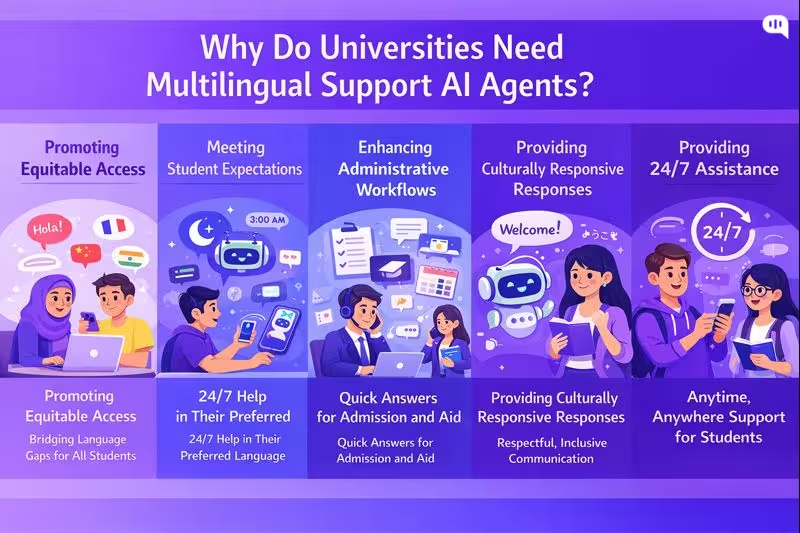
Multilingual student support is no longer a “translation layer” on top of English-first services. It is an equity, access, and operations requirement. As student populations become more international and more linguistically diverse, language-capable systems become essential to keep these benefits equitable and effective.
Practically, you need multilingual chatbots because they perform the following functions:
1) Promoting Equitable Access
Universities increasingly rely on digital touchpoints like portals and apps, but when these systems assume fluency in “academic English,” they create invisible barriers to financial aid and enrollment. True digital equity goes beyond internet connectivity; it requires systems designed for usability across linguistic lines.
By implementing multilingual support, institutions ensure that essential services are legible and accessible to all learners, directly addressing the exclusion that occurs when non-native speakers cannot confidently navigate English-only resources.
2) Meeting Modern Expectations for Translation
Beyond administrative tasks, chatbots play a growing role in language learning and comprehension support, offering personalized practice that aligns with modern student expectations.
With advancements in AI, students now view seamless, high-quality translation as a baseline requirement for digital interactions. Integrating these capabilities allows universities to match the fluidity students experience in consumer apps, transforming the chatbot from a static directory into a dynamic communication tool.
3) Enhancing Support for Administrative Workflows
Multilingual capability offers high leverage in critical administrative areas, where international students frequently navigate complex admissions, visa compliance, and tuition requirements. If the support layer remains English-only, the students who most need clarity are often the least likely to receive it quickly, leading to increased anxiety and administrative errors.
By automating answers in a student’s native language, universities can streamline these critical processes, ensuring that language barriers do not become bottlenecks for enrollment or legal compliance.
4) Fostering Culturally Responsive Support
True inclusivity extends beyond mere translation to cultural comprehension, ensuring that automated responses respect diverse communication patterns and avoid bureaucratic tones. Drawing on principles of culturally responsive teaching, multilingual bots can be designed with “human sensitivity”.
5) Providing 24/7 Assistance
As universities operate across global time zones and serve students with varied schedules, the need for immediate, 24/7 assistance is critical. Multilingual chatbots democratize this availability, allowing students who struggle with the primary language of instruction to receive instant explanations at their own pace without waiting for office hours. This capability resolves “communication bottlenecks” by handling repetitive queries automatically, freeing up human staff to focus on complex issues during regular business hours.
Building language-capable support is essential for maintaining the university as the trusted “source of truth” in an AI-mediated world. By engaging students in their preferred languages, institutions prevent misinformation gaps and prepare their infrastructure for a future where seamless, multilingual digital communication is the standard.
So, how do we design these systems? In the next section, we’ll talk about how people can create more inclusive and sensitive systems.
How Do We Design Accessible and Inclusive Student Support Bots?
Universities can build support bots that scale access without flattening student experience, but only if they are designed for accessibility, inclusion, and safe escalation from day one. The goal is not “automation.” The goal is equitable help that works for every student, in every context.
| Feature (what you build) | Benefit (why it matters) | Student Outcome (what improves) |
| Automatic language detection + one-tap language switch | Removes the “English-first” barrier and supports code-switching | Fewer drop-offs in admissions/onboarding; more students complete next steps correctly |
| Plain-language mode (jargon → simple explanations) | Reduces cognitive load and prevents misunderstandings in high-stakes workflows | Higher confidence, fewer missed deadlines, and fewer repeat contacts |
| WCAG-aligned UI foundations (Perceivable, Operable, Understandable, Robust) | Ensures the experience is usable across abilities, devices, and assistive tech | More students can independently access support; fewer “I can’t use this” failures |
| Keyboard-only navigation + visible focus states | Supports users with motor impairments and power users; prevents “trap” interactions | Faster task completion and fewer abandonment events |
| Screen-reader-friendly semantics (proper labels, roles, and announcements) | Makes conversations understandable for blind/low-vision users | Students can reliably navigate the bot without assistance |
| Structured quick replies + free-text fallback | Helps students who struggle to type long messages; reduces ambiguity | Higher resolution rate, less frustration, and faster routing to the right answer |
| Progressive disclosure (step-by-step flows, not walls of text) | Supports neurodiverse students and reduces overwhelm during complex tasks | Better completion rates for forms, registration, and compliance steps |
| Low-bandwidth and mobile-first interaction patterns | Works for students on limited data plans or unstable connectivity | Better accessibility off-campus; higher engagement in time-sensitive moments |
| Clear “Talk to a human” affordance at all times | Preserves agency and prevents students from feeling “stuck with the bot” | Higher trust, fewer rage-quits, and faster resolution for edge cases |
| High-stakes escalation triggers (mental health, safety, immigration, harassment, financial hardship) | Prevents the bot from mishandling sensitive situations; prioritizes safety | Reduced risk: students get timely human support when it matters most |
| Privacy-by-design: data minimization + consent cues | Reduces unnecessary PII capture and clarifies what’s happening to student data | Higher willingness to use the bot; fewer privacy concerns |
| Verification gating for account-specific answers | Prevents accidental disclosure of education records in open chat | Safer service delivery; fewer compliance issues |
| Culturally neutral tone + respectful clarification patterns | Avoids alienating students from different cultural contexts | Stronger sense of belonging; fewer negative experiences |
| Equity analytics (performance by language, device, accessibility mode) | Surfaces who the bot serves well and who it fails | Continuous improvement focused on fairness, not averages |
Accessibility and inclusion ensure the bot is usable for every student, across languages, devices, and abilities. The next requirement is human sensitivity: designing an AI student support agent that responds with empathy, cultural awareness, and clear safety boundaries.
What Makes a Chatbot “Human-Sensitive” in Education?
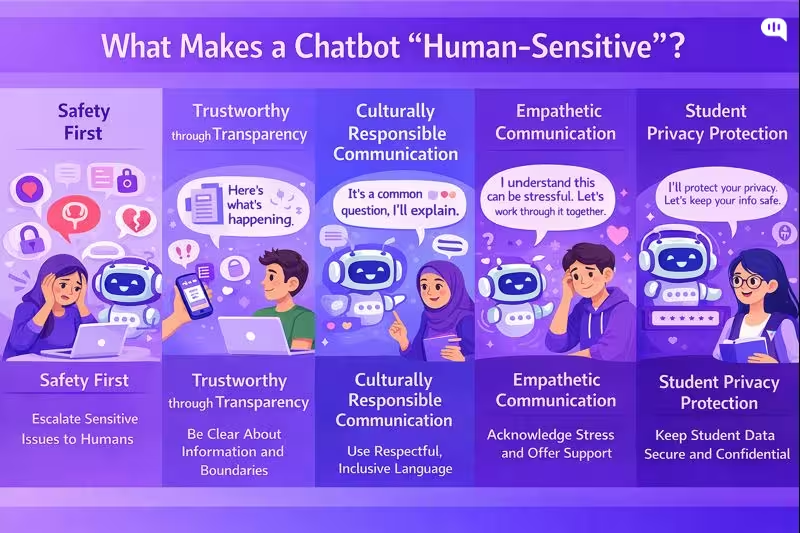
A human-sensitive chatbot can communicate like a competent, respectful student support professional.
In practice, this comes down to a few operational principles drawn from human-centered design, trauma-informed communication, culturally responsive practice, and trustworthy AI risk management.
1) Safety First
Human sensitivity starts with knowing what the bot should not handle alone.
Design patterns
- Hard escalation triggers for self-harm, harassment, violence, acute distress, immigration risk, and urgent financial hardship.
- “Fast path to a human” that is always visible, not buried behind repeated bot prompts.
- Clear crisis guidance when appropriate, with local campus resources and emergency instructions.
Trauma-informed approaches emphasize safety, trust, empowerment, and cultural considerations as core principles, which translate directly into bot behavior and escalation design.
2) Trustworthiness Through Transparency
Students should never have to guess what the system is, what it can do, or what happens to their information.
Design patterns
- Identify the assistant as AI, and explain what it can help with.
- Use certainty language carefully (for example, “Based on the policy page, here is the requirement”).
- When unsure, ask a clarifying question or route to a human; do not improvise.
- Provide source links when answering policy questions (fees, deadlines, scholarship eligibility), so the student can verify.
This aligns with trustworthy AI characteristics like transparency, accountability, and reliability, and with education guidance emphasizing human-centered and responsible AI use.
3) Culturally Responsible Communication
Human sensitivity in education is closely tied to culturally responsive communication: students interpret tone, formality, and “institutional voice” differently based on context.
Design patterns
- Use culturally neutral, nonjudgmental phrasing (avoid scolding language like “You should have…”).
- Normalize confusion (“This is a common question”) to reduce shame.
- Support code switching and mixed language input without forcing the student to “choose a language first.”
- Avoid idioms and region-specific slang in official guidance; default to clear global English plus localized translations.
Culturally responsive teaching frameworks emphasize making learning and communication meaningful through students’ lived experiences and frames of reference, which is directly relevant to student support interactions.
4) Empathy-First Communication
The bot should acknowledge stress and uncertainty without role-playing therapy.
Design patterns
- Validate emotion briefly (“I understand this can be stressful”), then move to concrete next steps.
- Offer choices (“Do you want the quick checklist or the detailed steps?”).
- Avoid false intimacy (“I’m always here for you”) and avoid minimization (“It’s not a big deal”).
Trauma-informed communication guidance consistently emphasizes leading with empathy, respect, and choice, especially when users may be anxious or overwhelmed.
5) Student Privacy Protection
Education support frequently touches regulated or sensitive information. A human-sensitive bot behaves conservatively around identity and records.
Design patterns
- Do not request or display personal student record details in open chat unless authenticated.
- Minimize data collection, and explain why any information is needed.
- Provide safe alternatives (“I can explain the general process here. For your specific record, sign in, or I can connect you to staff.”)
FERPA guidance is a useful baseline reference for privacy expectations around education records in the US context.
Now that we have the behavioral requirements for a human-sensitive bot, the next step is implementation: how to build multilingual support in Kommunicate with language detection, knowledge grounding, safe escalation rules, and measurement so sensitivity and accuracy hold up at scale.
How Can You Build a Multilingual Chatbot With Kommunicate?
Creating a multilingual student support AI agent used to require complex coding and massive translation databases. Today, platforms like Kommunicate have simplified this into a low-code process that universities can deploy in an afternoon.
You can follow this video to quickly get started with the steps:
Phase 1: The Setup (Kompose)
- Create Your Bot: Log in to your Kommunicate Dashboard and navigate to the Agent Integrations section.
- Select Kompose: Choose “Kompose” (the visual bot builder) and click Create Agent/\..
- Define Identity: Give your bot a welcoming name (e.g., “CampusAlly” or “Student Success Agent”) and set the default language to English. This will serve as your “base” language for training data.
Phase 2: The “GenAI” Shortcut
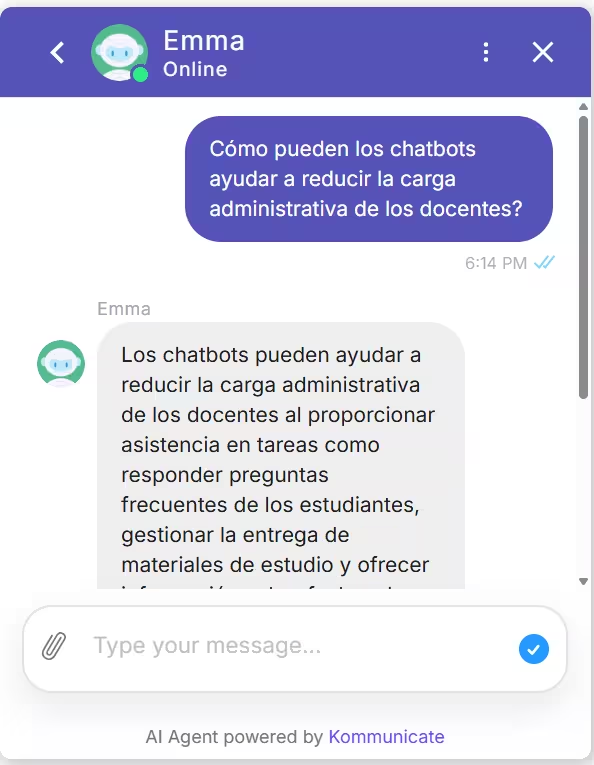
This is the fastest method to achieve true multilingual support without manual scripting.
- Train on Data: Inside the bot builder, locate the “Knowledge Source” section
- Upload Sources: Upload your university’s PDF handbooks, admissions FAQ documents, or simply paste the URL of your “International Students” web page. You can also add your Zendesk or Salesforce help desk here.
- Enable Multilingual Capabilities: Kommunicate’s GenAI engine ingests this content. Because it uses Large Language Models (LLMs), it doesn’t just memorize keywords—it understands concepts.
- How it works: If a student asks, “¿Cuándo vence la matrícula?” (When is tuition due?), the AI understands the intent, retrieves the answer from your English “Tuition Deadlines” document, and generates the response back in Spanish automatically.
- Why this matters: You do not need to hire translators to rewrite your entire knowledge base. The AI handles the linguistic bridge for you.
Phase 3: Building the “Escape Hatch” (Human Handoff)
To maintain human sensitivity, the bot must know when to step aside.
- Enable Handoff: You will get the option when you build your AI agent.
- Create a Fallback: Kommunicate handles all the triggers for support on itself. You just need to tell your AI agent about the message they should use when transferring the conversation to an agent.
Phase 4: Testing Your Bot
Before going live, use the Test AI Agent button in the dashboard.
- Test Intent: Type a question in a different language (e.g., French) and verify that the GenAI responds correctly in French.
- Test Tone: Ensure the generated answers sound helpful and not overly robotic.
- Test Handoff: Type “I need to speak to a person” to confirm the bot routes the chat to your team’s inbox.
Phase 5: Actually Using the Bot
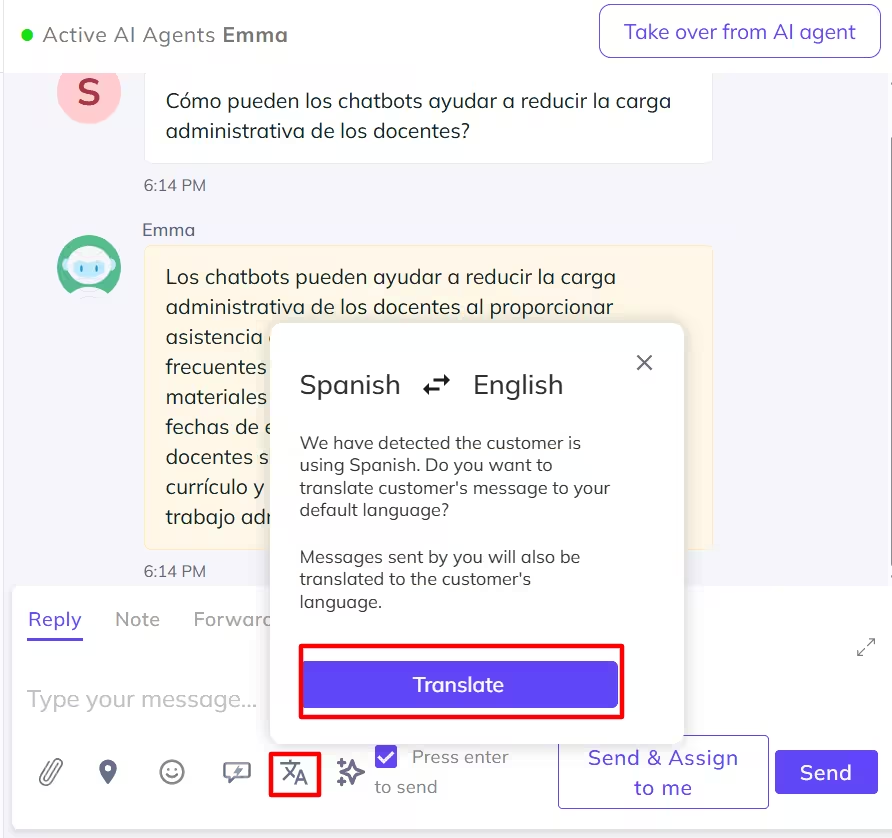
When a student messages you in a foreign language, the Kommunicate conversation dashboard will automatically translate the conversation for your customer support agent.
- Initiate Translation – You will be prompted to click on the Translation icon at the bottom of the conversation page.
- Translate – You can now translate the conversation to the language you want.
With Kommunicate, you can easily build an out-of-the-box multilingual AI agent to answer basic questions from students. However, you still need customer support agents to answer complicated questions (you can find out how an AI agent will change the customer support equation in this article).
However, once you get started with Kommunicate, you need to start measuring some metrics daily. Let’s talk about how you can measure the success of your student support AI agents.
How Do You Measure the Success of Your Student Support Bot?
A student support bot should be measured like any mission-critical campus service: Does it help students complete outcomes without increasing risk? The cleanest way to do this is a scorecard that blends usability (effectiveness, efficiency, satisfaction), service operations, and trustworthiness monitoring.
1) Student outcomes
These tie the bot to institutional goals, not just chatbot activity.
- Enrollment Yield – Completion rate of admitted-student tasks (fee payment, registration steps, documentation)
- Melt Impact – Drop-off reduction on key workflows (aid, immunizations, placement, orientation)
- Student Success and Retention Signals – Reduction in missed deadlines (registration, payment, document submissions) and increase in successful self-service completion (students finishing flows without staff)
2) Experience and accessibility (is it usable for everyone?)
Usability is commonly framed as effectiveness, efficiency, and satisfaction in context
- Effectiveness – Task completion rate (student reaches the correct next step) & correct-answer rate (QA scored via sampling + rubric).
- Efficiency – Time to resolution (median and P90), and messages per resolution (lower is typically better, but watch for “too short” failures)
- Satisfaction – CSAT after resolution (overall + by journey stage) and CES (customer effort score): “It was easy to get help.”
- Accessibility Quality – Drop-off rate by device type and assistive technology patterns (where measurable) and accessibility defect rate from audits and user testing (tracked like bugs)
3) Resolution Performance
These are the operational KPIs that tell you whether the bot is doing useful work.
- Containment rate – Percentage of conversations resolved without human handoff (track overall and by intent)
- Escalation rate – Percentage routed to staff; segment by reason (no-match, policy uncertainty, high-stakes trigger)
- First-contact resolution (FCR) – Percentage resolved without repeat contact within X days (choose 3–7 days for student services)
- Fallback and Failure Indicators – No-match rate (NLU fails), webhook/integration failure rate, “looping” rate
You can track these failure hotspots (escalations, no-matches, webhook failures, and flow/page drop-offs) on Kommunicate, which is useful for ongoing optimization.
4) Operational Impact
This is where you demonstrate value to student services leadership.
- Deflection volume – Number of resolved queries that would otherwise become calls/tickets
- Ticket quality improvements – For escalations: Percentage of tickets with complete context (student goal, steps attempted, relevant IDs)
- Peak handling – Performance and queue stability during spikes (admissions, fee deadlines, start-of-term)
5) Trust, Safety, and Compliance
Measurement should include continuous monitoring of AI risks. NIST’s AI Risk Management Framework is a practical reference point for structuring ongoing measurement of trustworthy AI characteristics.
- High-Stakes Safety Handling – Rate of correct escalations for sensitive categories (self-harm, harassment, urgent safety)
- Hallucination and Policy Error Rate – Percentage of sampled conversations with unsupported claims (especially for deadlines/fees/eligibility)
- Privacy Incidents – Instances of unnecessary PII collection or exposure (tracked as severity-rated incidents)
Once you define this scorecard, you can set pilot thresholds (for example, minimum accuracy on high-stakes intents, parity targets across languages, maximum no-match rate, and escalation SLAs).
Those thresholds become your go/no-go gates for expanding beyond a limited cohort.
Next, we’ll outline a practical rollout strategy: pilot design, staffing and handoff readiness, phased language expansion, and the continuous improvement cadence that keeps the bot reliable over time.
How Do You Manage Rollout and Continuous Improvement?
Rolling out a student support bot is best treated as a risk-managed service launch, not a one-time product release. A phased rollout with defined gates lets you scale safely while building a measurable improvement loop (govern, measure, and manage AI risk across the lifecycle).
| Phase | What you do | Primary owners | Exit criteria (go / no-go gates) |
| 0. Alignment and scope | Define the bot’s mission (student outcomes), supported journeys (admissions, aid, registration), languages, channels, and “never-do” boundaries | Student Services lead + IT + Compliance | Signed scope, risk categories defined, baseline metrics agreed (CSAT, containment, parity by language) |
| 1. Content and policy grounding | Build/clean the knowledge base (single source of truth), add citations/links to official pages, write plain-language variants, and define update owners | Content owner + department SMEs | Content coverage for top intents; versioning and review process in place |
| 2. Safety, privacy, and accessibility readiness | Implement escalation triggers (mental health, safety, immigration, harassment), authentication rules for record-specific info, privacy minimization, and WCAG testing | Compliance + Security + Accessibility lead | Passing accessibility audit; escalation routing tested end-to-end; privacy checks passed |
| 3. Pilot (one department, one cohort) | Launch to a controlled cohort (e.g., admitted students or international admits) and one department (Admissions or Financial Aid); staff handoff training + runbooks | Department manager + support team lead | Accuracy and policy-error rate within threshold; time-to-human SLA met for high-stakes; no critical incidents |
| 4. Expand coverage (more intents, more languages) | Add departments and languages in waves; expand integrations (portal, ticketing); introduce proactive nudges (deadline reminders) where appropriate | IT + department SMEs | Language parity targets met (accuracy/CSAT within acceptable variance); stable performance during peak weeks |
| 5. Operationalize continuous improvement | Weekly intent review, failed-conversation triage, escalation sampling QA, and monthly knowledge refresh; maintain an improvement register and incident postmortems | Bot owner + QA lead + SMEs | Predictable cadence, measurable KPI improvement, and documented changes and learnings |
| 6. Governance and audit | Quarterly risk review (bias, privacy, hallucinations), access reviews, data retention checks, and policy re-validation | Governance committee | Audit artifacts available; risks tracked and mitigations implemented across the lifecycle |
With phased gates and a steady improvement cadence in place, you can now close the loop by documenting learnings and translating results into a campus-wide operating model for sustainable, student-centered support.
Conclusion
The evolution from Georgia State University’s 2016 Pounce chatbot to today’s multilingual AI agents reflects a fundamental shift in how universities must approach student support. Modern campuses serve increasingly diverse, anxious, and digitally fatigued populations who need accessible help in their own languages, on their own schedules, and through interfaces that respect their dignity.
Building effective student support systems today requires moving beyond simple automation toward intentional design that centers equity, accessibility, and human sensitivity. When universities implement multilingual chatbots with careful attention to cultural responsiveness, clear escalation pathways, and robust privacy protections, they create infrastructure that affirms every student’s right to understand and navigate their educational journey, regardless of language background or time zone.
Success in this space demands treating AI deployment as an ongoing service commitment rather than a one-time technology project. Universities that establish clear governance frameworks, measure outcomes through the lens of equity and student success, and maintain disciplined improvement cycles will build support systems that scale without losing the human touch.
The technical implementation matters far less than the institutional commitment to accessibility, safety-first design, and transparent operation. As AI capabilities continue to advance, the universities that thrive will be those that use these tools not to replace human connection, but to ensure that every student, regardless of background, can access the support they need to succeed.
If you need help to build a safety-first AI agent implementation for student support, feel free to book a consultation with us.

Devashish Mamgain is the CEO & Co-Founder of Kommunicate, with 15+ years of experience in building exceptional AI and chat-based products. He believes the future is human and bot working together and complementing each other.