TL;DR
AI agent memory architecture holds five distinct context types:
- Conversation history
- User profile
- Preferences
- Knowledge base
- Live tool data
Mixing them into a single prompt blob creates freshness, privacy, and debugging problems that compound over time.
Core design rule: never use stored memory as a substitute for live data.
Most AI agent implementations treat memory as a single context blob: everything the agent has ever seen, concatenated into a prompt and passed forward. That works well enough in demos. It breaks down in production, where freshness, privacy, and deletion requirements are real constraints and where a stale customer preference or an outdated issue summary can send an agent in the wrong direction.
Good AI agent memory architecture treats memory as a set of typed, permissioned layers rather than a unified store. Each layer has a different purpose, a different retention policy, and a different retrieval mechanism.
This guide covers the five memory types used in customer service AI agent systems and gives you a basic support workflow that you can implement for your own agent. We will cover:
- The five memory types in a customer service interaction
- Retention rules for each memory type
- Which type of memories should be retained?
- Which type of memories should be erased?
- How do the memory rules function in a support workflow?
- When does memory architecture fail?
- Conclusion
- FAQs
The five memory types in a customer service interaction
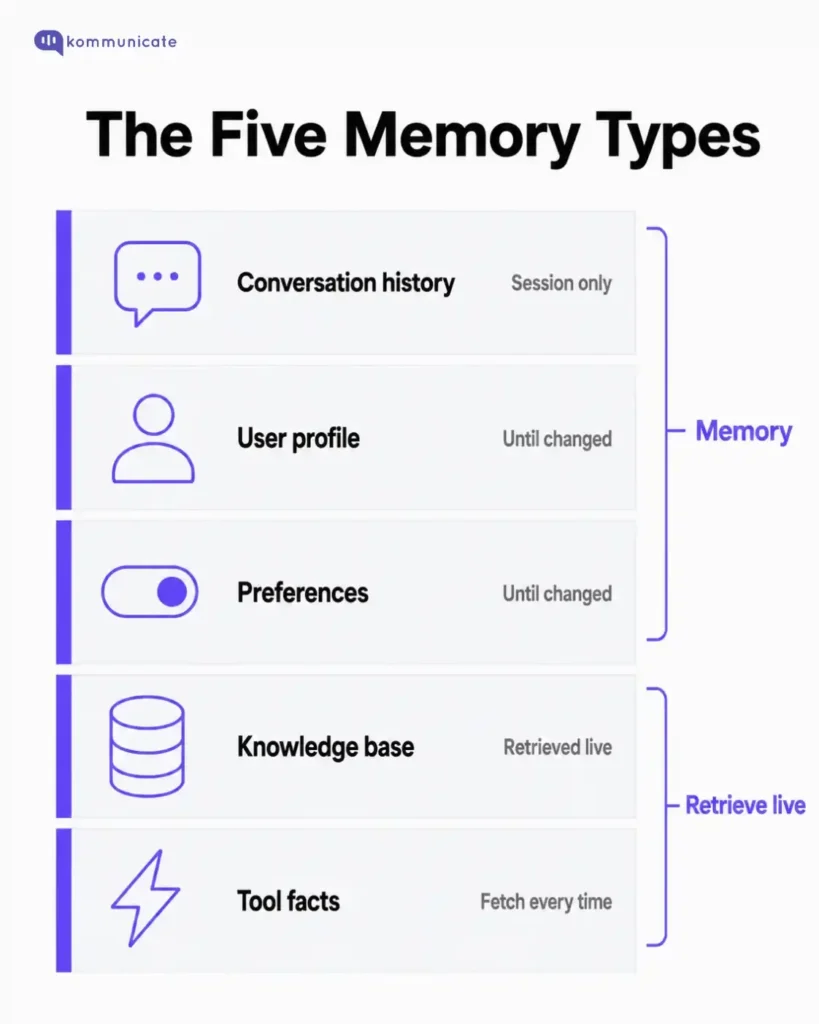
A well-designed customer service AI agent memory architecture does not treat all information as equal. Each type serves a different function, has a different freshness requirement, and should be stored and retrieved independently.
- Conversation history holds the current session transcript. It lets the agent track what has been said, what was asked, and what remains unresolved. This memory is short-lived by design: it should expire at the end of the session or ticket, not accumulate indefinitely.
- User profile stores routing and personalization signals: account tier, product owned, preferred channel, and assigned team. This is relatively stable and changes infrequently, but it should be permissioned. An agent should not surface profile data that the customer or the platform has not explicitly made available.
- Preferences capture communication defaults: language, notification frequency, and tone. “Prefers Spanish” is a preference. It is safe to persist and straightforward to update or delete. Preferences are the most durable memory type, but they are also the easiest to get wrong if the customer changes them and the update does not propagate.
- Knowledge base supplies company-approved facts, policies, and procedures. This is not memory in the traditional sense: it is retrieved on demand via retrieval-augmented generation (RAG), not stored in the agent’s working context. The distinction matters because knowledge base content is versioned and governed. If a return policy changes, the knowledge base is updated centrally, and the agent retrieves the current version automatically. Memory cannot do that.
- Tool-fetched facts cover anything live: order status, account balance, shipment location, and ticket state. These should never be stored in memory. They should always be fetched at the moment of need. A customer asking “where is my replacement?” deserves a live answer from the shipping system, not a cached summary from a conversation three days ago.
The practical boundary looks like this:
| Memory Type | Purpose | Retention |
|---|---|---|
| Conversation history | Understand the current session | Session or ticket lifetime |
| User profile | Route and personalize | Until changed by the system |
| Preferences | Language, channel, tone | Until the customer changes them |
| Knowledge base | Company facts and policies | Retrieved live via RAG; not stored |
| Tool facts | Live order and account data | Do not store; fetch every time |
Keeping these types separate makes deletion, freshness review, and privacy audits tractable. Mixing them into a single context blob makes all three much harder.
As is apparent from this section, you also need to engineer specific retention rules for each type of memory that your AI agent accesses.
Retention rules for each memory type
Every memory type in an AI agent memory architecture needs an explicit retention policy. Without one, memory becomes a warehouse: old complaints, outdated preferences, and stale summaries that the agent treats as current.
The right mental model for this is a working notebook. For example, this is how retention policies should differ by type:
- “Prefers Spanish” is a preference. Keep it until the customer changes it.
- “Customer was frustrated about a delayed refund in March” is an issue summary. Keep it until the issue is resolved, then expire it.
- “Current shipment location” is a live fact. Do not store it at all.
- “Payment card ending in 4242” should never enter memory.
Representing memory as typed records, rather than unstructured notes, makes retention enforceable:
| { “memoryId”: “mem_123”, “type”: “preference”, “value”: “prefers Spanish”, “source”: “customer_message”, “verified”: true, “retention”: “until_changed”, “expiresAt”: null, “allowedUse”: [“language_selection”, “handoff_context”] } |
That structure allows a support team to remove one stale preference without touching the conversation history.
It also makes the allowedUse field explicit: a language preference should flow into handoff context, but it should not be used to make inferences about the customer’s identity or behaviour.
To make this concrete, let’s talk about the types of memories that are retained and the types that are erased.
Which type of memories should be retained?
Useful support memory is narrow and purposeful. The goal is to preserve the context that improves the next interaction.
Some good candidates for memory here are:
- Preferred language
- Product or plan the customer owns
- Open issue summary with an expiry date
- Last handoff reason
- Relevant recent context (for example, that a replacement shipment was discussed last week)
A minimal but useful memory record looks like this:
| { “preferredLanguage”: “Spanish”, “openIssue”: “Waiting for replacement shipment”, “lastHandoffReason”: “Refund exception required human review” } |
These fields help the next interaction without pretending to be the only source-of-truth.
Which type of memories should be erased?
Some data should never enter agent memory, regardless of how operationally convenient it might seem.
Avoid storing:
- Passwords or authentication credentials
- Payment card data or bank account details
- Sensitive medical or legal content
- Old complaints that are no longer relevant to open issues
- Inferences or guesses that the model generated but did not verify
- Internal notes that are not meant to be visible to customers
The risk with unverified model inferences is particularly easy to overlook. If an agent concludes during a conversation that a customer “seems like a high churn risk” and that inference gets written to memory, subsequent agents will treat it as a fact.
Memory should store what the customer said or confirmed, not what the model deduced.
How do the memory rules function in a support workflow?
The workflow for a well-architected support agent looks like this:
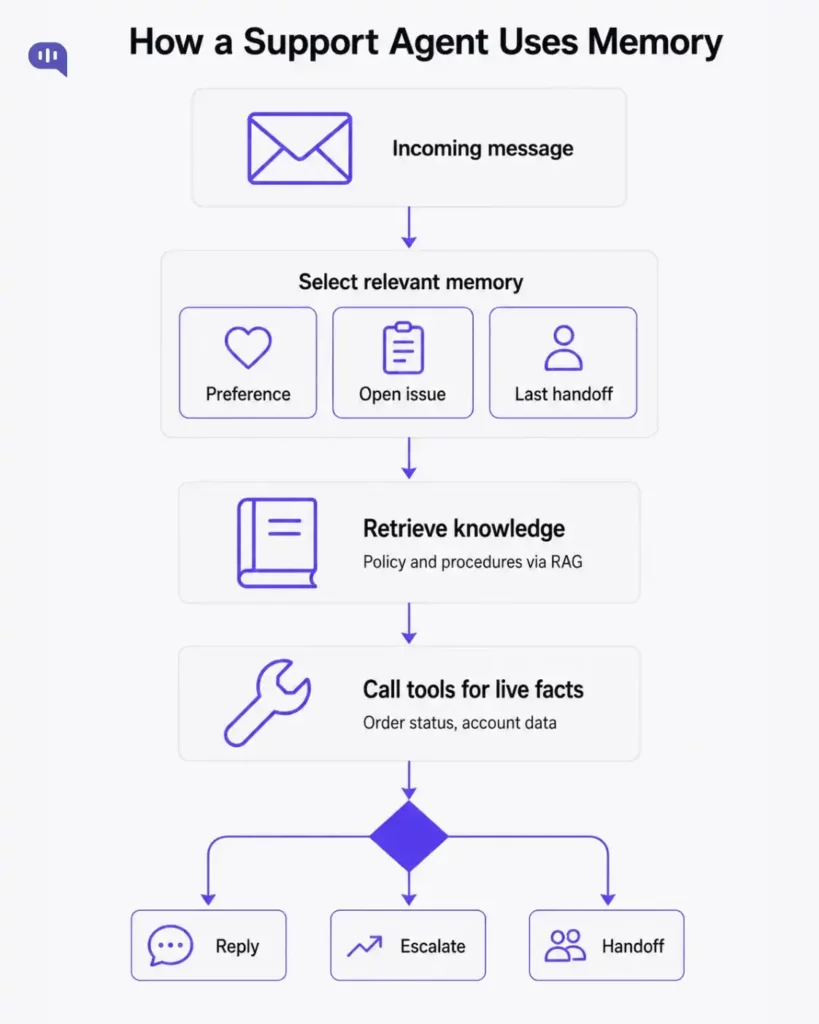
Memory and tools play different roles in that sequence. Memory tells the agent what context exists. Tools tell the agent what is true right now.
If a customer asks where their replacement is, memory can surface the fact that a replacement was discussed last week and the reason for the original escalation. The shipping tool still has to provide the current delivery status. Memory does not substitute for that call.
Kommunicate sits around this workflow at the channel and handoff layer. The AI agent handles context and reasoning; Kommunicate preserves conversation history across channels, manages human takeover, and provides analytics across support interactions.
These architecture decisions change depending on the workflow you’re building:
Memory by workflow type
Different support workflows need different memory rules. The same architecture applies, but the retention and sensitivity thresholds shift depending on the domain.
| Workflow | Useful Memory | Do Not Remember |
|---|---|---|
| Student support | Current department, open issue, preferred channel | Academic or financial-aid details after the case closes |
| Tax filing support | Document collection status, assigned expert | Raw identity documents or tax details in model memory |
| Insurance self-service | Current journey step, handoff reason | Stale policy answers or old cancellation intent |
| Delivery support | Recent issue summary | Live shipment status; fetch it from the system |
| BFSI and fintech | WhatsApp preference, escalation history | Identity documents, transaction details, and account credentials |
For BFSI in particular, “customer prefers WhatsApp updates” and “customer’s recent transaction ID” are entirely different categories. The first is a preference and is safe to retain. The second belongs in a secure backend system, not in model memory.
For healthcare, keep administrative context separate from clinical content, and expire sensitive conversation summaries quickly unless a compliance requirement mandates retention.
When does memory architecture fail?
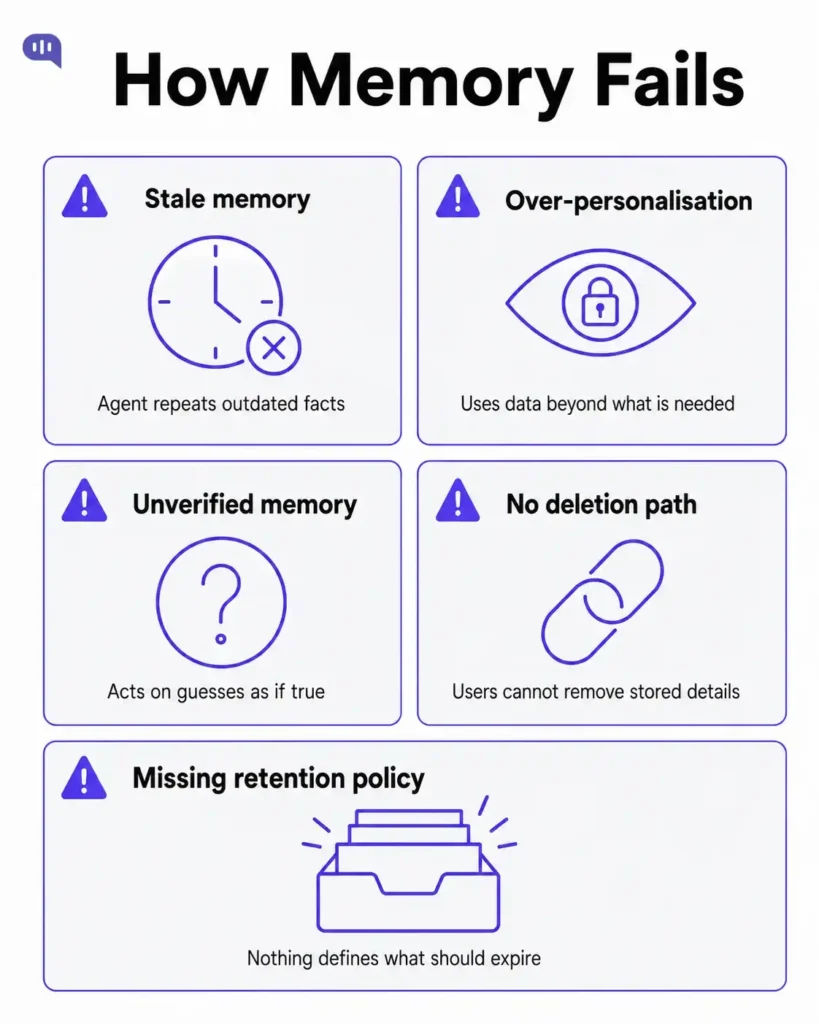
Memory in AI agents fails in predictable ways. Understanding the failure modes is as important as designing the architecture.
| Failure | What Happens |
|---|---|
| Stale memory | Agent repeats outdated facts as if they were current |
| Over-personalization | Customer feels surveilled; trust erodes |
| Unverified memory | Model guesses become stored context; errors compound |
| No deletion path | Resolved issues keep influencing new interactions |
| Missing retention policy | Memory accumulates without bound; old data contaminates fresh reasoning |
The correction path matters as much as the storage path. If a human agent updates a customer’s profile, the AI should stop using the previous version immediately.
Memory architectures that do not support deletion and correction will degrade over time, even if the initial design was sound. Additionally, you should also add in privacy boundaries.
Privacy boundaries
| Data Type | Rule |
|---|---|
| Name | Use sparingly and only in direct address |
| Use only when needed for routing or verification | |
| Account data | Permissioned access only |
| Payment data | Never store in agent memory |
| Internal notes | Do not surface to customers |
The principle that ties these together: memory should only remember what helps the customer.
Conclusion
The design choices in AI agent memory architecture are not primarily technical. They are decisions about what the agent should know, for how long, and for what purpose.
Separate the five memory types. Assign retention policies. Use tools for live facts. Use the knowledge base for policy. Keep memory minimal enough that it can be corrected, deleted, and audited.
Memory improves continuity. It should not create a permanent shadow profile.
FAQs
Conversation history is short-term memory, scoped to the current session. It should not be treated as a source of truth or persisted beyond the ticket lifetime unless there is a specific reason to keep it.
Yes, when the preference is permissioned, verified, and genuinely useful for future interactions. Language preference is the clearest example of when retention adds value.
No. RAG retrieves approved, versioned knowledge on demand. Memory stores context about a specific customer or conversation. They solve different problems and should not substitute for each other.
No. Payment data, identity documents, medical details, and similar sensitive information should remain in secure backend systems. Memory is for context, not for data custody.
Kommunicate manages the channel layer, handoff routing, and conversation analytics around AI agents. Memory operates at the reasoning layer inside the agent. The two work together: the agent uses memory to reason; Kommunicate ensures that reasoning connects correctly to channels, human agents, and outcome tracking.
Use the Kommunicate developer docs when building support agents that need safe handoff alongside memory-aware reasoning.

Adarsh Kumar is the CTO & Co-Founder at Kommunicate. As a seasoned technologist, he brings over 14 years of experience in software development, artificial intelligence, and machine learning to his role. His expertise in building scalable and robust tech solutions has been instrumental in the company’s growth and success.