Updated on June 19, 2026
TL;DR
- A full IVR-to-WhatsApp migration takes 10-14 weeks for most mid-sized insurers.
- Start by auditing your IVR call data: 60-70% of inbound volume is automatable on WhatsApp.
- Use IVR deflection as the bridge to route customers through it to WhatsApp.
- Connect WhatsApp to your policy system, claims system, and CRM.
- Pilot with 10–20% of customers first; target a 5:1 conversation-to-agent ratio at launch.
- Key limitations: not every customer is on WhatsApp, Meta’s template approval adds friction, and legacy system integration takes time.
- Complex claims and disputes still need human agents. Automate the high-volume, low-complexity queries first.
If your insurance support team is still running on IVR (Interactive Voice Response), you already know what’s broken. Your customers have to navigate five menu layers to report a claim. Agents spend their day on repeat calls that a chatbot could handle in 30 seconds. And somewhere between “Press 3 for billing” and “Your estimated wait time is 14 minutes,” your policyholder churns. Moving off IVR is one step in a broader shift toward conversational AI for insurance
This guide is a straight-line path from your current IVR setup to WhatsApp-based insurance servicing with a realistic timeline. We’re going to cover:
- A timeline for IVR-to-WhatsApp migration
- The migration guide (Step by step)
- How does this migration help support teams?
- Limitations and hurdles
- Conclusion
A timeline for IVR-to-WhatsApp migration
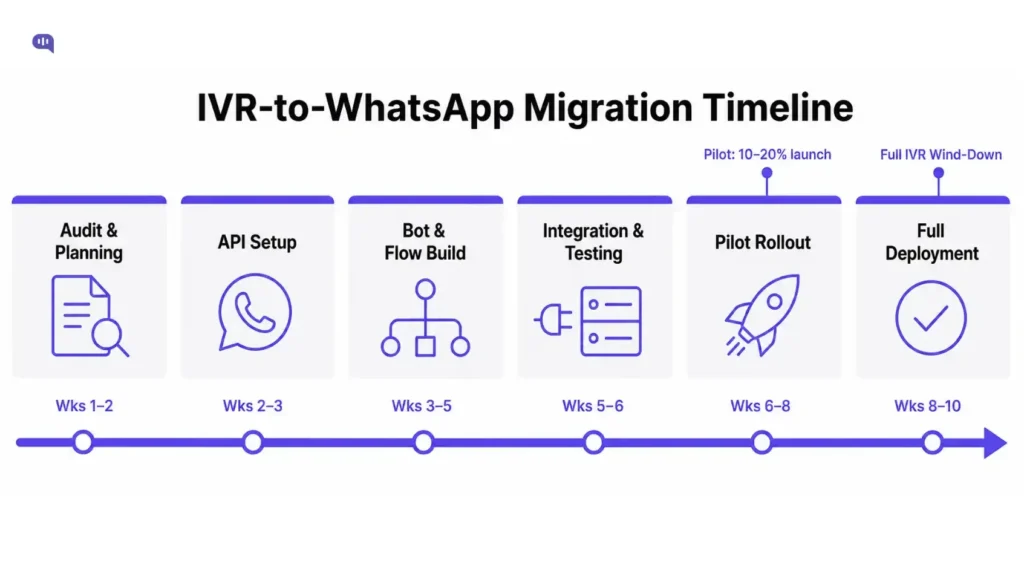
Most mid-sized insurance operations complete a full IVR-to-WhatsApp migration in 10 to 14 weeks. Here’s how that breaks down:
| Phase | Duration | What Happens |
| Audit & Planning | Weeks 1–2 | Map IVR flows, identify deflectable query types, and pick a WhatsApp BSP |
| WhatsApp API Setup | Weeks 3–4 | Register WhatsApp Business API, configure business profile, get Meta approval |
| Bot & Flow Build | Weeks 5–7 | Build conversation flows for top query categories, set up human handoff logic |
| Integration & Testing | Weeks 8–9 | Connect to your CRM/policy system, QA test all flows and fallback paths |
| Pilot Rollout | Weeks 10–11 | Go live with 10–20% of your customer base; monitor CSAT and containment rate |
| Full Deployment | Weeks 12–14 | Expand to 100% of customers; decommission or downgrade IVR |
Timeline varies depending on how complex your IVR tree is and how quickly Meta approves your WhatsApp Business account. Heavily regulated insurers subject to compliance review requirements might face a longer wait to launch.
Let’s see how migration would need to work for this timeline to succeed.
The migration guide (Step by step)
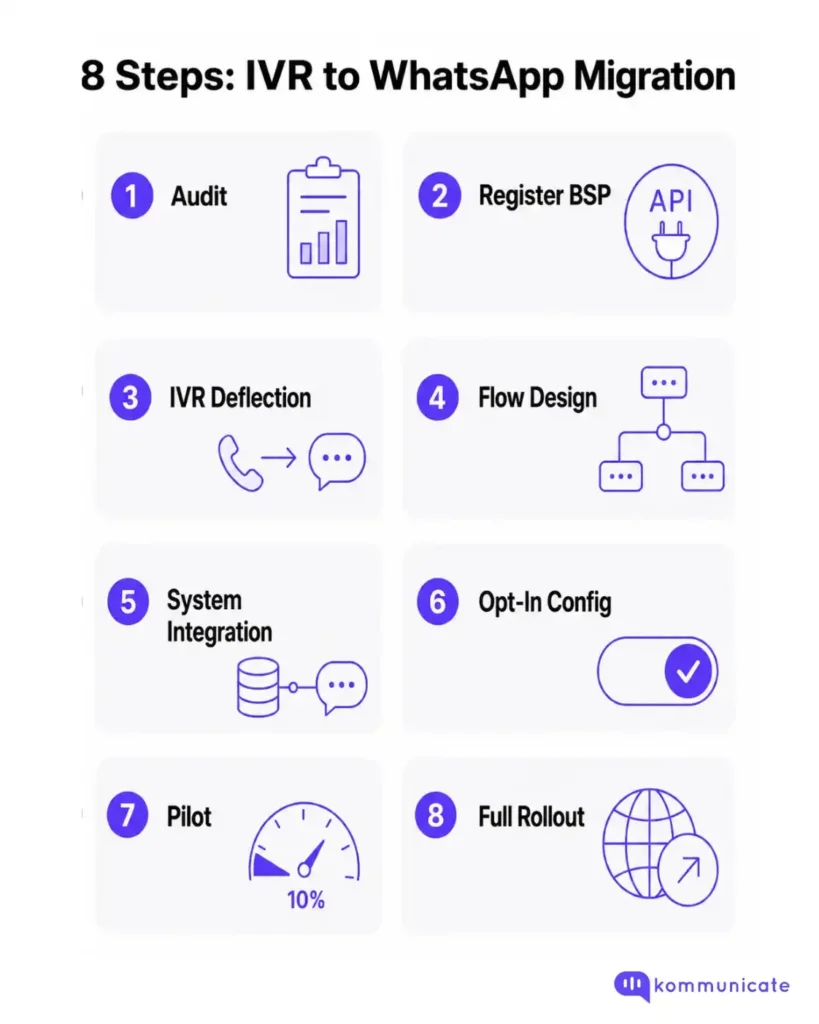
We’ve managed the AI integration component of this migration for tens of insurers worldwide. The guide that works best for most of them is as follows:
Step 1: Audit your IVR and categorize query types
Before you touch any technology, pull three months of IVR data and answer one question: What are customers actually calling about?
In most insurance contact centers, 60–70% of inbound volume is a handful of repeat query types:
- Policy status checks
- Premium payment reminders
- Claim status updates
- Document requests
- Renewal confirmations
These queries are your WhatsApp candidates. Live agents handle complex claims, disputes, and underwriting queries.
Deliverable: A tiered list of query types: automate on WhatsApp, bot + handoff, and agent-only.
Step 2: Register a WhatsApp business API account
You cannot run customer-facing WhatsApp at scale through the standard WhatsApp Business app. You need to access the WhatsApp Business API through a Meta-approved Business Solution Provider (BSP).
Choose a BSP that:
- Has insurance or BFSI-sector experience
- Supports your CRM (Salesforce, Zendesk, Freshdesk, etc.)
- Offers built-in message template management
During this step, you’ll also verify your business profile and submit message templates for Meta approval. Standard templates (claim confirmations, renewal reminders, payment receipts) are typically approved within 24–48 hours.
If you’re looking for conversational AI solutions that connect with WhatsApp, here’s a list of the best insurance chatbots to compare your options.
Step 3: Build your IVR deflection point
This is the bridge between old and new. Instead of cutting off IVR entirely, you route customers to WhatsApp through it.
A simple deflection prompt would be like: “Did you know you can also reach us on WhatsApp for faster service? To continue this conversation on WhatsApp, press 1 now.”
When a customer presses 1, your IVR triggers the WhatsApp Business API to send them a templated welcome message. If they don’t have WhatsApp, the IVR detects this and keeps them in the voice queue.
Add deflection triggers at the highest-friction points:
- Long hold times
- Common self-service query selections (claim status, policy details)
- Overflow periods
Step 4: Design conversation flows for your top 5 query types
Take the five most common query categories from your Step 1 audit and build WhatsApp conversation flows for each. Each flow needs:
- A clear opening that confirms what the bot can help with
- Authentication (policy number, OTP, or phone number match)
- The resolution path (status update, document send, payment link, etc.)
- A clean handoff path to a human agent when the query exceeds bot scope
- A fallback message when input isn’t recognized
For insurance specifically, your flows should also support rich media: customers reporting an accident should be able to send photos and videos directly through the chat. This speeds up claim triage and doubles as early fraud detection, since visual evidence comes in before a story can be constructed.
Step 5: Connect WhatsApp to your policy management system
A WhatsApp bot that can’t pull live policy data is just an FAQ page with a chat bubble. The integration layer is where the migration pays off.
Connect your WhatsApp channel to:
- Policy database for real-time status lookups
- Claims system for FNOL intake and claim tracking
- Payment gateway for premium collection and confirmation
- CRM, so every WhatsApp interaction is logged against the customer record
This also enables your agents to see the full WhatsApp conversation history in their CRM before picking up a handoff.
Step 6: Configure opt-in and compliance
WhatsApp has strict rules: you cannot send outbound messages to a customer unless they’ve opted in. For insurance, this means collecting WhatsApp opt-in at:
- Policy purchase or renewal
- The IVR deflection moment (pressing 1 counts as opt-in for that session)
- Your customer portal or app
Keep records of all opt-ins. For insurers in regulated markets, this documentation also satisfies communication audit requirements: WhatsApp automatically archives all message history, which is useful for compliance reviews.
Step 7: Pilot with 10–20% of your customer base
Don’t go straight to full deployment. Run a two-week pilot with a controlled segment, either a product line, a geography, or a percentage of inbound callers.
During the pilot, track:
- Containment rate – What percentage of queries the bot resolves without agent handoff
- CSAT – Are customers rating WhatsApp interactions positively?
- Deflection rate – How much IVR volume shifted to WhatsApp
- Handoff quality – Are agents getting enough context when they take over?
Target a conversation-to-agent ratio of 5:1 when you start. As your team builds messaging experience, you can push toward 16:1 – meaning one agent handling 16 simultaneous WhatsApp conversations versus a single phone call.
Step 8: Full rollout and IVR Wind-Down
Once your pilot results hold for two consecutive weeks, expand to your full customer base. Update your IVR to offer WhatsApp deflection on every menu level, not just on hold.
At this point, evaluate whether you still need your full IVR infrastructure. Many insurers keep a lean IVR for complex routing only and eliminate the multi-level menu tree. Others keep IVR as a fallback for customers without WhatsApp.
These steps should get you to a full IVR deflection rollout. This also reduces the pressure on your support team.
How does this migration help support teams?
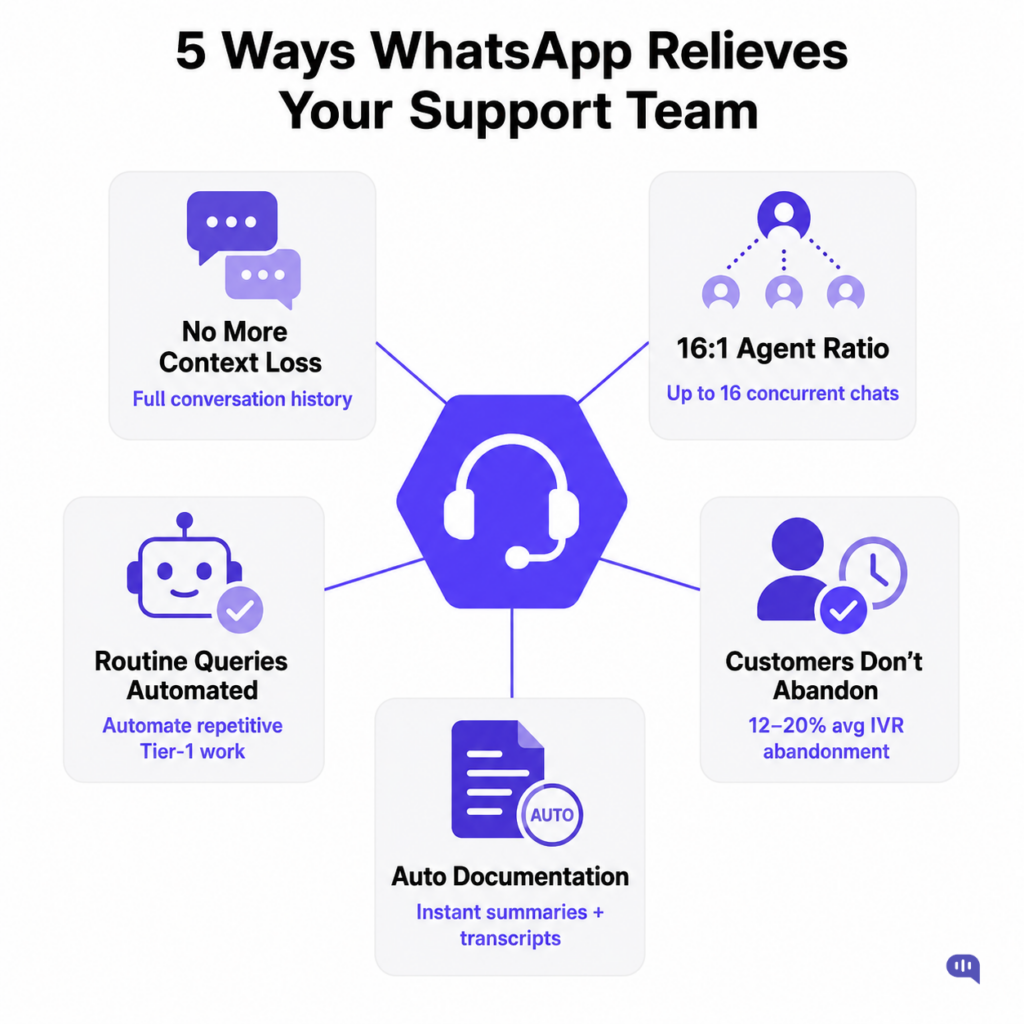
Answering phone calls live increases the workload on support teams. If a significant amount of time is spent answering routine queries, they have less time to handle more important issues. A migration solves this in a few ways.
1. Agents Stop Repeating Themselves
The single biggest complaint from insurance support agents is context loss. A customer navigates an IVR, gets transferred, and then has to re-explain their issue to the agent. WhatsApp eliminates this: the full conversation history travels with the handoff.
Agents can track exactly what the customer tried, what the bot said, and where the breakdown happened.
2. One Agent Can Handle Multiple Conversations
Phone calls are synchronous: one agent, one call, fully occupied. WhatsApp is asynchronous.
An agent can manage multiple chats simultaneously, respond while a customer is checking their policy number, and step away briefly without dropping the interaction. Studies indicate that teams with messaging experience can handle up to a 16:1 conversation-to-agent ratio compared to 1:1 on voice.
3. Routine Queries Stop Reaching Agents Entirely
The queries that burn most agent time actually don’t need a human:
- “What’s my claim status?”
- “When is my premium due?”
- “Can you resend my policy document?”
You can fully automate these queries on WhatsApp. Automation can reduce inbound support workload by up to 60%, so agents spend their shifts on complex work, not status checks.
4. Customers Stop Abandoning Before They Get Help
IVR abandonment rates in contact centers average 12–20%, with a significant portion of that drop-off happening inside the IVR menu itself.
When customers abandon, agents still spend resources preparing for a call that never happened. WhatsApp’s asynchronous format means customers don’t abandon the process.
5. Documentation Is Automatic
Every WhatsApp conversation is logged and timestamped. For an industry that runs on documentation, this is a quiet but meaningful win.
Your agents don’t need to write separate notes for every single conversation because it exists on your dashboard.
While these benefits are significant, there are some limitations to making this process seamless. Let’s examine them next.
Limitations and hurdles
While it’s certainly possible to deflect a significant volume of queries to WhatsApp, not everything can be automated. The major hurdles here are:
1. Not every customer is on WhatsApp
WhatsApp has a massive user base, but it isn’t universal. Older policyholders in some markets still prefer voice. You can’t eliminate your IVR until you know the WhatsApp adoption rate among your customers. Keep voice as a fallback channel, especially during the first 6 months.
2. Complex claims still need humans
WhatsApp handles high-frequency, low-complexity queries well. A policyholder filing a contested claim, disputing a settlement figure, or dealing with a catastrophic loss needs a trained adjuster. Define your escalation criteria tightly, and ensure the bot hands off early when a query indicates complexity.
3. Meta’s template approval process slows you down
Every outbound WhatsApp message (anything you initiate, not a reply) requires Meta-approved templates. Approval is generally fast, but edits require re-submission. If your compliance or legal team needs to review every template, build that cycle into your timeline. Last-minute message changes before a campaign or product update can stall operations.
4. WhatsApp’s 24-Hour Conversation Window
Once a customer-initiated conversation goes 24 hours without activity, you can no longer reply freely.
For insurance queries that span multiple days (an ongoing claim, a document request that takes time), your agents need to be aware of this window. Missing it means a cold restart for the customer.
5. Integration complexity with legacy systems
Many insurers run policy management systems that are years or decades old. Getting a WhatsApp bot to query live policy data in real time is painful on legacy infrastructure.
Budget time for API development or middleware if your core system doesn’t have clean integration capabilities.
6. Regulatory and data residency compliance
Insurance is one of the most regulated industries in the world. WhatsApp messages travel through Meta’s infrastructure, which raises data residency and privacy questions in certain markets.
Before full deployment, confirm that your WhatsApp configuration meets local data protection laws. End-to-end encryption is built in, but where data is processed and stored is a separate question.
Conclusion
Migrating from IVR to WhatsApp isn’t a rip-and-replace. It’s a phased shift that starts with redirecting your highest-volume, lowest-complexity queries to a channel your customers already use every day.
Done properly, the migration:
- Reduces call volume
- Shrinks agent handle time
- Eliminates context loss
- Gives customers a way to get help without having to wait on hold
The technology is mature, the implementation path is well-documented, and the ROI in insurance is clear.
But there are hurdles:
- Legacy systems
- Meta’s approval processes
- Regulatory compliance
- Customers who will always prefer a phone call.
None of these are complete blockers, but it’s necessary to plan around them. Start with your audit. Categorize your query types. Pick an AI-first WhatsApp customer communication tool and pilot before you launch.
If you need help automating any part of this process, feel free to book a demo with Kommunicate.

Devashish Mamgain is the CEO & Co-Founder of Kommunicate, with 15+ years of experience in building exceptional AI and chat-based products. He believes the future is human and bot working together and complementing each other.