Updated on May 25, 2026
Key Takeaways
- Most insurance CX automation projects stall because they try to automate everything at once instead of a single, high-confidence journey first.
- A narrow scope is the best automation strategy. One fully automated journey that works flawlessly builds more internal trust than five half-finished ones.
- The audit comes before the automation. You cannot scope correctly without knowing where your current experience breaks.
- “Automation-ready” is a bar worth setting explicitly. Not every touchpoint deserves a bot.
- Expanding slowly helps you protect the CX you already have while building something better.
We’ve watched this pattern play out more times than we’d like. An insurance CX leader gets the green light for automation. The initial excitement is contagious. The Gantt chart is ambitious. Six months later, three journeys are half-automated, the claims chatbot gives inconsistent answers, the renewal flow silently fails for 12% of users, and the project is quietly considered a disappointment.
The problem lies with the scope.
The default instinct is to automate everything:
- Claims
- Renewals
- FNOL
- Policy queries
You’re looking at a cost reduction case, and the case gets bigger the more you automate. But CX automation in insurance is a trust exercise. Your customers are talking to you at their most stressed moments, and a bad experience at those moments is a churn trigger.
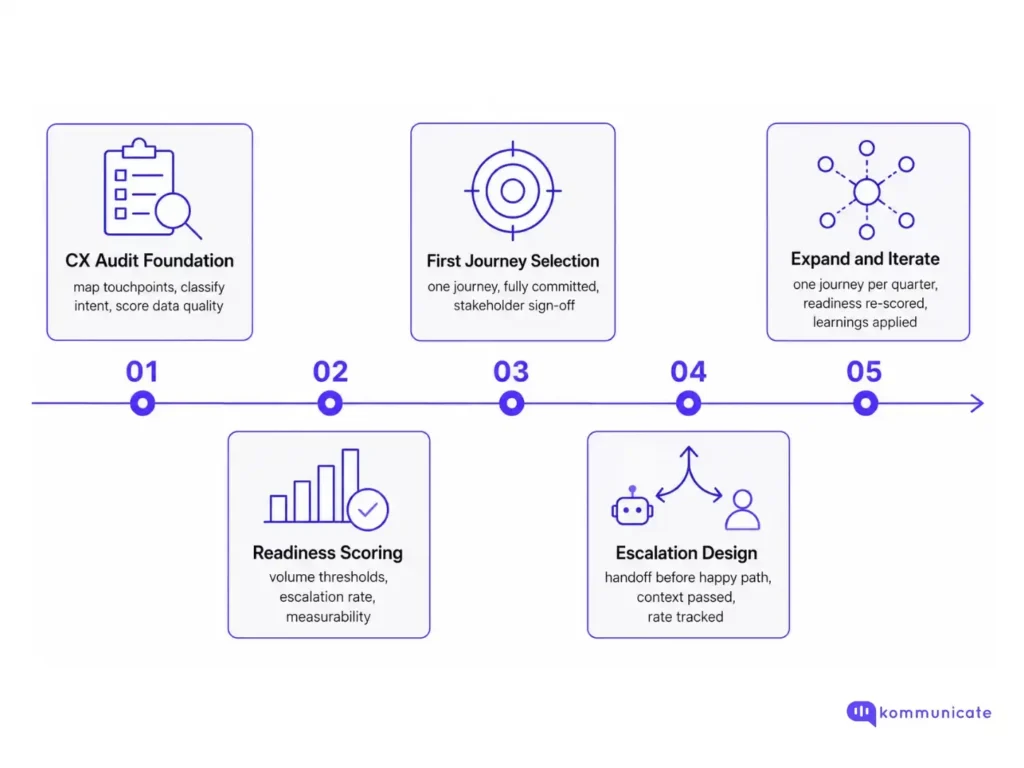
Leaders who’re rushing ahead of the competition in this environment are the ones creating tight prioritization lists for automation. This article will help you do that for your business with a 5-phase plan and an automation checklist. We’ll cover:
- Phase 1 – Start with a CX audit
- The automation audit checklist tool
- Phase 2 – Define “automation-ready” CX processes
- Phase 3 – Pick one journey and automate it
- Phase 4 – Build a human-in-the-loop escalation system
- Phase 5 – Expand your scope
- Conclusion
Phase 1 – Start with a CX audit
Before any automation decision gets made, you need a ground-level view of where your current experience actually stands.
This means mapping every customer-facing touchpoint across the policy lifecycle:
- Pre-purchase
- Onboarding
- Mid-term changes
- Claims
- Renewal
- Cancellation.
For each of these stages, ask four questions:
- How frequently does this happen?
- How predictable is the customer intent?
- How much agent effort does it consume?
- And what does a poor experience here cost?
This audit is going to be your basis for prioritization.
| Touchpoint | Volume | Intent Predictability | Automation Readiness |
|---|---|---|---|
| Policy document requests | High | Very high | Ready now |
| Simple renewal confirmations | High | High | Ready now |
| FNOL intake (straightforward claims) | Medium | Medium | Ready with guardrails |
| Mid-term coverage changes | Medium | Low | Not yet |
| Complex claims disputes | Low | Very low | Keep human |
| Complaints and escalations | Low | Very low | Keep human |
Remember that this CX audit isn’t a direct signal to start automating, but a signal that shows you which workflows will be the easiest to automate. A sample audit structure we recently shared with a global insurance client is shared below.
The automation audit checklist tool
We built the audit checklist tool below for an insurance client. Work through it against your current touchpoint map before moving to the next phase.
Now that you’ve gone through the tool, let’s discuss the next few phases.
Phase 2 – Define “automation-ready” CX processes
One of the most underrated decisions a CX leader can make is setting an explicit standard for what counts as automation-ready. Most teams don’t do this, which means every journey gets evaluated politically rather than analytically.
A reasonable automation-readiness bar looks something like this: the journey must have high, predictable volume; customer intent must be resolvable without nuance or judgment; failure must be recoverable (i.e., the customer can reach a human immediately if the automation can’t help); and success criteria must be measurable within 30 days of launch.
If a journey doesn’t clear that bar, it doesn’t get automated. Because automating a low-readiness journey too early creates technical debt, damages trust internally, and gives your stakeholders a bad data point that slows down everything else.
| Readiness Criterion | What “Pass” Looks Like |
|---|---|
| Volume | 500+ monthly interactions of the same type |
| Intent clarity | The agent can resolve 80%+ with no escalation |
| Failure recovery | Human handoff reachable in under 2 clicks/taps |
| Measurability | A clear CSAT or resolution rate baseline exists |
| Data quality | Structured data available to power the flow |
Phase 3 – Pick one journey and automate it
This is the part most teams get wrong. They pick five journeys, build a bot that handles each one partially, and ship a product that half-works everywhere. The better move is picking one journey and making it genuinely excellent.
Policy document delivery is often the right first choice.
There are three reasons for this:
- The intent for this workflow is almost always the same.
- The resolution requires no human judgment.
- And failure is low-stakes.
However, when you get it right, it improves the workflow for customers, stakeholders, and agents. This working journey pays dividends across the board.
The goal of the first automation isn’t scale. It’s proof. Proof that your team can ship, that your systems can connect, that your customers will accept it, and that your agents will trust it. Without proof, your broader roadmap is just a slide deck.
Once the first journey is stable (you’re achieving low escalation rates, consistent CSAT, and facing no major failure points), then you expand. One journey at a time. Eating slowly through the readiness ranking you built from the audit.
Phase 4 – Build a human-in-the-loop escalation system
The number one mistake in insurance automation is designing the happy path first and bolting on escalation later. In a high-stakes industry where customers are sometimes mid-crisis, that’s backwards.
Every automated journey needs a clear, low-friction path to a human before you ship it. Not buried in a menu. Not behind three “are you sure?” prompts. One tap, one clear label, immediate response.
This matters for three reasons.
- It protects the customer in edge cases you didn’t design for.
- It protects your data
- Early escalation patterns function as a de facto logging surface
Escalation and human-in-the-loop processes are central to the automation process. And once you build in escalation into your workflow, you can proceed with your expansion plans.
Phase 5 – Expand your scope
Slow expansion helps you protect your credibility as an operator. Every new journey you add carries the weight of what came before it. If your first automation was excellent, the second one gets more goodwill from customers and more internal support for the budget. If your first one was shaky, every subsequent one starts in a hole.
Set a cadence:
- Automate one new journey per quarter
- Review it against the readiness criteria before it’s greenlit
- Keep your audit live to check for readiness
The CX leaders who build durable automation programs aren’t the ones who moved fastest at the start. They’re the ones who moved carefully enough to still be moving two years later.
Conclusion
Insurance CX automation isn’t a technology problem. It’s a scoping and sequencing problem. The teams that win are the ones who:
- Audit first
- Define readiness explicitly
- Ship one excellent journey at a time
- And treat escalation as a design requirement
Slowness here is a deliberate choice instituted to protect customer trust. It also helps you create automation workflows that work for every type of customer you want to serve.
If you’re going through the audit checklist and having trouble automating your CX processes, feel free to book a call with us.

Devashish Mamgain is the CEO & Co-Founder of Kommunicate, with 15+ years of experience in building exceptional AI and chat-based products. He believes the future is human and bot working together and complementing each other.