Updated on February 23, 2026
Most teams chase whatsapp automation ROI the same way: push deflection up, assume support costs fall, and call it a win.
The problem is that deflection can create quiet failure: customers get partially answered, don’t reach a competent handoff, and return later through a costlier path. When that happens, your reported deflection savings are overstated, your backlog “mysteriously” stays flat, and support quality deteriorates in ways your dashboard doesn’t immediately show.
WhatsApp adds a realism layer that makes sloppy ROI math fall apart: your cost stack includes WhatsApp messaging rules and fees (plus your BSP/platform and operating costs), and those rules changed materially in 2025 with template messages moving to per-message pricing; utility templates sent inside an open customer service window can be free of Meta fees. If you don’t model those channel economics explicitly, you’ll underinvest in the experience and pay for it in repeat contacts.
In this article, we’ll break down how to measure savings without sacrificing support quality:
- What Counts As WhatsApp Automation?
- Which Support Cost Model Can You Use to Calculate WhatsApp Automation ROI?
- How to Calculate Deflection Savings Using Resolved Deflection?
- How to Calculate ROI From AHT Reduction on Escalation?
- How to Calculate WhatsApp Costs for Customer Service?
- How Can You Maintain Quality for WhatsApp ROI Calculations?
- How to Effectively Maintain ROI and Performance of WhatsApp Automations?
- Conclusion
What Counts As WhatsApp Automation?
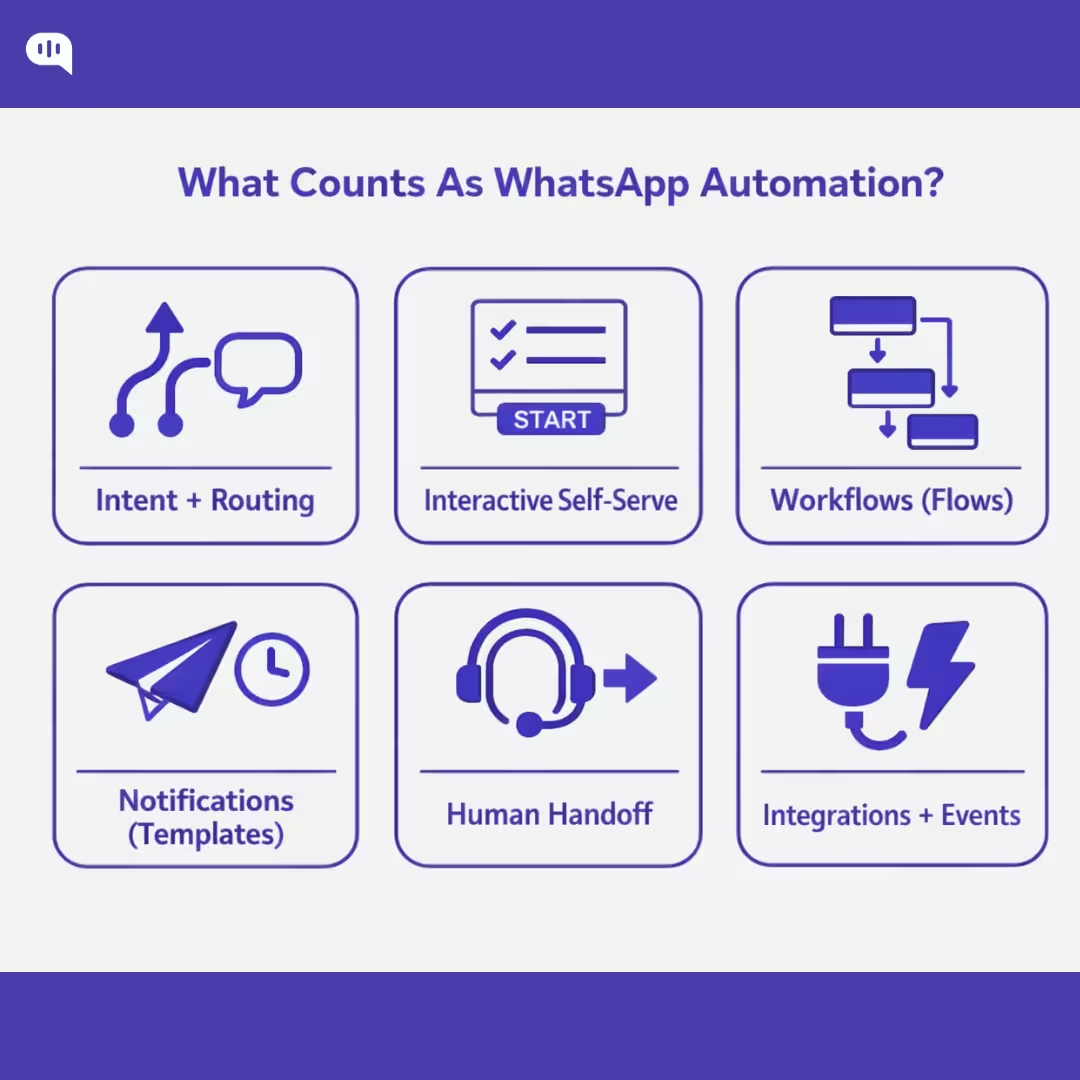
WhatsApp automation isn’t “a bot that replies on WhatsApp.” It’s the end-to-end system that:
- Captures intent
- Guides customers through structured interactions
- Triggers backend work
- Escalates cleanly when needed
It also has a boundary condition: Meta’s WhatsApp Business terms have been tightened to prevent WhatsApp from being used to distribute general-purpose AI assistants as the primary product, while still allowing business-specific customer experiences and support automation.
1. Intent Capture + Routing (Menus, Keywords, Segmentation, Entry Points)
Automation starts before the “answer.” It’s how you get customers into the right path: greeting menus, keyword shortcuts, language detection, account/VIP routing, and intent-based branching.
In practice, WhatsApp routing design must respect the customer service window: when a user messages you, a 24-hour window opens/resets for service replies; outside that window, you typically need templates for outbound messaging.
2. Interactive Self-Serve UX (buttons, lists, product pickers)
If your WhatsApp automation relies on long text prompts, it’s fragile. The platform supports interactive messages that make self-serve deterministic: reply buttons (up to 3), list menus (up to 10), and catalog-based product messages, each returning structured selections you can route on.
3. Structured Workflows Inside Chat
“Automation” also means completing tasks. WhatsApp Flows let you embed form-like, guided steps (appointments, reservations, signups, surveys, lead qualification) directly inside the conversation, so you can reduce back-and-forth and collect clean inputs for downstream systems.
4. Proactive Notifications
Order updates, reminders, OTP/authentication, and payment confirmations are automation if they’re triggered reliably from your ERP/CRM/helpdesk and sent in the right message category.
This is also where many ROI models break: WhatsApp template messaging has message-based billing behavior and rules tied to the customer service window, so “automation” includes optimizing when and how you send templates (not just sending more).
5. Human Handoff Orchestration
WhatsApp automation counts even when it escalates. Good automation includes: non-negotiable escalation triggers, queue/skill routing, conversation labeling, and handoff summaries that prevent customers from repeating themselves. Platforms like Kommunicate frame this as automating responses while managing conversations centrally, plus agent-assist capabilities like summaries/suggestions that speed resolution.
6. Integrations + Event-Driven Triggers
Finally, WhatsApp automation is operational plumbing: message events and customer selections triggering actions (create ticket, update CRM field, fetch order status, refund workflow, etc.). You’ll typically use structured IDs from interactive selections and delivery/read statuses to drive workflows and measure funnel health (sent → delivered → read → action).
These automations lead to real ROI for your business. However, to measure that ROI you need to build a cost model.
Which Support Cost Model Can You Use to Calculate WhatsApp Automation ROI?
The best ROI model for Whatsapp automation is a Cost-per-Resolved-Contact (CPRC) model with a capacity (FTE) conversion layer. It’s the cleanest way to quantify deflection savings and AHT reduction without “winning the dashboard” while support quality erodes.
Why Does CPRC work best for WhatsApp Automation?
- It ties savings to the only thing that matters operationally: resolved outcomes, not “conversations handled.”
- It naturally supports intent-level economics (Order Status ≠ Refund ≠ Account Access).
- It can explicitly subtract WhatsApp-specific variable costs (template messaging + BSP/platform fees) that sit outside your agent labor model.
Here are some steps you can follow to implement the CPRC model into your WhatsApp operations:
Step 1: Build the baseline support cost model (pre-automation)
Inputs you need
- Contact volume (N)
- Handle time: AHT (Average Handling Time) + after-contact work (ACW) in minutes (AHT is commonly defined using talk + hold + wrap/ACW concepts; adapt to chat by counting active handling + wrap time.)
- Loaded agent cost per hour (wages + benefits + management allocation) = L
- Optional but recommended: tooling cost per month (helpdesk, WFM (Workforce management), QA(Quality Analysis)) = T
Core baseline equations
- Cost per minute (CPM) = L / 60
- Baseline cost per contact = (AHT₀ + ACW₀) × CPM + (T / N)
This gives you an auditable “what one contact costs today” baseline.
Step 2: Add the two ROI Levers
A) Deflection Savings
Define:
- Resolved deflections = contacts closed by automation with no recontact for the same intent within X days
Then:
- Deflection savings = Resolved Deflections × Baseline Cost Per Contact
(This is where most ROI decks cheat—counting containment as savings. Don’t.)
B) AHT reduction on escalations (often the biggest, most reliable lever)
Define:
- Escalations = contacts that still reach humans
- Handle time delta = (AHT₀ + ACW₀) − (AHT₁ + ACW₁)
Then:
- AHT savings = Escalations × HandleTimeDelta × CPM
This captures agent minutes saved from better intake, triage, pre-collection, and handoff summaries.
Step 3: Subtract WhatsApp-Specific Costs
Under Meta’s current model, WhatsApp pricing can be per delivered template message (Marketing/Utility/Authentication), with service replies inside the customer service window generally free, and multiple industry references note utility templates sent within an open customer service window are free.
Model it like this:
WhatsApp variable fees
- (UtilityTemplatesOutsideWindow × UtilityRate)
- (AuthTemplates × AuthRate)
- (MarketingTemplates × MarketingRate)
BSP/platform fees = monthly platform + seats + add-ons
Ops costs = QA sampling, knowledge upkeep, routing tuning (monthly hours × blended rate)
Then:
- Program cost = WhatsAppVariableFees + BSP/PlatformFees + OpsCosts (+ implementation amortized if you want CFO-grade rigor)
Step 4: Net savings, ROI, and payback
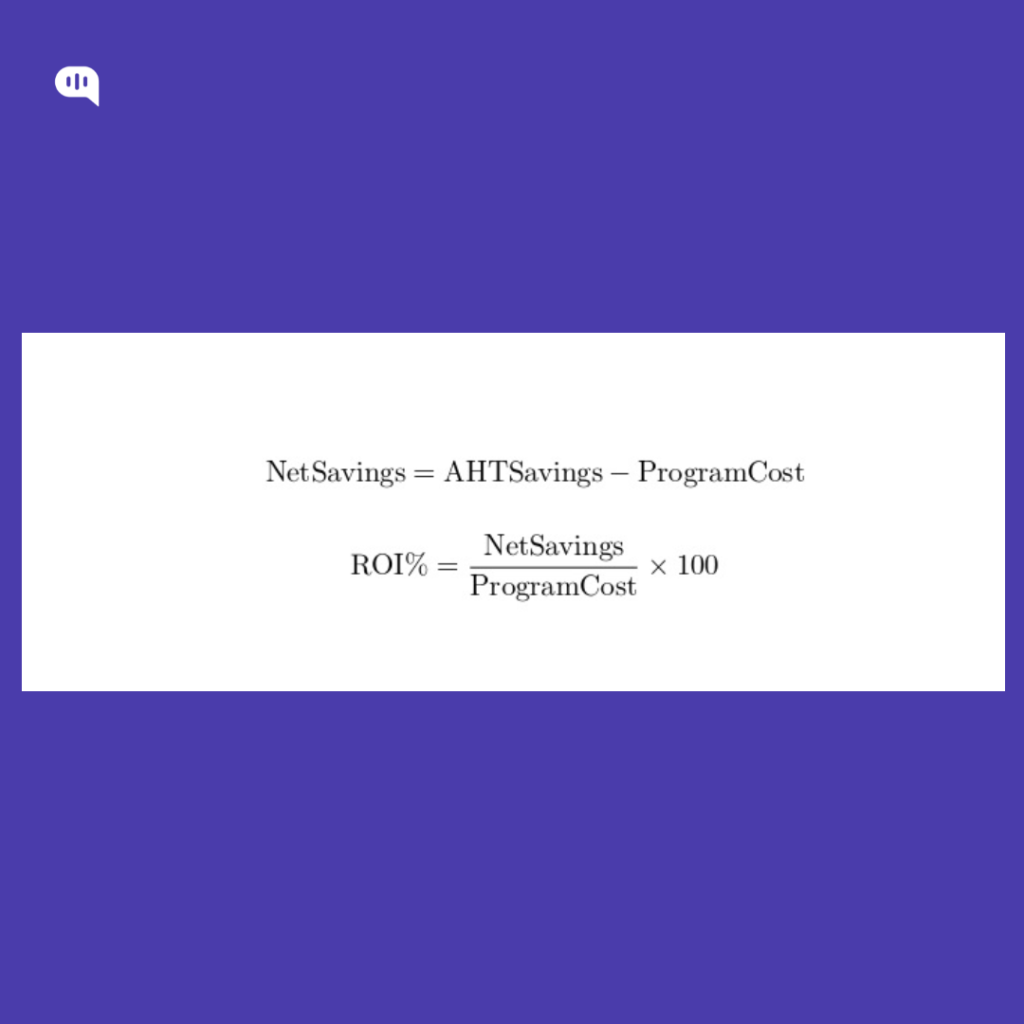
- Net savings = DeflectionSavings + AHTSavings − ProgramCost
- ROI % = (NetSavings / ProgramCost) × 100
- Payback (months) = ProgramCost / (DeflectionSavings + AHTSavings)
Step 5: Convert minutes saved into capacity (FTE freed)
This is how you translate “minutes saved” into staffing outcomes.
- Minutes saved = (ResolvedDeflections × (AHT₀ + ACW₀)) + (Escalations × HandleTimeDelta)
- Productive minutes per FTE/month = PaidMinutes × (1 − Shrinkage) × Occupancy
Then:
- FTE freed = MinutesSaved / ProductiveMinutesPerFTE
(You don’t need perfect WFM math to start—just keep assumptions explicit.)
Also, Aadd a quality gate: if repeat contact rate or reopen rate rises for automated intents, discount “resolved deflection” accordingly. That prevents “deflection savings” that are actually cost shifting.
With model gives you a quick overview of how to calculate WhatsApp automation ROI. Next, we’ll take individual parts of the equation and try and solve for them in a business context. First up, resolved deflection.
How to Calculate Deflection Savings Using Resolved Deflection?
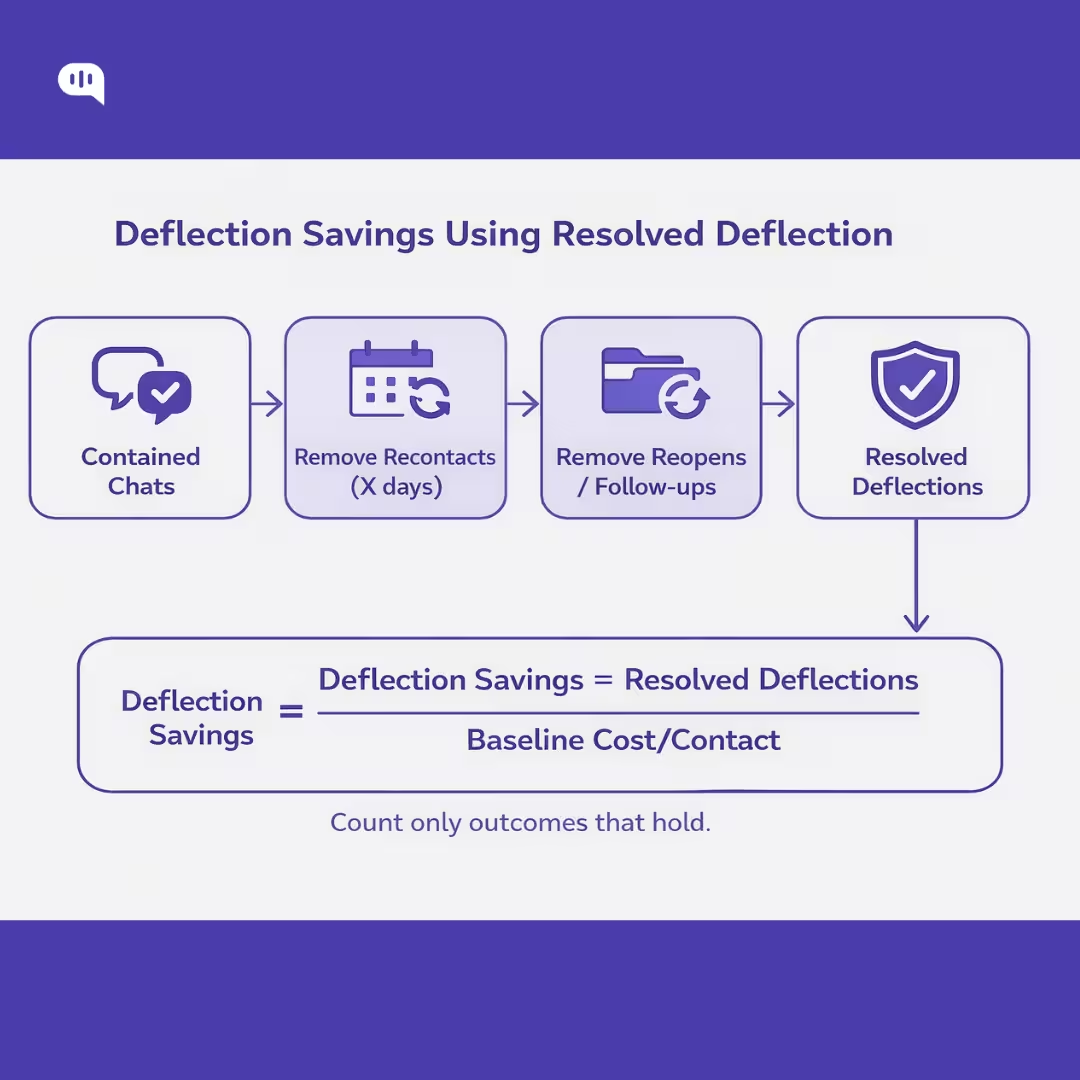
Resolved deflection means the customer’s issue is handled without human-agent involvement and the customer does not recontact about the same issue within a defined window. This avoids inflating ROI with “containment” that simply pushes customers to come back later.
You can calculate this by following some steps
1. Choose Your “No Recontact” Window (X days)
Pick X based on your support cycle and the typical time it takes for the issue to “prove” it’s resolved (e.g., delivery updates may need a longer window than password resets). A pragmatic range used in practice is 3–14 days.
Then define what counts as a “same issue” recontact:
- Same customer identifier (phone/user ID)
- Same intent (your classifier or workflow label)
- Within X days of the automation-marked resolution
If you don’t have reliable intent tagging, start with a narrower set of intents you can label deterministically (menus/buttons/flows).
2. Calculate “Resolved Deflections”
Start with contained conversations (ended in WhatsApp without escalation). Then subtract the ones that weren’t actually resolved:
ResolvedDeflections = Contained − RecontactsSameIntentWithinX − Reopens/Follow-ups − HumanAssists
Where:
- Contained = bot ends the conversation without handing to an agent (channel-level containment)
- RecontactsSameIntentWithinX = customer comes back about the same intent within X days (this is the “bad deflection” bucket)
- Reopens/Follow-ups = reopened tickets / follow-up messages that indicate the issue persisted (if you map WhatsApp conversations to tickets)
- HumanAssists = any conversations where an agent intervened don’t count these as deflection
This framing aligns with the idea that deflection is only meaningful when resolution holds and customers aren’t forced into repeat contact.
3. Compute Baseline Cost per Contact
You need a baseline unit cost to translate deflection into dollars.
CostPerMinute = LoadedAgentCostPerHour / 60
BaselineCostPerContact = (AHT₀ + ACW₀) × CostPerMinute
Average handle time is commonly defined as the active time an agent spends handling interactions (plus follow-up/wrap work as applicable).
4. Calculate Deflection Savings
DeflectionSavings = ResolvedDeflections × BaselineCostPerContact
If you want a stricter CFO-grade version, apply a quality adjustment to avoid claiming savings while quality deteriorates:
QualityAdjustedDeflectionSavings = DeflectionSavings × QualityFactor
Where QualityFactor could be 0.8–1.0 depending on whether your repeat contact rate or reopen rate worsened for those intents. Repeat contact rate measures customers reaching out more than once about the same issue—exactly what “resolved deflection” is designed to exclude.
An Example
Assume (monthly, for one intent group like “Order Status”):
- Loaded agent cost/hour = $24 → CostPerMinute = $24/60 = $0.40
- Baseline AHT + ACW = 7 minutes → BaselineCostPerContact = 7 × $0.40 = $2.80
- Contained conversations = 18,000
- Recontacts within 7 days for same intent = 3,600
- Reopens/follow-ups indicating unresolved = 400
ResolvedDeflections = 18,000 − 3,600 − 400 = 14,000
DeflectionSavings = 14,000 × $2.80 = $39,200 / month
If repeat contact rate rises in other intents because customers are being misrouted, you’d apply a QualityFactor (say 0.9) and report $35,280 instead.
Now that we have a working understanding of resolved deflection, let’s talk about how average handling time (AHT) influences your ROI calculations.
How to Calculate ROI From AHT Reduction on Escalation?
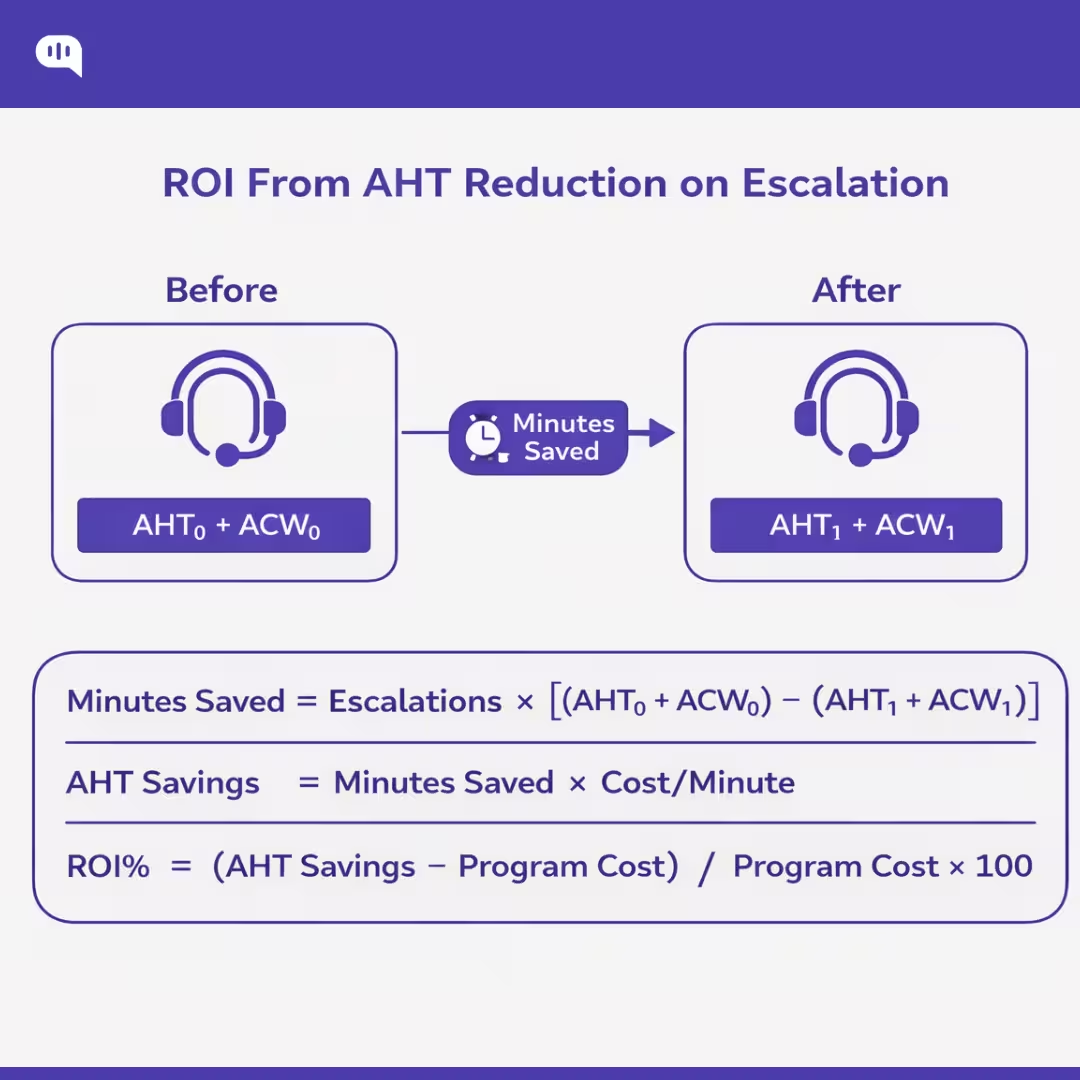
AHT-reduction ROI on escalations is the “second engine” of WhatsApp automation ROI: even when a conversation must go to a human, automation can cut agent minutes by collecting context, pre-triaging, and handing off a clean summary.
1. Measure Baseline AHT for Escalations (AHT₀)
For escalated interactions, treat AHT as active handling time, including wrap/after-contact work (ACW). The standard AHT construct is talk/handle time + hold time (if applicable) + after-call work, divided by handled interactions.
Define:
- Escalations (E) = # conversations that reached a human agent in the period
- AHT₀ = baseline average handle time for escalations (minutes)
- ACW₀ = baseline wrap time for escalations (minutes)
Use AHT₀ + ACW₀ as your “agent minutes per escalated contact” baseline.
2. Measure Post-Automation AHT for Escalations (AHT₁)
After automation is introduced (intake, routing, summary, knowledge suggestions), measure:
- AHT₁ = post-automation handle time (minutes)
- ACW₁ = post-automation wrap time (minutes)
Important: compare like-for-like (same intent mix, same queues, same hours). If you can, measure by intent cohort so you’re not crediting automation for changes in ticket mix.
3. Compute Minutes Saved from AHT Reduction
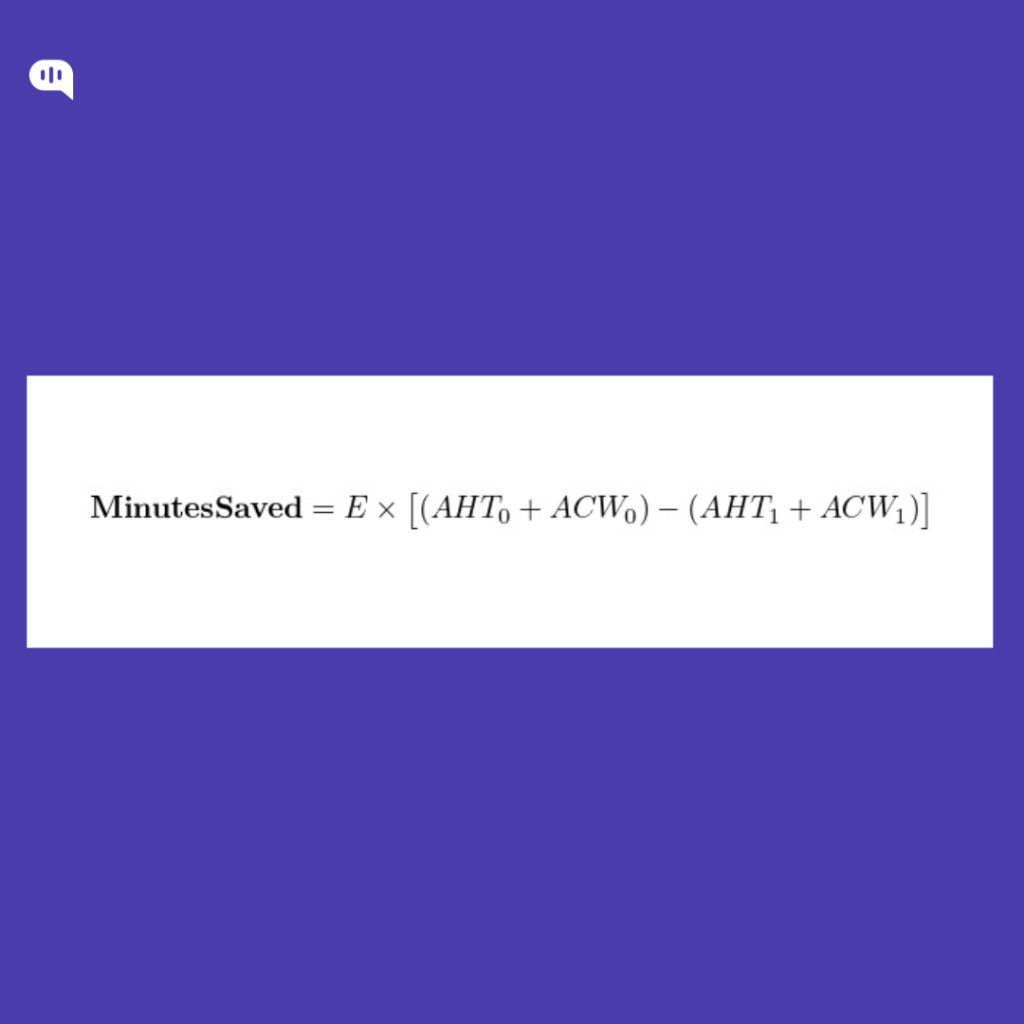
This is the auditable core metric: “How many agent minutes did we remove from escalations?”
4. Convert Minutes Saved into Dollar Value
Option A — Simple “productive time” value (good for directional ROI)
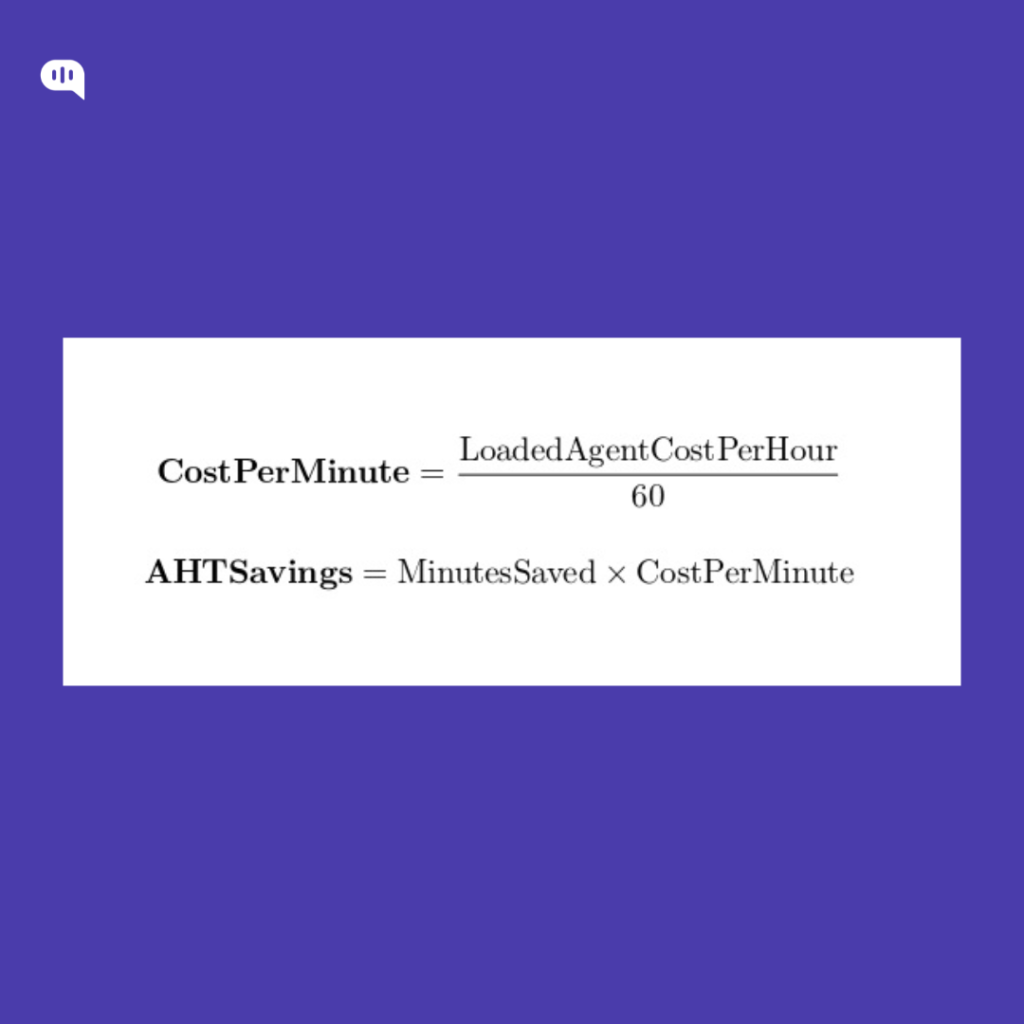
This treats every saved productive minute as worth a productive-minute rate.
Option B — CFO-grade “paid time” value (accounts for shrinkage + occupancy)
In real ops, productive minutes require paid minutes, inflated by:
- Shrinkage (breaks, meetings, training, absence) and
- Occupancy (target % of available time spent handling contacts).
Let:
- Productivity = 1 − Shrinkage
- PaidCostPerProductiveMinute = CostPerMinute / (Productivity × Occupancy)
Then:
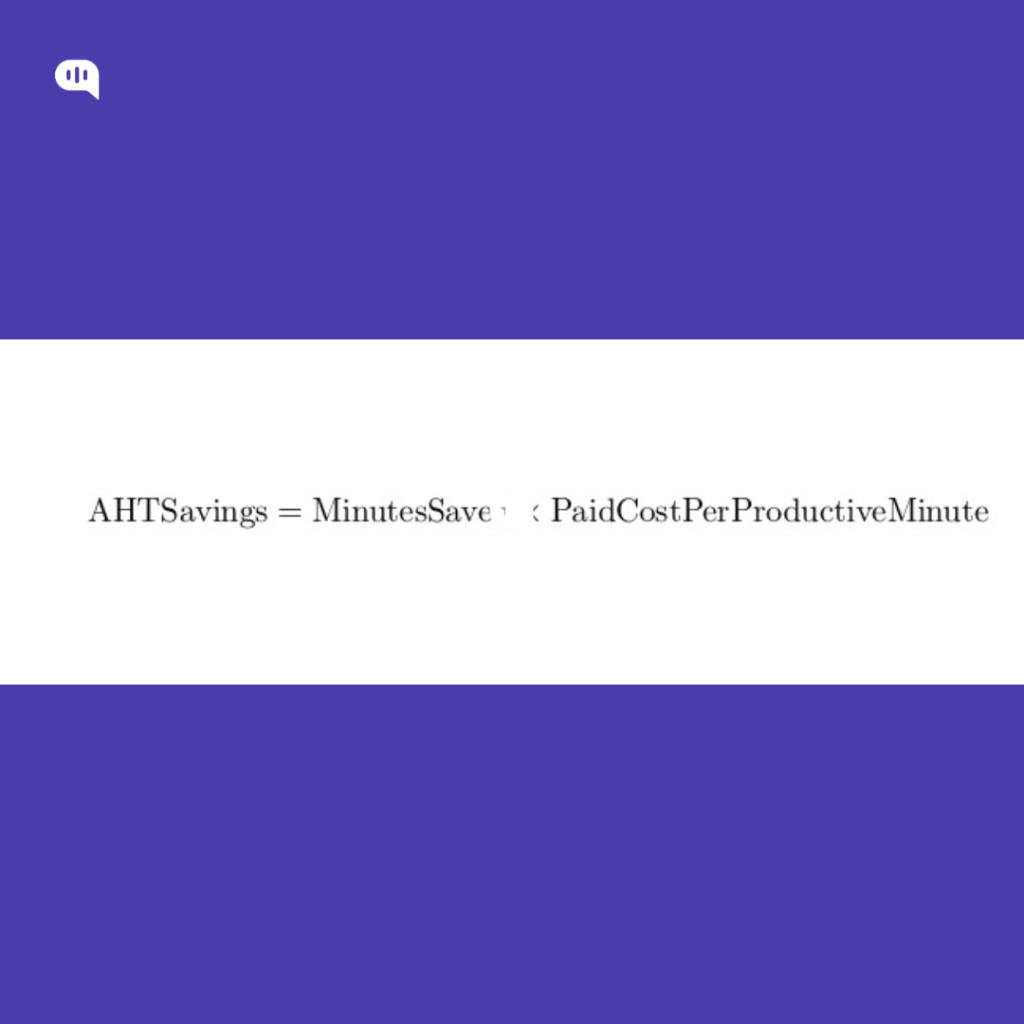
This is usually what finance prefers because it aligns to how staffing capacity is actually purchased.
5. Subtract the Program Costs Tied to “AHT reduction”
Only include costs required to achieve the AHT drop on escalations:
- Agent-assist / automation platform fees
- QA + tuning ops time
- Integration amortization (if you want strict payback math)
6. Worked Example
Assume (monthly):
- Escalations E = 20,000
- Baseline AHT₀+ACW₀ = 9.5 min
- Post AHT₁+ACW₁ = 7.5 min
- Loaded agent cost = $30/hr ⇒ CostPerMinute = 30/60 = $0.50
- Shrinkage = 30% ⇒ Productivity = 0.70
- Target occupancy = 85% ⇒ 0.85
MinutesSaved = 20,000 × (9.5 − 7.5) = 20,000 × 2.0 = 40,000 minutes
Option A (productive value):
AHTSavings = 40,000 × 0.50 = $20,000/month
Option B (paid-time value):
PaidCostPerProductiveMinute = 0.50 / (0.70 × 0.85) = 0.50 / 0.595 ≈ $0.8403/min
AHTSavings = 40,000 × 0.8403 ≈ $33,613/month
If ProgramCost is $12,000/month:
- NetSavings ≈ $33,613 − $12,000 = $21,613/month
- ROI% ≈ 21,613 / 12,000 × 100 ≈ 180%
AHT reduction creates real cash savings only when you can:
- reduce staffing (or slow hiring), or
- redeploy the freed capacity into measurable backlog reduction / higher volumes handled.
Otherwise, it’s still valuable, but it shows up as capacity and SLA gains, not immediate headcount cuts.
Finally, let’s calculate the costs of WhatsApp automation at scale.
How to Calculate WhatsApp Costs for Customer Service?
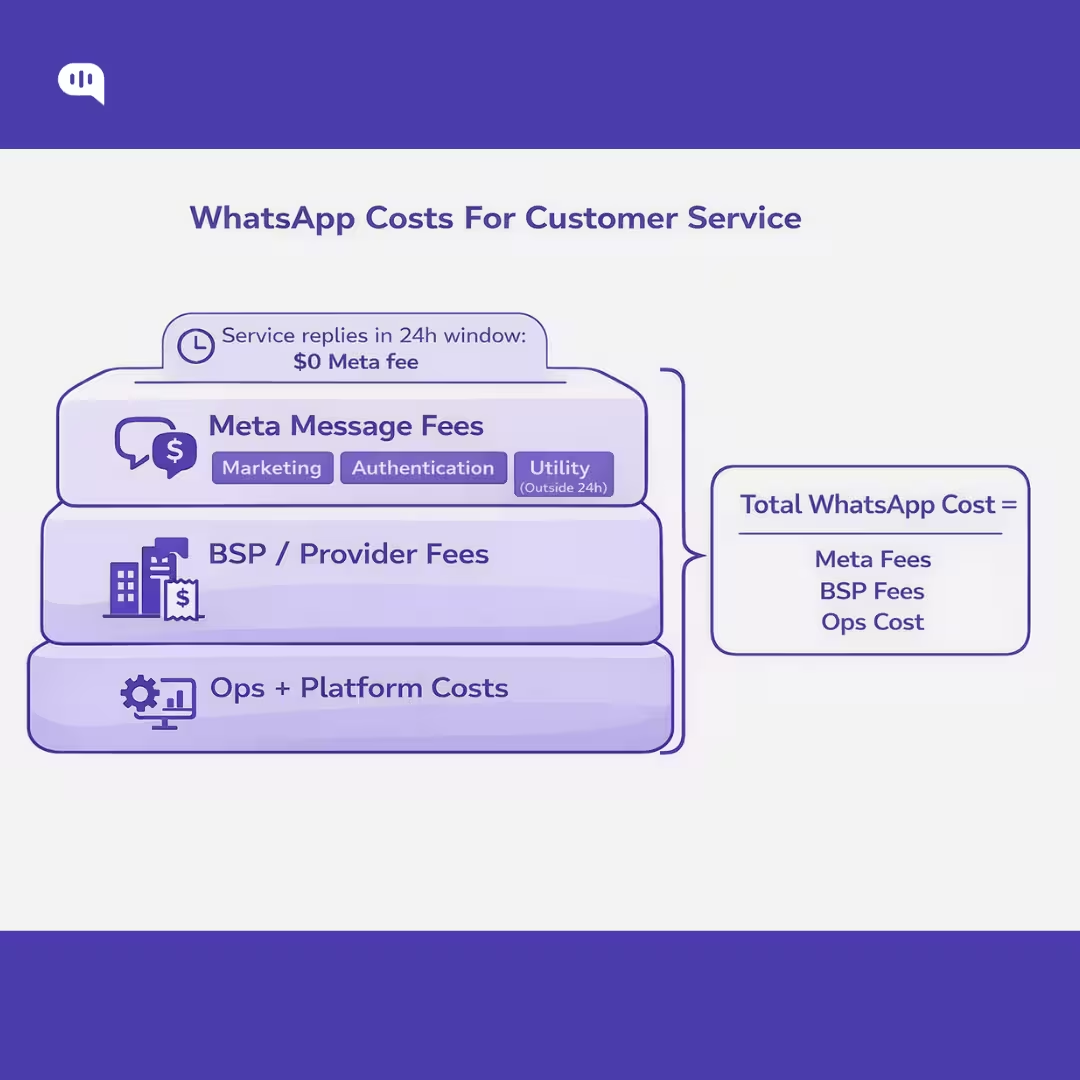
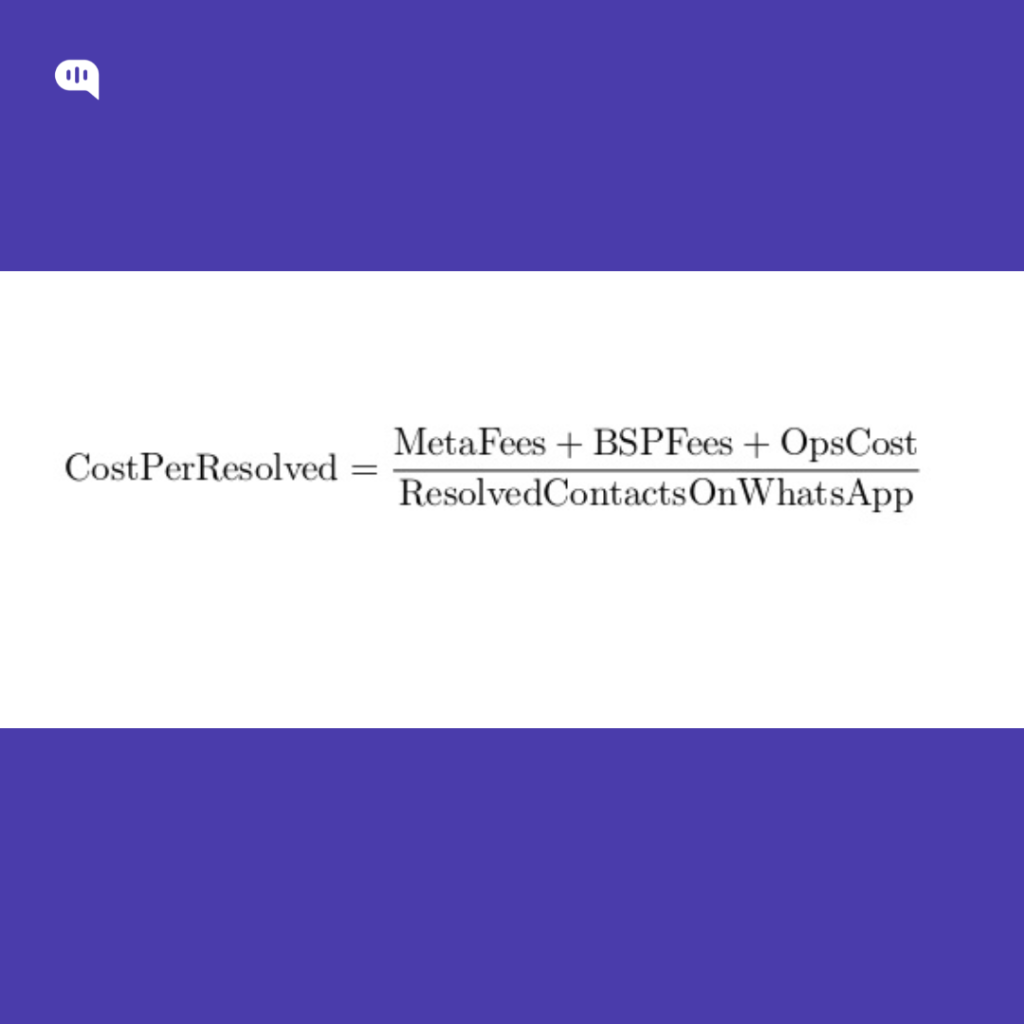
A clean WhatsApp customer service cost model has three layers:
- Meta (WhatsApp) message charges (variable, per delivered message)
- BSP/provider charges (fixed + variable, depends on your partner)
- Your internal operating costs (platform + people time to run automation)
The steps below let you compute all three—then roll them into a single “WhatsApp cost per resolved contact.”
Step 1: Classify Every Outbound Message
Meta charges per delivered message, based on recipient market and message category. There are four categories: marketing, utility, authentication, service.
For customer service, the buckets you need are:
- Service messages (free-form replies): not charged by Meta, but only usable inside the 24-hour customer service window, which resets on each user message.
- Utility templates: free when sent in response to users (i.e., within an open customer service window); charged when sent outside the window.
- Authentication templates: charged per delivered message.
- Marketing templates: charged per delivered message.
- Free entry point window (72 hours): if users start via Click-to-WhatsApp ads or FB Page CTA, messages are not charged for 72 hours (Meta fees), subject to the entry-point rules.
Practical implication: most “customer service” spend is actually templates (utility outside window, authentication, marketing), not the free-form service replies.
Step 2: Count Delivered Messages per Bucket
Meta explicitly charges when a message is delivered, and rates vary by market–category pair.
Create monthly counts (ideally per recipient country/market):
- D_mkt = delivered marketing templates
- D_auth = delivered authentication templates
- D_util_out = delivered utility templates outside customer service window
- D_util_in = delivered utility templates inside customer service window (Meta fee = 0)
- D_srv = delivered service/free-form messages (Meta fee = 0)
- D_free72 = delivered messages within the 72-hour free entry point window (Meta fee = 0 for the window)
For each outbound template, check the timestamp vs the user’s most recent inbound message; if >24h, it’s outside CSW.
Step 3: Pull the Correct Meta Rates
Use WhatsApp’s official pricing page/rate cards to get:
- Rate_mkt(market,currency)
- Rate_auth(market,currency)
- Rate_util(market,currency)
(Do this per major market if you serve multiple countries; otherwise use your primary market rate.)
Step 4: Compute Meta Message Fees
Per market k:
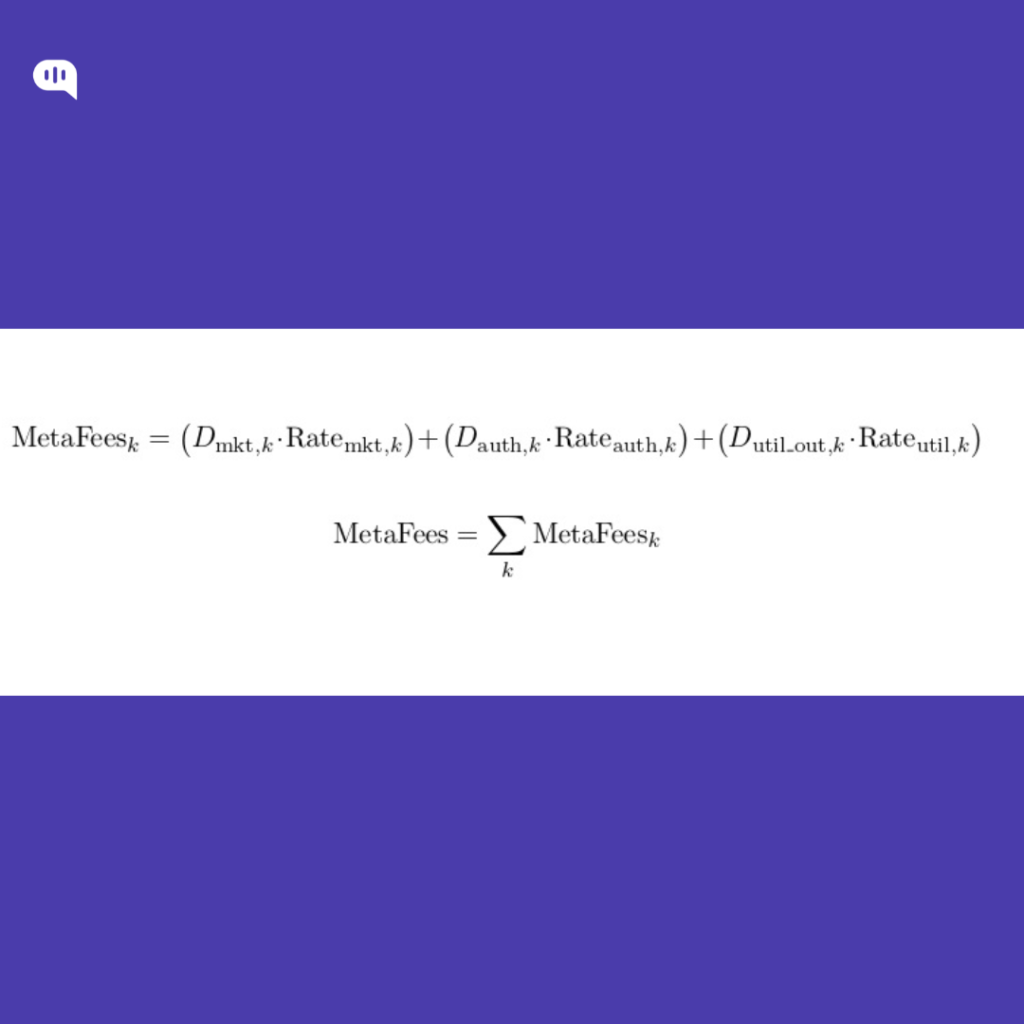
You do not add Meta fees for:
- service messages (D_srv)
- utility templates inside the customer service window (D_util_in)
- free entry point window traffic (D_free72)
Step 5: Add BSP/Provider Charges
Your Business Solution Provider (BSP) or WhatsApp partner may charge:
- monthly subscription/platform fee
- per-number fees
- per-message markup or pass-through
- add-ons (shared inbox, automation builder, analytics, etc.)
Model it explicitly as:

(You’ll get these from your provider contract/invoice; they’re not standardized by Meta.)
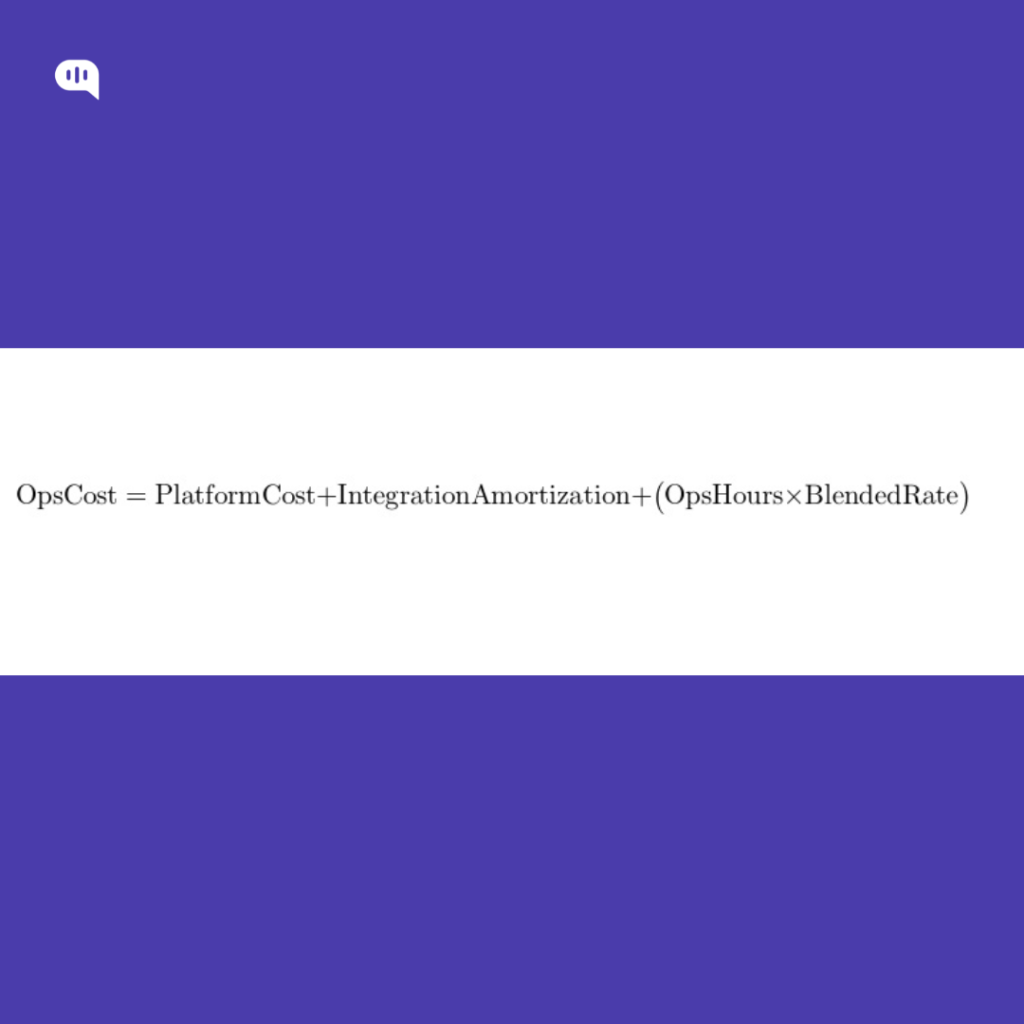
Step 6: Add Your Internal “Run Costs”
Typical recurring costs:
- Automation platform fees (bot + inbox seats)
- Integrations (helpdesk/CRM/order system)
- QA sampling + routing/intent tuning time
- Template ops (creation, approvals, compliance review)
- Knowledge maintenance
Model:
Step 7: Roll it into a Customer Service Unit Cost
Two useful unit economics:
A) WhatsApp Channel Cost per Resolved Contact
B) WhatsApp Variable Cost per Resolved Contact
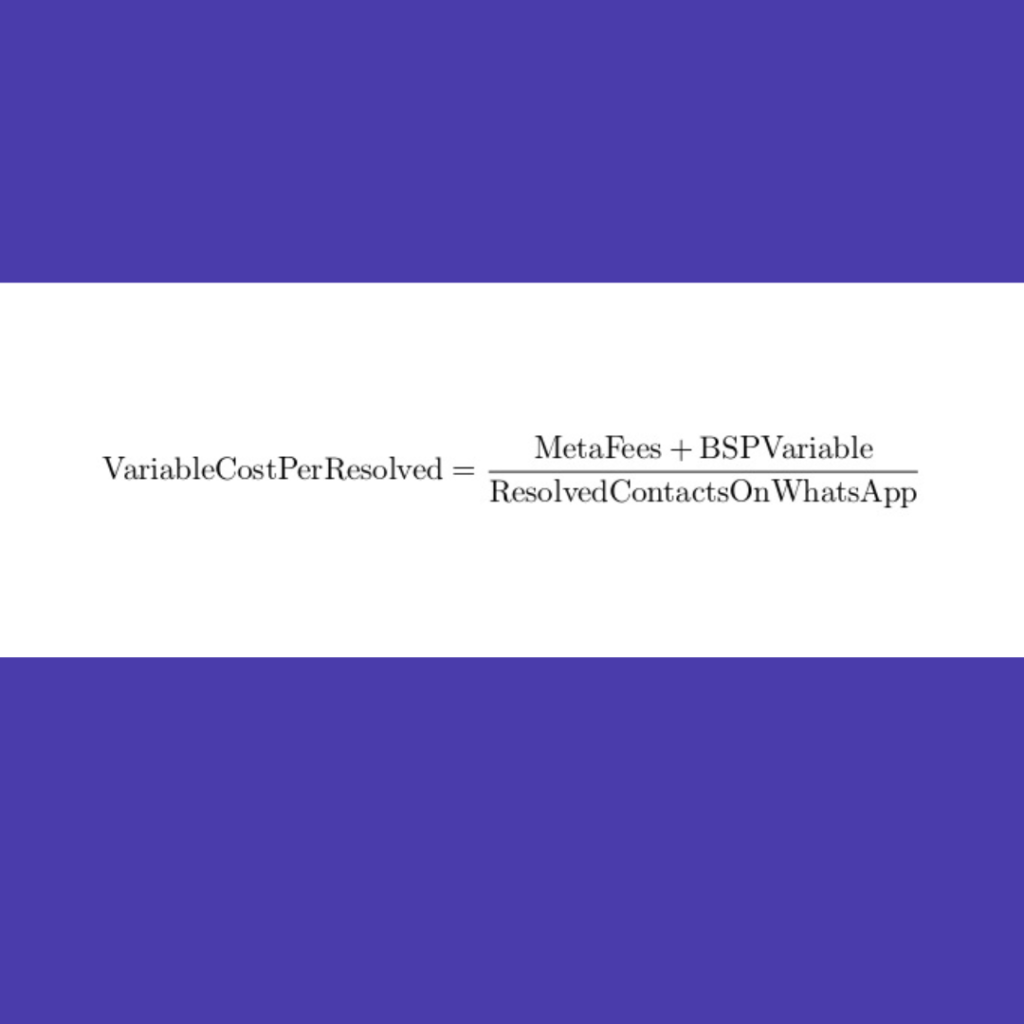
This is the number you use inside your ROI model (because it’s the “realism layer” that prevents inflated savings).
As every CFO knows, these calculations depend on your accounting and calculation practices. We’re going to quickly review our best practices for maintaining the quality of these calculations.
How Can You Maintain Quality for WhatsApp ROI Calculations?
Quality in WhatsApp ROI math comes from one discipline: only count savings when the customer outcome holds. If you measure whatsapp automation by “bot-handled conversations,” you’ll over-credit deflection savings and miss the downstream cost of recontacts, misroutes, and escalations that arrive hotter. A defensible model ties ROI to resolved deflection and AHT reduction on escalations, while enforcing quality gates so savings can’t be claimed when support quality slips.
- Use “resolved deflection,” not containment: Count a deflection only if there’s no recontact for the same intent within X days (e.g., 7–14 days), and subtract reopen/follow-up signals.
- Track ROI by intent cohorts: Compute deflection and AHT deltas per intent (Order Status vs Refund vs Account Access), not blended averages that hide regressions.
- Bundle quality metrics into ROI gates: Don’t report ROI unless these hold within tolerance: repeat contact rate, reopen rate, time-to-human, post-handoff CSAT, misroute rate.
- Discount savings when quality drops: Apply a QualityFactor (e.g., 0.7–1.0) to deflection savings if repeat contacts or reopens rise for automated intents.
- Separate “automation-assisted escalations” from “deflections”: If a human touched it, it belongs in the AHT reduction bucket, not deflection savings.
- Enforce escalation guardrails: Policy/compliance triggers, VIP routing, low-confidence thresholds, and “3 strikes → human” prevent bad deflection from inflating ROI.
- Standardize handoff summaries to protect AHT: Require Intent + Attempted steps + Current status + user context so escalations actually get faster.
- Audit a weekly sample of ‘successful’ deflections: Manually review a statistically meaningful slice of “resolved” cases to validate intent accuracy and true resolution.
- Instrument WhatsApp-specific friction: Track template usage outside the 24-hour window, delivery/read rates, and drop-offs—channel mechanics can create hidden failure loops.
- Report a single north-star unit: Cost per resolved contact (and its trend), because it bakes in both savings and quality outcomes.
If your ROI model can’t survive a repeat-contact and post-handoff CSAT audit, it’s just shifting your costs. Finally, let’s talk about how you can maintain the ROI and performance of your WhatsApp automations.
How to Effectively Maintain ROI and Performance of WhatsApp Automations?
ROI and performance drift over time because WhatsApp automations sit on moving inputs: intent mix changes, knowledge gets stale, edge cases accumulate, and channel mechanics (24-hour window, templates, opt-ins) create new failure modes. To maintain ROI, you need an operating cadence that treats automation like a production system—not a one-time launch.
- Lock the North-Star Unit: track Cost per Resolved Contact (WhatsApp) as the primary KPI, with supporting drivers (resolved deflection, AHT on escalations, WhatsApp variable costs).
- Separate Outcomes Buckets: report Resolved Deflection (no recontact within X days) separately from Automation-Assisted Escalations (handoff that reduces AHT). Don’t blend them.
- Run Intent-Cohort Dashboards: measure ROI and quality by intent (e.g., Order Status vs Refund vs Account Access). Blended averages hide regressions.
- Quality Gates Before ROI Claims: only “count savings” when repeat contact rate, reopen rate, time-to-human, and post-handoff CSAT stay within tolerance bands.
- Cost Control as a First-Class Metric: track template usage outside the 24-hour window, template category mix, and delivery rates; optimize flows to keep service replies inside the window when appropriate.
- Guardrails that Prevent Expensive Failures: confidence thresholds, policy/compliance triggers, VIP routing, and “3 strikes → human” reduce misroutes and recontacts (the biggest ROI killer).
- Handoff Summaries as a Required Artifact: enforce a structured payload—Intent, key entities, attempted steps, current status, risk flags—so escalations consistently drive AHT reduction.
- Weekly “Bad Savings” Review Loop: sample “successful deflections,” “customer came back,” and “high-AHT escalations” every week; tag root causes (coverage gap, routing error, unclear UX, system outage).
- Knowledge Freshness SLA: maintain a rotation to update top intents, policy pages, and pricing/eligibility rules; track “answer invalidated” rate as a leading indicator of ROI decay.
- Experiment, Don’t Guess: A/B test routing prompts, menus, and escalation thresholds; ship changes behind flags and compare recontact + AHT deltas by cohort.
- Operational Alerting: alerts for spikes in recontacts, escalations, time-to-human, template costs, and drop-offs; pair alerts with a rollback playbook.
- Quarterly Scope Re-Baseline: re-score intents by volume × variance × risk; expand only where resolution holds and unit economics improve.
You maintain WhatsApp automation ROI by treating it like a monitored production system: quality-gated outcomes, intent-level economics, and a weekly optimization cadence.
Conclusion
WhatsApp automation ROI holds up only when you measure it like an operating system, not a launch metric. That means treating resolved deflection as the only defensible “deflection,” valuing AHT reduction on escalations as a first-class savings lever, and subtracting the real WhatsApp cost stack (templates, window dynamics, provider fees, ops). When you quality-gate the math with repeat contact, reopens, time-to-human, and post-handoff CSAT, you stop “winning the dashboard” and start proving savings that don’t come back as rework.
The teams that sustain ROI over time run a cadence: intent-level cohorts, weekly sampling of “successful deflections,” tight escalation guardrails, and a knowledge freshness SLA—so performance doesn’t drift as customer behavior changes. If you want to implement this model quickly (and keep it stable), Kommunicate helps you deploy WhatsApp automations with controlled routing, safe handoffs, and the analytics you need to tie outcomes to costs.
If you’re ready to automate WhatsApp customer support without sacrificing support quality, book a demo with Kommunicate.

Devashish Mamgain is the CEO & Co-Founder of Kommunicate, with 15+ years of experience in building exceptional AI and chat-based products. He believes the future is human and bot working together and complementing each other.