Updated on January 16, 2026
WhatsApp is quickly becoming the default place customers ask for help—but most WhatsApp support experiences still feel surprisingly high-friction. The problem is not the channel; it’s the interaction design. Customers end up in long back-and-forth threads because the business doesn’t capture the right context up front, can’t route accurately, and can’t carry conversation state forward. That gap matters because 70% of customers expect anyone they interact with to have full context.
The stakes are high because WhatsApp is not a niche service. WhatsApp now has 3+ billion monthly users, and it has become a mainstream way people engage with brands.
However, WhatsApp is also a personal, permissioned channel. If you treat it like email and spray generic messages, ask vague questions, or force customers into “tell us everything” prompts, you will create distrust.
In this guide, we’ll break down 7 WhatsApp support patterns that reduce back-and-forth without losing context—so customers don’t have to repeat themselves, agents don’t chase missing details, and the conversation moves to resolution faster. We’ll cover:
1. Why Should you use WhatsApp as a Support Channel?
2. Is WhatsApp Better than SMS, Email or Phone?
3. What are the Best practices for WhatsApp Customer Support?
4. What are the 7 WhatsApp Support Patterns that Reduce Back-and-Forth?
5. How do you Choose the Right Pattern for the Right Intent?
6. How do you Implement AI in these Flows without Losing Trust?
7. Where does AI Fit in During WhatsApp Support?
8. What are the most Common Challenges teams face During WhatsApp Support?
9. What Metrics Should You Use to Measure Performance in WhatsApp Support?
10. What is the Simplest Rollout Plan to Deploy these WhatsApp Support Flows?
11. Conclusion
Why Should You Use WhatsApp as a Support Channel?
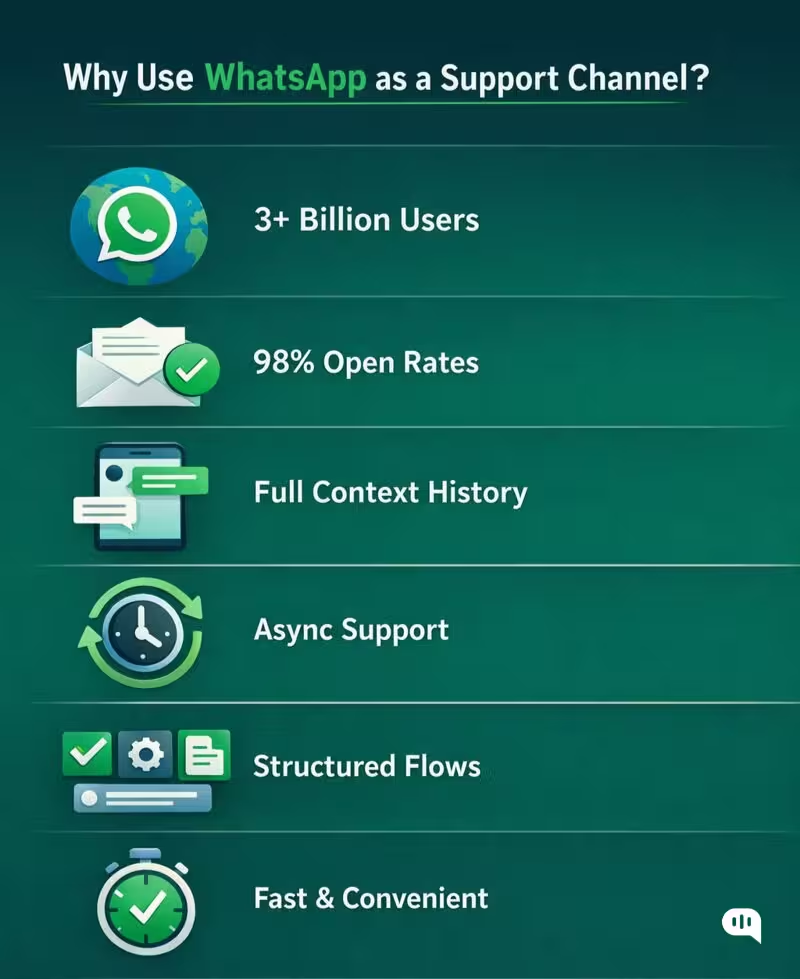
WhatsApp works as a support channel because it matches how customers already behave: they message first, and they expect responses that feel immediate, personal, and continuous. This means using WhatsApp for support gives you a few advantages:
- Your Customers Use WhatsApp – WhatsApp has 3+ billion monthly users, and over 175 million people message a WhatsApp Business account every day, making it a native support destination—not an adopted one.
- Better Read & Open Rates – WhatsApp reports ~98% open rates, compared to ~20% for email, which is critical for confirmations, verification steps, and resolution updates.
- It Preserves Conversation Context – Message history lives in one continuous thread, aligning with the expectation that 70% of customers want agents to have full context without repeating themselves.
- It Supports Asynchronous Support – Customers can respond on their own time without waiting on hold, while agents and systems can progress the case without real-time availability.
- It Enables Structured Resolution – Buttons, guided prompts, and rich media allow teams to capture the right information upfront, reducing clarification loops and back-and-forth.
- It Fits Modern Expectations – WhatsApp was explicitly positioned to eliminate waiting, transfers, and uncertainty—core failure modes of phone- and ticket-based support.
Despite all of these benefits, WhatsApp is a personal channel, so your success depends on experience design and operational discipline. As Zarnaz Arlia (CMO, Emplifi) put it, “You need resources and investment put into WhatsApp so that it adds value and credibility, rather than taking away from the brand.”
Used well, WhatsApp becomes your fastest path to resolution for high-frequency intents (status checks, simple troubleshooting, scheduling, account updates). Used poorly, it becomes an endless back-and-forth thread. In the next section, we will discuss how WhatsApp fares against email, SMS, and phone.
Is WhatsApp Better than SMS, Email or Phone?
Every support channel solves a different problem.
The real question is not whether WhatsApp replaces SMS, email, or phone, but which channel best minimizes back-and-forth while preserving context for common support intents. When evaluated on those criteria, WhatsApp behaves very differently from legacy options.
| Channel | Context Retention | Response Speed | Customer Effort | Structure & Guidance | Best-Fit Support Use Cases |
| High (single continuous thread) | High (async, near real-time) | Low | Strong (buttons, guided flows, rich media) | Status checks, account issues, troubleshooting, scheduling, FAQs | |
| SMS | Low (fragmented threads, no history) | Medium | Medium | Very limited (text-only) | OTPs, alerts, one-way notifications |
| Medium (threads break easily) | Low | High | Weak (long-form, unstructured) | Long-form issues, documentation-heavy cases | |
| Phone | None (ephemeral) | Real-time only | Very High | None | Emotional, high-stakes, complex edge cases |
WhatsApp stands out because it combines persistent context, asynchronous speed, and structured interaction.
Phone calls are fast but memoryless. Email retains history but creates delay and overload. SMS reaches users but cannot guide them. WhatsApp sits in the middle: fast enough, structured enough, and context-aware by default.
WhatsApp is not “better” for every scenario, but it is the most effective channel for high-volume, repeatable support intents where reducing clarification and handoffs matters. To make that advantage real, however, teams must design the experience deliberately. Let’s talk about the best practices for customer support,
What are the Best practices for WhatsApp Customer Support?
WhatsApp is a high-trust, high-attention channel.
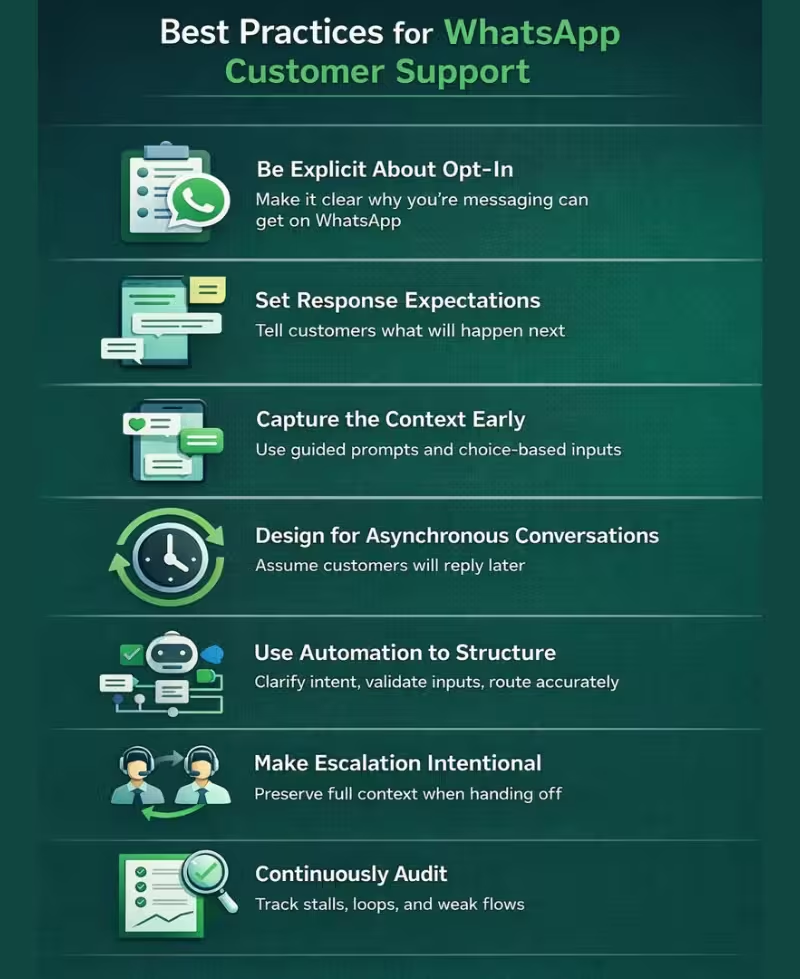
The most effective WhatsApp support teams treat the channel not as a live chat inbox, but as a structured, permissioned workflow where context is captured early, expectations are set clearly, and escalation is intentional. These best practices are the foundation that makes automation and AI usable without degrading trust.
- Be Explicit About Opt-In – Make it clear why you’re messaging the customer and what kind of help they can get on WhatsApp. Ambiguity here is the fastest way to lose trust.
- Set Response Expectations – Tell customers what will happen next, so silence doesn’t feel like failure.
- Capture the Context Early – Use guided prompts and choice-based inputs to collect only what’s needed to move the case forward, instead of asking open-ended questions.
- Design for Asynchronous Conversations – Assume customers will reply later. Each message should stand on its own and re-anchor context without forcing repetition.
- Use Automation to Structure – Automation should clarify intent, validate inputs, and route accurately.
- Make Escalation Intentional – When handing off to a human, preserve full conversation context and signal clearly that ownership has changed.
- Continuously Audit – Track where conversations stall or loop; these moments usually indicate missing context, poor prompts, or the wrong flow choice.
Best practices set the guardrails, but they don’t tell you how to design conversations that resolve faster. To achieve that, you need repeatable interaction models. Next, we’ll break down the 7 WhatsApp support patterns that reduce back-and-forth without losing context.
What are the 7 WhatsApp Support Patterns that Reduce Back-and-Forth?
Most WhatsApp support friction comes from the same root cause: the conversation starts without structure. Customers explain their issue in free text, agents ask follow-up questions to fill gaps, and context is slowly reconstructed over multiple messages.
Well-designed WhatsApp Flows solve this by front-loading intent capture and guiding the conversation toward resolution. Below are seven repeatable WhatsApp support patterns that consistently reduce back-and-forth while preserving context.
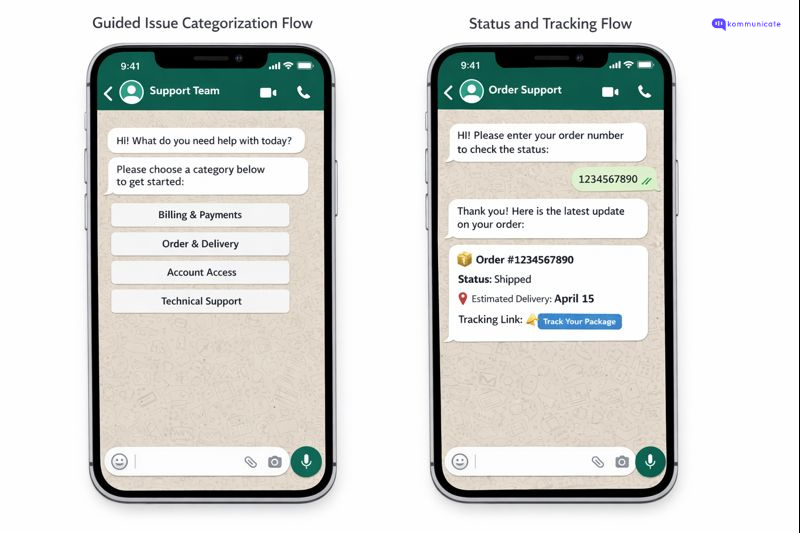
1. Guided Issue Categorization Flow
This flow helps customers quickly identify the nature of their issue through a short, structured set of choices.
Flow Design
The conversation begins with a clear prompt such as “What do you need help with today?” followed by buttons for common categories like billing, delivery, account access, or technical issues.
Why it Works:
By establishing intent at the start, the system can route the conversation correctly and avoid clarifying questions later.
Who is it For:
High-volume support teams handling multiple issue types across the same WhatsApp number.
2. Status and Tracking Flow
This flow allows customers to check the status of an order, ticket, or request without agent involvement.
Flow Design
The customer selects a status-related option and is prompted to provide a reference number or identifier, after which the system returns the current status.
Why it Works
Most status queries are repetitive and data-driven. Providing a structured lookup removes unnecessary human interaction and follow-ups.
Who is it For
E-commerce, logistics, financial services, and any team receiving frequent “Where is my request?” queries.
3. Account Verification Flow

Flow Design
The system requests one or two verification inputs, such as a phone number, date of birth, or one-time password, within the WhatsApp conversation.
Why it Works
Verification happens early and cleanly, which prevents delays later in the conversation when access or changes are required.
Who is it For
Teams handling personal data, account changes, or regulated workflows.
4. Structured Troubleshooting Flow
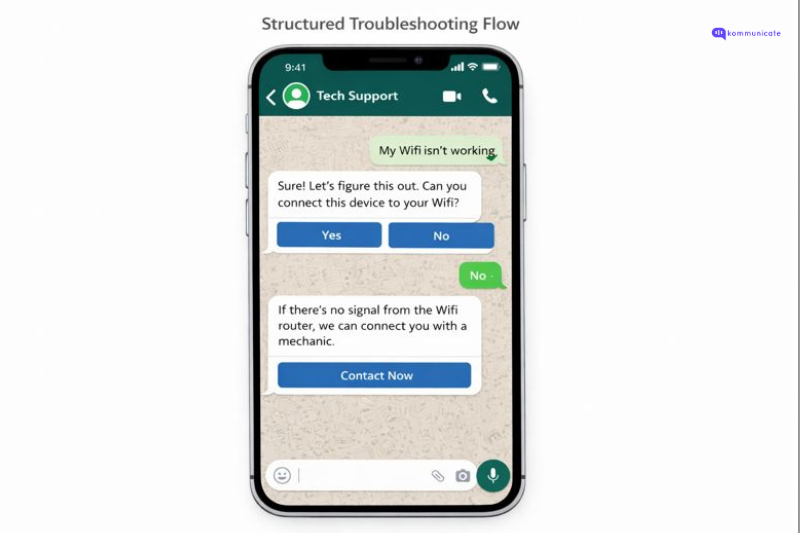
This flow guides customers through a step-by-step diagnostic process for common issues.
Flow Design
The system presents a sequence of simple checks or actions, each with clear instructions and confirmation options.
Why it Works
Many issues can be resolved without escalation when customers are guided through a logical sequence instead of free-text explanations.
Who is it For
Technical support teams and product-led companies with repeatable issue patterns.
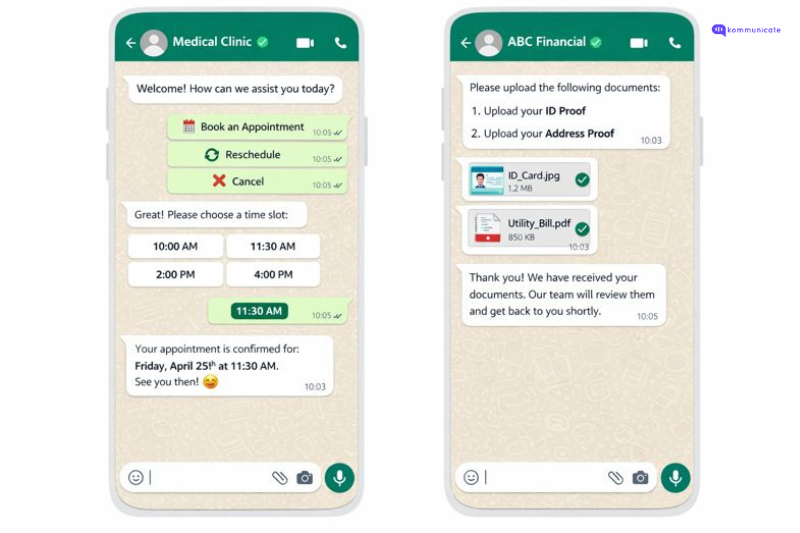
5. Appointment and Scheduling Flow
This flow enables customers to book, reschedule, or cancel appointments directly within WhatsApp.
Flow Design
The customer selects a scheduling action, chooses from available time slots, and receives confirmation in the same thread.
Why it Works
By eliminating manual coordination, the flow reduces multiple messages and ensures clarity on timing.
Who is it For
Healthcare providers, service businesses, and teams managing time-bound interactions.
6. Document Collection Flow
This flow collects required documents or information in a structured and trackable way.
Flow Design
The system prompts the customer to upload specific documents or complete defined fields, with clear instructions for each step.
Why it Works
Clear requirements prevent partial submissions and repeated follow-ups for missing information.
Who is it For
Financial services, onboarding teams, and any process that depends on user-submitted documents.
7. Context-Preserving Handoff
This flow escalates the conversation to a human agent without making the customer repeat information, even though WhatsApp does not provide a native “handoff UI” inside the chat.
Flow Design
The automation confirms escalation in WhatsApp and sets expectations (who will respond, when). In parallel, it routes the conversation to the right team in your Kommunicate dashboard and attaches structured context (intent, fields collected, transcript, and a summary).
Why It Works
Customers get clarity and continuity, while agents start with full context in their workspace.
Who is it For
Teams balancing automation with high-touch support for complex, sensitive, or exception-heavy issues.
These seven patterns work because they bring structure to conversations before confusion sets in. The next step is understanding how to match each pattern to the right customer intent, which we will explore in how you can match these flows to the right intent.
How do you Choose the Right Pattern for the Right Intent?
Choosing the right WhatsApp support pattern is an operational decision. The goal is to capture the minimum context required for resolution, route correctly, and avoid clarification loops. Teams reduce back and forth when each intent follows a predictable structure and escalation happens early for sensitive or complex cases.
A reliable guideline is this: the more predictable the intent, the more structured the flow should be. The more nuanced the situation, the earlier a human should take ownership, with context preserved in your helpdesk.
Step 1: Classify Intents by Predictability and Risk
Start by mapping your top WhatsApp intents into three buckets:
- Predictable and low risk: status checks, scheduling, basic FAQs, simple how-to queries
- Predictable and medium risk: account updates, cancellations, payment issues, plan changes, requests that involve identity confirmation
- Unpredictable or high risk: complaints, exception handling, regulated workflows, high-value customers, emotionally sensitive conversations
This classification determines how much structure you need and how soon you should escalate.
Step 2: Define the Minimum Information Needed to Resolve Each Intent
Back and forth usually happens because the flow starts with a broad question and collects context slowly. Instead, define the smallest set of inputs that unlock resolution.
Examples:
- Order or delivery status: order ID and phone number
- Login issues: email or phone number, error type, device or platform
- Reschedule appointment: appointment ID and preferred time slot
- Address update: verification step and the new address details
Once you define the minimum required context, you can select a pattern that captures it cleanly.
Step 3: Use a Pattern Selection Matrix
| Intent type | Example intents | Best pattern | Why it fits |
| Broad, unclear starting point | “I need help”, “Support” | 1. Guided Issue Categorization | Establishes intent early and routes correctly from the first message |
| Status lookups | Order status, ticket status, delivery ETA | 2. Status and Tracking | Captures an identifier and returns an answer without follow-up questions |
| Sensitive access or changes | Account changes, refunds, policy details, profile updates | 3. Account Verification | Moves verification early so resolution does not stall later |
| Repeatable technical issues | Setup problems, common errors, basic troubleshooting | 4. Structured Troubleshooting | Guides the user through steps that resolve known issues consistently |
| Time coordination | Book, reschedule, cancel appointments | 5. Appointment and Scheduling | Uses slot selection and confirmation to prevent scheduling loops |
| Document dependent workflows | KYC, onboarding, claims, applications | 6. Document Collection | Makes requirements explicit so customers submit complete information |
| Exceptions and escalations | Complex cases, complaints, VIP, and emotional situations | 7. Context-Preserving Human Handoff | Preserves context in your helpdesk so agents do not re-collect details |
Step 4: Set clear escalation triggers
A strong WhatsApp experience does not require automation for every intent. It requires predictable criteria for when a human should take ownership. Common triggers include:
- Security or privacy sensitivity: identity, access, payments, personal data
- High uncertainty: the system cannot confidently classify the intent
- Negative sentiment: anger, repeated frustration, cancellation language
- High value: enterprise accounts, high LTV customers, priority tiers
- Flow failure: the customer fails validation or drops out of a step multiple times
These triggers prevent long loops and protect trust.
Step 5: Make the handoff accurate for WhatsApp
WhatsApp does not offer a native handoff interface inside the chat thread. You can still preserve context by designing a two-layer handoff:
- Customer visible: the bot confirms escalation, restates what was captured, and sets expectations for response time
- Agent visible: your helpdesk receives the transcript, structured fields, routing metadata, and an AI summary, so the agent starts with full context
This is what prevents repetition while keeping the WhatsApp experience honest.
The right pattern depends on what the customer is trying to accomplish and what information is required to resolve it. When intent is predictable, structured flows reduce back and forth. When the situation is complex or sensitive, a fast escalation with full context protects resolution speed and customer trust. Next, we will cover how to implement AI in these flows without losing trust.
How do you Implement AI in these Flows without Losing Trust?
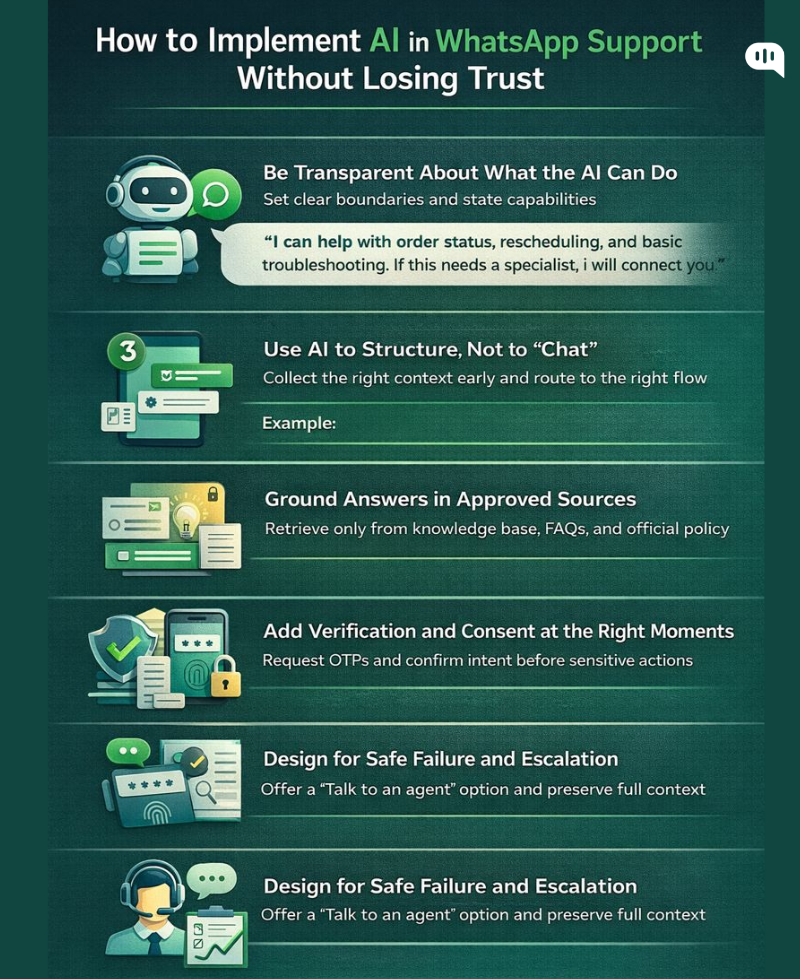
AI can make WhatsApp support dramatically faster, but it can also damage credibility quickly if customers feel misled, monitored, or trapped in automation. In a permissioned channel like WhatsApp, trust is the product. The goal is not maximum automation. The goal is reliable resolution with clear boundaries, predictable behavior, and respectful messaging.
1) Be Transparent About What the AI Can do
Customers tolerate automation when it behaves consistently and sets expectations clearly. They lose trust when a bot pretends to be a person or implies capabilities it does not have. Use simple language that signals what the system will do next.
Example:
- “I can help with order status, rescheduling, and basic troubleshooting. If this needs a specialist, I will connect you.”
This reduces frustration because customers stop guessing whether they are talking to a human and they know escalation is available.
2) Use AI to Structure, not to “Chat”
In WhatsApp support, the biggest win is reducing back and forth by collecting the right context early. AI should support this by classifying intent, extracting entities, validating inputs, and guiding the customer into a structured flow.
Practical applications:
- Detect intent from free text and route the user into the right pattern (status, scheduling, verification, troubleshooting)
- Extract identifiers like order ID, appointment ID, email, product model, or error message
- Ask one targeted follow-up question when required, then move forward
This keeps conversations short and predictable while still feeling responsive.
3) Ground Answers in Approved Sources
Trust fails when AI improvises. For FAQs and policy-related questions, use retrieval from a curated knowledge base and restrict the AI to those sources. If the answer is missing or ambiguous, the correct behavior is escalation, not guesswork.
Operational guardrails that work:
- Only answer from approved articles or documents
- Prefer quoting or summarizing official policies rather than generating new interpretations
- Fall back to “I do not have enough information” with a fast handoff
This is particularly important for refunds, billing, delivery commitments, and regulated workflows.
4) Add Verification and Consent at the Right Moments
WhatsApp is personal, so sensitive actions should feel deliberate. AI should introduce verification steps before it reveals account details or performs changes. It should also confirm customer intent before irreversible actions.
Examples:
- Before sharing account information: “Please verify with OTP.”
- Before changing something: “Confirm you want to update your address to the one you shared.”
This prevents errors and reassures customers that the process is controlled.
5) Design for Safe Failure and Graceful Escalation
A trustworthy system shows its limits early. If the user’s request is complex, emotional, or outside the supported paths, the best response is a clean escalation with context preserved.
Best practices:
- Provide a “Talk to an agent” option at key junctions
- Escalate when confidence is low or when the customer repeats themselves
- Pass the transcript, extracted fields, and a summary to the agent system
WhatsApp does not provide a native handoff interface, so keep the customer experience simple and honest:
- “I am connecting you to a specialist. You will receive a reply here within 10 minutes.”
When AI is implemented with transparency, grounded answers, strong verification, and predictable escalation, customers experience it as competence rather than automation. The next step is mapping where AI fits in during WhatsApp support so you can decide which parts of the journey should be automated, assisted, or fully human-led.
Where does AI Fit in During WhatsApp Support?
AI fits best where it reduces customer effort, captures context early, and speeds up resolution. Use it as a workflow layer that structures conversations and accelerates agents, while humans handle exceptions, sensitive decisions, and emotional cases.
1) Intake and Intent Capture
- Classify intent from the first message and route to the right flow
- Extract key details like order ID, email, device, location, and error type
- Ask one targeted clarification question when required, then proceed
2) High-Frequency Resolution Flows
- Status and tracking lookups
- Appointment booking, rescheduling, and cancellation
- Structured troubleshooting for repeatable issues
- Document collection with step-by-step prompts and validations
3) Knowledge and FAQs
- Answer only from approved knowledge sources
- Summarize policies into short WhatsApp-friendly responses
- Escalate when the knowledge is missing, unclear, or high-risk
4) Verification and Sensitive Actions
- Trigger OTP or identity checks before sharing account details
- Confirm intent before changes like cancellations or address updates
- Validate inputs so the agent does not need to re-collect information
5) Human Handoff and Agent Acceleration
- Escalate when confidence is low, risk is high, or sentiment is negative
- Pass the transcript, extracted fields, and an AI summary to the helpdesk
- Set customer expectations in WhatsApp since WhatsApp has no native handoff UI
6) Follow-up and Quality Signals
- Send resolution confirmation and next steps
- Collect CSAT and short feedback
- Detect drop-offs and loop points to improve flows over time
AI fits best in WhatsApp support where intents are predictable, context can be captured structurally, and answers can be grounded in approved information. Humans should take ownership when exceptions appear, risk increases, or emotions rise. When you place AI across intake, structured resolution, grounded knowledge, agent acceleration, and follow-up, WhatsApp becomes faster without feeling automated in a way that erodes trust.
However, support teams still face some challenges while automating WhatsApp support. Let’s talk about them.
What are the most Common Challenges teams face During WhatsApp Support?
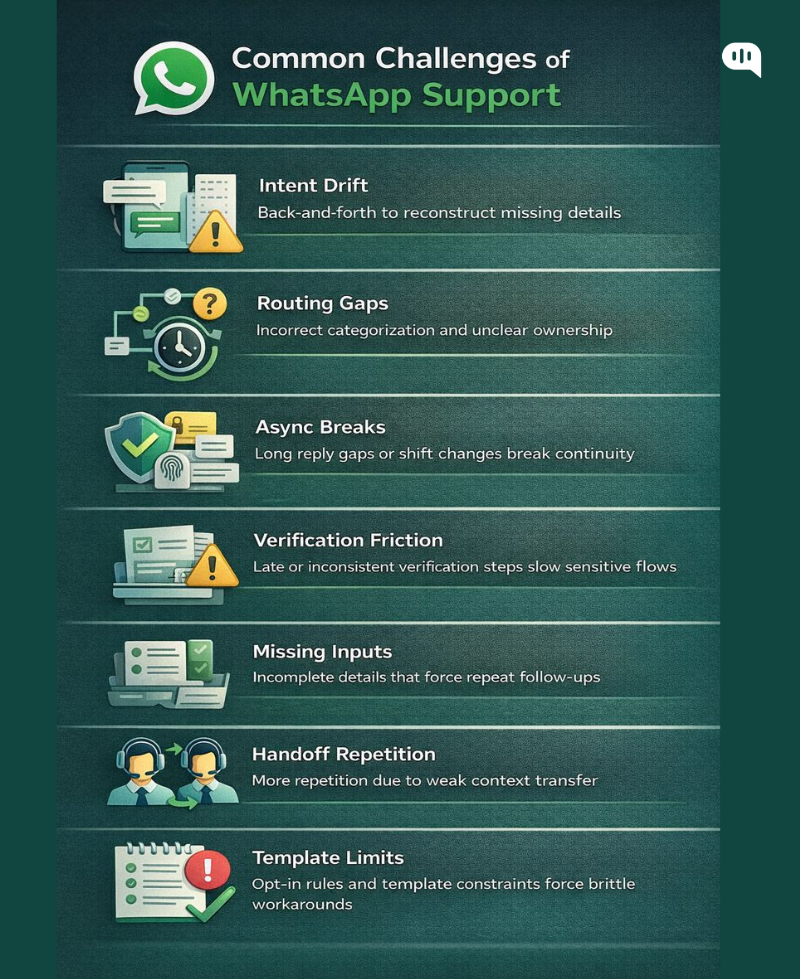
WhatsApp support can feel frictionless for customers, but it introduces operational constraints that many teams underestimate. The most common failures are rarely about the channel itself. They come from weak context capture, inconsistent routing, and workflows that do not account for asynchronous behavior, verification, and handoffs.
- Intent Drift: Conversations start in free text, so teams miss the minimum details required for resolution and spend multiple messages reconstructing context.
- Routing Gaps: Incorrect categorization and unclear ownership cause delays, reassignment, and repeated questions.
- Async Breaks: Long reply gaps and shift changes break continuity, forcing agents to re-anchor the case.
- Verification Friction: Identity checks and consent steps are implemented late or inconsistently, slowing sensitive workflows and reducing trust.
- Missing Inputs: Customers submit incomplete details or partial documents, leading to avoidable follow-ups.
- Handoff Repetition: WhatsApp has no native handoff UI, so weak CRM or helpdesk context transfer forces customers to repeat themselves.
- Template Limits: Opt-in rules and template constraints create inconsistent messaging and brittle operational workarounds.
These challenges are manageable when you treat WhatsApp as a structured workflow, then measure where conversations stall, loop, or escalate. Next, we will cover the metrics you will need to measure the success of your WhatsApp support process.
What Metrics Should You Use to Measure Performance in WhatsApp Support?
A strong WhatsApp support operation needs metrics that capture speed, efficiency, and trust, not just ticket volume. The right measurement framework makes it obvious where context breaks, where flows stall, and where escalation is happening too late.
| Metric | What it Measures | Why it Matters | How to Use It |
| First Response Time (FRT) | Time from first customer message to first meaningful reply | Sets trust and perceived responsiveness in a high-attention channel | Segment by business hours vs after-hours and by intent |
| Time to Resolution (TTR) | End-to-end time from first message to confirmed resolution | Best indicator of whether flows reduce friction | Track medians and percentiles (p50/p90); compare across intents |
| Messages to Resolve | Total messages exchanged before resolution | Direct proxy for back-and-forth and missing context | Benchmark by intent; flag outliers for flow redesign |
| Clarification Rate | Percent of conversations needing basic follow-up questions | Reveals weak context capture and poor prompts | Tag common missing fields (order ID, email, device, etc.) and fix intake |
| Containment Rate | Percent resolved without a human agent | Measures automation impact for repeatable intents | Report by intent; avoid optimizing containment for high-risk cases |
| Escalation Rate | Percent that move from automation to human or T1 to T2 | Shows where automation stops being reliable | Track escalation reasons (low confidence, sentiment, exception) |
| Handoff Quality | Percent of escalations where agent does not ask for repetition | Measures whether context is preserved during handoff | QA sample transcripts; detect repetition phrases and improve summaries/fields |
| Drop-Off Rate | Percent who start but do not complete a flow step | Identifies friction in verification, scheduling, or document upload | Measure by step; shorten flows and improve instructions/validation |
| Reopen Rate | Conversations that restart shortly after “resolution” | Signals incorrect resolution or unclear closure | Tie to intents and agents; use as a quality control metric |
| CSAT (or Quick Rating) | Satisfaction after resolution | Captures perceived quality, not just speed | Segment by intent and whether AI was involved; review low-score transcripts |
| Opt-Out / Block Rate | Customers who opt out, block, or complain | Trust metric unique to a permissioned channel | Correlate with template frequency, follow-up cadence, and messaging tone |
| Template Failure Rate | Messages failing due to template or compliance rules | Operational bottleneck that delays support | Monitor failure reasons and fix template coverage and routing logic |
When you track these metrics by intent and by flow stage, you can prioritize the few improvements that remove the most back-and-forth. Next, we will chive you a simple rollout plan for WhatsApp support that you can start using today.
What is the Simplest Rollout Plan to Deploy these WhatsApp Support Flows?
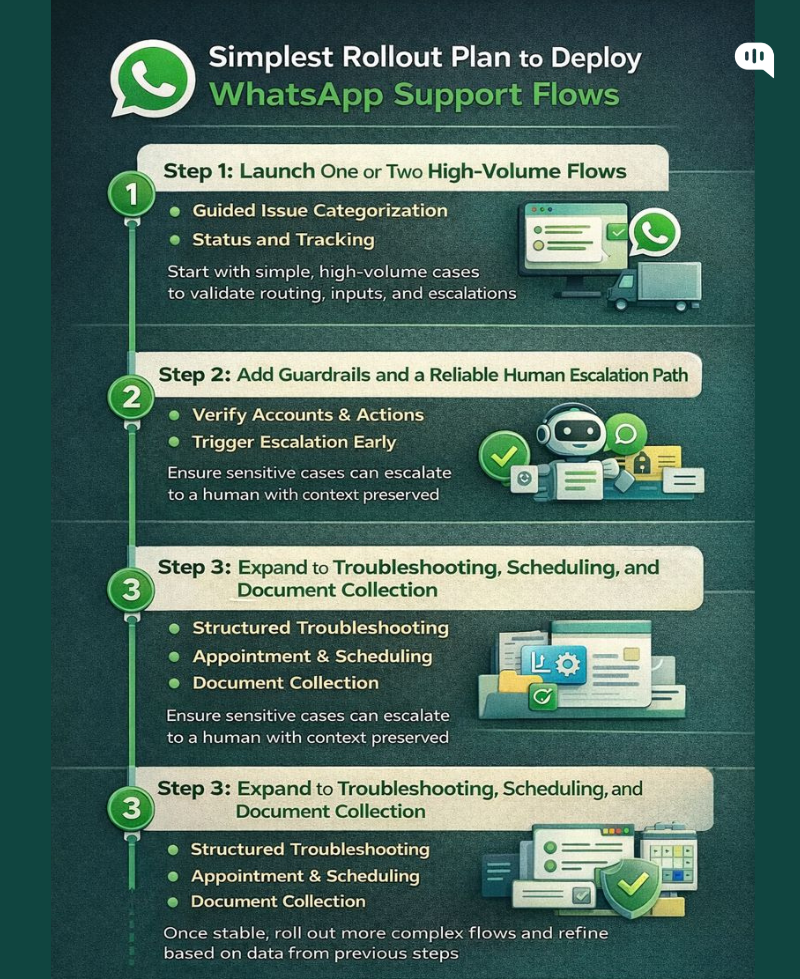
WhatsApp support flows work best when you roll them out in a controlled sequence, starting with the highest-volume, lowest-risk intents. A simple rollout plan reduces operational disruption, prevents trust-breaking failures, and gives your team clear feedback loops as you expand automation.
Step 1: Launch One or Two High-Volume Flows
Start with the safest, most repeatable intents, such as Guided Issue Categorization and Status and Tracking. Define the minimum inputs required to resolve these requests, implement buttons and structured prompts, and ensure every path ends in either a clear resolution or a clean escalation option.
Keep the first version intentionally minimal so you can validate that routing, data capture, and response expectations are working before adding complexity.
Step 2: Add Guardrails and a Reliable Human Escalation Path
Before expanding automation, make sure sensitive cases are handled correctly. Add verification for account-related actions, set clear escalation triggers for low confidence or negative sentiment, and ensure agents receive full context in your helpdesk.
Since WhatsApp has no native handoff interface, the customer experience should simply acknowledge the escalation and set response expectations, while the agent system receives the transcript, structured fields, and a short summary.
Step 3: Expand to Troubleshooting, Scheduling, and Document Collection
Once the foundation is stable, roll out structured troubleshooting, appointment and scheduling, and document collection flows. Introduce step-by-step guidance, input validation, and clear instructions to reduce incomplete submissions and repeated follow-ups. Track drop-offs and message counts per flow, then refine prompts and decision points based on where customers stall or escalate most often.
A simple rollout succeeds when it prioritizes reliability over breadth. By starting with predictable intents, locking down guardrails and handoffs, and expanding only after the basics are stable, you can improve resolution speed without sacrificing customer trust.
Conclusion
WhatsApp support works best when it is designed as a structured, permissioned workflow rather than an open-ended chat thread. The seven patterns in this guide reduce back-and-forth because they capture intent early, collect only the information required for resolution, and preserve context across automation and human escalation.
If you implement these flows with transparent AI boundaries, grounded answers, and reliable handoffs, you can improve resolution speed without compromising trust. The key is discipline: start simple, measure the right signals, and continuously refine the moments where conversations stall, repeat, or escalate.
Need help setting up workflows like this in WhatsApp Business? Please don’t hesitate to contact us at Kommunicate.

Devashish Mamgain is the CEO & Co-Founder of Kommunicate, with 15+ years of experience in building exceptional AI and chat-based products. He believes the future is human and bot working together and complementing each other.