Updated on August 19, 2026

Accounting firms didn’t invest in client portals because they love logins and passwords. They did it because portals promised a single, scalable front door for every client: one place to upload documents, check status, pay invoices, and reduce the endless back-and-forth with support. However, most portals have underperformed.
Studies on client portals highlight real benefits (secure sharing, faster response times), but also recurring implementation challenges (integration with existing tools, inconsistent data, confusing UX, and friction that pushes users back to email and phone). For CS and CX leaders, that means you own the worst of both worlds: the cost and complexity of a portal, plus the full volume of tickets you were supposed to eliminate.
Conversational AI agents can sit on your website, email, and messaging channels, bridging this experience gap by handling L1 and L2 queries, triggering secure document requests, and surfacing real-time status from your practice management and billing systems. Platforms like Kommunicate’s AI customer service for financial services demonstrate how an AI frontline can unify web, WhatsApp, and other digital channels into a single, auditable trail, so clients don’t have to remember where the portal link resides.
This article takes that idea to its logical conclusion. We’ll unpack why accounting client portals fail from a customer-experience perspective, map what they were actually hired to do, and show how AI in accounting can now replace roughly 80% of that workload. The goal isn’t to tear out your portal; it’s to redesign your client experience around conversations. We’ll cover:
- How Did Client Portals Become the Default “Front Door” in the Era of AI in Accounting?
- Why Do Traditional Accounting Client Portals Consistently Underperform?
- What Are Client Portals Actually Doing Today and How Does That Differ From What Clients Really Need?
- How Is AI in Accounting is Becoming the New Conversational Front Door for Clients?
- Which 80% of Client Portal Work Can AI Realistically Replace Today?
- Where Do Humans and Client Portals Still Matter in the Remaining 20% of Work?
- How Do You Design an AI-Led Client Experience for an Accounting Firm?
- What Is a Practical Implementation Blueprint for CS and CX Directors Rolling Out AI in Accounting?
- How Should You Measure Success With New KPIs for an AI-Led Client Experience?
- What Risks, Compliance Requirements, and Guardrails Matter When Using AI in Accounting?
- How Will Client Portals Evolve as AI Moves Toward Autonomous Accounting Assistants?
How Did Client Portals Become the Default “Front Door” in the Era of AI in Accounting?
Client portals rose to prominence because they solved two big problems at once: secure document exchange and increasing demand for self-service. Email attachments and paper packets were becoming untenable for tax returns, payroll reports, and financial statements. Portals promised a single, encrypted hub where clients could upload files, sign documents, and review reports with full audit trails and access controls.
On the client side, expectations shifted dramatically. Studies show that more than 70% of clients now expect digital self-service options when working with professional services firms, including accountants. Broader customer-portal research reveals that 95% of businesses have experienced an increase in demand for self-service, with mobile devices emerging as the dominant access point. Specifically, 78% of users prefer mobile devices, and this preference rises to 90% among millennials.
In that context, the client portal appeared to be the natural “front door” to the firm: always on, always available, and theoretically channel-agnostic.
Meanwhile, AI in accounting has accelerated digital transformation in the background. Surveys indicate that approximately 60% of accounting firms have implemented AI to automate tasks and support informed strategic decision-making. As fintech startups expand their teams, thepaystubs can help simplify payroll documentation by making it easier to generate professional w2 form and maintain accurate employee payment records. More than two-thirds of accountants believe AI’s impact on the profession is positive, especially for efficiency and data quality.
Put together, you get today’s reality: client portals became the default “front door” because they matched regulatory pressure for secure digital workflows with client pressure for self-service. But accounting firms are also learning that traditional accounting client platforms are underperforming.
Why Do Traditional Accounting Client Portals Consistently Underperform?
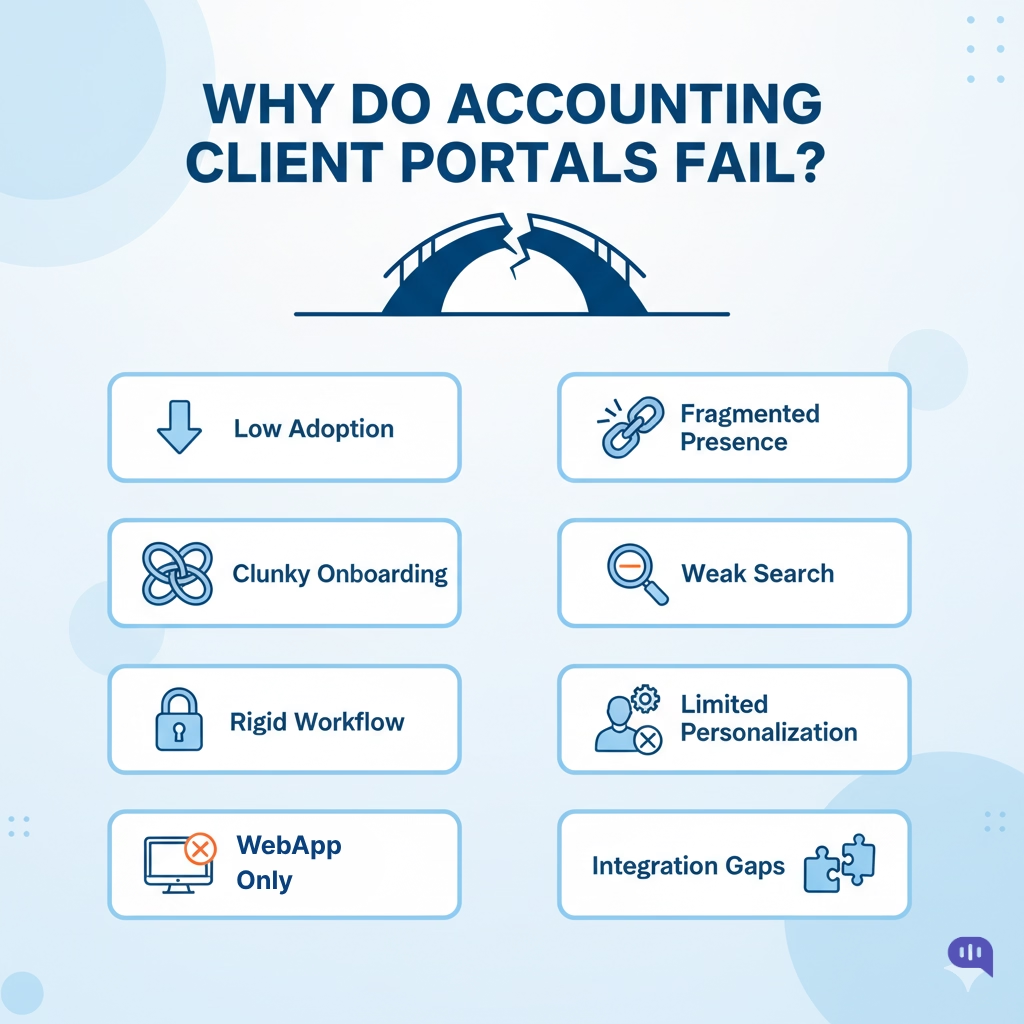
Most firms don’t have a “portal problem” as much as a customer experience problem wrapped in portal form.
- Low Adoption: Clients often forget URLs and passwords, so they default to using email, phone, and WhatsApp instead of logging in, resulting in a high volume of tickets.
- Clunky Onboarding: Invitation emails, account creation, and multi-step verification create friction at the exact moment clients are deciding whether to engage digitally.
- Rigid Workflows: Static forms and fixed upload flows cannot adapt to different entity types, service lines, or edge cases, forcing agents to intervene manually.
- Poor Mobile Fit: Many portals are designed for desktop dashboards, not for quick tasks on a mobile device, so busy business owners often abandon the experience mid-flow.
- Fragmented Channels: Conversations live partly in the portal, partly in email, and partly in messaging apps, resulting in a lack of a unified view for agents or clients.
- Opaque Status: Status labels like “In Progress” or “Submitted” do not answer the fundamental questions clients have: who is working on this, what is next, and by when.
- Weak Search: Clients struggle to find the correct document, report, or message thread, leading to “Can you resend that?” tickets and duplicate work.
- Limited Personalization: Portals rarely tailor content, checklists, or alerts to a client’s profile, history, or seasonality, making them feel generic and untrustworthy.
- Integration Gaps: When the portal is not deeply integrated with practice management, billing, and support systems, agents are forced into copy-paste workflows.
In other words, portals underperform because they are designed around systems, rather than how clients naturally ask for help.
Next, we will examine the current workflows in client portals to more concretely map this customer experience gap.
What Are Client Portals Actually Doing Today and How Does That Differ From What Clients Really Need?
| What Portals Actually Do Today | What Clients Really Need | Why This Gap Matters (With Sources) |
| Act as file dropboxes – primary use is uploading/downloading PDFs, statements, and returns | Guided, low-effort workflows that tell them what to upload, why it matters, and what’s next | Self-service succeeds when systems provide clear guidance, not just storage. |
| Centralize documents in one place for compliance and audit trails | Omnichannel continuity so they can move between web, email, and messaging without losing context | Over 70% of customers expect companies to know their history across channels. |
| Provide basic status labels like “Submitted,” “In Review,” “Completed” | Plain-language answers to “Where is my file, who has it, what is blocking it, and when will it be done?” | Customers value clarity and transparency over raw data. |
| Offer secure messaging inboxes inside the portal | Frictionless conversations in channels they already use (email, WhatsApp, SMS, web chat, voice) | 81% of consumers want easier contact options and faster responses, not new logins. |
| Enforce login/password flows with periodic resets for security | Low-friction access plus security (magic links, SSO, secure links in familiar channels) | Password fatigue is a top reason users abandon portals and revert to email. |
| Serve static forms and checklists that look the same for every client | Dynamic, context-aware tasks that adapt to entity type, engagement, risk, and history | Personalized experiences significantly increase completion and satisfaction rates. |
| Offer a desktop-first UX with complex navigation | Mobile-first micro-interactions that can be completed in 1–2 taps on a phone | Between 78% and 90% of portal users now access services from mobile devices. |
| Act as a compliance artifact satisfying security and audit requirements | Act as a service layer that actually reduces effort and anxiety while still meeting compliance | CX leaders report that “effort to get help” is a stronger loyalty driver than traditional metrics. |
Put simply, most accounting portals behave like secure filing cabinets, while clients are looking for guided, conversational help that fits their daily workflow. In the next section, we’ll explore how AI in accounting can fill this gap and replace much of what the portal was initially intended to do.
How Is AI in Accounting is Becoming the New Conversational Front Door for Clients?
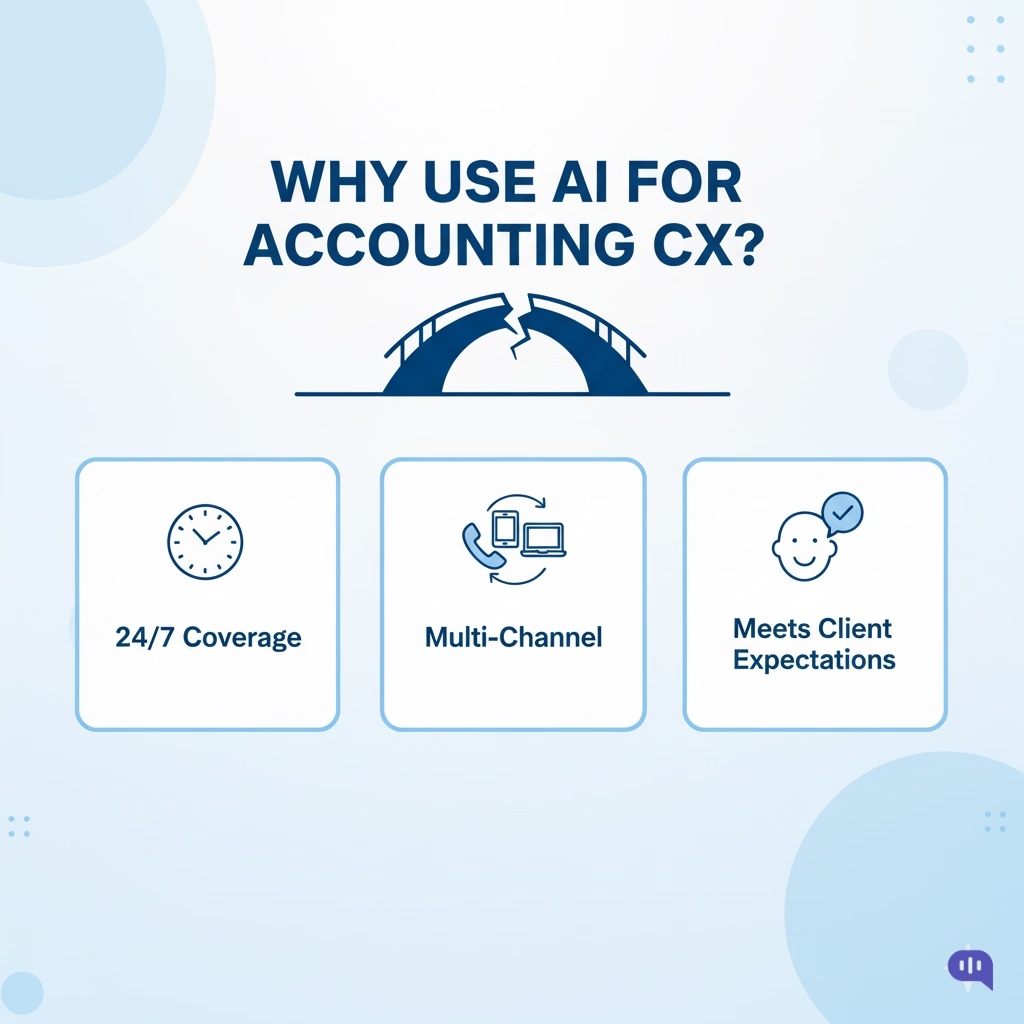
While AI was first proposed as a back-office solution, it’s increasingly becoming a tool for frontline, customer service work. This is because of the benefits this approach offers:
- 24/7 Low Cost Support – Maintaining communications 24/7 is difficult, especially when you have a tight budget around headcount. AI eases this process significantly by answering repetitive questions and reducing friction. This also minimizes the agent’s workload, allowing them to provide more on-time, personalized customer support.
- Omnichannel Presence – Instead of a portal on one URL and a separate knowledge base, AI can unify web chat, email triage, WhatsApp, and even voice IVR through a single engine.
- Fits Client Behavior – Portal adoption is often limited by login friction and password fatigue. In contrast, messaging adoption is exceptionally high. Research on customer service trends indicates that messaging and chat are among the fastest-growing service channels, particularly for younger business owners, and that customers reward companies that are easy to contact with higher loyalty and spending.
AI doesn’t remove the client portal; you still need the backend tech that keeps track of documentation and helps your customers. However, it eliminates the barrier to access and enables customers to access your services more quickly.
This also means that a significant portion of the work handled by your client portal is shifted to other channels. Channels that your customers already have installed on their devices, such as phones or laptops.
Which 80% of Client Portal Work Can AI Realistically Replace Today?
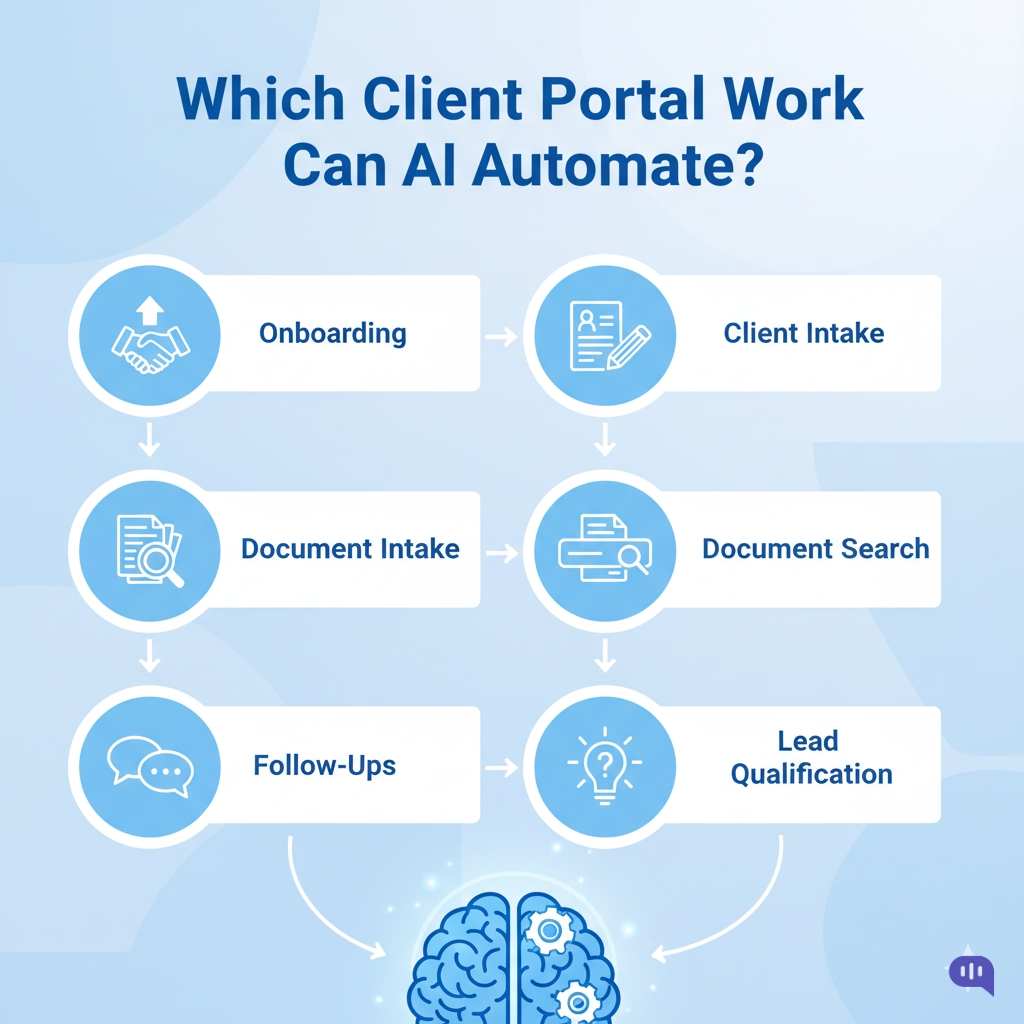
AI can already handle most of the repetitive, rules-based work that portals were hired to do. In practice, that’s easily 70–80% of typical client interactions, which aligns with studies showing AI can automate a large portion of routine professional tasks and materially reduce service workload in accounting and financial services.
Usual automations include:
- Onboarding Q&A and Service Explanation – Explaining service tiers, deadlines, what’s included, and what the firm needs from the client (“What do you need to file my corporate tax?”). AI can utilize your SOPs, pricing pages, and past tickets to provide consistent, policy-aligned responses.
- Dynamic Intake and Qualification – Instead of static portal forms, an AI agent can ask adaptive questions based on entity type, industry, and service line, then write structured records into your CRM or practice management system.
- Document Checklists and Smart Requests – AI can generate tailored document lists (“Because you’re an LLC with employees, we’ll need X, Y, Z”), send secure upload links, and update the checklist automatically as files arrive.
- Follow-Ups and Reminder Cadence – Rather than generic “You have a new item” portal emails, AI can schedule and send targeted reminders across email, WhatsApp, or SMS (“We still need your bank statements for Q3; here’s the secure link”), a pattern shown to improve response rates versus static notices.
- Search and Retrieval Across Documents – Instead of making clients click through folders, AI can locate and return specific documents by intent (“Send me last year’s payroll summary” or “I need the 2023 VAT return draft”), which aligns with research showing that intent-based, conversational search reduces effort and improves portal usability.
In other words, any task that looks like “read structured/known data + follow business rules + explain in plain language” can be automated with AI.
In the next section, we’ll narrow in on the high-stakes scenarios where partner judgment, nuanced advice, and formal sign-offs still belong firmly on the human side.
Where Do Humans and Client Portals Still Matter in the Remaining 20% of Work?
Some aspects of the client experience are too high-stakes, too nuanced, or too heavily regulated to be fully handed over to AI. This is where you can maximize the billable hours for your business.
| Task | Who Does It | Why |
| Complex Tax Strategy and Structuring | Human advisor/partner | Requires deep judgment, risk appetite trade-offs, and long-term planning that go beyond rules and past data. |
| High-Stakes Advisory Calls (M&A, funding, exits) | Human advisor + optional AI notes | These conversations involve a mix of financial, legal, and emotional factors; AI can prepare summaries, but trust is built through human-to-human interactions. |
| Responding to Regulatory or Audit Inquiries | Human advisor with a portal as a vault | Responses need precise wording, full context, and often real-time negotiation with authorities; the portal holds official records and evidence. |
| Final Review and Sign-Off on Returns/Statements | Human advisor + portal e-sign | Regulations and firm policy usually require human review and explicit approval, with signed documents stored in the portal. |
| Handling Disputes, Complaints, and Edge Cases | Senior CX/CS lead + advisor | Reputation, legal exposure, and relationship equity are at stake; effective escalation handling remains an art. |
| Setting and Changing Firm Policies | Leadership team | Decisions on risk, engagement models, and pricing must be owned by humans; AI then enforces and explains them. |
| Managing Exceptions to Standard Processes | Human advisor/ops lead | Exceptions can create precedent; humans decide when to bend rules and how to document that decision. |
| Long-Term Planning and Cross-Sell/Upsell | Human advisor with AI insights | AI can surface signals and opportunities, but prioritization and timing are relationship-driven. |
| Maintaining the System of Record | Portal + back-office systems | The portal continues to serve as the secure “source of truth” for contracts, signed returns, historical documents, and audit trails. |
| Compliance, KYC, and Risk Oversight | Compliance team + portal | Evidence collection and retention must follow strict standards; the portal’s structured storage and access controls remain essential. |
AI can handle the repetitive front-line work, but humans and portals still anchor judgment, compliance, and official records. Next, we’ll move on to implementation, but before that, let’s talk about how you should approach AI agents.
How Do You Design an AI-Led Client Experience for an Accounting Firm?
Since AI is new, designing AI-led experiences might come across as unintuitive. The process becomes simpler when you follow a few guiding principles:
1. Start With Journeys, Not Tools
Begin by mapping a few core journeys (onboarding, tax season, payroll) and ask, “Where could an AI agent answer a question or move this step forward without a human jumping in?”
2. Use AI as the Easiest Front Door
Place your AI agent wherever clients naturally show up first (website chat, WhatsApp, email), so the default behavior becomes “ask the assistant” instead of “hunt for the portal link.”
3. Connect AI to Source Systems, Not Just FAQs
Treat the agent as a thin conversational layer over practice management, billing, and document storage, so it can answer live questions, such as status, invoices, and missing documents, instead of only reciting static help articles.
4. Design Around Jobs, Not Scripts
For each journey, write the client’s goal in plain language (“I want to know exactly what to upload”), then let the AI guide them step by step, pulling known data from your systems rather than re-asking for everything.
5. Make Escalation Natural and Visible
When the AI is unsure or detects sensitive topics, it should gracefully hand over to a human, indicate who is taking over, and preserve the conversation history intact, rather than requiring the client to repeat themselves.
6. Track a Few Simple AI Metrics
Track a few basic metrics when you start, such as the number of queries the AI resolves without handoff, the speed of the first response, and how clients rate the interaction after a chat.
7. Frame AI as a Helper for Humans
Position the agent internally and externally as a digital front-line assistant that clears routine questions, so your accountants and support teams can spend more time on complex, high-value work with clients.
With these guardrails in place, we can discuss a 30-day implementation plan.
What Is a Practical Implementation Blueprint for CS and CX Directors Rolling Out AI in Accounting?
You can roll out a meaningful pilot for an AI agent off the ground in 30 days with a focused, CX-led blueprint. We recommend the following process:
| Week | Focus | Key Actions | Owner / Stakeholders | Success Signals |
| Week 1 | Define Scope and Journeys | Pick 1–2 journeys (e.g., tax-season FAQs + status queries), list top 20 intents, and clarify guardrails (what AI must never answer). | CS/CX Director, Ops Lead, 1–2 Partners | A clear list of intents, no-go areas, and success criteria has been agreed upon. |
| Week 2 | Configure AI Agent and Connect Systems | Set up an AI assistant in 1–2 channels (website chat, WhatsApp), connect read-only to practice management, billing, and KB/SOPs. | CS/CX + Vendor/IT + Practice Management Lead | AI can answer a basic set of status, FAQ, and document queries end-to-end. |
| Week 3 | Soft Launch and Supervised Testing | Roll out to a small client cohort, enable human “shadow mode” review, refine prompts/flows, and tune escalation rules. | CS/CX Team Leads, Frontline Agents | Rising containment rate, clean escalations, fewer misunderstandings. |
| Week 4 | Expand, Measure, and Communicate Value | Open to a broader audience, track automation, response times, and CSAT, and share early wins internally (hours saved, calls reduced). | CS/CX Director, Finance Lead, Partners | Tangible reductions in L1 volume and a clear story on ROI and client impact. |
By the end of 30 days, you will have proven that an AI front line can safely handle real client work. You should also be ready with a few reports on KPIs that will actively track this progress.
How Should You Measure Success With New KPIs for an AI-Led Client Experience?

We will focus solely on the top 5 KPIs that are most top-of-mind for you to track and measure your AI-led client experience.
- Automation Rate for L1 and L2 Queries – Measures the percentage of queries entirely handled by AI. Higher automation frees agents and accountants to focus on billable advisory and complex work, allowing you to take on more clients without adding headcount, which in turn lifts revenue per FTE and overall margins.
- Time to First Response (TFR) – Measures how quickly clients get the first meaningful reply. Faster TFR reduces perceived neglect, lowers churn risk during high-stress periods like tax season, and supports premium pricing because the firm feels more responsive and “always on.”
- Time to Resolution (TTR) for Key Journeys – Tracks how long it takes to complete defined journeys, such as onboarding or document collection. Shorter TTR lets you close engagements faster, bill sooner, and process more work with the same team, which improves both revenue velocity and capacity.
- Channel Shift Away From High-Cost Contacts – Looks at the reduction in phone and unstructured email volume versus AI-led chat and messaging. As more interactions shift to lower-cost channels with AI handling the heavy lifting, your support cost per client decreases, protecting margins and freeing up budget for growth initiatives.
- Client Satisfaction After AI-Assisted Interactions – Captures CSAT or simple post-chat ratings specifically for AI and AI-plus-human flows. Strong scores here correlate with higher renewal rates and greater openness to cross-sell or upsell (for example, adding payroll or advisory), which directly increases revenue per account.
Once you’ve started implementing these KPIs and the related OKRs for your team, it might be helpful to be aware of the guardrails that you will also need to implement with each AI agent.
What Risks, Compliance Requirements, and Guardrails Matter When Using AI in Accounting?
Data and Model Risks
When you put AI in front of clients, the primary risks are incorrect answers and unintended exposure.
- Hallucinations and Misadvice: A model might confidently give incorrect tax or compliance guidance if it’s not grounded in your own KB, SOPs, and systems. That’s a direct regulatory and reputational risk.
- Data leakage: If prompts or conversations are logged or used to train external models without controls, you could expose PII, financial data, or even regulated health/benefit information. Regulators increasingly treat mishandled AI outputs the same way as any other data breach.
The simple rule: treat your AI layer as part of your regulated data environment, not as a toy. That means contracts, DPAs, and technical controls at the same standard as your core apps.
Compliance Requirements: GDPR, HIPAA, SOC 2
For most accounting and financial-services contexts, three frameworks come up again and again:
- GDPR – Governs personal data for EU/UK residents and requires clear legal bases, data minimization, access controls, and strong disclosure around how data is processed and profiled.
- HIPAA – Kicks in whenever you touch protected health information (common in benefits, healthcare-related deductions, or healthcare clients). It demands strict safeguards, audit logs, and Business Associate Agreements for vendors.
- SOC 2 – Focuses on the security, availability, confidentiality, and privacy of your systems; it’s the de facto proof that your SaaS vendor actually lives up to its security claims.
Choosing an AI CX platform that is already GDPR, HIPAA, and SOC 2 certified significantly reduces the workload for your own compliance team, as much of the technical and process control work has already been audited and documented.
However, we’ve discussed at length how automation will impact accounting services. Let’s discuss how that change is going to take shape.
How Will Client Portals Evolve as AI Moves Toward Autonomous Accounting Assistants?
No serious accountant thinks that AI will automate all their processes. The job is too sensitive and needs too much data wrangling for machine learning to be a pure silver bullet. Client portals, though, need to evolve to keep pace with software development, and we expect to see a few changes in the coming decade:
- Portals Become Secure Data Rooms, Not Entry Points – Instead of being the main way clients “use” the firm, portals will increasingly act as the signed, timestamped vault: engagement letters, filed returns, workpapers, audit logs, and KYC evidence. Autonomous assistants will fetch from and write to this vault, but day-to-day interactions will occur through chat, messaging, and voice.
- Embedded AI as the Default Interface Inside the Portal – When clients do log in, they will not be asked to click through tabs. They will talk to an assistant who can search, summarize, and trigger actions on their behalf, using the portal UI only when a formal approval, upload, or signature is needed.
- From Static Status Pages to Live Workflow Streams – Status labels like “In progress” will give way to richer, AI-generated updates: what was completed this week, which documents are blocking progress, who is currently assigned, and what the expected completion window is. This mirrors how autonomous agents perceive tasks as queues and events, rather than static forms.
- API First Portals That Serve AI Agents First, Humans Second – The next generation of portals will expose clean APIs for documents, tasks, approvals, and messaging. Autonomous accounting assistants will utilize these APIs to prepare returns, track missing data, and compile summaries for human review, treating the portal as infrastructure rather than a front end.
- Advisor Cockpits That Sit on Top of Portal Data – Partners and senior advisors will see AI-aggregated views of client risk, workload, deadlines, and opportunities, all built on portal and practice data. The portal remains the system of record, while AI becomes the lens that turns that record into decisions, conversations, and billable work.
Conclusion
Client portals are not going away, but their role is changing. The firms that win will use portals as secure, compliant systems of record and let AI handle the repetitive front line: answering status questions, chasing documents, and guiding clients through complex workflows in plain language. For CS and CX leaders, that shift is less about chasing the latest buzzword and more about a very practical trade: automate 60–80% of low-value interactions so your teams can spend their best hours on advisory, exceptions, and renewal conversations that actually drive revenue.
If you want to see how this looks in practice, you can book a 15-minute Kommunicate demo and walk through real L1 and L2 accounting workflows with an AI front line. Or, if you prefer to experiment hands-on, you can sign up for Kommunicate and start testing an AI-led experience on your own website, portal, and messaging channels.

Devashish Mamgain is the CEO & Co-Founder of Kommunicate, with 15+ years of experience in building exceptional AI and chat-based products. He believes the future is human and bot working together and complementing each other.