Updated on August 27, 2026
The success of your organization depends on how your internal IT help desk performs at scale. However, the job of this team has only become harder over the past few years.
According to Microsoft, hybrid work mode has increased the “surface area” that IT teams need to cover, stretching the work hours of the IT department.
Leaders acknowledge a gap between the quality of service a customer receives and the quality of service an employee receives. 80% of leaders agree that their employee experience could be improved, enabling employees to solve customer problems.
This gap can be solved through improved self-service processes mediated by AI. Major ITSM (IT service management) software businesses increasingly adopt this approach to improve internal help desks. A good combination of AI and knowledge management can become an organization’s force multiplier.
This article will guide you through the end-to-end process of creating an internal IT help desk that works with AI. We’re going to cover:
1. What is an Internal IT Help Desk?
2. Why Should You Modernize Your ITSM Process?
3. What are the Core Features of an Internal IT Help Desk?
4. What are the Best Practices for Modernizing Your ITSM System?
5. What are Some Common Challenges in AI-Powered ITSM and How Can You Resolve Them?
6. How Can You Optimize Your Internal IT Help Desk for Employee Experience?
7. How Does Modernizing IT Help Desks Improve Organizational Productivity?
8. What is the Future of Internal IT Help Desks?
What is an Internal IT Help Desk?
An internal IT help desk is the organization’s first contact for employees who need technical assistance and the hub that routes, tracks, and resolves those requests through defined workflows. It’s distinct from customer support because its “customers” are internal end-users (employees), and it typically operates as the single point of contact within broader IT service management (ITSM) practices.
The “help desk ” started in the late 1980s and evolved into the more comprehensive “service desk” as ITIL took shape under the UK’s CCTA. ITIL’s successive versions (from v1 to today’s ITIL 4) broadened focus from break-fix to end-to-end service delivery, governance, and continual improvement.
What is the Difference Between ITSM and External Support?
To understand the role of the internal IT help desk more granularly, it is helpful to see it in the background of external support:
| Dimension | ITSM / Internal IT Help Desk | External (Customer) Support |
| Primary “customer” | Employees and internal end-users across the business. | Paying customers, prospects, and users outside the company. |
| Purpose & scope | End-to-end service delivery and operations (incidents, requests, changes, problems) guided by ITIL/ITSM practices. | Product usage help, troubleshooting, onboarding, and success for external users; typically focused on product/service experience. |
| Single point of contact | Service desk/portal centralizes internal intake and routing. | Multiple public channels (website, phone, chat, email, social) for customers. |
| SLAs & metrics | Internal SLAs are tied to business priorities, such as metrics like MTTR, change success, backlog, and policy compliance. | Customer-facing SLAs/support tiers; metrics emphasize CSAT, FCR, NPS, and time to resolution. |
| Knowledge management | Internal runbooks, asset context, and privileged info to accelerate fixes. | Public/self-service knowledge base and how-to guides for product users. |
| Tooling landscape | ITSM platforms (e.g., service desk modules) are integrated with operations and change management. | Customer support/ticketing stacks integrated with CRM and success tools. |
| Experience lens | Framed as employee experience (EX): treating employees as “customers” of IT to drive productivity. | Framed as customer experience (CX): loyalty, adoption, and retention for external users. |
Now that you understand how ITSM operates, let’s talk about why businesses are moving towards modernizing them.
Why Should You Modernize Your ITSM Process?
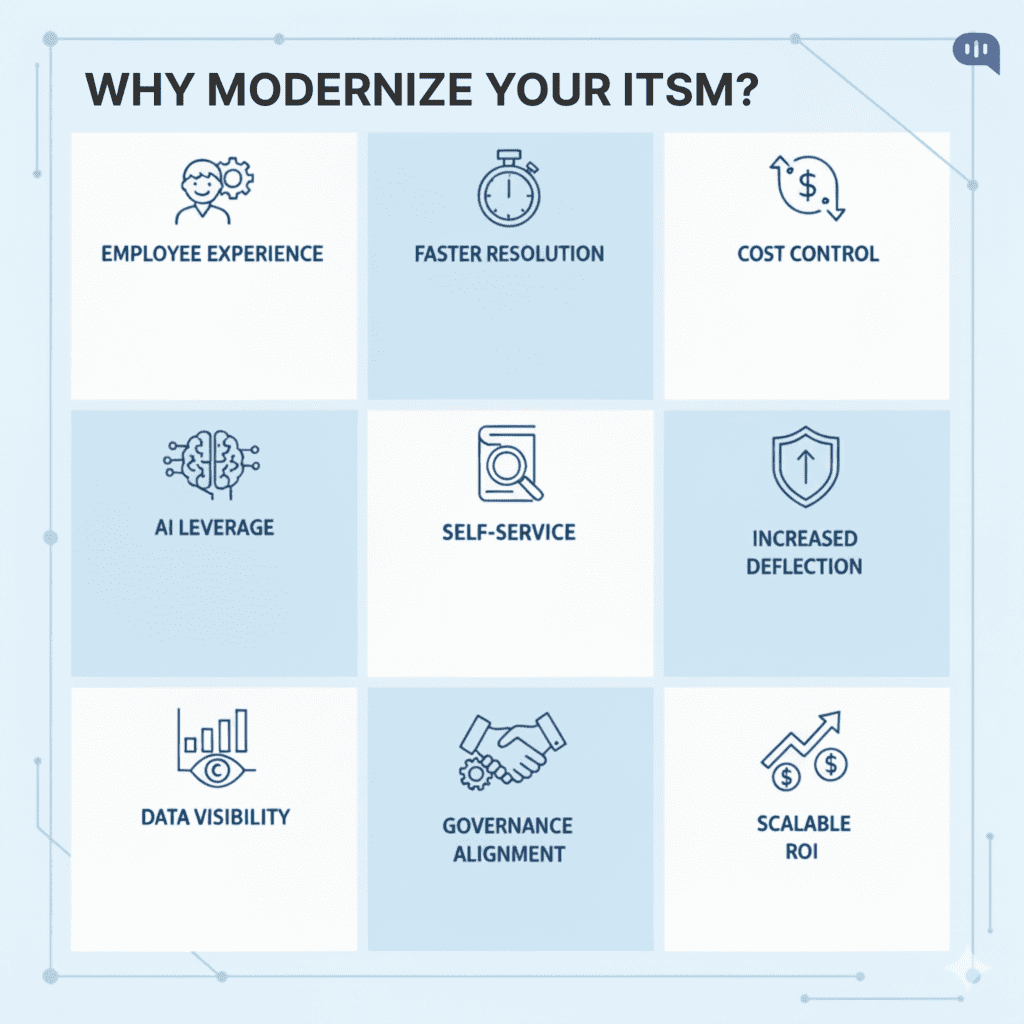
Modernizing your ITSM infrastructure will help you improve the following things:
- Employee Experience – Modern ITSM treats employees as IT customers, focusing on fast, low-friction support across channels. Centering employee experience improves adoption of IT services and aligns improvements with real user outcomes.
- Faster Resolution – Centralized intake, SLAs, and incident workflows reduce handoffs and shorten time to restore service. ITIL 4’s service value system pushes end-to-end flows instead of ad-hoc fixes.
- Cost Control – Platform consolidation cuts maintenance/licensing overhead and reduces tool sprawl while improving agility. Organizations that consolidate to a unified platform report faster time-to-market, better innovation, and increased security
- AI Leverage – Modernization will help you implement AI routing, summarization, and auto-resolution to scale support beyond human capacity. Recent studies show broad adoption intent and usage of AI for ticket handling and knowledge creation.
- Self-Service – A robust knowledge base and shift-left design deflect repetitive requests so agents can focus on complex issues. Industry research links effective self-service to measurable deflection and cost savings.
- Increased Deflection – AI assistants and portals can substantially increase deflected tickets, easing service desk load. Businesses cite ~35% higher deflection after deploying digital agents and improved self-service.
- Data Visibility – Standardized processes and analytics expose bottlenecks and guide proactive fixes. Dashboards and continuous measurement are core to modern ITSM practice.
- Governance Alignment – ITIL 4 reframes ITSM around value co-creation, aligning IT outcomes to business results and risk management. Modernization brings practices, policies, and controls into one coherent system.
- Scalable ROI – TEI studies consistently attribute multi-year ROI to ITSM modernization through efficiency and labor savings. While commissioned, these frameworks document how organizations capture time savings and productivity gains at scale.
A modernized ITSM process can revitalize your organization and improve employee outcomes. So, what features should you seek in modern ITSM systems?
What are the Core Features of an Internal IT Help Desk?
Whenever we help companies build their ITSM processes, we focus on the following features:
- Centralized Intake Portal — A single entry point where employees submit requests, track status, and see updates; eliminates scattered emails and makes ownership explicit.
- Omnichannel Support — Handles tickets via email, chat, Slack/Teams, self-service portal, and mobile; conversations are unified so context follows the user across channels.
- Request, Incident, Problem & Change Management — Standardized workflows for everyday requests, break/fix incidents, root-cause elimination, and controlled changes; reduces chaos and risk.
- Service Catalog — Structured forms with categories, approvals, and SLAs; ensures the correct data is captured upfront and routes work to the correct team.
- SLA/OLA Management — Response/resolution targets with breach alerts and escalations; keeps teams accountable and expectations transparent.
- Intelligent Routing & Automation — Rules and AI to classify, prioritize, assign, and notify; cuts manual triage and accelerates time to first action.
- Knowledge Base & Self-Service — Curated articles, FAQs, and how-tos linked to ticket types; empowers employees to solve common issues without waiting.
- AI Assistance — Summarization, suggested answers, auto-classification, and deflection; boosts agent productivity and improves consistency.
- Asset/CMDB Linkage — Connects tickets to devices, apps, licenses, and configurations; gives agents instant context and reduces back-and-forth.
- Integrations — SSO/IDP, HRIS, Jira, CI/CD, MDM, monitoring, CRM, and status pages; keeps work in sync with the tools teams already use.
- Reporting & Analytics — Dashboards for backlog, SLA health, MTTR, ticket drivers, and capacity; surfaces trends and bottlenecks for continuous improvement.
- Central Incident Management — Playbooks, virtual war rooms, comms templates, and status pages; coordinates cross-functional response during high-impact outages.
- Role-Based Access & Audit Trails — Fine-grained permissions and immutable logs; supports security policies, audits, and compliance frameworks.
- Mobile & Field Support — Agent and approver actions from phones/tablets; enables on-site fixes and faster approvals for distributed teams.
These features are essential for providing the full benefits of ITSM to an organization. They lead to measurable outcomes as well.
How Does a Modernized ITSM’s Outcomes Influence a Business?
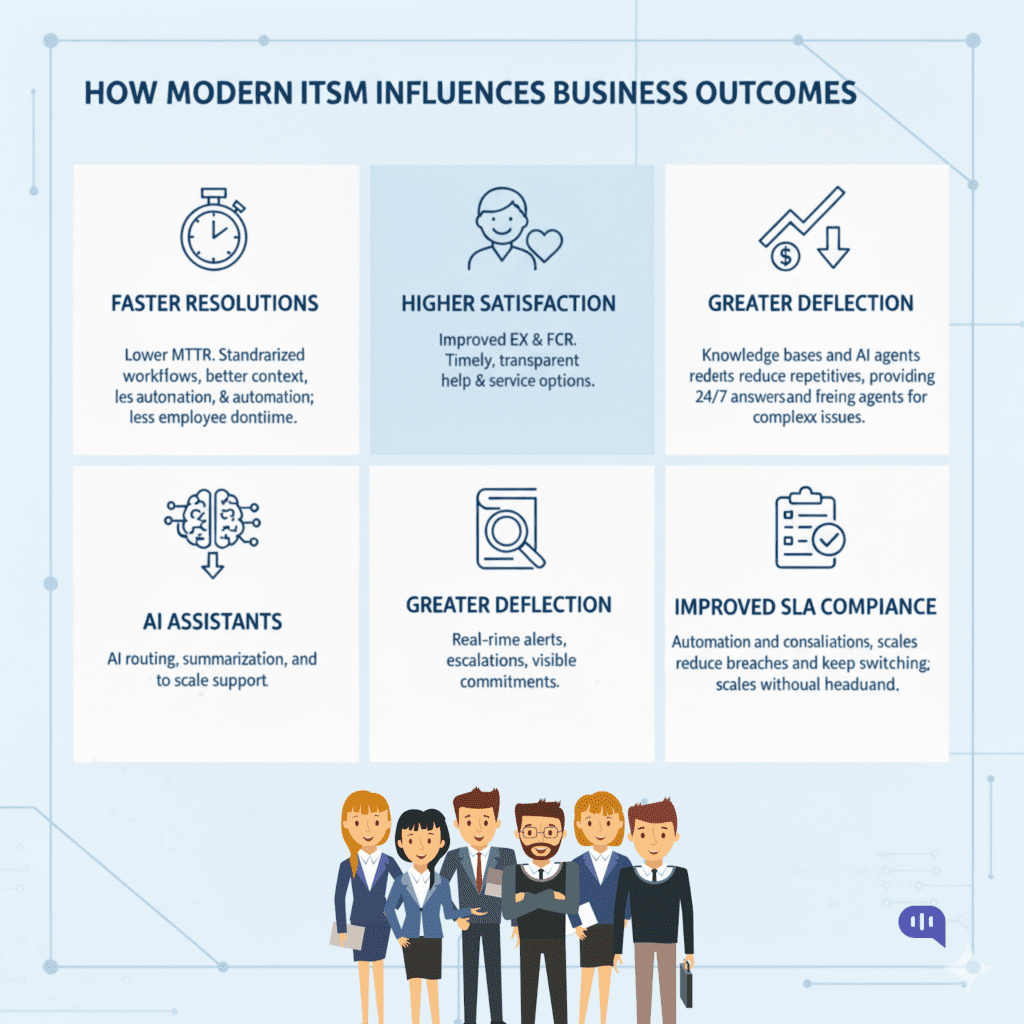
Finding the right KPIs to track the evolution of your system is significant. In our experience, an AI-enabled internal IT help desk influences –
- Faster Resolutions — Lower MTTR (Mean Time to Repair) through standardized workflows, better context, and automation; less employee downtime.
- Higher Satisfaction — Improved EX (Employee Experience) and FCR (First Contact Resolution) as users get timely, transparent help and self-service options that actually work.
- Greater Deflection — Knowledge bases and AI agents reduce repetitive tickets, providing 24/7 answers and freeing agents for complex issues.
- Improved SLA Compliance — Real-time alerts, escalations, and dashboards reduce breaches and keep commitments visible.
- Lower Cost per Ticket — Automation and consolidation trim manual effort, licenses, and context switching; scales without proportional headcount.
You need to follow some established practices to achieve these outcomes organization-wide. The following section will talk about these workflows and practices.
What are the Best Practices for Modernizing Your ITSM System?
We’ve worked with enterprises across manufacturing, services, and technology to support and assist ITSM teams. The practices we recommend are as follows:
- Anchor on ITIL 4 – Use guiding principles (focus on value, progress iteratively, collaborate) to frame every change and prevent process bloat.
- Centralize Intake – Offer a single entry point (portal/chat/email/Slack) with auto-classification and ownership to kill “lost in email” problems.
- Shift Left with Knowledge – Build a searchable, curated knowledge base and route repeatables to self-service/L1 before they escalate.
- Automate the Routine – Apply rules/workflows for triage, routing, notifications, approvals, and status updates to reduce manual toil.
- Instrument SLAs that Matter – Tie response/resolution targets to business impact; alert/escalate on breach risk in real time.
- Close the Loop with Metrics – Track MTTR, backlog, deflection, change success, etc. Review trends weekly and modify processes as required.
- Strengthen Problem & Change – Treat root-cause analysis and change enablement as first-class practices with PIRs and risk gates.
- Integrate with Dev/Ops – Connect ITSM to monitoring, CI/CD, asset/MDM, identity, and HRIS so context and fixes flow automatically.
- Apply AI Where It Helps – Start with AI classification, summaries, article suggestions, and virtual agents; expand as data quality improves.
- Run a Quarterly Roadmap – Deliver modernization in visible 90-day waves (intake → knowledge → automation/AI → problem/change hardening).
If you have not implemented an ITSM yet, we use a playbook that helps you launch within a 90-day time frame.
90-Day ITSM Modernization Playbook
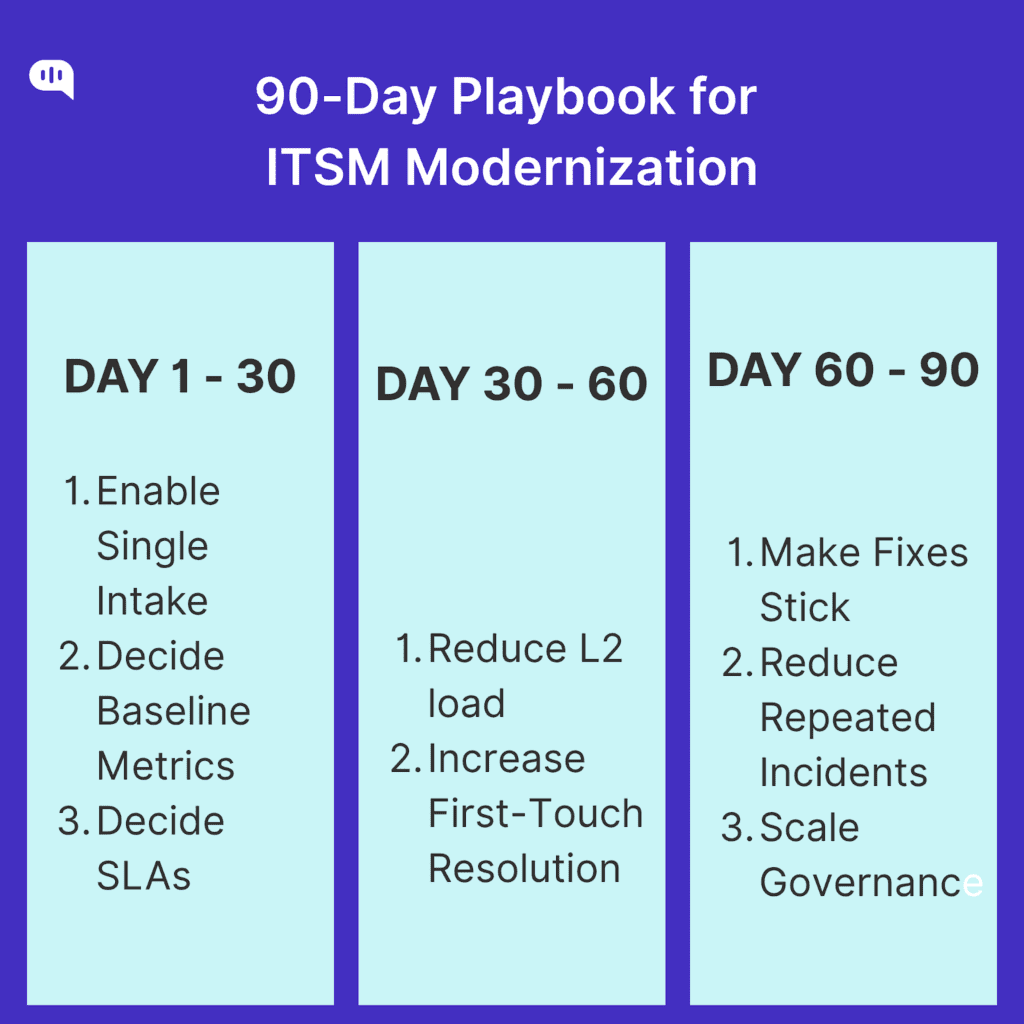
Phase 1 (Days 1–30): Foundation & Control
- Objectives: Stand up single intake, baseline metrics, and SLA hygiene.
- Key Actions:
- Launch unified intake (portal + chat + email + Slack/Teams) with required fields and categories.
- Define SLA tiers (e.g., Sev 1/2/3) and enable breach alerts/escalations.
- Configure core queues, assignment rules, on-call/rotations, and status taxonomy.
- Build starter dashboards (MTTR, backlog, SLA breach risk, top categories).
- Identify last quarter’s top 20 repeatable requests/incidents (data pull). You can automate this process with Insights in Kommunicate.
- Deliverables: Live intake portal, SLA policy page, baseline dashboard, prioritized top-20 list.
- Owners: ITSM Lead (overall), Service Desk Manager (intake/SLA), Platform Admin (config), Analytics (dashboards).
- KPIs (exit targets): Intake adoption >70% of tickets, SLA definition coverage 100%, baseline MTTR established.
Phase 2 (Days 31–60): Shift-Left & Automation
- Objectives: Reduce L2 load; accelerate first-touch resolution.
- Key Actions:
- Publish 25–40 KB articles covering the top-20 drivers; embed article suggestions in forms and agent UI.
- Implement automation: auto-triage, routing, requester notifications, inactivity nudges, and approval flows.
- Pilot AI assistance for classification/summaries and a virtual agent for 5–8 high-volume FAQs.
- Integrate identity/SSO, asset/MDM, and monitoring for richer ticket context.
- Deliverables: KB v1, automation rulebook, AI/virtual agent pilot, integrations live.
- Owners: Knowledge Manager (KB), Automation Engineer (workflows), Platform Admin (integrations), AI/Chat Lead (pilot).
- KPIs (exit targets): Self-service deflection +15–25%, FCR +10 pts, MTTR −15%, automation coverage >30% of tickets.
Phase 3 (Days 61–90): Problem/Change Hardening & Scale
- Objectives: Make fixes stick; reduce repeat incidents; scale governance.
- Key Actions:
- Formalize Problem Management for the top 5 recurring issues; create known-error DB entries and permanent fixes.
- Stand up Change Enablement with risk scoring, templates, CAB cadence, and post-implementation reviews (PIRs).
- Build major incident playbooks (communication templates, virtual war-room mechanics, status page updates); run a drill.
- Expand AI/virtual agent coverage to the top 15 intents; refine prompts/policies from Phase 2 data.
- Publish a quarterly ITSM report highlighting ROI, trend improvements, and the next-quarter roadmap.
- Deliverables: Problem register & KEDB, change policy & templates, MI playbooks, AI expansion, QBR deck.
- Owners: Problem Manager, Change Manager, Incident Commander, AI/Chat Lead, ITSM Lead.
- KPIs (exit targets): Repeat incidents −25–35%, change success rate >90%, Sev-1 MTTR −20%, deflection +30–40% vs. baseline.
We recommend that this playbook include the entire team (even outside IT) so that you can leverage the organization’s experience while designing conversations and your knowledge base. Of course, this playbook doesn’t make the entire process seamless, and most organizations will face some challenges.
What are Some Common Challenges in AI-Powered ITSM and How Can You Resolve Them?
Given the crucial tasks an internal IT help desk helps with, there are multiple failure points, too. Some common challenges we’ve seen with AI-powered ITSM processes are:
1. Data Quality & Taxonomy
AI falls apart when ticket categories, CMDB assets, user profiles, and service catalogs are inconsistent or incomplete. Poor labels lead to misclassification, wrong routing, and weak recommendations.
Example: A “VPN issue” submitted as “network,” “remote access,” or “login” across teams confuses the classifier. Standardizing a taxonomy (with mandatory fields and validation) and backfilling historical data improves model accuracy and routing within weeks.
2. Knowledge Freshness
Virtual agents and suggestion engines depend on accurate, up-to-date knowledge. When articles are stale or scattered, AI confidently returns outdated solutions, causing repeat incidents and frustration.
Example: A password reset flow changed last quarter, but the top KB article still references the old portal. Establishing content ownership, 90-day review cadences, and “KB on closure” prompts for agents keeps answers current and boosts deflection.
3. Hallucinations & Overconfidence
Generative AI can fabricate steps, tools, or policies with thin context, giving plausible but wrong answers. Over time, this undermines adoption—even if most responses are helpful.
Example: The bot invents a non-existent “admin console toggle” to fix SSO. Constrain the model with retrieval-augmented generation (RAG) from approved docs, add confidence thresholds, and require human handoff for low-confidence or sensitive intents.
4. Access Control & Data Leakage
AI that can “see everything” risks exposing privileged information or internal runbooks beyond the right audience. Conversely, too-restrictive access blocks AI from using relevant contexts, reducing utility.
Example: A finance SOX playbook appears in an agent’s suggestions for a general IT ticket. Enforce role-based access control, row-level security on KB/asset data, and context filtering so the AI retrieves only what the requester and agent can view.
5. Bias & Inequitable Support
Models trained on historical data can encode biases—prioritizing specific departments, locations, or ticket types—leading to uneven SLA performance and satisfaction.
Example: Tickets from HQ get faster responses than those from regional offices due to historical staffing patterns. Monitor queue metrics by segment, apply fairness constraints in prioritization, and adjust staffing rules so AI-driven queues meet equitable targets.
6. Integration Gaps
Great AI still fails if it can’t act—no connection to MDM, monitoring, identity, or deployment systems means the assistant becomes a “fancy search box” rather than a resolver.
Example: The bot identifies a known Wi-Fi cert issue, but can’t push a device profile. Add action connectors (MDM, IDP, ticketing updates) behind guardrails, enabling the AI to perform safe, auditable tasks like resets, unlocks, and policy pushes.
7. Change Velocity & Drift
Rapidly evolving tooling (new apps, policies, environments) outpaces model prompts, intents, and KB content. The AI lags reality, pushing incorrect workflows and increasing escalations.
Example: A new VPN client rolls out, but the assistant still recommends the legacy installer. Tie AI updates to change enablement: when a change is approved, trigger KB refresh, intent remapping, and prompt updates as part of the release checklist.
8. Trust & Adoption
Employees and agents abandon the assistant if early interactions feel wrong—slow responses, irrelevant suggestions. You won’t see deflection, MTTR gains, or ROI without adoption.
Example: After three bad chats, engineers bypass the bot and email L2 directly. Introduce an “assistive first” mode (AI suggestions in agent UI), collect thumbs-up/down with rationale, and publicly share weekly quality wins to rebuild confidence.
9. Governance & Auditability
AI decisions (auto-close, routing, approvals) must be traceable. You risk compliance issues and operational disputes without clear logs, appeal paths, and policy coverage.
Example: A high-impact change was “auto-approved” via an unclear rule. Implement policy packs with explicit AI permissions, immutable logs, human approval checkpoints for high-risk actions, and periodic audits to verify adherence.
10. Cost Control & ROI Proof
Inference, connectors, and observability add up. Without usage caps, caching, and a value narrative, AI spend can outpace savings.
Example: The assistant calls the model multiple times per ticket. Introduce prompt caching, tiered models (cheap for classification, premium for complex reasoning), set monthly quotas, and publish a quarterly ROI report (deflection, MTTR, ticket avoidance) to justify investment.
These processes can be optimized to create more robust workflows that scale with your organization. We’re going to talk about how we can optimize the process next.
How Can You Optimize Your Internal IT Help Desk for Employee Experience?
To improve employee experience through your internal IT help desk, your primary focus will be reducing the employee effort required to solve IT issues. Here are five factors that are crucial to optimizing that aspect:
- Start with EX Principles – Design every policy and workflow around employee effort: fewer steps, faster answers, and clear outcomes. Treat employees like customers and iterate your processes based on feedback loops to maximize the outcomes of your internal IT support process.
- Keep One Central Portal – Give employees a single hub (portal + chat entry) with short, innovative forms. Pre-fill identity, device, and team info so they don’t retype details. This directly reduces the time-to-fix required for each incident.
- Optimize Your Self-Service Portals – Even the largest companies worldwide have incomplete SOPs because employees develop customized workflows over time. This complicates the process of creating a Knowledge Base. A proper self-service portal needs org-wide approval with contributions from every team member.
- Personalize by Team – A marketing professional has less tech know-how than a frontend developer. Your support portal should be able to communicate in simple language and meet your employees where they are.
- Measure and Optimize – It’s challenging to design feedback loops for internal systems, but take stock of how long it takes to solve a problem. Optimize common bottlenecks and create new articles to address common questions so that the time and effort are reduced over time.
By focusing on employee experience, the internal IT team can help increase organizational productivity. In the next section, we will talk about how this takes place.
How Does Modernizing IT Help Desks Improve Organizational Productivity?
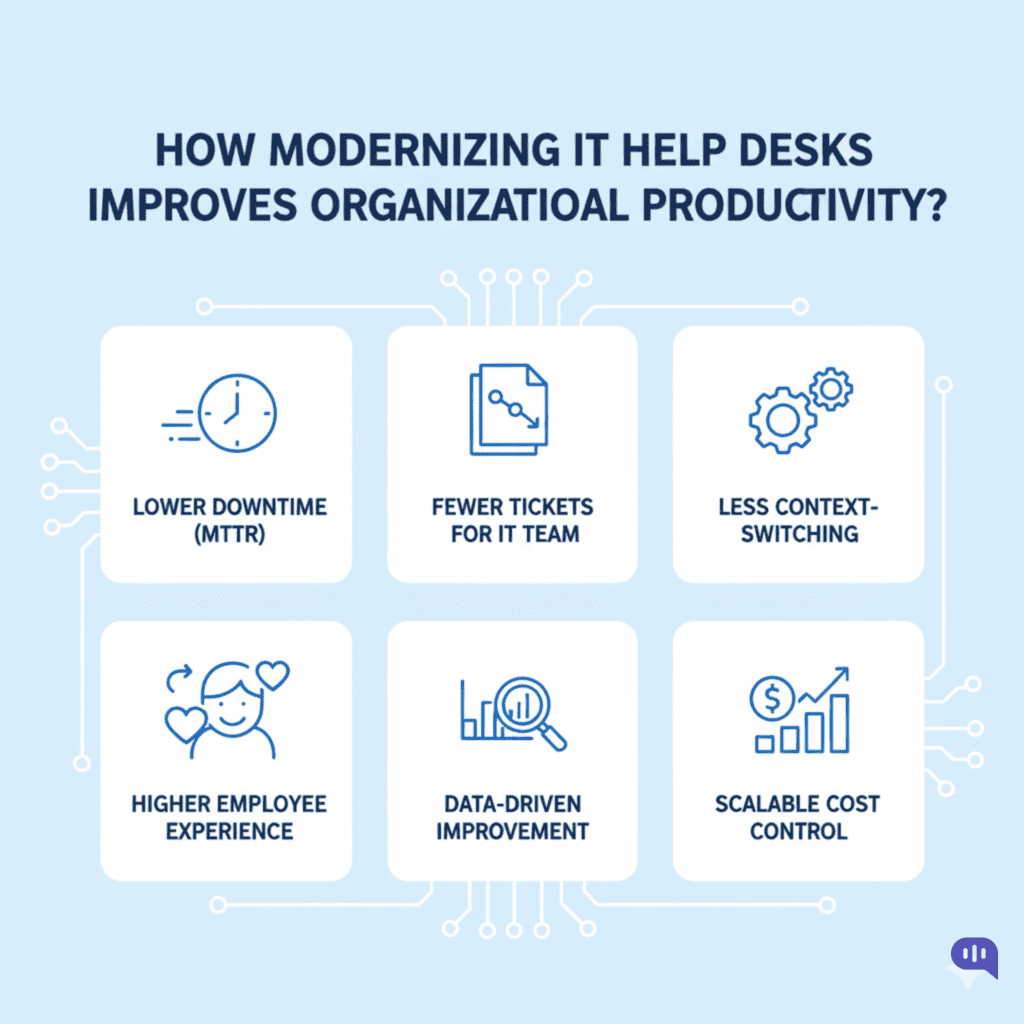
While organizations might not be enthused about allocating higher budgets to an internal process, the modernized internal IT help desk is directly connected to revenue outcomes:
- Lower Downtime (MTTR) — Standardized workflows, live SLAs, and integrated diagnostics cut mean time to resolution so employees get back to work faster. (Reducing MTTR is a core lever for operational efficiency.)
- Fewer Tickets for the IT Team— A usable knowledge base + AI search/virtual agents resolve common issues self-serve, shrinking queue volume and agent load. (Real-world programs report meaningful savings from case deflection.)
- Less context-switching — Connecting ITSM with identity, device/MDM, monitoring, and DevOps tools brings context to the ticket and enables one-click actions, reducing back-and-forth and rework.
- Higher Employee Experience = Higher Output — Treating employees like customers of IT (clear status, faster updates, working self-service) improves EX, which organizations increasingly view as a productivity driver and differentiator.
- Data-Driven Improvement — Modern reporting exposes bottlenecks (backlogs, breach risk) and guides continuous fixes; knowledge programs further boost agent efficiency and consistency.
- Scalable Cost Control — By deflecting routine requests and automating triage/notifications/approvals, teams handle more demand without linear headcount growth, stabilizing support costs while improving service quality.
Over the past few years, ITSM has led to a direct revenue increase in multiple businesses. This has also led to increased research and development across the industry, and a few trends are taking shape.
What is the Future of Internal IT Help Desks?
Some recent developments in the ITSM space are as follows:
- AI Copilots are Becoming Standard — Service desks shift from “search and route” to AI-assisted triage, summarization, and next-best-action, embedded natively in ITSM platforms (e.g., ServiceNow Now Assist). Expect faster first responses and more consistent resolutions.
- Self-Healing Systems — With better telemetry and workflow connectors, common issues trigger automated fixes (reset certs, push profiles, reassign licenses) without human touch, moving the desk toward autonomous operations (AIOps + ITSM).
- Digital Employee Experience is the Focus — Digital Employee Experience (DEX) tools and metrics mature; IT roadmaps prioritize friction reduction (time to first useful update, reopen rate) and proactive comms because EX is increasingly viewed as a productivity lever.
- Conversational, Multimodal Support — Employees engage with help through chat, voice, and even on-screen assistance. Newer models like GPT-5 and Claude Sonnet 4.5 can use computers to help employees solve their problems.
- Predictive Operations at Scale — Combining ITSM data with monitoring and identity systems enables forecasting ticket surges, staffing needs, and risk hotspots.
These improvements are still taking place and are expected to improve your IT help desk outcomes over the next few years.
Conclusion
Based on the article’s content, tone, and focus, this article is written for:
Primary Audience:
- IT Leaders and ITSM Managers – Those responsible for internal IT help desk operations, service delivery, and modernization initiatives
- CIOs and IT Directors – Senior technology leaders evaluating investments in ITSM platforms and AI capabilities
- Operations and Digital Transformation Leaders – Executives focused on employee experience and organizational productivity
Secondary Audience:
- IT Service Desk Managers – Practitioners implementing day-to-day ITSM processes
- Enterprise Architects – Those designing integrated technology ecosystems
- HR and Employee Experience Teams – Stakeholders interested in improving internal service quality
The article assumes a moderately technical audience familiar with IT concepts but presents information accessibly for business decision-makers.
Modernizing your internal IT help desk is no longer optional: it’s a strategic imperative that directly impacts employee productivity, operational efficiency, and your organization’s bottom line. The gap between customer experience and employee experience continues to widen, and AI-powered ITSM provides the most straightforward path to closing it.
By anchoring on ITIL 4 principles, centralizing intake, shifting left with knowledge management, and thoughtfully integrating AI assistance, you can transform your help desk from a reactive cost center into a proactive enabler of business value.
Success requires more than technology. It demands cross-functional collaboration, continuous measurement against KPIs like MTTR and deflection rate, and a relentless focus on employee experience. Address common AI challenges head-on with guardrails, feedback loops, and transparent governance.
If you want to adopt a generative AI-powered chatbot for your internal help desk, sign up or book a demo for Kommunicate.
See how Kommunicate builds custom IT support agents alongside support, HR, and sales on one platform.

Adarsh Kumar is the CTO & Co-Founder at Kommunicate. As a seasoned technologist, he brings over 14 years of experience in software development, artificial intelligence, and machine learning to his role. His expertise in building scalable and robust tech solutions has been instrumental in the company’s growth and success.