Updated on August 3, 2026
TL;DR: You can reduce no-shows by 35% by configuring drips and flows for WhatsApp appointment booking. This guide shows you how to automate confirmations, reminders, and reschedules—no code required.
You have finally landed a beautiful Meta campaign, the customer acquisition costs (CAC) are low, and bookings are pouring in. But then you sit in a Google Meet meeting for 15 minutes, and the client just doesn’t show up.
“No Shows” can be a drain on any business. Whenever this happens, you lose out on:
1. Acquisition costs
2. Employee time
3. Operational capacity
4. Opportunity
If you run a service business with limited resources and staff, no-shows can derail an entire day of operations. But there’s a way out, and it comes with WhatsApp.
The messaging app boasts a tremendous 2.5 billion users who log in monthly. And since your clients are most likely on the platform, simple automations can decrease the number of no-shows you get.
This guide will cover setting up these automations and recovering lost revenue. We will talk about:
1. Why Use WhatsApp for Appointment Booking?
2. How Can You Set Up WhatsApp for Appointment Booking?
3. How Can You Make WhatsApp Appointment Booking More Effective with Integrations?
4. What are the Best Practices for WhatsApp Automations for Appointment Booking?
5. Conclusion
Why Use WhatsApp for Appointment Booking?
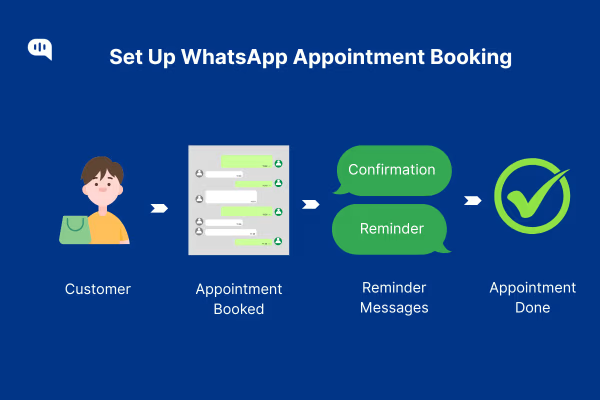
Today’s customers live on mobile chat, and WhatsApp is the clear favorite. With a massive user base and features built for fast, friendly exchanges, the app checks every box for cutting missed appointments, boosting sales, and keeping every age group happy. Let’s understand why:
1. Massive Reach, Immediate Opens
WhatsApp is the largest private messaging app, reaching 2.5 billion people in 180 countries. Messages on the platform enjoy a 98% open rate, and 4 out of 5 are read in the first five minutes. That speed matters for appointment reminders: clients see the note immediately, have time to react, and are less likely to forget.
Compare that with email, where even good campaigns sit unopened for hours, or SMS, which many users now ignore. A reminder that gets read fast is the first step toward fewer no-shows.
2. Customers Prefer It
Half of WhatsApp users already ask brands to send appointment alerts, order updates, or event notices through the app.
Additionally, 33% of customers expect quick answers, and 40% like chatting outside regular office hours. 50% of them already feel safer messaging a business on WhatsApp because of the encryption, and most trust automated chat help inside the app. Meeting people where they feel comfortable builds goodwill, lowers friction, and encourages on-time arrivals.
3. Personal, Two-Way Chats
WhatsApp feels like a private conversation rather than a broadcast. Staff can answer prep questions, share directions, and reschedule in the same thread. Clients can send photos, voice notes, or documents if needed, and everything stays organized in one place.
This back-and-forth makes customers feel heard and valued, which research shows reduces no-show rates. A quick “See you tomorrow!” reply can be the friendly nudge that fills a slot.
4. Sales and Loyalty Boost
The value goes beyond attendance. Seventy-five percent of shoppers buy after chatting with a business on a messaging app, and companies that sell only on WhatsApp see a 68% repeat-purchase rate. Clients who receive helpful reminders and quick answers are more likely to trust the brand and return. Appointment booking becomes a gateway to upsells, follow-up services, and long-term loyalty. For service businesses, this makes appointment reminders and messaging more than an operational convenience. It becomes part of the broader marketing effort, helping you build trust, encourage repeat bookings, and create more opportunities for follow-up services.
5. Meets “Always-On” Expectations
Modern customers expect instant service: 71% want continuous access, and 80% expect a response within ten minutes.
WhatsApp’s templates, quick replies, and chatbot automation make it possible to answer simple questions 24/7, while routing complex issues to humans during business hours. Delivering that round-the-clock support sets you apart from slower competitors and shows clients you respect their time.
6. Future-Proof Communication
Younger users rarely check email and avoid voice calls, preferring casual chats. Older users have also grown comfortable with mobile messaging. By adopting WhatsApp now, your business stays relevant to both groups.
Choosing WhatsApp makes you more relevant to your audience. It improves your reply rates and the way your customers interact with you.
So, let’s start understanding how to set up WhatsApp appointments.
How Can You Set Up WhatsApp for Appointment Booking?
Setting up WhatsApp for Appointment booking is simple. You just need to use your WhatsApp Business API with some automations to improve customer responses.
Given that email reminders often land in crowded inboxes, and phone calls go unanswered, WhatsApp offers a faster, more trusted path to keep appointments on track and revenue flowing. Here is a short how-to on how use WhatsApp for your appointment booking process.
1. Create a Smooth Booking with Interactive Messages & Flows
Create the following templates on WhatsApp so that you can improve your no-show numbers.
- Auto-greetings – You can trigger a welcome message for first-time contacts or those who have been silent for 14 days. Share business hours, key services, and a link to FAQs.
- WhatsApp Flows – Meta’s Flows let customers choose a service, date, and time via buttons and list menus without leaving chat, slashing form-fill friction.
- NLP chatbots – A basic AI layer can parse open text like “need airport pickup” and surface the right option, cutting typical booking drop-offs tied to typos or format errors.
- Zero manual data entry – Send captured fields straight into your CRM with integrations to CRMs.
Why it works: Messages on WhatsApp boast a 98 % open rate, so the entire flow stays visible and actionable.
2. Send Proactive Reminders
Sending reminders about the booking in advance can improve attendance by up to 80%. These are the campaigns you should send:
- Instant confirmation – Set up an automation that sends a template-based receipt when a slot is booked.
- Layered nudges – Send follow-ups 72 hours and 24 hours before the visit. Personalize with name, service, date, and time placeholders (e.g., “Hi {{1}}, just a reminder about your {{2}} on {{3}} at {{4}}.”).
- Self-service changes – Include a “Reschedule” button so clients can adjust times without staff calls.
- Deposits inside chat – In regions where WhatsApp Pay is live (India recently lifted its 100M-user cap), collecting a small pre-payment adds commitment and cuts last-minute flaking.
Impact: Businesses using WhatsApp reminders report up to a 35% drop in missed appointments and a 50% cut in staff confirmation time.
Quick reply matters: 82% of consumers call an “immediate” response critical, and most define that as under 10 minutes—perfect territory for automated WhatsApp bots.
3. Handle Reschedules & Changes
Reschedulings and cancellations happen. The best way to manage it is to set up alternatives using automation. We recommend the following practices:
- One-tap Reschedule or Cancel – Offer quick-reply buttons to shift or drop a slot.
- Send an Instant Cancel Receipt + Incentive – E.g., “Your massage on 12 Aug at 3 PM is canceled. Rebook now and save 10 %.”
- Use a Smart Wait-List – Fill openings by pinging the next customer in the queue with a “Reply YES to claim” prompt.
- Send a Follow-Up – A day or two later, send a “Need help finding a new time?” nudge to keep the relationship warm.
We use this cadence to design the templates for any customer that pairs with Kommunicate:
| Message Type | Why Send It | Key Info | Example |
| Greeting | Set expectations | Hours/services/FAQ | “Thanks for reaching out! We’re open 9-6 M-F. FAQ: [link]” |
| Confirmation | Lock slot | Date, time, service | “✅ Your haircut is set for 14 Aug, 11 AM.” |
| Reminders | Prevent forgetfulness | Same + reschedule link | “⏰ See you tomorrow at 11 AM. Need to move it? Tap here.” |
| Reschedule | Retain booking | New date request | “Pick a new time and we’ll confirm.” |
| Cancel receipt | Upsell re-booking | Incentive | “❌ Canceled. Rebook now—10 % off.” |
| Wait-list alert | Fill up booking slots | Date/time | “Slot open 14 Aug, 3 PM. Reply YES to book.” |
| Post-visit | Feedback & repeat | Survey link | “Rate today’s visit (30 sec): [link].” |
Doing these steps will ensure that you reduce the number of no-shows in your appointments.
After a helpful WhatsApp chat, 75% of consumers purchase, and 67% prefer messaging over email or calls for brand interactions.
That means appointment workflows can double as revenue engines, nudging add-ons, upsells, and future bookings inside the same trusted channel.
You can even improve this process by using integrations.
How Can You Make WhatsApp Appointment Booking More Effective with Integrations?
Smart integrations can turn a simple chat reminder into an AI-enriched workflow. You can use them to sync your calendars, enrich contacts in your CRM, manage ticket routing, and optimize your campaigns.
Most of these integrations aren’t available natively and require coding experience to navigate. To take advantage of 40+ no-code native integrations from Kommunicate, start by following this tutorial:
Below are the “must-connect” pieces that unlock the real power of WhatsApp.
1. Sync Every Slot to Your Calendar
Connect Kommunicate to Google Calendar or Outlook through Zapier. Each confirmed time slot instantly drops onto the staff and customer calendars, complete with meeting links and reminders—no manual copy-paste. That one automation prevents double-booking and keeps your whole team in sync.
2. Enrich Your CRM
Connect your CRM (Hubspot, Piperdrive, etc) to WhatsApp via Kommunicate to create or update contacts the moment someone books on WhatsApp. Conversation history, custom fields, and even payment status flow straight into the deal record, giving sales and service teams the context they need.
3. Escalate Complex Queries to Your Helpdesk
When a chatbot can’t solve the issue, Kommunicate routes the thread to human agents—or pipes it into Zendesk or Freshdesk. Your agents reply from the Kommunicate dashboard, and your customers see a seamless chat in the same thread.
4. Measure, Learn, and Optimise
Kommunicate’s AI Insights dashboard shows drop-off points in Flows and agent handling time. You can then push these events to Google Sheets or your BI tool via webhooks for deeper analysis—the result is a data loop that continuously trims no-shows and boosts satisfaction.
Finally, before setting up your WhatsApp marketing automations, let’s talk about the best practices for building WhatsApp messages.
What are the Best Practices for WhatsApp Automations for Appointment Booking?
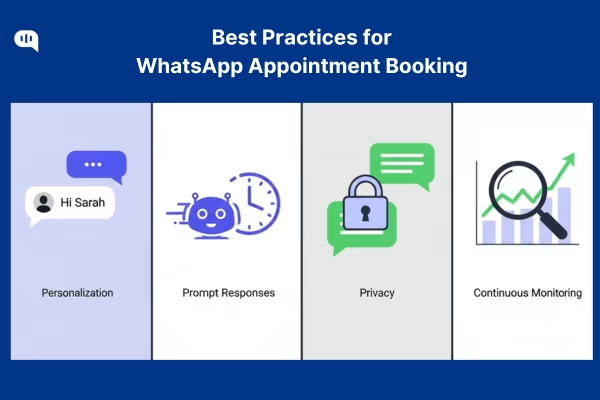
Customers judge you for every message you send on WhatsApp. To maintain cadence and improve your conversion rate.
Personalize Your Messages and Maintain an Authentic Tone
Research shows that personalized WhatsApp broadcasts pull 85-95% open rates. At the same time, 81% of consumers ignore irrelevant messages, and 71% expect brands to personalize each interaction.
Practical tips:
- Use dynamic variables ({{name}}, {{service}}, etc.) in every template.
- Keep copy conversational, not canned; WhatsApp is closer to a friend chat than a formal email.
- Embed rich media (location pins, PDFs, short videos) only when it adds real value.
Send Prompt Responses with Clear Escalation Paths
Almost two-thirds of buyers expect a reply within 10 minutes on messaging apps, and 82% call an “immediate” response important.
- Let Kommunicate chatbots handle FAQs and simple reschedules 24/7.
- Configure the “human-handoff” node so any “agent” intent routes straight to a live rep or tickets into your help-desk tool.
- Publish backup channels—phone, email, or store address—in your WhatsApp profile and auto-greeting so customers know where to turn next.
Secure Privacy with Consent Management and Data Privacy
Meta’s guidelines require separate opt-ins for each message category (order updates vs promotions) and an easy opt-out path. Combine that with GDPR/CCPA rules on data minimization:
- Collect only what you need (never full card numbers).
- Store WhatsApp contact data inside secure CRM fields, encrypted at rest.
- Honor every “STOP” or opt-out within 24 hours—Kommunicate webhooks let you automate the purge.
Respecting preferences isn’t just legal hygiene; it keeps the channel open so reminders don’t get blocked.
Maintain Continuous Monitoring & Optimisation
Your WhatsApp performance shifts fast. Use a benchmark guide to track read-through, reply time, and no-show deltas every month.
- Review Kommunicate’s Analytics dashboard weekly—look for drop-offs in Flows or spikes in “agent transfer” events.
- A/B-test message templates: try emoji vs. plain text, or morning vs. evening sends.
- Feed all events to a BI sheet; if no-show rate creeps up, tweak reminder timing or payment requirements.
If you work on automations and improve your overall messaging on WhatsApp, it will decrease no-show rates across your appointments.
Conclusion
No-shows drain revenue, staff time, and customer goodwill.
By moving your entire appointment journey to WhatsApp and powering it with Kommunicate’s chatbots, Flows, and plug-and-play integrations, you can create a booking experience that is fast, personal, and available 24/7. Your customers will get instant confirmations, friendly reminders, and one-tap rescheduling. And your team will get cleaner calendars, richer CRM data, and fewer empty slots.
Ready to see it live? Book a 15-minute demo and watch Kommunicate turn your WhatsApp bookings into a zero-no-show, revenue-boosting machine.

Devashish Mamgain is the CEO & Co-Founder of Kommunicate, with 15+ years of experience in building exceptional AI and chat-based products. He believes the future is human and bot working together and complementing each other.