Updated on September 22, 2026
Three billion users exchange over 100 billion messages every single day on WhatsApp. This scale translates into a rare opportunity for marketers: connecting with users through a permission-based inbox with 98% open rates.
In 2025, this opportunity is larger than ever. Meta has begun rolling out ads inside the app’s “Updates” tab alongside paid channel subscriptions and discovery units to let brands promote themselves natively without touching private chats. With WhatsApp Business API upgrades, templated marketing messages, and conversation-based pricing, the platform is evolving into a full-funnel revenue engine.
This article will help you with a practical, 2025-ready playbook to launch and level-up your WhatsApp marketing programme. We’ll cover:
1. What is WhatsApp Marketing?
2. Why Does WhatsApp Marketing Matter in 2025?
3. Should You Use the WhatsApp Business App or Business API?
4. How Much Do WhatsApp Marketing Conversations Cost?
5. How Do You Calculate WhatsApp Marketing ROI?
6. How Do You Set Up a WhatsApp Marketing Campaign Step by Step?
7. What Are the Best Practices for Opt-In and Content on WhatsApp?
8. Which Tools Can You Use for WhatsApp Marketing?
9. Which WhatsApp Features and Trends Should You Watch?
10. Final Thoughts
What is WhatsApp Marketing?
In WhatsApp marketing, you use the WhatsApp chat ecosystem, connect with customers, promote products, deepen engagement, and drive revenue. WhatsApp is an excellent platform for this because of its user base (more than 3 billion monthly) and the trust customers place in the end-to-end encryption on the platform.
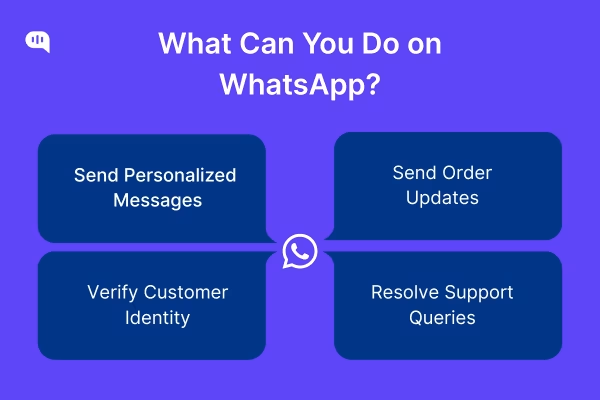
Recently, WhatsApp marketing has become more effective because the app’s core functions span the entire customer journey. With WhatsApp, marketers can:
1. Broadcast personalised promotions
2. Send order updates
3. Verify identities with one-time passwords
4. Resolve support queries
The platform also lets you send different types of rich-text and media, including:
1. Plain text
2. Images
3. Video
4. Documents
5. Product catalogues
6. Quick-reply buttons
7. Carousels
8. In-chat CTA buttons
You can also set up a WhatsApp AI Agent for automated replies and segment your customers to drive more personalized campaigns.
Recent updates from WhatsApp have also made it a full-stack marketing app. The app now supports:
- Native payments (in select markets)
- Flows for multi-step forms
- Ads in the Updates tab
With these updates, brands can now handle discovery, consideration, purchase, fulfilment, and loyalty programmes on WhatsApp without forcing users to jump to email, SMS, or a website.
The result is higher conversion rates and deeper lifetime relationships, especially for D2C and mobile-first businesses in markets where WhatsApp dominates daily life. For more context, let’s quantify why WhatsApp is so relevant for marketers today.
Why Does WhatsApp Marketing Matter in 2025?

We work with many marketers who use WhatsApp for their marketing efforts. In our experience, everyone from startups to enterprises is prioritizing the app for the following reasons:
1. Massive Reach & Engagement
WhatsApp’s audience tops 3 billion monthly users across 180-plus countries. These users spend 34 minutes on the app daily and open 98 % of messages.
These metrics dwarf other communication channels like emails and SMS.
2. Customers Prefer It
Over 60% of consumers favour brands that contact them on their preferred channel. With WhatsApp allowing these customers to track orders, get reminders, and request support, it becomes a natural favorite for these conversations.
3. Conversion Rates That Outperform
According to a Watikit report, campaigns on WhatsApp regularly deliver 45–60% click or purchase rates.
This is a massive advantage compared to the 5-6% conversion rate across email and SMS.
4. Cost-Efficient & Scalable
You can use Meta’s Business App for free and the WhatsApp Business API once you achieve scale. As an add-on, conversion costs on WhatsApp are currently much lower than those of any other paid ad channel.
5. Built-In Trust & Privacy
Customers prefer WhatsApp for its end-to-end encryption and strict opt-in rules that keep personal chats ad-free. So, it’s easier for marketers to maintain high response rates and brand credibility on the platform.
With its vast user base and business-friendly features, WhatsApp has become the preferred marketing channel for everyone from mom-and-pop stores to large enterprises. Currently, most businesses we work with use WhatsApp to maintain customer loyalty, send bulk messages, and reply to support requests.
When you start on WhatsApp, choosing the WhatsApp Business API might be challenging. The following section will compare the two experiences and help you get started with WhatsApp.
Should You Use the WhatsApp Business App or Business API?
Let’s compare the WhatsApp business app and its business API. Here’s a comprehensive table that lists all of the differences
| Feature | WhatsApp Business App | WhatsApp Business API |
| User Access | Single user / Limited devices (1 mobile + 4 linked) | Unlimited users/devices |
| Message Volume | Low | High (up to 1 million unique users simultaneously) |
| Automation | Basic (greeting/away messages, quick replies) | Advanced (flows, AI bots, automated responses/follow-ups) |
| Chatbot Support | No direct chatbot flows | Yes (integrates with external software for chatbot flows) |
| CRM Integration | No | Yes (seamlessly connects with major CRMs) |
| E-commerce Integration | No | Yes (integrates with platforms like Shopify, WooCommerce) |
| Shared Inbox | No (difficult for teams) | Yes (via BSPs like Kommunicate) |
| Message Templates | Limited (regular text/media) | Yes (pre-approved templates with interactive buttons) |
| Verified Green Tick | No | Yes (Official Business Account status) |
| Cost | Free to download and use | Conversation-based pricing (not free) |
| Ideal Business Size | Small businesses, solopreneurs | Medium to large businesses, enterprises |
A business app will be enough for all your needs if you are just starting your business. But, as you scale, you should partner with a Business Solution Partner (BSP) like Kommunicate, who can help you manage the API integration.
Next, let’s understand how much it costs to market through the WhatsApp Business API solution.
How Much Do WhatsApp Marketing Conversations Cost?
The WhatsApp Business API follows a pay-per-conversation model. A conversation here refers to a 24-hour messaging thread between a WhatsApp Business API account and a customer. You’ll be charged for each message you deliver during these sessions.
Depending on how you have these conversations, it will fall into different categories.
What are the Different Categories of Conversations on WhatsApp?
Different conversation categories are priced differently. These categories are:
- Marketing: Typically started by the business, this includes product announcements, special offers, related product suggestions, abandoned cart reminders, and retargeting campaigns.
- Utility: This category refers to transactional messages usually triggered by a user’s action. It includes order confirmations, shipping updates, appointment reminders, or recurring billing statements.
- Authentication: Messages in this category verify user identity, often through one-time passwords (OTPs) for logins or transactions.
- Service: These messages manage incoming customer inquiries handled by a live agent or an AI-powered conversational bot. The user initiates this category.
Additionally, other factors also affect the pricing of conversations.
What are the Different Factors that Affect Conversation Pricing on WhatsApp?
The cost of conversations on WhatsApp also depends on:
- Regional Variations: Rates vary significantly depending on the market or country where the message is sent. For instance, a marketing message in North America costs approximately USD 0.025, whereas the same message in India costs around $USD 0.0107
- Free Service Conversations: As of November 1, 2024, service conversations initiated by users are free for all businesses. When a user messages a business, a 24-hour customer service window opens, during which companies can respond at no charge. This window resets with each subsequent user message.
- Free Entry Points: A significant cost-saving mechanism involves “free entry points.” Suppose a user initiates a chat by clicking a click-to-WhatsApp ad or a call-to-action button on a Facebook Page. In that case, all messages the business sends within the subsequent 3 days (72 hours) are complimentary. This extended window provides a longer period for free engagement than the standard 24-hour window.
- Utility Templates in Customer Service Window: Beginning July 1, 2025, utility templates sent within an active customer service window will also be free.
- Messaging Limits: Businesses typically start with a limit of 250 business-initiated conversations within a rolling 24-hour period. This limit can be scaled up to unlimited discussions over time, based on message quality and engagement levels.
- Provider Fees: Besides Meta’s charges, Business Solution Providers (BSPs) or agencies may levy their own per-message or monthly subscription charges. Examples include Kommunicate’s starter plan at $40/month.
Your business and the partner BSP can optimize the costs by working with these factors. With this information, let’s compile a table comparing the prices for WhatsApp.
What are WhatsApp Conversation Prices Across Different Regions?
| Category | North America (USD) | India (USD) | Germany (USD) | France (USD) | Brazil (USD) | Notes |
| Marketing | $0.025 | $0.0107 | $0.015 | $0.015 | $0.010 | Business-initiated promotions. |
| Utility | $0.004 | $0.004 | $0.004 | $0.004 | $0.004 | Transactional, non-promotional. Free if sent within the customer service window |
| Authentication | $0.004 | $0.004 | $0.004 | $0.004 | $0.004 | One-time passwords for identity verification. |
| Service | Free | Free | Free | Free | Free | User-initiated inquiries. Free for all businesses |
| Free Entry Point | Free for 72 hours | Free for 72 hours | Free for 72 hours | Free for 72 hours | Free for 72 hours | Any message type is free if the user initiates chat via a click-to-WhatsApp ad or a Facebook CTA. |
These rates are based on Meta’s pricing and might vary depending on your WhatsApp BSP. Now that we have a picture of the pricing, let’s start calculating the ROI for these conversations.
How Do You Calculate WhatsApp Marketing ROI?
We usually calculate ROI with the formula:
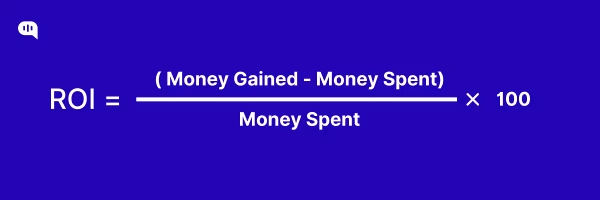
For example, if you spend $10,000 in WhatsApp marketing and generate $50,000 from that effort, your ROI will be 4, showing a 400% return.
The first step in this ROI calculation is to find out what “Return” means in your case. For most WhatsApp marketers, this is either of the following:
1. Direct revenue from WhatsApp – Sales & the Amount of pipeline added
2. Cost savings from WhatsApp – Savings from deflected tickets, and automated customer service (You can find the calculations for this on our blog on customer service ROI)
To account for sales revenue from WhatsApp, ensure that you track the following metrics:
- Attribution: Use UTM parameters to track the conversions driven through WhatsApp.
- Timeframe: Consider the time it took for a person to convert; this should help you account for fixed costs associated with the customers.
- Overhead Costs: All indirect costs associated with marketing, such as salaries, software subscriptions, and infrastructure, should be included in the total marketing cost for a precise ROI calculation.
These will help you track the ROI for WhatsApp marketing well. You should also track other KPIs to understand if your marketing efforts are working.
Which KPIs Should You Track to Optimize WhatsApp Marketing?
| KPI Category | Specific KPI | Formula/Description | Why it Matters |
| Delivery KPIs (Ensure Reach) | Delivery Rate | (Number of messages delivered / Total messages sent) x 100 | Indicates message delivery efficiency and an active contact list. |
| Open Rate | (Number of opens / Total messages delivered) x 100 | Measures how compelling messages are and optimal timing; WhatsApp boasts ~98% open rates. | |
| Engagement KPIs (Measure Interaction) | Response Rate | (Number of responses / Total messages delivered) x 100 | Shows audience engagement with content and interest level. |
| Click-Through Rate (CTR) | (Number of clicks / Total messages delivered) x 100 | Measures user action on links; WhatsApp CTRs are 45-60%. | |
| Opt-Out Rate | (Number of opt-outs / Total messages delivered) x 100 | Essential for monitoring audience health and avoiding message fatigue. | |
| Customer Feedback | Qualitative insights from WhatsApp chats or surveys | Provides direct understanding of customer concerns and preferences for refinement. | |
| Revenue KPIs (Optimize Spend) | Conversion Rate | (Number of desired actions / Total messages delivered) x 100 | Tracks specific actions like purchases or sign-ups, a key indicator of success. |
| Revenue Per Conversion | Total Revenue / Number of Conversions | Helps understand the monetary value each conversion brings to the campaign. | |
| Cost Per Qualified Lead (CPL) | Total Spend / Number of Leads Generated | Measures the efficiency of lead generation efforts and informs future campaign planning. | |
| Revenue Per Recipient | Total Revenue / Total messages delivered | Shows average revenue generated from each engaged recipient. | |
| Cost Per Recipient | WhatsApp marketing conversation cost + (Software provider monthly subscription cost / Total messages delivered in a month) | Provides a granular understanding of campaign cost-effectiveness. | |
| Return on Campaign Spend | Revenue per recipient / Cost per recipient | A comprehensive metric comparing revenue to cost for overall profitability. | |
| Retention KPIs (Keep Customers Happy) | Retention Metrics | Measures how many customers continue to engage with messages over time | Indicates audience satisfaction and effective long-term marketing strategies. |
| Customer Lifetime Value (CLV) | The average revenue generated by a customer throughout their relationship | Assesses the long-term value of acquired customers and overall marketing investment return. |
We measure Delivery and Engagement KPIs on WhatsApp because these are leading indicators, i.e., if your WhatsApp campaigns aren’t performing, these KPIs will fail first. Since revenue and lifetime value are realized later, keeping track of this data lets you know which campaigns are working and which aren’t.
With this in mind, let’s set up our first WhatsApp marketing campaign.
How Do You Set Up a WhatsApp Marketing Campaign Step by Step?
Step 1: Connect WhatsApp with Kommunicate
We’ve created a short video on how you can set up WhatsApp on Kommunicate here:
Just to summarize the points from the video, this is what you need to do:
- Go to Meta for Developers, click My Apps → Create App, choose Business, give it a name, and hit Create.
- Inside Meta, scroll down the product list until you spot WhatsApp. Tap Set Up, pick or create a Business Account, then press Start Using the API. You’ll be on the Quickstart screen with a test number and a temporary token.
- In a new tab, log in to Kommunicate → Integrations → WhatsApp Cloud API. Copy the Temporary Access Token, Phone‑Number ID, WABA ID, and your test number from Meta into the five Sandbox fields, and add the API version.
- (Settings → Advanced in Meta shows this, e.g., v16.0), Then click Set Up Sandbox.
- Back on Meta’s Quickstart page, hit Configure Webhooks. Paste in Kommunicate’s callback URL https://omni-channel.kommunicate.io/whatsapp/cloud-api/webhook and the verify token kommunicate_private_access_token, choose the messages field, then Verify & Save.
- Add your mobile number as a recipient on the same Meta page, click Send message, and reply “Hi 👋”. If the webhook is happy, that reply will pop up in your Kommunicate dashboard.
- When you’re ready for customers, switch to Go‑Live inside the Kommunicate panel. Enter the business phone you want to use (must be WhatsApp‑free), add it in Meta’s “Add a Phone Number” section, verify the 6‑digit SMS code, then copy the new Phone‑Number ID and WABA ID back into Kommunicate. Finish by pasting a permanent system‑user token and completing Meta’s business verification + payment setup.
- In WhatsApp Manager → Message Templates, create your Marketing, Utility, or OTP templates.
- Add click‑to‑WhatsApp buttons on ads, QR codes at checkout, or a checkbox on your web forms to capture explicit consent. Back in Kommunicate, open Campaign Messaging, pick an approved template, upload your opt‑in list or segment, schedule the blast, and watch real‑time metrics roll in.
If you face any problems during this setup, please check out our documentation or book a meeting with our support team.
Step 2: Send Out Bulk Messages on WhatsApp
You can watch this video to understand how to send campaign messages on WhatsApp through Kommunicate:
Here is a summary of the steps:
1. Open the Campaign Messaging section on your Kommunicate dashboard.
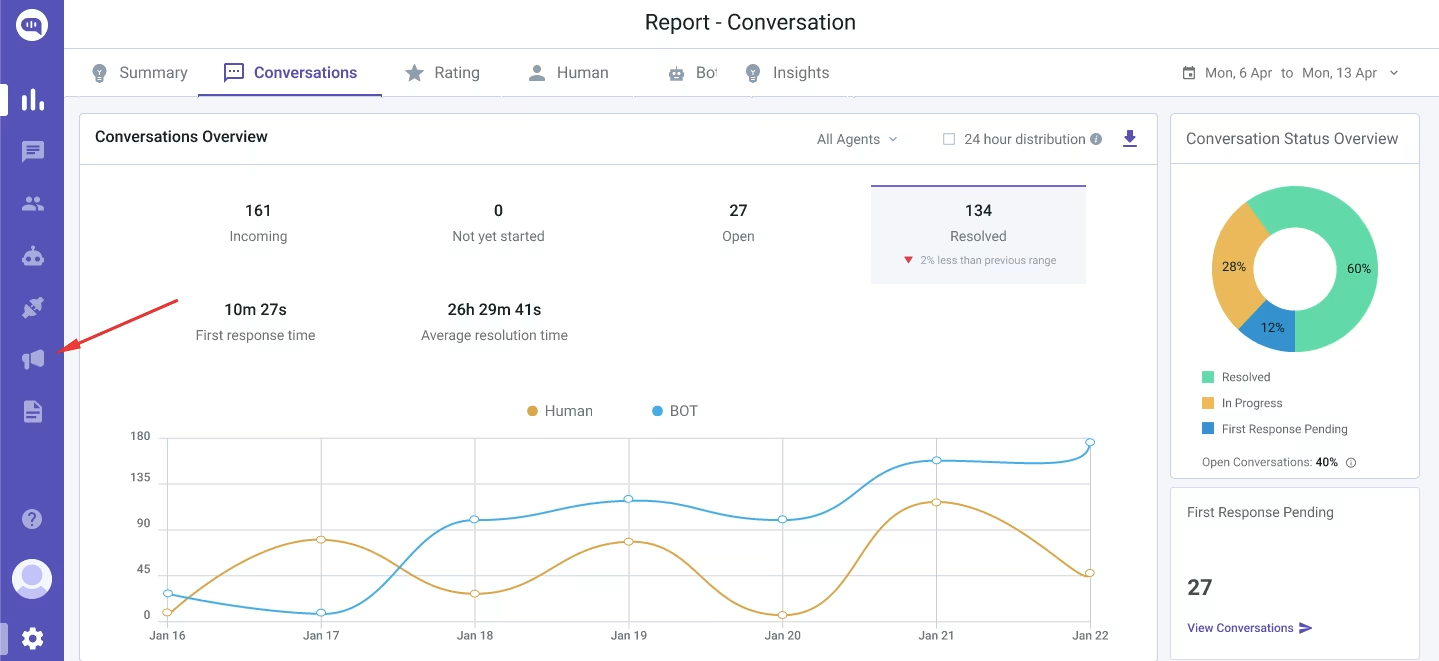
2. Import your contact list; you can use a CSV to import your user list from somewhere else, or use the contacts directly imported into your Kommunicate dashboard.
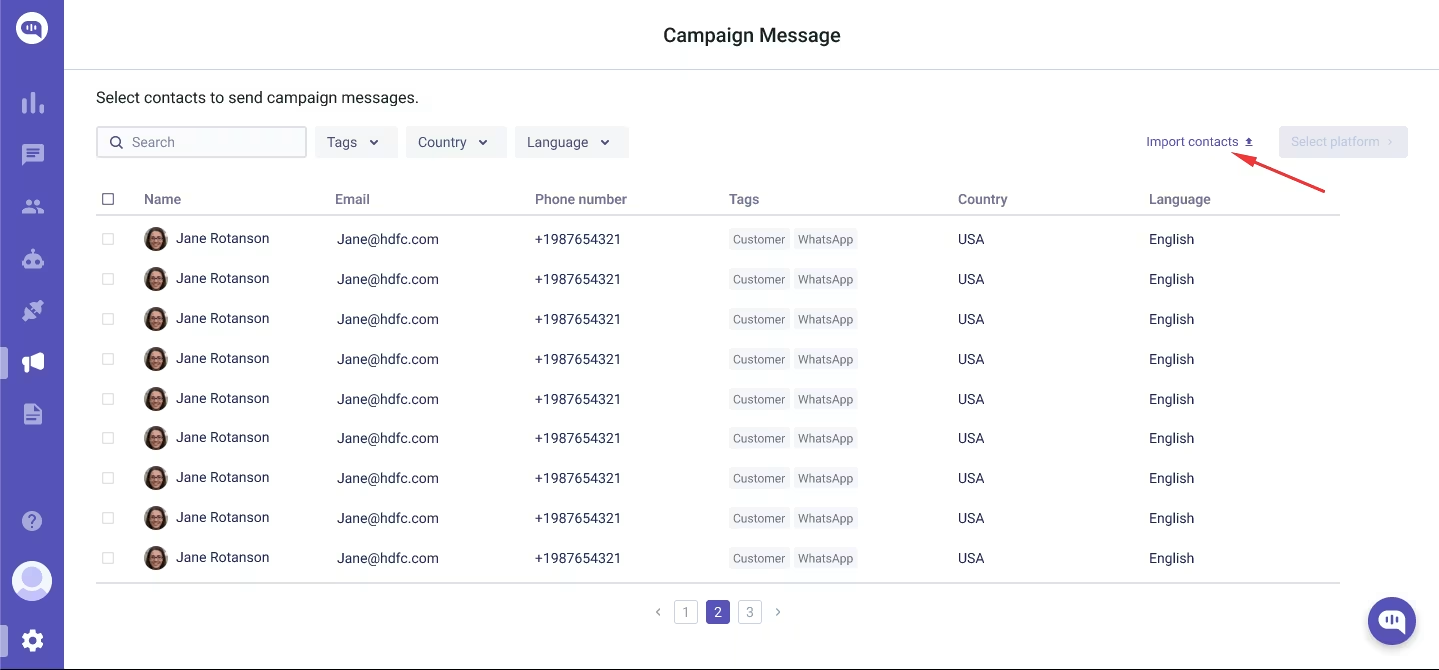
3. Use the filter panel to slice contacts by built‑in fields. You can also assign three custom attributes to each user profile (e.g., plan tier, last‑seen page, loyalty score). This lets you tailor one template to multiple micro‑audiences instead of blasting everyone.
4. Click on Select Platform and select WhatsApp.
5. Pick an approved template you created in step 1 and personalize the message.
6. Send away. You can also schedule your messages to send at a particular time.
Bulk messages are a good way to inform your customers about ongoing offers, discounts, and other promotions. It’s also a good way to contact customers about maintenance, downtime, or other issues on your platform.
What Are the Best Practices for Opt-In and Content on WhatsApp?
While WhatsApp is a great way to grow a business, Meta uses a strict content and opt-in policy to ensure a better user experience. Here are the guidelines you should follow to avoid getting suspended or delisted from WhatsApp Business:
Guidelines for Opt-In
1. Make consent crystal clear – Use a tick box, QR code, or click‑to‑WhatsApp CTA that spells out what you’ll send and how often. Users must knowingly tap “Yes” before they deliver a single promo.
2. Set expectations up front – Tell people they’ll receive “weekly product drops” or “order updates”—expectation drives lower unsubscribe rates and higher quality scores.
3. Offer an easy exit – Include “Reply STOP to opt‑out” or surface WhatsApp’s native block instructions in your first message; Meta checks for a clear opt‑out path during template review.
Guidelines for Content
- Stay relevant, timely, and concise – WhatsApp recommends keeping messages short, actionable, and tied to the customer’s recent behaviour (e.g., cart left behind < 24 h ago).
- Personalise and segment – Drop variables like name, city, or last‑purchase date and target micro‑audiences; generic blasts raise spam scores and template limits.
- Use rich media sparingly – GIFs, product carousels, and CTA buttons lift CTR, but only if they load fast and serve a clear purpose.
- Mind the cadence – Limit marketing templates to one per day per user unless they reply; Meta throttles over‑messaging to protect the user experience.
- Close with a single, clear CTA – “Tap to buy,” “Track your order,” or “Chat with support”. You should have only one key message in your CTA.
Now that we have a basic framework for WhatsApp marketing, let’s talk about the tools we can use to run these campaigns.
Which Tools Can You Use for WhatsApp Marketing?
We’ll talk about five tools that businesses could use for WhatsApp marketing. These act as BSPs and can help you handle everything in the WhatsApp Cloud API without code.
1. Kommunicate
Kommunicate plugs the official WhatsApp Cloud API straight into a multichannel inbox so you can broadcast your customer service with a WhatsApp chatbot and hand off to agents without code. A built‑in Campaign Messaging module lets marketers blast approved templates or segment contacts.
Pros
- You can send bulk messages and segment customers
- You get a Unified inbox & chatbot builder out of the box
- The pricing is standardized
Cons
- Lacks some marketing features
- Strict template approval cycles can slow the speed to market
2. Wati
Wati wraps WhatsApp APIs in a clean SaaS UI, offering shared team inboxes, rule‑based automation, and catalog‑driven broadcasts. GetApp reviewers like its fast onboarding and template approval times.
Pros
- Intuitive interface for non-tech teams
- Quick BSP approvals and responsive onboarding staff
- Built‑in audience segmentation & simple no‑code marketing flows
Cons
- Users report intermittent downtime after platform updates and limited port‑out options.
- Support quality varies; some reviews flag slow follow‑ups.
3. Interakt
Interakt is an all‑in‑one WhatsApp CRM + campaign tool for Indian e‑commerce and D2C brands. It offers product‑catalog pushes, green‑tick verification, and Shopify/WooCommerce integrations.
Pros
- Full‑funnel toolkit (catalogues, cart recovery, bulk notifications)
- Shared inbox with unlimited teammates on higher tiers
- 4.5/5 G2 rating; praised for value to small businesses
Cons
- Lacks deep multichannel orchestration beyond WhatsApp
- Limited seats for agents; costs rise as you scale
4. Braze
Braze’s WhatsApp integrations add the channel onto Braze’s customer engagement cloud, so brands can orchestrate WhatsApp alongside email, push, SMS, and in‑app messaging from one canvas. Marketers get real‑time segmentation, WhatsApp Flows, and commerce carousels without relying on third‑party senders.
Pros
- Authentic cross‑channel journeys and AI‑driven segmentation
- Granular analytics stitched into the Braze Currents/CDP stack
- Enterprise‑grade SLA and compliance
Cons
- License + message fees push it into upper‑mid‑market budgets
- Requires technical resources to wire data events and catalogues
5. AiSensy
AiSensy focuses on cost‑efficient broadcasting and automation for Indian SMBs. It has a drag‑and‑drop chatbot builder, a native Click‑to‑WhatsApp Ad manager, payment links, and an AI template generator.
Pros
- Free‑forever tier plus ₹999/mo starter makes it wallet‑friendly
- Rich automation (chatbots, webviews, forms, payments) in one plan
- Unlimited agent seats from the basic paid tier
Cons
- Limited WhatsApp agent hand‑off features compared to CRM‑centric tools
- Some integrations (e.g., Shopify) cost extra on Wati but are free here.
Bottom Line
- Kommunicate is the fastest path if you want bulk sends + segmentation and a live‑chat/AI hybrid in one place.
- Wati shines for teams that prize simplicity but can live with occasional service hiccups.
- Interakt is a solid middle‑ground CRM for commerce‑heavy brands.
- Braze unlocks actual omnichannel orchestration at an enterprise price.
- AiSensy offers the most bang‑for‑buck if ultra‑cheap, high‑speed broadcasts and AI helpers top your list.
Now that you understand the top vendors for your WhatsApp marketing tools, we can look at the trends currently shaping this market.
Which WhatsApp Features and Trends Should You Watch?
With the rise of conversational commerce, Meta has made a concerted effort to improve WhatsApp for businesses. They’ve launched many new tools for this effort. Let’s take a look at these tools.
| Tool | What’s Coming | Why It Matters |
| AI Chatbots | NLP‑driven bots that handle multi‑step tasks (bookings, troubleshooting) and auto‑tag chats for follow‑up. | 24/7 support at scale, freeing agents for high‑stakes issues. |
| Hyper‑Personalisation | Predictive models will trigger messages based on behaviour (renewal reminders, tailored upsells). | Higher click‑through and conversion rates, as every chat feels 1‑to‑1. |
| In‑App Payments & Catalog Commerce | Global rollout of WhatsApp Pay and card payments turns chats into checkout lanes. | Customers browse, buy, and get support in a single thread, with zero friction. |
| Omnichannel Handoffs | Deeper APIs will let brands orchestrate WhatsApp alongside email, SMS, and web chat from one dashboard. | Consistent CX and faster resolutions regardless of entry point. |
| Privacy‑First Enhancements | Stricter opt‑in flows, granular consent logs, and reinforced encryption. | Keeps user trust intact, and your template approvals sail through. |
These features will develop more over the next few years, and WhatsApp-first businesses will become more popular as time goes on.
Final Thoughts
WhatsApp has outgrown its origins as a simple messaging app. It is now a full‑stack engagement and commerce channel that delivers unmatched reach, open rates, and conversion potential.
Thousands of businesses are now using WhatsApp for marketing by partnering with providers like Kommunicate that provide AI automations, bulk messages, and concrete content & opt-in policies. The businesses that adopt these practices today will be best positioned to ride the next wave of conversational commerce in 2025 and beyond.
Ready to see how easy WhatsApp marketing can be? Book a free demo with Kommunicate.

Devashish Mamgain is the CEO & Co-Founder of Kommunicate, with 15+ years of experience in building exceptional AI and chat-based products. He believes the future is human and bot working together and complementing each other.