Updated on June 24, 2026
Meta has finally launched the WhatsApp Business API inside the app window, which allows you to have an end-to-end conversational journey. This API lets your customers call you directly on WhatsApp to resolve queries and place orders whenever they want. You can also manage outbound calls after requesting permission from the user.
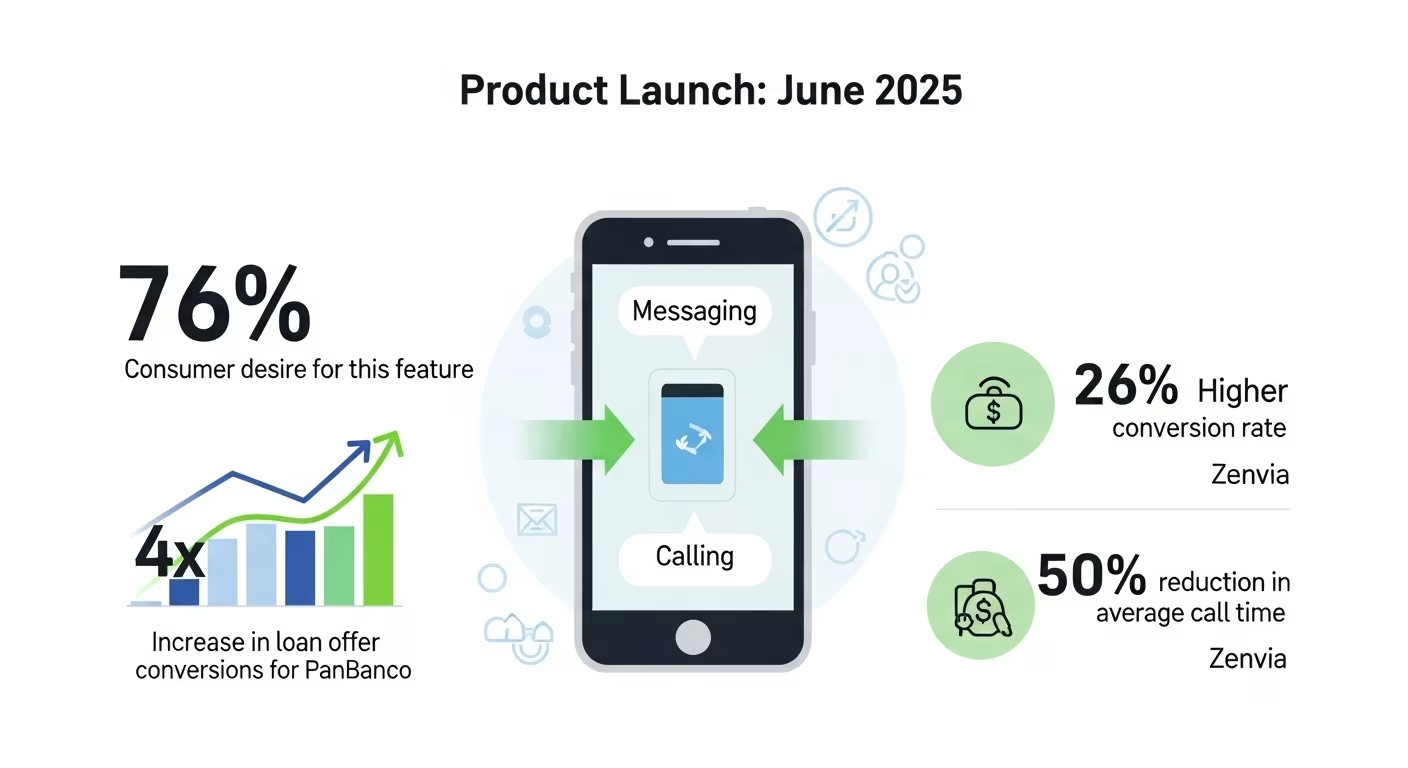
Launched in July 2025, this new launch addresses huge customer demand. According to recent data, 76% of consumers desire the flexibility to switch between messaging and calling within a single interaction.
Early case studies from Meta have validated this value with compelling metrics: PanBanco, a financial services firm, achieved a 4x increase in loan offer conversions, while Zenvia, a private social discount program in Brazil, saw a 26% higher conversion rate and a 50% reduction in average call time to make a sale.
You must partner with a BSP (like Kommunicate) to implement this. Kommunicate can let you integrate WhatsApp Calling into your support flows, help you nurture leads, and help you connect organically with customers. Any business with complex support and sales cycles should go for this integration.
This article will explain the architecture, features, benefits, and basic setup for the WhatsApp Business API. We’ll cover:
1. Why Should You Use the WhatsApp Business Calling API?
2. What are the Core Features of the WhatsApp Business Calling API?
3. What are the Benefits of WhatsApp Business Calling API?
4. How Can You Implement the WhatsApp Business Calling API for your Business?
5. What are the Best Practices for Using WhatsApp Business Calling API?
6. Conclusion
Why Should You Use the WhatsApp Business Calling API?
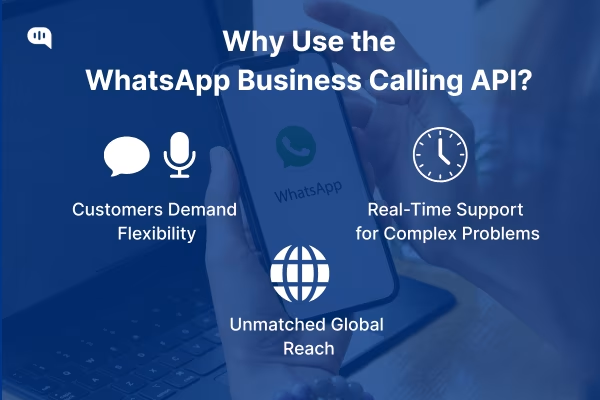
The lines between communication channels are blurring, and customers demand fluidity, context, and immediacy in their business interactions. WhatsApp Business Calling API adds this fluidity to your business by letting you have phone calls with your customers on the largest messaging platform in the world.
Let’s dive into why this is so important:
1. Customers Want Flexibility Between Phone Calls and Messages
76% of consumers want the option to switch between calling and messaging with a business seamlessly.
This outlines the foundational need for the WhatsApp Calling API. Customers want the form of choice based on the complexity of their problems and wants. WhatsApp calls give them this choice, and do it on the most popular messaging platform in the world.
2. Customers Want Real-Time Support for Complex Problems
While messaging has been the leading form of customer support lately, customers often want to hop onto calls for serious and complex issues. This is because asynchronous support tickets can take more time to resolve.
Customers prefer getting real-time support over the phone for urgent issues, and the WhatsApp business API now supports that with the new calling feature.
3. WhatsApp’s 3-Billion Strong User Base
As of March 2025, WhatsApp has around 3 billion users worldwide.
When a platform of this scale introduces a fundamental new capability like voice calling, businesses jump at the opportunity to create new connections with their customers. This is also simple for customers, who get a new avenue to solve their problems in an unfamiliar environment.
The feature positions WhatsApp not merely as a competitor to other messaging apps or CPaaS providers, but as a potential rival to entire business software categories. The launch of the Calling API is a clear signal that Meta intends for WhatsApp to become the central operating system for modern business-to-consumer interaction.
Let’s understand this feature in more detail in the next section.
What are the Core Features of the WhatsApp Business Calling API?
The core features of the API are as follows:
1. Bidirectional Calling – The API supports user-initiated (inbound) and business-initiated (outbound) calling within WhatsApp.
2. Programmatic Call Control – Your business can programmatically accept, reject, or terminate calls.
3. Manage Call Availability – To control inbound volume, you can toggle the call icon visibility on the business profile.
4. Multiple Entry Points – Customers can tap the profile call icon, a call-to-action button in an interactive message template, or follow deep links/QR codes to initiate a call.
5. IVR/DTMF Support – WhatsApp Calling supports DTMF(touch tones on keypad) tones so you can drive IVR-style experiences; Meta notes a dedicated keypad for business calls.
6. Chat + Voice Continuity – You can exchange messages through the Cloud API while the voice call is ongoing, maintaining a single conversation context.
7. Branded, Trusted Experience – Calls show the business identity (name and verified badge) within WhatsApp, enhancing pickup rates and trust. This verified badge also improves your trustworthiness in the eyes of customers.
To understand this in more detail, we’ll also explain the core architecture of this new feature.
How is the WhatsApp Calling API Structured?
The WhatsApp Business Calling API is cloud-hosted by Meta and uses VoIP (Voice Over Internet Protocol) to send and receive calls.
1. You can initiate these calls using SIP (Session Initiation Protocol) or Graph API.
2. The call occurs through the VoIP protocol.
3. No PSTN (Public Switched Telephone Network) connectivity (The call doesn’t occur through the standard phone line method), so you can’t connect with users outside WhatsApp.
4. Meta uses signalling via Graph API + webhooks (or SIP), with the media path over WebRTC.
Since managing the Cloud API is complicated and lengthy, most businesses use a WhatsApp messaging partner like Kommunicate to manage messages and calls on the platform.
Before we move on from exploring this API, let’s talk about the restrictions that Meta has set.
What are the Restrictions and Rules for WhatsApp Calling API?
Meta has restricted the WhatsApp platform to protect user privacy and experience. These are:
1. You need to obtain permission to call a customer by sending a template with a VOICE_CALL_REQUEST action inside an active thread.
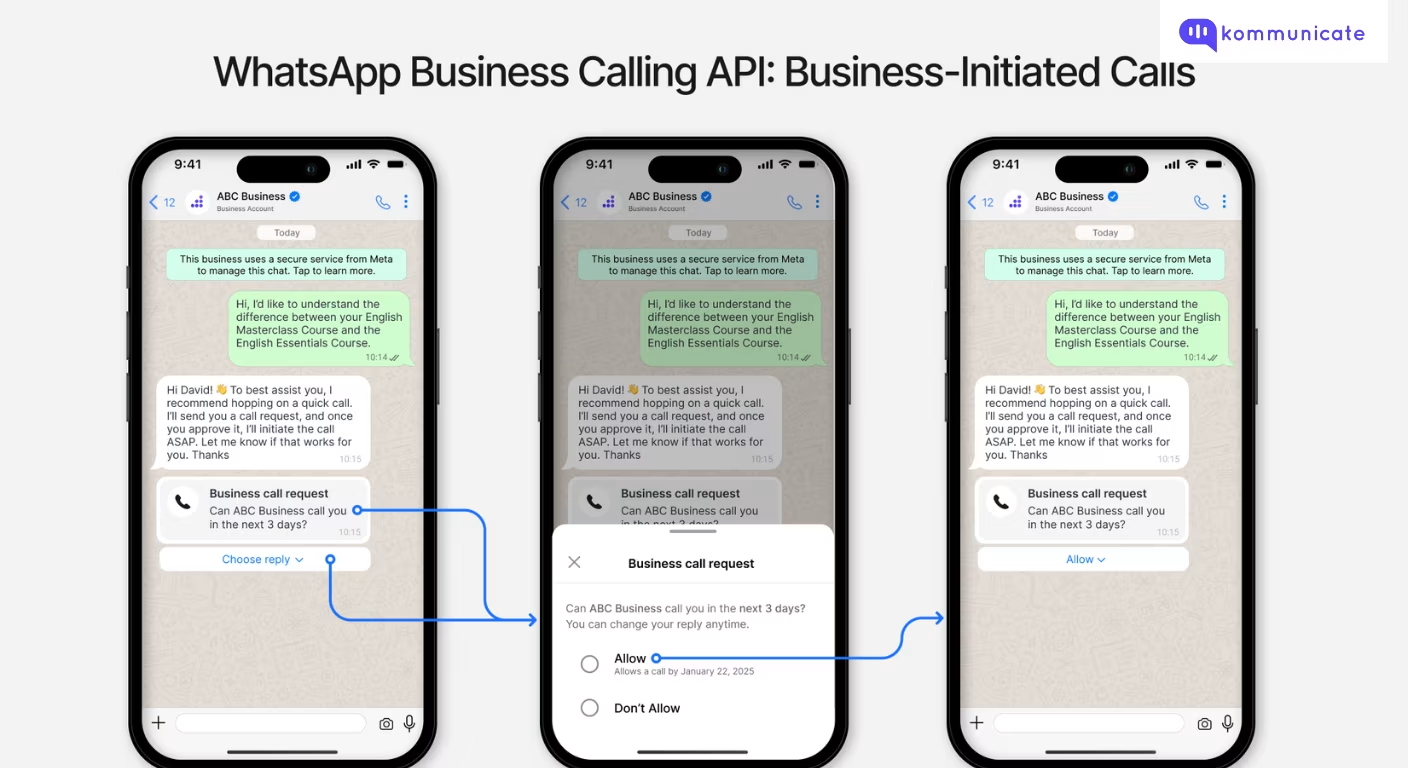
2. You can send at most one call-permission request per 24 hours, and no more than two in seven days.
3. After the permission is granted, a business can place up to five calls per 24 hours for up to seven days, after which new permission is needed.
4. Your calls cannot be connected to PSTN endpoints.
Also, to use this platform, you must be:
1. Messaging limit tier ≥ 1K: Meta/BSPs require your number to be at 1K (business-initiated) messaging tier or higher to enable Calling.
2. Approved use case: BSPs typically gate Calling to Service/Utility/Marketing use cases (per BSP participation rules).
3. Regional availability: Availability varies by BSP and region. Calling is available in most Cloud-API countries except the USA, Canada, Turkey, Egypt, Vietnam, and Nigeria (subject to change).
With these features and restrictions in mind, we can start analyzing the actual benefits of this API for your business.
What are the Benefits of WhatsApp Business Calling API?
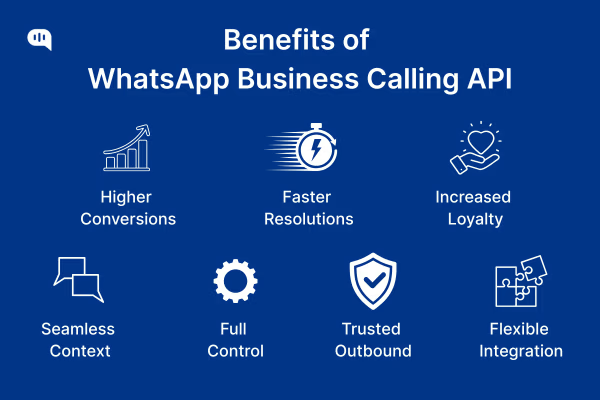
You can use the WhatsApp business calling API, convert and support more customers, and develop deeper relationships with them. Put simply, the benefits of this API are as follows:
1. Convert More High-Intent Opportunities
When your agents can’t solve the customer’s problem via text, they can escalate to voice in the same WhatsApp thread. This eliminates channel-switch friction and helps close complex, high-consideration deals.
Early adopters are already showing this success. Banco PAN saw a 4× increase in loan-offer conversions, while Cartão de Todos recorded a 26% higher conversion rate after enabling calling.
2. Resolve Complex Issues Faster (and With Fewer Back-and-Forths)
Customer conversations during calls are resolutions. This happens because the call is initiated from the existing chat, and the agent already has the full context (history, documents, prior troubleshooting). In practice, Cartão de Todos cut the average call time to make a sale by 50%.
3. Raise satisfaction and loyalty.
Keeping the entire experience inside WhatsApp (trusted identity, persistent thread, encrypted media + voice) leads to a better perceived quality of customer service.
4. Preserve Conversation Context End-to-End
With WhatsApp, customers can message a business in a single window. This continuity reduces re-asks, speeds verification, and simplifies compliance logging versus multi-channel handoffs.
5. Control When and How Customers Can Call You.
The feature-rich API gives CX leaders complete control over how their teams interact with customers. You can toggle the call icon, set business hours, use click-to-call buttons and deep links, and even provide an in-call dialer for IVR/DTMF.
With these features, you can shape the customer experience during peak times.
6. Consent-First Outbound that Protects Customer Trust
Outbound voice requires explicit, in-thread permission (via a call-permission request), and the user dictates when calls can be received. That “privacy-by-design” approach reduces spam risk while enabling timely follow-ups for sales or service.
7. Flexible Integration Paths that fit Your Stack
You can implement calling via Graph API + webhooks (control/signaling) or configure SIP if you prefer to anchor in existing voice infrastructure. Either way, the media path runs over VoIP and stays inside the WhatsApp context.
These benefits are significant in some specific business scenarios.
What are the Best Use Cases for WhatsApp Calling API?
1. High-touch sales: You can accelerate late-stage conviction (finance, automotive, SaaS deals) with a trusted, branded voice escalation inside the same thread.
2. Complex support: Your agents move from chat to voice without losing context to improve first-contact resolution and handle time.
3. Appointment-led services: You can manage confirmations, reminders, and the session (voice) within one persistent, secure conversation.
Now that you know how WhatsApp calling API can improve your business, let’s create an implementation plan.
How Can You Implement the WhatsApp Business Calling API for your Business?
To implement the WhatsApp Business Calling API, you’ll need to navigate Meta’s platform rules, select a Business Solution Provider (BSP), integrate with your CRM/CCaaS, and upskill your support agents.
The most direct path to value is pairing 360dialog (BSP for WhatsApp Business Platform/Cloud API) with Kommunicate (agent desktop, automation, and orchestration). This combo gets you calling access through 360dialog, while Kommunicate provides the operational layer your teams use.
Here’s how you can implement this:
Step 1 – Start the Integration
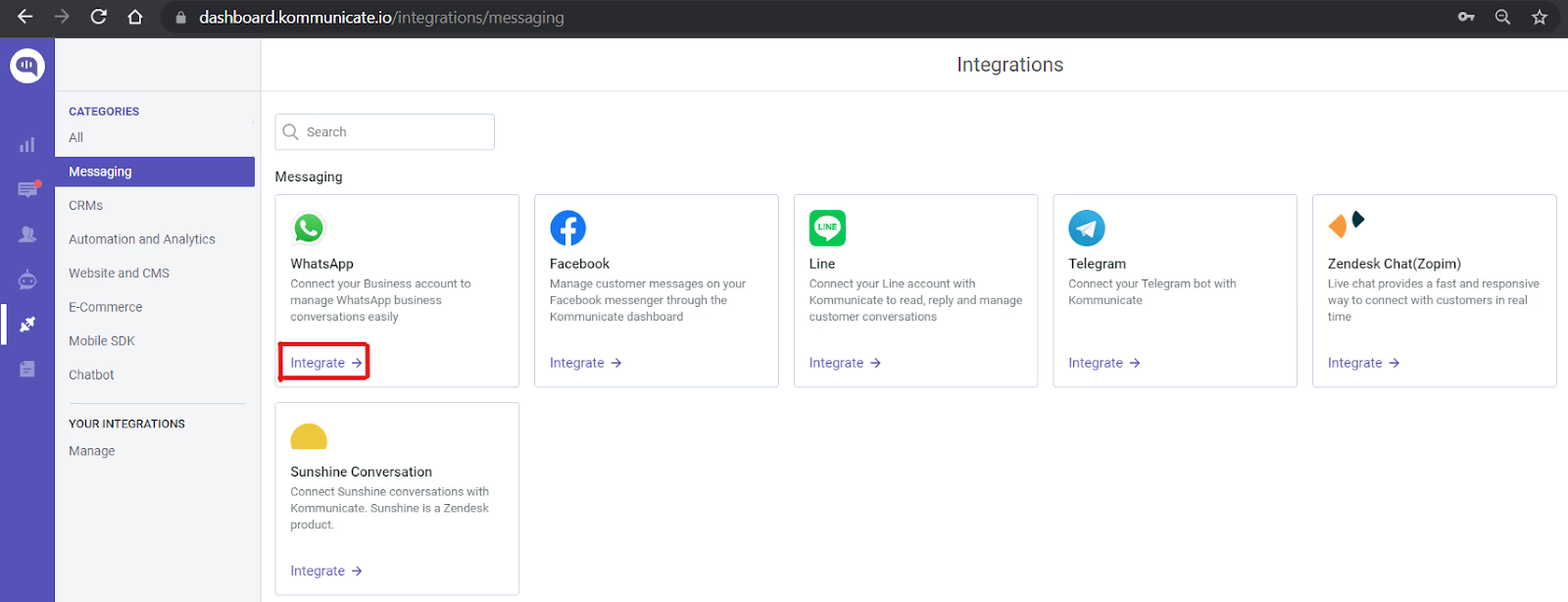
Go to Integrations on your Kommunicate dashboard. Search for WhatsApp and select 360Dialog.
Step 2 – Test in a Sandbox
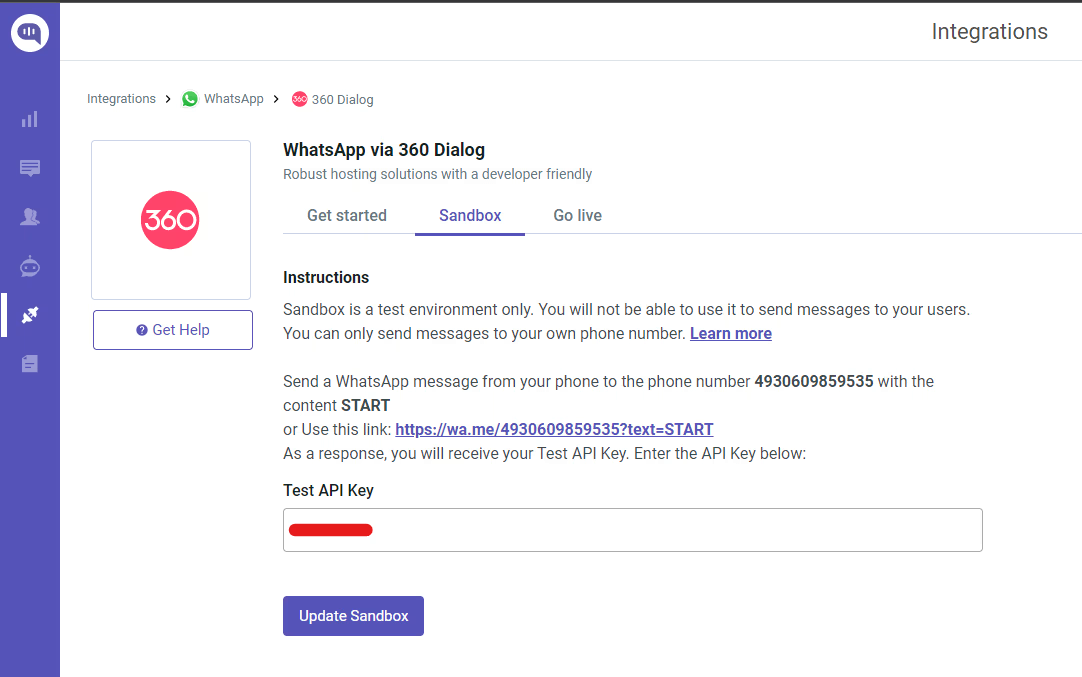
Go to the Sandbox section in the 360Dialog integration window. Send a WhatsApp message with the text “START” to +4930609859535 from your phone number, and you’ll receive an API key in response. Enter this key in the “Test API Key” field in the Dashboard, and you’re ready to test your Bot.
Step 3 – Go Live
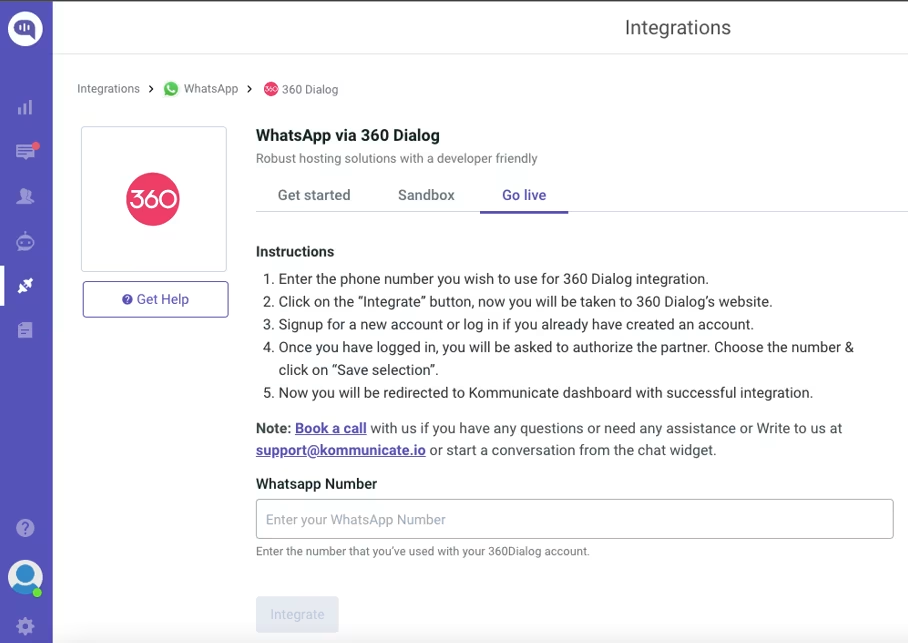
Go to the Go Live section in the same window. Enter the WhatsApp number you want for the 360Dialog account and click on Integrate.
This will open a pop-up that will guide you through the integration process.
Once integrated, you can initiate a support chat or book a demo with us to start using the WhatsApp calling API.
Why Use Kommunicate + 360Dialog for WhatsApp Business Calling?
With 360Dialog and Kommunicate integration, you get access to:
- Unified agent desktop: One interface for WhatsApp messaging and Calling, with “press-to-escalate.”
- AI & automations: You can use Kommunicate’s AI agents to deflect L1/L2 via bot, auto-summaries, follow-ups, and template insertion during/after calls.
- Analytics: Track first-contact resolution, AHT, CSAT, and NPS for journeys involving calling.
- Integrations: We connect with 40+ tools in your tech stack, providing you with all-around support.
With this integration information, you’re ready to start the WhatsApp calling journey for your business. Now, let’s talk about the pricing for calling through this API.
What is the Pricing for WhatsApp Business Calling API?
Your pricing for each call will depend on your BSP, type of call, and some other factors:
1. Incoming (user-initiated) calls: Free for your business.
2. Outgoing (business-initiated) calls: Charged per minute; rates vary by the callee’s country and region.
3. Message costs you’ll still incur: Requesting call permission uses a template message; Meta will bill you per message (rate depends on template type and destination).
4. BSP/software fees: Your BSP (e.g., Kommunicate) may charge a monthly license per number (our plans start at $40/month); platform fees from your chosen inbox/automation tool may also apply.
Your pricing for WhatsApp calling will depend mostly on the time you spend talking with your customers. Finally, our next section will discuss some best practices for this API.
What are the Best Practices for Using WhatsApp Business Calling API?
Some best practices to keep in mind for using this API are:
1. Respect user preferences and time zones. Avoid off-hours calls unless the user asks for them.
2. Keep frequency low. Don’t repeatedly nudge for calls. Offer easy ways to change preferences.
3. Keep a consistent business name, logo, and trustworthy profile to boost pickup.
4. Use a human, concise tone. Reference the user’s chat history so they never repeat themselves.
5. Provide a quick opt-out for calls and future prompts right in the thread.
6. Localize language. Keep your wording simple and accessible (avoid jargon, speak to outcomes).
7. Never request sensitive data (passwords, full card numbers, OTPs) over voice to minimize PII.
We’ve found that businesses that stick to these guidelines see improved customer engagement and experience on WhatsApp calls. It also helps you maintain a trustworthy brand reputation.
Conclusion
WhatsApp Business Calling turns high-intent chats into high-fidelity voice so you convert more, resolve faster, and lift satisfaction without adding channel friction.
Using Kommunicate as a BSP gives you access to AI agents, automation workflows, and analytics that give you a clean, compliant path from pilot to scale. If you’re ready to add contextual voice to your customer journeys, we’d love to show you how it works in your stack—book a 15-minute demo with Kommunicate.

Adarsh Kumar is the CTO & Co-Founder at Kommunicate. As a seasoned technologist, he brings over 14 years of experience in software development, artificial intelligence, and machine learning to his role. His expertise in building scalable and robust tech solutions has been instrumental in the company’s growth and success.