Updated on February 10, 2026
If you’ve ever launched a Zendesk knowledge base chatbot and watched it “work” in demos but struggle in production, you’ve seen the real conflict: accuracy breaks down at the edges, and escalation becomes either too frequent or too late.
In Zendesk Messaging, the handoff moment is the point where customers decide whether your automation is helpful or just a gatekeeper, and Zendesk’s own model explicitly treats handoff/handback as a first-responder switch between AI and agents.
From our perspective, the goal isn’t “containment at all costs.” The goal is a resolution system: predictable intents grounded in Zendesk Guide, smart fallbacks when confidence drops, and a human handoff that preserves context so agents never have to restart the conversation. Zendesk itself emphasizes designing escalation strategy and flows up front, because escalation is part of the workflow, not an exception.
This guide is a practical playbook for designing that system: what to automate, when to escalate, how to set up handoff using Kommunicate with Zendesk, how to test it, how to route to the right teams, and how to measure whether your handoffs actually improve outcomes.
We’ll cover:
1. What Is Zendesk Chatbot Handoff and Why Does It Matter?
2. How Does Zendesk Chatbot Handoff Work?
3. When Should Chatbots Escalate or Automate?
4. What Makes a Zendesk Knowledgebase Chatbot Effective?
5. Why Do Zendesk Chatbots Escalate Too Often?
6. How Do You Troubleshoot Chatbot Accuracy Issues?
7. How Do You Set Up Zendesk Handoff?
8. How Do You Test Zendesk Chatbot Handoff?
9. How Should Chatbots Route Escalations?
10. What Documentation Supports Scalable Handoffs?
11. Which Metrics Measure Chatbot Handoff Success?
12. What Real Zendesk Handoff Examples Look Like?
13. What Is Chatbot Versus Live Chat ROI?
14. Conclusion
What Is Zendesk Chatbot Handoff and Why Does It Matter?
Zendesk chatbot handoff is the moment when an automated chatbot deliberately stops responding and transfers the conversation to a human agent. In Zendesk Messaging, this is not a failure state; it is a first-responder switch designed to prevent automation from handling issues it cannot safely or effectively resolve. When implemented correctly, handoff ensures that chatbots accelerate resolution without blocking customers from human help.
Handoff is not an edge case but a core design primitive in any production-grade automation system. A bot that never escalates is brittle. A bot that escalates randomly is expensive. The difference lies in how deliberately the handoff is designed and executed. A deeper breakdown of this philosophy is covered in our guide to chatbot-to-human transitions.
Why Does it Matter?
Zendesk chatbot handoff improves customer outcomes and satisfaction because it affects the following factors:
- Customer Trust – Users lose confidence when bots guess, loop, or block access to humans
- Resolution Quality – Complex or high-stakes issues require judgment beyond deterministic automation
- Operational Control – Teams retain visibility into when and why automation steps aside
- Agent Efficiency – Context-rich handoffs prevent “start over” conversations
- Risk Reduction – Sensitive intents are escalated before errors cause damage
While the language around handoff is usually complex, it’s very simple to understand how this process works. Let’s understand that in the next section.
How Does Zendesk Chatbot Handoff Work?
At a practical level, Zendesk chatbot handoff works as a controlled transition of first-responder responsibility from an automated chatbot to a human agent, triggered by predefined rules rather than ad-hoc failure. In Zendesk Messaging, the bot begins as the first responder, attempts resolution using grounded knowledge, and then deliberately steps aside when confidence, policy, or risk thresholds are crossed—at which point a human agent takes over with full conversational context intact.
To make this concrete, let’s walk through a realistic education-sector timeline, where handoff design is especially critical due to deadlines, compliance, and student anxiety.
Zendesk Chatbot Handoff Timeline
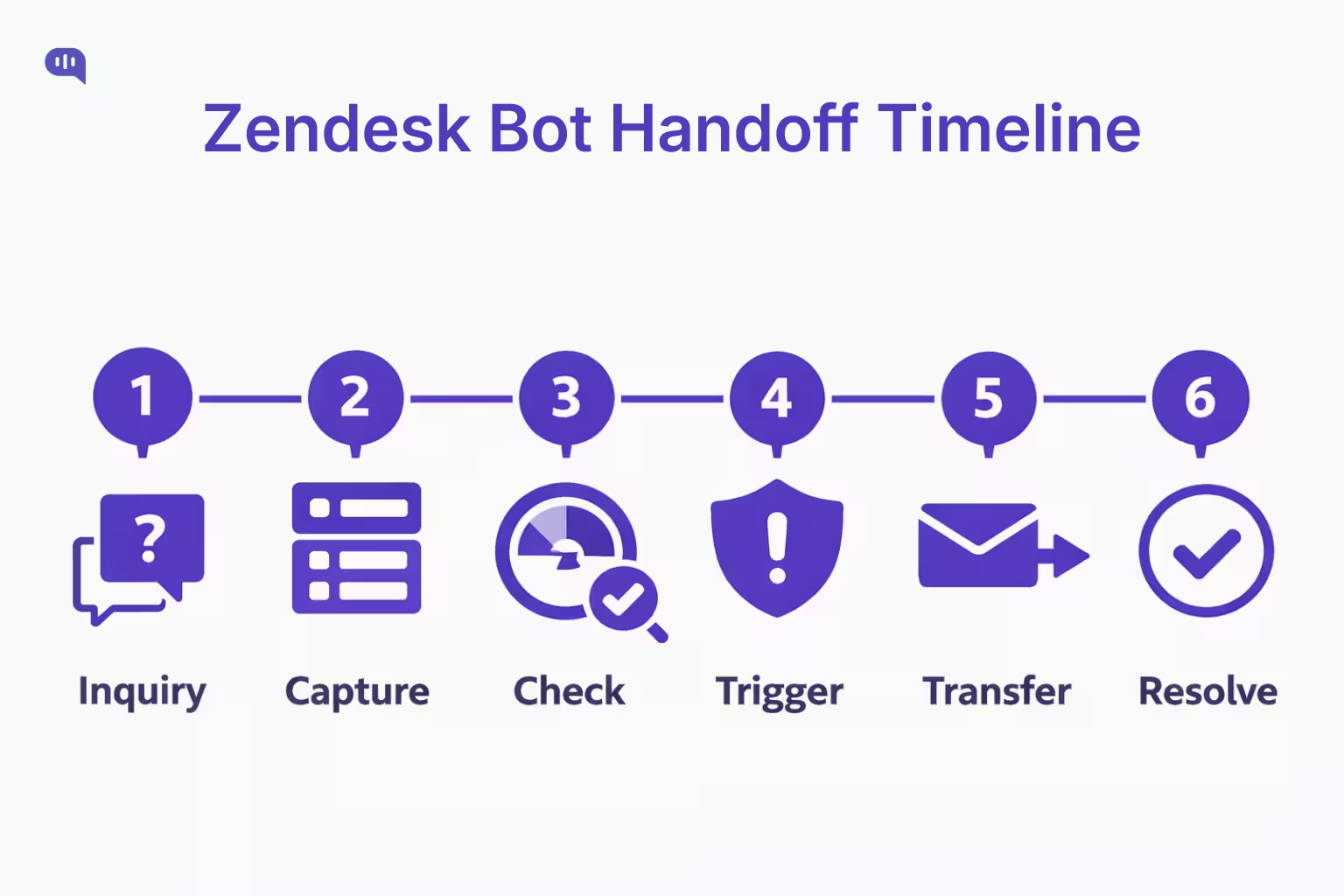
1. Initial Inquiry – A student asks about enrollment status or application requirements; the bot identifies a high-confidence, FAQ-style intent and retrieves answers from the institution’s Zendesk Guide.
2. Context Capture – The bot collects structured details such as student ID, program name, intake term, and application stage, attaching them to the conversation metadata.
3. Confidence Check – The student asks a follow-up that moves beyond policy explanation into a personalized decision (for example, an exception request or deadline override).
4. Escalation Trigger – The bot detects a non-negotiable boundary: personalized academic decisions cannot be automated, so it initiates a human handoff rather than attempting inference.
5. Contextual Transfer – The conversation is routed to the admissions or registrar team, with a summary of intent, captured student details, and all prior bot responses attached—preventing the agent from asking the student to repeat themselves.
6. Human Resolution – The agent joins as first responder, continues the conversation seamlessly, and resolves or advances the case according to institutional policy.
This flow mirrors Zendesk’s recommended approach, where escalation is treated as part of the workflow, ensuring that automation accelerates resolution without overstepping its authority.
Next, this raises a more fundamental design question: when should a chatbot attempt automation at all, and when should escalation be the default?
When Should Chatbots Escalate or Automate?
The decision to automate or escalate is about risk, confidence, and consequence. In Zendesk, the most effective chatbots are designed to automate only where outcomes are predictable and to escalate before ambiguity or risk degrades trust.
Chatbots perform best when they handle predictable information retrieval and step aside the moment interpretation, risk, or personalization is required.
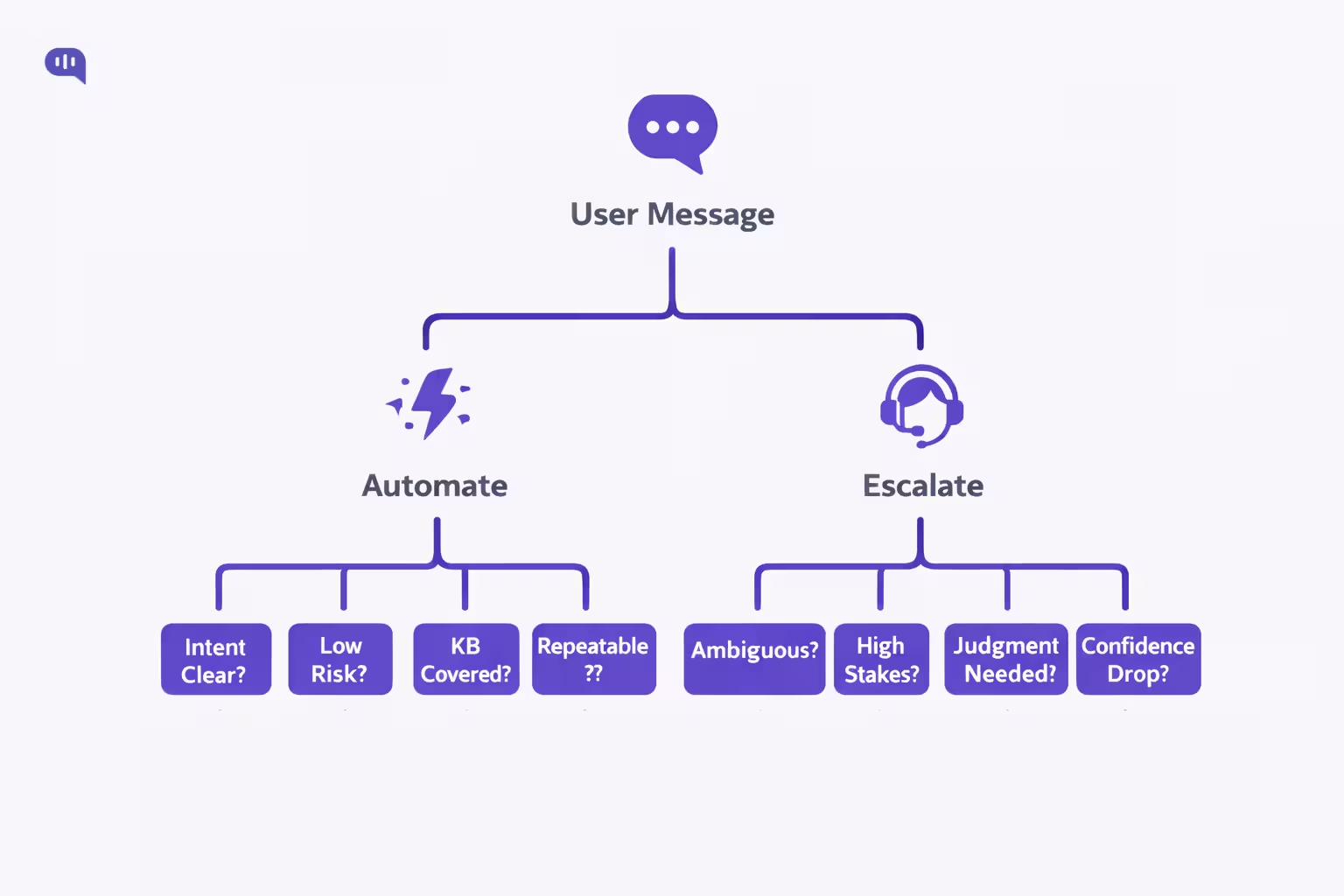
When Should Chatbots Automate?
- Clear Intents – The user’s goal maps cleanly to a single, well-defined request
- Stable Answers – The response is fully covered by one authoritative Zendesk Guide article
- Low Risk – Incorrect answers have minimal financial, legal, or academic impact
- Repeatable Outcomes – The same steps resolve the issue for most users
- Neutral Emotion – The user is informational rather than distressed or frustrated
When Chatbots Should Escalate?
- Ambiguous Requests – The user intent cannot be confidently determined
- High Stakes – The issue involves billing, access, compliance, or policy exceptions
- Personal Judgment – Decisions require human discretion or approval
- Confidence Drops – Knowledge retrieval fails or contradicts prior responses
- Emotional Signals – Frustration, urgency, or anxiety increases during the exchange
With this boundary in place, the next question becomes how to design a Knowledge Base bot that stays accurate, grounded, and predictable at scale.
What Makes a Zendesk Knowledge Base Chatbot Effective?
A Zendesk knowledgebase chatbot is “effective” when it reliably converts messy, real-world questions into grounded, consistent answers.
In practice, that means tight linkage to your Help Center content, explicit scope boundaries, and a human handoff design that preserves context instead of forcing users to restate everything. Zendesk itself frames knowledge base chatbots as bots that connect directly to your help center content to power self-service, which makes knowledge quality and structure the limiting factor, not model cleverness.
From a UX standpoint, strong bots also set expectations clearly, avoid overpromising, and stay focused on tasks they can do well.
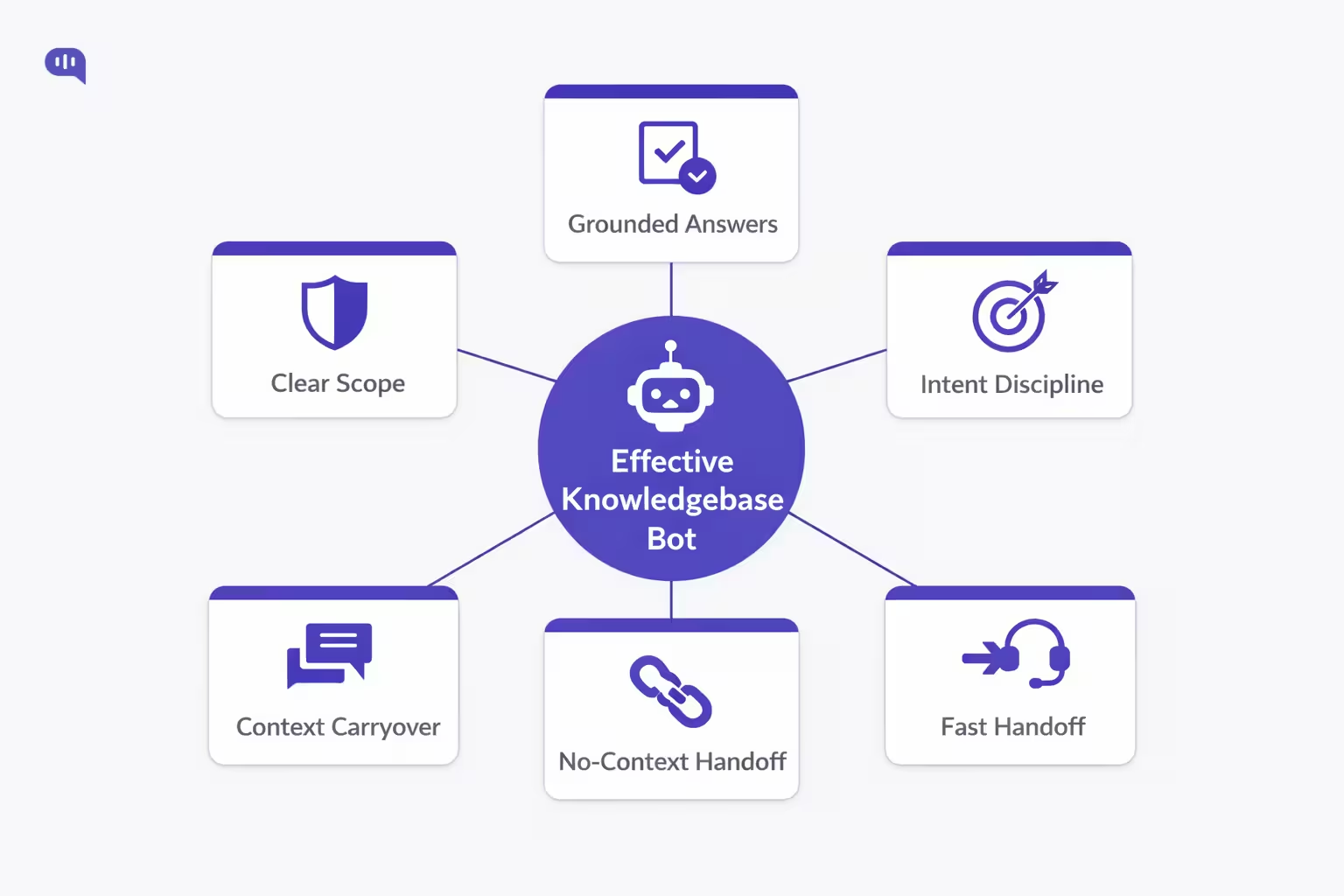
To summarize, here are things that a great Zendesk Knowledge Base chatbot should do:
- Clear Scope – The bot states what it can handle and stays inside those boundaries.
- Grounded Answers – Responses are anchored to Help Center content rather than open-ended guessing.
- Intent Discipline – Each automated path maps to a specific goal with predictable outcomes.
- Fast Handoff – The bot escalates early when confidence drops or risk rises, without disrupting the flow.
- Context Carryover – The handoff includes intent, key details, and attempted steps so agents don’t restart the conversation.
Next, we’ll look at why Zendesk bots often escalate too frequently, and how to design fallback logic that reduces noisy handoffs without increasing risk.
Why Do Zendesk Chatbots Escalate Too Often?
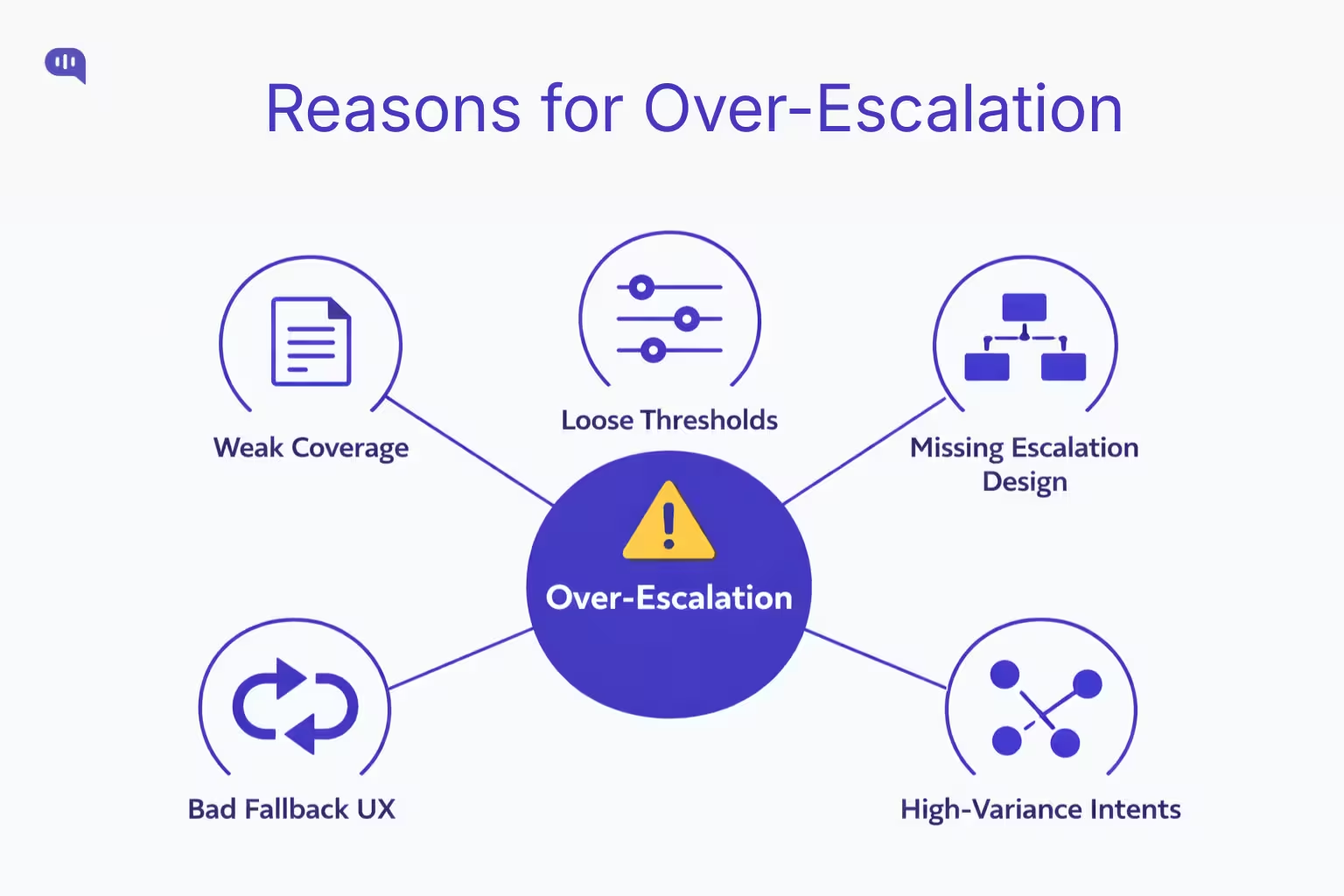
Zendesk chatbots usually escalate too often for one reason: the system is being asked to operate in high-variance, low-structure conversations without enough constraints.
In Zendesk AI agent workflows, misconfigured escalation blocks and poorly placed thresholds can also cause conversations to “fall through” or escalate unpredictably, especially when flows allow multiple use cases or lack explicit escalation points.
The most common causes for over-escalation are:
- Weak Coverage — Your Zendesk Guide content doesn’t cover the real phrasing customers use, so retrieval misses spike and the bot can’t ground answers reliably.
- Loose Thresholds — Intent confidence or retrieval confidence is set too conservatively (or used inconsistently), so the bot routes to an agent instead of clarifying.
- Missing Escalation Design — Conversation flows don’t include escalation blocks at the right points, which Zendesk warns can create dead ends or inconsistent transitions.
- Bad Fallback UX — The bot treats fallback as a patch rather than a designed “failure path,” causing repeated misses and premature escalation loops.
- High-Variance Intents — You’re trying to automate intents that require judgment (exceptions, disputes, account changes), so escalation becomes the correct outcome—just happening too frequently because the boundary wasn’t defined early.
Next, we’ll translate these causes into a practical troubleshooting playbook so you can diagnose accuracy issues and reduce noisy handoffs without increasing risk.
How Do You Troubleshoot Chatbot Accuracy Issues?
Chatbot accuracy issues in Zendesk rarely stem from the model alone—they usually trace back to knowledge structure, intent design, or fallback configuration. Troubleshooting accuracy, therefore, is less about retraining AI and more about auditing the system the AI operates within.
Below is a practical diagnostic table you can use to isolate root causes and apply targeted fixes.
| Problem Signal | Likely Root Cause | How to Diagnose | Fix / Optimization Step |
| Bot gives irrelevant answers | Weak KB grounding | Review top failed queries vs article titles | Consolidate articles; enforce one best answer per intent |
| Bot says “I don’t know” too often | Retrieval confidence too low | Audit search logs and confidence scores | Expand KB coverage; add synonyms and alternate phrasing |
| Bot answers partially, then escalates | Fragmented articles | Check if answers span multiple docs | Merge content; create end-to-end resolution articles |
| Bot loops same article repeatedly | Missing fallback logic | Simulate 3 failed responses | Implement 3-strike fallback escalation |
| Bot misunderstands intent | Poor intent clustering | Review utterance mapping | Refine taxonomy; add disambiguation prompts |
| Bot escalates simple questions | Over-conservative thresholds | Compare escalation vs resolution rates | Adjust confidence thresholds incrementally |
| Agents report no context on handoff | Metadata not passed | Inspect ticket fields + payload logs | Map bot variables to Zendesk fields |
| Users bypass bot immediately | Low trust or bad greeting | Analyze first-turn abandonment | Add quick actions + value framing upfront |
Systematically auditing these layers reduces unnecessary escalation while improving resolution quality.
With accuracy stabilized, the next step is operational: implementing the actual handoff infrastructure between Kommunicate and Zendesk.
How Do You Set Up Zendesk Handoff?
If you are using Kommunicate for Zendesk FAQ automation, “handoff setup” is really three things wired together: secure Zendesk access, Zendesk Guide as the knowledge source, and explicit escalation rules that route conversations to the right agents.
Prerequisites: Zendesk and Kommunicate Readiness
- Zendesk Admin Access to create API tokens and confirm Messaging is enabled.
- A machine-ready Zendesk Guide for your pilot intents (clean, single-intent articles).
- A routing plan (which team receives billing, access, technical, VIP).
- A Kommunicate workspace where you will create and configure the AI agent.
Once these prerequisites are in place, you can implement the integration in a straightforward sequence.
Step-by-Step: Kommunicate Handoff Setup for Zendesk
Secure Zendesk API Credentials
- Generate an API token in Zendesk Admin Center (Apps and Integrations → APIs → API Tokens).
- Treat this token like a password because API tokens can impersonate users in the account, including admins.
- Ops best practice: create a dedicated service account for the integration so employee changes do not break automation (Follow the implementation steps outlined here)
Create Your AI Agent in Kommunicate
- Create an agent in the Kommunicate dashboard, choose your LLM provider, and set conservative parameters.
- Recommended baseline for support: temperature set to 0 to reduce “creative” variance
Connect Zendesk Guide as the Knowledge Source
- In Kommunicate, select Zendesk as the knowledge base source and connect using Zendesk email, subdomain, and API token.
- Enforce the discipline that answers must come from Zendesk Guide to keep outputs grounded
Enable Human Handoff and Conversation Rules
- Turn on human handoff so failures or policy boundaries immediately transfer the conversation to a human agent.
- Configure routing rules so escalations notify the right agents, for example round-robin assignment versus notifying all available agents
Run a Safe Pilot Before Full Rollout
- Start with a controlled FAQ set and validate three outcomes: retrieval correctness, escalation behavior, and correct use of the intended Zendesk knowledge sections
After the wiring is complete, the main risk shifts from “can we hand off” to “are handoffs going to the right place with the right context.”
Common Setup Mistakes to Avoid
- Token Hygiene – Tokens stored insecurely or shared broadly, which increases account risk.
- Ungrounded Responses – The bot is not constrained to Zendesk Guide, which increases hallucination risk.
- Missing Routing Logic – Escalations happen, but they land in the wrong queue or do not alert agents.
- No Pilot Discipline – Launching without scripted tests across KB hits, KB misses, ambiguity, and escalation triggers.
Next, we will validate this setup with a controlled test plan so you can confirm that escalation triggers, routing, and handoff payload quality behave as expected.
How Do You Test Zendesk Chatbot Handoff?
Testing Zendesk chatbot handoff is less about “does the transfer happen” and more about “does the transfer happen for the right reasons, to the right team, with usable context.” A good test plan validates the full chain: intent detection, fallback behavior, escalation triggers, routing, agent visibility, and post-handoff continuity.
| Test Area | What You’re Verifying | Test Scenario (Example) | Pass Criteria |
| KB Hit Accuracy | Bot answers from the correct article | “How do I reset my password?” | Correct answer + correct article reference + no escalation |
| KB Miss Behavior | Bot fails safely without guessing | “How do I enable feature X?” (not in KB) | Clarifying question or safe “can’t find” + offers human option |
| Ambiguity Handling | Bot disambiguates before escalating | “I can’t access my account” | Asks 1–2 clarifiers (SSO vs password) before escalating |
| 3-Strike Logic | Bot avoids looping unhelpful answers | User replies “Not helpful” three times | Escalates on strike 3 with summary + attempted steps |
| Non-Negotiable Triggers | High-stakes issues escalate immediately | “This is fraud” / “chargeback” | Instant escalation + correct priority/tags |
| Sentiment Threshold | Frustration escalates early | “HELLO?? Worst service” | Agent option offered; escalates if repeated sentiment spike |
| Entity Capture | Bot collects key fields before handoff | “Refund dispute for invoice 4431” | Captures invoice ID, plan, email, and reason |
| Routing Correctness | Escalations go to the right queue | Billing dispute → Billing L2 | Ticket lands in the correct group/queue |
| Agent Visibility | Agents can see and claim handoff | Escalation created during the live test | Ticket visible in workspace; claimable; notifications fired |
| Context Quality | Agents get enough to avoid repeats | Any escalation scenario | Intent + summary + attempted steps + entities present |
| No Duplicate Tickets | One escalation = one ticket | User escalates twice | Single ticket with updated context, no duplicates |
| Handback Readiness | Conversation lifecycle ends cleanly | Ticket resolved and closed | Future conversation starts with bot again (as designed) |
Once your handoffs pass these tests, the next step is operationalizing routing—so escalations reliably reach the right team, with the right priority, every time.
How Should Chatbots Route Escalations?
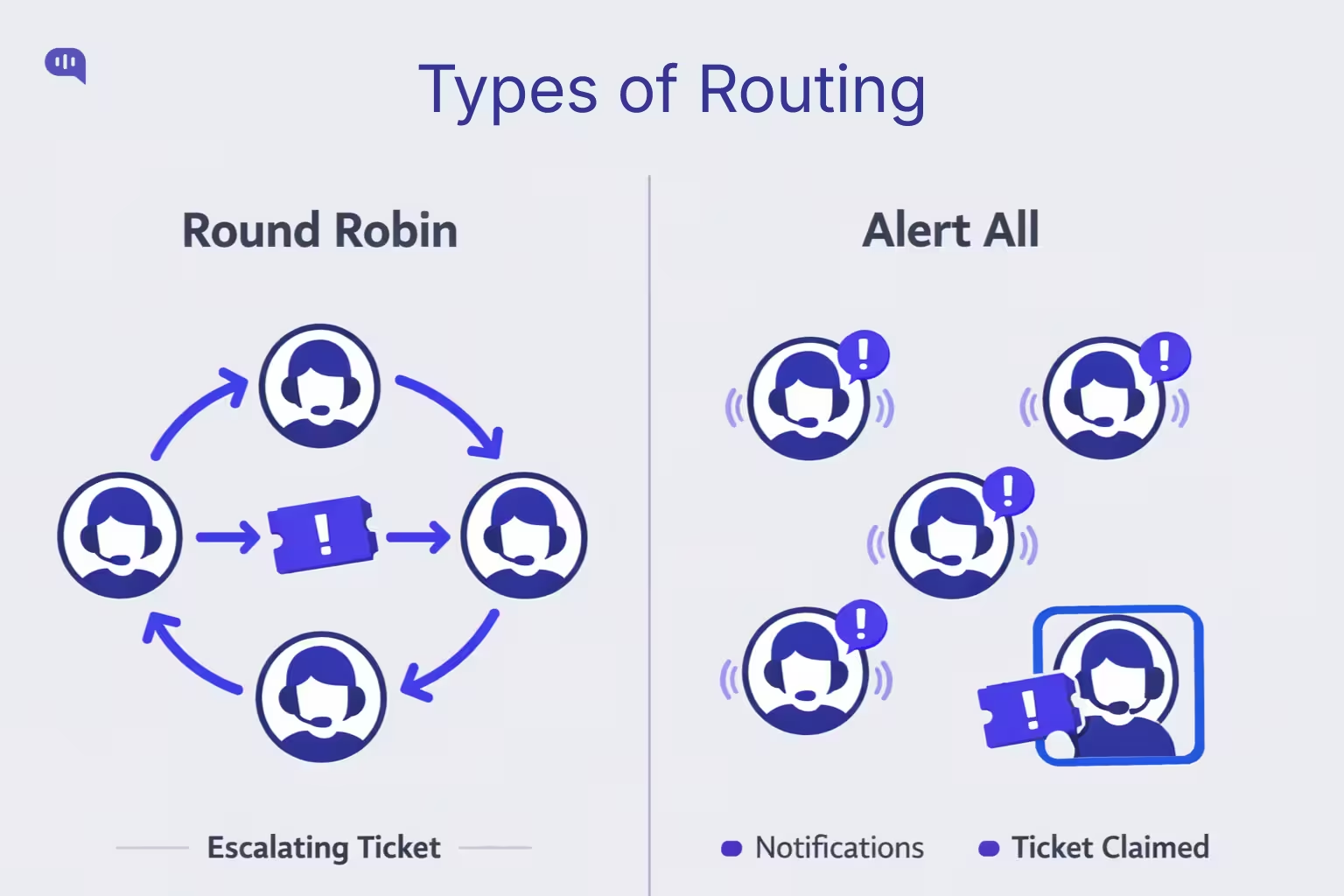
In Kommunicate’s Zendesk handoff model, escalation routing should stay simple and deterministic: once the chatbot decides to escalate, the only question is how you want agents to be notified and assigned. Kommunicate supports two practical routing options—Round Robin and Alert All—and each is appropriate in different operational conditions.
1) Round Robin Routing
Round Robin assigns each new escalated conversation to the next available agent in sequence.
- Best for: high-volume queues, standardized work, teams with similar skill levels
- Why it works: prevents multiple agents from picking the same conversation and keeps the workload balanced
- Watch-outs: can misroute complex cases if you don’t segment escalations by queue/team upstream
Use Round Robin when
- You have 3+ agents online at any given time
- Escalations are mostly similar in complexity
- You want a predictable workload distribution
2) Alert All Routing
Alert All notifies all eligible agents that an escalated conversation is waiting, and the first agent to pick it up claims it.
- Best for: low-volume queues, time-sensitive escalations, specialist groups
- Why it works: reduces time-to-human because anyone can grab it immediately
- Watch-outs: can create internal noise, competing pick-ups, and uneven workload without clear ownership norms
Use Alert All when
- Escalations are infrequent but urgent
- You rely on “whoever is free” responsiveness
- You need specialists to self-select the right cases quickly
Next, we’ll document these routing rules and escalation triggers so your handoff behavior stays consistent as your KB, intents, and team structure evolve.
What Documentation Supports Scalable Handoffs?
Scalable Zendesk handoffs don’t come from “more AI”—they come from repeatable rules your team can maintain. In Zendesk Messaging, handoff/handback changes who the “first responder” is, so your documentation needs to define exactly when that switch happens, what context must transfer, and how agents operationalize the outcome.
| Document | What It Defines | Primary Owner | Update Cadence |
| Intent Taxonomy | Top intents, sample utterances, required entities, resolution criteria | CS Ops + KB Owner | Monthly |
| Escalation Spec | Non-negotiable triggers, risk categories, fallback rules, 3-strike logic | CS Ops + Support Lead | Monthly / After incidents |
| Handoff Payload Schema | What must be passed to Zendesk (intent, summary, attempted steps, entities, priority) | Automation Owner | Quarterly |
| Routing Map | Which escalation goes to which team; priority rules; VIP logic | Support Lead | Quarterly / Org changes |
| KB Readiness Checklist | Article standards (single-intent, scoped, updated); what is “automation-grade” | KB Owner | Monthly |
| QA Test Scripts | 20–30 scripted conversations covering hits, misses, ambiguity, risk triggers | QA / CS Ops | Before every rollout |
| Change Log | What changed, why, impact, rollback plan | Automation Owner | Continuous |
| Governance Cadence | Weekly review agenda: top misses, escalations by intent, agent feedback | CS Ops | Weekly |
Why These Docs Prevent “Random Escalation”?
- Escalation Strategy – Zendesk recommends defining which queries escalate and through which channel (messaging, ticket, email), which forces you to document boundaries instead of letting the bot “decide” ad hoc.
- Routing Consistency – Zendesk routing typically relies on triggers and routing rules, so your routing map must spell out what tags/fields get applied on escalation and what queues those map to.
- Knowledge Discipline – Kommunicate’s Zendesk FAQ automation approach emphasizes strict source-of-truth behavior and guardrails, which only stays stable if your KB readiness checklist is written and enforced.
Next, we’ll turn this documentation into a measurement system, so you can prove whether handoffs are improving resolution, CSAT, and time-to-human.
Which Metrics Measure Chatbot Handoff Success?
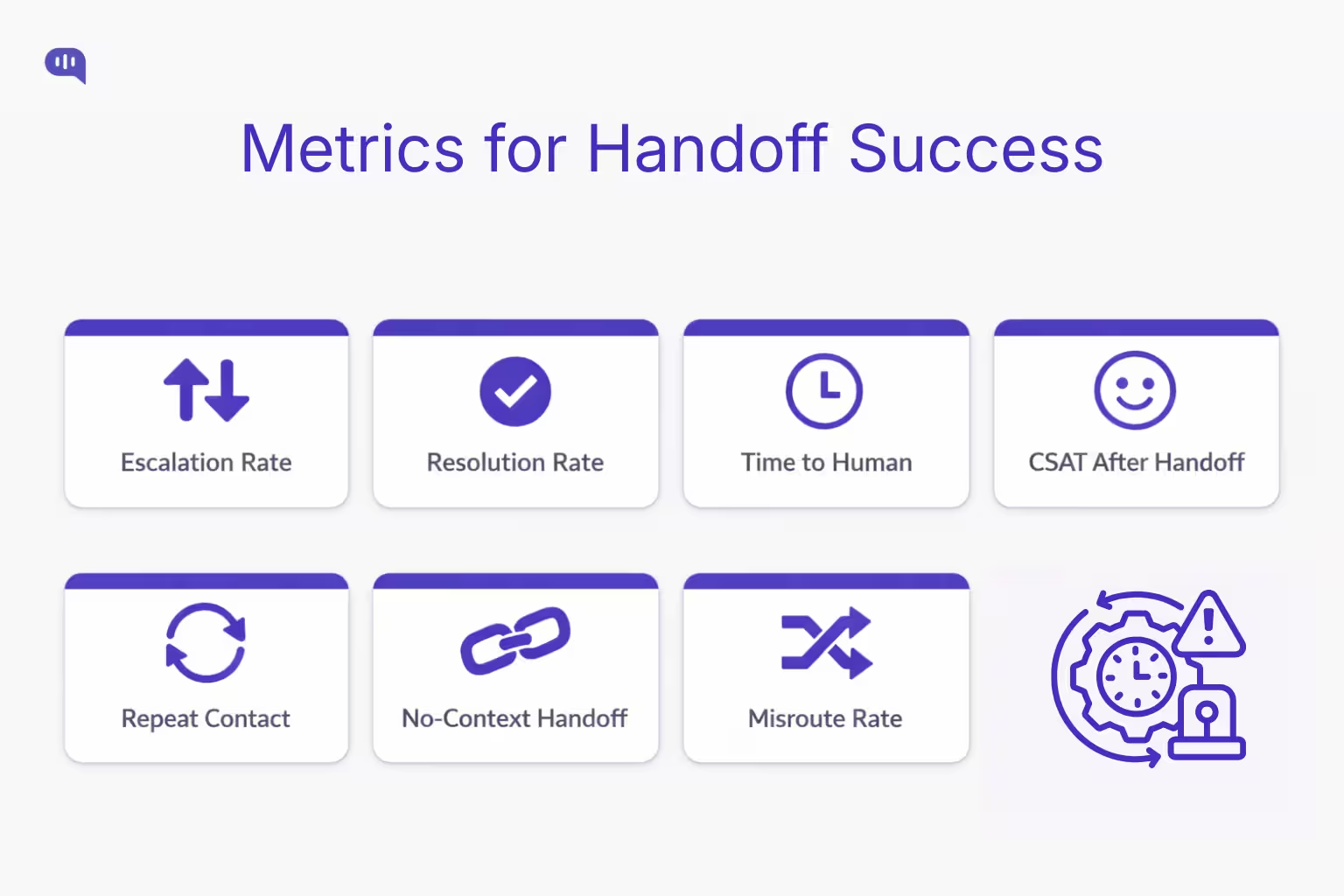
Here are the metrics that most reliably indicate whether handoffs are improving outcomes.
- Escalation Rate – Percentage of bot conversations transferred to humans; reveals over-escalation, poor KB coverage, or overly conservative thresholds
- Automated Resolution Rate – Percentage of conversations fully resolved by the bot; validates true self-service impact (not just deflection)
- Time to Human After Escalation – Minutes from escalation trigger to first human response; shows whether routing and staffing actually support handoff
- First Reply Time (Escalated Tickets) – Time from ticket creation to first agent reply; highlights queue responsiveness and alert effectiveness
- Requested Wait Time – Time the customer waits during escalation; measures the real experience of “handoff latency”
- CSAT After Handoff – Satisfaction scores for escalated conversations; confirms whether escalation improves outcomes versus frustrating users
- CSAT After Bot Resolution – Satisfaction for bot-resolved interactions; catches silent failures masked by low escalation rates
- Repeat Contact Rate by Intent – Users returning with the same issue; indicates broken resolutions or incomplete handoffs
- Ticket Reopen Rate (Post-Handoff) – Reopens on escalated cases; signals poor agent context, wrong routing, or unresolved root cause
- Escalation Rate by Intent – Which intents escalate most; pinpoints where KB needs expansion or where automation scope should shrink
- Abandonment Before Handoff – Users drop before escalation completes; often caused by slow handoff, confusing UX, or excessive questions
- No-Context Handoff Rate – Share of escalations where agents must ask for basics again; indicates missing summary, missing entities, or poor payload design
- Agent Handle Time on Escalations – Longer handling times can reflect low-quality handoff context or misrouted complexity
- Escalation “Misroute” Rate – Percent of escalations reassigned to another team; exposes routing rule gaps and missing metadata
Next, we’ll bring these metrics to life with real handoff scenarios—showing what the chatbot captures, why it escalates, and what the agent receives.
What do Real Zendesk Handoff Examples Look Like?
Healthcare: Prescription Refill and Side Effects
User Transcript (Condensed)
- Patient: “I need a refill for my medication. Also feeling dizzy—normal?”
- Bot: “I can help with refill steps. Which pharmacy and prescription name?”
- Patient: “Metformin, CVS on 5th. Dizziness started today.”
- Bot: “Thanks. I’m transferring you to a care team member now.
Bot Decision Logic
- Automate the refill workflow (low-risk logistics) until a clinical safety signal appears.
- Immediate escalation when symptoms are mentioned (high-stakes, safety).
Handoff Payload (What the Agent Sees)
- Intent: Prescription refill + adverse effects mentions
- Captured entities: medication name, pharmacy location, symptom, onset time
- Attempted steps: collected refill details; did not advise medically
- Escalation reason: clinical/safety boundary triggered
- Priority: High
Agent Outcome
- Agent confirms patient identity, initiates refill request, and routes symptom report to clinical triage.
Next, you’ll see how handoff works in education when policy interpretation becomes a personalized exception.
Education: Enrollment Deadline Exception Request
User Transcript (Condensed)
- Student: “I missed the enrollment deadline—can you reopen it?”
- Bot: “I can share the deadline policy. Which program and term?”
- Student: “MS Data Science, Fall 2026. I had a medical emergency.”
- Bot: “Understood. I’m handing this to admissions for review.”
Bot Decision Logic
- Provide policy and gather context, but escalate when the request becomes an exception requiring human judgment.
- Avoid “policy hallucination” and avoid promising outcomes.
Handoff Payload (What the Agent Sees)
- Intent: Deadline exception request
- Captured entities: program, term, reason category (medical)
- Attempted steps: shared policy reference; collected details
- Escalation reason: exception/judgment required
- Priority: Medium–High (deadline-related)
Agent Outcome
- Admissions agent requests supporting documentation, verifies eligibility, and updates the student with next steps.
Next, we’ll look at finance, where escalation protects both compliance and customer trust.
Finance: Billing Dispute and Chargeback Threat
User Transcript (Condensed)
- Customer: “You charged me twice. I want a refund or I’ll do a chargeback.”
- Bot: “I can help. Please share the invoice number and email.”
- Customer: “Invoice 88341, same email. This is unacceptable.”
- Bot: “Thanks. I’m transferring you to billing support now.”
Bot Decision Logic
- Treat disputes and chargeback threats as non-negotiable escalation triggers.
- Collect minimal required entities, then escalate immediately to reduce risk.
Handoff Payload (What the Agent Sees)
- Intent: Duplicate charge dispute
- Captured entities: invoice number, customer email, sentiment flag
- Attempted steps: verified invoice identifier; no policy argument
- Escalation reason: billing dispute + chargeback language
- Priority: High
Agent Outcome
- Billing specialist verifies transaction logs, issues corrections/refunds if valid, and confirms resolution to prevent chargeback.
Next, we’ll close by tying these examples back to ROI—when chatbots beat live chat, and when they should get out of the way.
What Is Chatbot Versus Live Chat ROI?
Chatbots and live chat solve different problems. Chatbots win ROI when they handle high-volume, repeatable intents instantly and consistently; live chat wins when issues require judgment, negotiation, or exception handling. The best ROI almost always comes from a hybrid system: bots do triage + retrieval + context capture, and humans take over where risk and ambiguity begin.
| Dimension | Bot (Knowledgebase + Guardrails) | Live Chat (Human-First) |
| Best-Fit Work | FAQs, “how-to,” policy explanation, basic troubleshooting | Exceptions, disputes, escalations, emotional or ambiguous cases |
| Time to First Response | Instant, 24/7 | Depends on staffing and queue load |
| Marginal Cost per Chat | Low (scales with volume) | High (scales with headcount) |
| Consistency | High if grounded to KB | Varies by agent training and fatigue |
| Ability to Handle Complexity | Limited by scope/guardrails | High (humans can reason, negotiate, interpret) |
| Risk Handling | Requires strict escalation boundaries | Better for high-stakes topics by default |
| Customer Experience Risk | High if bot blocks or loops | High if wait times are long |
| Peak Load Handling | Excellent (surge-proof) | Weak without surge staffing |
| Data Capture | Strong structured capture (entities, intent tags) | Often unstructured unless enforced |
| Long-Term Compounding Value | Improves as KB improves; creates deflection flywheel | Improves with training; limited by turnover |
| ROI Sweet Spot | High volume + predictable intents + strong KB hygiene | Premium experiences, complex support, relationship-heavy segments |
| Biggest Failure Mode | Over-automation → frustration + noisy escalations | Under-staffing → long wait times + churn |
Chatbots outperform live chat on ROI when the goal is to absorb volume and standardize outcomes; live chat outperforms chatbots when the goal is to resolve ambiguity safely and preserve trust in high-stakes moments.
Parting Thoughts
Zendesk chatbot handoff is not a last-resort escape hatch—it’s the mechanism that makes automation trustworthy in production. When chatbots are grounded in a clean Zendesk Guide, constrained by explicit intent boundaries, and backed by designed fallbacks, they can resolve high-volume questions without gambling on accuracy. When those limits are reached, a context-rich handoff ensures the customer experience doesn’t reset and your agents don’t start from zero.
The playbook is straightforward: choose a tight intent set, make your knowledge base automation-grade, define non-negotiable escalation triggers, and route escalations predictably. Then measure success on outcomes rather than vanity containment.
Kommunicate’s approach is to treat chatbots and humans as one system: bots do triage, retrieval, and context capture; humans handle judgment, exceptions, and high-stakes cases.
If you want to go design human handoff as a core UX primitive for your business, feel free to book a call with Kommunicate.

Adarsh Kumar is the CTO & Co-Founder at Kommunicate. As a seasoned technologist, he brings over 14 years of experience in software development, artificial intelligence, and machine learning to his role. His expertise in building scalable and robust tech solutions has been instrumental in the company’s growth and success.